

Microsoft updated Microsoft 365 Roadmap ID 502532 on July 2, 2026, confirming that Microsoft 365 Copilot will let organizations customize the icon and name shown for data sources in Copilot Search and chat, with worldwide general availability planned for September 2026. The feature sounds cosmetic, but in enterprise AI the label on a source is part of the trust model. Microsoft is effectively acknowledging that Copilot’s usefulness depends not only on what it can retrieve, but on whether users understand where the answer came from. For admins, connector builders, and security teams, this is a small UI change sitting on top of a much larger governance problem.
The new roadmap item is short, almost aggressively so: organizations will be able to customize the icon and name for data sources in Search and chat. It applies to Microsoft 365 Copilot on the web, is marked “in development,” and is slated for general availability in the standard worldwide Microsoft 365 cloud in September 2026. There is no preview ring listed, no government cloud listing, and no long technical explanation attached.
That brevity is typical of Microsoft 365 Roadmap entries, but it undersells the shift. Microsoft 365 Copilot is not merely a chatbot bolted onto Office; it is a work interface that reads across files, messages, meetings, SharePoint sites, and external systems exposed through Copilot connectors. When that interface tells a user that an answer came from “ServiceNow,” “Jira,” “Contract Repository,” or a custom line-of-business system, the name and icon become part of the evidence chain.
In old enterprise search, source identity mattered mostly after the fact. Users scanned a list of results, saw a file path or application name, and decided whether to open it. In Copilot Search and chat, the source is often folded into an AI-generated answer, cited as supporting material, or surfaced as a result card inside a conversational workflow. That compresses the user’s judgment window. If the source label is vague, generic, or misleading, the user may trust too much, trust too little, or waste time verifying what the system should have made obvious.
This is why Microsoft’s icon-and-name customization is more than branding polish. It gives tenants a way to make the enterprise knowledge layer look like the enterprise employees actually know. That matters in companies where “HR,” “People Services,” “Workday,” and “Benefits Portal” may refer to overlapping systems, or where a third-party platform is only one front end for a heavily customized internal process.
That vision creates a practical problem. Once everything is searchable from one place, the differences between systems become less visible to the user. A ticketing comment, a SharePoint policy document, a Confluence design note, and a CRM record can all arrive inside the same Copilot experience. The interface has to do extra work to preserve provenance.
Microsoft has been building toward this for some time. Copilot Search is positioned as a universal, AI-powered search layer for Microsoft 365 and beyond, with natural-language queries, personalized results, and the ability to transition from search results into Copilot Chat. The connector story is a major part of that pitch because few real enterprises live entirely inside Microsoft 365. The knowledge that matters is often scattered across SaaS tools, legacy databases, project trackers, source repositories, and departmental systems with names only insiders understand.
The result is a familiar IT paradox. The more successful Microsoft is at unifying enterprise data, the more important it becomes to show users that the data has not become an anonymous soup. Custom names and icons are a lightweight answer to that problem, but lightweight does not mean trivial. In search UX, labels are load-bearing.
Copilot changes that contract. A chat answer may summarize several sources at once, phrase the result confidently, and place citations or source references around the generated text. Even when the citations are available, many users will read the answer first and inspect the grounding second. That makes the presentation of each source a first-order usability and risk issue.
A generic connector label such as “External Connection” or a vendor default name may be technically accurate but organizationally useless. A user asking about a customer escalation does not want to mentally map “SN_PROD_ITSM_Connector_02” to the company’s official incident system. A lawyer reviewing policy language does not want a source called “Documents” when the difference between an approved policy repository and an obsolete archive is material.
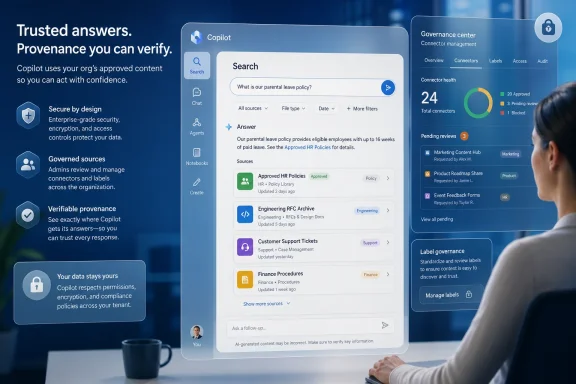
This is where Microsoft’s change could pay off. A well-chosen icon and display name can encode institutional meaning: “Approved HR Policies,” “Customer Support Tickets,” “Engineering RFC Archive,” “Finance Planning System,” or “Legal Matter Management.” Those names still need governance, but they reduce the cognitive gap between Copilot’s technical plumbing and the user’s mental model of the business.
That is a different kind of administration. It sits somewhere between identity governance, information architecture, records management, and internal communications. The icon and name are not security controls in themselves, but they influence whether users correctly understand the authority, freshness, and business context of the information they are seeing.
The obvious risk is sprawl. If every department names its connector after its own internal shorthand, Copilot Search becomes another enterprise junk drawer. If multiple connectors use similar icons or names, users may assume equivalence where none exists. If a connector is named after a vendor rather than the business process it supports, users may miss the distinction between a source system and a curated repository.
Microsoft is therefore handing admins a deceptively small governance surface. Enterprises will need naming conventions, ownership rules, and review processes for connector identity. The best implementations will treat these labels like tenant-wide information architecture, not like decorative metadata filled in during deployment.
In any environment with custom connectors, agents, and external knowledge sources, source impersonation becomes a real design concern. A connector called “Corporate Policy” should not be created casually by a project team. A logo resembling a sanctioned department should not be attached to a data source that contains draft material, vendor-provided documentation, or unreviewed exports. The more Copilot becomes a front door to work, the more source identity becomes part of the attack surface.
This is not the same as phishing in email, but the psychology is adjacent. Users are trained to recognize familiar logos and system names. If Copilot presents a source with a polished icon and authoritative label, many users will assume the organization has blessed it. That assumption may be reasonable in a tightly governed tenant and dangerous in a chaotic one.
The feature therefore increases the value of centralized oversight. Enterprises should decide who can create or modify source names and icons, whether changes require approval, and how retired or deprecated sources are displayed. A stale connector with a trusted name may be worse than no connector at all because it preserves the appearance of authority after the underlying process has moved on.
By 2026, the conversation is moving from “Can Copilot access our work data?” to “Can Copilot represent our work data correctly?” That is a maturity curve. Once the crawler works and the answers are useful enough to matter, the next pain point is trust, navigation, and control.
Microsoft’s roadmap around Copilot extensibility reflects that. Connectors bring more sources into the graph. Search UX improvements make those sources more usable. Chat integration makes retrieval part of task completion rather than a separate step. Custom names and icons sit at the intersection of all three trends.
The timing also suggests Microsoft is preparing for broader, messier deployments. A small pilot can survive with rough labels because the users know the setup team and the data sources. A company-wide rollout cannot. When tens of thousands of employees see Copilot results from dozens or hundreds of connectors, the display layer must become disciplined.
In those environments, the source name is often the only clue a user has about institutional legitimacy. “Salesforce” may be too broad if one connector indexes account records while another indexes sales enablement material. “Confluence” may be actively misleading if one space contains approved engineering runbooks and another contains brainstorming notes from 2022. “Google Drive” says almost nothing in a company where some teams use it for active collaboration and others use it as a dumping ground.
Custom labels let organizations expose the business meaning rather than the platform plumbing. That is the right abstraction. Users generally do not care whether a connector is backed by a Microsoft Graph external connection, a SaaS API, or a custom ingestion process. They care whether the result is from the approved place.
This is especially important in Copilot Chat, where users may ask for synthesis rather than retrieval. If Copilot summarizes “the latest customer issues” or “the current travel policy,” the source label helps the user decide whether the answer is grounded in the right body of knowledge. A better label will not fix bad data, but it can make good data easier to recognize.
Custom connectors often start as integration projects. The engineering team maps fields, handles authentication, transforms items into the external item model, and pushes content into Microsoft Graph. That work is necessary and usually invisible. The visible part may be a small card in search results or a citation-like source indicator in chat.
That small card is where developer choices meet user trust. A connector should not expose internal system codes as display names unless those codes are meaningful to ordinary users. It should not use a generic icon if the organization has a sanctioned visual language for systems of record. It should not blur production, test, archive, and draft repositories under one friendly name.
The roadmap item may encourage connector teams to include communications, knowledge management, and security stakeholders earlier in the build process. That is healthy. Enterprise AI projects fail less often because the API call is impossible than because the system’s behavior does not line up with how people understand their work.
Too much source detail can make Copilot feel like an overcomplicated search appliance. Too little source detail turns it into a black box with a pleasant voice. Microsoft’s challenge is to preserve enough provenance for serious work without drowning users in connector taxonomy.
Custom icons and names are one compromise. They give users a lightweight cue without forcing every answer to expose the full machinery behind it. The danger is that organizations may mistake the cue for the control. A pretty icon does not prove the data is current, complete, authorized, or correctly permissioned.
The deeper lesson is that Copilot governance must happen before the prompt. By the time a user asks a question, the system has already decided which content is indexed, which permissions apply, which connectors exist, what those connectors are called, and how results will be ranked and displayed. The chat box is only the most visible surface of a much larger administrative stack.
For WindowsForum readers, the practical impact is less about a new button and more about the direction of travel. Microsoft is continuing to make Copilot the front end for enterprise information retrieval. Whether a user begins in a browser, a Microsoft 365 app, or a Windows-adjacent Copilot experience, the expectation is the same: ask once, search everywhere, continue in chat.
That creates new support realities. Help desks will field questions that sound like search problems but are actually connector-labeling problems. Users will say Copilot “found the wrong policy” when the issue may be that two repositories have indistinguishable names. They will say a result “came from HR” when the source label actually points to an archived HR migration folder.
Administrators should prepare documentation and training around source identity, not just prompt writing. The industry has spent two years teaching employees how to ask better AI questions. The next phase is teaching them how to read AI answers with attention to where the answer came from.
That phrase sounds grand, but the mechanics are mundane. Index the data. Respect permissions. Rank results. Generate answers. Show sources. Let users continue the task. Each step has its own failure modes, and source labeling is one of the places where technical correctness can still produce human confusion.
The fact that Microsoft is adding customization here suggests the company has heard enough friction from customers and partners to justify a product change. Generic source presentation may be acceptable in demos, where the data estate is clean and the narrator knows what everything means. Real tenants are not demos.
There is also a competitive angle. Every enterprise AI platform now claims it can connect to business data. The harder differentiator is whether it can do so in a way that feels governed, intelligible, and safe to use at scale. Microsoft’s advantage is its control over Microsoft 365, Graph, Entra, and the productivity surfaces where work already happens. Its burden is that customers will expect the experience to match the complexity of their organizations.
A useful starting point is an inventory of current and planned Copilot connectors. Which systems are connected? Who owns them? Which ones represent systems of record, and which ones expose convenience copies, archives, or team-level content? Which names would make sense to a new employee, a frontline worker, or an executive who does not know the integration history?
The next step is to define naming rules that survive organizational politics. Names should be user-centered, stable, and specific enough to distinguish authority. Icons should reinforce recognition without implying endorsement beyond what the governance process allows. Deprecated sources should be labeled plainly or removed from the experience.
Security teams should also be involved. Not because an icon is a security boundary, but because user trust is part of the security model. If the organization trains employees to rely on Copilot for policy, customer, or operational decisions, then the representation of source authority becomes a security-adjacent control.
 Microsoft Is Turning Source Labels Into Enterprise Infrastructure
The new roadmap item is short, almost aggressively so: organizations will be able to customize the icon and name for data sources in Search and chat. It applies to Microsoft 365 Copilot on the web, is marked “in development,” and is slated for general availability in the standard worldwide Microsoft 365 cloud in September 2026. There is no preview ring listed, no government cloud listing, and no long technical explanation attached.That brevity is typical of Microsoft 365 Roadmap entries, but it undersells the shift. Microsoft 365 Copilot is not merely a chatbot bolted onto Office; it is a work interface that reads across files, messages, meetings, SharePoint sites, and external systems exposed through Copilot connectors. When that interface tells a user that an answer came from “ServiceNow,” “Jira,” “Contract Repository,” or a custom line-of-business system, the name and icon become part of the evidence chain.
In old enterprise search, source identity mattered mostly after the fact. Users scanned a list of results, saw a file path or application name, and decided whether to open it. In Copilot Search and chat, the source is often folded into an AI-generated answer, cited as supporting material, or surfaced as a result card inside a conversational workflow. That compresses the user’s judgment window. If the source label is vague, generic, or misleading, the user may trust too much, trust too little, or waste time verifying what the system should have made obvious.
This is why Microsoft’s icon-and-name customization is more than branding polish. It gives tenants a way to make the enterprise knowledge layer look like the enterprise employees actually know. That matters in companies where “HR,” “People Services,” “Workday,” and “Benefits Portal” may refer to overlapping systems, or where a third-party platform is only one front end for a heavily customized internal process.
Copilot Search Has Made the Connector Problem Visible
Microsoft’s Copilot connector strategy is straightforward: bring external data into Microsoft Graph so Microsoft 365 Copilot and Microsoft Search can reason over it alongside Microsoft 365 content. The company promotes connectors for services such as Salesforce, ServiceNow, Confluence, Jira, GitHub, Google Drive, and many others, as well as custom connectors built through Microsoft Graph. The vision is that the user should not have to remember where the answer lives; Copilot should know enough to find it.That vision creates a practical problem. Once everything is searchable from one place, the differences between systems become less visible to the user. A ticketing comment, a SharePoint policy document, a Confluence design note, and a CRM record can all arrive inside the same Copilot experience. The interface has to do extra work to preserve provenance.
Microsoft has been building toward this for some time. Copilot Search is positioned as a universal, AI-powered search layer for Microsoft 365 and beyond, with natural-language queries, personalized results, and the ability to transition from search results into Copilot Chat. The connector story is a major part of that pitch because few real enterprises live entirely inside Microsoft 365. The knowledge that matters is often scattered across SaaS tools, legacy databases, project trackers, source repositories, and departmental systems with names only insiders understand.
The result is a familiar IT paradox. The more successful Microsoft is at unifying enterprise data, the more important it becomes to show users that the data has not become an anonymous soup. Custom names and icons are a lightweight answer to that problem, but lightweight does not mean trivial. In search UX, labels are load-bearing.
The Old Search Box Could Hide Behind Links; Copilot Cannot
Classic search engines could get away with ambiguity because they were mostly navigation tools. If a result looked suspicious, the user opened it, checked the site, looked at the author, read the surrounding context, and then decided what to do. The burden was annoying, but the interaction model was transparent: search gave you links, and you did the judging.Copilot changes that contract. A chat answer may summarize several sources at once, phrase the result confidently, and place citations or source references around the generated text. Even when the citations are available, many users will read the answer first and inspect the grounding second. That makes the presentation of each source a first-order usability and risk issue.
A generic connector label such as “External Connection” or a vendor default name may be technically accurate but organizationally useless. A user asking about a customer escalation does not want to mentally map “SN_PROD_ITSM_Connector_02” to the company’s official incident system. A lawyer reviewing policy language does not want a source called “Documents” when the difference between an approved policy repository and an obsolete archive is material.
This is where Microsoft’s change could pay off. A well-chosen icon and display name can encode institutional meaning: “Approved HR Policies,” “Customer Support Tickets,” “Engineering RFC Archive,” “Finance Planning System,” or “Legal Matter Management.” Those names still need governance, but they reduce the cognitive gap between Copilot’s technical plumbing and the user’s mental model of the business.
Admins Are Being Asked to Curate Meaning, Not Just Access
For IT administrators, the feature lands in a broader shift from access management to experience management. The old job was to connect a data source, configure permissions, ingest content, and make sure search respected access control lists. That remains essential. But Copilot raises a second-order question: once the data is available, how should it be represented to a human being who may act on an AI-generated answer?That is a different kind of administration. It sits somewhere between identity governance, information architecture, records management, and internal communications. The icon and name are not security controls in themselves, but they influence whether users correctly understand the authority, freshness, and business context of the information they are seeing.
The obvious risk is sprawl. If every department names its connector after its own internal shorthand, Copilot Search becomes another enterprise junk drawer. If multiple connectors use similar icons or names, users may assume equivalence where none exists. If a connector is named after a vendor rather than the business process it supports, users may miss the distinction between a source system and a curated repository.
Microsoft is therefore handing admins a deceptively small governance surface. Enterprises will need naming conventions, ownership rules, and review processes for connector identity. The best implementations will treat these labels like tenant-wide information architecture, not like decorative metadata filled in during deployment.
Branding Is a Trust Signal, and Trust Signals Can Be Abused
There is an uncomfortable security angle here. If a trusted-looking icon and name help users identify reliable sources, they can also make unreliable sources look more trustworthy if governance is weak. That does not mean Microsoft should avoid customization. It means customization needs guardrails.In any environment with custom connectors, agents, and external knowledge sources, source impersonation becomes a real design concern. A connector called “Corporate Policy” should not be created casually by a project team. A logo resembling a sanctioned department should not be attached to a data source that contains draft material, vendor-provided documentation, or unreviewed exports. The more Copilot becomes a front door to work, the more source identity becomes part of the attack surface.
This is not the same as phishing in email, but the psychology is adjacent. Users are trained to recognize familiar logos and system names. If Copilot presents a source with a polished icon and authoritative label, many users will assume the organization has blessed it. That assumption may be reasonable in a tightly governed tenant and dangerous in a chaotic one.
The feature therefore increases the value of centralized oversight. Enterprises should decide who can create or modify source names and icons, whether changes require approval, and how retired or deprecated sources are displayed. A stale connector with a trusted name may be worse than no connector at all because it preserves the appearance of authority after the underlying process has moved on.
The September 2026 Timing Fits Microsoft’s Copilot Maturity Curve
The planned September 2026 general availability date is notable because it places this feature well after the first wave of Microsoft 365 Copilot adoption. Early Copilot deployments were dominated by licensing, data readiness, security trimming, SharePoint hygiene, and user training. Organizations first had to answer basic questions: who gets Copilot, what can it see, and how do we prevent it from surfacing overshared content?By 2026, the conversation is moving from “Can Copilot access our work data?” to “Can Copilot represent our work data correctly?” That is a maturity curve. Once the crawler works and the answers are useful enough to matter, the next pain point is trust, navigation, and control.
Microsoft’s roadmap around Copilot extensibility reflects that. Connectors bring more sources into the graph. Search UX improvements make those sources more usable. Chat integration makes retrieval part of task completion rather than a separate step. Custom names and icons sit at the intersection of all three trends.
The timing also suggests Microsoft is preparing for broader, messier deployments. A small pilot can survive with rough labels because the users know the setup team and the data sources. A company-wide rollout cannot. When tens of thousands of employees see Copilot results from dozens or hundreds of connectors, the display layer must become disciplined.
The Feature Will Help Most Where the Data Estate Is Messiest
The organizations most likely to benefit are not the clean-room Microsoft 365 shops with neatly maintained SharePoint sites and a handful of standard SaaS systems. They are the large enterprises where knowledge lives in acquisitions, regional platforms, departmental tools, legacy systems, and semi-official repositories that have outlived three intranet redesigns.In those environments, the source name is often the only clue a user has about institutional legitimacy. “Salesforce” may be too broad if one connector indexes account records while another indexes sales enablement material. “Confluence” may be actively misleading if one space contains approved engineering runbooks and another contains brainstorming notes from 2022. “Google Drive” says almost nothing in a company where some teams use it for active collaboration and others use it as a dumping ground.
Custom labels let organizations expose the business meaning rather than the platform plumbing. That is the right abstraction. Users generally do not care whether a connector is backed by a Microsoft Graph external connection, a SaaS API, or a custom ingestion process. They care whether the result is from the approved place.
This is especially important in Copilot Chat, where users may ask for synthesis rather than retrieval. If Copilot summarizes “the latest customer issues” or “the current travel policy,” the source label helps the user decide whether the answer is grounded in the right body of knowledge. A better label will not fix bad data, but it can make good data easier to recognize.
Developers Get a UX Obligation Alongside an API Surface
For developers building custom Copilot connectors, the roadmap item is a reminder that ingestion is only half the product. The connector’s schema, access control list, and indexing pipeline may determine what Copilot can retrieve, but the user-facing identity determines whether people will use the result correctly.Custom connectors often start as integration projects. The engineering team maps fields, handles authentication, transforms items into the external item model, and pushes content into Microsoft Graph. That work is necessary and usually invisible. The visible part may be a small card in search results or a citation-like source indicator in chat.
That small card is where developer choices meet user trust. A connector should not expose internal system codes as display names unless those codes are meaningful to ordinary users. It should not use a generic icon if the organization has a sanctioned visual language for systems of record. It should not blur production, test, archive, and draft repositories under one friendly name.
The roadmap item may encourage connector teams to include communications, knowledge management, and security stakeholders earlier in the build process. That is healthy. Enterprise AI projects fail less often because the API call is impossible than because the system’s behavior does not line up with how people understand their work.
Microsoft Is Still Walking the Line Between Magic and Auditability
Copilot’s commercial promise is that it reduces the friction of work. Ask a question in natural language, get an answer grounded in your organization’s data, and move on. But enterprise buyers also want auditability, explainability, and control. Those goals can fight each other.Too much source detail can make Copilot feel like an overcomplicated search appliance. Too little source detail turns it into a black box with a pleasant voice. Microsoft’s challenge is to preserve enough provenance for serious work without drowning users in connector taxonomy.
Custom icons and names are one compromise. They give users a lightweight cue without forcing every answer to expose the full machinery behind it. The danger is that organizations may mistake the cue for the control. A pretty icon does not prove the data is current, complete, authorized, or correctly permissioned.
The deeper lesson is that Copilot governance must happen before the prompt. By the time a user asks a question, the system has already decided which content is indexed, which permissions apply, which connectors exist, what those connectors are called, and how results will be ranked and displayed. The chat box is only the most visible surface of a much larger administrative stack.
Windows Users Will Feel This Through the Microsoft 365 Front Door
Although this roadmap item is listed for the web platform, Windows users should not dismiss it as a browser-only concern. Microsoft’s productivity strategy increasingly treats Microsoft 365 Copilot as a cross-surface experience. The web app, desktop apps, Teams, Edge, Windows entry points, and Microsoft 365 companion experiences all orbit the same work graph.For WindowsForum readers, the practical impact is less about a new button and more about the direction of travel. Microsoft is continuing to make Copilot the front end for enterprise information retrieval. Whether a user begins in a browser, a Microsoft 365 app, or a Windows-adjacent Copilot experience, the expectation is the same: ask once, search everywhere, continue in chat.
That creates new support realities. Help desks will field questions that sound like search problems but are actually connector-labeling problems. Users will say Copilot “found the wrong policy” when the issue may be that two repositories have indistinguishable names. They will say a result “came from HR” when the source label actually points to an archived HR migration folder.
Administrators should prepare documentation and training around source identity, not just prompt writing. The industry has spent two years teaching employees how to ask better AI questions. The next phase is teaching them how to read AI answers with attention to where the answer came from.
The Roadmap Entry Is Small Because the Platform Bet Is Big
Microsoft does not need a lengthy announcement for every small UX improvement, and this one may arrive quietly. But it belongs to a pattern that is reshaping Microsoft 365. Copilot is becoming less of a feature and more of a presentation layer over enterprise memory.That phrase sounds grand, but the mechanics are mundane. Index the data. Respect permissions. Rank results. Generate answers. Show sources. Let users continue the task. Each step has its own failure modes, and source labeling is one of the places where technical correctness can still produce human confusion.
The fact that Microsoft is adding customization here suggests the company has heard enough friction from customers and partners to justify a product change. Generic source presentation may be acceptable in demos, where the data estate is clean and the narrator knows what everything means. Real tenants are not demos.
There is also a competitive angle. Every enterprise AI platform now claims it can connect to business data. The harder differentiator is whether it can do so in a way that feels governed, intelligible, and safe to use at scale. Microsoft’s advantage is its control over Microsoft 365, Graph, Entra, and the productivity surfaces where work already happens. Its burden is that customers will expect the experience to match the complexity of their organizations.
The Sensible Admin Will Treat September as a Deadline, Not a Surprise
Because the feature is scheduled for general availability in September 2026, administrators have time to prepare. That preparation should not wait for the toggle to appear. The hard work is deciding what source identity should mean inside the tenant.A useful starting point is an inventory of current and planned Copilot connectors. Which systems are connected? Who owns them? Which ones represent systems of record, and which ones expose convenience copies, archives, or team-level content? Which names would make sense to a new employee, a frontline worker, or an executive who does not know the integration history?
The next step is to define naming rules that survive organizational politics. Names should be user-centered, stable, and specific enough to distinguish authority. Icons should reinforce recognition without implying endorsement beyond what the governance process allows. Deprecated sources should be labeled plainly or removed from the experience.
Security teams should also be involved. Not because an icon is a security boundary, but because user trust is part of the security model. If the organization trains employees to rely on Copilot for policy, customer, or operational decisions, then the representation of source authority becomes a security-adjacent control.
The Tiny Label That Will Decide Whether Users Believe Copilot
Microsoft’s September 2026 plan is modest in interface terms, but concrete in operational terms: it gives tenants control over how Copilot Search and chat present connected data sources. That control will matter most in organizations where Copilot’s usefulness depends on external systems, custom connectors, and clear provenance.- Organizations should review their Copilot connector inventory before the feature reaches general availability, because poor source names will become more visible as Copilot adoption expands.
- Custom icons and names should describe the business meaning of a source, not merely the vendor platform or internal connector code behind it.
- Security and compliance teams should treat source presentation as part of user trust governance, even though it is not itself an access-control mechanism.
- Help desks should expect some Copilot complaints to trace back to confusing data-source identity rather than search quality or model behavior.
- Developers building custom connectors should involve business owners and information architects before deciding how a source appears in Search and chat.
- The feature will not fix stale, overshared, or low-quality data, but it can make well-governed data easier for users to recognize and trust.
References
- Primary source: Microsoft 365 Roadmap
Published: 2026-07-02T23:12:48.2177075Z
Microsoft 365 Roadmap | Microsoft 365
The Microsoft 365 Roadmap lists updates that are currently planned for applicable subscribers. Check here for more information on the status of new features and updates.www.microsoft.com
- Official source: learn.microsoft.com
Use the Microsoft Search API to search custom types imported using cMicrosoft 365 Copilot connectors - Microsoft Graph | Microsoft Learn
Use the Microsoft Search API in Microsoft Graph to search across external content ingested and indexed by Copilot connectors.learn.microsoft.com - Official source: developer.microsoft.com
Microsoft 365 Copilot Connectors | Connect external data sources
Connect content from external data services into Microsoft Graph to power experiences such as Microsoft 365 Copilot, Copilot Search, and Microsoft Search.developer.microsoft.com - Official source: techcommunity.microsoft.com
- Official source: support.microsoft.com
Understand Copilot connectors | Microsoft Support
Understand Copilot connectorssupport.microsoft.com - Related coverage: m365admin.handsontek.net
Microsoft Copilot (Microsoft 365): [Copilot Extensibility] [Search UX] Custom filter support for data sources on Copilot Search - M365 Admin
1. Allow IT admins to customize filters at a data source level.2. IT admins can add/delete a filter at data source level. Product Release phase General Availability Release date December CY2025 Platform Web Cloud Instance Worldwide (Standard Multi-Tenant) Created 2025-10-31 Roadmap ID 502534...m365admin.handsontek.net
- Related coverage: windowscentral.com
New Microsoft 365 Companion Apps Are Coming to Windows 11 | Windows Central
Microsoft 365’s new companion apps bring your files, contacts, and events to the Windows 11 taskbar.www.windowscentral.com - Related coverage: fe5e0932bbdbee188a67-ade54de1bba9a4fe61c120942a09245b.ssl.cf1.rackcdn.com
Enabling AI on Microsoft Surface
PDF documentfe5e0932bbdbee188a67-ade54de1bba9a4fe61c120942a09245b.ssl.cf1.rackcdn.com
- Official source: news.microsoft.com
- Official source: cdn-dynmedia-1.microsoft.com