

On July 1, 2026, ReactOS merged a kernel and NTDLL change implementing NtGetCurrentProcessorNumberEx, giving the open-source Windows-compatible operating system its first NT6-era system call and a small but symbolically important step toward Vista-and-later application compatibility. The function itself is not glamorous; it tells software which logical processor is running the current thread. The importance is architectural, not theatrical. ReactOS is beginning to cross the line between re-creating the Windows XP and Server 2003 world and speaking the language of modern Windows.
ReactOS has always lived with a strange burden: it is more ambitious than Wine in one direction and less immediately useful than Linux in another. Wine translates Windows expectations onto Unix-like systems; ReactOS tries to build an operating system that is Windows-compatible from the kernel upward. That means every small compatibility feature is not just a library shim but a negotiation with decades of NT behavior.
The new merge request, titled around NTOS, NTDLL, and Vista-oriented NTDLL work, adds NT6 processor functions and the first NT6 system call to the ReactOS tree. The code includes NtGetCurrentProcessorNumberEx, tests for it, and related runtime processor routines. It was merged into ReactOS master after review and automated checks, making this more than a demo branch or roadmap promise.
That distinction matters. ReactOS has long targeted the Windows NT 5.2 generation, meaning Windows Server 2003 and its close cousin Windows XP x64. NT6 is the architectural family that begins with Windows Vista and continues through Windows 7, Windows 8.x, Windows 10, and Windows 11, even though Microsoft’s branding long ago stopped making that lineage obvious to normal users.
The first NT6 syscall is therefore a marker. It does not mean ReactOS suddenly runs modern Windows software at scale. It means the project has begun landing the kernel-facing pieces that such software and drivers increasingly assume exist.
But modern Windows is built out of exactly these unromantic pieces. Applications and drivers that care about scheduling, per-CPU data, performance counters, cache locality, or CPU topology use APIs like this not because they are flashy, but because the assumptions of the hardware changed. A single flat list of processors was easier to live with when mainstream machines had far fewer logical CPUs.
Windows Vista and Windows 7 arrived during a period when the PC platform was shifting from single-core and dual-core assumptions toward multiprocessor normalcy. Windows 7’s processor group model, in particular, became important for systems with more than 64 logical processors. That is server territory first, workstation territory later, but operating systems do not get to pretend topology is someone else’s problem forever.
ReactOS adding this system call is therefore a compatibility move disguised as a processor utility. It says the project is beginning to implement the lower-level contracts that newer Windows binaries may probe for, import, or indirectly rely on. The function is small; the contract is not.
Vista introduced or mainstreamed architectural shifts that became the foundation for later Windows versions. The Windows Display Driver Model replaced the old XP-era display driver model. The security model tightened. User Account Control changed how applications encountered privilege. Driver expectations changed. The networking, audio, graphics, and service-hosting assumptions moved forward.
Windows 7 polished that foundation and won back the users Vista lost, but it did not revert to NT5. Windows 10 and Windows 11 are not Vista in branding or user experience, but they inherit much of the platform direction that began there. For compatibility work, the marketing names are less important than the ABI and behavioral contracts.
That is why ReactOS moving toward NT6 is really ReactOS moving toward the Windows world most people still recognize. XP compatibility is historically valuable and technically fascinating, but modern Windows software has spent nearly two decades assuming the post-XP architecture exists. ReactOS cannot remain an XP-compatible operating system forever and still claim to be on a path toward broad Windows compatibility.
The project’s ambition is unusually punishing. Building a Unix-like operating system is hard enough, but Linux benefited from defining its own interfaces while borrowing concepts from Unix. ReactOS must instead reproduce the behavior of a proprietary operating system closely enough that closed-source Windows applications and drivers behave as if they are home. That is a harsher test than passing a specification, because much of Windows compatibility lives in undocumented behavior, historical quirks, and edge cases that real software depends on.
This is also why ReactOS milestones often look odd from the outside. Running a classic game, booting on new hardware, passing a test, or implementing a minor-looking API can all represent years of groundwork. Outsiders see a small result; developers see a missing layer finally becoming real enough to support the next layer.
The first NT6 system call fits that pattern. It is not a consumer-ready turning point. It is a foundation stone, and foundation stones rarely look dramatic unless you understand what must stand on top of them.
For ReactOS, getting NTDLL behavior right is central to the whole project. Many Win32 APIs eventually bottom out in lower-level NT functions. Applications may not call NtGetCurrentProcessorNumberEx directly, but libraries, runtimes, and drivers can depend on the availability and behavior of related routines. A missing export, wrong calling convention, or subtle semantic mismatch can break software that otherwise looks ordinary.
The Vista-oriented NTDLL work suggests a practical strategy: ReactOS needs to support different compatibility personalities rather than pretending one binary surface can satisfy every Windows generation. That is how Windows itself carries its history. Modern Windows is full of version gates, compatibility manifests, legacy paths, and behavior preserved because some important application once depended on it.
Compatibility is not a single target; it is a time machine with rules. ReactOS must learn to present the right behavior to the right class of software without breaking older assumptions. The first NT6 syscall is meaningful because it appears to arrive as part of that broader machinery, not as an isolated symbol added to make a checklist look better.
But the same target narrows the operating system’s future. Windows XP has been out of mainstream support for many years, and the software ecosystem has moved on. Modern browsers, developer tools, security products, games, and commercial applications increasingly assume APIs and subsystems introduced after XP. Even when a program looks simple, its runtime may depend on newer kernel calls, side-by-side assemblies, TLS behavior, processor group handling, or graphics stack assumptions.
ReactOS cannot leap from NT5.2 to Windows 11 compatibility in one dramatic release. The only plausible path is incremental: implement NT6-era primitives, expand user-mode APIs, modernize drivers and graphics expectations, improve test coverage, and keep old software from regressing while newer software begins to run. That is slow work, but it is the only work that counts.
The first NT6 syscall is a signal that the project is no longer merely talking about that path. It has started committing code into the mainline tree that changes the compatibility horizon.
A modern Windows program may depend on kernel object behavior, thread scheduling details, newer synchronization primitives, updated heap behavior, driver model expectations, cryptographic APIs, service management semantics, or graphics stack assumptions. It may not care whether the desktop looks like XP or Vista. It cares whether the invisible contracts are honored precisely enough that the program does not trip on them.
That is the hard part for ReactOS. Re-skinning an interface is easy compared with matching NT internals. A Windows-compatible operating system has to be boring in the exact same ways Windows is boring. It has to return the right error codes, preserve the right quirks, expose the right structures, and fail in ways that applications already know how to handle.
NtGetCurrentProcessorNumberEx sits in that invisible world. It is not something most software splash screens will advertise. But if a runtime, driver, or performance-sensitive application checks for it and expects it to work, its absence becomes one more reason ReactOS cannot pass as the operating system it wants to emulate.
Modern Windows hardware support is bound up with post-XP technologies. UEFI, newer ACPI expectations, WDDM graphics drivers, modern USB behavior, advanced power management, high-DPI displays, NVMe storage, and contemporary Wi-Fi hardware all live in a world shaped by Vista and later Windows releases. A system that remains too close to XP-era assumptions becomes increasingly difficult to run on real machines rather than carefully chosen retro hardware or virtual machines.
That is why ReactOS’s broader NT6 work matters even when individual commits look small. Processor topology support, display driver model research, runtime API expansion, and kernel compatibility are all parts of the same problem. A Windows-compatible open-source OS cannot merely run old Notepad clones; it must eventually understand the hardware abstractions that modern Windows drivers expect.
This is where enthusiasts and sysadmins should temper hope with realism. ReactOS is not about to become the supported platform for modern enterprise laptops. It remains experimental, and anyone treating it as a production Windows replacement is asking for pain. But the move toward NT6 is precisely the kind of work required if ReactOS is ever to graduate from fascinating lab artifact to broadly useful compatibility platform.
ReactOS is pursuing a different prize. It wants Windows compatibility at the operating-system level, including the NT kernel architecture and driver compatibility. That makes it harder, slower, and less immediately rewarding, but also potentially more complete in areas Wine does not try to own. Drivers, low-level services, and assumptions about the NT kernel cannot always be translated cleanly through a user-mode compatibility layer.
The two projects are not enemies. ReactOS has historically benefited from Wine components, and both live in the larger ecosystem of reverse-engineered Windows compatibility. But their success criteria diverge. Wine can succeed spectacularly while leaving kernel-mode Windows compatibility untouched. ReactOS cannot.
That is why a system call matters more in ReactOS than it would in a Wine changelog. For Wine, the question is often whether an application-facing behavior can be reproduced on top of a host OS. For ReactOS, the question is whether the OS itself can become the expected host.
That is a narrow bridge. Developers can study documentation, behavior, tests, public symbols, and open-source analogs, but they cannot simply copy Windows. They must infer, reimplement, validate, and revise. In some areas, Microsoft provides documentation. In others, the only practical documentation is how Windows behaves under a microscope.
This is why test infrastructure matters. A compatibility project without tests becomes folklore. ReactOS adding API tests alongside implementation is not incidental housekeeping; it is how the project prevents progress from becoming accidental. Each test that captures Windows-like behavior becomes a small defense against future regressions.
The NT6 syscall milestone therefore tells two stories at once. One is that ReactOS added a missing function. The other is that it is building the machinery to add more of them without turning the codebase into a pile of hopeful approximations.
That has value beyond immediate usability. ReactOS documents behavior by reimplementing it. It preserves knowledge about Windows internals that would otherwise live only inside Microsoft, old driver teams, and scattered reverse-engineering communities. It gives students, hobbyists, and systems programmers a rare place to see NT-like design in open code.
There is also a preservation angle. The Windows ecosystem is full of abandonware, industrial software, old utilities, device control panels, and business applications that outlive their official platforms. Virtual machines help, but they are not a complete answer forever. An open-source Windows-compatible OS, even an imperfect one, is a hedge against the disappearance of platforms that still matter to someone.
ReactOS is not a substitute for supported Windows in any serious environment. But it is a reminder that compatibility itself can be a community project. In a computing world increasingly defined by cloud accounts, signed drivers, locked boot chains, and subscription software, that remains a radical idea.
NT6 compatibility is not a single switch. It includes user-mode APIs, kernel calls, driver behavior, graphics infrastructure, security semantics, service model changes, installer expectations, side-by-side assembly behavior, and countless application compatibility shims. Implementing one syscall does not make ReactOS Vista-compatible any more than installing one brick makes a house weatherproof.
Still, firsts matter because they prove a path exists. Before the first implementation lands, NT6 support can remain an aspiration. Afterward, the discussion changes to coverage, correctness, prioritization, and regression control. The project has something concrete to expand.
The most interesting question is not whether NtGetCurrentProcessorNumberEx is exciting. It is whether ReactOS can turn this into a pattern: identify NT6 surfaces that unblock real software, implement them with tests, preserve NT5 behavior, and gradually make the Vista-and-later world less alien to the OS.
Developers should see the merge as evidence that NT6-facing work is becoming more concrete. Administrators should see it as interesting, not deployable. Enthusiasts should see it as one more reason to test ReactOS in a VM, file useful bug reports, and resist the urge to measure it only by whether it can replace a Windows 11 desktop today.
The milestone also sharpens the project’s identity. ReactOS is not chasing nostalgia for its own sake. It is trying to move from the XP-compatible past into the Windows platform architecture that still underpins modern software.
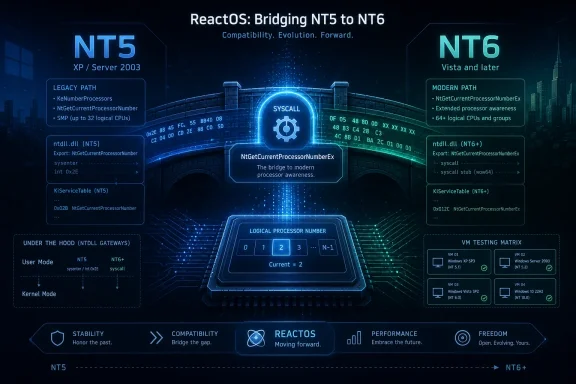 ReactOS Has Crossed a Line It Spent Years Approaching
ReactOS has always lived with a strange burden: it is more ambitious than Wine in one direction and less immediately useful than Linux in another. Wine translates Windows expectations onto Unix-like systems; ReactOS tries to build an operating system that is Windows-compatible from the kernel upward. That means every small compatibility feature is not just a library shim but a negotiation with decades of NT behavior.The new merge request, titled around NTOS, NTDLL, and Vista-oriented NTDLL work, adds NT6 processor functions and the first NT6 system call to the ReactOS tree. The code includes NtGetCurrentProcessorNumberEx, tests for it, and related runtime processor routines. It was merged into ReactOS master after review and automated checks, making this more than a demo branch or roadmap promise.
That distinction matters. ReactOS has long targeted the Windows NT 5.2 generation, meaning Windows Server 2003 and its close cousin Windows XP x64. NT6 is the architectural family that begins with Windows Vista and continues through Windows 7, Windows 8.x, Windows 10, and Windows 11, even though Microsoft’s branding long ago stopped making that lineage obvious to normal users.
The first NT6 syscall is therefore a marker. It does not mean ReactOS suddenly runs modern Windows software at scale. It means the project has begun landing the kernel-facing pieces that such software and drivers increasingly assume exist.
The Small Function Carries a Bigger Windows Story
NtGetCurrentProcessorNumberEx is the kind of function only kernel developers, performance engineers, and compatibility nerds could love. Its job is to expose the processor number of the logical CPU on which a caller is running, including information needed in a world of processor groups. It is not a new desktop shell, not a browser compatibility win, and not a headline-grabbing game demo.But modern Windows is built out of exactly these unromantic pieces. Applications and drivers that care about scheduling, per-CPU data, performance counters, cache locality, or CPU topology use APIs like this not because they are flashy, but because the assumptions of the hardware changed. A single flat list of processors was easier to live with when mainstream machines had far fewer logical CPUs.
Windows Vista and Windows 7 arrived during a period when the PC platform was shifting from single-core and dual-core assumptions toward multiprocessor normalcy. Windows 7’s processor group model, in particular, became important for systems with more than 64 logical processors. That is server territory first, workstation territory later, but operating systems do not get to pretend topology is someone else’s problem forever.
ReactOS adding this system call is therefore a compatibility move disguised as a processor utility. It says the project is beginning to implement the lower-level contracts that newer Windows binaries may probe for, import, or indirectly rely on. The function is small; the contract is not.
Vista Compatibility Is Not About Loving Vista
It is tempting to frame this as ReactOS chasing Windows Vista, a release still remembered by many users as a synonym for driver pain, UAC shock, and sluggish OEM laptops. That framing is emotionally satisfying and technically misleading. NT6 compatibility is not about rehabilitating Vista’s reputation; it is about acknowledging that Vista reset large parts of the Windows platform beneath the surface.Vista introduced or mainstreamed architectural shifts that became the foundation for later Windows versions. The Windows Display Driver Model replaced the old XP-era display driver model. The security model tightened. User Account Control changed how applications encountered privilege. Driver expectations changed. The networking, audio, graphics, and service-hosting assumptions moved forward.
Windows 7 polished that foundation and won back the users Vista lost, but it did not revert to NT5. Windows 10 and Windows 11 are not Vista in branding or user experience, but they inherit much of the platform direction that began there. For compatibility work, the marketing names are less important than the ABI and behavioral contracts.
That is why ReactOS moving toward NT6 is really ReactOS moving toward the Windows world most people still recognize. XP compatibility is historically valuable and technically fascinating, but modern Windows software has spent nearly two decades assuming the post-XP architecture exists. ReactOS cannot remain an XP-compatible operating system forever and still claim to be on a path toward broad Windows compatibility.
A Thirty-Year Project Measures Progress in Millimeters
ReactOS is one of the open-source world’s great acts of persistence. It has outlived hardware eras, Windows releases, CPU transitions, browser wars, and entire waves of developer fashion. Its continued existence is impressive, but its pace also explains why every milestone is greeted with both enthusiasm and skepticism.The project’s ambition is unusually punishing. Building a Unix-like operating system is hard enough, but Linux benefited from defining its own interfaces while borrowing concepts from Unix. ReactOS must instead reproduce the behavior of a proprietary operating system closely enough that closed-source Windows applications and drivers behave as if they are home. That is a harsher test than passing a specification, because much of Windows compatibility lives in undocumented behavior, historical quirks, and edge cases that real software depends on.
This is also why ReactOS milestones often look odd from the outside. Running a classic game, booting on new hardware, passing a test, or implementing a minor-looking API can all represent years of groundwork. Outsiders see a small result; developers see a missing layer finally becoming real enough to support the next layer.
The first NT6 system call fits that pattern. It is not a consumer-ready turning point. It is a foundation stone, and foundation stones rarely look dramatic unless you understand what must stand on top of them.
The NTDLL Split Shows ReactOS Is Thinking Like Windows
One detail in the merge is especially telling: the addition of NT6-related NTDLL syscall handling linked into a Vista-oriented NTDLL. NTDLL is not a normal DLL in the way casual Windows users think about DLLs. It is the user-mode gateway into the NT kernel, the place where low-level system calls and runtime functions form a thin but crucial seam between applications and the operating system.For ReactOS, getting NTDLL behavior right is central to the whole project. Many Win32 APIs eventually bottom out in lower-level NT functions. Applications may not call NtGetCurrentProcessorNumberEx directly, but libraries, runtimes, and drivers can depend on the availability and behavior of related routines. A missing export, wrong calling convention, or subtle semantic mismatch can break software that otherwise looks ordinary.
The Vista-oriented NTDLL work suggests a practical strategy: ReactOS needs to support different compatibility personalities rather than pretending one binary surface can satisfy every Windows generation. That is how Windows itself carries its history. Modern Windows is full of version gates, compatibility manifests, legacy paths, and behavior preserved because some important application once depended on it.
Compatibility is not a single target; it is a time machine with rules. ReactOS must learn to present the right behavior to the right class of software without breaking older assumptions. The first NT6 syscall is meaningful because it appears to arrive as part of that broader machinery, not as an isolated symbol added to make a checklist look better.
The XP Era Is Still the Project’s Anchor
ReactOS’s NT5.2 focus has been both a strength and a trap. It gives the project a concrete target: Windows Server 2003 and XP-era behavior are old enough to be well understood, widely studied, and still relevant to a large body of legacy software. The hardware and driver models are less sprawling than modern Windows. The user experience is familiar to anyone who lived through the early 2000s PC era.But the same target narrows the operating system’s future. Windows XP has been out of mainstream support for many years, and the software ecosystem has moved on. Modern browsers, developer tools, security products, games, and commercial applications increasingly assume APIs and subsystems introduced after XP. Even when a program looks simple, its runtime may depend on newer kernel calls, side-by-side assemblies, TLS behavior, processor group handling, or graphics stack assumptions.
ReactOS cannot leap from NT5.2 to Windows 11 compatibility in one dramatic release. The only plausible path is incremental: implement NT6-era primitives, expand user-mode APIs, modernize drivers and graphics expectations, improve test coverage, and keep old software from regressing while newer software begins to run. That is slow work, but it is the only work that counts.
The first NT6 syscall is a signal that the project is no longer merely talking about that path. It has started committing code into the mainline tree that changes the compatibility horizon.
Modern Windows Compatibility Begins Below the Desktop
Users tend to judge operating systems by the visible layer: the Start menu, window borders, control panels, device manager, file explorer, and whether Steam launches. Developers and administrators know better. Compatibility fails most painfully in the layers users never see.A modern Windows program may depend on kernel object behavior, thread scheduling details, newer synchronization primitives, updated heap behavior, driver model expectations, cryptographic APIs, service management semantics, or graphics stack assumptions. It may not care whether the desktop looks like XP or Vista. It cares whether the invisible contracts are honored precisely enough that the program does not trip on them.
That is the hard part for ReactOS. Re-skinning an interface is easy compared with matching NT internals. A Windows-compatible operating system has to be boring in the exact same ways Windows is boring. It has to return the right error codes, preserve the right quirks, expose the right structures, and fail in ways that applications already know how to handle.
NtGetCurrentProcessorNumberEx sits in that invisible world. It is not something most software splash screens will advertise. But if a runtime, driver, or performance-sensitive application checks for it and expects it to work, its absence becomes one more reason ReactOS cannot pass as the operating system it wants to emulate.
The Hardware Problem Is Catching Up With the Software Problem
ReactOS’s NT6 ambitions are not only about application compatibility. They are also about hardware. The XP and Server 2003 driver universe belongs to an era of BIOS boot, older graphics stacks, different storage assumptions, and devices that no longer resemble mainstream PCs.Modern Windows hardware support is bound up with post-XP technologies. UEFI, newer ACPI expectations, WDDM graphics drivers, modern USB behavior, advanced power management, high-DPI displays, NVMe storage, and contemporary Wi-Fi hardware all live in a world shaped by Vista and later Windows releases. A system that remains too close to XP-era assumptions becomes increasingly difficult to run on real machines rather than carefully chosen retro hardware or virtual machines.
That is why ReactOS’s broader NT6 work matters even when individual commits look small. Processor topology support, display driver model research, runtime API expansion, and kernel compatibility are all parts of the same problem. A Windows-compatible open-source OS cannot merely run old Notepad clones; it must eventually understand the hardware abstractions that modern Windows drivers expect.
This is where enthusiasts and sysadmins should temper hope with realism. ReactOS is not about to become the supported platform for modern enterprise laptops. It remains experimental, and anyone treating it as a production Windows replacement is asking for pain. But the move toward NT6 is precisely the kind of work required if ReactOS is ever to graduate from fascinating lab artifact to broadly useful compatibility platform.
Wine Solves a Different Problem, and That Difference Still Matters
The obvious comparison is Wine, because Wine has delivered practical Windows application compatibility on Linux, macOS, and other Unix-like systems for decades. Proton, Valve’s gaming-focused Wine distribution, has made that work visible to millions of Steam Deck and Linux users. If the goal is simply to run Windows applications without Windows, Wine is the proven workhorse.ReactOS is pursuing a different prize. It wants Windows compatibility at the operating-system level, including the NT kernel architecture and driver compatibility. That makes it harder, slower, and less immediately rewarding, but also potentially more complete in areas Wine does not try to own. Drivers, low-level services, and assumptions about the NT kernel cannot always be translated cleanly through a user-mode compatibility layer.
The two projects are not enemies. ReactOS has historically benefited from Wine components, and both live in the larger ecosystem of reverse-engineered Windows compatibility. But their success criteria diverge. Wine can succeed spectacularly while leaving kernel-mode Windows compatibility untouched. ReactOS cannot.
That is why a system call matters more in ReactOS than it would in a Wine changelog. For Wine, the question is often whether an application-facing behavior can be reproduced on top of a host OS. For ReactOS, the question is whether the OS itself can become the expected host.
The Legal and Engineering Constraints Are the Real Story
ReactOS’s slow progress is not merely a staffing problem or a lack of ambition. It is shaped by legal and engineering constraints that make the project unusually delicate. A clean-room Windows-compatible operating system must avoid proprietary Microsoft source code while still matching externally visible behavior well enough to run closed binaries.That is a narrow bridge. Developers can study documentation, behavior, tests, public symbols, and open-source analogs, but they cannot simply copy Windows. They must infer, reimplement, validate, and revise. In some areas, Microsoft provides documentation. In others, the only practical documentation is how Windows behaves under a microscope.
This is why test infrastructure matters. A compatibility project without tests becomes folklore. ReactOS adding API tests alongside implementation is not incidental housekeeping; it is how the project prevents progress from becoming accidental. Each test that captures Windows-like behavior becomes a small defense against future regressions.
The NT6 syscall milestone therefore tells two stories at once. One is that ReactOS added a missing function. The other is that it is building the machinery to add more of them without turning the codebase into a pile of hopeful approximations.
Windows Enthusiasts Should Care, Even If They Never Install It
For most WindowsForum readers, ReactOS is unlikely to become a daily driver in the near term. That does not make it irrelevant. It is one of the few projects that treats Windows compatibility as a public engineering problem rather than a proprietary product feature or a vendor lock-in fact of life.That has value beyond immediate usability. ReactOS documents behavior by reimplementing it. It preserves knowledge about Windows internals that would otherwise live only inside Microsoft, old driver teams, and scattered reverse-engineering communities. It gives students, hobbyists, and systems programmers a rare place to see NT-like design in open code.
There is also a preservation angle. The Windows ecosystem is full of abandonware, industrial software, old utilities, device control panels, and business applications that outlive their official platforms. Virtual machines help, but they are not a complete answer forever. An open-source Windows-compatible OS, even an imperfect one, is a hedge against the disappearance of platforms that still matter to someone.
ReactOS is not a substitute for supported Windows in any serious environment. But it is a reminder that compatibility itself can be a community project. In a computing world increasingly defined by cloud accounts, signed drivers, locked boot chains, and subscription software, that remains a radical idea.
The First NT6 Syscall Is a Door, Not a Destination
The risk with milestones like this is overinterpretation. “First NT6 system call” sounds like the beginning of a new era, and in one sense it is. In another sense, it highlights how much remains undone.NT6 compatibility is not a single switch. It includes user-mode APIs, kernel calls, driver behavior, graphics infrastructure, security semantics, service model changes, installer expectations, side-by-side assembly behavior, and countless application compatibility shims. Implementing one syscall does not make ReactOS Vista-compatible any more than installing one brick makes a house weatherproof.
Still, firsts matter because they prove a path exists. Before the first implementation lands, NT6 support can remain an aspiration. Afterward, the discussion changes to coverage, correctness, prioritization, and regression control. The project has something concrete to expand.
The most interesting question is not whether NtGetCurrentProcessorNumberEx is exciting. It is whether ReactOS can turn this into a pattern: identify NT6 surfaces that unblock real software, implement them with tests, preserve NT5 behavior, and gradually make the Vista-and-later world less alien to the OS.
The Practical Reading for Admins, Developers, and Tinkerers
The right reaction is neither hype nor dismissal. ReactOS has not become a modern Windows replacement, but it has made a meaningful architectural move. For a project of this scope and pace, that is the kind of progress worth tracking.Developers should see the merge as evidence that NT6-facing work is becoming more concrete. Administrators should see it as interesting, not deployable. Enthusiasts should see it as one more reason to test ReactOS in a VM, file useful bug reports, and resist the urge to measure it only by whether it can replace a Windows 11 desktop today.
The milestone also sharpens the project’s identity. ReactOS is not chasing nostalgia for its own sake. It is trying to move from the XP-compatible past into the Windows platform architecture that still underpins modern software.
This Is the Compatibility Work That Happens Before the Demo
A useful ReactOS future will not arrive as a single surprise release. It will arrive as thousands of changes like this one, most of them too technical to trend outside systems-programming circles. The real story is accumulation.- ReactOS merged its first NT6-era system call into the main development tree on July 1, 2026.
- The implemented function, NtGetCurrentProcessorNumberEx, supports processor-number reporting used in modern Windows processor-topology handling.
- The change is small in user-visible terms but important because NT6 compatibility begins with low-level kernel and NTDLL contracts.
- ReactOS remains primarily anchored in Windows Server 2003 and XP-era compatibility, so Vista-and-later support is still early and incomplete.
- The milestone should be read as architectural progress, not as evidence that ReactOS is ready to replace supported Windows installations.
References
- Primary source: Phoronix
Published: Fri, 03 Jul 2026 00:22:00 GMT
ReactOS Implements First Windows NT6 System Call In Step Toward Vista Compatibility - Phoronix
The ReactOS project that is striving to be the 'open-source Windows' with Windows driver and software binary compatibility hit another milestone todaywww.phoronix.com
- Related coverage: archive.ph
- Related coverage: tomshardware.com
Open-Source Windows Project Working to Integrate DirectX Support | Tom's Hardware
ReactOS is also working to add UEFI support.www.tomshardware.com - Official source: github.com
GitHub - reactos/reactos: A free Windows-compatible Operating System · GitHub
A free Windows-compatible Operating System. Contribute to reactos/reactos development by creating an account on GitHub. github.com
- Related coverage: reactos.org
- Related coverage: pcgameshardware.de
- Related coverage: remio.ai
ReactOS Targets Windows NT 6.0 Compatibility With Major MSVCRT Overhaul
ReactOS begins 2026 by syncing its MSVCRT implementation with Wine 10.0, fixing thousands of test failures and significantly advancing ReactOS Windows NT 6.0 compatibility for legacy applications. www.remio.ai
- Related coverage: gitlab.com
- Related coverage: pxe.gr
เครดิตฟรียืนยันเบอร์ โบนัสฝากน้อยเลื่อมใส มาแจกฟรี 2026
เครดิตฟรียืนยันเบอร์ เริ่มต้นความสนุกแบบไม่ต้องคิดเยอะเพียงแค่ลงทะเบียน คุณจะได้สัมผัสเกมหลากหลาย ทั้ง สล็อต รูเล็ต ไปจนถึงเกมกีฬาโดยไม่เสียค่าใช้จ่าย นอกจากนี้ ยังไม่จำเป็นต้องฝากเงินก่อน แค่เข้าระบบก็สามารถทดลองเล่นได้ทันที พร้อมสำรวจฟีเจอร์ใหม่ล่าสุดในทุกหมวดเกม แจ่มใสpxe.gr - Related coverage: digitrendz.blog
- Related coverage: download.reactos.org