

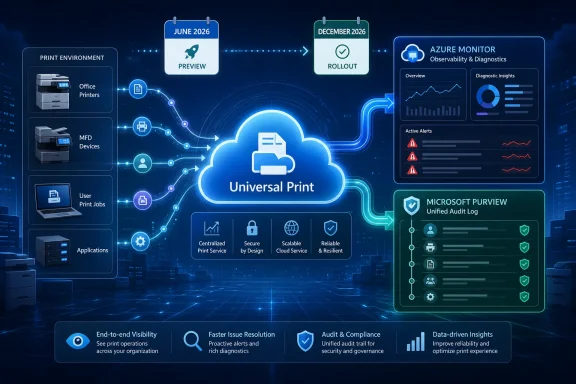
Microsoft has marked two Universal Print observability features as preview available in June 2026, with rollout start targeted for December 2026: diagnostic logs and alerts through Azure Monitor, and audit logging into Microsoft Purview’s Unified Audit Log. Admins should use the June preview window to validate Log Analytics workspaces, Purview audit access, retention expectations, and alert workflows before print telemetry becomes part of the broader managed-service change wave. The feature itself is not just “better logging”; it is Microsoft moving cloud printing closer to the same compliance and operations model already expected for identity, mail, endpoint, and collaboration services.
That distinction matters because print has long been treated as the stubborn exception in modern IT. Organizations have moved authentication, device management, file access, and productivity workloads into cloud-administered control planes, while print often remains a semi-visible utility with help-desk tickets as the primary signal. Universal Print was Microsoft’s answer to print infrastructure without traditional print servers. These June 2026 roadmap items suggest the next answer is print infrastructure with evidence.
The immediate action for admins is straightforward: treat June 2026 as the validation window, not the deployment finish line. Microsoft’s roadmap says Universal Print: Logs and alerts is in preview in June 2026 and is scheduled to begin rollout in December 2026. The same preview-and-rollout timing applies to Universal Print audit logging.
The logs-and-alerts item is the operational half of the story. Microsoft says it will add Azure Monitor integration so customers can send detailed diagnostic logs to a Log Analytics workspace and configure custom alerts. That means Universal Print events should become usable alongside other Azure Monitor-driven service telemetry instead of living as isolated administrative observations.
The audit logging item is the governance half. Microsoft says Universal Print audit logging will capture activities such as print job submissions, configuration changes, and printer registrations, with records available in Microsoft Purview’s Unified Audit Log. That is a different audience from the help desk: compliance teams, internal investigators, security operations, and administrators who need a defensible record of who changed what and when.
The practical preparation sequence is this: identify the Universal Print tenant or tenants you manage, confirm who owns the Log Analytics workspace strategy, confirm who owns Purview audit review, decide which print events should become alerts, and test whether the right people can see the right records without overgranting permissions. Microsoft has not supplied, in the roadmap entry alone, a final admin-center click path or definitive configuration screen for these preview features. That absence is itself part of the planning problem: admins should prepare the surrounding control plane now so the preview can be evaluated quickly when the feature appears.
Roadmap dates are estimated and can move, and Microsoft’s own roadmap language leaves room for features to change, slip, disappear, or graduate into general availability on a different schedule. That is why a preview matters. A preview is not a promise that every detail is frozen, but it is the first practical chance to test whether the feature’s shape matches the operating model your tenant already uses.
The sharper reading is that Microsoft is aligning Universal Print with the modern Microsoft 365 admin stack. Log Analytics gives operations teams a place to query and alert. Purview’s Unified Audit Log gives governance teams a place to review activity. Together, those integrations make print less of a peripheral nuisance and more of a first-class cloud workload.
That is a welcome change, but it also raises the bar. Once print activity is available in central logs, the organization can no longer honestly claim that print is invisible. If print job submissions, configuration changes, and printer registrations are recorded in a compliance-grade audit trail, admins need to know who reviews those records, what counts as suspicious, and what gets escalated.
Traditional print problems often arrive as symptoms: a user cannot print, a printer disappears, a queue stalls, a driver issue spreads, or a site loses access to a shared device. In that world, diagnosis is reactive. Someone checks the printer, the queue, the workstation, the network, or the print server, and the incident is reconstructed after the fact.
Cloud print telemetry changes the starting point. If diagnostic logs can flow into a Log Analytics workspace, the first question becomes whether the signal exists and whether the right query or alert can surface it. If audit records land in Purview, the second question becomes whether a configuration change or registration event explains the operational symptom.
That is where the feature becomes more than another Microsoft 365 roadmap checkbox. The admin value is not that every print problem magically becomes easy. The value is that print joins the same evidence workflow as other cloud-managed services. A failed process, a suspicious change, or a questionable registration can be investigated as an event stream rather than as folklore.
WindowsForum readers have seen this pattern across Microsoft 365 updates before: a feature wave is announced as a productivity or management enhancement, but its real impact depends on tenant hygiene. Related coverage of Microsoft 365 update waves has repeatedly shown that the headline feature is only half the story; the other half is whether admins have policies, permissions, and monitoring ready before rollout pressure arrives.
Microsoft says the Universal Print audit logging feature will include activities such as print job submissions, configuration changes, and printer registrations. Those examples cover three distinct risk categories. A print job submission is user activity; a configuration change is administrative activity; a printer registration is asset or service onboarding activity.
That combination matters because print touches sensitive business processes in ways that are easy to forget. Legal teams print drafts. HR teams print forms. Finance teams print reports. Healthcare, government, education, and regulated industries often have print workflows that still matter even after years of digital transformation.
Purview’s Unified Audit Log is therefore not just a destination. It is a forcing function. Once Universal Print activity appears there, organizations need to decide whether print audit events are part of their normal review process, whether they are retained long enough for internal policy, and whether the people who can search them are the people who should search them.
The subtle risk is overcollection without operational maturity. Logs that nobody reviews create a false sense of control. Audit trails that are available only to a narrow admin group may fail the people who need them during an incident. Preview testing should therefore include access validation, not just event validation.
Admins should resist the temptation to alert on everything. Print generates plenty of noise in real environments, especially across hybrid workforces, shared devices, branch offices, and aging printer fleets. The first preview task should be separating events that are merely interesting from events that require action.
A useful Universal Print alert should meet a simple test: if this fires at 9:15 a.m., who owns it by 9:16? If the answer is unclear, the alert is not ready. It may still be a useful query, dashboard, or weekly review item, but it is not yet an operational alert.
The preview should also be used to test naming conventions. Printer names, locations, groups, and administrative ownership models become much more important when logs are queried across the tenant. A beautifully instrumented service can still be miserable to operate if every printer name is a local joke, a room number with no building context, or a migrated artifact from an old print server.
There is also a cost and retention conversation lurking behind the roadmap text. The verified Microsoft statement confirms Log Analytics workspace integration, but it does not define every downstream operational choice an organization will make around data volume, workspace design, retention, or alert routing. Admins should bring in the Azure monitoring owner early rather than treating Universal Print as a Microsoft 365-only project.
A June 2026 preview puts Universal Print observability into the July and August planning window. That does not mean a July or August production rollout is guaranteed; Microsoft’s roadmap says the rollout start is December 2026. But the preview timing means the people who run change advisory boards, security reviews, and monitoring standards should have the item on their summer agenda.
This is also why a simple roadmap watchlist is not enough. Admins need an item-level tracker that records the feature name, roadmap status, preview timing, rollout start estimate, tenant impact, owner, test tenant, Log Analytics dependency, Purview dependency, and go/no-go criteria. If the feature slips, that tracker records the slip. If the feature changes, the tracker records what changed. If the feature disappears, the tracker records the operational assumption that needs to be unwound.
The existing coverage gap is practical rather than factual. Many roadmap roundups explain that release dates are estimates and that targeted release may precede standard release. Fewer translate that into a concrete plan for the admin who owns printing, monitoring, or compliance evidence. The important question is not merely when Microsoft says the feature may land. It is whether your tenant will be ready to evaluate it when the preview shows up.
The second step is environment mapping. Admins should know which printers are registered through Universal Print, which sites or business units depend on them, and which devices or user groups create the most operational risk. That map does not need to be perfect to be useful. It needs to be good enough to test whether telemetry tells a coherent story.
The third step is access review. The team that manages print may not have access to Log Analytics. The team that owns Log Analytics may not understand print operations. The team that searches Purview audit logs may not know what a suspicious printer registration looks like. Preview testing should deliberately cross those boundaries.
The fourth step is alert design. Decide which conditions are candidates for real-time alerting, which belong in dashboards, and which belong in periodic audit review. A configuration change may warrant faster attention than routine job submission activity. A printer registration event may be benign during a migration but suspicious outside a maintenance window.
The fifth step is documentation. Not glossy documentation, but operational runbooks: what the alert means, how to verify it, who to contact, and when to escalate. Universal Print observability will be most valuable when it shortens diagnosis rather than merely adding another portal to check.
That distinction matters. The feature gives administrators data and destinations. It does not, based on the available facts, define your detection logic for you. If a printer registration event matters in your environment, you will need to decide why it matters and what should happen next.
Still, security teams should care because printers remain part of the business workflow. A change in print configuration can affect availability. A job submission record can become relevant in an inquiry. A printer registration can reveal changes in the service footprint. These are not exotic scenarios; they are ordinary administrative events that become more useful when captured centrally.
The right posture is measured seriousness. Do not invent a crisis around print telemetry. Do not ignore it because printing feels old-fashioned. Treat it as another signal source in the Microsoft 365 estate, with the same questions you would ask of any new log source: What does it record, who can access it, how long is it retained, how do we query it, and what actions follow from it?
If a print job submission is visible, the help desk may be able to distinguish “the user never reached the service” from “the service accepted activity but something downstream failed.” If configuration changes are visible, a sudden wave of issues can be correlated against administrative activity. If printer registrations are visible, onboarding and inventory questions become less dependent on tribal knowledge.
This is where Universal Print’s managed-service promise becomes more credible. A cloud print service without operational telemetry is easier to deploy than old infrastructure but not necessarily easier to run. A cloud print service with logs, alerts, and audit trails gives admins a chance to build a real support model around it.
The catch is that support teams need training before production pressure arrives. They should know which portal or workspace to check, what event names or categories are meaningful once Microsoft exposes them, and where their authority stops. A help-desk analyst should not need Purview superpowers to troubleshoot every print issue, but the escalation path to someone with audit access should be clear.
Universal Print logging and audit logging sit in that quieter category. They do not promise a new user interface flourish or a productivity breakthrough. They promise that a service many organizations already depend on will emit records into systems administrators already use or are expected to use.
That is why WindowsForum readers should track this as part of the July and August change-planning cycle even though the roadmap’s rollout start is December. The summer work is not production deployment. It is readiness: assigning owners, validating dependencies, drafting queries, identifying alert candidates, and deciding what evidence your organization expects from print.
There is a larger lesson here for Microsoft 365 roadmap monitoring. The best watchlists are not sorted only by product popularity or release month. They are sorted by operational consequence. A small feature that changes auditability can matter more to an enterprise admin than a large feature that changes a ribbon button.
The concrete takeaways are narrow enough to act on now:
That distinction matters because print has long been treated as the stubborn exception in modern IT. Organizations have moved authentication, device management, file access, and productivity workloads into cloud-administered control planes, while print often remains a semi-visible utility with help-desk tickets as the primary signal. Universal Print was Microsoft’s answer to print infrastructure without traditional print servers. These June 2026 roadmap items suggest the next answer is print infrastructure with evidence.
 Microsoft Is Turning Cloud Print Into an Observable Service
The immediate action for admins is straightforward: treat June 2026 as the validation window, not the deployment finish line. Microsoft’s roadmap says Universal Print: Logs and alerts is in preview in June 2026 and is scheduled to begin rollout in December 2026. The same preview-and-rollout timing applies to Universal Print audit logging.The logs-and-alerts item is the operational half of the story. Microsoft says it will add Azure Monitor integration so customers can send detailed diagnostic logs to a Log Analytics workspace and configure custom alerts. That means Universal Print events should become usable alongside other Azure Monitor-driven service telemetry instead of living as isolated administrative observations.
The audit logging item is the governance half. Microsoft says Universal Print audit logging will capture activities such as print job submissions, configuration changes, and printer registrations, with records available in Microsoft Purview’s Unified Audit Log. That is a different audience from the help desk: compliance teams, internal investigators, security operations, and administrators who need a defensible record of who changed what and when.
The practical preparation sequence is this: identify the Universal Print tenant or tenants you manage, confirm who owns the Log Analytics workspace strategy, confirm who owns Purview audit review, decide which print events should become alerts, and test whether the right people can see the right records without overgranting permissions. Microsoft has not supplied, in the roadmap entry alone, a final admin-center click path or definitive configuration screen for these preview features. That absence is itself part of the planning problem: admins should prepare the surrounding control plane now so the preview can be evaluated quickly when the feature appears.
The June Preview Is the Real Deadline for Serious Shops
Microsoft’s December 2026 rollout start date may look like the operational deadline, but that is the wrong way to read this roadmap entry. For organizations that rely on print as a managed service, June 2026 is the deadline for readiness. By December, the question should not be “what is this?” It should be “does this meet our alerting, retention, and audit-review requirements?”Roadmap dates are estimated and can move, and Microsoft’s own roadmap language leaves room for features to change, slip, disappear, or graduate into general availability on a different schedule. That is why a preview matters. A preview is not a promise that every detail is frozen, but it is the first practical chance to test whether the feature’s shape matches the operating model your tenant already uses.
The sharper reading is that Microsoft is aligning Universal Print with the modern Microsoft 365 admin stack. Log Analytics gives operations teams a place to query and alert. Purview’s Unified Audit Log gives governance teams a place to review activity. Together, those integrations make print less of a peripheral nuisance and more of a first-class cloud workload.
That is a welcome change, but it also raises the bar. Once print activity is available in central logs, the organization can no longer honestly claim that print is invisible. If print job submissions, configuration changes, and printer registrations are recorded in a compliance-grade audit trail, admins need to know who reviews those records, what counts as suspicious, and what gets escalated.
Print Telemetry Will Expose Gaps That Printers Used to Hide
The most important effect of these features may be organizational rather than technical. Logging does not merely show what happened; it reveals whether anyone had a plan for what to do after seeing it. Universal Print telemetry will likely expose blurry ownership boundaries between endpoint teams, Microsoft 365 admins, security operations, facilities teams, and compliance staff.Traditional print problems often arrive as symptoms: a user cannot print, a printer disappears, a queue stalls, a driver issue spreads, or a site loses access to a shared device. In that world, diagnosis is reactive. Someone checks the printer, the queue, the workstation, the network, or the print server, and the incident is reconstructed after the fact.
Cloud print telemetry changes the starting point. If diagnostic logs can flow into a Log Analytics workspace, the first question becomes whether the signal exists and whether the right query or alert can surface it. If audit records land in Purview, the second question becomes whether a configuration change or registration event explains the operational symptom.
That is where the feature becomes more than another Microsoft 365 roadmap checkbox. The admin value is not that every print problem magically becomes easy. The value is that print joins the same evidence workflow as other cloud-managed services. A failed process, a suspicious change, or a questionable registration can be investigated as an event stream rather than as folklore.
WindowsForum readers have seen this pattern across Microsoft 365 updates before: a feature wave is announced as a productivity or management enhancement, but its real impact depends on tenant hygiene. Related coverage of Microsoft 365 update waves has repeatedly shown that the headline feature is only half the story; the other half is whether admins have policies, permissions, and monitoring ready before rollout pressure arrives.
Purview Makes Printing a Compliance Conversation
The Purview angle is the one many IT teams will underestimate. Audit logging sounds mundane until someone asks for a record during an investigation. Then the difference between “we think this happened” and “we can search the audit log” becomes enormous.Microsoft says the Universal Print audit logging feature will include activities such as print job submissions, configuration changes, and printer registrations. Those examples cover three distinct risk categories. A print job submission is user activity; a configuration change is administrative activity; a printer registration is asset or service onboarding activity.
That combination matters because print touches sensitive business processes in ways that are easy to forget. Legal teams print drafts. HR teams print forms. Finance teams print reports. Healthcare, government, education, and regulated industries often have print workflows that still matter even after years of digital transformation.
Purview’s Unified Audit Log is therefore not just a destination. It is a forcing function. Once Universal Print activity appears there, organizations need to decide whether print audit events are part of their normal review process, whether they are retained long enough for internal policy, and whether the people who can search them are the people who should search them.
The subtle risk is overcollection without operational maturity. Logs that nobody reviews create a false sense of control. Audit trails that are available only to a narrow admin group may fail the people who need them during an incident. Preview testing should therefore include access validation, not just event validation.
Azure Monitor Turns Printer Trouble Into an Alerting Design Problem
The Azure Monitor integration is more tactical, but no less important. Microsoft says customers will be able to send detailed diagnostic logs to a Log Analytics workspace and configure custom alerts. That sounds like the familiar Azure pattern: collect events centrally, query them, and turn selected conditions into notifications or incident triggers.Admins should resist the temptation to alert on everything. Print generates plenty of noise in real environments, especially across hybrid workforces, shared devices, branch offices, and aging printer fleets. The first preview task should be separating events that are merely interesting from events that require action.
A useful Universal Print alert should meet a simple test: if this fires at 9:15 a.m., who owns it by 9:16? If the answer is unclear, the alert is not ready. It may still be a useful query, dashboard, or weekly review item, but it is not yet an operational alert.
The preview should also be used to test naming conventions. Printer names, locations, groups, and administrative ownership models become much more important when logs are queried across the tenant. A beautifully instrumented service can still be miserable to operate if every printer name is a local joke, a room number with no building context, or a migrated artifact from an old print server.
There is also a cost and retention conversation lurking behind the roadmap text. The verified Microsoft statement confirms Log Analytics workspace integration, but it does not define every downstream operational choice an organization will make around data volume, workspace design, retention, or alert routing. Admins should bring in the Azure monitoring owner early rather than treating Universal Print as a Microsoft 365-only project.
The Roadmap Timing Points to the July and August Planning Window
The broader Microsoft 365 roadmap story in mid-2026 is crowded, and much public attention tends to drift toward Copilot and agentic features. That is understandable, but it leaves a gap for administrators who need to plan around infrastructure-adjacent changes. Universal Print logging is exactly the kind of roadmap item that can be missed because it is not flashy, then suddenly matter because it affects auditability and operations.A June 2026 preview puts Universal Print observability into the July and August planning window. That does not mean a July or August production rollout is guaranteed; Microsoft’s roadmap says the rollout start is December 2026. But the preview timing means the people who run change advisory boards, security reviews, and monitoring standards should have the item on their summer agenda.
This is also why a simple roadmap watchlist is not enough. Admins need an item-level tracker that records the feature name, roadmap status, preview timing, rollout start estimate, tenant impact, owner, test tenant, Log Analytics dependency, Purview dependency, and go/no-go criteria. If the feature slips, that tracker records the slip. If the feature changes, the tracker records what changed. If the feature disappears, the tracker records the operational assumption that needs to be unwound.
The existing coverage gap is practical rather than factual. Many roadmap roundups explain that release dates are estimates and that targeted release may precede standard release. Fewer translate that into a concrete plan for the admin who owns printing, monitoring, or compliance evidence. The important question is not merely when Microsoft says the feature may land. It is whether your tenant will be ready to evaluate it when the preview shows up.
The Admin Checklist Starts Before the Toggle Exists
Because Microsoft has not provided a final configuration path in the roadmap text, the prep work should focus on prerequisites and decision points rather than imaginary clicks. The first step is ownership. Universal Print may live in Microsoft 365 administration, but the logs-and-alerts feature belongs partly to Azure monitoring, and audit logging belongs partly to Purview governance.The second step is environment mapping. Admins should know which printers are registered through Universal Print, which sites or business units depend on them, and which devices or user groups create the most operational risk. That map does not need to be perfect to be useful. It needs to be good enough to test whether telemetry tells a coherent story.
The third step is access review. The team that manages print may not have access to Log Analytics. The team that owns Log Analytics may not understand print operations. The team that searches Purview audit logs may not know what a suspicious printer registration looks like. Preview testing should deliberately cross those boundaries.
The fourth step is alert design. Decide which conditions are candidates for real-time alerting, which belong in dashboards, and which belong in periodic audit review. A configuration change may warrant faster attention than routine job submission activity. A printer registration event may be benign during a migration but suspicious outside a maintenance window.
The fifth step is documentation. Not glossy documentation, but operational runbooks: what the alert means, how to verify it, who to contact, and when to escalate. Universal Print observability will be most valuable when it shortens diagnosis rather than merely adding another portal to check.
Security Teams Should Care, But Not Overclaim the Threat
It would be easy to oversell this as a dramatic new security control. The verified roadmap facts do not say Microsoft is shipping threat detection for Universal Print, nor do they describe built-in detections, risk scoring, or automated remediation. They say diagnostic logs can go to Log Analytics, custom alerts can be configured, and audit records can appear in Purview’s Unified Audit Log.That distinction matters. The feature gives administrators data and destinations. It does not, based on the available facts, define your detection logic for you. If a printer registration event matters in your environment, you will need to decide why it matters and what should happen next.
Still, security teams should care because printers remain part of the business workflow. A change in print configuration can affect availability. A job submission record can become relevant in an inquiry. A printer registration can reveal changes in the service footprint. These are not exotic scenarios; they are ordinary administrative events that become more useful when captured centrally.
The right posture is measured seriousness. Do not invent a crisis around print telemetry. Do not ignore it because printing feels old-fashioned. Treat it as another signal source in the Microsoft 365 estate, with the same questions you would ask of any new log source: What does it record, who can access it, how long is it retained, how do we query it, and what actions follow from it?
Help Desks Will Feel the Benefit First If IT Does the Boring Work
For all the compliance language around Purview, the earliest practical wins may land at the help desk. Print tickets are notorious for wasting time because the failure can sit anywhere between user intent and physical output. A central diagnostic trail will not eliminate that complexity, but it can reduce the number of blind alleys.If a print job submission is visible, the help desk may be able to distinguish “the user never reached the service” from “the service accepted activity but something downstream failed.” If configuration changes are visible, a sudden wave of issues can be correlated against administrative activity. If printer registrations are visible, onboarding and inventory questions become less dependent on tribal knowledge.
This is where Universal Print’s managed-service promise becomes more credible. A cloud print service without operational telemetry is easier to deploy than old infrastructure but not necessarily easier to run. A cloud print service with logs, alerts, and audit trails gives admins a chance to build a real support model around it.
The catch is that support teams need training before production pressure arrives. They should know which portal or workspace to check, what event names or categories are meaningful once Microsoft exposes them, and where their authority stops. A help-desk analyst should not need Purview superpowers to troubleshoot every print issue, but the escalation path to someone with audit access should be clear.
Roadmap Watchers Need More Than a Copilot Filter
The Microsoft 365 roadmap has become a difficult signal environment. Copilot, agents, and AI-driven workflow changes dominate the visible narrative because they are strategically important and commercially loud. But for admins, some of the most consequential changes are the quiet ones that alter evidence, governance, and service operations.Universal Print logging and audit logging sit in that quieter category. They do not promise a new user interface flourish or a productivity breakthrough. They promise that a service many organizations already depend on will emit records into systems administrators already use or are expected to use.
That is why WindowsForum readers should track this as part of the July and August change-planning cycle even though the roadmap’s rollout start is December. The summer work is not production deployment. It is readiness: assigning owners, validating dependencies, drafting queries, identifying alert candidates, and deciding what evidence your organization expects from print.
There is a larger lesson here for Microsoft 365 roadmap monitoring. The best watchlists are not sorted only by product popularity or release month. They are sorted by operational consequence. A small feature that changes auditability can matter more to an enterprise admin than a large feature that changes a ribbon button.
The Universal Print Prep Window Is Shorter Than It Looks
The safest way to read the June 2026 Universal Print entries is as a warning flare. Microsoft is not merely adding a convenience feature; it is connecting print to Azure Monitor and Purview, two systems that carry real operational and compliance weight. That makes preparation a cross-team exercise, not a one-admin checkbox.The concrete takeaways are narrow enough to act on now:
- Universal Print diagnostic logs and alerts are in preview in June 2026, with rollout start currently targeted for December 2026.
- Microsoft says diagnostic logs will be exportable to a Log Analytics workspace, where admins can configure custom alerts.
- Universal Print audit logging is also in preview in June 2026, with rollout start currently targeted for December 2026.
- Microsoft says audit records will include activities such as print job submissions, configuration changes, and printer registrations in Purview’s Unified Audit Log.
- Admins should validate Log Analytics ownership, Purview audit access, alert routing, printer naming, and runbooks before treating the preview as complete.
- The roadmap facts do not yet provide a final configuration path, so teams should avoid inventing procedures and instead prepare the surrounding monitoring and governance model.