

If your Power BI reports still use the Intune Data Warehouse beta connector, Microsoft says you must move them to Intune connector v2 or the OData Feed connector before the retirement finishes after a gradual rollout beginning in late April 2026. Reports created after November 2025 already use connector v2 and are not affected. The practical decision is simple: inventory old reports now, migrate anything that still calls
Microsoft’s retirement notice is not ambiguous: the Intune Data Warehouse beta connector in Power BI, also described as connector v1, is going away. Once the transition completes, access through that beta connector will no longer be available. This is not merely a branding change or a warning banner that admins can defer into the next quarter.
The important cutoff is not when the report is opened, published, shared, or last refreshed. The practical cutoff is whether the report relies on connector v1. Microsoft says reports created after November 2025 already use connector v2, which means the risk concentrates in older Power BI Desktop files, published datasets, workspace reports, departmental dashboards, and inherited templates that have been quietly refreshing for months or years.
That is why this retirement is a decision story rather than a feature story. If the report is old and still uses connector v1, migrate it. If it was created after November 2025 and uses connector v2, it should be outside the blast radius. If nobody knows which category a report falls into, that uncertainty is now the work.
If the source shows
The endpoint is found in the Microsoft Intune admin center under Reports > Intune Data warehouse > Data warehouse. Copy the reporting service endpoint from there, but do not include the
The replacement pattern is:
If you want to limit historical data during testing or reduce the initial load, Microsoft also documents the optional
That is the core migration move: identify
In a staggered retirement, one team may see failures before another, one workspace may look healthy while a sibling workspace breaks, and a report that refreshed yesterday may not refresh tomorrow. That is the sort of pattern that burns time because it looks like an authentication, gateway, tenant, or transient Power BI issue before someone connects it back to the connector retirement.
The date also creates a familiar Microsoft 365 operations problem: the deadline sits far enough away to feel abstract, but close enough that enterprise change windows can swallow it. Between owner discovery, report inventory, test workspace setup, stakeholder signoff, and production publishing, late April 2026 is not a distant date for anyone with regulated reporting or executive dashboards.
WindowsForum readers have seen this movie across Microsoft’s ecosystem. Feature retirements often look small in isolation, but they become operationally expensive when they expose undocumented dependencies. The same pattern has shown up in broader Microsoft 365 retirement planning, Windows 10 support timelines, Edge Collections migration concerns, and older Windows metadata deprecations: the technical change is usually manageable, while the asset discovery is where organizations lose time.
That distinction is important because it should shape the migration conversation. This is not a reason to abandon Intune reporting, nor is it proof that Power BI is a poor fit for endpoint management analytics. It is a reason to remove a beta dependency from production reporting before Microsoft removes access for you.
The word beta is doing a lot of work here. Beta connectors are useful when a service is young, but they are bad foundations for reports that become part of monthly security reviews, device compliance governance, license planning, or executive IT scorecards. Once a beta path survives long enough, it often becomes invisible; admins stop seeing it as beta and start seeing it as plumbing.
Microsoft’s supported alternatives give organizations two broad choices. Intune connector v2 is the cleaner path for reports that should remain inside the Power BI connector experience. OData Feed is the more explicit and portable path, especially for teams that want to see the endpoint, query behavior, and version parameter directly in Power Query.
Start with reports that carry operational weight. Compliance dashboards, enrollment trend reports, app protection views, device inventory summaries, and executive endpoint health decks should move ahead of experimental reports or abandoned workspaces. If a report is used in a CAB meeting, security review, audit package, or monthly operations readout, it belongs near the top of the queue.
Ownership will be messy. Some Intune reports live with endpoint engineering, some with security operations, some with service management, and some with a Power BI team that does not know what
The inventory should record three things: whether the report uses connector v1, which supported path it will move to, and who will validate the output. The third item is the one most often skipped. A refresh that succeeds is not the same as a report that still tells the same business story.
A sensible validation run compares the migrated report against the old report before the retirement window. Use the same tenant, the same refresh timing where possible, and the same report pages. Focus on totals, trend direction, slicer behavior, blank values, and visuals that depend on custom Power Query steps.
The optional
Rollback deserves a sober definition. After Microsoft completes the retirement, connector v1 access will no longer be available, so the old connector is not a true rollback strategy. The useful rollback is keeping an untouched copy of the old report for comparison while publishing the migrated version through normal Power BI change controls.
OData Feed is attractive when teams want transparency. The endpoint is visible, the query parameter is explicit, and the connection model is easier to reason about for admins who are comfortable with service endpoints and Power Query. It also fits environments where reporting data may be consumed by tools beyond Power BI, provided those tools support the required authentication and OData standards.
The tradeoff is maintainability. Explicit OData queries can be wonderfully clear to one engineer and intimidating to the next analyst who inherits the report. Connector v2 may hide some of that complexity, which can be a virtue when reports are maintained by business intelligence teams rather than endpoint specialists.
There is no need to turn this into a platform war. The urgent point is to get off connector v1. The strategic point is to choose the supported path that your organization can operate, document, and troubleshoot after the person doing the migration moves on.
Endpoint reporting sits at an awkward intersection. It is operational enough that admins use it to spot real problems, but executive enough that the same numbers often appear in governance decks. A broken Intune Power BI report can therefore become both a troubleshooting ticket and a credibility problem.
That is why migration should not be framed as a cosmetic maintenance item. The report may be “just Power BI,” but the decisions attached to it can include compliance follow-up, device fleet planning, app protection posture, and enrollment health. If those reports go dark during the retirement window, the organization may still have data elsewhere, but it loses the curated view people actually use.
The best-run migrations will be boring. Report owners will identify connector v1, replace the source, test the output, publish the migrated report, and move on before late April 2026. The worst-run migrations will begin with an executive asking why a dashboard failed after the transition already started.
If the report has already been migrated to OData Feed, scrutinize the endpoint. Confirm that the reporting service endpoint came from Reports > Intune Data warehouse > Data warehouse in the Intune admin center and that the copied endpoint did not include the
If the migrated report refreshes but visuals look wrong, work downstream. Query steps may reference old field names, changed structures, or assumptions from the previous connector behavior. Relationships, calculated columns, measures, and visual-level filters should all be checked before blaming the service.
Admins should also distinguish between a migration defect and a data expectation problem. The Intune Data Warehouse is designed for reporting and trends, not as a live reflection of every device state change at the exact moment an admin opens a dashboard. A migrated report should be validated against the old report and the intended reporting cadence, not against an imagined real-time control plane.
Organizations that keep a dependency register for reporting assets will handle this retirement with less drama. That register does not need to be elaborate. It needs to capture what the report connects to, who owns it, how often it refreshes, where it is published, and what business process depends on it.
Without that register, every retirement becomes archaeology. Someone opens an old report, finds a connector nobody remembers choosing, and discovers that the owner left two reorganizations ago. The technical migration then competes with identity cleanup, workspace permissions, source control gaps, and the politics of changing a dashboard people trust.
This is why WindowsForum’s recurring coverage of Microsoft retirements is not just noise about product churn. Retirements are where architecture diagrams meet reality. They reveal whether a Microsoft tenant is managed as an estate or merely accumulated as a pile of useful artifacts.
Intune.Contents(x), and validate refresh before the two-week transition window turns a reporting chore into an outage.
 The Reports That Still Call the Beta Connector Are Living on Borrowed Time
Microsoft’s retirement notice is not ambiguous: the Intune Data Warehouse beta connector in Power BI, also described as connector v1, is going away. Once the transition completes, access through that beta connector will no longer be available. This is not merely a branding change or a warning banner that admins can defer into the next quarter.The important cutoff is not when the report is opened, published, shared, or last refreshed. The practical cutoff is whether the report relies on connector v1. Microsoft says reports created after November 2025 already use connector v2, which means the risk concentrates in older Power BI Desktop files, published datasets, workspace reports, departmental dashboards, and inherited templates that have been quietly refreshing for months or years.
That is why this retirement is a decision story rather than a feature story. If the report is old and still uses connector v1, migrate it. If it was created after November 2025 and uses connector v2, it should be outside the blast radius. If nobody knows which category a report falls into, that uncertainty is now the work.
The Fastest Check Is Inside Power BI Desktop
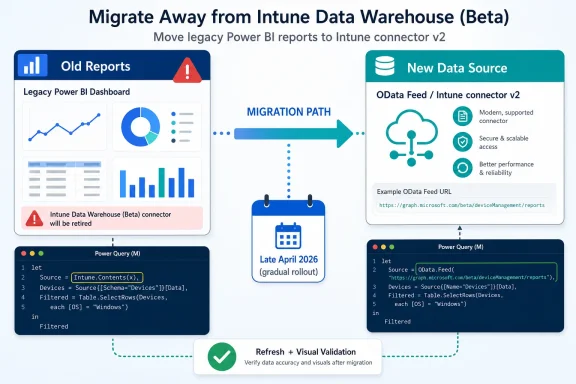
The shortest useful procedure starts with the report file, not with a meeting. Open the report in Power BI Desktop, select Transform data, and inspect the queries that pull from Intune. For each Intune-backed query, open Advanced Editor and look for the old connector pattern.If the source shows
Intune.Contents(x), the report is using connector v1 and must be updated. Microsoft’s documented migration path is to replace that data source with an OData Feed connection using the Intune reporting service endpoint from the Intune admin center.The endpoint is found in the Microsoft Intune admin center under Reports > Intune Data warehouse > Data warehouse. Copy the reporting service endpoint from there, but do not include the
api-version segment when placing it into the connection string. The Power Query source Microsoft shows uses OData.Feed with the OData implementation set to 2.0 and the api-version query value set to v1.0.The replacement pattern is:
Source = OData.Feed("<reporting_service_endpoint>", null, [Implementation="2.0", Query=[#"api-version"="v1.0"]])If you want to limit historical data during testing or reduce the initial load, Microsoft also documents the optional
maxHistoryDays parameter. For example:Source = OData.Feed("<reporting_service_endpoint>?maxHistoryDays=7", null, [Implementation="2.0", Query=[#"api-version"="v1.0"]])That is the core migration move: identify
Intune.Contents(x), replace it with the supported OData Feed source, refresh, and repair any query dependencies that assumed the old connector shape. For many reports, the work will be less about typing the new source and more about proving that every downstream transformation, relationship, measure, and visual still behaves the same way.Late April 2026 Is the Start of Enforcement, Not the Start of Planning
Microsoft says the transition begins in late April 2026 and rolls out gradually over roughly two weeks. That wording matters because it implies different tenants, workspaces, or report refreshes may not fail at the same instant. A gradual transition is kinder to service reliability, but it can be cruel to troubleshooting.In a staggered retirement, one team may see failures before another, one workspace may look healthy while a sibling workspace breaks, and a report that refreshed yesterday may not refresh tomorrow. That is the sort of pattern that burns time because it looks like an authentication, gateway, tenant, or transient Power BI issue before someone connects it back to the connector retirement.
The date also creates a familiar Microsoft 365 operations problem: the deadline sits far enough away to feel abstract, but close enough that enterprise change windows can swallow it. Between owner discovery, report inventory, test workspace setup, stakeholder signoff, and production publishing, late April 2026 is not a distant date for anyone with regulated reporting or executive dashboards.
WindowsForum readers have seen this movie across Microsoft’s ecosystem. Feature retirements often look small in isolation, but they become operationally expensive when they expose undocumented dependencies. The same pattern has shown up in broader Microsoft 365 retirement planning, Windows 10 support timelines, Edge Collections migration concerns, and older Windows metadata deprecations: the technical change is usually manageable, while the asset discovery is where organizations lose time.
Connector V1 Is the Liability; The Data Warehouse Is Not Disappearing
The retirement does not mean the Intune Data Warehouse concept is disappearing. Microsoft continues to point admins toward supported ways to use Intune reporting data, including Intune connector v2 and the OData Feed connector. The thing being retired is the beta connector path inside Power BI.That distinction is important because it should shape the migration conversation. This is not a reason to abandon Intune reporting, nor is it proof that Power BI is a poor fit for endpoint management analytics. It is a reason to remove a beta dependency from production reporting before Microsoft removes access for you.
The word beta is doing a lot of work here. Beta connectors are useful when a service is young, but they are bad foundations for reports that become part of monthly security reviews, device compliance governance, license planning, or executive IT scorecards. Once a beta path survives long enough, it often becomes invisible; admins stop seeing it as beta and start seeing it as plumbing.
Microsoft’s supported alternatives give organizations two broad choices. Intune connector v2 is the cleaner path for reports that should remain inside the Power BI connector experience. OData Feed is the more explicit and portable path, especially for teams that want to see the endpoint, query behavior, and version parameter directly in Power Query.
The Real Migration Is a Report Inventory Problem
The obvious mistake is to treat this as a one-report fix. The safer approach is to treat it as a small reporting estate migration. Every old.pbix file, every published semantic model, every copied report, and every departmental dashboard that came from an older template deserves a check.Start with reports that carry operational weight. Compliance dashboards, enrollment trend reports, app protection views, device inventory summaries, and executive endpoint health decks should move ahead of experimental reports or abandoned workspaces. If a report is used in a CAB meeting, security review, audit package, or monthly operations readout, it belongs near the top of the queue.
Ownership will be messy. Some Intune reports live with endpoint engineering, some with security operations, some with service management, and some with a Power BI team that does not know what
Intune.Contents(x) means. Retirement projects fail when everyone assumes someone else owns the dataset.The inventory should record three things: whether the report uses connector v1, which supported path it will move to, and who will validate the output. The third item is the one most often skipped. A refresh that succeeds is not the same as a report that still tells the same business story.
Validation Needs More Than a Green Refresh Icon
After migration, refresh success is only the first gate. The report also needs semantic validation: do the same pages load, do filters behave as expected, do relationships still resolve, and do headline numbers remain explainable? If a compliance trend suddenly changes shape after migration, the team needs to know whether that reflects a source difference, a transformation mistake, or a real tenant change.A sensible validation run compares the migrated report against the old report before the retirement window. Use the same tenant, the same refresh timing where possible, and the same report pages. Focus on totals, trend direction, slicer behavior, blank values, and visuals that depend on custom Power Query steps.
The optional
maxHistoryDays parameter can help during early testing because it narrows the data pulled through the OData Feed connection. That can make iteration less painful while the team confirms credentials, endpoint syntax, and query structure. But final validation should reflect the actual reporting horizon the business uses.Rollback deserves a sober definition. After Microsoft completes the retirement, connector v1 access will no longer be available, so the old connector is not a true rollback strategy. The useful rollback is keeping an untouched copy of the old report for comparison while publishing the migrated version through normal Power BI change controls.
V2 Versus OData Is a Governance Choice, Not Just a Connector Choice
Microsoft names two supported paths: Intune connector v2 and the OData Feed connector. The right answer depends less on ideology and more on who maintains the report. If the report is owned by a Power BI-heavy team that wants a familiar connector experience, v2 is likely the lower-friction route.OData Feed is attractive when teams want transparency. The endpoint is visible, the query parameter is explicit, and the connection model is easier to reason about for admins who are comfortable with service endpoints and Power Query. It also fits environments where reporting data may be consumed by tools beyond Power BI, provided those tools support the required authentication and OData standards.
The tradeoff is maintainability. Explicit OData queries can be wonderfully clear to one engineer and intimidating to the next analyst who inherits the report. Connector v2 may hide some of that complexity, which can be a virtue when reports are maintained by business intelligence teams rather than endpoint specialists.
There is no need to turn this into a platform war. The urgent point is to get off connector v1. The strategic point is to choose the supported path that your organization can operate, document, and troubleshoot after the person doing the migration moves on.
What Breaks Is Access, But What Hurts Is Trust
When the beta connector stops working, the immediate symptom is likely to be failed access or refresh through that connector path. That is the technical break. The business break is that stakeholders lose trust in the report precisely when they need endpoint data to be reliable.Endpoint reporting sits at an awkward intersection. It is operational enough that admins use it to spot real problems, but executive enough that the same numbers often appear in governance decks. A broken Intune Power BI report can therefore become both a troubleshooting ticket and a credibility problem.
That is why migration should not be framed as a cosmetic maintenance item. The report may be “just Power BI,” but the decisions attached to it can include compliance follow-up, device fleet planning, app protection posture, and enrollment health. If those reports go dark during the retirement window, the organization may still have data elsewhere, but it loses the curated view people actually use.
The best-run migrations will be boring. Report owners will identify connector v1, replace the source, test the output, publish the migrated report, and move on before late April 2026. The worst-run migrations will begin with an executive asking why a dashboard failed after the transition already started.
Troubleshooting Should Begin With the Connector Signature
When an Intune-backed Power BI report behaves strangely during this period, the first check should be whether it still usesIntune.Contents(x). That single signature separates a retirement-related problem from a broader Power BI or Intune investigation. It is faster to check the source in Advanced Editor than to chase refresh errors through tenant settings and credentials first.If the report has already been migrated to OData Feed, scrutinize the endpoint. Confirm that the reporting service endpoint came from Reports > Intune Data warehouse > Data warehouse in the Intune admin center and that the copied endpoint did not include the
api-version segment. Then confirm that the Power Query formula supplies api-version as Microsoft documents.If the migrated report refreshes but visuals look wrong, work downstream. Query steps may reference old field names, changed structures, or assumptions from the previous connector behavior. Relationships, calculated columns, measures, and visual-level filters should all be checked before blaming the service.
Admins should also distinguish between a migration defect and a data expectation problem. The Intune Data Warehouse is designed for reporting and trends, not as a live reflection of every device state change at the exact moment an admin opens a dashboard. A migrated report should be validated against the old report and the intended reporting cadence, not against an imagined real-time control plane.
Microsoft’s Retirement Pattern Rewards Teams That Keep a Dependency Register
There is a larger lesson here for Windows and Microsoft 365 shops. Microsoft’s cloud estate changes constantly, and retirements increasingly target old components that are still embedded in daily workflows. The change may be reasonable, but reasonableness does not make it painless.Organizations that keep a dependency register for reporting assets will handle this retirement with less drama. That register does not need to be elaborate. It needs to capture what the report connects to, who owns it, how often it refreshes, where it is published, and what business process depends on it.
Without that register, every retirement becomes archaeology. Someone opens an old report, finds a connector nobody remembers choosing, and discovers that the owner left two reorganizations ago. The technical migration then competes with identity cleanup, workspace permissions, source control gaps, and the politics of changing a dashboard people trust.
This is why WindowsForum’s recurring coverage of Microsoft retirements is not just noise about product churn. Retirements are where architecture diagrams meet reality. They reveal whether a Microsoft tenant is managed as an estate or merely accumulated as a pile of useful artifacts.
The April 2026 Window Belongs on the Admin Calendar Now
The operational plan is straightforward, but it should be started early because the hard part is finding every affected report. Treat late April 2026 as the enforcement window, not the kickoff meeting, and use November 2025 as the rough dividing line for which reports deserve extra scrutiny.- Reports that show
Intune.Contents(x)in Power Query Advanced Editor are still using connector v1 and need to be migrated. - Reports created after November 2025 already use Intune connector v2, according to Microsoft, and are not affected by this retirement.
- Microsoft says the transition begins in late April 2026 and rolls out gradually over about two weeks.
- After the transition completes, access through the beta connector will no longer be available.
- The supported migration targets are Intune connector v2 and the OData Feed connector.
- A successful migration should be validated against old report output, not judged only by whether Power BI refresh completes.
References
- Primary source: learn.microsoft.com
Connect to the Data Warehouse With Power BI - Microsoft Intune | Microsoft Learn
You can download a file for use with Microsoft Power BI that allows you to load interactive, dynamically generated reports for your Microsoft Intune tenant.learn.microsoft.com - Primary source: WindowsForum
Microsoft 365 Feature Retirements: Impacts and Solutions for Sysadmins | Windows Forum
Microsoft has been busy streamlining its ecosystem, announcing a series of feature retirements across the Microsoft 365 (M365) environment. According to...windowsforum.com