

Innoelement’s HALO TOUCH V2, reported July 3, 2026, is a Guangzhou-designed desktop USB 2.0 hub that combines three downstream USB ports, dual microSD functions, Fast Ethernet, USB power monitoring, a circular touchscreen, and a Windows-compatible rotary controller. That sounds like a novelty until you look at what it is really trying to do: collapse the messy layer of desk gadgets around a PC into one small programmable object. The gamble is that the humble USB hub is no longer just plumbing. It is becoming another surface for control, telemetry, and personality.
For two decades, the USB hub has been the least glamorous object on the desk. It either works invisibly or fails loudly, and in both cases it is usually a plastic strip of ports hiding behind a monitor. HALO TOUCH V2 treats that assumption as outdated.
Its pitch is not raw I/O density. This is still a USB 2.0 hub, with two Type-A downstream ports, one Type-C downstream port, a Type-C upstream connection to the PC, a separate Type-C USB PD power input, dual microSD roles, and 100Mbps Ethernet. A conventional dock buyer scanning for USB 3.x, DisplayPort, HDMI, 2.5GbE, or Thunderbolt will not need long to conclude that this is not trying to replace a serious workstation dock.
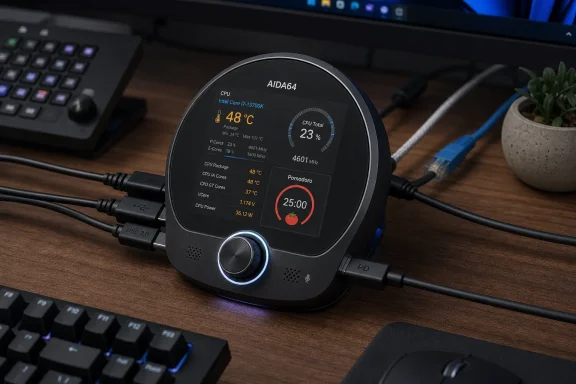
Instead, it asks a more interesting question: what if the hub were the thing you actually touched? The 360 × 360 circular IPS display, touch gestures, haptic motor, onboard speaker, microphone, and rotary encoder turn a peripheral expander into a tiny embedded dashboard. It is part hub, part desk clock, part media toy, part system monitor, and part input device.
That mix is why the device is more interesting than its port list. Plenty of USB hubs are faster, cheaper, smaller, and better certified. Very few are trying to be a physical interface layer between Windows and the user.
Microsoft’s Surface Dial concept was always elegant but oddly underexploited. Windows exposes wheel-style input through the RadialController APIs, with rotate, click, and press-and-hold behaviors that apps can use for contextual controls. In practice, the Dial never became a mainstream input category, partly because the official hardware was niche and partly because app support never reached mouse-and-keyboard inevitability.
HALO TOUCH V2 benefits from that unfinished story. By presenting itself as a Surface Dial-like device, it can tap into an existing Windows interaction model rather than inventing one from scratch. For apps and workflows that already understand radial input, the knob has a path into real software rather than being reduced to a glorified volume dial.
The catch is that “Surface Dial-compatible” does not automatically mean “universally useful.” The best experience still depends on software support, foreground app behavior, and the way Windows handles radial menus and default tools. A rotary encoder can feel magical when it adjusts brush size, scrubs a timeline, controls volume, or steps through values; it can feel pointless when an app ignores it.
That tension makes HALO TOUCH V2 a Windows accessory in the old enthusiast sense. It rewards people who know what they want to bind, monitor, or automate. It is not a mass-market dock with a knob added for decoration.
AIDA64 integration means the hub can display live system information from a PC over the local network. That immediately puts HALO TOUCH V2 in the same psychological category as tiny secondary monitors, sensor panels, and Stream Deck-style control displays. The appeal is not just that the data exists; it is that the data leaves the main display and becomes glanceable.
That matters because modern Windows desktops are increasingly overloaded. Between monitoring overlays, GPU utilities, RGB control panels, chat windows, browser tabs, and system trays, the “main” monitor is often doing too many jobs. A small physical dashboard for thermals, load, clocks, or network state is not necessary, but it can be surprisingly pleasant.
The round format is more stylish than efficient. A square or rectangular screen would show more text cleanly, and a 360 × 360 circular panel imposes obvious layout constraints. But style is part of the point. The display makes the hub visible, and visibility changes the category: this is not a hidden utility box; it is a desk object.
That is old-fashioned in the best way. It treats the user as an owner with a file system, not as a tenant inside an app ecosystem. For a maker-adjacent device, that matters.
The same approach extends to networking, with Wi-Fi settings configurable through a
There are drawbacks. File-based customization is only as good as the firmware’s tolerance for naming, formats, encoding, and folder structure. A slick app can validate assets before transfer; a microSD card workflow often makes users discover errors on the device itself. But for the audience likely to buy this gadget, drag-and-drop customization is a feature, not a flaw.
That is reassuring, but the warning attached to the device should not be treated as boilerplate. The developer describes it as a DIY project without formal product certifications and specifically warns users not to connect a high-voltage Type-C charger directly to the USB-PC port. Doing so could reportedly bypass proper negotiation and inject 12V to 20V into circuitry expecting far less, potentially destroying the board.
For a hobby device, that kind of warning is valuable honesty. For an enterprise desk, it is a red flag. IT departments live in a world where users grab whatever cable is nearby, especially now that USB-C has trained everyone to assume physical compatibility implies electrical safety.
The power monitoring features are genuinely useful. HALO TOUCH V2 can display voltage, current, and wattage for downstream USB ports, and it includes software-configurable overcurrent thresholds from 0 to 1000mA with digital isolation switches. That makes it more than a passive hub. It becomes a small diagnostic instrument for USB peripherals.
But diagnostics do not erase risk. They make the device attractive to labs, benches, and enthusiasts precisely because it exposes behavior that consumer gear hides. The same transparency makes it less appropriate for environments that demand certified, idiot-proof accessories.
A 100Mbps RJ45 port in 2026 is not anyone’s idea of a primary workstation network interface. It is useful as fallback connectivity, emergency access, legacy network support, or a convenience port when speed does not matter. It may also be good enough for device setup, embedded work, lab environments, and occasional maintenance tasks.
The USB 2.0 downstream ports are similar. They are fine for keyboards, mice, serial adapters, dongles, audio gadgets, microcontrollers, and many low-bandwidth tools. They are not ideal for external SSDs, high-speed capture devices, or modern multi-gig workflows. Calling this a desktop “hub” is accurate; calling it a “dock” risks implying too much.
That limitation is not necessarily a failure. The device is not competing with a CalDigit, Plugable, Lenovo, Dell, or Anker workstation dock. It is competing with the scattered small objects many enthusiasts already keep on their desk: USB meter, timer cube, macro knob, mini sensor display, spare Ethernet dongle, card reader, and desk clock.
Seen that way, the slower ports make more sense. HALO TOUCH V2 is less about maximum bandwidth and more about consolidating low-speed utility into a single programmable object.
A normal USB hub can be judged mostly by its controller, power design, compliance, and reliability. HALO TOUCH V2 is defined by firmware. The Surface Dial emulation, touchscreen apps, AIDA64 display, OTA updates, Wi-Fi behavior, audio features, file parsing, port monitoring, and overcurrent controls all live in software. Without source code, buyers are trusting an opaque embedded stack that handles input, networking, USB behavior, updates, and power-management decisions.
That does not make the product bad. Many commercial peripherals are closed. But HALO TOUCH V2 is described as a DIY project, sold through maker-oriented channels, and customized through microSD files. In that context, closed firmware reduces the community’s ability to audit, repair, extend, or fork the device.
The absence of formal certifications compounds the issue. Enthusiasts may accept that bargain; enterprise buyers generally should not. If a device sits between a PC, USB peripherals, a PD power supply, Wi-Fi, and Ethernet, the software and electrical design both deserve scrutiny.
There is an obvious path forward: publish at least partial firmware components, hardware schematics, or a documented plugin interface. Even if the entire codebase cannot be opened, a clearer boundary between stable system firmware and user-customizable behavior would make the product more credible.
A physical knob does not get buried behind windows. A desk display does not require Alt-Tab. A haptic timer does not vanish into the notification center. A dedicated power readout does not require launching a utility. These things survive because they reduce friction.
Windows itself has never fully solved the problem of ambient information. Widgets, taskbar indicators, tray icons, overlays, and phone-link panels all compete for attention on the main screen. Enthusiasts respond by moving some of that information into hardware.
That is why HALO TOUCH V2 is more than a strange USB hub. It is a small vote for a different interface model: one where the PC is surrounded by lightweight instruments rather than controlled entirely through menus and windows.
The Surface Dial angle is especially telling. Microsoft built the software model years ago, but the market did not fill with wheel devices. Now maker hardware is circling back to the idea, not as a premium creative accessory, but as one feature in a multifunction desk object.
For the right buyer, the value equation is easy. A mini display, rotary controller, USB meter, card reader, simple hub, Ethernet fallback, haptic timer, and MP3-capable desk toy could easily cost more if purchased separately. The appeal is in the integration.
For the wrong buyer, the same price is hard to justify. If you need a reliable USB-C dock, the money is better spent elsewhere. If you need high-speed data, display output, certified PD behavior, or corporate support, this is not the product class to shop in.
The lack of formal certification also changes the meaning of price. A certified commercial dock is boring partly because someone paid for testing, support, documentation, supply consistency, and liability. A DIY-style device can be cheaper and more interesting because some of that burden shifts to the buyer.
That tradeoff is not inherently bad. It just needs to be explicit. HALO TOUCH V2 is priced like a polished maker product, not like an enterprise accessory.
USB-C has made consumer electronics feel universal while hiding a great deal of negotiation complexity. A port can mean data, charging, display output, debugging, upstream host connection, downstream peripheral connection, or some overlapping combination of those roles. HALO TOUCH V2 has multiple Type-C ports with different jobs, including upstream PC connection, downstream USB, programming, and PD power.
That is manageable for a careful user. It is dangerous for a careless one. The device reportedly uses physical isolation via a toggle switch between PC and PD power paths, which is exactly the kind of practical design choice enthusiasts appreciate. But the warning suggests the design still relies on the user understanding port roles.
This is where product maturity shows. A refined consumer device makes the dangerous action physically difficult or electrically harmless. A DIY device documents the danger and expects attention. HALO TOUCH V2 appears closer to the latter.
For WindowsForum readers, that distinction matters. Many of us are comfortable with exposed boards, firmware flashing, jumper settings, and port labels. But a desk hub is something other people may touch. The moment a spouse, coworker, cleaner, or hurried user plugs in “the USB-C charger,” the risk model changes.
There is a long tradition of PC builders exposing internal state. In the 1990s and 2000s it was front-panel temperature probes, fan controllers, and LCD bays. Later came motherboard OLEDs, keyboard displays, Rainmeter desktops, RTSS overlays, and USB sensor panels. HALO TOUCH V2 is part of that lineage.
The difference is that it also has ports and input. A tiny sensor display is passive; a rotary hub is interactive. That means the device could plausibly become a station for both observing and nudging the system: check temperatures, adjust volume, run a timer, access media, and connect a low-speed tool without reaching behind the PC.
Sysadmins may also appreciate the per-port power monitoring more than the animations. Anyone who has diagnosed flaky USB devices knows the value of seeing whether a port is browning out, whether a peripheral is drawing too much current, or whether a supposedly idle device is doing something strange. A hub that exposes voltage and current per port can save time.
Still, it should be viewed as a convenience instrument, not a calibrated lab tool unless proven otherwise. The difference between “useful indication” and “measurement-grade accuracy” is large, and the published material does not establish the latter.
That is a meaningful step. Development modules are raw ingredients; a desk hub is a daily object. By wrapping the knob-and-screen concept around USB expansion, Innoelement is pushing the idea from “project component” toward “finished accessory.”
The case for that category is stronger than it first appears. A PC desk already has cables converging at the front edge: temporary USB devices, SD cards, headphones, debug boards, dongles, chargers, and input devices. A small smart hub at that convergence point can justify its footprint if it also provides a display and controls.
This may be where the next wave of enthusiast peripherals goes. Not giant docking stations with every port under the sun, but smaller, more personal hubs with screens, knobs, buttons, meters, and firmware-defined behavior. The fastest data paths will remain on serious docks and motherboard rear I/O. The human-scale interactions may move to devices like this.
HALO TOUCH V2 is not proof that the category is mature. It is proof that the category is forming.
The problem is not that Windows lacks hooks. The problem is that PC accessory makers often choose the safest possible implementation: keyboard, mouse, webcam, dock, headset, repeat. Enthusiast hardware tends to move faster because it can tolerate smaller audiences and rougher edges.
HALO TOUCH V2 shows what happens when a maker device treats Windows as a platform for physical augmentation. The Surface Dial compatibility is not a gimmick; it is a way to enter the OS through a door Microsoft already built. AIDA64 integration does the same through the enthusiast monitoring ecosystem.
The long-term question is whether these ideas remain scattered across niche gadgets or become normal features in mainstream peripherals. Imagine a certified USB-C hub with a safe PD design, a small touch display, per-port power telemetry, firmware signed and updateable through a documented app, and Windows radial input support that just works. That product would not be a toy.
HALO TOUCH V2 is not that polished future. But it points toward it.
The device is USB 2.0, not a high-speed dock. Its Ethernet is Fast Ethernet, not gigabit. Its firmware appears closed. Its documentation is reportedly Chinese-only. It is described as a DIY project without formal certifications. It has a serious USB-C power warning that users must understand before connecting chargers.
None of that disqualifies it for an enthusiast desk. In fact, some of those traits are normal in maker hardware. But they place responsibility on the buyer in a way mainstream peripherals do not.
The best owner is someone who enjoys configuring files on a microSD card, understands USB-C port roles, wants a Windows-compatible rotary input, uses or is willing to configure AIDA64 telemetry, and sees value in per-port power readouts. The worst owner is someone who wants a foolproof laptop dock for a shared office.
That difference is the story.
 The USB Hub Finally Gets a User Interface
For two decades, the USB hub has been the least glamorous object on the desk. It either works invisibly or fails loudly, and in both cases it is usually a plastic strip of ports hiding behind a monitor. HALO TOUCH V2 treats that assumption as outdated.Its pitch is not raw I/O density. This is still a USB 2.0 hub, with two Type-A downstream ports, one Type-C downstream port, a Type-C upstream connection to the PC, a separate Type-C USB PD power input, dual microSD roles, and 100Mbps Ethernet. A conventional dock buyer scanning for USB 3.x, DisplayPort, HDMI, 2.5GbE, or Thunderbolt will not need long to conclude that this is not trying to replace a serious workstation dock.
Instead, it asks a more interesting question: what if the hub were the thing you actually touched? The 360 × 360 circular IPS display, touch gestures, haptic motor, onboard speaker, microphone, and rotary encoder turn a peripheral expander into a tiny embedded dashboard. It is part hub, part desk clock, part media toy, part system monitor, and part input device.
That mix is why the device is more interesting than its port list. Plenty of USB hubs are faster, cheaper, smaller, and better certified. Very few are trying to be a physical interface layer between Windows and the user.
Surface Dial Compatibility Is the Windows Hook
The most important Windows-facing feature is not the touchscreen. It is the rotary encoder’s claimed Microsoft Surface Dial-compatible mode, supported in firmware v1.3.0 and later for Windows 10 and Windows 11.Microsoft’s Surface Dial concept was always elegant but oddly underexploited. Windows exposes wheel-style input through the RadialController APIs, with rotate, click, and press-and-hold behaviors that apps can use for contextual controls. In practice, the Dial never became a mainstream input category, partly because the official hardware was niche and partly because app support never reached mouse-and-keyboard inevitability.
HALO TOUCH V2 benefits from that unfinished story. By presenting itself as a Surface Dial-like device, it can tap into an existing Windows interaction model rather than inventing one from scratch. For apps and workflows that already understand radial input, the knob has a path into real software rather than being reduced to a glorified volume dial.
The catch is that “Surface Dial-compatible” does not automatically mean “universally useful.” The best experience still depends on software support, foreground app behavior, and the way Windows handles radial menus and default tools. A rotary encoder can feel magical when it adjusts brush size, scrubs a timeline, controls volume, or steps through values; it can feel pointless when an app ignores it.
That tension makes HALO TOUCH V2 a Windows accessory in the old enthusiast sense. It rewards people who know what they want to bind, monitor, or automate. It is not a mass-market dock with a knob added for decoration.
The Screen Is a Dashboard, Not a Docking Station
The circular display is where the device moves from peripheral to desk companion. It supports a Pomodoro timer, photo and animation viewing, MP3 playback, an audio spectrum visualizer, clock functions, and an AIDA64 hardware monitoring dashboard. The last of those is the most relevant for WindowsForum readers.AIDA64 integration means the hub can display live system information from a PC over the local network. That immediately puts HALO TOUCH V2 in the same psychological category as tiny secondary monitors, sensor panels, and Stream Deck-style control displays. The appeal is not just that the data exists; it is that the data leaves the main display and becomes glanceable.
That matters because modern Windows desktops are increasingly overloaded. Between monitoring overlays, GPU utilities, RGB control panels, chat windows, browser tabs, and system trays, the “main” monitor is often doing too many jobs. A small physical dashboard for thermals, load, clocks, or network state is not necessary, but it can be surprisingly pleasant.
The round format is more stylish than efficient. A square or rectangular screen would show more text cleanly, and a 360 × 360 circular panel imposes obvious layout constraints. But style is part of the point. The display makes the hub visible, and visibility changes the category: this is not a hidden utility box; it is a desk object.
The MicroSD Customization Model Feels Refreshingly Old-School
One of the more charming details is the way HALO TOUCH V2 handles customization. Instead of forcing users into a cloud account, a desktop companion app, or a mobile pairing ritual, it stores operational files on a microSD card. Users can replace photos, MJPEG animations, MP3 music, boot animations, system sounds, and AIDA64 backgrounds by placing files into folders such as/mjpeg, /pic, /music, and /aida64.That is old-fashioned in the best way. It treats the user as an owner with a file system, not as a tenant inside an app ecosystem. For a maker-adjacent device, that matters.
The same approach extends to networking, with Wi-Fi settings configurable through a
wifi.txt file on the microSD card. That will seem clunky to anyone raised on polished onboarding flows, but it is also transparent, recoverable, and easy to document. If the device fails to join Wi-Fi, you inspect a file rather than wonder what a half-broken pairing wizard cached somewhere.There are drawbacks. File-based customization is only as good as the firmware’s tolerance for naming, formats, encoding, and folder structure. A slick app can validate assets before transfer; a microSD card workflow often makes users discover errors on the device itself. But for the audience likely to buy this gadget, drag-and-drop customization is a feature, not a flaw.
The Power Design Is Clever Enough to Demand Caution
The device’s most serious practical issue is power. HALO TOUCH V2 supports dual power modes: PC mode, where it is powered through the USB-C upstream port, and PD mode, where a dedicated USB-C power input supplies the hub. A mechanical toggle physically separates the PC and PD paths, according to the published description.That is reassuring, but the warning attached to the device should not be treated as boilerplate. The developer describes it as a DIY project without formal product certifications and specifically warns users not to connect a high-voltage Type-C charger directly to the USB-PC port. Doing so could reportedly bypass proper negotiation and inject 12V to 20V into circuitry expecting far less, potentially destroying the board.
For a hobby device, that kind of warning is valuable honesty. For an enterprise desk, it is a red flag. IT departments live in a world where users grab whatever cable is nearby, especially now that USB-C has trained everyone to assume physical compatibility implies electrical safety.
The power monitoring features are genuinely useful. HALO TOUCH V2 can display voltage, current, and wattage for downstream USB ports, and it includes software-configurable overcurrent thresholds from 0 to 1000mA with digital isolation switches. That makes it more than a passive hub. It becomes a small diagnostic instrument for USB peripherals.
But diagnostics do not erase risk. They make the device attractive to labs, benches, and enthusiasts precisely because it exposes behavior that consumer gear hides. The same transparency makes it less appropriate for environments that demand certified, idiot-proof accessories.
Fast Ethernet and USB 2.0 Reveal the Real Target Market
The port choices tell a clear story. USB 2.0 and 100Mbps Ethernet are not modern dock specs; they are maker-desk specs.A 100Mbps RJ45 port in 2026 is not anyone’s idea of a primary workstation network interface. It is useful as fallback connectivity, emergency access, legacy network support, or a convenience port when speed does not matter. It may also be good enough for device setup, embedded work, lab environments, and occasional maintenance tasks.
The USB 2.0 downstream ports are similar. They are fine for keyboards, mice, serial adapters, dongles, audio gadgets, microcontrollers, and many low-bandwidth tools. They are not ideal for external SSDs, high-speed capture devices, or modern multi-gig workflows. Calling this a desktop “hub” is accurate; calling it a “dock” risks implying too much.
That limitation is not necessarily a failure. The device is not competing with a CalDigit, Plugable, Lenovo, Dell, or Anker workstation dock. It is competing with the scattered small objects many enthusiasts already keep on their desk: USB meter, timer cube, macro knob, mini sensor display, spare Ethernet dongle, card reader, and desk clock.
Seen that way, the slower ports make more sense. HALO TOUCH V2 is less about maximum bandwidth and more about consolidating low-speed utility into a single programmable object.
The Closed Firmware Is the One Part That Feels Out of Step
For a device that smells like open hardware culture, the firmware situation is awkward. The published report notes that the firmware source code does not appear to have been released. That matters more here than it would on an ordinary hub.A normal USB hub can be judged mostly by its controller, power design, compliance, and reliability. HALO TOUCH V2 is defined by firmware. The Surface Dial emulation, touchscreen apps, AIDA64 display, OTA updates, Wi-Fi behavior, audio features, file parsing, port monitoring, and overcurrent controls all live in software. Without source code, buyers are trusting an opaque embedded stack that handles input, networking, USB behavior, updates, and power-management decisions.
That does not make the product bad. Many commercial peripherals are closed. But HALO TOUCH V2 is described as a DIY project, sold through maker-oriented channels, and customized through microSD files. In that context, closed firmware reduces the community’s ability to audit, repair, extend, or fork the device.
The absence of formal certifications compounds the issue. Enthusiasts may accept that bargain; enterprise buyers generally should not. If a device sits between a PC, USB peripherals, a PD power supply, Wi-Fi, and Ethernet, the software and electrical design both deserve scrutiny.
There is an obvious path forward: publish at least partial firmware components, hardware schematics, or a documented plugin interface. Even if the entire codebase cannot be opened, a clearer boundary between stable system firmware and user-customizable behavior would make the product more credible.
Windows Desks Are Becoming Physical Again
HALO TOUCH V2 lands in a broader trend: the PC desk is becoming physical again. After years of everything being absorbed into software, users are buying macro pads, Stream Decks, rotary controllers, monitor-mounted sensor panels, USB power meters, and small programmable displays. The attraction is not nostalgia. It is relief.A physical knob does not get buried behind windows. A desk display does not require Alt-Tab. A haptic timer does not vanish into the notification center. A dedicated power readout does not require launching a utility. These things survive because they reduce friction.
Windows itself has never fully solved the problem of ambient information. Widgets, taskbar indicators, tray icons, overlays, and phone-link panels all compete for attention on the main screen. Enthusiasts respond by moving some of that information into hardware.
That is why HALO TOUCH V2 is more than a strange USB hub. It is a small vote for a different interface model: one where the PC is surrounded by lightweight instruments rather than controlled entirely through menus and windows.
The Surface Dial angle is especially telling. Microsoft built the software model years ago, but the market did not fill with wheel devices. Now maker hardware is circling back to the idea, not as a premium creative accessory, but as one feature in a multifunction desk object.
The Price Makes It a Temptation, Not a Tooling Standard
At $69.99 on Tindie, plus international shipping from China starting at $18, HALO TOUCH V2 sits in impulse-buy territory for enthusiasts but not in throwaway territory. The AliExpress listing reportedly sits around $84 and appears similar, though the naming is less clear. That pricing puts it near other specialty desk gadgets rather than commodity hubs.For the right buyer, the value equation is easy. A mini display, rotary controller, USB meter, card reader, simple hub, Ethernet fallback, haptic timer, and MP3-capable desk toy could easily cost more if purchased separately. The appeal is in the integration.
For the wrong buyer, the same price is hard to justify. If you need a reliable USB-C dock, the money is better spent elsewhere. If you need high-speed data, display output, certified PD behavior, or corporate support, this is not the product class to shop in.
The lack of formal certification also changes the meaning of price. A certified commercial dock is boring partly because someone paid for testing, support, documentation, supply consistency, and liability. A DIY-style device can be cheaper and more interesting because some of that burden shifts to the buyer.
That tradeoff is not inherently bad. It just needs to be explicit. HALO TOUCH V2 is priced like a polished maker product, not like an enterprise accessory.
The Safety Warning Is the Review in Miniature
The most revealing sentence in the source material is the warning about plugging a high-voltage USB-C charger into the wrong port. It captures the entire product: clever, useful, flexible, and not quite protected from the chaos of ordinary desks.USB-C has made consumer electronics feel universal while hiding a great deal of negotiation complexity. A port can mean data, charging, display output, debugging, upstream host connection, downstream peripheral connection, or some overlapping combination of those roles. HALO TOUCH V2 has multiple Type-C ports with different jobs, including upstream PC connection, downstream USB, programming, and PD power.
That is manageable for a careful user. It is dangerous for a careless one. The device reportedly uses physical isolation via a toggle switch between PC and PD power paths, which is exactly the kind of practical design choice enthusiasts appreciate. But the warning suggests the design still relies on the user understanding port roles.
This is where product maturity shows. A refined consumer device makes the dangerous action physically difficult or electrically harmless. A DIY device documents the danger and expects attention. HALO TOUCH V2 appears closer to the latter.
For WindowsForum readers, that distinction matters. Many of us are comfortable with exposed boards, firmware flashing, jumper settings, and port labels. But a desk hub is something other people may touch. The moment a spouse, coworker, cleaner, or hurried user plugs in “the USB-C charger,” the risk model changes.
The AIDA64 Angle Gives It a Sysadmin Adjacent Charm
The AIDA64 dashboard is not a throwaway feature. It gives HALO TOUCH V2 a credible role on a Windows power-user desk: always-on system telemetry without another monitor or overlay.There is a long tradition of PC builders exposing internal state. In the 1990s and 2000s it was front-panel temperature probes, fan controllers, and LCD bays. Later came motherboard OLEDs, keyboard displays, Rainmeter desktops, RTSS overlays, and USB sensor panels. HALO TOUCH V2 is part of that lineage.
The difference is that it also has ports and input. A tiny sensor display is passive; a rotary hub is interactive. That means the device could plausibly become a station for both observing and nudging the system: check temperatures, adjust volume, run a timer, access media, and connect a low-speed tool without reaching behind the PC.
Sysadmins may also appreciate the per-port power monitoring more than the animations. Anyone who has diagnosed flaky USB devices knows the value of seeing whether a port is browning out, whether a peripheral is drawing too much current, or whether a supposedly idle device is doing something strange. A hub that exposes voltage and current per port can save time.
Still, it should be viewed as a convenience instrument, not a calibrated lab tool unless proven otherwise. The difference between “useful indication” and “measurement-grade accuracy” is large, and the published material does not establish the latter.
The Maker Desk Now Has Its Own Dock Category
The comparison devices are instructive. M5Stack M5Dial, Elecrow’s ESP32-S3 rotary displays, Waveshare’s ESP32-S3 knob-touch LCD products, and similar modules have made circular screens and knobs familiar in embedded circles. HALO TOUCH V2’s novelty is integration into a USB hub.That is a meaningful step. Development modules are raw ingredients; a desk hub is a daily object. By wrapping the knob-and-screen concept around USB expansion, Innoelement is pushing the idea from “project component” toward “finished accessory.”
The case for that category is stronger than it first appears. A PC desk already has cables converging at the front edge: temporary USB devices, SD cards, headphones, debug boards, dongles, chargers, and input devices. A small smart hub at that convergence point can justify its footprint if it also provides a display and controls.
This may be where the next wave of enthusiast peripherals goes. Not giant docking stations with every port under the sun, but smaller, more personal hubs with screens, knobs, buttons, meters, and firmware-defined behavior. The fastest data paths will remain on serious docks and motherboard rear I/O. The human-scale interactions may move to devices like this.
HALO TOUCH V2 is not proof that the category is mature. It is proof that the category is forming.
The Windows Opportunity Is Bigger Than This Device
Microsoft has spent years adding layers to Windows that few hardware makers fully exploit. RadialController support is one example. Dynamic Lighting is another. Phone Link, widgets, notifications, power telemetry, and accessibility APIs all expose pieces of the system that could benefit from dedicated hardware surfaces.The problem is not that Windows lacks hooks. The problem is that PC accessory makers often choose the safest possible implementation: keyboard, mouse, webcam, dock, headset, repeat. Enthusiast hardware tends to move faster because it can tolerate smaller audiences and rougher edges.
HALO TOUCH V2 shows what happens when a maker device treats Windows as a platform for physical augmentation. The Surface Dial compatibility is not a gimmick; it is a way to enter the OS through a door Microsoft already built. AIDA64 integration does the same through the enthusiast monitoring ecosystem.
The long-term question is whether these ideas remain scattered across niche gadgets or become normal features in mainstream peripherals. Imagine a certified USB-C hub with a safe PD design, a small touch display, per-port power telemetry, firmware signed and updateable through a documented app, and Windows radial input support that just works. That product would not be a toy.
HALO TOUCH V2 is not that polished future. But it points toward it.
The Fine Print Is Where Buyers Should Start
HALO TOUCH V2 is easy to like and easy to misbuy. Its appeal is visual and tactile, but the buying decision should start with the constraints.The device is USB 2.0, not a high-speed dock. Its Ethernet is Fast Ethernet, not gigabit. Its firmware appears closed. Its documentation is reportedly Chinese-only. It is described as a DIY project without formal certifications. It has a serious USB-C power warning that users must understand before connecting chargers.
None of that disqualifies it for an enthusiast desk. In fact, some of those traits are normal in maker hardware. But they place responsibility on the buyer in a way mainstream peripherals do not.
The best owner is someone who enjoys configuring files on a microSD card, understands USB-C port roles, wants a Windows-compatible rotary input, uses or is willing to configure AIDA64 telemetry, and sees value in per-port power readouts. The worst owner is someone who wants a foolproof laptop dock for a shared office.
That difference is the story.
A Tiny Round Screen Exposes the Shape of the Tradeoff
HALO TOUCH V2’s concrete appeal can be reduced to a handful of practical points, but the broader lesson is about how much responsibility a clever peripheral can shift onto its owner.- It is best understood as a programmable desktop companion with hub features, not as a modern high-speed USB-C docking station.
- Its Surface Dial-compatible rotary encoder gives Windows users a real OS-level input path, but usefulness still depends on app support and workflow fit.
- Its AIDA64 dashboard, per-port power monitoring, haptic timer, media playback, and file-based customization make it unusually flexible for a small desk device.
- Its USB 2.0 ports, 100Mbps Ethernet, closed firmware, and certification caveats limit its suitability for business and high-reliability environments.
- Its USB-C power arrangement demands careful use, especially because plugging a high-voltage charger into the wrong port could reportedly damage the board.
- Its $69.99 Tindie price makes sense for enthusiasts who value integration, but conventional dock buyers will get more dependable I/O elsewhere.