

Microsoft’s June 26 Windows 11 Insider Experimental Preview Build 26300.8758 adds a dedicated Taskbar Size setting, giving testers a supported way to make the Windows 11 taskbar smaller after years of complaints about the operating system’s rigid shell. It is not yet a mainstream Windows 11 feature, and it is not the full restoration of every Windows 10 taskbar behavior. But it is a meaningful admission from Microsoft that the Windows 11 taskbar redesign went too far in trading flexibility for visual order. The company is now trying to repair that bargain without undoing the modern shell architecture it spent the last five years defending.
The Windows taskbar has always been more than a strip of pixels at the bottom of the screen. It is the operating system’s cockpit: app launcher, window switcher, notification surface, system tray, clock, status board, and muscle-memory anchor. When Microsoft redesigned it for Windows 11, it treated that cockpit more like a design object than a work surface.
That was the original sin. Centered icons, rounded corners, and simplified menus made Windows 11 feel cleaner on launch day in 2021, but they also made the desktop feel less negotiable. Users who had spent years tuning their machines suddenly found that a basic choice — how much vertical space the taskbar should occupy — had been removed.
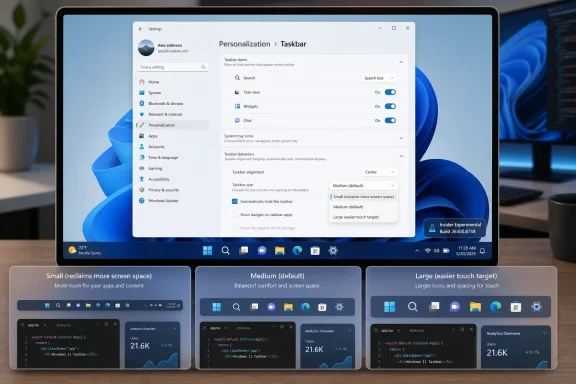
The new Insider setting changes that. Instead of relying on registry edits, third-party utilities, or unsupported hacks, testers can now go through Settings, open Personalization, enter Taskbar settings, expand Taskbar behaviors, and choose a taskbar size. The important part is not merely the dropdown. The important part is that Microsoft has turned a long-running complaint into a supported control surface.
That is a small UI change with a large symbolic payload. Windows users can forgive rough edges, but they tend not to forgive being told that customization they used for years was somehow unnecessary.
Microsoft’s defenders had a fair point: legacy shell code can become a museum of edge cases. Every old behavior has to interact with modern DPI scaling, touch targets, multi-monitor setups, accessibility settings, tablet modes, animation systems, and app compatibility quirks. A cleaner taskbar is easier to maintain, easier to test, and easier to explain.
But Windows is not iOS, and that distinction matters. The Windows desktop is used by gamers with ultrawide monitors, accountants with three spreadsheets open, developers with vertical displays, sysadmins living in remote sessions, accessibility users with carefully tuned layouts, and office workers who simply do not want the taskbar eating more screen than necessary. A single default can be elegant; a single enforced layout becomes paternalistic.
The unresizable taskbar became a shorthand for a broader Windows 11 anxiety. Users did not merely dislike its height. They disliked the feeling that the desktop was becoming less theirs.
That distinction matters. Microsoft is not just adding another checkbox; it is reshaping the feature into something ordinary users might actually find. A dedicated “Taskbar size” setting is far more legible than a buried option about button sizing, especially for people who do not live in Windows Insider release notes.
The reported choices are exactly what most users would expect: smaller, default, and larger-style sizing. That is not as granular as dragging the taskbar border in older Windows releases, but it is closer to the way modern settings panels work. Microsoft prefers constrained customization now: enough options to satisfy common needs, not enough to create an untestable matrix of weird configurations.
Power users may find that compromise unsatisfying. Still, the practical improvement is real. A smaller taskbar means more vertical room for apps, more breathing space on laptop displays, and less visual weight for users who want Windows to get out of the way.
That is especially true for shell features. The taskbar is not a standalone widget; it is tied to Explorer, Start, notifications, system tray behavior, search, widgets, Copilot entry points, jump lists, touch affordances, and multi-monitor presentation. A size change that looks simple in Settings can expose strange bugs in overflow handling, tray icon spacing, app badges, clock rendering, and accessibility scaling.
This is why the Insider period matters. Microsoft needs telemetry from normal chaos: mixed-DPI displays, corporate images, old graphics drivers, third-party shell extensions, pinned legacy apps, remote desktop sessions, and users who combine taskbar settings in ways no product manager would design on purpose.
The optimistic reading is that Microsoft is taking the complaint seriously enough to productize it. The cautious reading is that Windows 11 users outside the Insider program should wait before declaring victory. Both readings can be true.
This does not mean Windows 11 is turning back into Windows 10. The older taskbar was a product of a different design era, one that tolerated more visible seams and more inconsistent behavior. Windows 11’s shell still aims for visual consistency, animation polish, and a cleaner Settings-first model.
But the company seems to have learned that clean cannot mean inflexible. The Windows desktop’s strength has always been that it can become many different workspaces. The more Microsoft narrows that range, the more it pushes its most loyal users toward registry hacks, Explorer patchers, and third-party replacement shells.
That is bad for Microsoft too. Unsupported customization creates support headaches, breaks during cumulative updates, and makes users blame Windows when a shell modification misbehaves. A supported taskbar size setting is safer than a thousand forum posts recommending dubious tweaks.
Windows 11 arrived during a period when laptops were becoming the default PC for many users, even at desks. High-DPI screens made interface scaling more comfortable, but they did not magically create vertical space. A fixed taskbar height was therefore not just an aesthetic issue; it affected how much work could fit on screen.
That is why the smaller taskbar option has been so heavily requested. It lets users reclaim space without changing global display scaling, which can make every app smaller and sometimes worse. Taskbar sizing is a targeted adjustment, and targeted adjustments are usually the difference between customization and compromise.
For IT departments, this can also reduce friction in managed environments. If users can make a supported change through Settings, help desks get fewer requests for unsupported registry modifications. A small control in the UI can prevent a surprising amount of shadow tinkering.
But hacks come with a cost. They can break after feature updates, behave inconsistently across builds, conflict with security policies, or create mysterious shell crashes that are difficult to diagnose. Enthusiasts may accept that risk; ordinary users should not have to.
Microsoft sometimes appears to underestimate what those hacks represent. They are not merely evidence of stubborn nostalgia. They are market research written in PowerShell scripts and GitHub issues. When enough users risk unsupported modifications to restore a removed feature, the product team has received a signal.
The new setting is Microsoft finally absorbing that signal into the product. It is late, but late is better than leaving one of Windows 11’s most visible annoyances to the modding scene indefinitely.
Enterprise Windows deployments live or die by predictability. Admins care less about whether a feature is exciting than whether it is supportable, documentable, and controllable. If Microsoft exposes taskbar size through Settings, it should eventually be manageable through policy, provisioning, or at least predictable user-state behavior.
That is where the feature’s final implementation will matter. A consumer-friendly dropdown is only half the story. IT pros will want to know whether the setting roams, whether it can be locked down, whether it interacts cleanly with multi-user machines, and whether it survives in-place upgrades from older Windows 11 builds.
The larger lesson for Microsoft is that enterprise users are still users. A locked-down corporate PC is not improved by making basic ergonomics worse. The best Windows features are the ones that satisfy enthusiasts, reduce help-desk noise, and do not create new administrative burden.
That will frustrate some longtime users. The ability to make the taskbar smaller is not the same as full classic taskbar restoration. Users who want every Windows 10 behavior back — draggable resizing, full placement freedom, old context menus, legacy tray behavior, and every edge case preserved — may still be disappointed.
But Microsoft’s problem was never that it modernized the taskbar. The problem was that it modernized by subtraction, then moved too slowly to replace removed power with modern equivalents. A rebuilt shell can be justified; a less capable shell is harder to defend.
The taskbar size setting suggests a better model. Keep the modern surface, but restore the choices that shape real workflows. That is the path Windows 11 should have taken from the beginning.
That context matters. Users have watched Windows 11 gain Copilot surfaces, account prompts, recommendations, ads-by-another-name, and cloud nudges while long-requested desktop basics lingered. Against that backdrop, taskbar resizing feels refreshing because it is not a monetization surface. It is a user-requested ergonomic fix.
That may be why the reaction has been so positive. People are not celebrating a dropdown in isolation. They are celebrating Microsoft spending engineering time on something that makes the PC feel more personal rather than more promotional.
If Microsoft wants Windows enthusiasts back on its side, this is the kind of work that helps. Not because it is flashy, but because it respects the daily ritual of using a PC.
 Microsoft Finally Concedes That the Taskbar Is Not Decoration
The Windows taskbar has always been more than a strip of pixels at the bottom of the screen. It is the operating system’s cockpit: app launcher, window switcher, notification surface, system tray, clock, status board, and muscle-memory anchor. When Microsoft redesigned it for Windows 11, it treated that cockpit more like a design object than a work surface.That was the original sin. Centered icons, rounded corners, and simplified menus made Windows 11 feel cleaner on launch day in 2021, but they also made the desktop feel less negotiable. Users who had spent years tuning their machines suddenly found that a basic choice — how much vertical space the taskbar should occupy — had been removed.
The new Insider setting changes that. Instead of relying on registry edits, third-party utilities, or unsupported hacks, testers can now go through Settings, open Personalization, enter Taskbar settings, expand Taskbar behaviors, and choose a taskbar size. The important part is not merely the dropdown. The important part is that Microsoft has turned a long-running complaint into a supported control surface.
That is a small UI change with a large symbolic payload. Windows users can forgive rough edges, but they tend not to forgive being told that customization they used for years was somehow unnecessary.
Windows 11’s Original Taskbar Bet Was Too Neat for Real Desktops
The Windows 11 taskbar was rebuilt rather than carried forward wholesale from Windows 10. That decision gave Microsoft room to modernize, but it also meant familiar behaviors disappeared. Users lost the easy ability to resize the taskbar, move it to different screen edges, and rely on some of the older layout tricks that had made Windows feel unusually adaptable.Microsoft’s defenders had a fair point: legacy shell code can become a museum of edge cases. Every old behavior has to interact with modern DPI scaling, touch targets, multi-monitor setups, accessibility settings, tablet modes, animation systems, and app compatibility quirks. A cleaner taskbar is easier to maintain, easier to test, and easier to explain.
But Windows is not iOS, and that distinction matters. The Windows desktop is used by gamers with ultrawide monitors, accountants with three spreadsheets open, developers with vertical displays, sysadmins living in remote sessions, accessibility users with carefully tuned layouts, and office workers who simply do not want the taskbar eating more screen than necessary. A single default can be elegant; a single enforced layout becomes paternalistic.
The unresizable taskbar became a shorthand for a broader Windows 11 anxiety. Users did not merely dislike its height. They disliked the feeling that the desktop was becoming less theirs.
The New Setting Is a Repair Job, Not a Revolution
The new Taskbar Size setting appears in the Experimental channel, including build 26300.8758, and has also been discussed alongside Microsoft’s broader work to make Taskbar and Start more personal. Earlier Insider work had already exposed a “smaller taskbar buttons” option, and recent builds have been moving toward clearer, more discoverable settings rather than hidden switches.That distinction matters. Microsoft is not just adding another checkbox; it is reshaping the feature into something ordinary users might actually find. A dedicated “Taskbar size” setting is far more legible than a buried option about button sizing, especially for people who do not live in Windows Insider release notes.
The reported choices are exactly what most users would expect: smaller, default, and larger-style sizing. That is not as granular as dragging the taskbar border in older Windows releases, but it is closer to the way modern settings panels work. Microsoft prefers constrained customization now: enough options to satisfy common needs, not enough to create an untestable matrix of weird configurations.
Power users may find that compromise unsatisfying. Still, the practical improvement is real. A smaller taskbar means more vertical room for apps, more breathing space on laptop displays, and less visual weight for users who want Windows to get out of the way.
The Insider Channel Is Where Microsoft Tests Its Apologies
The feature’s current home in the Experimental channel is a reminder that this is not a promise you should plan a deployment around today. Windows Insider builds are where Microsoft floats ideas, changes labels, hides features behind staged rollouts, and sometimes removes experiments entirely. The company’s direction is clear, but the timing is not final until the feature arrives in a stable channel and survives servicing.That is especially true for shell features. The taskbar is not a standalone widget; it is tied to Explorer, Start, notifications, system tray behavior, search, widgets, Copilot entry points, jump lists, touch affordances, and multi-monitor presentation. A size change that looks simple in Settings can expose strange bugs in overflow handling, tray icon spacing, app badges, clock rendering, and accessibility scaling.
This is why the Insider period matters. Microsoft needs telemetry from normal chaos: mixed-DPI displays, corporate images, old graphics drivers, third-party shell extensions, pinned legacy apps, remote desktop sessions, and users who combine taskbar settings in ways no product manager would design on purpose.
The optimistic reading is that Microsoft is taking the complaint seriously enough to productize it. The cautious reading is that Windows 11 users outside the Insider program should wait before declaring victory. Both readings can be true.
The Real Story Is the Slow Return of Desktop Agency
Taskbar resizing is part of a larger course correction. Microsoft has also been testing more personalization around Start and taskbar behavior, including work on smaller taskbar buttons and renewed attention to placement options. The pattern is hard to miss: after years of defending a simplified Windows 11 shell, Microsoft is gradually giving back some of the controls it removed.This does not mean Windows 11 is turning back into Windows 10. The older taskbar was a product of a different design era, one that tolerated more visible seams and more inconsistent behavior. Windows 11’s shell still aims for visual consistency, animation polish, and a cleaner Settings-first model.
But the company seems to have learned that clean cannot mean inflexible. The Windows desktop’s strength has always been that it can become many different workspaces. The more Microsoft narrows that range, the more it pushes its most loyal users toward registry hacks, Explorer patchers, and third-party replacement shells.
That is bad for Microsoft too. Unsupported customization creates support headaches, breaks during cumulative updates, and makes users blame Windows when a shell modification misbehaves. A supported taskbar size setting is safer than a thousand forum posts recommending dubious tweaks.
Why This Matters More on Laptops Than Desktops
On a 32-inch monitor, taskbar size is mostly a preference. On a 13-inch or 14-inch laptop, it is a tax. Every additional row of interface chrome competes with browser tabs, code editors, chat windows, timelines, spreadsheets, and remote consoles.Windows 11 arrived during a period when laptops were becoming the default PC for many users, even at desks. High-DPI screens made interface scaling more comfortable, but they did not magically create vertical space. A fixed taskbar height was therefore not just an aesthetic issue; it affected how much work could fit on screen.
That is why the smaller taskbar option has been so heavily requested. It lets users reclaim space without changing global display scaling, which can make every app smaller and sometimes worse. Taskbar sizing is a targeted adjustment, and targeted adjustments are usually the difference between customization and compromise.
For IT departments, this can also reduce friction in managed environments. If users can make a supported change through Settings, help desks get fewer requests for unsupported registry modifications. A small control in the UI can prevent a surprising amount of shadow tinkering.
The Registry Hack Era Was Always a Symptom
One reason this feature resonates is that users have spent years trying to get it back by other means. Registry values, third-party tools, Explorer patches, and community utilities became the informal answer to the missing Windows 11 taskbar controls. That ecosystem was predictable because Windows users rarely accept “no” as the final answer.But hacks come with a cost. They can break after feature updates, behave inconsistently across builds, conflict with security policies, or create mysterious shell crashes that are difficult to diagnose. Enthusiasts may accept that risk; ordinary users should not have to.
Microsoft sometimes appears to underestimate what those hacks represent. They are not merely evidence of stubborn nostalgia. They are market research written in PowerShell scripts and GitHub issues. When enough users risk unsupported modifications to restore a removed feature, the product team has received a signal.
The new setting is Microsoft finally absorbing that signal into the product. It is late, but late is better than leaving one of Windows 11’s most visible annoyances to the modding scene indefinitely.
The Enterprise Angle Is Boring, Which Is Why It Matters
For businesses, taskbar resizing will not drive a migration plan by itself. No CIO is going to greenlight Windows 11 adoption because a smaller taskbar exists. But small quality-of-life changes can influence the background sentiment around an upgrade, and sentiment matters when a platform transition already asks users to relearn habits.Enterprise Windows deployments live or die by predictability. Admins care less about whether a feature is exciting than whether it is supportable, documentable, and controllable. If Microsoft exposes taskbar size through Settings, it should eventually be manageable through policy, provisioning, or at least predictable user-state behavior.
That is where the feature’s final implementation will matter. A consumer-friendly dropdown is only half the story. IT pros will want to know whether the setting roams, whether it can be locked down, whether it interacts cleanly with multi-user machines, and whether it survives in-place upgrades from older Windows 11 builds.
The larger lesson for Microsoft is that enterprise users are still users. A locked-down corporate PC is not improved by making basic ergonomics worse. The best Windows features are the ones that satisfy enthusiasts, reduce help-desk noise, and do not create new administrative burden.
Microsoft Is Still Walking a Narrow Design Line
There is a risk in reading too much into this. Microsoft has not suddenly become a maximalist customization company again. Windows 11 still reflects a design philosophy that prizes coherence, simplicity, and cloud-connected surfaces. The taskbar may become more flexible, but it is unlikely to return to the anything-goes personality of older releases.That will frustrate some longtime users. The ability to make the taskbar smaller is not the same as full classic taskbar restoration. Users who want every Windows 10 behavior back — draggable resizing, full placement freedom, old context menus, legacy tray behavior, and every edge case preserved — may still be disappointed.
But Microsoft’s problem was never that it modernized the taskbar. The problem was that it modernized by subtraction, then moved too slowly to replace removed power with modern equivalents. A rebuilt shell can be justified; a less capable shell is harder to defend.
The taskbar size setting suggests a better model. Keep the modern surface, but restore the choices that shape real workflows. That is the path Windows 11 should have taken from the beginning.
The Timing Is Not Accidental
This change arrives as Windows 11 is moving deeper into its post-launch maturity phase. The early years were about migration, hardware requirements, visual identity, and cleaning up rough edges. Now the operating system has to prove it can improve without simply accumulating more Microsoft services and AI entry points.That context matters. Users have watched Windows 11 gain Copilot surfaces, account prompts, recommendations, ads-by-another-name, and cloud nudges while long-requested desktop basics lingered. Against that backdrop, taskbar resizing feels refreshing because it is not a monetization surface. It is a user-requested ergonomic fix.
That may be why the reaction has been so positive. People are not celebrating a dropdown in isolation. They are celebrating Microsoft spending engineering time on something that makes the PC feel more personal rather than more promotional.
If Microsoft wants Windows enthusiasts back on its side, this is the kind of work that helps. Not because it is flashy, but because it respects the daily ritual of using a PC.
The Small Taskbar Carries a Large Message
The concrete facts are straightforward, but the implications are bigger than the setting itself. Windows 11’s taskbar controversy has always been about control, continuity, and whether Microsoft still understands the desktop as a tool rather than a canvas.- Microsoft added a dedicated Taskbar Size setting to Windows 11 Insider Experimental Preview Build 26300.8758, released on June 26, 2026.
- The setting gives testers a supported path to reduce the taskbar’s footprint instead of relying on registry edits or third-party shell tools.
- The feature is still in Insider testing, so mainstream Windows 11 users should not assume it will arrive unchanged or immediately.
- The move fits a broader Microsoft effort to make Taskbar and Start more personal after years of criticism over removed Windows 10-era behaviors.
- The biggest practical benefit is on smaller screens, where a fixed-height taskbar has a measurable impact on usable workspace.
- The remaining test for Microsoft is whether this becomes a stable, manageable, enterprise-safe setting rather than another Insider experiment that drifts.
References
- Primary source: tech-ish.com
Published: Fri, 03 Jul 2026 05:11:14 GMT
Loading…
tech-ish.com - Related coverage: windowscentral.com
Progress! Microsoft is finally giving Windows 11 users the taskbar they actually asked for | Windows Central
A new option in Windows 11 lets you resize the taskbar, not just make its icons smaller.www.windowscentral.com - Official source: blogs.windows.com
Announcing new builds for 26 June 2026, retail launch of new WIP improvements
Hello Windows Insiders, We have new releases today with builds across Beta and Experimental, and are excited to begin rolling out the new Windows Insider experience to retail Windows 11 builds this week! New Windows Insider Program changesblogs.windows.com - Official source: learn.microsoft.com
Loading…
learn.microsoft.com - Related coverage: pureinfotech.com
Loading…
pureinfotech.com - Related coverage: basic-tutorials.com
Windows 11: New Options for Taskbar Size in the Insider Program - Basic Tutorials
Windows 11 is getting a dedicated setting for taskbar size in the Insider Program. Here's what the new option does and who can test it now.basic-tutorials.com
- Related coverage: windowsforum.com
Loading…
windowsforum.com - Related coverage: pcgamer.com