

IGN’s Microsoft-sponsored buying guide argues that Copilot+ PCs can improve Windows 11 productivity by using dedicated neural processing hardware, known as an NPU, to run selected AI features locally for tasks such as summarizing text, translating content, assisting with screen actions, and improving security. The important part is not that Windows suddenly became intelligent, but that Microsoft is trying to make the PC itself the new boundary of AI computing. That is a bolder claim than “your laptop has a chatbot,” and it deserves more scrutiny than sponsored copy can provide. Copilot+ is both a hardware standard and a marketing campaign, and the tension between those two roles explains why the pitch feels convincing, incomplete, and strategically important all at once.
For most of the Windows era, Microsoft’s PC pitch was cyclical but familiar: faster processor, more memory, better screen, longer battery life, maybe a thinner chassis. Copilot+ changes the framing. The upgrade is no longer merely from an old laptop to a faster one, but from a conventional Windows machine to one that can run a class of AI workloads locally.
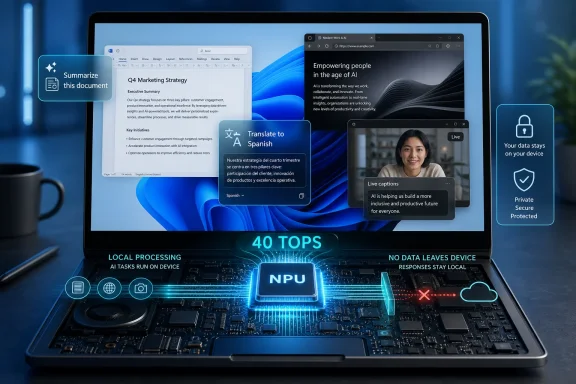
That is why the 40 TOPS requirement matters. Microsoft is using the neural processing unit as the dividing line between ordinary Windows 11 PCs and the machines that qualify for the Copilot+ label. In plain English, the company is telling buyers that future Windows experiences will not be measured only in CPU cores, GPU shaders, or SSD speeds, but in how much AI computation the device can perform without phoning home.
The IGN piece presents this as a straightforward productivity benefit: less waiting, fewer app hops, better battery life, and more secure local processing. Those are reasonable claims in the abstract. NPUs are designed for repeated machine-learning workloads that would be inefficient on a CPU and power-hungry on a GPU.
But the more interesting shift is commercial. Microsoft is not just adding features to Windows; it is defining a new class of Windows hardware. That gives PC makers a story to tell, gives retailers a sticker to put on boxes, and gives Microsoft a way to push the installed base toward machines that can support its AI roadmap.
The NPU is different. A dedicated AI accelerator changes what software can assume about the machine beneath it. If Windows can count on local AI silicon, Microsoft can design features around constant, low-power inference instead of treating AI as a cloud service bolted onto the side.
That is the technical logic behind features such as Live Captions with translation, Windows Studio Effects, Cocreator, Recall, Click to Do, and image enhancement tools. They are not all equally useful, and they are not all equally mature. But they share the same premise: the PC should be able to understand enough about what you are doing to help without sending every action to a remote server.
This is where the sponsored framing is strongest. The argument that local AI can be faster, more private, and more battery-efficient than cloud-only AI is not merely marketing fluff. A laptop that can perform certain inference tasks on-device may indeed feel more responsive, especially for frequent small actions such as extracting text, blurring a background, reframing a webcam shot, or suggesting a quick action.
The catch is that users do not buy NPUs. They buy outcomes. Microsoft still has to prove that the AI layer is useful often enough to become habit, not just impressive enough to sell a demo.
That sounds modest until you consider how much modern work is trapped in screenshots, PDFs, browser tabs, Teams messages, receipts, slide decks, and web apps that do not talk to each other cleanly. The dream of Click to Do is that Windows becomes an action layer across all of it. Copy this text, summarize that paragraph, remove that background, rewrite this passage, search for this object, translate that block — without first deciding which app should own the task.
This is Microsoft returning to an old Windows ambition with new machinery. The operating system has always wanted to be more than a launcher for programs. It wants to be the place where context lives.
The risk is that context-aware assistance can become another layer of interruptions. If the feature is too timid, nobody uses it. If it is too aggressive, it becomes Clippy with better silicon. The difference between productivity and nuisance will come down to restraint, speed, and whether the suggested actions are consistently better than the user’s existing muscle memory.
But local does not automatically mean harmless. A computer that can interpret more of your screen, documents, images, and activity is also a computer that creates new questions about storage, access, retention, and consent. Microsoft learned this the hard way with Recall, which became the defining controversy of the Copilot+ launch cycle.
Recall’s original promise was seductive: a searchable memory of what you had seen and done on your PC. Its original reception was brutal because that promise sounded, to many security professionals, like a constantly updated evidence locker sitting on the endpoint. Microsoft later reworked the feature with stronger security, clearer opt-in controls, and Windows Hello requirements, but the episode exposed the central contradiction of ambient AI.
To help you more, Windows needs to see more. To trust Windows more, users and administrators need stronger guarantees about what is seen, what is stored, what is excluded, and who can retrieve it.
That is why passkeys and biometric sign-in matter in this story, but they do not close the argument. They are part of a broader shift away from passwords and toward device-bound identity. Yet identity protection is not the same thing as data governance. A secure front door does not answer every question about what the house is recording.
That distinction matters because Microsoft is selling Copilot+ into two very different emotional climates. In consumer marketing, AI is convenience. In enterprise deployment, AI is risk, policy, support burden, procurement strategy, and occasionally litigation discovery.
For administrators, the value proposition is plausible. Local AI could reduce dependence on cloud calls, improve accessibility, make meetings and multilingual collaboration easier, and give users quick tools that do not require shadow IT browser extensions. A fleet of more efficient laptops with better battery life and modern security hardware is not a trivial win.
But enterprises standardize slowly for a reason. They will want management controls, auditability, clear documentation, and feature maturity. They will also want to know whether Copilot+ capabilities differ across Arm, Intel, and AMD systems, and whether a feature demonstrated on one device will behave identically on another.
That is the part of the Copilot+ story Microsoft still has to keep tightening. A brand is useful only if it reduces uncertainty. If buyers see Copilot+ as a shifting bundle of previews, phased rollouts, silicon-specific caveats, and regional limitations, the label risks becoming less like “Centrino” and more like a sticker that asks users to do homework.
That does not make it useless. Sponsored content often reveals how a company wants the market to think. Here, Microsoft’s preferred story is clear: Windows 11 already has Copilot, but Copilot+ PCs unlock the real AI experiences because they have the hardware to run them locally.
The missing middle is where most users actually live. Many people do not spend their day desperately wishing for AI summarization. They want fewer pop-ups, better battery life, reliable sleep and resume, predictable updates, quieter fans, and a laptop that does not turn into a toaster during video calls. If Copilot+ PCs deliver those old-fashioned improvements because they are built on newer silicon, the AI branding may get credit for benefits that come from the broader platform refresh.
That is not necessarily a problem for buyers. A good laptop is a good laptop, even if the marketing department picked the wrong hero feature. But it does complicate the claim that Copilot+ itself is the productivity breakthrough.
A user upgrading from a five-year-old Windows laptop to a modern Copilot+ machine may experience a dramatic improvement. The question is whether the improvement comes from AI features, from better chips, from more memory, from a cleaner Windows installation, or from all of the above. Microsoft benefits if those distinctions blur.
The AI layer gives Microsoft a new way to reassert the operating system. If Windows can summarize what is visible, translate what is spoken, search what was seen, and suggest actions across app boundaries, then the OS becomes useful in places where individual applications remain isolated. That is a powerful idea.
It also explains why Microsoft cares so much about on-device AI. A purely cloud-based assistant is not quite the same strategic asset. It can live in a browser tab, a sidebar, a mobile app, or a competing platform. A Windows feature that depends on local hardware, Windows security, Windows identity, and Windows UI integration is much harder to abstract away.
This is the part that should interest Windows enthusiasts even if they are skeptical of AI hype. Copilot+ is a bid to make the PC platform more differentiated. For years, the Windows laptop market competed on price, ports, screens, and processor generations. Microsoft is trying to add “native AI experiences” to that list.
Whether that becomes meaningful depends on execution. The PC has seen plenty of platform promises that never became daily habits. Touch on Windows laptops mattered for some users but did not transform the desktop. Voice assistants arrived with great confidence and then mostly retreated. Widgets, timelines, charms, live tiles, and taskbar experiments all carried some version of the same ambition: make the OS more aware, more glanceable, more helpful.
Copilot+ is the most technically credible version of that ambition in years. It is also not immune to the same failure mode: being clever in demos and forgettable in real work.
The software side is less tidy. Some features are broadly available on Windows 11. Some are exclusive to Copilot+ PCs. Some are in preview. Some depend on language, region, app support, or phased rollout timing. Some run locally, while others connect to Microsoft’s cloud services.
This is where Microsoft’s naming can work against it. “Copilot” is an app, a subscription concept, a button, a Microsoft 365 feature, a Windows integration, a developer tool, and a general AI brand. “Copilot+ PC” is something more specific, but the plus sign does a lot of work for a small character.
For a buyer standing in a store or reading a sponsored guide, that distinction may not be obvious. Windows 11 has Copilot. A Copilot+ PC has special AI experiences. Copilot Pro and Microsoft 365 Copilot are different things. Some features require sign-in. Some require compatible hardware. Some may arrive later.
Microsoft can solve this only by making the experiences themselves obvious. If users remember the feature names, the branding failed. If they simply expect a new Windows laptop to handle translation, image cleanup, screen actions, and local search elegantly, the branding did its job and can fade into the background.
AI help inside Photoshop is not the same as AI help from Windows layered over Photoshop. Spreadsheet analysis can mean anything from summarizing a table to building a model, detecting anomalies, explaining formulas, or generating a chart. Browser-tab overload is a workflow problem, a memory-management problem, an attention problem, and sometimes a personal problem.
Copilot+ PCs can assist at the edges of these tasks. They can run local models, accelerate effects, improve media handling, and expose quick actions. But the deepest productivity gains will come when application makers design for NPUs directly and when Windows provides stable APIs that developers actually target.
That is the real prize. If the NPU becomes a standard resource like the GPU, developers can build features that assume its presence. If it remains mostly a Microsoft showcase, the value proposition narrows.
For creative professionals, the question is especially practical. They already understand hardware acceleration. They know when a GPU matters, when RAM matters, when storage matters, and when a feature is just a menu item with a marketing budget. Copilot+ will have to earn its place in that hierarchy.
That is why Copilot Vision and Copilot Voice are more important than their branding suggests. If a user can ask what an error message means, have a dense passage explained, or navigate a confusing interface with spoken help, Windows becomes more forgiving. That is not just convenience; it is accessibility meeting support.
For IT departments, accessibility features also have a pragmatic appeal. They reduce friction across a diverse workforce without requiring every employee to become a power user. For home users, they can make the PC less intimidating.
This is one of the areas where local AI could matter most. Accessibility tools need to be fast, private, and available in the moment. Waiting for a round trip to the cloud can make assistance feel fragile. Having more of that capability on-device makes the computer feel less like a terminal and more like an instrument.
The challenge, again, is consistency. Users who rely on accessibility features need dependability more than novelty. A feature that works only in some apps, in some languages, or during some rollout phase is not yet infrastructure.
For Windows 10 holdouts, aging ultrabook owners, and businesses planning fleet refreshes, the calculation is different. Windows 10’s end-of-support pressure already pushed many organizations toward hardware decisions. If a company is buying new Windows 11 laptops anyway, choosing models that meet the Copilot+ bar may be a rational hedge.
That is the understated value of the category. Even skeptics of today’s AI features may not want to buy hardware that misses tomorrow’s baseline. A 40 TOPS NPU is not a guarantee that every future Windows feature will run beautifully, but it is a signal that the device belongs to Microsoft’s intended direction of travel.
This is how platform transitions often work. The first wave feels overmarketed. The second wave feels normal. By the third wave, developers and buyers begin assuming the capability exists.
The question is whether Copilot+ reaches that third wave before users grow tired of AI branding. Microsoft has an opportunity, but it also has a trust problem. It must show that these features make PCs calmer and more capable, not more intrusive.
A good Copilot+ PC should still be judged first as a PC. The keyboard, display, thermals, battery life, repairability, ports, performance, memory, storage, and price matter more than any AI badge. The NPU is an addition to that checklist, not a replacement for it.
Near-term buyers should keep a few grounded points in mind:
 Microsoft Is Selling a New Kind of Upgrade Cycle
For most of the Windows era, Microsoft’s PC pitch was cyclical but familiar: faster processor, more memory, better screen, longer battery life, maybe a thinner chassis. Copilot+ changes the framing. The upgrade is no longer merely from an old laptop to a faster one, but from a conventional Windows machine to one that can run a class of AI workloads locally.That is why the 40 TOPS requirement matters. Microsoft is using the neural processing unit as the dividing line between ordinary Windows 11 PCs and the machines that qualify for the Copilot+ label. In plain English, the company is telling buyers that future Windows experiences will not be measured only in CPU cores, GPU shaders, or SSD speeds, but in how much AI computation the device can perform without phoning home.
The IGN piece presents this as a straightforward productivity benefit: less waiting, fewer app hops, better battery life, and more secure local processing. Those are reasonable claims in the abstract. NPUs are designed for repeated machine-learning workloads that would be inefficient on a CPU and power-hungry on a GPU.
But the more interesting shift is commercial. Microsoft is not just adding features to Windows; it is defining a new class of Windows hardware. That gives PC makers a story to tell, gives retailers a sticker to put on boxes, and gives Microsoft a way to push the installed base toward machines that can support its AI roadmap.
The NPU Is the Real Product, Not the Copilot Key
The Copilot key was the easy thing to mock. It looked like a branding exercise stamped onto a keyboard, and in many ways it was. A key that launches an app is not a computing revolution.The NPU is different. A dedicated AI accelerator changes what software can assume about the machine beneath it. If Windows can count on local AI silicon, Microsoft can design features around constant, low-power inference instead of treating AI as a cloud service bolted onto the side.
That is the technical logic behind features such as Live Captions with translation, Windows Studio Effects, Cocreator, Recall, Click to Do, and image enhancement tools. They are not all equally useful, and they are not all equally mature. But they share the same premise: the PC should be able to understand enough about what you are doing to help without sending every action to a remote server.
This is where the sponsored framing is strongest. The argument that local AI can be faster, more private, and more battery-efficient than cloud-only AI is not merely marketing fluff. A laptop that can perform certain inference tasks on-device may indeed feel more responsive, especially for frequent small actions such as extracting text, blurring a background, reframing a webcam shot, or suggesting a quick action.
The catch is that users do not buy NPUs. They buy outcomes. Microsoft still has to prove that the AI layer is useful often enough to become habit, not just impressive enough to sell a demo.
Click to Do Is Microsoft’s Best Argument for Ambient AI
Among the features highlighted in the IGN article, Click to Do may be the most revealing. It is not a chatbot, and that is precisely why it matters. Instead of asking the user to formulate a prompt, Click to Do inspects what is on screen and offers actions tied to visible text and images.That sounds modest until you consider how much modern work is trapped in screenshots, PDFs, browser tabs, Teams messages, receipts, slide decks, and web apps that do not talk to each other cleanly. The dream of Click to Do is that Windows becomes an action layer across all of it. Copy this text, summarize that paragraph, remove that background, rewrite this passage, search for this object, translate that block — without first deciding which app should own the task.
This is Microsoft returning to an old Windows ambition with new machinery. The operating system has always wanted to be more than a launcher for programs. It wants to be the place where context lives.
The risk is that context-aware assistance can become another layer of interruptions. If the feature is too timid, nobody uses it. If it is too aggressive, it becomes Clippy with better silicon. The difference between productivity and nuisance will come down to restraint, speed, and whether the suggested actions are consistently better than the user’s existing muscle memory.
Local AI Makes the Privacy Argument Easier, Not Automatic
The IGN guide leans heavily on local processing as a privacy and security advantage. That is a fair starting point. If a task runs on the device, the user is not uploading the relevant content to a cloud AI system simply to get a summary, translation, or visual effect.But local does not automatically mean harmless. A computer that can interpret more of your screen, documents, images, and activity is also a computer that creates new questions about storage, access, retention, and consent. Microsoft learned this the hard way with Recall, which became the defining controversy of the Copilot+ launch cycle.
Recall’s original promise was seductive: a searchable memory of what you had seen and done on your PC. Its original reception was brutal because that promise sounded, to many security professionals, like a constantly updated evidence locker sitting on the endpoint. Microsoft later reworked the feature with stronger security, clearer opt-in controls, and Windows Hello requirements, but the episode exposed the central contradiction of ambient AI.
To help you more, Windows needs to see more. To trust Windows more, users and administrators need stronger guarantees about what is seen, what is stored, what is excluded, and who can retrieve it.
That is why passkeys and biometric sign-in matter in this story, but they do not close the argument. They are part of a broader shift away from passwords and toward device-bound identity. Yet identity protection is not the same thing as data governance. A secure front door does not answer every question about what the house is recording.
The Enterprise Buyer Will Read the Fine Print
Consumers may ask whether a Copilot+ PC will make daily work easier. IT departments will ask a harsher question: what new data surfaces does this create, and how do we control them?That distinction matters because Microsoft is selling Copilot+ into two very different emotional climates. In consumer marketing, AI is convenience. In enterprise deployment, AI is risk, policy, support burden, procurement strategy, and occasionally litigation discovery.
For administrators, the value proposition is plausible. Local AI could reduce dependence on cloud calls, improve accessibility, make meetings and multilingual collaboration easier, and give users quick tools that do not require shadow IT browser extensions. A fleet of more efficient laptops with better battery life and modern security hardware is not a trivial win.
But enterprises standardize slowly for a reason. They will want management controls, auditability, clear documentation, and feature maturity. They will also want to know whether Copilot+ capabilities differ across Arm, Intel, and AMD systems, and whether a feature demonstrated on one device will behave identically on another.
That is the part of the Copilot+ story Microsoft still has to keep tightening. A brand is useful only if it reduces uncertainty. If buyers see Copilot+ as a shifting bundle of previews, phased rollouts, silicon-specific caveats, and regional limitations, the label risks becoming less like “Centrino” and more like a sticker that asks users to do homework.
Sponsored Optimism Leaves Out the Messy Middle
The IGN article is openly labeled as a Microsoft partnership, and it reads accordingly. It is a buying guide, not a review. Its job is to make the upgrade feel obvious.That does not make it useless. Sponsored content often reveals how a company wants the market to think. Here, Microsoft’s preferred story is clear: Windows 11 already has Copilot, but Copilot+ PCs unlock the real AI experiences because they have the hardware to run them locally.
The missing middle is where most users actually live. Many people do not spend their day desperately wishing for AI summarization. They want fewer pop-ups, better battery life, reliable sleep and resume, predictable updates, quieter fans, and a laptop that does not turn into a toaster during video calls. If Copilot+ PCs deliver those old-fashioned improvements because they are built on newer silicon, the AI branding may get credit for benefits that come from the broader platform refresh.
That is not necessarily a problem for buyers. A good laptop is a good laptop, even if the marketing department picked the wrong hero feature. But it does complicate the claim that Copilot+ itself is the productivity breakthrough.
A user upgrading from a five-year-old Windows laptop to a modern Copilot+ machine may experience a dramatic improvement. The question is whether the improvement comes from AI features, from better chips, from more memory, from a cleaner Windows installation, or from all of the above. Microsoft benefits if those distinctions blur.
Windows Is Trying to Become the Workflow Layer Again
There is a larger strategic move underneath the feature list. Microsoft wants Windows to matter again as a daily productivity surface, not merely as the thing underneath Chrome, Slack, Steam, Adobe Creative Cloud, and a pile of web apps.The AI layer gives Microsoft a new way to reassert the operating system. If Windows can summarize what is visible, translate what is spoken, search what was seen, and suggest actions across app boundaries, then the OS becomes useful in places where individual applications remain isolated. That is a powerful idea.
It also explains why Microsoft cares so much about on-device AI. A purely cloud-based assistant is not quite the same strategic asset. It can live in a browser tab, a sidebar, a mobile app, or a competing platform. A Windows feature that depends on local hardware, Windows security, Windows identity, and Windows UI integration is much harder to abstract away.
This is the part that should interest Windows enthusiasts even if they are skeptical of AI hype. Copilot+ is a bid to make the PC platform more differentiated. For years, the Windows laptop market competed on price, ports, screens, and processor generations. Microsoft is trying to add “native AI experiences” to that list.
Whether that becomes meaningful depends on execution. The PC has seen plenty of platform promises that never became daily habits. Touch on Windows laptops mattered for some users but did not transform the desktop. Voice assistants arrived with great confidence and then mostly retreated. Widgets, timelines, charms, live tiles, and taskbar experiments all carried some version of the same ambition: make the OS more aware, more glanceable, more helpful.
Copilot+ is the most technically credible version of that ambition in years. It is also not immune to the same failure mode: being clever in demos and forgettable in real work.
The Hardware Standard Is Clearer Than the Software Promise
One reason the Copilot+ category has traction is that the hardware requirement is simple. A qualifying PC needs an NPU capable of at least 40 trillion operations per second, along with the broader modern Windows baseline. That is easy to communicate.The software side is less tidy. Some features are broadly available on Windows 11. Some are exclusive to Copilot+ PCs. Some are in preview. Some depend on language, region, app support, or phased rollout timing. Some run locally, while others connect to Microsoft’s cloud services.
This is where Microsoft’s naming can work against it. “Copilot” is an app, a subscription concept, a button, a Microsoft 365 feature, a Windows integration, a developer tool, and a general AI brand. “Copilot+ PC” is something more specific, but the plus sign does a lot of work for a small character.
For a buyer standing in a store or reading a sponsored guide, that distinction may not be obvious. Windows 11 has Copilot. A Copilot+ PC has special AI experiences. Copilot Pro and Microsoft 365 Copilot are different things. Some features require sign-in. Some require compatible hardware. Some may arrive later.
Microsoft can solve this only by making the experiences themselves obvious. If users remember the feature names, the branding failed. If they simply expect a new Windows laptop to handle translation, image cleanup, screen actions, and local search elegantly, the branding did its job and can fade into the background.
The Adobe and Spreadsheet Examples Show the Opportunity and the Trap
The IGN piece invokes familiar productivity pain points: too many browser tabs, creative editing in apps like Photoshop, and extracting insight from large spreadsheets. These are good examples because they map to real frustration. They are also dangerous examples because they imply a level of seamlessness that depends heavily on app integration.AI help inside Photoshop is not the same as AI help from Windows layered over Photoshop. Spreadsheet analysis can mean anything from summarizing a table to building a model, detecting anomalies, explaining formulas, or generating a chart. Browser-tab overload is a workflow problem, a memory-management problem, an attention problem, and sometimes a personal problem.
Copilot+ PCs can assist at the edges of these tasks. They can run local models, accelerate effects, improve media handling, and expose quick actions. But the deepest productivity gains will come when application makers design for NPUs directly and when Windows provides stable APIs that developers actually target.
That is the real prize. If the NPU becomes a standard resource like the GPU, developers can build features that assume its presence. If it remains mostly a Microsoft showcase, the value proposition narrows.
For creative professionals, the question is especially practical. They already understand hardware acceleration. They know when a GPU matters, when RAM matters, when storage matters, and when a feature is just a menu item with a marketing budget. Copilot+ will have to earn its place in that hierarchy.
Accessibility May Be the Strongest Non-Hype Use Case
The most durable AI features are often the least glamorous. Live captions, translation, voice control, screen description, noise suppression, eye contact correction, and text reading may not produce the flashiest launch demos, but they can materially change how people use a PC.That is why Copilot Vision and Copilot Voice are more important than their branding suggests. If a user can ask what an error message means, have a dense passage explained, or navigate a confusing interface with spoken help, Windows becomes more forgiving. That is not just convenience; it is accessibility meeting support.
For IT departments, accessibility features also have a pragmatic appeal. They reduce friction across a diverse workforce without requiring every employee to become a power user. For home users, they can make the PC less intimidating.
This is one of the areas where local AI could matter most. Accessibility tools need to be fast, private, and available in the moment. Waiting for a round trip to the cloud can make assistance feel fragile. Having more of that capability on-device makes the computer feel less like a terminal and more like an instrument.
The challenge, again, is consistency. Users who rely on accessibility features need dependability more than novelty. A feature that works only in some apps, in some languages, or during some rollout phase is not yet infrastructure.
The Upgrade Case Is Strongest for Old PCs, Not Last Year’s Flagships
For someone using a recent premium Windows laptop, the Copilot+ argument is still conditional. If the machine is fast, efficient, and well-supported, replacing it just to gain Microsoft’s newest AI layer may be hard to justify. The feature set is improving, but it is not yet the kind of universal productivity leap that makes a 2024 or 2025 flagship feel obsolete.For Windows 10 holdouts, aging ultrabook owners, and businesses planning fleet refreshes, the calculation is different. Windows 10’s end-of-support pressure already pushed many organizations toward hardware decisions. If a company is buying new Windows 11 laptops anyway, choosing models that meet the Copilot+ bar may be a rational hedge.
That is the understated value of the category. Even skeptics of today’s AI features may not want to buy hardware that misses tomorrow’s baseline. A 40 TOPS NPU is not a guarantee that every future Windows feature will run beautifully, but it is a signal that the device belongs to Microsoft’s intended direction of travel.
This is how platform transitions often work. The first wave feels overmarketed. The second wave feels normal. By the third wave, developers and buyers begin assuming the capability exists.
The question is whether Copilot+ reaches that third wave before users grow tired of AI branding. Microsoft has an opportunity, but it also has a trust problem. It must show that these features make PCs calmer and more capable, not more intrusive.
The Copilot+ Pitch Becomes Real Only When It Disappears Into Work
The practical reading of Microsoft’s pitch is narrower and more useful than the ad copy. Do not buy a Copilot+ PC because it will magically solve productivity. Consider one because the next several years of Windows development are clearly being aimed at machines with local AI acceleration.A good Copilot+ PC should still be judged first as a PC. The keyboard, display, thermals, battery life, repairability, ports, performance, memory, storage, and price matter more than any AI badge. The NPU is an addition to that checklist, not a replacement for it.
Near-term buyers should keep a few grounded points in mind:
- A Copilot+ PC is defined by dedicated local AI hardware, most notably an NPU capable of at least 40 TOPS.
- The most practical current features are likely to be small workflow accelerators, accessibility improvements, camera and audio effects, translation, image tools, and screen-aware actions.
- Local AI can improve privacy and responsiveness, but it still requires careful controls over what Windows observes, stores, and exposes.
- Business deployments should treat Copilot+ features as policy-managed capabilities, not consumer conveniences.
- Users upgrading from much older laptops may feel the biggest improvement from the whole hardware platform, not from AI alone.
- The category will become more compelling if third-party developers treat the NPU as a standard Windows resource rather than a Microsoft-only showcase.
References
- Primary source: IGN
Published: Fri, 03 Jul 2026 15:12:20 GMT
Should You Buy a Copilot+ PC? What to Know About the New Windows 11 Laptops
Unsure if you actually need a Copilot+ PC? Our Windows 11 buying guide breaks down the local NPU hardware, battery life gains, and features to help you decide if it’s worth the upgrade.www.ign.com - Official source: learn.microsoft.com
Copilot+ PCs developer guide | Microsoft Learn
Developer guide for Windows Copilot+ PCs.learn.microsoft.com - Official source: microsoft.com
Shop High-Performance Laptops, Computers, PCs, and Tablets | Microsoft Windows
Shop high-performance laptops, PCs, and tablets built for multitasking, advanced AI capabilities, powerful graphics, and all-day performance. Explore premium, high-spec Windows devices.www.microsoft.com - Related coverage: windowslatest.com
Microsoft is killing the Copilot+ PC advantage, brings Windows 11's local AI to RTX 30+ PCs with 6GB vRAM
Microsoft has quietly expanded Windows 11's local Language Model APIs to non-Copilot+ PCs with NVIDIA RTX 30-series GPUs and 6GB+ vRAM. www.windowslatest.com
- Official source: support.microsoft.com
Click to Do in Recall: do more with what’s on your screen | Microsoft Support
Click to Do in Recall: do more with what’s on your screensupport.microsoft.com - Official source: blogs.microsoft.com
Introducing Copilot+ PCs - The Official Microsoft Blog
An on-demand recording of our May 20 event is available. Today, at a special event on our new Microsoft campus, we introduced the world to a new category of Windows PCs designed for AI, Copilot+ PCs. Copilot+ PCs are the fastest, most intelligent Windows PCs ever built. With powerful new...blogs.microsoft.com
- Related coverage: windowscentral.com
Microsoft Copilot+ PC guide: What it is, features, how to access it, and PC requirements, and everything you need to know | Windows Central
Microsoft Copilot+ has been announced for upcoming AI PCs, but what exactly is it? Here's everything you need to know.www.windowscentral.com - Related coverage: tomshardware.com
Microsoft is reportedly testing Copilot+ AI features with discrete GPUs instead of NPUs — a feature available on Windows App SDK with a Windows Insider Experimental Channel build and Developer Mode turned on | Tom's Hardware
Is this the beginning of the end for Copilot+ PCs?www.tomshardware.com - Related coverage: techradar.com
Microsoft is again nagging Windows 10 users about upgrading to a Copilot+ PC – but this time with an Arm twist | TechRadar
Windows 11 AI PCs are a "transformative shift", and Microsoft is arguing the case for devices with Arm CPUswww.techradar.com - Official source: news.microsoft.com
- Official source: cdn-dynmedia-1.microsoft.com
!! SpecificProject Only -MSSurface_Logo_horizontal_C-CoPilot Gray_RGB
PDF documentcdn-dynmedia-1.microsoft.com