

The “12 Best CPUs for Servers (August 2026)” label is premature and, more importantly, misleading. A guide published on July 23, 2026 cannot reliably represent an August buying list, and a closer look at its recommendations reveals a deeper issue: most of the highlighted processors are long-discontinued enterprise chips being sold through the used and refurbished market rather than modern server CPUs available through normal channels.
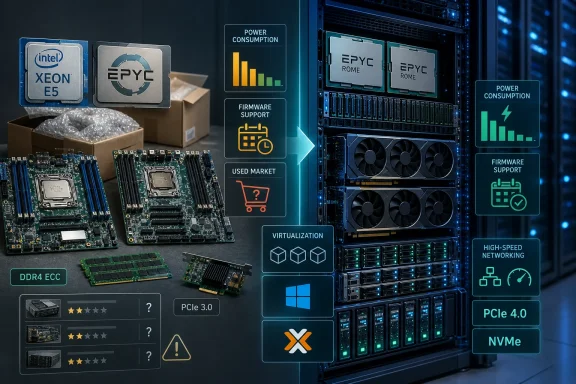
That does not make every processor in the list a bad purchase. Far from it. Older Intel Xeon E5 and AMD EPYC platforms can still provide outstanding homelab, storage, virtualization, and development-server value. But calling them the best CPUs for servers without clearly separating budget used-hardware recommendations from new-production server platforms risks steering buyers toward outdated sockets, uncertain supply chains, limited firmware support, and significantly higher power costs than expected.
For Windows Server users, Proxmox builders, VMware environments, and home lab enthusiasts, the right conclusion is more nuanced: these chips are potentially useful legacy-platform bargains, not universal server CPU champions.
The most striking problem is the list’s heavy reliance on processors launched years ago:
However, capability alone is not the same as being a smart purchase.
A credible best server CPU guide must evaluate more than benchmark scores and core counts. It must also consider:
A compact Windows Server file server needs something very different from a GPU-rich AI workstation. A Proxmox host with 20 lightweight Linux containers has different needs than a SQL Server deployment with strict latency requirements. A Plex server may be limited by video hardware acceleration and storage throughput rather than CPU core count.
Before choosing between Intel Xeon and AMD EPYC, buyers should identify the primary bottleneck.
For this reason, buying the highest-core-count used processor available is not automatically the economical choice. In many small business deployments, a lower-core CPU with stronger per-core performance and better power efficiency may provide a better outcome.
Yet this family requires much more caution than the ranking suggests.
But describing it as the best overall server CPU is too generous. It is a discontinued processor on an aging platform. It uses PCIe 3.0 rather than PCIe 4.0 or newer, it lacks modern accelerator features, and a dual-socket build can consume meaningful power even while lightly loaded.
The claim that the processor itself “sips just 44W at idle” is especially problematic. Idle consumption is a measurement for an entire system, not a processor in isolation. Motherboard design, DIMM count, power supply efficiency, storage, network adapters, BIOS configuration, and operating system power management can change idle draw dramatically.
Its weaknesses are equally important:
However, this CPU appears twice in the ranking: once as a renewed high-core-count choice and again as a supposedly premium “new” workstation pick. That is not a meaningful distinction between two processors. It is the same product, sold through different channels and potentially in different condition.
A “new” old-stock CPU may be preferable to a used one, but a listing’s rating does not establish processor quality, thermal behavior, or long-term reliability. Claims that a new E5-2699 v4 “runs cooler” than renewed versions are not a dependable CPU characteristic. Thermal behavior is shaped by cooler mounting, chassis airflow, thermal compound, firmware settings, power limits, and silicon variance.
The E5-2699 v4 is best treated as a specialist consolidation option for an existing LGA2011-3 platform. It is not a default recommendation for a new server build.
That combination can work well for:
The E5-2697 v2’s 12 cores are useful for VMs, while the E5-2690 v2’s 3.0GHz base clock helps in workloads that prefer stronger per-core speed. Both support ECC memory on appropriate boards and can offer reliable service in a well-maintained system.
But these are fundamentally legacy DDR3-era platform upgrades. They should not be positioned alongside modern server CPUs without a clear warning that buyers are accepting older instruction sets, lower I/O bandwidth, older firmware, less efficient power behavior, and potentially limited operating system support.
It can be an excellent fit for:
That advantage matters enormously for multi-NVMe storage servers, GPU systems, high-speed networking, and dense virtualization.
That makes the EPYC 7282 a good foundation for a GPU-capable homelab or data-heavy server, though 16 cores may be limiting when several GPUs require heavy data preparation, storage processing, or virtualized services.
Yet the ranking correctly raises one major warning: some marketplace listings may involve engineering samples, qualification samples, OEM pulls, or ambiguous provenance. This is not a minor footnote. It can determine whether a system boots, receives BIOS support, reports accurate telemetry, or remains stable under sustained load.
A production environment should use verified retail or properly documented OEM hardware with a known-compatible server motherboard. A lab builder may reasonably accept more risk, but only after confirming processor stepping, motherboard BIOS version, seller return policies, and cooling requirements.
Their strengths include:
But first-generation EPYC requires realistic expectations. Zen 1 has lower per-core performance and weaker power efficiency than Zen 2-based Rome processors. It can still excel in heavily parallel workloads, but it is not the best answer for latency-sensitive Windows workloads, lightly threaded services, or game hosting.
The original guide also treats marketplace review scores as though they validate the CPU. They do not. A seller rating may reflect packaging, shipping, or whether the correct part arrived. It cannot substitute for a proper reliability assessment.
For Windows Server and Linux administrators, checking whether corrected memory errors are logged and visible is just as important as seeing “ECC supported” on a specification sheet.
This is a strong choice for an existing LGA2011-3 setup. It delivers a practical balance of 14 cores, reasonable clocks, ECC DDR4 support, and used-market availability.
This remains useful when maximum virtual machine density matters more than efficiency, modern I/O, or per-core responsiveness. It is best for upgrading hardware already built around the platform.
The combination of 32 cores, PCIe 4.0 x128 connectivity, eight memory channels, and SP3 ecosystem flexibility makes this the most broadly capable option in the collection—provided the CPU and motherboard are legitimate, compatible, and properly supported.
This is a sensible entry point for builders who need the EPYC platform’s I/O advantages but do not need 32 cores.
For existing X99 workstation systems needing ECC support and high clocks, this processor remains useful. It is not a substitute for a true high-density server CPU.
A single-socket 24-core platform can still be excellent for containers, CI/CD jobs, test clusters, and virtual machines. Buyers should accept its older architecture and validate firmware compatibility before purchase.
But they should not be presented as the definitive best CPUs for servers in August 2026. The guide’s date is ahead of its publication, its rankings blur the line between obsolete enterprise processors and current server options, and several claims depend on individual systems or marketplace sellers rather than verified processor behavior.
The most defensible recommendation is straightforward: choose older Xeon E5 hardware when upgrading an existing low-cost platform, choose EPYC Rome when PCIe bandwidth, memory channels, and virtual machine density matter, and avoid unverified engineering samples or ambiguous refurbished listings for production systems. A server CPU is only as good as the motherboard, memory, storage, cooling, firmware, and support plan around it.
That does not make every processor in the list a bad purchase. Far from it. Older Intel Xeon E5 and AMD EPYC platforms can still provide outstanding homelab, storage, virtualization, and development-server value. But calling them the best CPUs for servers without clearly separating budget used-hardware recommendations from new-production server platforms risks steering buyers toward outdated sockets, uncertain supply chains, limited firmware support, and significantly higher power costs than expected.
For Windows Server users, Proxmox builders, VMware environments, and home lab enthusiasts, the right conclusion is more nuanced: these chips are potentially useful legacy-platform bargains, not universal server CPU champions.
 Overview: Why the Original Ranking Needs a Reality Check
The most striking problem is the list’s heavy reliance on processors launched years ago:- Intel Xeon E5 v2 chips belong to the Ivy Bridge-EP generation.
- Intel Xeon E5 v3 chips use Haswell-EP.
- Intel Xeon E5 v4 chips use Broadwell-EP.
- AMD EPYC 7001 “Naples” processors are first-generation EPYC parts.
- AMD EPYC 7002 “Rome” processors are considerably newer, but they are still established prior-generation server products rather than current mainstream platforms.
However, capability alone is not the same as being a smart purchase.
A credible best server CPU guide must evaluate more than benchmark scores and core counts. It must also consider:
- Platform age and firmware availability
- Security support and operating system requirements
- Idle and sustained power consumption
- Motherboard reliability and replacement availability
- Memory type, availability, and cost
- PCIe generation and usable lane topology
- Warranty coverage
- The difference between retail, used, renewed, OEM, qualification-sample, and engineering-sample hardware
- Whether a processor is suitable for a home lab, a small business, or a production environment
The Central Problem: “Best” Depends on the Server You Are Building
There is no single best server processor.A compact Windows Server file server needs something very different from a GPU-rich AI workstation. A Proxmox host with 20 lightweight Linux containers has different needs than a SQL Server deployment with strict latency requirements. A Plex server may be limited by video hardware acceleration and storage throughput rather than CPU core count.
Before choosing between Intel Xeon and AMD EPYC, buyers should identify the primary bottleneck.
For virtualization hosts
Virtualization benefits from:- High physical core counts
- Large memory capacity
- ECC memory support
- IOMMU support for device passthrough
- Sufficient PCIe lanes for networking and NVMe storage
- Efficient idle power behavior
For Windows Server workloads
Windows Server installations require a careful balance between core counts and licensing costs. More physical cores may improve VM density, but they can also raise licensing requirements depending on the edition and licensing model in use.For this reason, buying the highest-core-count used processor available is not automatically the economical choice. In many small business deployments, a lower-core CPU with stronger per-core performance and better power efficiency may provide a better outcome.
For storage and NAS servers
A ZFS, TrueNAS, or Windows Storage Spaces server should prioritize:- Memory capacity
- Reliable ECC support
- HBA compatibility
- Network connectivity
- PCIe expansion
- Low power draw during long idle periods
For game servers and latency-sensitive applications
Game servers, application servers, and lightly threaded databases often respond best to:- High boost clocks
- Strong instructions-per-clock performance
- Fast memory latency
- Modern CPU security and virtualization features
Intel Xeon E5: Still Valuable, but No Longer a Default Recommendation
The Intel Xeon E5 lineup dominates the original list. That is understandable from a used-market perspective: LGA2011 and LGA2011-3 systems are widely available, server DDR3 and DDR4 ECC memory can be inexpensive, and dual-socket boards offer dramatic core counts for relatively little upfront money.Yet this family requires much more caution than the ranking suggests.
Xeon E5-2690 v4: A sensible used-platform choice
The Intel Xeon E5-2690 v4 remains one of the more balanced Broadwell-EP options. It offers:- 14 cores and 28 threads
- A 2.6GHz base frequency
- Turbo frequencies up to 3.5GHz
- 35MB of cache
- Support for ECC DDR4 memory
- Up to 1.5TB of memory, depending on platform configuration
- 40 PCIe 3.0 lanes per processor
- Dual-socket capability
But describing it as the best overall server CPU is too generous. It is a discontinued processor on an aging platform. It uses PCIe 3.0 rather than PCIe 4.0 or newer, it lacks modern accelerator features, and a dual-socket build can consume meaningful power even while lightly loaded.
The claim that the processor itself “sips just 44W at idle” is especially problematic. Idle consumption is a measurement for an entire system, not a processor in isolation. Motherboard design, DIMM count, power supply efficiency, storage, network adapters, BIOS configuration, and operating system power management can change idle draw dramatically.
Xeon E5-2698 v3: Core-count value with meaningful compromises
The Xeon E5-2698 v3 provides 16 cores and 32 threads, making it attractive for builders chasing the greatest number of threads per dollar. Its Haswell-EP architecture is still capable in multithreaded workloads, and it can be a useful upgrade for compatible LGA2011-3 systems.Its weaknesses are equally important:
- It is older than the v4 generation.
- It uses DDR4 and PCIe 3.0, but without later platform improvements.
- Its efficiency is weak compared with newer server CPUs.
- Used-chip condition and seller quality matter greatly.
- Firmware support for older boards may be limited.
Xeon E5-2699 v4: Huge thread count, high operating cost
The Xeon E5-2699 v4 offers 22 cores and 44 threads, 55MB of cache, and a 145W thermal design power rating. It is undeniably powerful for its generation and remains attractive for virtual machine density, compilation workloads, rendering, and parallel services.However, this CPU appears twice in the ranking: once as a renewed high-core-count choice and again as a supposedly premium “new” workstation pick. That is not a meaningful distinction between two processors. It is the same product, sold through different channels and potentially in different condition.
A “new” old-stock CPU may be preferable to a used one, but a listing’s rating does not establish processor quality, thermal behavior, or long-term reliability. Claims that a new E5-2699 v4 “runs cooler” than renewed versions are not a dependable CPU characteristic. Thermal behavior is shaped by cooler mounting, chassis airflow, thermal compound, firmware settings, power limits, and silicon variance.
The E5-2699 v4 is best treated as a specialist consolidation option for an existing LGA2011-3 platform. It is not a default recommendation for a new server build.
Xeon E5-2680 v4: One of the better legacy Xeon compromises
The Xeon E5-2680 v4 is arguably a more practical used-market choice than the E5-2699 v4. It provides 14 cores and 28 threads, a 2.4GHz base clock, and a lower 120W TDP.That combination can work well for:
- Modest virtualization hosts
- Development labs
- File and application servers
- Game-hosting environments with multiple instances
- Windows Server test systems
Xeon E5-2697 v2 and E5-2690 v2: Upgrade parts, not fresh-build CPUs
The Xeon E5-2697 v2 and Xeon E5-2690 v2 remain useful for extending the life of compatible LGA2011 systems. They can be attractive upgrades for older Dell Precision workstations, Supermicro servers, and X79-based lab systems.The E5-2697 v2’s 12 cores are useful for VMs, while the E5-2690 v2’s 3.0GHz base clock helps in workloads that prefer stronger per-core speed. Both support ECC memory on appropriate boards and can offer reliable service in a well-maintained system.
But these are fundamentally legacy DDR3-era platform upgrades. They should not be positioned alongside modern server CPUs without a clear warning that buyers are accepting older instruction sets, lower I/O bandwidth, older firmware, less efficient power behavior, and potentially limited operating system support.
Xeon E5-1650 v4: A workstation chip with server-adjacent strengths
The Xeon E5-1650 v4 is the most different Intel option in the list. With six cores, a 3.6GHz base frequency, and a 4.0GHz turbo frequency, it targets workstation users who value responsive performance.It can be an excellent fit for:
- CAD workstations
- Engineering applications
- Light video editing
- Small databases
- Build servers
- Low-density virtualization
- Windows systems requiring ECC memory support
AMD EPYC: Better Platform Design, but Used-Market Risks Remain
The AMD EPYC processors in the ranking are more compelling from a platform perspective. EPYC systems generally provide more PCIe lanes, more memory channels, and more I/O flexibility than the older Xeon E5 ecosystem.That advantage matters enormously for multi-NVMe storage servers, GPU systems, high-speed networking, and dense virtualization.
EPYC 7282: A capable Rome platform entry point
The AMD EPYC 7282 is a 16-core, 32-thread Zen 2 processor built for the SP3 platform. It combines respectable clocks with the major advantages of second-generation EPYC:- Eight memory channels
- PCIe 4.0 connectivity
- Up to 128 PCIe lanes
- Strong virtualization capabilities
- Substantial memory bandwidth
- Single- and dual-socket platform support
That makes the EPYC 7282 a good foundation for a GPU-capable homelab or data-heavy server, though 16 cores may be limiting when several GPUs require heavy data preparation, storage processing, or virtualized services.
EPYC 7532: The strongest recommendation in the group
The AMD EPYC 7532 is arguably the most capable CPU in the original list when viewed as a practical server platform. It provides:- 32 cores and 64 threads
- Zen 2 architecture
- A 2.4GHz base frequency
- Boost frequencies up to 3.3GHz
- Eight DDR4 memory channels
- 128 PCIe 4.0 lanes
- SP3 socket compatibility
- Support for single- and dual-socket systems
Yet the ranking correctly raises one major warning: some marketplace listings may involve engineering samples, qualification samples, OEM pulls, or ambiguous provenance. This is not a minor footnote. It can determine whether a system boots, receives BIOS support, reports accurate telemetry, or remains stable under sustained load.
A production environment should use verified retail or properly documented OEM hardware with a known-compatible server motherboard. A lab builder may reasonably accept more risk, but only after confirming processor stepping, motherboard BIOS version, seller return policies, and cooling requirements.
EPYC 7551 and EPYC 7401P: Massive cores on a first-generation platform
The EPYC 7551 and EPYC 7401P remain attractive because they offer 32 cores and 24 cores, respectively, at prices that can be surprisingly low on the used market.Their strengths include:
- Eight memory channels
- 128 PCIe 3.0 lanes
- High core counts
- Strong virtualization density
- Large memory capacity
- SP3 platform compatibility
But first-generation EPYC requires realistic expectations. Zen 1 has lower per-core performance and weaker power efficiency than Zen 2-based Rome processors. It can still excel in heavily parallel workloads, but it is not the best answer for latency-sensitive Windows workloads, lightly threaded services, or game hosting.
The original guide also treats marketplace review scores as though they validate the CPU. They do not. A seller rating may reflect packaging, shipping, or whether the correct part arrived. It cannot substitute for a proper reliability assessment.
Claims That Need More Careful Treatment
Several statements in the ranking should be revised or removed because they overstate what can be inferred from the CPU model.“All Xeon and EPYC processors support ECC memory”
This is broadly true for the listed server processors, but CPU support alone is not enough. The motherboard, BIOS, memory type, and platform wiring must support ECC operation. A system may physically accept ECC DIMMs without exposing full correction and reporting behavior in the operating system.For Windows Server and Linux administrators, checking whether corrected memory errors are logged and visible is just as important as seeing “ECC supported” on a specification sheet.
“EPYC has no vendor lock motherboards”
That is too broad. Server-board compatibility depends on firmware, platform vendor policy, CPU stepping, OEM customization, and BIOS support. AMD EPYC generally offers a flexible ecosystem, but no buyer should assume a processor will work in any SP3 board without checking the board vendor’s CPU support list.“The CPU needs the correct V4 power connectors”
Processors do not have special generation-specific external power connectors. Motherboard power requirements, CPU EPS connectors, VRM design, and total system load determine the power-supply choice. A 145W CPU absolutely needs a capable board, cooler, and PSU, but the claim should be framed as platform power planning rather than a special connector requirement.“Windows 11 security update concerns”
This phrase is too vague to be useful. The Xeon E5 family is generally outside Microsoft’s mainstream Windows 11 supported-processor lists, but that does not mean a specific CPU has a unique “security update concern.” Operating system support, TPM availability, Secure Boot configuration, virtualization-based security performance, firmware updates, and organizational policy should all be assessed separately.A More Honest Way to Rank These Processors
Rather than presenting every chip as one of the best CPUs for servers, the list should separate them by scenario.Best low-cost legacy virtualization CPU
Intel Xeon E5-2690 v4This is a strong choice for an existing LGA2011-3 setup. It delivers a practical balance of 14 cores, reasonable clocks, ECC DDR4 support, and used-market availability.
Best high-thread-count legacy Xeon
Intel Xeon E5-2699 v4This remains useful when maximum virtual machine density matters more than efficiency, modern I/O, or per-core responsiveness. It is best for upgrading hardware already built around the platform.
Best used AMD platform for storage and expansion
AMD EPYC 7532The combination of 32 cores, PCIe 4.0 x128 connectivity, eight memory channels, and SP3 ecosystem flexibility makes this the most broadly capable option in the collection—provided the CPU and motherboard are legitimate, compatible, and properly supported.
Best lower-cost EPYC option for GPU and NVMe expansion
AMD EPYC 7282This is a sensible entry point for builders who need the EPYC platform’s I/O advantages but do not need 32 cores.
Best workstation-oriented option
Intel Xeon E5-1650 v4For existing X99 workstation systems needing ECC support and high clocks, this processor remains useful. It is not a substitute for a true high-density server CPU.
Best first-generation EPYC value for parallel lab workloads
AMD EPYC 7401PA single-socket 24-core platform can still be excellent for containers, CI/CD jobs, test clusters, and virtual machines. Buyers should accept its older architecture and validate firmware compatibility before purchase.
The Buying Checklist That Matters More Than a Top-12 List
A server CPU decision should start with the complete platform, not just the processor listing.- Define the workload.
Identify whether the server is primarily for virtual machines, databases, storage, containers, GPU workloads, rendering, streaming, or game hosting. - Set a power budget.
Estimate whole-system consumption, not CPU TDP alone. Include DIMMs, disks, NVMe drives, GPUs, NICs, fans, and PSU efficiency. - Choose the platform generation.
Decide whether a used legacy platform is acceptable or whether PCIe 4.0, newer firmware, and future expansion justify a newer system. - Validate motherboard and BIOS support.
Check the exact CPU model, stepping, memory type, BIOS revision, and socket support before buying. - Confirm memory requirements.
Calculate both capacity and channel population. A server with many cores but too little RAM will disappoint quickly. - Account for storage and networking.
PCIe lane availability matters most when using multiple NVMe drives, HBAs, GPUs, 10GbE or faster networking, and passthrough devices. - Treat used-market hardware as used-market hardware.
Verify return policies, inspect the processor upon arrival, run memory testing, execute sustained stress tests, and check management-controller logs.
Conclusion
The processors in this list are not worthless; several are excellent bargains for the right kind of server. The Intel Xeon E5-2690 v4, Xeon E5-2699 v4, AMD EPYC 7282, AMD EPYC 7532, and AMD EPYC 7401P can all deliver serious performance in a home lab, development environment, storage server, or virtualization host.But they should not be presented as the definitive best CPUs for servers in August 2026. The guide’s date is ahead of its publication, its rankings blur the line between obsolete enterprise processors and current server options, and several claims depend on individual systems or marketplace sellers rather than verified processor behavior.
The most defensible recommendation is straightforward: choose older Xeon E5 hardware when upgrading an existing low-cost platform, choose EPYC Rome when PCIe bandwidth, memory channels, and virtual machine density matter, and avoid unverified engineering samples or ambiguous refurbished listings for production systems. A server CPU is only as good as the motherboard, memory, storage, cooling, firmware, and support plan around it.