

Acer’s newest TravelMate refresh is built around a simple but compelling proposition for business buyers: a Windows 11 Copilot+ PC can be genuinely easy to carry without abandoning the security, ports, battery capacity, and manageability expected of an enterprise notebook. The Acer TravelMate P6 14 AI is the headline act, combining Intel Core Ultra Series 3 processors, Intel vPro support, and a premium carbon-fiber design that reaches 0.96 kg in its lightest display configuration.
That sub-1 kg figure deserves attention, but also context. It applies to the 14-inch 3K OLED model, while the 3K IPS model is listed at 0.98 kg and the WUXGA IPS version comes in at a substantially heavier 1.3 kg. Acer has created an unusually broad spread within one product family, which means the exact configuration matters far more than the marketing shorthand.
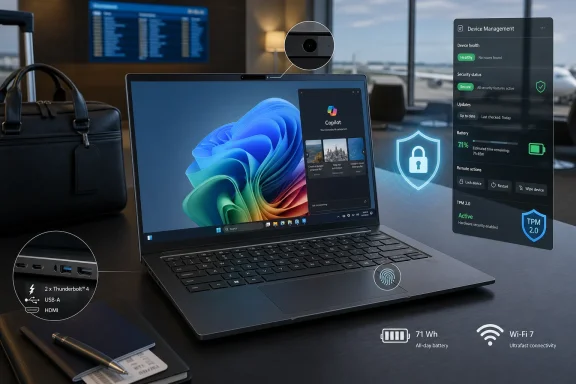
For mobile executives, consultants, frequent travelers, and IT departments trying to standardize a Windows 11 laptop fleet, the TravelMate P6 14 AI looks like a thoughtfully targeted product. It is not simply another thin laptop with an NPU badge; Acer is attempting to pair modern AI hardware with practical business features such as a 71 Wh battery, dual Thunderbolt 4 ports, a physical camera shutter, optional chassis-intrusion detection, and a full commercial security stack.
At the same time, the announcement raises familiar questions surrounding the new AI PC market. Platform-level TOPS figures do not automatically translate into better performance for every Windows workload. Long battery claims need to be separated from real-world office usage. And as with any ultra-light enterprise system, businesses will need to look beyond the spec sheet at repairability, warranty terms, regional SKUs, driver support, and long-term fleet management.
The refreshed TravelMate range includes four new business laptops designed to address different sizes of organizations and working styles:
This segmentation makes sense. Large organizations often need remote management, formal security controls, and predictable device standards. Smaller companies may instead prioritize a reasonable price, a full complement of ports, a durable chassis, and enough local AI acceleration for video calls and Windows features.
Acer’s challenge is that the commercial laptop market has become intensely competitive. Lenovo ThinkPad, HP EliteBook, Dell Pro, Microsoft Surface Laptop for Business, and a growing selection of AI-equipped systems from ASUS and others all pursue the same blend of mobility, security, and collaboration. The TravelMate P6 14 AI must therefore prove its value not only through its low starting weight, but through a stronger total package.
Its chassis is constructed from carbon fiber and magnesium-aluminum alloy, materials commonly used to keep premium business laptops rigid without adding unnecessary mass. At a stated 15.99 mm thick, the notebook is slim enough for regular travel while still accommodating a 71 Wh battery and a relatively generous array of connectivity.
The contrast is striking. Buyers who choose the practical 1920 x 1200 WUXGA panel will receive a laptop that is still portable, but it no longer competes in the same weight class as the OLED and 3K IPS variants.
That distinction should directly affect purchasing decisions. A company equipping employees who travel several days each week may find that a 0.96 kg system meaningfully reduces bag weight. An organization that primarily works from offices, homes, and conference rooms may instead prioritize cost, runtime, and display practicality over saving a few hundred grams.
It is also notable that the lighter options are not low-resolution compromises. The OLED panel is a 2880 x 1800 touchscreen with 500 nits of brightness, 100% DCI-P3 coverage, HDR True Black certification, and variable refresh rate support. The 3K IPS panel offers the same resolution at 400 nits, while the WUXGA panel remains a sensible 16:10 productivity display.
That may sound cosmetic, but input comfort matters on an ultraportable business laptop. Employees who spend full days creating reports, writing emails, editing presentations, or working through spreadsheets care far more about keyboard feel, palm-rest texture, touchpad responsiveness, and flex resistance than about an abstract chassis material description.
The keyboard uses 1.55 mm travel, which is encouraging for a machine under 16 mm thick. Acer also claims durability testing that includes up to 25,000 hinge cycles and millions of keyboard presses. Those figures do not replace long-term field evidence, but they indicate that Acer is at least designing the P6 around sustained corporate use rather than short-lived consumer appeal.
The potential downside is longevity. Soft-touch finishes can feel excellent out of the box yet become worn, shiny, or difficult to clean over time. IT managers should pay close attention to fleet feedback once these systems have spent months in backpacks, airport lounges, shared offices, and field environments.
Acer highlights up to 150 TOPS of platform AI performance. That is a platform measurement, meaning it can reflect combined AI-capable resources across the CPU, GPU, and NPU rather than the NPU alone.
A 150 TOPS platform number does not mean that every AI task will use all available compute engines. It also does not guarantee that a local model, an AI-enhanced application, or a Windows feature will run faster than on another system with a different hardware balance.
Actual results depend on several factors:
Acer identifies several Windows capabilities, including:
The hardware may be ready, but governance determines whether the AI features become useful tools or another set of disabled icons in the Start menu.
The company quotes up to 30 hours of video playback for the WUXGA IPS configuration. The official figures also list up to 15.5 hours in MobileMark 30 and up to 23 hours of web browsing for that same WUXGA SKU. Touch-panel systems are rated lower, including up to 13 hours in MobileMark 30 and up to 23.5 hours of video playback.
Real working conditions can be much tougher:
Still, a 71 Wh battery paired with a modern Intel mobile platform suggests that the P6 has the potential to be a true all-day laptop. Acer also claims fast charging to 50% in 30 minutes or 80% in one hour with its 100W USB Power Delivery adapter. That is a practical benefit for travelers who need a short airport or conference-room recharge.
The P6 14 AI includes:
HDMI 2.1 reduces dependence on dongles in meeting rooms, while USB Type-A still matters in corporate environments where older accessories, wireless receivers, security keys, and presentation remotes remain common.
However, no laptop can create Wi-Fi 7 benefits on its own. Users will need compatible access points, properly designed networks, suitable broadband capacity, and current drivers. In many offices and homes, the immediate experience may be closer to a well-tuned Wi-Fi 6E implementation than a dramatic generational leap.
The positive takeaway is not that Wi-Fi 7 guarantees faster work today. It is that the TravelMate P6 14 AI should remain better aligned with modern enterprise networks over a longer replacement cycle.
For organizations with distributed staff, this matters. A device that cannot boot correctly, has an operating system problem, or needs diagnostics may be easier for IT teams to assess and recover remotely when the platform supports the appropriate management capabilities.
That said, vPro is not automatic magic. Its benefits require:
The optional chassis intrusion sensor is more specialized. It may be valuable for organizations handling sensitive data or deploying devices in semi-public environments, but it is unlikely to be a deciding feature for every small business. Its effectiveness also depends on how alerts are integrated into the company’s broader security response process.
The company’s custom meeting tools include Acer Display Lens, which can magnify on-screen content up to four times, QR-code recognition, and slow-motion review of meeting highlights. These features are unusual, and their usefulness will depend on the job.
For example, a technician, instructor, healthcare administrator, field consultant, or product manager may find it useful to enlarge a diagram, document, or tiny on-screen detail during a remote presentation. QR recognition could speed up certain workflows involving device setup, event access, documentation, or inventory systems.
For many office workers, though, these tools may be extras rather than essentials. Better camera quality, clear microphone pickup, reliable background-noise suppression, and a quick physical privacy shutter are likely to have a much greater day-to-day impact.
The notebook also includes a particularly useful dual-camera arrangement:
The P2 Spin 14 offers Wi-Fi 7, Bluetooth 6.0, a discrete TPM, optional chassis intrusion protection, an RJ-45 port, and up to 65 Wh of battery capacity. At 1.46 kg, it is not an ultralight system, but it balances convertible utility with commercial features.
At 1.5 kg, it remains portable enough for commuting and occasional travel. Its 65 Wh battery is rated for up to 17.5 hours of video playback, while the port selection includes two USB-C ports, two USB-A ports, HDMI 2.1, and RJ-45 Ethernet.
Unlike the P6 and P2 Spin, the X2 15 uses Wi-Fi 6E rather than Wi-Fi 7. That is not necessarily a deal-breaker for cost-conscious organizations, but it reinforces the product’s role as a durable, conventional business system rather than a premium future-facing flagship.
For many small businesses, that may be enough. The X2 14 offers an approachable blend of portability, a discrete TPM, optional fingerprint reader configurations, camera shutter, Ethernet, durable construction, and Intel Core Series 3 processors.
It also avoids the potential cost premium associated with OLED, vPro, ultra-light carbon fiber, and high-end AI branding. A business that needs dozens or hundreds of standardized Windows laptops may find that balance more compelling than the flagship’s luxury positioning.
Key items to verify include:
Its biggest strength is not the 150 TOPS headline, although that platform performance could be valuable for supported workloads. The stronger story is that Acer has built a high-end business system around the practical realities of hybrid work: video calls, travel, docking, privacy, authentication, remote management, and the need to get through a demanding day without carrying a heavy charger.
There are caveats. The under-1 kg designation applies only to specific 3K display models, while the WUXGA option weighs 1.3 kg. The 30-hour battery claim reflects video playback, not a representative day of browser-heavy, meeting-heavy office work. And the long-term value of Acer Comfort Touch, new AI tools, and local AI performance will only become clear after wider deployment.
Even so, the broader TravelMate refresh is well judged. The P6 14 AI gives premium enterprise buyers an ambitious ultralight Copilot+ PC, the P2 Spin 14 serves users who need pen input and convertible flexibility, and the X2 models offer more conventional choices for SMB fleets. Acer is not trying to make one business laptop fit every worker; it is offering a more coherent set of options for organizations balancing performance, budget, management, and mobility.
That sub-1 kg figure deserves attention, but also context. It applies to the 14-inch 3K OLED model, while the 3K IPS model is listed at 0.98 kg and the WUXGA IPS version comes in at a substantially heavier 1.3 kg. Acer has created an unusually broad spread within one product family, which means the exact configuration matters far more than the marketing shorthand.
For mobile executives, consultants, frequent travelers, and IT departments trying to standardize a Windows 11 laptop fleet, the TravelMate P6 14 AI looks like a thoughtfully targeted product. It is not simply another thin laptop with an NPU badge; Acer is attempting to pair modern AI hardware with practical business features such as a 71 Wh battery, dual Thunderbolt 4 ports, a physical camera shutter, optional chassis-intrusion detection, and a full commercial security stack.
At the same time, the announcement raises familiar questions surrounding the new AI PC market. Platform-level TOPS figures do not automatically translate into better performance for every Windows workload. Long battery claims need to be separated from real-world office usage. And as with any ultra-light enterprise system, businesses will need to look beyond the spec sheet at repairability, warranty terms, regional SKUs, driver support, and long-term fleet management.
 Overview: Acer Expands the TravelMate AI PC Strategy
The refreshed TravelMate range includes four new business laptops designed to address different sizes of organizations and working styles:- TravelMate P6 14 AI — Acer’s premium, ultra-light Copilot+ PC for enterprise users.
- TravelMate P2 Spin 14 — A 14-inch convertible with a touchscreen, 360-degree hinge, and garaged stylus.
- TravelMate X2 15 — A traditional 15.6-inch clamshell aimed at spreadsheet-heavy and small-business work.
- TravelMate X2 14 — A lighter 14-inch clamshell designed for mobile SMB users.
This segmentation makes sense. Large organizations often need remote management, formal security controls, and predictable device standards. Smaller companies may instead prioritize a reasonable price, a full complement of ports, a durable chassis, and enough local AI acceleration for video calls and Windows features.
Acer’s challenge is that the commercial laptop market has become intensely competitive. Lenovo ThinkPad, HP EliteBook, Dell Pro, Microsoft Surface Laptop for Business, and a growing selection of AI-equipped systems from ASUS and others all pursue the same blend of mobility, security, and collaboration. The TravelMate P6 14 AI must therefore prove its value not only through its low starting weight, but through a stronger total package.
The TravelMate P6 14 AI: Ultralight Without Looking Under-Specified
The TravelMate P6 14 AI is the model with the broadest ambitions. Acer describes it as a premium commercial notebook for organizations that need portability alongside enterprise-grade protection and Windows 11 Copilot+ PC capabilities.Its chassis is constructed from carbon fiber and magnesium-aluminum alloy, materials commonly used to keep premium business laptops rigid without adding unnecessary mass. At a stated 15.99 mm thick, the notebook is slim enough for regular travel while still accommodating a 71 Wh battery and a relatively generous array of connectivity.
The sub-1 kg claim is real — but configuration-dependent
Acer’s weight breakdown is unusually important here:| Display configuration | Listed weight |
|---|---|
| 14-inch 3K OLED WQXGA+ touchscreen | 0.96 kg |
| 14-inch 3K WQXGA+ IPS display | 0.98 kg |
| 14-inch WUXGA IPS display | 1.3 kg |
That distinction should directly affect purchasing decisions. A company equipping employees who travel several days each week may find that a 0.96 kg system meaningfully reduces bag weight. An organization that primarily works from offices, homes, and conference rooms may instead prioritize cost, runtime, and display practicality over saving a few hundred grams.
It is also notable that the lighter options are not low-resolution compromises. The OLED panel is a 2880 x 1800 touchscreen with 500 nits of brightness, 100% DCI-P3 coverage, HDR True Black certification, and variable refresh rate support. The 3K IPS panel offers the same resolution at 400 nits, while the WUXGA panel remains a sensible 16:10 productivity display.
Comfort Touch focuses on the part users actually interact with
Acer’s most distinctive design addition is Comfort Touch, a surface treatment applied to both the chassis and keyboard. It is positioned as a more tactile, soft-touch experience intended to make extended typing feel less fatiguing and more premium.That may sound cosmetic, but input comfort matters on an ultraportable business laptop. Employees who spend full days creating reports, writing emails, editing presentations, or working through spreadsheets care far more about keyboard feel, palm-rest texture, touchpad responsiveness, and flex resistance than about an abstract chassis material description.
The keyboard uses 1.55 mm travel, which is encouraging for a machine under 16 mm thick. Acer also claims durability testing that includes up to 25,000 hinge cycles and millions of keyboard presses. Those figures do not replace long-term field evidence, but they indicate that Acer is at least designing the P6 around sustained corporate use rather than short-lived consumer appeal.
The potential downside is longevity. Soft-touch finishes can feel excellent out of the box yet become worn, shiny, or difficult to clean over time. IT managers should pay close attention to fleet feedback once these systems have spent months in backpacks, airport lounges, shared offices, and field environments.
Intel Core Ultra Series 3 and the Meaning of 150 TOPS
The TravelMate P6 14 AI is available with several Intel Core Ultra Series 3 processors, ranging from Core Ultra 5 options through Core Ultra 7 and Core Ultra X7 configurations. Higher-end models can also include Intel Arc B390 graphics.Acer highlights up to 150 TOPS of platform AI performance. That is a platform measurement, meaning it can reflect combined AI-capable resources across the CPU, GPU, and NPU rather than the NPU alone.
Platform TOPS are not a universal benchmark
TOPS, or trillions of operations per second, has become a standard AI PC marketing measure. It provides a rough indication of theoretical compute capacity for certain AI operations, but it is not a direct equivalent to CPU speed, graphics performance, or everyday productivity.A 150 TOPS platform number does not mean that every AI task will use all available compute engines. It also does not guarantee that a local model, an AI-enhanced application, or a Windows feature will run faster than on another system with a different hardware balance.
Actual results depend on several factors:
- Whether the application supports the NPU, GPU, CPU, or a mix of all three.
- The AI framework used by the software.
- Model size, precision, memory requirements, and storage performance.
- Power profile, thermal conditions, and battery state.
- Whether the task is handled locally or sent to a cloud service.
Copilot+ PC features matter more than the label
As a Windows 11 Copilot+ PC, the TravelMate P6 14 AI is intended to support Microsoft’s newer AI-focused Windows experiences, subject to feature availability, language support, software updates, and organizational policy.Acer identifies several Windows capabilities, including:
- Improved natural-language file search.
- Click to Do contextual actions.
- AI-assisted Settings controls.
- Windows Studio Effects and related video-call enhancements.
- A Copilot key for faster access to supported Microsoft experiences.
The hardware may be ready, but governance determines whether the AI features become useful tools or another set of disabled icons in the Start menu.
Battery Life: Impressive Claims, Necessary Caveats
Acer equips the TravelMate P6 14 AI with a 71 Wh, four-cell lithium-ion battery. For a 14-inch system that can weigh below one kilogram, that is a major engineering point in the laptop’s favor.The company quotes up to 30 hours of video playback for the WUXGA IPS configuration. The official figures also list up to 15.5 hours in MobileMark 30 and up to 23 hours of web browsing for that same WUXGA SKU. Touch-panel systems are rated lower, including up to 13 hours in MobileMark 30 and up to 23.5 hours of video playback.
Video playback is not an office day
The 30-hour number is legitimate as a quoted test result, but it should not be interpreted as an all-purpose workday estimate. Local video playback is among the least representative battery tests for many business users because it can involve predictable, low-intensity decoding with modest networking activity.Real working conditions can be much tougher:
- Multiple browser tabs and web applications.
- Microsoft Teams or Zoom calls with camera processing.
- External displays through Thunderbolt or HDMI.
- VPN connectivity and endpoint protection software.
- Cloud-sync activity.
- High display brightness.
- AI-powered video and audio effects.
- Compiling, data analysis, local development, or media work.
Still, a 71 Wh battery paired with a modern Intel mobile platform suggests that the P6 has the potential to be a true all-day laptop. Acer also claims fast charging to 50% in 30 minutes or 80% in one hour with its 100W USB Power Delivery adapter. That is a practical benefit for travelers who need a short airport or conference-room recharge.
Ports and Wireless: A Business-Friendly Mix
Many ultra-light laptops achieve their compact footprint by sacrificing ports. Acer has avoided the most aggressive version of that trade-off.The P6 14 AI includes:
- Two Thunderbolt 4 ports
- Two USB Type-A ports
- HDMI 2.1
- microSD card reader
- 3.5 mm headset jack
- Wi-Fi 7
- Bluetooth 6.0
HDMI 2.1 reduces dependence on dongles in meeting rooms, while USB Type-A still matters in corporate environments where older accessories, wireless receivers, security keys, and presentation remotes remain common.
Wi-Fi 7 is valuable, but deployment still matters
Wi-Fi 7 is a forward-looking inclusion, especially for organizations refreshing network hardware and employee devices together. It can offer higher throughput, lower latency, and improved operation in congested environments.However, no laptop can create Wi-Fi 7 benefits on its own. Users will need compatible access points, properly designed networks, suitable broadband capacity, and current drivers. In many offices and homes, the immediate experience may be closer to a well-tuned Wi-Fi 6E implementation than a dramatic generational leap.
The positive takeaway is not that Wi-Fi 7 guarantees faster work today. It is that the TravelMate P6 14 AI should remain better aligned with modern enterprise networks over a longer replacement cycle.
Security and Manageability Are the Real Enterprise Story
The TravelMate P6 14 AI’s enterprise identity rests less on its AI score than on its layered security approach. The notebook combines Windows security features, Intel vPro capabilities, a discrete TPM solution, firmware protections, biometric login options, and physical privacy measures.Intel vPro remains a meaningful differentiator
Intel vPro is designed around manageability, stability, and hardware-assisted security for commercial fleets. On compatible TravelMate P6 configurations, it can support remote administration and recovery scenarios that are difficult or impossible to handle using a standard consumer laptop.For organizations with distributed staff, this matters. A device that cannot boot correctly, has an operating system problem, or needs diagnostics may be easier for IT teams to assess and recover remotely when the platform supports the appropriate management capabilities.
That said, vPro is not automatic magic. Its benefits require:
- An eligible processor and supporting system configuration.
- Compatible network hardware and firmware.
- Appropriate IT tools.
- Correct provisioning.
- Staff who know how to use the management features.
Physical protections still deserve a place
Acer also includes or offers:- A physical camera shutter.
- A fingerprint reader integrated with the power button.
- A discrete TPM.
- Acer ProShield Plus encryption tools.
- Kensington lock support.
- Optional chassis-intrusion alerts.
- An IR camera for Windows Hello authentication.
The optional chassis intrusion sensor is more specialized. It may be valuable for organizations handling sensitive data or deploying devices in semi-public environments, but it is unlikely to be a deciding feature for every small business. Its effectiveness also depends on how alerts are integrated into the company’s broader security response process.
A 5 MP IR Camera and AI Tools for Hybrid Work
Acer has invested heavily in collaboration features, equipping the P6 14 AI with a 5 MP IR camera, a three-microphone array, AI noise reduction, and quad speakers with DTS Virtual:X support.The company’s custom meeting tools include Acer Display Lens, which can magnify on-screen content up to four times, QR-code recognition, and slow-motion review of meeting highlights. These features are unusual, and their usefulness will depend on the job.
For example, a technician, instructor, healthcare administrator, field consultant, or product manager may find it useful to enlarge a diagram, document, or tiny on-screen detail during a remote presentation. QR recognition could speed up certain workflows involving device setup, event access, documentation, or inventory systems.
For many office workers, though, these tools may be extras rather than essentials. Better camera quality, clear microphone pickup, reliable background-noise suppression, and a quick physical privacy shutter are likely to have a much greater day-to-day impact.
The Other New TravelMate Models
The P6 14 AI is the premium product, but Acer’s broader refresh is more interesting because it gives organizations multiple entry points into the current Intel business laptop platform.TravelMate P2 Spin 14: The flexible option
The TravelMate P2 Spin 14 is a 14-inch convertible built around Intel Core Series 3 processors. Its 360-degree hinge, WUXGA 16:10 touchscreen, and garaged Wacom AES 2.0 stylus make it the most versatile model in the range.The notebook also includes a particularly useful dual-camera arrangement:
- A user-facing 5 MP IR or Full HD camera.
- A 5 MP world-facing camera.
The P2 Spin 14 offers Wi-Fi 7, Bluetooth 6.0, a discrete TPM, optional chassis intrusion protection, an RJ-45 port, and up to 65 Wh of battery capacity. At 1.46 kg, it is not an ultralight system, but it balances convertible utility with commercial features.
TravelMate X2 15: The spreadsheet-friendly workhorse
The TravelMate X2 15 targets more conventional office workloads. It combines a 15.6-inch Full HD IPS display with a dedicated numeric keypad, making it a natural fit for finance, operations, accounting, procurement, and data-entry roles.At 1.5 kg, it remains portable enough for commuting and occasional travel. Its 65 Wh battery is rated for up to 17.5 hours of video playback, while the port selection includes two USB-C ports, two USB-A ports, HDMI 2.1, and RJ-45 Ethernet.
Unlike the P6 and P2 Spin, the X2 15 uses Wi-Fi 6E rather than Wi-Fi 7. That is not necessarily a deal-breaker for cost-conscious organizations, but it reinforces the product’s role as a durable, conventional business system rather than a premium future-facing flagship.
TravelMate X2 14: The practical SMB choice
The TravelMate X2 14 may be the sleeper hit of the lineup. It uses a 14-inch WUXGA 16:10 IPS display, weighs around 1.4 kg, includes a 53 Wh battery, and carries a similar core set of ports and security features to the larger X2 15.For many small businesses, that may be enough. The X2 14 offers an approachable blend of portability, a discrete TPM, optional fingerprint reader configurations, camera shutter, Ethernet, durable construction, and Intel Core Series 3 processors.
It also avoids the potential cost premium associated with OLED, vPro, ultra-light carbon fiber, and high-end AI branding. A business that needs dozens or hundreds of standardized Windows laptops may find that balance more compelling than the flagship’s luxury positioning.
What Buyers Should Verify Before Ordering
Acer’s TravelMate P6 14 AI is promising, but commercial laptop purchases should never rely solely on top-line claims. Organizations considering these systems should confirm the exact model number and regional configuration.Key items to verify include:
- Processor: Not every Core Ultra Series 3 SKU necessarily carries identical graphics, vPro, or AI capabilities.
- Display: The choice affects resolution, touch support, color gamut, brightness, battery life, and weight.
- Memory: The P6 supports up to 64 GB of onboard LPDDR5X memory, making the factory specification especially important.
- Storage: Confirm capacity, serviceability, and whether additional storage options are available.
- Operating system: Models can ship with Windows 11 Pro or Windows 11 Home, with major implications for business management.
- Security features: Fingerprint reader, chassis intrusion detection, and vPro support may vary by SKU.
- Support program: Warranty duration, accidental-damage coverage, on-site service, and parts availability are central to total cost.
- Dock compatibility: Validate Thunderbolt behavior with existing displays, docks, and peripherals.
- Sustainability certifications: TCO and EPEAT status can differ by market and configuration.
The Bottom Line
The Acer TravelMate P6 14 AI succeeds as a concept because it treats mobility, security, connectivity, and battery capacity as equally important. At its lightest, it is genuinely remarkable for a 14-inch commercial Windows laptop with a 71 Wh battery, dual Thunderbolt 4, HDMI, USB-A, Wi-Fi 7, a 5 MP IR camera, and Intel vPro availability.Its biggest strength is not the 150 TOPS headline, although that platform performance could be valuable for supported workloads. The stronger story is that Acer has built a high-end business system around the practical realities of hybrid work: video calls, travel, docking, privacy, authentication, remote management, and the need to get through a demanding day without carrying a heavy charger.
There are caveats. The under-1 kg designation applies only to specific 3K display models, while the WUXGA option weighs 1.3 kg. The 30-hour battery claim reflects video playback, not a representative day of browser-heavy, meeting-heavy office work. And the long-term value of Acer Comfort Touch, new AI tools, and local AI performance will only become clear after wider deployment.
Even so, the broader TravelMate refresh is well judged. The P6 14 AI gives premium enterprise buyers an ambitious ultralight Copilot+ PC, the P2 Spin 14 serves users who need pen input and convertible flexibility, and the X2 models offer more conventional choices for SMB fleets. Acer is not trying to make one business laptop fit every worker; it is offering a more coherent set of options for organizations balancing performance, budget, management, and mobility.
References
- Primary source: Absolute Geeks
Published: 2026-07-23T08:25:30+00:00
Loading…
www.absolutegeeks.com - Related coverage: news.acer.com
Loading…
news.acer.com - Related coverage: acer.com
Loading…
www.acer.com - Related coverage: amd.com
Loading…
www.amd.com - Related coverage: techradar.com
Loading…
www.techradar.com