A newly disclosed vulnerability affecting Johnson Controls C•CURE 9000 and victor application servers should be treated as an urgent security priority for organizations that rely on these platforms for enterprise access control, video management, and physical-security operations. Identified as CVE-2026-21655, the issue could allow an unauthenticated attacker on an adjacent network to achieve arbitrary code execution against a vulnerable application server and potentially compromise connected operator workstations.
The most important remediation is straightforward: organizations should upgrade to C•CURE 9000 / victor version 3.20 or later. That release addresses the affected deserialization path associated with the flaw. However, patching alone should not be the entire response. Because the vulnerable service listens on TCP port 8999, and because a successful attack may lead to code execution under the application server’s security context, security teams should pair the vendor update with rapid network isolation, host hardening, logging, and incident-review measures.
For Windows administrators, this is more than a conventional line-of-business software patch. C•CURE 9000 and victor often sit close to the operational heart of a facility: they can be integrated with badge readers, door controllers, alarms, cameras, video systems, monitoring stations, and security operator workflows. A compromise could therefore become both an IT security event and a physical-security continuity problem.
The vulnerability concerns a vulnerable deserialization path in the application-server software used by C•CURE 9000 and victor deployments. In broad terms, deserialization occurs when an application converts received data into objects it can process. If an application accepts untrusted serialized data and does not strictly constrain the types or content that may be created, an attacker may be able to manipulate the process into executing unauthorized code.
In this case, the reported risk is severe because exploitation may not require valid credentials. An attacker who can reach the affected service from an adjacent network could potentially send a malicious request to the exposed application component and execute arbitrary code on the server.
The advisory also notes risk to connected clients, including the Windows workstations used by physical-security personnel. That does not necessarily mean every connected client will automatically be compromised during every attack. It does mean that the application server should be regarded as a high-value pivot point: an intruder who gains control of it may be positioned to tamper with services, interact with trusted client connections, steal operational data, or pursue additional access across the environment.
Potential paths to an adjacent network may include:
That integration delivers legitimate operational value. Security teams can associate a door event with camera footage, investigate alarms through a central console, and give staff a more complete picture of an incident. Yet the same integration means a compromise of the central application server can have unusually broad consequences.
A C•CURE 9000 or victor server may have access to local services, databases, network shares, integration credentials, service accounts, and communication paths to other security platforms. If the application process runs with excessive local or domain privileges, an attacker’s effective reach after exploitation can expand dramatically.
This is why least privilege is not an optional hardening recommendation. The practical damage from a remote code execution flaw depends heavily on what the compromised process is permitted to do.
The immediate objective is to establish three facts:
A careful review should examine:
That typically means:
An organization that relies only on segmentation and does not update remains exposed to mistakes, future network changes, compromised internal hosts, and malicious activity originating from within a trusted segment. Network controls reduce reachability; the software update removes the identified vulnerable path.
A practical upgrade process should include:
Validation should include the actual application version shown in the management interface or installed-program inventory, as well as review of relevant Windows services and server logs. For clustered, redundant, or distributed deployments, each component should be checked individually.
A compromised process running under a restricted service identity is still a serious incident. A compromised process running as a local administrator, domain administrator, or excessively privileged service account is much more likely to become an enterprise-wide compromise.
Windows environments can use application-control approaches that permit only approved executables, libraries, scripts, and installers. The specific implementation must fit the organization’s Windows estate and operational requirements, but the core policy goal is universal:
Review and remove or restrict:
A physical-security application server should have a relatively predictable operating profile. Its parent-child process relationships, service restarts, logon activity, network connections, and file-write patterns should be well understood. Sudden deviation from that baseline deserves attention.
Network detection should be used carefully. Signature-based controls can identify known payload characteristics, but attackers may alter traffic patterns or use techniques that evade simplistic detection. IDS and IPS are strongest when used as one component of a layered strategy that also includes the vendor update, strict port restrictions, endpoint protection, application control, and logging.
Security teams should tune alerts to avoid drowning analysts in benign internal traffic. Any detection strategy should include a tested escalation path that identifies who owns the application, who can isolate the affected server, and how physical-security operations will continue during the investigation.
The security objective is not to keep every service online at any cost. It is to balance containment with safe facility operations. That balance should be defined before an incident, not improvised when a server is already under investigation.
That makes secure design essential. A vulnerable service should not be reachable from broad internal networks. A specialized application server should not run with unnecessary administrative authority. A compromise should not be able to move easily from a security platform to operator workstations or the wider Windows domain.
Upgrading to C•CURE 9000 / victor version 3.20 or later is the priority action because it removes the known vulnerable deserialization path. Pairing that update with segmentation, port 8999 restrictions, application control, least privilege, and strong monitoring is what turns a one-time patch into a resilient security posture.
For organizations operating C•CURE 9000 or victor, the appropriate response is urgent but methodical: patch the servers, reduce exposure, validate the Windows security baseline, and treat the physical-security environment as the mission-critical IT system it has become.
The most important remediation is straightforward: organizations should upgrade to C•CURE 9000 / victor version 3.20 or later. That release addresses the affected deserialization path associated with the flaw. However, patching alone should not be the entire response. Because the vulnerable service listens on TCP port 8999, and because a successful attack may lead to code execution under the application server’s security context, security teams should pair the vendor update with rapid network isolation, host hardening, logging, and incident-review measures.
For Windows administrators, this is more than a conventional line-of-business software patch. C•CURE 9000 and victor often sit close to the operational heart of a facility: they can be integrated with badge readers, door controllers, alarms, cameras, video systems, monitoring stations, and security operator workflows. A compromise could therefore become both an IT security event and a physical-security continuity problem.
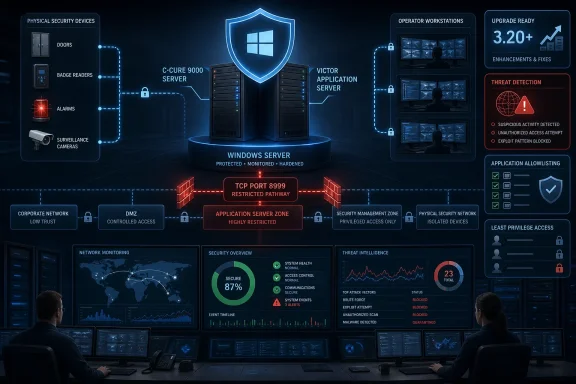 Overview of CVE-2026-21655
The vulnerability concerns a vulnerable deserialization path in the application-server software used by C•CURE 9000 and victor deployments. In broad terms, deserialization occurs when an application converts received data into objects it can process. If an application accepts untrusted serialized data and does not strictly constrain the types or content that may be created, an attacker may be able to manipulate the process into executing unauthorized code.In this case, the reported risk is severe because exploitation may not require valid credentials. An attacker who can reach the affected service from an adjacent network could potentially send a malicious request to the exposed application component and execute arbitrary code on the server.
The advisory also notes risk to connected clients, including the Windows workstations used by physical-security personnel. That does not necessarily mean every connected client will automatically be compromised during every attack. It does mean that the application server should be regarded as a high-value pivot point: an intruder who gains control of it may be positioned to tamper with services, interact with trusted client connections, steal operational data, or pursue additional access across the environment.
Why “Adjacent Network” Still Matters
The phrase adjacent network can sound less alarming than “remote attacker over the internet,” but it should not create a false sense of safety. In many enterprise environments, a threat actor does not need direct public exposure to reach a sensitive service.Potential paths to an adjacent network may include:
- A compromised employee workstation
- A breached vendor remote-access connection
- An improperly segmented building-automation VLAN
- A wireless network with overly broad routing permissions
- A misconfigured firewall rule between corporate IT and operational technology
- Malware that has moved laterally through shared Windows infrastructure
- A virtual private network account with more network access than its role requires
Why C•CURE 9000 and victor Servers Deserve Immediate Attention
C•CURE 9000 is widely used for access-control management, while victor is associated with video-management and integrated physical-security workflows. In unified deployments, access events, video, alarms, identity data, operator activity, and device status can be brought together in a Windows-based environment.That integration delivers legitimate operational value. Security teams can associate a door event with camera footage, investigate alarms through a central console, and give staff a more complete picture of an incident. Yet the same integration means a compromise of the central application server can have unusually broad consequences.
The Potential Operational Impact
A successful compromise could create risks across several areas:- Physical access operations: An attacker may gain an opportunity to interfere with the systems used to monitor or administer access-control activity.
- Video surveillance workflows: Operators could lose confidence in the availability or integrity of video-management functions.
- Security workstations: Connected Windows clients may face elevated risk if the server is used as a trusted platform for lateral movement or malicious software delivery.
- Sensitive information: Physical-security systems can contain personnel identities, cardholder details, site maps, access schedules, camera inventories, event histories, and operational procedures.
- Business continuity: Security operations may need to switch to manual processes while servers are isolated, rebuilt, or validated.
- Incident response complexity: Investigators must determine not only whether the application server was exploited, but also whether connected systems, domain accounts, databases, backups, or controller-management paths were affected.
Windows Environments Face a Familiar Pattern
The vulnerability reinforces a recurring Windows enterprise security lesson: a specialized application may run on a standard Windows server, but its business function can make it far more sensitive than a typical departmental service.A C•CURE 9000 or victor server may have access to local services, databases, network shares, integration credentials, service accounts, and communication paths to other security platforms. If the application process runs with excessive local or domain privileges, an attacker’s effective reach after exploitation can expand dramatically.
This is why least privilege is not an optional hardening recommendation. The practical damage from a remote code execution flaw depends heavily on what the compromised process is permitted to do.
The Vulnerable Service and Port 8999 Exposure
Administrators should identify which systems listen on TCP port 8999 and determine whether those listeners are part of a C•CURE 9000 or victor application-server deployment. This should be done through approved asset-management, endpoint-management, firewall-management, and Windows administration processes.The immediate objective is to establish three facts:
- Which servers run the affected application components
- Which systems are able to connect to port 8999
- Whether the server version is earlier than 3.20
Validate the Actual Exposure, Not Just the Firewall Intent
Security teams frequently assume a sensitive service is isolated because a network design document says it should be isolated. Production reality can differ. Firewall rules accumulate, temporary troubleshooting exceptions are forgotten, and legacy integrations can remain active long after their owners have changed roles.A careful review should examine:
- Network firewall and host firewall rules
- VLAN and routing relationships
- Remote-access gateways and jump servers
- Site-to-site VPN paths
- Virtual-machine network adapters and virtual switches
- Network access-control policies
- Vendor support connections
- Legacy monitoring and backup infrastructure
- Systems with dual network interfaces
- Workstation and server exceptions created for integrations
Restrict the Port to Explicitly Authorized Systems
The recommended approach is an allow-list model. Port 8999 should be reachable only from the precise systems that require it for normal business operations.That typically means:
- Dedicated security operator workstations
- Approved satellite or application-server roles
- Documented integration servers
- Required administrative jump hosts, where applicable
- Monitoring systems with a validated business need
- Network firewall or access-control list
- Windows Defender Firewall with Advanced Security
- Segmentation gateway between IT and security networks
- Endpoint network controls
- Remote-access policy boundaries
Patch First: Upgrade to Version 3.20 or Later
The vendor’s primary remediation is to upgrade to C•CURE 9000 / victor version 3.20 or later. This is the correct starting point because the update addresses the vulnerable deserialization path itself.An organization that relies only on segmentation and does not update remains exposed to mistakes, future network changes, compromised internal hosts, and malicious activity originating from within a trusted segment. Network controls reduce reachability; the software update removes the identified vulnerable path.
Treat the Upgrade as a Controlled Operational Change
Physical-security systems are often required around the clock, so patching needs coordination. That does not justify indefinite delay. It means the update should be planned as an urgent but disciplined change with explicit operational ownership.A practical upgrade process should include:
- Identify affected servers and components. Confirm C•CURE 9000 and victor application-server roles, versions, installed services, connected clients, integrations, and dependencies.
- Review vendor compatibility requirements. Validate supported operating systems, databases, client versions, drivers, integrations, licensing dependencies, and high-availability or failover components.
- Create verified backups. Protect relevant application data, databases, configuration files, certificates, system-state information, and virtual-machine snapshots where those are part of approved recovery procedures.
- Establish a maintenance window. Coordinate with physical-security operations, facilities, IT infrastructure, help desk teams, and any third-party integrators.
- Apply the vendor-supported update. Upgrade the application platform to version 3.20 or a later supported release.
- Validate service health. Confirm that application services start correctly, clients reconnect, event processing works, access-control monitoring remains available, and video integrations behave as expected.
- Retest network restrictions. Verify that required systems can connect and unapproved systems cannot.
- Document the completed state. Record installed versions, update timestamps, change tickets, rollback information, exceptions, and post-change validation results.
Do Not Confuse “Installed” With “Remediated”
A software upgrade should be followed by verification. In an enterprise Windows environment, an update can fail silently, leave a service on an old binary, be applied to a standby server but not the active server, or expose a version mismatch between application-server and client components.Validation should include the actual application version shown in the management interface or installed-program inventory, as well as review of relevant Windows services and server logs. For clustered, redundant, or distributed deployments, each component should be checked individually.
Hardening the Windows Application Server
The advisory’s mitigation guidance aligns with strong Windows server-security practices. These measures will not replace the vendor update, but they can materially reduce the blast radius of a successful intrusion.Enforce Least Privilege
The relevant application-server process should run with the minimum privileges necessary. This recommendation should be evaluated at several layers:- Windows service account permissions
- Local Administrators group membership
- Domain privileges and delegated rights
- Access to file shares and backup repositories
- Database permissions
- Rights to launch child processes
- Rights to install drivers, services, or scheduled tasks
- Access to security-system integration credentials
A compromised process running under a restricted service identity is still a serious incident. A compromised process running as a local administrator, domain administrator, or excessively privileged service account is much more likely to become an enterprise-wide compromise.
Use Application Control, Not Just Traditional Antivirus
The advisory recommends application whitelisting to prevent unauthorized executables from being launched by the server process. This is a valuable safeguard because arbitrary code execution frequently turns into malicious process execution, script execution, or the loading of unapproved tools.Windows environments can use application-control approaches that permit only approved executables, libraries, scripts, and installers. The specific implementation must fit the organization’s Windows estate and operational requirements, but the core policy goal is universal:
A well-designed application-control policy can make post-exploitation activity more difficult by blocking unsanctioned payloads, scripting engines, and attacker tooling. It may also generate useful telemetry when blocked execution attempts occur.The physical-security application server should run only the software required for its defined role.
Reduce Unnecessary Server Roles
C•CURE 9000 and victor application servers should not double as general-purpose file servers, web-browsing endpoints, remote desktop hubs, development boxes, or utility servers. Every additional role broadens the attack surface and complicates incident response.Review and remove or restrict:
- Unused Windows services
- Legacy remote-management tools
- Unnecessary browser access
- Local mail clients
- Consumer cloud-storage software
- Unapproved remote-control tools
- Unused database tools
- Development frameworks and compilers
- Broad administrative shares
- Outdated third-party utilities
ClientConnectionManager_NF.SynchronousServerNotification. If this interface is not required for the deployment’s operational design, it should be disabled or restricted to reduce exposure. Organizations should confirm dependency requirements before making that change, especially in environments with custom integrations or distributed client architectures.Detection: What Security Teams Should Monitor
The vendor’s mitigation guidance specifically calls for monitoring anomalous process creation bySoftwareHouse.CrossFire.Server.exe. This is a highly actionable detection point.A physical-security application server should have a relatively predictable operating profile. Its parent-child process relationships, service restarts, logon activity, network connections, and file-write patterns should be well understood. Sudden deviation from that baseline deserves attention.
High-Value Windows Telemetry
Security teams should prioritize centralized collection and review of:- Windows Security event logs
- Process-creation telemetry
- Service installation and service-change events
- Scheduled-task creation or modification
- PowerShell operational logging, where PowerShell is permitted
- Windows Defender or endpoint-detection alerts
- Firewall connection events
- Application-specific logs
- SQL Server audit logs where applicable
- Authentication and privileged-group change events
- Remote Desktop and remote-management activity
- File integrity monitoring for critical directories
Suspicious Behaviors Worth Investigating
The following are examples of behaviors that should prompt investigation on a C•CURE 9000 or victor application server:SoftwareHouse.CrossFire.Server.exelaunching unexpected child processes- New command shells, scripting hosts, or installer processes
- Unusual outbound connections from the server
- Connections to port 8999 from systems outside the approved allow list
- Unexpected service-account interactive logons
- Sudden changes to local administrator membership
- New scheduled tasks, startup items, or Windows services
- Modifications to application binaries or configuration files
- Large archive creation, unusual data staging, or rapid file copying
- Unexplained event-log clearing
- Repeated application crashes or service restarts near suspicious network activity
- Authentication attempts against unrelated systems using the application service account
IDS and IPS Can Add a Useful Layer
The advisory recommends intrusion detection and prevention signatures tuned to identify known .NET deserialization exploit patterns, including patterns associated with tools such asysoserial.net, targeting port 8999.Network detection should be used carefully. Signature-based controls can identify known payload characteristics, but attackers may alter traffic patterns or use techniques that evade simplistic detection. IDS and IPS are strongest when used as one component of a layered strategy that also includes the vendor update, strict port restrictions, endpoint protection, application control, and logging.
Security teams should tune alerts to avoid drowning analysts in benign internal traffic. Any detection strategy should include a tested escalation path that identifies who owns the application, who can isolate the affected server, and how physical-security operations will continue during the investigation.
Incident Response Considerations
Organizations that discover a vulnerable, exposed, or potentially compromised system should not assume that standard Windows cleanup alone will be sufficient. A physical-security application server can have specialized databases, integrations, proprietary services, controller relationships, and operational dependencies that require coordinated remediation.If Exploitation Is Suspected
A measured response should generally include:- Containment. Restrict network access to the server, especially port 8999, while preserving necessary operational communication where safely possible.
- Evidence preservation. Capture volatile data, relevant logs, process information, endpoint telemetry, firewall records, and application diagnostics before destructive remediation steps occur.
- Scope assessment. Determine whether the server was running an affected version, whether unauthorized systems reached port 8999, and whether suspicious process execution or account use occurred.
- Credential review. Rotate passwords, secrets, certificates, service-account credentials, and integration credentials that may have been accessible from the compromised host.
- Host recovery. Rebuild or restore the server using a trusted process if compromise is confirmed or cannot be ruled out with sufficient confidence.
- Client assessment. Evaluate connected workstations and management clients for unusual processes, new persistence mechanisms, or malicious software.
- Operational validation. Confirm access-control monitoring, alarm handling, video workflows, and administrator functions after recovery.
- Lessons learned. Correct the network, privilege, monitoring, and change-management weaknesses that allowed the exposure to persist.
Preserve Physical-Security Continuity
Incident plans should explicitly account for the real-world operational impact of isolating a security server. Facilities teams may need a temporary manual process for visitor management, door-event monitoring, alarm response, or incident documentation.The security objective is not to keep every service online at any cost. It is to balance containment with safe facility operations. That balance should be defined before an incident, not improvised when a server is already under investigation.
A Practical Priority List for Administrators
For organizations that need a concise response plan, the following sequence offers a defensible starting point:- Upgrade every affected C•CURE 9000 and victor application server to version 3.20 or later.
- Identify and restrict TCP port 8999 so that only approved systems can reach it.
- Segment physical-security infrastructure from general corporate networks and untrusted remote-access paths.
- Review application service-account privileges and remove unnecessary local or domain rights.
- Enable application allowlisting or an equivalent application-control policy on the server.
- Monitor
SoftwareHouse.CrossFire.Server.exefor anomalous process creation and unexpected child processes. - Deploy and tune network detection for .NET deserialization exploit activity directed at port 8999.
- Evaluate the callback interface
ClientConnectionManager_NF.SynchronousServerNotificationand disable or restrict it when it is not operationally required. - Validate backups and recovery procedures for the server, its database, configuration, and dependent integrations.
- Review connected Windows clients and ensure they are patched, protected, and unable to reach unnecessary server-management interfaces.
The Broader Lesson for Integrated Security Systems
CVE-2026-21655 is a reminder that modern physical-security platforms are also critical Windows and network infrastructure. Their importance is no longer limited to badge enrollment or camera viewing. They operate at the junction of people, facilities, identity systems, video data, alarms, and enterprise networks.That makes secure design essential. A vulnerable service should not be reachable from broad internal networks. A specialized application server should not run with unnecessary administrative authority. A compromise should not be able to move easily from a security platform to operator workstations or the wider Windows domain.
Upgrading to C•CURE 9000 / victor version 3.20 or later is the priority action because it removes the known vulnerable deserialization path. Pairing that update with segmentation, port 8999 restrictions, application control, least privilege, and strong monitoring is what turns a one-time patch into a resilient security posture.
For organizations operating C•CURE 9000 or victor, the appropriate response is urgent but methodical: patch the servers, reduce exposure, validate the Windows security baseline, and treat the physical-security environment as the mission-critical IT system it has become.
References
- Primary source: CISA
Published: 2026-07-23T12:00:00+00:00
- Related coverage: docs.johnsoncontrols.com
Software House Knowledge Exchange
docs.johnsoncontrols.com
- Related coverage: latam.johnsoncontrols.com
C•CURE 9000 v3.00.2 Hardening Guide FINAL
C•CURE 9000 v3.00.2 Hardening Guidewww.latam.johnsoncontrols.com
- Related coverage: me.johnsoncontrols.com
C•CURE 9000 v3.00.2 Hardening Guide FINAL
C•CURE 9000 v3.00.2 Hardening Guideme.johnsoncontrols.com