

Microsoft is preparing a meaningful refinement to the Viva Engage community feed experience, aiming to make everyday community browsing feel more natural while giving detail-oriented users a clearer way to review every message that matters.
The change, tracked as Microsoft 365 Roadmap ID 513275, is currently marked In development and is expected to reach general availability in September 2026 for Viva Engage on the web. The stated goal is concise but important: align the default community feed with expected user behavior while supporting users who need to triage activity and read every message in a community.
That framing signals more than a cosmetic redesign. Community feeds sit at the center of how employees discover knowledge, follow organizational updates, answer questions, and participate in company-wide conversation. A better default feed can reduce friction for casual readers, while a stronger review-oriented option can make Viva Engage more useful for administrators, subject-matter experts, moderators, and highly engaged community members.
Viva Engage communities serve a wide range of purposes inside Microsoft 365 environments. They may host company announcements, leadership discussions, employee resource groups, technical support conversations, project knowledge, social campaigns, or ongoing Q&A between experts and employees.
Those use cases create a basic tension in any social feed design. Most people want a useful, relevant snapshot of what is happening. They do not necessarily want to see every reply, every revived thread, or every item presented strictly in chronological order.
At the same time, some people do need comprehensive visibility. A community manager may need to check whether a discussion requires moderation. An HR communications team may need to monitor questions following a policy update. A technical expert may want to ensure that no support request, unanswered question, or newly added comment is overlooked.
Microsoft’s upcoming Viva Engage community feed improvements appear designed to address both audiences rather than forcing one feed behavior on everyone.
This is a practical distinction. A community feed optimized for discovery is not automatically a feed optimized for oversight.
A Viva Engage community can contain:
These decisions have a major effect on the experience.
A feed that surfaces relevant and popular discussion can help employees find useful content quickly. But it may frustrate someone trying to verify whether all recent messages have been reviewed. Conversely, a strict chronology can provide confidence that nothing has been missed, but it may bury important content beneath low-value replies or routine activity.
Microsoft’s planned update acknowledges that community participation is not one-size-fits-all.
The item was last updated on July 23, 2026. As with any Microsoft 365 Roadmap entry, the target month represents Microsoft’s current delivery intention rather than an immutable contractual deadline.
The wording does, however, establish a clear product direction: the default experience will be refined, and users who need comprehensive review will be better supported.
That is enough for IT leaders and Viva Engage administrators to begin considering the operational implications.
They may be looking for:
For Viva Engage, that could mean a more intuitive treatment of active conversations, newly posted messages, unread activity, or threads with recent replies. Microsoft has not confirmed the design, but the underlying goal is likely to reduce the cognitive work required to scan a community.
This matters because enterprise users have limited patience for feeds that require manual investigation. If the important content is difficult to identify, users will default to more direct communication channels such as Teams chats, email threads, or private messages.
That behavior can weaken the long-term value of a knowledge community. Conversations become fragmented, answers are repeated, and useful expertise remains trapped in private exchanges.
When employees can quickly see what is active and relevant, they are more likely to:
That need is common in enterprise environments, even if it is not universal.
A purely personalized feed is poorly suited to that responsibility. It may optimize for relevance but omit lower-engagement activity that still requires attention.
For a moderator, the central question is not “What is most likely to interest me?” It is “What has happened that I have not reviewed?”
The difference is substantial.
Examples include:
A review-oriented experience can help experts work systematically rather than relying on memory, notifications, or manual scrolling.
A useful triage workflow lets a user identify content that is:
That is a welcome evolution. Enterprise social tools succeed when they support real work, not merely visible activity.
A stronger default feed could reduce the familiar problem of opening a community, seeing an old thread, and wondering whether anything new has happened.
Communications teams also benefit if they can more easily assess whether an announcement has generated questions that deserve a formal response.
The update may reduce the need to rely on scattered notification settings as a substitute for a coherent review process.
A question that receives a high-quality answer in a visible community becomes an organizational asset. It can help the next employee with the same issue and reduce repetitive support requests.
The ultimate benefit is not better scrolling. It is better circulation of institutional knowledge.
If nobody owns the conversation, a more complete feed may simply reveal a larger volume of unanswered posts.
Organizations should ensure that communities have clear answers to the following operational questions:
This is especially relevant for global organizations where users post across time zones and discussions can continue outside normal support hours.
Administrators should avoid implying that every post is continuously monitored unless they have staffing and processes to support that commitment.
The solution is a combination of thoughtful feed design and community discipline. Organizations should encourage clear subject lines, concise posts, appropriate use of topics, and respectful replies.
IT teams should prepare for a period of adjustment. A short internal guide can explain what has changed, which audience the default feed serves, and how users with review responsibilities should adapt their workflow.
Identify who currently monitors those communities and how they do it. If the answer involves manually opening threads, relying on email notifications, or hoping that contributors tag the right person, the new feed capabilities may offer an opportunity to formalize a better process.
For example:
When users receive too many messages, they begin ignoring all of them. Important signals then get lost among routine activity.
The upcoming Viva Engage community feed improvements may give organizations a chance to reconsider which events genuinely require notification and which can be handled through a purposeful review workflow.
Instead, prepare principle-based guidance:
Consumer-style feeds often prioritize engagement, relevance, and discovery. Those goals are useful in business software, but they are not sufficient for every scenario. Employees need to find interesting and valuable content, yet organizations also need reliable ways to manage emerging questions, moderation tasks, and high-volume discussions.
Viva Engage occupies a distinctive position in Microsoft 365 because it is designed for communities that extend beyond individual teams. That makes feed behavior especially important.
A user may join an IT community to solve a device problem, a leadership community to ask a question, an employee network to build connection, or a professional community to share expertise. Each interaction depends on the confidence that the right content can be found and that important contributions will not quietly disappear into an opaque feed.
That is a more mature model than assuming every user wants the same type of feed. It recognizes that an employee casually checking a community has different needs from an expert responsible for answering questions, and both needs are legitimate.
If Microsoft executes well, the September 2026 release could make Viva Engage communities feel less like passive streams of activity and more like manageable, dependable spaces for organization-wide conversation.
For everyday users, the promise is a feed that better reflects how people expect to catch up on community activity. For administrators, communicators, moderators, and experts, the more important opportunity is improved triage and content review without relying entirely on notifications or manual thread hunting.
The September 2026 rollout will need to deliver clear behavior, understandable controls, and enough transparency to build user trust. It will not replace community governance, ownership, or thoughtful communication practices. But it could remove a persistent source of friction in Viva Engage and strengthen its role as a practical platform for knowledge sharing, employee engagement, and company-wide conversation.
The change, tracked as Microsoft 365 Roadmap ID 513275, is currently marked In development and is expected to reach general availability in September 2026 for Viva Engage on the web. The stated goal is concise but important: align the default community feed with expected user behavior while supporting users who need to triage activity and read every message in a community.
That framing signals more than a cosmetic redesign. Community feeds sit at the center of how employees discover knowledge, follow organizational updates, answer questions, and participate in company-wide conversation. A better default feed can reduce friction for casual readers, while a stronger review-oriented option can make Viva Engage more useful for administrators, subject-matter experts, moderators, and highly engaged community members.
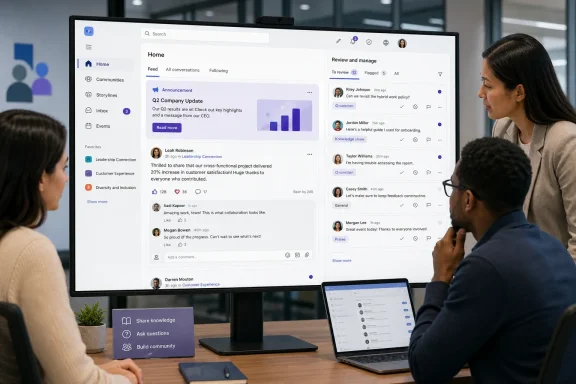 Overview: A Feed Change Focused on Two Different Work Styles
Viva Engage communities serve a wide range of purposes inside Microsoft 365 environments. They may host company announcements, leadership discussions, employee resource groups, technical support conversations, project knowledge, social campaigns, or ongoing Q&A between experts and employees.Those use cases create a basic tension in any social feed design. Most people want a useful, relevant snapshot of what is happening. They do not necessarily want to see every reply, every revived thread, or every item presented strictly in chronological order.
At the same time, some people do need comprehensive visibility. A community manager may need to check whether a discussion requires moderation. An HR communications team may need to monitor questions following a policy update. A technical expert may want to ensure that no support request, unanswered question, or newly added comment is overlooked.
Microsoft’s upcoming Viva Engage community feed improvements appear designed to address both audiences rather than forcing one feed behavior on everyone.
The likely shift in emphasis
The roadmap language points to two key outcomes:- A default feed experience that better matches normal user expectations.
- A way to support triage and content review for people who want to read every message within a community.
This is a practical distinction. A community feed optimized for discovery is not automatically a feed optimized for oversight.
Background: Why Viva Engage Community Feeds Matter
Viva Engage is Microsoft’s enterprise social and community platform within the broader Microsoft Viva and Microsoft 365 ecosystem. It provides a space for conversations that are broader and more persistent than a Teams chat, but typically more interactive and community-driven than a static SharePoint news page.A Viva Engage community can contain:
- Discussion posts and threaded replies
- Announcements
- Questions and best answers
- Polls and praise
- Files, images, videos, and links
- Community events and related resources
- Topic-driven knowledge sharing
- Leadership and employee engagement activity
Community feeds are not simple timelines
At first glance, a community feed might look like a familiar stream of posts. In practice, it must make difficult choices about what appears first, which activity is emphasized, whether replies elevate older threads, and how users distinguish new material from content they have already seen.These decisions have a major effect on the experience.
A feed that surfaces relevant and popular discussion can help employees find useful content quickly. But it may frustrate someone trying to verify whether all recent messages have been reviewed. Conversely, a strict chronology can provide confidence that nothing has been missed, but it may bury important content beneath low-value replies or routine activity.
Microsoft’s planned update acknowledges that community participation is not one-size-fits-all.
What Microsoft Has Confirmed
The roadmap entry provides several concrete details about the release:| Item | Confirmed detail |
|---|---|
| Feature | Viva Engage community feed improvements |
| Roadmap ID | 513275 |
| Product | Microsoft Viva |
| Platform | Web |
| Release status | In development |
| Release ring | General Availability |
| Cloud availability | Worldwide, Standard Multi-Tenant |
| Expected availability | September 2026 |
What remains unspecified
Microsoft has not publicly detailed the final interface, feed labels, sorting controls, filtering mechanics, or precise behavior for community members. That means organizations should avoid assuming that the update will introduce a specific “latest” tab, a read-state dashboard, a traditional unread counter, or a universal chronological mode.The wording does, however, establish a clear product direction: the default experience will be refined, and users who need comprehensive review will be better supported.
That is enough for IT leaders and Viva Engage administrators to begin considering the operational implications.
The Importance of a Better Default Experience
The phrase “expected user behaviors” is especially revealing. People approaching a community feed generally expect to open it and quickly understand what deserves their attention.They may be looking for:
- New posts from colleagues or leaders
- Active discussions that have drawn useful responses
- Questions that relate to their role
- Important announcements
- Conversations they previously joined
- Content that has changed since their last visit
Relevance must not feel arbitrary
The strongest social and collaboration feeds do not merely rank content. They give users enough contextual clarity to understand why an item is appearing.For Viva Engage, that could mean a more intuitive treatment of active conversations, newly posted messages, unread activity, or threads with recent replies. Microsoft has not confirmed the design, but the underlying goal is likely to reduce the cognitive work required to scan a community.
This matters because enterprise users have limited patience for feeds that require manual investigation. If the important content is difficult to identify, users will default to more direct communication channels such as Teams chats, email threads, or private messages.
That behavior can weaken the long-term value of a knowledge community. Conversations become fragmented, answers are repeated, and useful expertise remains trapped in private exchanges.
Better defaults can improve participation
A cleaner, more intuitive community feed can help users feel that Viva Engage is a destination worth revisiting. That is important for adoption because communities depend on repeated participation, not just initial enrollment.When employees can quickly see what is active and relevant, they are more likely to:
- Read and react to organizational updates
- Answer questions in their area of expertise
- Return to discussions they have joined
- Discover peers outside their immediate team
- Share useful resources with the wider organization
- Treat the community as a reliable knowledge channel
Why “Read Every Message” Support Is Equally Important
The second half of the roadmap description may be even more important for organizations with active or sensitive communities. Microsoft explicitly identifies users who want to read every message in a community.That need is common in enterprise environments, even if it is not universal.
Community managers need confidence, not just relevance
Community administrators are often responsible for more than welcoming new members and posting announcements. Depending on the community, they may need to monitor conduct, respond to unanswered questions, spot misinformation, move off-topic discussions, and ensure that important employee feedback reaches the right team.A purely personalized feed is poorly suited to that responsibility. It may optimize for relevance but omit lower-engagement activity that still requires attention.
For a moderator, the central question is not “What is most likely to interest me?” It is “What has happened that I have not reviewed?”
The difference is substantial.
Experts need a dependable review workflow
Technical and support-oriented communities often rely on volunteers, product specialists, IT staff, or designated experts. These participants may not need to follow every message across the entire organization, but they often need comprehensive visibility within a particular community.Examples include:
- A Windows support community where employees report device or update issues
- A cybersecurity community where users raise potential phishing or access concerns
- An internal developer community where engineers post platform questions
- A benefits community where HR monitors recurring employee questions
- A facilities community where staff report workplace incidents or operational problems
A review-oriented experience can help experts work systematically rather than relying on memory, notifications, or manual scrolling.
Triage is different from engagement
The roadmap’s use of the word triage is significant. Triage implies evaluation, prioritization, and follow-up.A useful triage workflow lets a user identify content that is:
- New or not yet reviewed
- Unanswered
- Recently updated
- Escalated by replies or reactions
- Related to an ongoing issue
- In need of moderation
- Ready for an authoritative answer or resolution
That is a welcome evolution. Enterprise social tools succeed when they support real work, not merely visible activity.
Potential Benefits for Microsoft 365 Organizations
The planned Viva Engage community feed improvements could deliver benefits across several roles in the organization.For everyday employees
Most employees are likely to benefit from a feed that feels easier to understand on first use. The standard experience should ideally make it simpler to catch up without creating the sense that important activity is hidden.A stronger default feed could reduce the familiar problem of opening a community, seeing an old thread, and wondering whether anything new has happened.
For communications teams
Corporate communicators use Viva Engage to encourage dialogue around announcements, campaigns, leadership updates, and cultural initiatives. Better feed behavior can help important messages remain discoverable without making the community feel dominated by official posts.Communications teams also benefit if they can more easily assess whether an announcement has generated questions that deserve a formal response.
For community administrators
Moderation and governance work can become far more manageable when administrators have a dependable way to review all content. This can be particularly valuable in large communities, where engagement-based ranking may otherwise make lower-visibility posts difficult to find.The update may reduce the need to rely on scattered notification settings as a substitute for a coherent review process.
For subject-matter experts
Experts can spend less time hunting for questions and more time providing answers. In communities built around IT support, employee learning, HR policies, security awareness, or business processes, that improvement can increase the practical value of Viva Engage.A question that receives a high-quality answer in a visible community becomes an organizational asset. It can help the next employee with the same issue and reduce repetitive support requests.
For knowledge management programs
Many knowledge-management initiatives struggle because employees cannot easily tell where to ask a question or where to look for a trusted answer. Viva Engage already provides features such as questions, replies, and best answers. A more usable feed could make those capabilities easier to surface in daily work.The ultimate benefit is not better scrolling. It is better circulation of institutional knowledge.
Risks and Limitations to Watch Before Deployment
Despite the promise of the update, organizations should be realistic about what a feed improvement can and cannot solve.A better feed does not replace governance
No ranking model or review mode can compensate for unclear community ownership. Every important community still needs defined administrators, response expectations, posting rules, and escalation paths.If nobody owns the conversation, a more complete feed may simply reveal a larger volume of unanswered posts.
Organizations should ensure that communities have clear answers to the following operational questions:
- Who is responsible for monitoring new discussions?
- What types of questions should receive an official response?
- When should a post move from community discussion into a support ticket or formal case?
- What content requires moderation or removal?
- How are sensitive issues escalated?
- How long should users expect to wait for a response?
More visibility can create more pressure
A “read every message” workflow sounds valuable, but it can create unrealistic expectations if leaders treat it as a guarantee of immediate review. In a very active community, comprehensive monitoring can become a significant operational task.This is especially relevant for global organizations where users post across time zones and discussions can continue outside normal support hours.
Administrators should avoid implying that every post is continuously monitored unless they have staffing and processes to support that commitment.
Information overload remains a real concern
The default feed may become easier to consume, but communities can still become noisy. Excessive cross-posting, low-value reactions, repeated questions, promotional content, and off-topic discussion can undermine the experience.The solution is a combination of thoughtful feed design and community discipline. Organizations should encourage clear subject lines, concise posts, appropriate use of topics, and respectful replies.
Changes may affect established habits
Some long-time Viva Engage users may have developed routines around the existing community feed behavior. Any shift in defaults can initially feel disruptive, particularly for power users who have learned how to spot updates in the current interface.IT teams should prepare for a period of adjustment. A short internal guide can explain what has changed, which audience the default feed serves, and how users with review responsibilities should adapt their workflow.
Preparing for the September 2026 Rollout
Because the feature is expected to arrive in September 2026, now is the appropriate time for Viva Engage owners to assess their communities rather than waiting for the interface to change.Review your highest-value communities
Start with the communities where missed content would be most costly. These may include All Company communities, IT support hubs, executive feedback spaces, HR communities, security awareness groups, and business-critical knowledge forums.Identify who currently monitors those communities and how they do it. If the answer involves manually opening threads, relying on email notifications, or hoping that contributors tag the right person, the new feed capabilities may offer an opportunity to formalize a better process.
Distinguish browsing from operational review
Not every member needs the same feed experience. Make a clear distinction between casual participation and community oversight.For example:
- Employees may use the default feed to catch up, contribute, and discover useful discussion.
- Community managers may need a systematic process for reviewing posts.
- Subject-matter experts may need to focus on questions and unresolved conversations.
- Communications teams may need to monitor responses after major announcements.
- Administrators may need to detect moderation and governance concerns.
Audit notification dependency
Many organizations compensate for imperfect feed visibility by enabling large numbers of notifications. This can create a second problem: alert fatigue.When users receive too many messages, they begin ignoring all of them. Important signals then get lost among routine activity.
The upcoming Viva Engage community feed improvements may give organizations a chance to reconsider which events genuinely require notification and which can be handled through a purposeful review workflow.
Update training materials carefully
Avoid publishing detailed instructions until Microsoft finalizes the user experience. The roadmap does not confirm the names or locations of any new controls.Instead, prepare principle-based guidance:
- Use the default community feed for regular catch-up and participation.
- Use the available review-oriented experience when complete visibility is required.
- Follow established escalation processes for urgent issues.
- Do not assume that a post has been seen merely because it was published.
- Use clear wording and relevant context when asking for help.
The Wider Significance for Viva Engage
This roadmap item reflects a broader reality in workplace collaboration: enterprise social platforms must balance personalization with accountability.Consumer-style feeds often prioritize engagement, relevance, and discovery. Those goals are useful in business software, but they are not sufficient for every scenario. Employees need to find interesting and valuable content, yet organizations also need reliable ways to manage emerging questions, moderation tasks, and high-volume discussions.
Viva Engage occupies a distinctive position in Microsoft 365 because it is designed for communities that extend beyond individual teams. That makes feed behavior especially important.
A user may join an IT community to solve a device problem, a leadership community to ask a question, an employee network to build connection, or a professional community to share expertise. Each interaction depends on the confidence that the right content can be found and that important contributions will not quietly disappear into an opaque feed.
A more mature model for enterprise conversation
The likely value of this update is that it treats community feeds as both a discovery surface and a work surface.That is a more mature model than assuming every user wants the same type of feed. It recognizes that an employee casually checking a community has different needs from an expert responsible for answering questions, and both needs are legitimate.
If Microsoft executes well, the September 2026 release could make Viva Engage communities feel less like passive streams of activity and more like manageable, dependable spaces for organization-wide conversation.
Conclusion
Microsoft’s planned Viva Engage community feed improvements are modestly described on the roadmap, but they address a fundamental challenge in enterprise communities: balancing a smooth default browsing experience with the need to review every message when responsibility demands it.For everyday users, the promise is a feed that better reflects how people expect to catch up on community activity. For administrators, communicators, moderators, and experts, the more important opportunity is improved triage and content review without relying entirely on notifications or manual thread hunting.
The September 2026 rollout will need to deliver clear behavior, understandable controls, and enough transparency to build user trust. It will not replace community governance, ownership, or thoughtful communication practices. But it could remove a persistent source of friction in Viva Engage and strengthen its role as a practical platform for knowledge sharing, employee engagement, and company-wide conversation.