

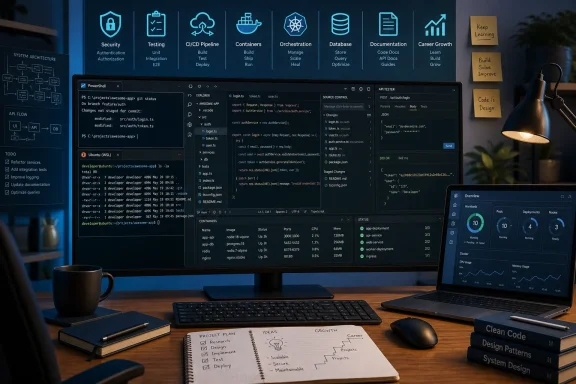
A sprawling collection of 220 developer-focused blog posts can be valuable not because it offers a single definitive roadmap, but because it exposes the reality of modern software work: developers are expected to learn continuously across code, tools, security, collaboration, careers, and the systems that carry an application from a laptop to production.
The HackerNoon-style roundup behind this collection is broad by design. Its entries range from beginner-friendly Git, Bootstrap, database, and C# lessons to Kubernetes, DevSecOps, Web3, API testing, technical writing, hiring, career progression, and developer well-being. That breadth is its greatest strength—and its biggest challenge. A list with hundreds of articles can inspire learning, but it can also become another browser tab graveyard unless readers turn it into a focused, practical plan.
For Windows users in particular, the collection highlights a shift that has been building for years. The Windows developer experience is no longer defined only by Visual Studio, PowerShell, .NET, and traditional desktop applications. It now includes Linux tooling through Windows Subsystem for Linux, containers, cloud-native development, cross-platform editors, browser-based tools, automation pipelines, and increasingly security-conscious workflows.
The best way to approach a giant developer reading list is not to consume it from top to bottom. It is to use it as a map: identify the skills that support your current work, distinguish timeless foundations from dated advice, and build enough hands-on practice around every article that the lesson survives after the bookmark disappears.
The most useful idea running through the collection is simple: becoming a better developer is not merely about learning another programming language. Technical ability matters, but it lives alongside communication, debugging habits, security awareness, system design, version control, testing, documentation, and the ability to work effectively with other people.
That broader perspective is especially important for developers entering the field. Many newcomers focus on front-end frameworks, tutorials, interview questions, or whichever language is dominating online discussion. Those things have value, but they are only part of the job. A developer who can write a feature but cannot diagnose a production issue, communicate a risk, review a pull request, or understand a deployment pipeline will struggle to grow beyond isolated coding tasks.
The collection repeatedly returns to several themes:
That is why the strongest entries in a collection like this are not necessarily the posts promising to teach a language in five minutes. They are the ones that reveal how engineers actually work: how they recover from a Git mistake, write a useful bug report, manage a hard interview, test an API, create a local development environment, or make trade-offs between speed and maintainability.
Modern WSL installations commonly use WSL 2, which relies on a real Linux kernel running in a lightweight virtualized environment. That is an important correction to the outdated claim that Windows simply provides an Ubuntu userland without a Linux kernel. The practical result is much stronger Linux compatibility and a development model that better reflects the Linux environments where many services eventually run.
For a Windows developer, WSL can support a hybrid workflow:
A disciplined setup usually means choosing a primary environment for a project rather than constantly crossing boundaries between Windows and Linux paths. If a project primarily uses Linux command-line tools, containers, and Linux-oriented dependencies, keeping it in the Linux file system can make the experience more consistent. If it is a Windows-first project using Windows-native tools, keeping it on the Windows side may be the better fit.
The important lesson is broader than WSL: developer environment design is part of software engineering. A poorly configured local environment can waste hours every week through slow builds, inconsistent line endings, authentication failures, missing dependencies, mismatched runtime versions, and confusing path behavior.
Those layers often include:
A more durable strategy is a T-shaped skill profile:
Professional Git usage requires understanding:
That includes small practices such as meaningful commits, code review, protected branches, automated tests, backups, migration discipline, and environment separation. A developer who learns these habits early becomes far more valuable than one who only optimizes for typing code quickly.
A useful test strategy usually operates at several levels:
A strong Windows-based workflow can combine local testing in Visual Studio or Visual Studio Code, command-line test runners in PowerShell or WSL, CI pipelines in a source-control platform, and clear reporting for failures. The tools vary. The principle does not: fast, trustworthy feedback makes teams faster over time.
At a practical level, that includes:
For Windows developers, this is a reminder that local convenience must be balanced with operational safety. Local secrets should be excluded from source control. Production credentials should be managed through appropriate secret stores and identity systems. Access should be limited, rotated when necessary, and monitored.
Effective adoption can include automated dependency scanning, code analysis, infrastructure checks, secret detection, signing and provenance practices, and vulnerability triage. But automation is not a substitute for judgment. A pipeline that produces hundreds of unreviewed alerts can make a team less secure by training people to ignore warnings.
The better objective is clear ownership and actionable signals. Security tools should help teams answer questions such as:
However, Kubernetes also introduces complexity. Developers need to understand containers, manifests, deployments, services, ingress, configuration, networking, permissions, logging, resource limits, and the differences between local and production environments. A local Kubernetes cluster can be excellent for learning, but it does not automatically make an application simpler.
The central design question should be: what operational problem are we solving? A small service, internal tool, or early-stage product may be better served by a simpler deployment platform. A team should not deploy Kubernetes merely because its job listings and conference talks create a sense of obligation.
For developers who do need it, the best learning path is practical:
Good API design is not just endpoint naming. It includes:
A new theme can make long coding sessions more comfortable. A terminal shortcut can save a few seconds. A formatter and linter can prevent arguments about style. These are worthwhile improvements. Yet productivity gains compound only when tools reduce friction in meaningful work.
A repeatable setup script can turn a day of manual configuration into a predictable process. A build pipeline can catch regressions before they reach customers. A database migration can replace risky hand-edited production changes. A scripted API check can reveal a breaking change before another team finds it.
But automation is healthiest when developers understand what it is automating. Copying a complex pipeline, Docker configuration, or shell script without understanding it creates hidden operational debt. The script may work until it does not—and then the team has no map.
Developers who grow into more senior roles tend to demonstrate that they can:
Writing forces developers to clarify what they know. Explaining a bug fix, deployment process, testing strategy, or design decision exposes gaps in understanding. It also creates artifacts that colleagues, hiring managers, users, and future teammates can evaluate.
Good technical writing does not need grand claims or excessive self-promotion. It can be as simple as:
That does not make older articles useless. It means readers should treat them as historical or conceptual material and verify operational steps against current product documentation before acting on them.
A practical approach is to organize the reading list into learning tracks.
Still, the collection succeeds as a reminder that a developer career is not a straight line through a curriculum. It is a cycle of learning a concept, applying it imperfectly, encountering a failure, improving the approach, and sharing the result.
For Windows enthusiasts and professional developers alike, the most productive path is to combine the strengths of the modern Windows ecosystem—PowerShell, .NET, Visual Studio, Windows Terminal, and WSL—with enduring engineering disciplines such as Git, testing, secure design, API literacy, documentation, and operational awareness.
The result is not merely a developer who knows more tools. It is a developer who can choose tools carefully, solve problems responsibly, and keep improving long after the latest framework, theme, or trending technology has moved on.
The HackerNoon-style roundup behind this collection is broad by design. Its entries range from beginner-friendly Git, Bootstrap, database, and C# lessons to Kubernetes, DevSecOps, Web3, API testing, technical writing, hiring, career progression, and developer well-being. That breadth is its greatest strength—and its biggest challenge. A list with hundreds of articles can inspire learning, but it can also become another browser tab graveyard unless readers turn it into a focused, practical plan.
For Windows users in particular, the collection highlights a shift that has been building for years. The Windows developer experience is no longer defined only by Visual Studio, PowerShell, .NET, and traditional desktop applications. It now includes Linux tooling through Windows Subsystem for Linux, containers, cloud-native development, cross-platform editors, browser-based tools, automation pipelines, and increasingly security-conscious workflows.
The best way to approach a giant developer reading list is not to consume it from top to bottom. It is to use it as a map: identify the skills that support your current work, distinguish timeless foundations from dated advice, and build enough hands-on practice around every article that the lesson survives after the bookmark disappears.
 Overview: What This Developer Reading Collection Gets Right
The most useful idea running through the collection is simple: becoming a better developer is not merely about learning another programming language. Technical ability matters, but it lives alongside communication, debugging habits, security awareness, system design, version control, testing, documentation, and the ability to work effectively with other people.That broader perspective is especially important for developers entering the field. Many newcomers focus on front-end frameworks, tutorials, interview questions, or whichever language is dominating online discussion. Those things have value, but they are only part of the job. A developer who can write a feature but cannot diagnose a production issue, communicate a risk, review a pull request, or understand a deployment pipeline will struggle to grow beyond isolated coding tasks.
The collection repeatedly returns to several themes:
- Full-stack development and the growing expectation that developers understand more than one layer of an application.
- Developer productivity, including editors, terminal workflows, extensions, automation, and better habits.
- Cloud-native development, particularly containers, Kubernetes, APIs, CI/CD, and observability.
- Career development, from job searches and promotions to personal branding and technical writing.
- Security, including OWASP guidance, secrets management, passwordless authentication, and DevSecOps.
- The human side of engineering, including burnout, low mood, difficult work cultures, feedback loops, and emotional intelligence.
That is why the strongest entries in a collection like this are not necessarily the posts promising to teach a language in five minutes. They are the ones that reveal how engineers actually work: how they recover from a Git mistake, write a useful bug report, manage a hard interview, test an API, create a local development environment, or make trade-offs between speed and maintainability.
The Windows Developer Story Has Changed
One of the most notable topics in the roundup concerns running Bash and Ubuntu-oriented tools on Windows. That topic deserves an update because the original framing commonly associated with older Windows 10 tutorials is incomplete today.WSL Is More Than an Old Bash-on-Windows Experiment
Windows Subsystem for Linux (WSL) gives developers a way to run Linux distributions and Linux command-line tools directly alongside Windows applications. For developers who work with Linux servers, open-source projects, Python, Node.js, Ruby, Rust, Go, containers, databases, and command-line tooling, it can eliminate much of the friction that once pushed them toward dual-boot setups or separate virtual machines.Modern WSL installations commonly use WSL 2, which relies on a real Linux kernel running in a lightweight virtualized environment. That is an important correction to the outdated claim that Windows simply provides an Ubuntu userland without a Linux kernel. The practical result is much stronger Linux compatibility and a development model that better reflects the Linux environments where many services eventually run.
For a Windows developer, WSL can support a hybrid workflow:
- Use Windows Terminal, PowerShell, and familiar Windows productivity applications.
- Run Linux package managers and command-line utilities in a chosen distribution.
- Work with Bash, SSH, Git, Python, Node.js, Ruby, databases, and build tools.
- Use Visual Studio Code with remote development support where appropriate.
- Keep Windows-native applications available without maintaining a second operating system.
The File-System Detail That New Users Often Miss
A good Windows development setup is not just about installing WSL and opening a shell. Performance, tooling behavior, permissions, and Git workflows can vary depending on where project files are stored and which tools access them.A disciplined setup usually means choosing a primary environment for a project rather than constantly crossing boundaries between Windows and Linux paths. If a project primarily uses Linux command-line tools, containers, and Linux-oriented dependencies, keeping it in the Linux file system can make the experience more consistent. If it is a Windows-first project using Windows-native tools, keeping it on the Windows side may be the better fit.
The important lesson is broader than WSL: developer environment design is part of software engineering. A poorly configured local environment can waste hours every week through slow builds, inconsistent line endings, authentication failures, missing dependencies, mismatched runtime versions, and confusing path behavior.
Learning the Full Stack Without Becoming a Tutorial Collector
The collection includes many discussions of full-stack developers, a term that remains popular but often gets used too loosely. A full-stack developer is not someone who claims expert-level mastery of every technology. More realistically, it is someone who can understand and contribute across the connected layers of an application.Those layers often include:
- Client-side interfaces built with HTML, CSS, JavaScript, TypeScript, and a framework such as React, Vue, Angular, or another UI approach.
- Server-side application logic built with languages and frameworks suited to the product.
- Data storage using relational databases, document databases, caches, search systems, or other specialized stores.
- APIs and integration points that allow services and clients to exchange data.
- Authentication, authorization, and security controls.
- Deployment, observability, and operational concerns.
Depth Still Matters More Than Buzzword Coverage
The risk is that “full stack” turns into a demand for shallow familiarity with everything. That can lead to professionals who have watched tutorials for dozens of frameworks but cannot confidently troubleshoot one production system.A more durable strategy is a T-shaped skill profile:
- Build depth in one primary area, such as front-end engineering, .NET development, databases, infrastructure, or application security.
- Learn enough adjacent skills to collaborate effectively and understand system boundaries.
- Add new tools only when they solve a real problem or support a clear career direction.
- Revisit foundations regularly, because fundamentals remain useful after frameworks change.
Git, Testing, and Debugging: The Skills That Make Developers Dependable
Some of the most practical themes in the collection concern Git mistakes, unit testing, API testing, bug reports, and debugging. These topics may not have the glamour of a new framework, but they are where professional reliability is built.Git Is a Collaboration System, Not Just a Backup Button
Many developers first encounter Git as a list of commands:clone, add, commit, push, and pull. That is enough to begin, but it is not enough to work safely in a team.Professional Git usage requires understanding:
- The distinction between a working tree, staging area, local repository, and remote repository.
- How branches support isolated work.
- How merge conflicts happen and how to resolve them deliberately.
- When a rebase can improve a local history and when it can create problems for shared work.
- How to inspect history before making a destructive correction.
- How to recover from mistakes without panicking.
That includes small practices such as meaningful commits, code review, protected branches, automated tests, backups, migration discipline, and environment separation. A developer who learns these habits early becomes far more valuable than one who only optimizes for typing code quickly.
Testing Is an Engineering Feedback Loop
Testing appears throughout the roundup in forms ranging from Python unit tests to API validation and automation testing. The key insight is that tests are not a ceremonial final step before deployment. They are a feedback mechanism.A useful test strategy usually operates at several levels:
- Unit tests verify small pieces of logic quickly and in isolation.
- Integration tests check how components work together, including databases, services, queues, or external boundaries.
- End-to-end tests validate important user journeys across the complete system.
- Manual exploratory testing exposes usability issues and unexpected behavior that scripts may not anticipate.
- Security testing helps identify weaknesses in code, dependencies, configuration, and delivery pipelines.
A strong Windows-based workflow can combine local testing in Visual Studio or Visual Studio Code, command-line test runners in PowerShell or WSL, CI pipelines in a source-control platform, and clear reporting for failures. The tools vary. The principle does not: fast, trustworthy feedback makes teams faster over time.
Security Cannot Be a Separate Developer Specialty
Security-focused entries in the collection cover OWASP concepts,.env files, secrets management, passwordless authentication, secure development practices, and DevSecOps. Together, they point to a necessary cultural shift: application security cannot be treated as a late-stage audit performed only by another department.Secure Development Starts Before Code
A secure software development lifecycle integrates security decisions into planning, design, implementation, testing, release, and maintenance. That does not mean every developer must become a full-time penetration tester. It means teams must treat security requirements as normal engineering requirements.At a practical level, that includes:
- Defining authorization rules early rather than bolting them onto completed features.
- Modeling threats for sensitive workflows and data.
- Validating inputs and handling errors safely.
- Keeping dependencies and build tooling under review.
- Protecting secrets rather than placing them in repositories or client-side code.
- Logging security-relevant events without exposing private data.
- Testing critical controls rather than assuming they work.
.env files is especially relevant. Environment-variable files can be useful for local configuration, but they are not a universal secrets-management solution. A file that is copied casually, committed accidentally, shared through chat, or embedded in a container image can become a security incident waiting to happen.For Windows developers, this is a reminder that local convenience must be balanced with operational safety. Local secrets should be excluded from source control. Production credentials should be managed through appropriate secret stores and identity systems. Access should be limited, rotated when necessary, and monitored.
DevSecOps Is Useful Only When It Reduces Real Risk
DevSecOps can sound like another overloaded industry label, yet its central idea is sound: security checks and controls should be integrated into development and delivery workflows instead of appearing only at the end.Effective adoption can include automated dependency scanning, code analysis, infrastructure checks, secret detection, signing and provenance practices, and vulnerability triage. But automation is not a substitute for judgment. A pipeline that produces hundreds of unreviewed alerts can make a team less secure by training people to ignore warnings.
The better objective is clear ownership and actionable signals. Security tools should help teams answer questions such as:
- Is this dependency safe enough for this use?
- Did this code change create an injection risk?
- Has a secret been exposed?
- Is this container configured more broadly than necessary?
- Can this deployment be trusted?
- Does the application enforce the access rules it claims to have?
Kubernetes, APIs, and the Cloud-Native Learning Curve
The collection includes multiple posts about Kubernetes, microservices, API development, private container registries, and local clusters. These are important subjects, but they deserve careful framing because the industry often makes them appear mandatory for every project.Kubernetes Is Powerful, Not Automatically Necessary
Kubernetes has become a major platform for orchestrating containerized workloads. It offers building blocks for deployment, scaling, service discovery, configuration, and workload management. For organizations operating many services at substantial scale, those capabilities can be transformative.However, Kubernetes also introduces complexity. Developers need to understand containers, manifests, deployments, services, ingress, configuration, networking, permissions, logging, resource limits, and the differences between local and production environments. A local Kubernetes cluster can be excellent for learning, but it does not automatically make an application simpler.
The central design question should be: what operational problem are we solving? A small service, internal tool, or early-stage product may be better served by a simpler deployment platform. A team should not deploy Kubernetes merely because its job listings and conference talks create a sense of obligation.
For developers who do need it, the best learning path is practical:
- Containerize one small application.
- Understand image creation, tags, registries, and runtime configuration.
- Deploy it locally.
- Add a service and basic networking.
- Observe logs, failures, restarts, and resource behavior.
- Learn configuration and secret handling.
- Only then move toward multi-service patterns and production controls.
APIs Remain the Common Language of Software
API-focused posts in the collection are among its most broadly useful resources. Whether a project uses REST, GraphQL, gRPC, messaging, webhooks, or internal service contracts, modern applications depend on explicit interfaces.Good API design is not just endpoint naming. It includes:
- Consistent request and response formats.
- Useful error messages that do not leak sensitive details.
- Authentication and authorization boundaries.
- Idempotency where retries are likely.
- Versioning and compatibility planning.
- Documentation that reflects actual behavior.
- Monitoring and testing for latency, failures, and unexpected traffic.
Developer Productivity Is Not About Installing More Extensions
The roundup includes posts on Visual Studio Code themes, developer tools, terminal emulators, shortcuts, automation, and productivity hacks. These are useful topics, but they carry an easy trap: confusing a better-looking setup with better engineering.A new theme can make long coding sessions more comfortable. A terminal shortcut can save a few seconds. A formatter and linter can prevent arguments about style. These are worthwhile improvements. Yet productivity gains compound only when tools reduce friction in meaningful work.
Build a Small, Reliable Toolchain
For a typical Windows developer, a practical baseline might include:- Windows Terminal for organized command-line work.
- PowerShell for Windows automation and administration.
- WSL when Linux-native tools or environments are relevant.
- Visual Studio or Visual Studio Code suited to the project.
- Git with a clear branching and review workflow.
- A package manager and runtime-version strategy.
- A test runner that developers can execute locally.
- Docker or another container workflow where the project needs it.
- A password manager and safe secret-handling process.
- Formatting, linting, and static analysis integrated into the editor and CI.
Automation Should Eliminate Repetition, Not Hide Understanding
Automation posts in the collection touch on workstation setup, image manipulation, scripting, CI/CD, and development workflows. These can be powerful productivity multipliers.A repeatable setup script can turn a day of manual configuration into a predictable process. A build pipeline can catch regressions before they reach customers. A database migration can replace risky hand-edited production changes. A scripted API check can reveal a breaking change before another team finds it.
But automation is healthiest when developers understand what it is automating. Copying a complex pipeline, Docker configuration, or shell script without understanding it creates hidden operational debt. The script may work until it does not—and then the team has no map.
Careers, Communication, and the Developer Experience
A substantial portion of the collection addresses hiring, interviews, promotions, personal branding, imposter feelings, job searches, remote work, difficult project management, and developer mental health. That inclusion is justified. Software development is highly technical, but it is never only technical.Promotions Reward More Than Individual Output
The collection correctly distinguishes getting hired from getting promoted. Entry-level hiring often emphasizes potential, core coding ability, and a willingness to learn. Advancement requires a broader record of impact.Developers who grow into more senior roles tend to demonstrate that they can:
- Deliver work predictably.
- Break ambiguous problems into manageable decisions.
- Communicate trade-offs and risks clearly.
- Improve systems rather than merely complete tickets.
- Help teammates become more effective.
- Document decisions and reduce repeated confusion.
- Take ownership during incidents without creating blame-driven drama.
Technical Writing Is a Career Asset, Not a Side Hobby
Several posts advocate writing technical articles, building a personal brand, and learning in public. The advice is valuable when approached thoughtfully.Writing forces developers to clarify what they know. Explaining a bug fix, deployment process, testing strategy, or design decision exposes gaps in understanding. It also creates artifacts that colleagues, hiring managers, users, and future teammates can evaluate.
Good technical writing does not need grand claims or excessive self-promotion. It can be as simple as:
- A concise internal guide for onboarding.
- A postmortem that explains a failure and the corrective actions.
- A tutorial built from a real problem.
- Documentation for a library or API.
- A clear explanation of a design trade-off.
- A reusable checklist for common maintenance work.
How to Turn 220 Posts Into a Real Learning Plan
The collection’s engagement-based ordering may help surface widely read material, but popularity is not the same as accuracy, relevance, or durability. Some entries are explicitly tied to old product versions, dated job markets, specific events, or technologies that may have changed substantially.That does not make older articles useless. It means readers should treat them as historical or conceptual material and verify operational steps against current product documentation before acting on them.
A practical approach is to organize the reading list into learning tracks.
A Foundation Track
Start with the skills that transfer across languages and frameworks:- Git and collaborative version control.
- Command-line fluency in PowerShell, Bash, or both.
- HTTP, APIs, and basic networking concepts.
- Databases, SQL, transactions, and data modeling.
- Debugging and logging.
- Unit and integration testing.
- Secure coding basics.
A Windows Development Track
For developers building on Windows, add:- Windows Terminal and PowerShell automation.
- WSL and Linux command-line fundamentals.
- Visual Studio or Visual Studio Code workflows.
- .NET, C#, or another chosen primary platform.
- Local databases and containerized dependencies.
- Windows-specific deployment and administration considerations where relevant.
A Cloud and Delivery Track
Once fundamentals are stable, expand into:- Docker and container images.
- CI/CD pipelines.
- Cloud identity and secret management.
- Observability, metrics, traces, and logs.
- Infrastructure configuration.
- Kubernetes only when its operational model matches the problem.
A Professional Growth Track
Finally, invest in the skills that determine whether technical work has influence:- Writing clear tickets, bug reports, and documentation.
- Giving and receiving code-review feedback.
- Estimating work with appropriate uncertainty.
- Explaining architecture and trade-offs.
- Managing attention, burnout risk, and sustainable working habits.
- Building a portfolio of real, maintainable projects.
The Core Lesson: Developers Grow by Shipping, Reflecting, and Repeating
A giant reading list about developers can seem chaotic because the profession itself is expansive. Developers now operate at the intersection of applications, cloud services, security controls, user experience, collaboration systems, and business constraints. No single article collection can make someone fluent in all of it.Still, the collection succeeds as a reminder that a developer career is not a straight line through a curriculum. It is a cycle of learning a concept, applying it imperfectly, encountering a failure, improving the approach, and sharing the result.
For Windows enthusiasts and professional developers alike, the most productive path is to combine the strengths of the modern Windows ecosystem—PowerShell, .NET, Visual Studio, Windows Terminal, and WSL—with enduring engineering disciplines such as Git, testing, secure design, API literacy, documentation, and operational awareness.
The result is not merely a developer who knows more tools. It is a developer who can choose tools carefully, solve problems responsibly, and keep improving long after the latest framework, theme, or trending technology has moved on.
References
- Primary source: HackerNoon
Published: 2026-07-24T00:00:00+00:00
Loading…
hackernoon.com