

Acer’s newest Swift AI family pushes the company deeper into the “Copilot+” era, pairing ultra‑thin aluminum and magnesium‑alloy designs with Intel’s fresh Core Ultra Series 3 silicon (Panther Lake) to deliver on‑device AI acceleration, high‑quality OLED displays, and a slate of hardware features pitched at creators and road warriors.
The PC industry’s narrative for 2025–2026 is dominated by two linked trends: Microsoft’s Copilot+ software experiences that push AI into everyday workflows, and silicon vendors embedding dedicated neural acceleration inside mainstream laptop SoCs. Acer’s latest Swift AI announcements position the company to sell hardware that claims to run Copilot+ features natively and with low latency, rather than relying solely on cloud inference. That’s made possible by Intel’s Panther Lake family (Core Ultra Series 3), which raises on‑device AI throughput and tighter GPU integration compared with earlier Core Ultra generations. Acer’s January 5, 2026 announcement outlines a refreshed Swift lineup led by the premium Swift 16 AI flagship, ultra‑portable Swift Edge 14/16 AI models that claim sub‑1 kg weights for certain SKUs, and value‑oriented Swift Go 14/16 AI models that trade some premium bells and whistles for broader appeal. Each model is presented as a Copilot+ PC—hardware that pairs an NPU‑equipped Intel Core Ultra Series 3 chip with Acer’s own software utilities and the Windows Copilot+ ecosystem.
What to watch in the coming weeks: independent benchmark results for Panther Lake laptops (CPU/GPU/NPU), real‑world battery tests under AI workloads, driver and Copilot+ feature rollouts from Microsoft, and pricing/availability in local markets—especially for the sub‑1 kg Swift Edge configurations that will be judged against rivals on both weight and durability.
Acer’s Swift AI generation is a credible, broadly scoped attempt to mainstream Copilot+ hardware. It demonstrates how OEMs are pairing advanced silicon with intentional design choices—high‑quality OLED displays, competitive I/O, and new input surfaces—to make AI genuinely useful on the laptop itself. The promise is clear; the market will now demand measurable proof that those AI features are not only fast, but practical, secure, and sustainable in everyday use.
Source: WV News Acer Announces New Lineup of Premium Swift AI Copilot+ PCs Featuring Intel Core Ultra Series 3 Processors
 Background / Overview
The PC industry’s narrative for 2025–2026 is dominated by two linked trends: Microsoft’s Copilot+ software experiences that push AI into everyday workflows, and silicon vendors embedding dedicated neural acceleration inside mainstream laptop SoCs. Acer’s latest Swift AI announcements position the company to sell hardware that claims to run Copilot+ features natively and with low latency, rather than relying solely on cloud inference. That’s made possible by Intel’s Panther Lake family (Core Ultra Series 3), which raises on‑device AI throughput and tighter GPU integration compared with earlier Core Ultra generations. Acer’s January 5, 2026 announcement outlines a refreshed Swift lineup led by the premium Swift 16 AI flagship, ultra‑portable Swift Edge 14/16 AI models that claim sub‑1 kg weights for certain SKUs, and value‑oriented Swift Go 14/16 AI models that trade some premium bells and whistles for broader appeal. Each model is presented as a Copilot+ PC—hardware that pairs an NPU‑equipped Intel Core Ultra Series 3 chip with Acer’s own software utilities and the Windows Copilot+ ecosystem. What Acer announced: the new Swift AI family
Acer broke the Swift AI announcement into three principal lines. Below are the headlines and the most consequential specifications that define each family.Swift 16 AI — flagship creative machine
- Up to Intel Core Ultra X9 388H with integrated Intel Arc B390 graphics (marketing points emphasize an Arc GPU with high Xe3 core counts in X‑series SKUs).
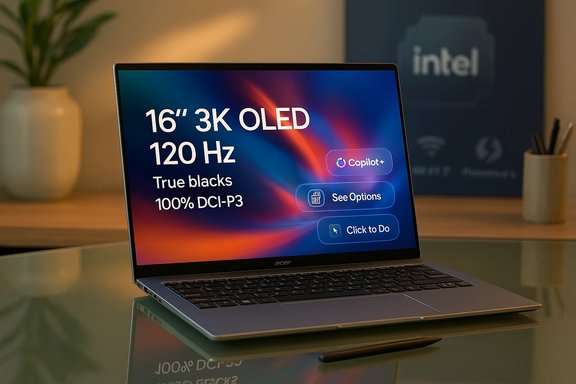
- 16‑inch 3K OLED WQXGA+ (2880×1800), 120 Hz variable refresh, VESA DisplayHDR True Black coverage and 100% DCI‑P3 color gamut.
- A very large haptic touchpad (Acer claims the “world’s largest” haptic touchpad: ~175.5 mm × 109.7 mm) with stylus support (MPP 2.5).
- Dual Thunderbolt 4, HDMI 2.1, Wi‑Fi 7, Bluetooth 5.4+, FHD IR webcam, and dual DTS:X Ultra speakers.
- Target chassis thickness ~14.9 mm and aluminum build; marketing touts creators who want a lighter, premium 16‑inch canvas.
Swift Edge 14 AI / Swift Edge 16 AI — ultra‑light pro machines
- Up to Core Ultra 9 (386H) SKUs, up to 32 GB LPDDR5X, and up to 1 TB PCIe Gen4 storage.
- Sub‑1 kg 14‑inch configuration and MIL‑STD‑810H durability for select SKUs.
- 3K OLED touch display options at up to 120 Hz, Wi‑Fi 7, Thunderbolt connectivity, FHD IR cameras with Human Presence Detection, and enhanced teleconferencing with Acer PurifiedVoice.
Swift Go 14 AI / Swift Go 16 AI — mainstream thin‑and‑light Copilot+ PCs
- Up to Core Ultra X9 388H for higher‑end SKUs, plus 2K and 3K OLED display options on various configurations.
- Emphasis on value: 180‑degree hinges, laser‑etched aluminum in the chassis, and the same Copilot+ enablement features (Recall, Click to Do previews, improved Windows Search).
- Dual Thunderbolt 4 I/O on higher trims, Wi‑Fi 7, larger IR cameras with HDR, and Acer Multi‑Control touchpad features for media and conferencing control.
Why Intel Panther Lake (Core Ultra Series 3) matters here
Intel’s Panther Lake architecture, branded as Core Ultra Series 3, is the technical foundation that enables Acer’s on‑device AI claims. Panther Lake is built on Intel’s advanced 18A process in a multi‑chiplet design and carries three headline improvements important to laptop buyers and OEMs alike:- Substantially faster CPU and GPU performance relative to the previous generation, driven by a combination of more P‑cores/E‑cores and a beefed‑up Arc GPU. Intel advertises up to 50% CPU and GPU improvements in targeted scenarios.
- A major increase in on‑package AI throughput: Intel describes a platform‑level capability approaching triple‑digit Platform TOPS, which OEMs are parceling out to product descriptions in the form of NPU TOPS figures. Panther Lake was designed to be a scalable “AI PC platform.”
Deep dive: hardware features that matter to real users
Displays, color fidelity and creative workflows
Acer’s decision to standardize 3K OLED panels at 120 Hz in its flagship Swift 16 (and to offer similar OLEDs on Edge/Go models) is a clear creative play. OLED delivers high contrast, deep blacks and saturated colors—exactly what photographers, video editors and designers prefer in a portable. Acer also highlights certifications like VESA DisplayHDR True Black and 100% DCI‑P3 on higher trims, which is meaningful for color‑critical work. Real‑world tradeoffs remain: glossy OLED surfaces can be more reflective than matte IPS panels—an important practical consideration for on‑the‑go pros.On‑device AI: NPU numbers and practical effects
Acer’s PR and product pages pair Intel chipset branding with discrete NPU/AI throughput numbers in marketing copy. Intel’s Panther Lake platform advertises scaled XPU performance (platform TOPS up to very high values), and OEMs like Acer are quoting NPU figures for particular SKUs. Those NPU numbers matter because features like Recall, Click to Do and local generative tasks rely on sustained NPU capability—not just short bursts. On the other hand, the true user experience depends on thermal headroom, power profiles, and how Windows and OEM drivers schedule workloads between P‑cores, E‑cores, GPU and NPU. Expect latency and battery impact to vary widely between light Copilot queries and prolonged heavy inference across multiple apps.I/O, connectivity and future proofing
Acer lists Wi‑Fi 7, dual Thunderbolt 4, HDMI 2.1, and high‑speed LPDDR5X memory on many SKUs. Wi‑Fi 7 is a forward‑looking inclusion—latency and throughput gains make cloud fallbacks and large dataset pulls during AI workflows less painful. Thunderbolt 4 remains a practical dock and external GPU/disk solution for pros who need high bandwidth. These choices indicate Acer is targeting long‑term utility rather than flash specs alone.The “world’s largest haptic touchpad” — novel or marketing?
Acer promotes the Swift 16’s oversized haptic touchpad (175.5 mm × 109.7 mm) that supports stylus input and haptic feedback as a creative surface. Independent press coverage has noticed the same feature, and it’s a visible, differentiating hardware quirk in a market where input surfaces have converged. Still, the superlative “world’s largest” is a marketing claim that will require direct comparison with contemporaneous laptops and official measurements. It’s notable and innovative, but buyers who rely on absolute stylus precision for illustration work should test the pad in person—this is a novel input surface but not a full replacement for dedicated pen tablets in all workflows.Strengths: where Acer’s Swift AI lineup can really deliver
- Real on‑device AI: Combining Intel’s Panther Lake NPUs with Copilot+ integration promises lower latency and offline‑friendly features. For business users who need fast summarization, local transcription, or privacy‑sensitive on‑device processing, this is a substantial step forward.
- Creative‑grade displays in thin chassis: 3K OLED panels at 120 Hz paired with accurate color coverage are compelling for creators who travel. Acer’s certification claims (VESA True Black, DCI‑P3) show a focus on color fidelity rather than mere resolution marketing.
- Performance uplift vs prior generations: Intel’s architectural changes in Panther Lake promise tangible CPU/GPU/NPU improvements; the presence of Core Ultra X‑series SKUs with beefier Arc graphics significantly narrows the gap to discrete GPU solutions in some scenarios.
- Connectivity and platform flexibility: Wi‑Fi 7, multiple Thunderbolt ports, and high‑speed LPDDR5X memory mean the devices are built to remain useful for years, especially in pro workflows that rely on external docks and fast networks.
Risks, caveats and areas to watch
- Thermal and battery tradeoffs. Thin and light designs trade cooling capacity for portability. Sustained AI inference (or sustained GPU‑heavy workloads using Arc) can push thermal and power limits, leading to reduced sustained performance under prolonged loads. Users should expect real‑world performance to differ from short synthetic benchmarks. Intel’s published gains are meaningful, but OEM thermal design will determine how much of that performance is usable during long sessions.
- Battery life under AI load. Acer quotes competitive battery numbers for light productivity, but on‑device Copilot+ features that use the NPU aggressively will consume more power than static web browsing or document editing. Buyers who need all‑day battery life while running on‑device models should test for the specific AI workloads they plan to run.
- Software maturity and ecosystem lock‑in. Copilot+ experiences depend on Microsoft’s software stack, driver maturity, and OEM integration. Some features are still listed as “preview” (for example, Recall and Click to Do) and may evolve over time. The best on‑device AI experience depends not only on silicon, but also on robust drivers, runtime updates, and cooperation between Intel, Microsoft, and Acer. Early adopters may encounter teething issues.
- Security and privacy considerations. On‑device AI reduces cloud exposure but doesn’t eliminate data‑safety risks. Local models and faster inference open new attack surfaces (firmware, AI drivers, NPU scheduling). Enterprises will need to validate enterprise‑grade firmware updates, support for secure boot chains, and how Copilot+ manages sensitive data in recall features. Buyers in regulated industries should weigh these factors carefully.
- Marketing claims vs measurable reality. Superlatives like “world’s largest haptic touchpad” or “up to 48 TOPS on NPUs” are useful shorthand for press copy, but buyers should treat them as starting points for validation. Independent benchmarks and hands‑on reviews will be required to understand how those features behave in daily use.
How to evaluate these machines if you’re shopping
- Identify your primary workload. If your daily tasks are heavy on local inference (transcription, coding assistants, media upscaling), prioritize NPU throughput, sustained thermal design, and battery life under load.
- Test display variants in person. If color accuracy matters, insist on the specific OLED SKU with certification and evaluate it in real lighting conditions. Glossy OLEDs can look spectacular but suffer from reflections.
- Validate I/O and docking strategy. If you need high‑bandwidth peripherals, confirm Thunderbolt support and whether the laptop supports simultaneous external displays at the resolutions you require.
- Confirm Windows Copilot+ feature parity and preview status. Some Copilot+ functions may roll out in stages; ensure the features you want are not limited to certain regions or preview programs.
- Check thermal and battery reviews post‑launch. Early reviews will reveal whether the best‑case spec numbers translate into usable, sustained performance for your tasks.
Market positioning and who should care
Acer’s Swift AI family is aimed at three broad audiences:- Creators and power users who want a large, high‑quality display in a thin chassis without stepping up to a heavier workstation. The Swift 16 AI tries to bridge that gap.
- Business and hybrid workers who value portability, battery life, and AI features that speed up routine tasks—especially teams that plan to adopt Copilot+ workflows. The Swift Edge line’s sub‑1 kg claim could have strong appeal if its durability and battery life hold up.
- Mainstream buyers who want future‑proof connectivity and useful AI features without paying flagship prices. The Swift Go models trade some premium parts for better price elasticity and should be attractive to students and everyday professionals.
Final assessment — value, timing and what to watch next
Acer’s Swift AI lineup is a persuasive, timely response to a market that increasingly values on‑device AI. By marrying Intel’s Panther Lake Core Ultra Series 3 processors with OLED displays, advanced I/O, and software‑level Copilot+ integration, Acer is staking a claim in the premium thin‑and‑light segment that favors creators and mobile professionals. Intel’s Panther Lake architecture provides the crucial silicon foundation, promising real gains in CPU/GPU and NPU performance compared with prior Core Ultra silicon generations. That said, many of the most important buyer questions hinge on implementation details: sustained thermal performance, battery behaviour under continuous AI inference, software maturity for Copilot+ features, and the durability/usability of novel hardware such as oversized haptic touchpads. Independent reviews and hands‑on benchmarks will determine whether these machines deliver real, day‑to‑day advantages or whether some of the headline claims are mostly marketing. Short‑term buyers who rely on stable, proven workflows may want to wait for detailed reviews; users chasing the leading edge of on‑device AI should monitor initial performance and update cadence closely.What to watch in the coming weeks: independent benchmark results for Panther Lake laptops (CPU/GPU/NPU), real‑world battery tests under AI workloads, driver and Copilot+ feature rollouts from Microsoft, and pricing/availability in local markets—especially for the sub‑1 kg Swift Edge configurations that will be judged against rivals on both weight and durability.
Acer’s Swift AI generation is a credible, broadly scoped attempt to mainstream Copilot+ hardware. It demonstrates how OEMs are pairing advanced silicon with intentional design choices—high‑quality OLED displays, competitive I/O, and new input surfaces—to make AI genuinely useful on the laptop itself. The promise is clear; the market will now demand measurable proof that those AI features are not only fast, but practical, secure, and sustainable in everyday use.
Source: WV News Acer Announces New Lineup of Premium Swift AI Copilot+ PCs Featuring Intel Core Ultra Series 3 Processors
