

Acronis Cyber Protect 17 lands as a major incremental release that doubles down on an aggressive one‑stop pitch: combine enterprise‑grade backup, recovery, and endpoint security into a single pane of glass and sell it to businesses that want fewer vendors and stronger ransomware resilience. This update expands platform support, adds agentless and discovery tools that simplify on‑prem and virtual deployments, and keeps Acronis’ familiar tiered licensing—an approach that remains powerful for medium and large environments but may be overkill (and costly) for smaller teams. The UK review from PCMag highlighted the same strengths and caveats seen in hands‑on testing: excellent flexibility and strong protection, paired with a price and complexity profile that demands careful procurement and testing.
Acronis has long positioned Cyber Protect as a unified "cyber protection" product that marries backup and disaster‑recovery features with endpoint protection, patching, and vulnerability assessment. The idea is straightforward: if backups and security live in the same platform, organizations can prevent, detect, and recover from threats faster without stitching multiple tools together. That design goal underpins version 17, which extends platform compatibility and introduces deployment options aimed specifically at hybrid and virtualized infrastructures. The product remains available in multiple editions—Standard, Backup Advanced, and Advanced—with per‑workstation and per‑server licensing and optional cloud storage add‑ons.
Operational highlights:
The product’s strengths—rich feature set, improved virtual and macOS coverage, and integrated security tooling—are genuine and validated by Acronis’ own release documentation and hands‑on editorial reviews. But procurement decisions must include staged pilots, careful RTO/RPO verification, and explicit validation of cloud storage pricing to avoid unwelcome surprises.
If the objective is robust ransomware protection combined with verified recoverability across mixed operating systems (Windows, macOS 26 Tahoe, Linux) and virtual hosts, Acronis Cyber Protect 17 is one of the most feature‑complete options available today. Confirm pricing and licensing against your exact device mix, perform realistic restore trials, and map scanning/verification behavior to your RTO commitments before making a purchase.
Source: PCMag UK Acronis Cyber Protect 17
 Background / Overview
Acronis has long positioned Cyber Protect as a unified "cyber protection" product that marries backup and disaster‑recovery features with endpoint protection, patching, and vulnerability assessment. The idea is straightforward: if backups and security live in the same platform, organizations can prevent, detect, and recover from threats faster without stitching multiple tools together. That design goal underpins version 17, which extends platform compatibility and introduces deployment options aimed specifically at hybrid and virtualized infrastructures. The product remains available in multiple editions—Standard, Backup Advanced, and Advanced—with per‑workstation and per‑server licensing and optional cloud storage add‑ons. What’s genuinely new in Cyber Protect 17
Full macOS 26 (Tahoe) coverage and broader OS support
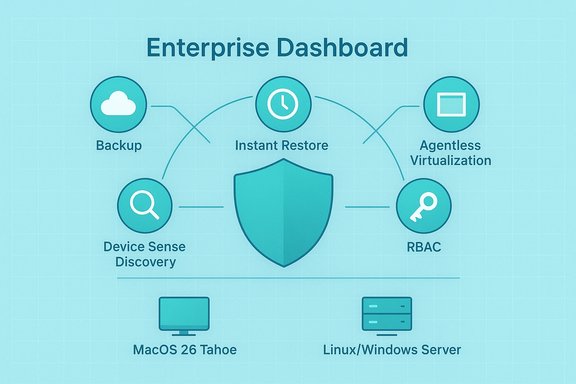
One of the headline items for this release is full protection for macOS 26 Tahoe, as well as refreshed support for the latest Linux distributions and Microsoft Server SKUs including Windows Server 2022 and Windows Server 2025 Essentials. That means backup agents, vulnerability assessment and (where licensed) active protection are all updated to run on those platforms, narrowing the gap that often exists between Windows‑centric enterprise tooling and heterogeneous fleets. Acronis’ release notes for the major 17/25-series updates explicitly list macOS 26 support and the expanded Linux/Windows Server compatibility. Why this matters: macOS adoption in enterprise fleets has been growing, and vendors that delay support create onboarding friction. Acronis’ forward‑looking compatibility reduces device fragmentation risk for mixed environments.Agentless backup for virtual platforms, and migration tooling
Version 17 adds or sharpens agentless backup paths for virtualized infrastructures (notably Nutanix AHV and Proxmox VE in the release notes), enabling centralized protection without installing a backup agent in each VM. Agentless backups simplify management, reduce resource overhead on guests, and can accelerate protection rollouts in large virtual farms. The product also improves migration workflows: capture a full image or VM and restore it across physical/virtual boundaries (P2V, V2V, V2P), which is particularly useful during hardware refreshes or datacenter consolidations. Practical caveat: agentless protection shifts complexity to the backup host (snapshots, changing APIs, and storage throughput), so organizations should test throughput and recovery time objectives (RTOs) under realistic loads.Device Sense — discovery and inventory at scale
A new discovery tool, Device Sense, identifies unmanaged endpoints on networks (targeted at fleets of three or more devices) and assembles hardware/software inventories and protection posture data. This reduces one of the perennial headaches in enterprise security: blind spots. By finding unmanaged or mis‑configured endpoints quickly, Device Sense accelerates onboarding and reduces windows of exposure. The feature is described in the release notes and is presented as part of the standard functionality across editions with some licensing constraints.Local, agentless migration and new local features
Acronis also expanded local features—agentless backup and migration in virtual environments, and improvements to instant‑run / mount workflows. The platform’s Instant Restore capability lets admins boot a VM or run an image from backup storage directly, reducing recovery time and enabling quick failover for critical workloads. Keep in mind that performance depends heavily on storage speed and network bandwidth; “instant” in name does not always translate to instant in practice if the underlying storage or network is a bottleneck.Hands‑on usability: dashboard, software management, and restores
The management console is web‑based and consolidates backup, cyber protection, and device inventory views. Administrators get a clear snapshot: backup status, blocked threats, patching backlog, and storage usage. Acronis’ software management includes vulnerability scans and bulk patch deployment, plus a Software Inventory that helps teams spot unused applications and compliance gaps.Operational highlights:
- Daily backups are scheduled by default but fully configurable; retention defaults to 90 backups.
- Full‑image backups support bare‑metal restore and migration to new hardware, delivering straightforward P2P/P2V migrations.
- Incremental backups reduce network load and make recurrent backups efficient.
- Restores offer file‑level recovery, full system restores, and the option to launch backups as live VMs for business continuity.
Security features: AI, behavioral detection, and encryption
Acronis continues to emphasize layered defenses:- AI‑powered antivirus and anti‑ransomware engines (machine learning models and behavioral heuristics) monitor for anomalous app activity—like unauthorized encryption attempts or suspicious registry changes—and can roll back or quarantine activity to protect backups.
- Pre‑restore malware scanning (verify‑then‑restore) prevents accidental reinfection of production systems by scanning mounted backup images before they are returned to service.
- Transport encryption uses TLS and Acronis’ internal communication protections; the cloud back end uses additional protocols to lock down agent‑to‑server traffic.
- For regulated workloads, Acronis supports GDPR/HIPAA‑relevant controls, and offers immutable (WORM) cloud targets for tamper resistant retention.
Pricing, licensing, and total cost of ownership
Acronis sells Cyber Protect in three primary tiers:- Cyber Protect Standard — entry tier (backup + base security) starting from roughly $85 per year per workstation.
- Cyber Protect Backup Advanced — adds deeper backup integrations (Microsoft 365, Google Workspace) and remote device management (listed at about $109 per workstation per year).
- Cyber Protect Advanced — full endpoint security suite with active detection and remediation, priced around $129 per workstation per year.
- CrashPlan: roughly $88 per device per year for its small‑business offering (unlimited endpoint backup), making it close to Acronis Standard on per‑endpoint cost but with a different security posture and fewer integrated endpoint security features.
- MSP360: entry‑level backup licensing can start much lower (e.g., single‑workstation plans or desktop licenses at $29.99 per year), but MSP360 often relies on third‑party cloud storage and lacks the native integrated endpoint security stack Acronis bundles.
- Backblaze: business endpoint backup pricing is significantly lower for many customers (Backblaze for Business has historically advertised per‑computer pricing as low as $50–$99/year depending on plan and term), but again this is a focused backup product, not a combined backup + endpoint protection solution.
Mobile backup and cloud storage add‑ons
Acronis provides mobile apps that can back up Android and iOS devices—not just access computer backups, but also create phone backups and perform remote fixes. However, many mobile backup features require purchasing Acronis Cloud Storage add‑ons; cloud storage is sold as a separate capacity block (250GB to multi‑terabyte tiers) that can be expensive relative to mainstream consumer cloud storage options. Market pricing for cloud storage add‑ons varies across resellers, but independent reviews and reseller listings confirm that Acronis’ storage add‑ons are pricier than consumer alternatives—often justified by encryption, immutability, and compliance guarantees offered for enterprise customers. If mobile device protection is a requirement, factor cloud add‑on costs into the procurement calculator.Strengths: where Acronis stands out
- Integrated cyber protection + backup reduces tool sprawl and improves coordinated incident workflows (detect → isolate → restore).
- Broad platform coverage: Windows, macOS (including macOS 26 Tahoe), Linux distributions, and modern Windows Server SKUs are supported out of the box.
- Agentless virtualization support for select hypervisors simplifies VM protection at scale.
- Rich recovery options: bare‑metal, file‑level, immediate VM‑run‑from‑backup options, and cloud recovery targets.
- Operational tooling: Device Sense discovery, software inventory, bulk patching, and integrated management lower administrative overhead for larger teams.
- Enterprise orientation: useful security controls—immutable targets, certificate/transport protections, role‑based access control (RBAC), and dedicated server licensing—support compliance and auditability.
Risks, limitations, and what to test before buying
- Price and complexity for small teams: The breadth of features is valuable at scale but costs more and requires staff with backup/security experience to configure correctly. Smaller organizations may pay for capabilities they don’t use.
- Restore latency when malware scanning is enabled: Pre‑restore scanning is security‑savvy but CPU‑intensive. If your RTO is measured in minutes, enable staged verification or "clean‑room" restores rather than blocking production restores until scans finish.
- Historical and ongoing advisories: Acronis has addressed several security advisories and CVEs in recent years. While the company publishes advisories and release notes for fixes, any large, integrated platform is an attractive target; customers must maintain patch discipline and monitor the vendor’s security advisories. Independent vulnerability trackers and advisories have documented past issues that were subsequently fixed—this is normal for complex enterprise software, but it underscores the need for prompt patching and good network segmentation.
- Vendor lock‑in concerns: Consolidating backup and endpoint protection reduces integration work but increases dependency on a single vendor for both security and recovery operations. Evaluate exit planning, data egress costs, and catalog portability during procurement.
- Cloud storage cost variability: Cloud add‑on pricing is sold separately and can be more expensive than generic cloud object storage alternatives; resellers and distributors list multi‑TB packages at price points that vary significantly. Verify total cost of ownership (TCO) including cloud retention, egress charges, and long‑term storage costs.
Recommended evaluation checklist (practical steps)
- Pilot a representative slice of your estate: include VMs, Windows servers, macOS endpoints, and a couple of mobile devices.
- Time actual restore scenarios (full bare‑metal, file‑level, and instant VM boot) under realistic storage conditions.
- Measure the overhead of pre‑restore malware scanning and quantify the impact on your RTOs.
- Test Device Sense discovery and confirm how unmanaged endpoints are surfaced and onboarded.
- Request transparent pricing for long‑term cloud storage and ask for sample egress scenarios to calculate worst‑case TCO.
- Verify vendor patch cadence and request CVE/patch history for the product stack you plan to run.
- Validate RBAC and segregation of duties to ensure restore operations are auditable and controlled.
Verdict — who should evaluate Acronis Cyber Protect 17 now
Acronis Cyber Protect 17 is a compelling candidate for organizations that value consolidation: MSPs, mid‑sized enterprises, and larger IT teams that want a unified backup + security platform with broad OS/hypervisor coverage and advanced recovery options. It is especially attractive where ransomware risk is high and verify‑then‑restore workflows and immutable storage are procurement musts. For small businesses on tight budgets, or for teams that prefer best‑of‑breed point solutions for backup and security, Acronis’ price and complexity may not deliver a clear ROI.The product’s strengths—rich feature set, improved virtual and macOS coverage, and integrated security tooling—are genuine and validated by Acronis’ own release documentation and hands‑on editorial reviews. But procurement decisions must include staged pilots, careful RTO/RPO verification, and explicit validation of cloud storage pricing to avoid unwelcome surprises.
Final thoughts
Acronis Cyber Protect 17 continues the vendor’s strategic push to fuse backup and cybersecurity into a single operational plane. For organizations that need consolidated workflows and are prepared to invest in people and testing, it can shorten incident response paths and simplify management. For everyone else, the core takeaway is pragmatic: this is a powerful, mature platform that demands the same respect you’d give any enterprise‑grade security or backup solution—test it thoroughly, budget for cloud storage and onboarding, and verify that its recovery performance meets the business’s tolerance for downtime.If the objective is robust ransomware protection combined with verified recoverability across mixed operating systems (Windows, macOS 26 Tahoe, Linux) and virtual hosts, Acronis Cyber Protect 17 is one of the most feature‑complete options available today. Confirm pricing and licensing against your exact device mix, perform realistic restore trials, and map scanning/verification behavior to your RTO commitments before making a purchase.
Source: PCMag UK Acronis Cyber Protect 17
