

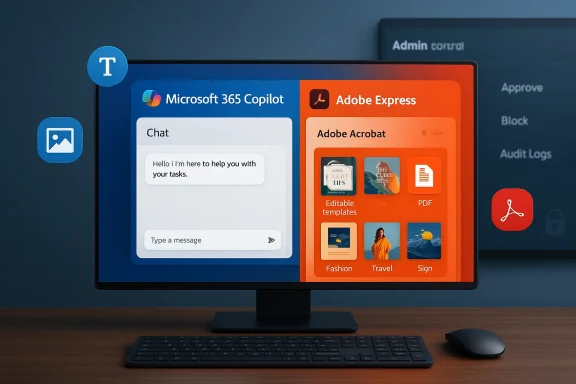
Adobe is bringing Adobe Express and Adobe Acrobat directly into Microsoft 365 Copilot via the Microsoft 365 Agent Store, a move that embeds design and PDF tooling into Copilot Chat so users can generate, edit and export creative assets and PDFs without leaving their Microsoft workflows.
Adobe and Microsoft have been aligning their products around an “agents” model for months. At Adobe Summit 2025 the company previewed the Adobe Express Agent for Microsoft 365 Copilot, and since then Adobe has pursued two parallel strategies: embedding generative AI (Firefly) inside its own apps and making those same creative capabilities available inside third‑party AI platforms where users already work.
That strategy accelerated toward the end of 2025 when Adobe placed Express, Acrobat and even Photoshop inside ChatGPT, demonstrating how Adobe’s creativity engines can be invoked by a chat interface and return editable file artifacts instead of static images. The Copilot move is the natural enterprise‑focused extension of that work: instead of hopping between separate apps, marketing teams, comms staff and knowledge workers will be able to call Adobe features from within Copilot Chat and the Agent Store.
Microsoft has also been building the infrastructure to make this safe and manageable for IT: the Microsoft 365 Agent Store is the controlled marketplace for agents, and administrators can review, allow, block or deploy partner agents to chosen groups inside their tenant. The Agent Store is the distribution point for partner experiences that surface inside Microsoft 365 Copilot, Teams and other Copilot endpoints.
If you manage a Microsoft 365 tenancy, start the internal conversation now: map the use cases, contact Adobe for enterprise entitlements and prepare admin policies in the Copilot Control System so the integration becomes an accelerant — not a governance headache.
Adobe’s Express and Acrobat arriving inside Microsoft 365 Copilot is a significant step in bringing professional creative and document editing work into enterprise chat workflows. The integration promises tangible productivity gains and a lower barrier to creativity, but the payoff depends squarely on clear licensing answers from Adobe and careful governance from IT. Organizations that pair this new capability with deliberate policy, auditing and a staged rollout will likely see the best results; those that treat it as just another “auto‑install” risk exposing sensitive data and adding operational friction.
Source: TechRadar Adobe Express and Acrobat come for business users in Microsoft 365 Copilot
 Background and overview
Adobe and Microsoft have been aligning their products around an “agents” model for months. At Adobe Summit 2025 the company previewed the Adobe Express Agent for Microsoft 365 Copilot, and since then Adobe has pursued two parallel strategies: embedding generative AI (Firefly) inside its own apps and making those same creative capabilities available inside third‑party AI platforms where users already work.That strategy accelerated toward the end of 2025 when Adobe placed Express, Acrobat and even Photoshop inside ChatGPT, demonstrating how Adobe’s creativity engines can be invoked by a chat interface and return editable file artifacts instead of static images. The Copilot move is the natural enterprise‑focused extension of that work: instead of hopping between separate apps, marketing teams, comms staff and knowledge workers will be able to call Adobe features from within Copilot Chat and the Agent Store.
Microsoft has also been building the infrastructure to make this safe and manageable for IT: the Microsoft 365 Agent Store is the controlled marketplace for agents, and administrators can review, allow, block or deploy partner agents to chosen groups inside their tenant. The Agent Store is the distribution point for partner experiences that surface inside Microsoft 365 Copilot, Teams and other Copilot endpoints.
What the integration actually does — features you’ll see in Copilot Chat
Within Copilot Chat, the Adobe integrations provide two distinct but related experiences: an Adobe Express experience for rapid graphic and layout creation, and an Acrobat experience for PDF creation and editing. The initial public descriptions and previews outline a practical set of capabilities:- Adobe Express in Copilot Chat:
- Browse and apply Express design templates from inside Copilot.
- Adjust text and copy, swap images, and generate or replace images with AI (Adobe Firefly‑powered image generation).
- Add simple animations and motion effects suitable for social posts and slides.
- Generate an editable Express file directly from chat so the result exists both in the conversation and in the Adobe Express app for deeper edits.
- Adobe Acrobat in Copilot Chat:
- Create, organize and edit PDFs inside the chat interface.
- Extract text and tables, merge and split files, compress and convert formats, and make targeted edits to PDF content without opening Acrobat separately.
Why this matters for business users
- Faster creative iteration where work happens. Embedding Adobe tools in Copilot removes friction between ideation, asset creation and distribution. That matters most in fast cycles — marketing updates, internal comms, pitch decks, sales collateral and HR notices.
- Lower learning barrier for non‑designers. Express is already aimed at rapid template‑based design; embedding it in Copilot means employees who don’t know a full design tool can still create acceptable, brandable assets quickly. Adobe describes this as part of a strategy to “make creativity more accessible.”
- Better continuity between AI generation and human editability. One common friction with plain chat‑based image generation is the difficulty of refining results. When Copilot returns an Express file, the output is a human‑editable artifact from the start, which improves handoff to designers and downstream workflows.
- PDF workflows without context switching. Acrobat’s editing features in Copilot mean document cleanup and conversions (for example, turning a messy export into a clean, shareable PDF) can be done inline, reducing the “open‑app, edit, save, attach” loop that wastes time.
How deployment and governance work — what IT admins should know
Microsoft built the Agent Store with enterprise controls in mind. The admin surface called the Copilot Control System (Microsoft 365 admin center) lets administrators:- Approve, block or remove third‑party agents.
- Assign agents to specific users or groups and limit exposure.
- Review agent data handling and privacy terms before deployment.
- Audit agent actions, logging and reporting for compliance.
- Agents published in the Agent Store do not automatically become tenant‑wide available; admins must approve and can restrict them to security groups or departments.
- Microsoft recommends reviewing the publisher’s terms and data handling policies before enabling an external agent, which is particularly important when an agent may process corporate or regulated data.
- Organizations with tighter access policies can disable third‑party agents entirely until they complete a security assessment. Admin controls exist to allow or disallow apps and agents built by external publishers.
Licensing and account questions — what’s clear and what remains ambiguous
Public reporting indicates the apps will appear in the Microsoft 365 Agent Store “in the coming weeks,” quoting Adobe Express SVP Govind Balakrishnan, but the rollout details remain high level at announcement time. Microsoft’s Agent Store availability is gated to users with a Microsoft 365 Copilot license, and administrators control whether an agent can be used in a tenant. That means to get to Adobe inside Copilot you will generally need:- A tenant with Microsoft 365 Copilot enabled, and
- Organizational admin approval to install or permit the Adobe agents from the Agent Store.
- Adobe account and licensing: When Adobe placed Express and Acrobat inside ChatGPT, Adobe required users to register with an Adobe account to use the integrations, and some functionality depended on Adobe account tiers. It is reasonable to expect there will be similar identity or entitlement checks for Copilot agents (for example, an Adobe account may be needed to access paid assets, brand templates or subscription‑only features). Adobe’s prior messaging about ChatGPT required registration, so treat absence of a clear Copilot pricing note as unverified until Adobe publishes explicit licensing terms for Copilot.
- Paywall vs. free features: Adobe has sometimes unbundled limited features for free in third‑party integrations while keeping advanced capabilities behind subscription plans. At present there is no definitive public statement that every Express/Acrobat capability in Copilot will be available to all users for free; that may vary by feature and by whether the user’s organization holds an Adobe license. Treat any public claims about universal free access as provisional until Adobe posts formal licensing guidance for the Agent Store launch.
Security, privacy and compliance analysis — where the risks live
Bringing third‑party creative tools into a chat assistant is a powerful productivity win, but it also introduces new vectors organizations must evaluate.- Data exposure risk: Agents often process files and prompts that include proprietary text, product roadmaps, customer data or images. Microsoft’s admin docs explicitly advise reviewing third‑party agent terms and data handling practices before enabling them in a tenant; admins should verify whether Adobe processes data in‑tenant, in Microsoft’s infrastructure, on Adobe servers, or across both. This matters for regulated sectors or where data residency rules apply.
- Model training and IP containment: If a user’s prompt or uploaded image is sent to Adobe for Firefly generation or Acrobat processing, organizations must understand whether that input could be used to further train vendor models. Adobe has previously defined policies for Firefly use, but the enterprise boundaries for inputs passing through a Copilot agent should be explicitly confirmed with Adobe and Microsoft. Where legal protections, NDAs or IP ownership are concerned, have procurement/legal teams get a specific, written answer.
- Administrative control is necessary but operationally heavy: While Microsoft supplies granular controls (allow/block, group assignment, auditing), those controls require active configuration. Some tenants will enable partner agents for some teams and not others; others will block them entirely until they complete longer security reviews. Expect operational work to align policies to agent availability.
- Auditability and logging: The Copilot management console and Microsoft 365 admin center provide reporting and audit trails for agent actions, which is essential for compliance. IT should confirm what logs are kept, for how long, and whether those logs capture the agent’s inputs and outputs in ways required by eDiscovery and forensic processes.
Practical scenarios and use cases — where teams will see impact first
- Marketing and comms: Rapid asset generation for social, email headers and slide decks will compress cycles. Non‑designer marketers can generate a first pass design in Copilot and hand the artifact to a designer for polishing in Express.
- Sales enablement: Customized one‑pagers and localized collateral can be produced on demand without a designer queue, useful for field sales needing last‑minute assets. Copilot + Express simplifies templated personalization.
- Legal and contracts teams: Acrobat in Copilot enables quick redaction, extraction of tables and single‑pane PDF edits, which speeds simple document prep tasks before passing to lawyers for final review. But legal teams should control access to Acrobat agents until data handling is fully validated.
- HR and internal comms: Policy notices, onboarding materials and event flyers can be iterated and localized quickly, with templates ensuring brand consistency through Express. Admins can restrict the feature to HR groups to prevent misuse.
Strengths — why this is a meaningful product step
- Real workflow integration: Putting creative tooling inside Copilot aligns asset creation with the rest of your work—drafting, approvals and distribution—reducing the need to context switch between apps.
- Democratization of creativity: Express lowers the skill barrier to producing decent visual content; inside Copilot it becomes accessible to even more users who otherwise wouldn’t open a design app.
- Editable outputs, not just images: Generative results that are immediately editable files (Express projects or Acrobat PDFs) improve handoffs and iteration compared with static image outputs from some chat‑only generators.
- Enterprise governance baked in: Microsoft’s admin controls and Agent Store model provide the scaffolding for secure deployment when organizations use the management controls responsibly.
Risks and weaknesses — what organizations must guard against
- Ambiguity in licensing and entitlements: Without formal, published licensing details for the Copilot Agent Store integrations, procurement and finance teams lack clarity on cost and content entitlements. This is especially important for feature‑gated capabilities tied to paid Adobe plans. Treat initial launch messaging as provisional until vendors publish explicit licensing terms.
- Data governance and training exposure: Unless contracts or technical measures explicitly prevent it, inputs sent to external vendor services could be used in model improvements or stored outside allowed boundaries. Enterprises must insist on contractual assurances and technical controls.
- Operational overhead for admins: The ability to permit or block agents is useful, but it increases the work load for Microsoft 365 administrators who must classify agents, assign approvals, and answer user access requests. Rolling out dozens of partner agents without a governance playbook will create security gaps.
- Over‑reliance on AI defaults: Designers and legal reviewers must watch for AI‑introduced errors — branding mis‑matches, incorrect formatting, or subtle legal phrasing flaws — that look acceptable but could cause reputational or compliance problems if distributed without review. Human review remains essential.
Recommended rollout checklist for IT and procurement teams
- Inventory: Identify which teams would benefit and what data those teams will process using Adobe agents.
- Legal & procurement: Request Adobe’s enterprise terms for Agent Store integrations and secure written confirmation on data handling and model training policies.
- Pilot: Approve Adobe agents for a small, controlled group (marketing or internal comms) and run a 30‑ to 60‑day pilot to collect usage, security and compliance data.
- Admin controls: Configure Copilot Control System policies to restrict agent visibility to approved groups, enable auditing and set retention for agent action logs.
- Training: Educate end users on when to use Copilot‑Adobe flows and when to escalate to designers or legal reviews before publishing.
- Review: After pilot, assess integration value, total cost of ownership and expand access only when governance and KPIs satisfy stakeholders.
Where this fits in the broader vendor strategies
Adobe is pursuing a hybrid approach: make Firefly and other generative capabilities core to its apps while also making those capabilities available inside widely used third‑party AI platforms. That serves two goals: grow adoption by meeting users where they work (ChatGPT, Copilot), and funnel users toward Adobe’s own apps for deeper work. Microsoft’s Agent Store, meanwhile, helps Microsoft turn Copilot from a personal assistant into a partner ecosystem where specialists (Adobe, Box, Figma, etc.) bring their domain capabilities into a single conversational surface. Together, the two moves accelerate the promise of agentic multitool workflows — so long as enterprises keep governance in step.Final assessment — what to expect in the weeks ahead
Expect a staged rollout: the apps are scheduled to appear in the Microsoft 365 Agent Store “in the coming weeks” per Adobe’s public comments, and Microsoft’s documentation confirms that partner agents will be distributed through that store to eligible Copilot users once admins approve them. Early adopters (marketing teams, sales enablement and internal comms) will see the most immediate benefit; security‑sensitive teams should pause until procurement and legal validate data terms.If you manage a Microsoft 365 tenancy, start the internal conversation now: map the use cases, contact Adobe for enterprise entitlements and prepare admin policies in the Copilot Control System so the integration becomes an accelerant — not a governance headache.
Adobe’s Express and Acrobat arriving inside Microsoft 365 Copilot is a significant step in bringing professional creative and document editing work into enterprise chat workflows. The integration promises tangible productivity gains and a lower barrier to creativity, but the payoff depends squarely on clear licensing answers from Adobe and careful governance from IT. Organizations that pair this new capability with deliberate policy, auditing and a staged rollout will likely see the best results; those that treat it as just another “auto‑install” risk exposing sensitive data and adding operational friction.
Source: TechRadar Adobe Express and Acrobat come for business users in Microsoft 365 Copilot