

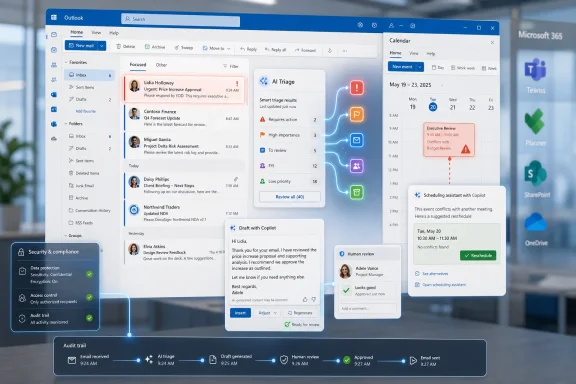
Microsoft began rolling out agentic Copilot experiences for Outlook on April 27, 2026, through its Frontier early-access program, giving Copilot the ability to triage inboxes, draft follow-ups, surface urgent mail, and help resolve calendar conflicts across Outlook for Windows, web, and related endpoints. The change is not just another AI button in the ribbon. It is Microsoft’s clearest attempt yet to turn Outlook from a communication archive into an operating layer for work. That makes it useful, risky, and far more consequential than another round of “help me write this email” demos.
For most of its life inside Microsoft 365, Copilot has been easiest to understand as a well-connected assistant. It could summarize a thread, draft a reply, find a file, or turn a meeting transcript into notes. That was helpful, but it was still basically reactive: the human asked, the model answered, and the work remained stubbornly human-owned.
The new Outlook push changes the posture. Microsoft is now positioning Copilot as something that watches work accumulate and starts making decisions about it before the user explicitly asks. In plain English, Outlook Copilot is moving from “tell me what happened” toward “keep this from becoming a mess.”
That distinction matters because email and calendars are not side channels in most organizations. They are the unofficial transaction log of the company. Decisions, approvals, escalations, customer promises, vendor disputes, project delays, hiring loops, security warnings, invoices, and executive drive-bys all eventually find their way into Outlook.
Microsoft knows this. Outlook is one of the few enterprise surfaces with enough daily repetition, enough structured metadata, and enough user pain to make agentic AI feel less like a speculative future and more like a plausible workflow product. If Copilot can reduce inbox drag without causing political or operational damage, it earns its keep faster than a chatbot buried inside a portal.
That is why Outlook is such an attractive target for Microsoft. An AI agent does not need to understand every domain-specific workflow to provide some immediate value. It can begin with the repetitive burden that nearly everyone recognizes: unread messages, abandoned threads, stale follow-ups, calendar collisions, and the grim Monday ritual of reconstructing what happened while you were away.
The reported feature set is aimed squarely at that administrative sludge. Copilot can identify messages that have not received a reply after a set period, draft follow-ups, summarize missed mail after leave, identify urgent items, suggest what can be archived, and help make calendar adjustments. On the calendar side, Microsoft is pushing the idea that Copilot can spot conflicts, reschedule one-to-one meetings, rebook rooms, protect focus time, and recommend which meetings deserve attendance.
None of that sounds magical because none of it is conceptually new. Human executive assistants, project coordinators, sales operations staff, and overloaded managers have done versions of this for decades. The difference is that Microsoft wants to give the pattern to every licensed knowledge worker, wrapped in the existing Microsoft 365 security and compliance perimeter.
That is the commercial bet. Copilot does not need to write a perfect strategy memo to justify itself. It needs to save enough time in the most repetitive layers of work that finance departments stop seeing the license as an experiment.
A missed email from a peer can be low priority. A missed email from the general counsel, a major customer, or a manager two levels up is not. A meeting conflict may be easy to resolve when it involves two routine check-ins. It is harder when one invitation is a relationship-maintenance meeting that looks optional on paper but matters greatly in practice.
This is where agentic Outlook runs into the same wall as every enterprise AI system: context is not the same thing as data access. Copilot may be grounded in mail, calendar, meetings, and files, but it does not automatically understand the hidden hierarchy of commitments that live in a person’s head. It can see that a thread is unanswered. It may not know that the silence is intentional.
Microsoft’s safety framing leans heavily on visibility and user control. Actions can be reviewed and adjusted, and the company’s broader agent strategy emphasizes human approval for meaningful actions. That is the right direction, but it does not eliminate the problem. A review step is only useful if the user has time and discipline to review.
The paradox is obvious. The people most likely to benefit from an inbox agent are also the people most likely to rubber-stamp its suggestions when buried under work. If Copilot becomes another queue to approve, the productivity gain shrinks. If it starts acting too freely, the risk rises.
This is especially true in Outlook because much of the work is implicit. Teams often rely on subject-line archaeology, informal side channels, and personal memory to know what matters. If five projects share the same vendor name, if meeting titles are vague, if approvals are buried in forwarded threads, and if important decisions happen in hallway conversations or private chats, an agent has to infer too much.
That does not mean the technology is useless. It means the first wave of successful deployments will probably belong to organizations that already have decent information hygiene. Sales teams with clean CRM discipline, consulting teams with consistent account naming, legal teams with strong matter conventions, and IT groups with ticket-linked communication will be better positioned than teams whose entire operating model is “someone will remember.”
For sysadmins and Microsoft 365 administrators, this is the part worth watching. The rollout is not merely a user-experience change. It is a stress test for governance, retention, sensitivity labeling, mailbox permissions, meeting culture, and change management. Copilot can only act safely if the environment gives it reliable boundaries.
That matters because the term “preview” can make risky features feel smaller than they are. An experimental inbox agent is not the same as an experimental icon set or a new ribbon layout. It lives close to customer communication, executive scheduling, and regulated data. Even if actions remain reviewable, the feature changes user expectations about what Microsoft 365 is allowed to do on their behalf.
Frontier also creates an adoption split. Enthusiastic users and AI-forward departments will want early access because they can see the immediate convenience. Central IT may see a different picture: inconsistent user behavior, unclear support boundaries, and a fresh round of “why did Copilot do that?” tickets.
That tension is familiar. Microsoft has spent years pushing cloud features into tenants faster than many administrators would prefer, then adding controls as enterprise feedback arrives. With agentic Outlook, the stakes are higher because the agent is not just displaying information. It is preparing work product and proposing operational decisions.
Microsoft has been moving Planner, To Do, Loop, Teams, and Copilot closer together for years, but the lived experience remains uneven. Some capabilities are arriving through Planner Agent and Microsoft 365 Copilot integrations, while other task flows still feel fragmented depending on tenant configuration, licensing, preview enrollment, and app surface. The result is a classic Microsoft productivity problem: the pieces are powerful, but the seams are visible.
For Outlook Copilot, that matters because an agent that identifies work but cannot reliably place it into the organization’s chosen work-management system is only halfway there. It can say, “These five things need attention.” It can draft the messages around them. But if the user still has to manually create tasks, reconcile duplicates, or decide whether Planner, To Do, Loop, Teams, or a third-party tool is the source of truth, the administrative burden has not disappeared. It has moved.
This is the difference between inbox relief and workflow transformation. The former is valuable. The latter requires Microsoft to make task ownership across Microsoft 365 feel boringly dependable. Until that happens, Outlook Copilot will be strongest as a triage and drafting layer, not a complete work-orchestration system.
The company can point to identity, permissions, compliance controls, auditing, data residency commitments, and administrative management as reasons to keep AI assistance inside the tenant. For regulated organizations, those controls are not decoration. They are the difference between a pilot and a procurement rejection.
But security boundaries do not solve every form of trust. An AI agent can be secure and still make a bad recommendation. It can follow permissions correctly and still misunderstand tone. It can act within policy and still create organizational friction by nudging a user to skip the wrong meeting or send the wrong follow-up.
That is why administrators should separate two questions that vendors often blend together. The first is whether Copilot can access and process data in a compliant way. The second is whether users should rely on its judgment for communication decisions. A “yes” to the first does not automatically produce a “yes” to the second.
Summarizing a backlog after vacation is a good example. The user still decides what to do, but Copilot reduces the time required to regain situational awareness. Drafting a follow-up for a plainly unanswered routine thread is another good fit, particularly when the message remains unsent until reviewed.
Focus-time protection can also be useful if the organization already respects focus time. If a company treats every open slot as free real estate, Copilot will not fix the culture. It will simply become another participant in the calendar war.
The riskier use cases are the ones that require social judgment. Declining meetings, deciding what can be ignored, sending messages in the user’s name, or resolving conflicts involving senior stakeholders all require caution. Those are not impossible tasks for an agent to assist with, but they should not be the starting line.
Admins need to know who is eligible for Frontier features, which departments can test agentic workflows, what review settings are required, how sensitive mailboxes are handled, and how incidents will be reported. Legal, HR, finance, executive offices, and customer-facing teams may need different rules. A one-size-fits-all toggle is unlikely to survive contact with reality.
Training also needs to change. Prompt tips are not enough. Users need to understand the difference between drafting and sending, between summarizing and deciding, between a suggested calendar change and an approved one. The policy should make clear that Copilot is allowed to be useful without being authoritative.
There is also a support burden hiding here. Help desks will need scripts for complaints that are not traditional bugs: “Copilot missed an important email,” “Copilot drafted something too blunt,” “Copilot suggested declining a meeting I should have attended,” or “Copilot summarized this thread incorrectly.” Those cases sit awkwardly between product support, user education, and organizational process failure.
If Copilot saves a user 15 minutes a day but creates one awkward communication failure a month, some people will still accept the trade. Others will not. If it helps a sales team chase stale leads faster, revenue leaders may forgive occasional clumsy drafts. If it mishandles legal, HR, or executive communication, the tolerance will be far lower.
That is why Microsoft’s challenge is less about dazzling demos and more about predictable behavior. Enterprise software succeeds when users can build habits around it. An inbox agent that is occasionally brilliant but unpredictably wrong will be harder to trust than one that is modest, constrained, and consistent.
The market has already seen enough AI novelty. The next phase is about whether AI can become mundane infrastructure. Outlook is a good place to test that because the work is repetitive, high-volume, and measurable. It is also a dangerous place to test it because the human consequences of communication mistakes are immediate.
 Microsoft Has Stopped Selling Copilot as a Better Search Box
For most of its life inside Microsoft 365, Copilot has been easiest to understand as a well-connected assistant. It could summarize a thread, draft a reply, find a file, or turn a meeting transcript into notes. That was helpful, but it was still basically reactive: the human asked, the model answered, and the work remained stubbornly human-owned.The new Outlook push changes the posture. Microsoft is now positioning Copilot as something that watches work accumulate and starts making decisions about it before the user explicitly asks. In plain English, Outlook Copilot is moving from “tell me what happened” toward “keep this from becoming a mess.”
That distinction matters because email and calendars are not side channels in most organizations. They are the unofficial transaction log of the company. Decisions, approvals, escalations, customer promises, vendor disputes, project delays, hiring loops, security warnings, invoices, and executive drive-bys all eventually find their way into Outlook.
Microsoft knows this. Outlook is one of the few enterprise surfaces with enough daily repetition, enough structured metadata, and enough user pain to make agentic AI feel less like a speculative future and more like a plausible workflow product. If Copilot can reduce inbox drag without causing political or operational damage, it earns its keep faster than a chatbot buried inside a portal.
The Inbox Was Always the Obvious Place to Put an Agent
Email overload is one of those problems that survives every promised replacement for email. Teams, Slack, Loop, SharePoint, Planner, Jira, and half a dozen line-of-business systems have not killed the inbox. They have simply taught people to receive notifications from more places.That is why Outlook is such an attractive target for Microsoft. An AI agent does not need to understand every domain-specific workflow to provide some immediate value. It can begin with the repetitive burden that nearly everyone recognizes: unread messages, abandoned threads, stale follow-ups, calendar collisions, and the grim Monday ritual of reconstructing what happened while you were away.
The reported feature set is aimed squarely at that administrative sludge. Copilot can identify messages that have not received a reply after a set period, draft follow-ups, summarize missed mail after leave, identify urgent items, suggest what can be archived, and help make calendar adjustments. On the calendar side, Microsoft is pushing the idea that Copilot can spot conflicts, reschedule one-to-one meetings, rebook rooms, protect focus time, and recommend which meetings deserve attendance.
None of that sounds magical because none of it is conceptually new. Human executive assistants, project coordinators, sales operations staff, and overloaded managers have done versions of this for decades. The difference is that Microsoft wants to give the pattern to every licensed knowledge worker, wrapped in the existing Microsoft 365 security and compliance perimeter.
That is the commercial bet. Copilot does not need to write a perfect strategy memo to justify itself. It needs to save enough time in the most repetitive layers of work that finance departments stop seeing the license as an experiment.
The First Real Test Is Not Intelligence, but Judgment
The uncomfortable part is that inbox management is not merely clerical. It looks clerical from a distance because the surface area is banal: replies, reminders, meetings, flags, folders. But the meaning underneath those actions is often political.A missed email from a peer can be low priority. A missed email from the general counsel, a major customer, or a manager two levels up is not. A meeting conflict may be easy to resolve when it involves two routine check-ins. It is harder when one invitation is a relationship-maintenance meeting that looks optional on paper but matters greatly in practice.
This is where agentic Outlook runs into the same wall as every enterprise AI system: context is not the same thing as data access. Copilot may be grounded in mail, calendar, meetings, and files, but it does not automatically understand the hidden hierarchy of commitments that live in a person’s head. It can see that a thread is unanswered. It may not know that the silence is intentional.
Microsoft’s safety framing leans heavily on visibility and user control. Actions can be reviewed and adjusted, and the company’s broader agent strategy emphasizes human approval for meaningful actions. That is the right direction, but it does not eliminate the problem. A review step is only useful if the user has time and discipline to review.
The paradox is obvious. The people most likely to benefit from an inbox agent are also the people most likely to rubber-stamp its suggestions when buried under work. If Copilot becomes another queue to approve, the productivity gain shrinks. If it starts acting too freely, the risk rises.
Outlook Automation Will Expose Bad Workflows Faster Than It Fixes Them
The promise of AI productivity has always been vulnerable to a simple truth: automation amplifies the process it is given. A well-structured inbox, clear meeting norms, consistent project naming, and disciplined ownership can make Copilot look clever. A chaotic organization can make the same system look like a hallucination machine with a corporate email address.This is especially true in Outlook because much of the work is implicit. Teams often rely on subject-line archaeology, informal side channels, and personal memory to know what matters. If five projects share the same vendor name, if meeting titles are vague, if approvals are buried in forwarded threads, and if important decisions happen in hallway conversations or private chats, an agent has to infer too much.
That does not mean the technology is useless. It means the first wave of successful deployments will probably belong to organizations that already have decent information hygiene. Sales teams with clean CRM discipline, consulting teams with consistent account naming, legal teams with strong matter conventions, and IT groups with ticket-linked communication will be better positioned than teams whose entire operating model is “someone will remember.”
For sysadmins and Microsoft 365 administrators, this is the part worth watching. The rollout is not merely a user-experience change. It is a stress test for governance, retention, sensitivity labeling, mailbox permissions, meeting culture, and change management. Copilot can only act safely if the environment gives it reliable boundaries.
Frontier Is a Preview Program, but It Is Also a Signpost
Microsoft’s decision to put these features in the Frontier program is doing two things at once. On the surface, it is the usual preview-channel maneuver: give early adopters access, collect telemetry, refine the experience, and avoid pretending the product is finished before real tenants touch it. Underneath that, Frontier is becoming the staging ground for Microsoft’s bigger shift toward agent-operated work.That matters because the term “preview” can make risky features feel smaller than they are. An experimental inbox agent is not the same as an experimental icon set or a new ribbon layout. It lives close to customer communication, executive scheduling, and regulated data. Even if actions remain reviewable, the feature changes user expectations about what Microsoft 365 is allowed to do on their behalf.
Frontier also creates an adoption split. Enthusiastic users and AI-forward departments will want early access because they can see the immediate convenience. Central IT may see a different picture: inconsistent user behavior, unclear support boundaries, and a fresh round of “why did Copilot do that?” tickets.
That tension is familiar. Microsoft has spent years pushing cloud features into tenants faster than many administrators would prefer, then adding controls as enterprise feedback arrives. With agentic Outlook, the stakes are higher because the agent is not just displaying information. It is preparing work product and proposing operational decisions.
The Planner and To Do Gap Shows the Workflow Is Still Unfinished
One of the most revealing details in the broader Copilot story is not what Outlook Copilot can do, but where the handoff still breaks. Inbox triage is useful, but work rarely ends as an email summary. Eventually, someone needs a task, an owner, a due date, a project board, a reminder, or a tracked commitment.Microsoft has been moving Planner, To Do, Loop, Teams, and Copilot closer together for years, but the lived experience remains uneven. Some capabilities are arriving through Planner Agent and Microsoft 365 Copilot integrations, while other task flows still feel fragmented depending on tenant configuration, licensing, preview enrollment, and app surface. The result is a classic Microsoft productivity problem: the pieces are powerful, but the seams are visible.
For Outlook Copilot, that matters because an agent that identifies work but cannot reliably place it into the organization’s chosen work-management system is only halfway there. It can say, “These five things need attention.” It can draft the messages around them. But if the user still has to manually create tasks, reconcile duplicates, or decide whether Planner, To Do, Loop, Teams, or a third-party tool is the source of truth, the administrative burden has not disappeared. It has moved.
This is the difference between inbox relief and workflow transformation. The former is valuable. The latter requires Microsoft to make task ownership across Microsoft 365 feel boringly dependable. Until that happens, Outlook Copilot will be strongest as a triage and drafting layer, not a complete work-orchestration system.
The Security Argument Is Stronger Than the Trust Argument
Microsoft’s best enterprise argument for agentic Outlook is not that AI is inherently trustworthy. It is that if employees are going to use AI to manage work, most organizations would rather have that happen inside Microsoft 365 than through unsanctioned tools. That is a practical argument, and it will land with many CIOs.The company can point to identity, permissions, compliance controls, auditing, data residency commitments, and administrative management as reasons to keep AI assistance inside the tenant. For regulated organizations, those controls are not decoration. They are the difference between a pilot and a procurement rejection.
But security boundaries do not solve every form of trust. An AI agent can be secure and still make a bad recommendation. It can follow permissions correctly and still misunderstand tone. It can act within policy and still create organizational friction by nudging a user to skip the wrong meeting or send the wrong follow-up.
That is why administrators should separate two questions that vendors often blend together. The first is whether Copilot can access and process data in a compliant way. The second is whether users should rely on its judgment for communication decisions. A “yes” to the first does not automatically produce a “yes” to the second.
The Best Early Use Cases Are Boring, Which Is Good
The smart way to adopt agentic Outlook is not to let it cosplay as a chief of staff on day one. The smart way is to give it the dull jobs where the cost of error is low and the benefit of consistency is high.Summarizing a backlog after vacation is a good example. The user still decides what to do, but Copilot reduces the time required to regain situational awareness. Drafting a follow-up for a plainly unanswered routine thread is another good fit, particularly when the message remains unsent until reviewed.
Focus-time protection can also be useful if the organization already respects focus time. If a company treats every open slot as free real estate, Copilot will not fix the culture. It will simply become another participant in the calendar war.
The riskier use cases are the ones that require social judgment. Declining meetings, deciding what can be ignored, sending messages in the user’s name, or resolving conflicts involving senior stakeholders all require caution. Those are not impossible tasks for an agent to assist with, but they should not be the starting line.
IT Departments Need a Copilot Policy That Is More Than a License Map
Many organizations have treated Microsoft 365 Copilot adoption as a licensing, enablement, and training project. That was defensible when Copilot was mostly a user-invoked assistant. Agentic Outlook requires a more operational policy.Admins need to know who is eligible for Frontier features, which departments can test agentic workflows, what review settings are required, how sensitive mailboxes are handled, and how incidents will be reported. Legal, HR, finance, executive offices, and customer-facing teams may need different rules. A one-size-fits-all toggle is unlikely to survive contact with reality.
Training also needs to change. Prompt tips are not enough. Users need to understand the difference between drafting and sending, between summarizing and deciding, between a suggested calendar change and an approved one. The policy should make clear that Copilot is allowed to be useful without being authoritative.
There is also a support burden hiding here. Help desks will need scripts for complaints that are not traditional bugs: “Copilot missed an important email,” “Copilot drafted something too blunt,” “Copilot suggested declining a meeting I should have attended,” or “Copilot summarized this thread incorrectly.” Those cases sit awkwardly between product support, user education, and organizational process failure.
The Productivity Story Will Be Won or Lost in the Middle Layer
Executives tend to discuss AI productivity in sweeping terms: hours saved, work transformed, organizational agility unlocked. Individual users experience it at a much smaller scale: fewer clicks, fewer forgotten replies, fewer mornings lost to inbox recovery. The truth of agentic Outlook will sit between those levels.If Copilot saves a user 15 minutes a day but creates one awkward communication failure a month, some people will still accept the trade. Others will not. If it helps a sales team chase stale leads faster, revenue leaders may forgive occasional clumsy drafts. If it mishandles legal, HR, or executive communication, the tolerance will be far lower.
That is why Microsoft’s challenge is less about dazzling demos and more about predictable behavior. Enterprise software succeeds when users can build habits around it. An inbox agent that is occasionally brilliant but unpredictably wrong will be harder to trust than one that is modest, constrained, and consistent.
The market has already seen enough AI novelty. The next phase is about whether AI can become mundane infrastructure. Outlook is a good place to test that because the work is repetitive, high-volume, and measurable. It is also a dangerous place to test it because the human consequences of communication mistakes are immediate.
The Real Outlook Copilot Test Starts After the Demo
The practical message for WindowsForum readers is not to panic and not to swoon. Agentic Copilot in Outlook is a meaningful step, but it is not an inbox autopilot that should be left alone over a long weekend. It is best understood as a junior assistant with excellent access, uneven judgment, and a need for explicit boundaries.- Organizations should start with low-risk workflows such as backlog summaries, routine follow-up drafts, and focus-time suggestions before allowing more autonomous calendar or email actions.
- Users should keep human review in place for anything that sends mail, declines meetings, changes commitments, or touches sensitive relationships.
- Administrators should treat Frontier enrollment as a controlled pilot, not a casual perk for anyone eager to try the newest Copilot feature.
- Teams with poor naming conventions, messy calendars, and unclear task ownership should fix those habits before expecting Copilot to infer order from chaos.
- The biggest productivity gains will come when Outlook triage connects reliably to task tracking, ownership, and project systems rather than stopping at a smarter summary.
References
- Primary source: UC Today
Published: Tue, 09 Jun 2026 09:53:51 GMT
Loading…
www.uctoday.com - Official source: support.microsoft.com
Loading…
support.microsoft.com - Official source: microsoft.com
Frontier Program Features | Microsoft Frontier
Explore the official inventory of Microsoft Frontier features. Track experimental agent capabilities as they evolve from early access to general release.www.microsoft.com
- Official source: techcommunity.microsoft.com
Loading…
techcommunity.microsoft.com - Related coverage: blog-en.topedia.com
Loading…
blog-en.topedia.com - Official source: learn.microsoft.com

Release Notes for Microsoft 365 Copilot
Lists the features that reach General Availability in each release of Microsoft 365 Copilot.learn.microsoft.com
- Related coverage: supersimple365.com
Loading…
supersimple365.com - Related coverage: ai-market-watch.com
Microsoft Copilot in Outlook becomes agentic, triaging emails and rescheduling calendar conflicts
Microsoft rolls out agentic Copilot features for Outlook that autonomously triage emails and reschedule calendar conflicts, leveraging Office distribution to embed AI agents into enterprise workflows.www.ai-market-watch.com
- Related coverage: windowscentral.com

Microsoft is moving the best Copilot features in Office behind a paywall
The "free" access to Copilot inside Word and Excel is ending as Microsoft splits the assistant into "Basic" and "Premium" tiers. www.windowscentral.com
- Related coverage: techradar.com
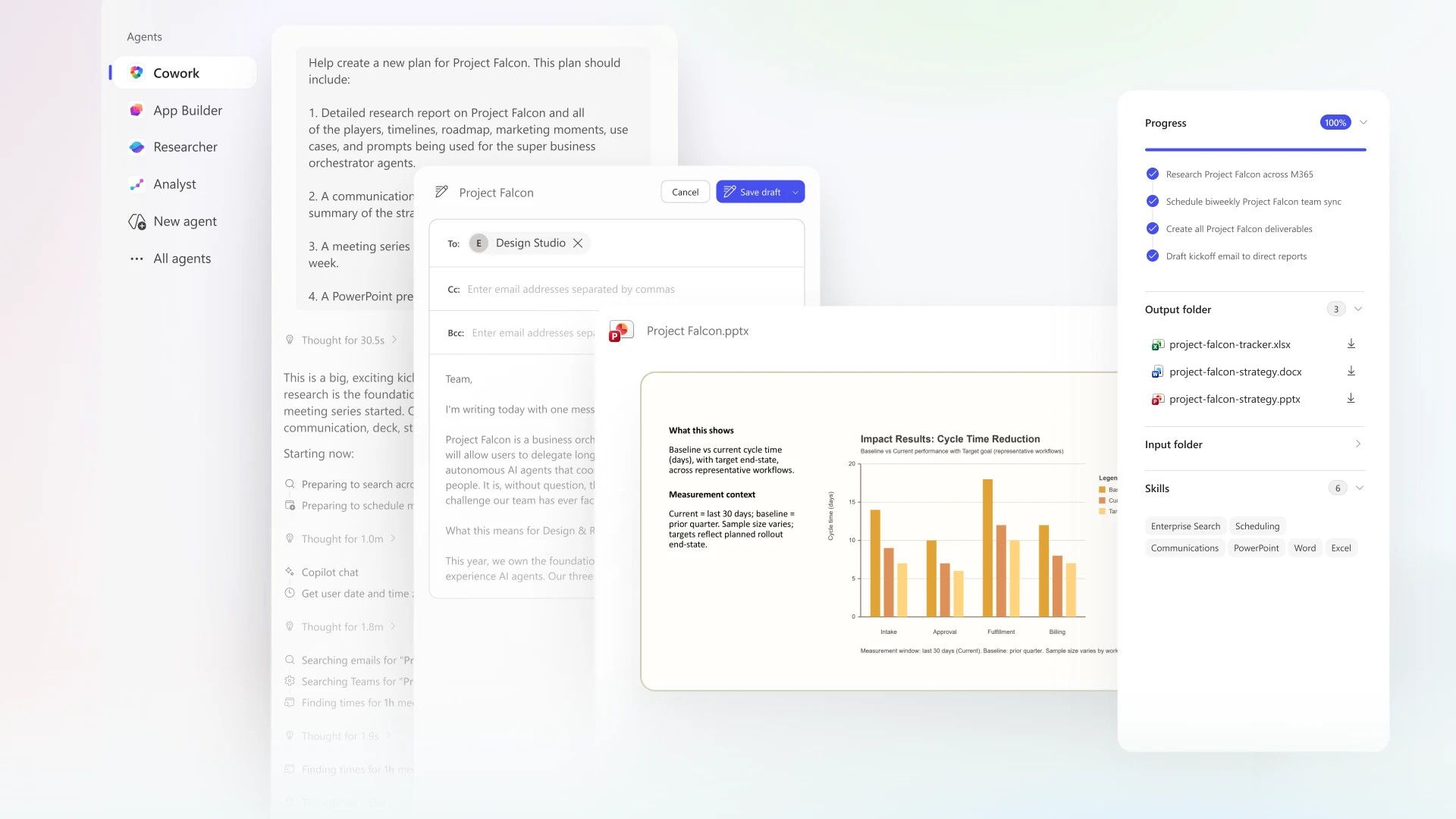
Microsoft's Copilot Cowork uses Anthropic AI to conquer all your biggest work tasks
Microsoft and Anthropic team up to release Copilot Cowork, a more effective way of getting work done.www.techradar.com
- Official source: cdn-dynmedia-1.microsoft.com
Loading…
cdn-dynmedia-1.microsoft.com - Official source: cdn.techcommunity.microsoft.com
Loading…
cdn.techcommunity.microsoft.com