
Signal President Meredith Whittaker warned in a June 2026 interview, amplified by TechCrunch and SC Media, that mainstream AI chatbots and assistants should not be treated as friends, confidants, or trustworthy agents because useful “personal assistant” features demand sweeping access to private data. The warning lands squarely in Windows territory because Microsoft has spent the last two years trying to turn Copilot from a sidebar into a layer of the operating system. Whittaker’s argument is not that chatbots are spooky because they sound human; it is that they become dangerous when vendors ask users to confuse intimacy with permission.
The privacy fight around AI has often been framed as a debate over model training: whether prompts are stored, whether chats improve the system, whether enterprise data is exempt. That framing is too narrow. The more consequential issue is what happens when an assistant is no longer a text box but a delegated actor with access to your browser, files, messages, calendar, payment details, and work identity.
The first wave of generative AI anxiety was easy to understand. Users typed sensitive material into a chatbot, and security teams asked where that text went. Lawyers worried about privileged documents, developers worried about proprietary code, and consumers worried about medical, financial, or relationship details being absorbed into a system they did not control.
That concern has not gone away. But Whittaker’s critique points to a larger and more structural problem: the industry is trying to graduate chatbots into agents. An agent does not merely answer a question. It acts, searches, books, buys, summarizes, messages, schedules, and decides which services it needs to touch along the way.
That shift changes the privacy model entirely. A chatbot with no permissions can still be risky if users paste secrets into it. An agent with broad permissions can become risky even when the user is careful, because the system is designed to roam across the user’s digital life in search of context.
For Windows users, this distinction matters. Microsoft’s AI strategy is not confined to a browser tab. Copilot has appeared across Windows, Edge, Microsoft 365, Teams, Outlook, Paint, Notepad, and the broader Copilot+ PC pitch. Even when individual features are opt-in, the strategic direction is unmistakable: AI is being positioned as a connective tissue between apps and services.
Whittaker’s warning is therefore less an anti-AI slogan than a threat model. The question is not whether an AI assistant can format a document or summarize a web page. The question is what permissions it must obtain before it can become the kind of all-purpose helper that platform companies are promising.
But in security terms, “not your friend” means something more concrete. A friend has social obligations, human judgment, and a relationship that exists outside a terms-of-service document. A chatbot has none of those things. It is a product interface mediated by corporate policy, software architecture, logging rules, moderation systems, model behavior, and business incentives.
That distinction becomes crucial when users begin treating AI as a safe place to think. People already use chatbots to draft private messages, interpret workplace conflict, plan finances, rehearse medical conversations, and make decisions they might once have discussed with another human. The more natural the interface becomes, the easier it is to forget that every interaction is mediated by a platform.
Whittaker’s own reported use of AI is revealing. She said she may use it for narrow clerical work such as formatting, but avoids asking it questions because she worries about outsourcing parts of her thought process. That is a philosophical concern, but it also has a practical privacy dimension: the questions we ask often reveal more than the files we upload.
Search history taught the technology industry this lesson years ago. A list of queries can expose health fears, political interests, legal trouble, employment anxiety, family conflict, and financial distress. Chatbot logs can be even richer because users are encouraged to provide context, emotion, intent, and follow-up detail.
For IT professionals, this is why “AI acceptable use” policies that only say “do not paste confidential data” are already obsolete. The risk is not limited to explicit secrets. It includes inferred secrets, behavioral patterns, organizational structure, decision-making processes, and the metadata around who asks what, when, and in connection with which files or accounts.
Whittaker’s response was to translate that convenience into permissions. To shop meaningfully on someone’s behalf, an assistant would need access to family conversations, personal preferences, browsing behavior, payment credentials, shipping addresses, calendars, messages, and perhaps purchase histories. If the assistant is supposed to infer what relatives want, it may need to read the very conversations people consider private.
That is where the privacy bargain becomes stark. A gift-buying agent is useful precisely because it can cross boundaries. It can see the group chat, remember the budget, compare retailers, coordinate delivery dates, and maybe message a sibling to confirm a detail. Each of those actions sounds modest in isolation. Together, they form a map of a person’s private life.
Signal’s role in the example is not accidental. Secure messaging apps are built around the premise that message content should be protected from intermediaries. If an AI assistant needs to read those messages to be useful, then the assistant becomes a new intermediary, even if the underlying messaging platform remains encrypted.
This is the backdoor argument in plain English. A backdoor does not always look like a government-mandated decryption key. Sometimes it looks like a helpful integration that persuades the user to grant a third-party agent access to data that the service provider itself cannot read.
The industry often responds that users remain in control. They can grant permissions, revoke them, choose settings, and decide which integrations to enable. That is formally true, but it underestimates how consumer software actually works. Defaults, prompts, interface nudges, bundled subscriptions, and “continue” buttons shape behavior far more than privacy dashboards do.
Microsoft has tried to draw distinctions between consumer Copilot, Microsoft 365 Copilot, Copilot Chat, and local AI features on Copilot+ PCs. Those distinctions matter. Enterprise versions come with stronger contractual commitments, service boundaries, compliance controls, and assurances that customer data is not used to train foundation models in the same way consumer interactions may be handled.
But users do not experience Microsoft’s AI portfolio as a neat compliance chart. They experience it as buttons, prompts, side panels, summaries, suggestions, and features appearing across the tools they already use. That creates a governance problem: the brand is unified, while the privacy model varies by product, account type, tenant configuration, license, and feature.
Recall is the obvious example because it turned AI privacy into a Windows household word. Microsoft’s revised architecture emphasizes local processing, opt-in controls, filtering, encryption, and Copilot+ PC security requirements. Those changes were meaningful, and they reflected real backlash from security researchers and users.
Yet Recall also illustrated the deeper trust gap. The problem was not only whether screenshots were stored locally or whether admins could access them. The problem was that Windows users suddenly had to consider an OS feature whose purpose was to remember what they had seen. Even a well-secured memory layer asks users to accept a more intimate relationship with the operating system.
Copilot Vision and other screen-aware tools push the same boundary from a different angle. If an assistant can understand what is on screen, it becomes more useful. It can explain settings, troubleshoot errors, summarize documents, or guide a user through a workflow. But screen awareness is also a privileged position, especially on shared PCs, regulated workstations, or machines that handle client data.
The Windows security model has traditionally treated privileges with suspicion. Admin rights, file access, microphone permission, screen recording, clipboard history, browser cookies, and credential stores are all sensitive because compromise at those layers is powerful. AI does not make those layers less sensitive. It makes vendors more eager to connect them.
But Whittaker’s critique still applies inside the enterprise because permission-respecting systems can still expose permission sprawl. If a user has access to too many SharePoint sites, stale Teams channels, misclassified documents, or legacy mailboxes, an AI assistant can make that overexposure far easier to exploit. The assistant does not need to hack the company; it can simply surface what the user was already allowed to see.
That is both the promise and the danger of Microsoft 365 Copilot. It can collapse hours of searching across email, documents, chats, and meetings into a few seconds. It can also collapse years of bad information governance into an instant answer. The AI layer does not create every data hygiene problem, but it makes the consequences more visible.
Security teams have already started to treat AI rollout as an identity and access management project, not just a productivity pilot. Least privilege, sensitivity labels, data loss prevention, audit logs, retention rules, and conditional access become prerequisites rather than afterthoughts. An assistant that can reason across the Microsoft Graph is only as safe as the graph is clean.
The harder issue is delegated action. Reading is one class of risk; acting is another. Once an assistant can send messages, create tickets, move files, approve workflows, book travel, purchase goods, or execute code, the blast radius expands from data exposure to operational change.
That is why “agentic AI” sounds different to administrators than it does to keynote audiences. In a demo, an agent completing a task feels magical. In a security review, the same agent looks like a non-human actor with ambiguous intent, broad context, uncertain failure modes, and a talent for confidently doing the wrong thing at machine speed.
That asymmetry is one reason Whittaker’s warning resonates. The consumer AI assistant is being sold as a lifestyle product, not as a managed security principal. It promises to reduce friction in precisely the parts of life where people are most exposed: family communication, shopping, travel, dating, health, finance, job hunting, education, and household logistics.
The Christmas-shopping example is almost quaint because it involves a cheerful seasonal task. Substitute “help me negotiate a medical bill,” “reply to my landlord,” “find a new job without my employer knowing,” or “summarize my teenager’s messages,” and the stakes become sharper. The more intimate the task, the more context the assistant needs.
This is where anthropomorphism becomes a privacy risk. If users believe the assistant is a neutral confidant, they will disclose more. If they believe it is a tool owned by a company with data practices, retention policies, and commercial incentives, they may behave differently.
The problem is not that every AI interaction is equally dangerous. Asking for a regex, summarizing a public article, formatting a table, or generating a draft from non-sensitive material may be perfectly reasonable. The problem is that the same interface that handles harmless tasks also invites confessional use.
A browser search box never pretended to care about you. A chatbot does, at least stylistically. That difference matters because privacy failures often begin with misplaced trust rather than technical ignorance.
That makes AI agents awkward for secure messaging. A secure messenger can protect data in transit and at rest, but it cannot protect a conversation from a user who voluntarily grants another application the right to read the screen, scrape notifications, ingest exports, or act through accessibility-style hooks. Security boundaries weaken when the operating system or user-authorized agent sits above the app.
Signal has already responded to Windows privacy concerns in the past by adding screen-security measures intended to reduce exposure to screen capture systems. That kind of defensive engineering is telling. Privacy apps are being forced to defend not only against attackers, but against platform features marketed as convenience.
The same dynamic could spread. Password managers, encrypted note apps, financial apps, health portals, legal tools, and enterprise chat clients may all need to decide how aggressively they resist AI overlays. The resulting tension will not be clean. Users will want convenience in one moment and confidentiality in the next.
Platform vendors will argue that blocking AI access degrades usability. Privacy vendors will argue that unrestricted AI access degrades security. Both claims can be true, which is why the fight will likely move from slogans to granular controls: which windows can be seen, which apps can be summarized, which connectors can be invoked, which data can leave the device, and which actions require explicit confirmation.
Windows sits at the center of that fight because the desktop is still where high-value work happens. Mobile operating systems are permission-heavy and sandboxed by design. Windows carries decades of compatibility, admin habits, background processes, enterprise agents, and user expectations that local software can see and do a lot.
This is not a new pattern. Cloud sync, browser password saving, location history, smart speakers, photo backups, and social sign-ins all expanded by trading convenience for data centralization. In each case, the immediate user benefit was real. So were the long-term consequences for surveillance, breach impact, legal discovery, advertising, and platform dependence.
AI agents intensify that bargain because they combine access with interpretation. A cloud drive stores files. An AI assistant reads across them, infers relationships, and generates actions. A calendar stores appointments. An AI assistant connects those appointments to emails, locations, contacts, travel plans, and purchases.
Consent becomes slippery in that environment. A user might consent to “help me plan gifts” without fully understanding that the assistant needs to parse messages, profiles, receipts, and browser activity. A worker might consent to “summarize this project” without realizing the assistant can surface sensitive but technically accessible documents from another department.
The legal language may be adequate. The human understanding may not be. Privacy policies are built for disclosure; AI assistants are built for delegation. Those are different concepts.
This is why security professionals should be wary of vendor reassurances that reduce the issue to encryption, storage location, or training exclusions. Those controls matter, but they do not answer the full question. The full question is: what can the assistant see, what can it infer, what can it do, who can audit it, and how badly can it fail?
That installed base gives Microsoft enormous leverage. A Copilot feature can move from experiment to default-adjacent presence faster than many organizations can update policy. Even when admins can disable or manage it, they must first understand which Copilot is involved, which license applies, which data boundary governs it, and which user interface changed after the last update.
The company has also spent years asking users to accept deeper cloud integration into Windows. Microsoft accounts, OneDrive backup prompts, Edge defaults, Start menu web content, telemetry debates, and now AI features all contribute to a perception that Windows is becoming less a neutral local platform and more a managed front end for Microsoft services.
That perception may be unfair in specific technical cases. Recall’s revised local architecture is not the same as uploading every screenshot to the cloud. Microsoft 365 Copilot’s enterprise commitments are not the same as a consumer chatbot session. But trust is cumulative, and users do not evaluate each feature in isolation.
The danger for Microsoft is that AI becomes the lens through which every old Windows grievance is reinterpreted. A Copilot button in Notepad may be harmless to one user and intrusive to another. A screen-aware assistant may be accessibility gold for one customer and a compliance nightmare for another. A local index may be a productivity breakthrough or a forensic liability, depending on the environment.
Microsoft’s path forward therefore requires more than privacy FAQs. It requires restraint, clear separation between consumer and enterprise behavior, admin-first controls, visible local/offline indicators, and an end to the sense that AI is being sprinkled across Windows faster than users can meaningfully consent.
A useful assistant needs access. Access must be scoped. Scoped access must be logged. Logs must be reviewable. Actions must be reversible where possible. Sensitive operations must require confirmation. None of that is exotic; it is ordinary security thinking applied to a new interface.
For consumers, the same principle can be simplified: do not give an assistant more context than the task requires. If it only needs a paragraph, do not give it the mailbox. If it only needs a screenshot, do not give it persistent screen access. If it only needs a shopping list, do not connect it to every private conversation that might contain gift hints.
For enterprises, the AI rollout checklist should begin before the license purchase. Organizations need to clean up permissions, classify data, test with realistic users, define prohibited use cases, and decide which agents are allowed to act on behalf of employees. The worst time to discover a SharePoint permissions mess is after Copilot has made it searchable in natural language.
The most mature organizations will treat AI as both a productivity tool and an insider-risk amplifier. That does not mean assuming malice. It means acknowledging that systems built to retrieve, summarize, and act across data estates can magnify ordinary mistakes.
The privacy fight around AI has often been framed as a debate over model training: whether prompts are stored, whether chats improve the system, whether enterprise data is exempt. That framing is too narrow. The more consequential issue is what happens when an assistant is no longer a text box but a delegated actor with access to your browser, files, messages, calendar, payment details, and work identity.
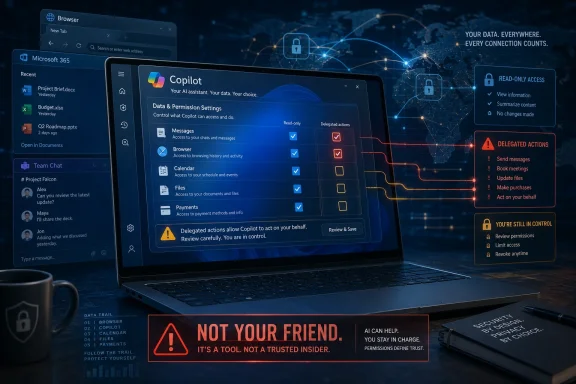 The Chatbot Privacy Debate Has Moved From Prompts to Permissions
The first wave of generative AI anxiety was easy to understand. Users typed sensitive material into a chatbot, and security teams asked where that text went. Lawyers worried about privileged documents, developers worried about proprietary code, and consumers worried about medical, financial, or relationship details being absorbed into a system they did not control.That concern has not gone away. But Whittaker’s critique points to a larger and more structural problem: the industry is trying to graduate chatbots into agents. An agent does not merely answer a question. It acts, searches, books, buys, summarizes, messages, schedules, and decides which services it needs to touch along the way.
That shift changes the privacy model entirely. A chatbot with no permissions can still be risky if users paste secrets into it. An agent with broad permissions can become risky even when the user is careful, because the system is designed to roam across the user’s digital life in search of context.
For Windows users, this distinction matters. Microsoft’s AI strategy is not confined to a browser tab. Copilot has appeared across Windows, Edge, Microsoft 365, Teams, Outlook, Paint, Notepad, and the broader Copilot+ PC pitch. Even when individual features are opt-in, the strategic direction is unmistakable: AI is being positioned as a connective tissue between apps and services.
Whittaker’s warning is therefore less an anti-AI slogan than a threat model. The question is not whether an AI assistant can format a document or summarize a web page. The question is what permissions it must obtain before it can become the kind of all-purpose helper that platform companies are promising.
“Not Your Friend” Is a Security Claim, Not Just a Cultural Complaint
The phrase that grabbed headlines was Whittaker’s reminder that AI chatbots are “not your friends.” It sounds like a cultural critique of people anthropomorphizing machines, and it is partly that. Chat interfaces invite emotional projection; the assistant remembers the thread, uses a calm tone, apologizes when corrected, and responds as if it is listening.But in security terms, “not your friend” means something more concrete. A friend has social obligations, human judgment, and a relationship that exists outside a terms-of-service document. A chatbot has none of those things. It is a product interface mediated by corporate policy, software architecture, logging rules, moderation systems, model behavior, and business incentives.
That distinction becomes crucial when users begin treating AI as a safe place to think. People already use chatbots to draft private messages, interpret workplace conflict, plan finances, rehearse medical conversations, and make decisions they might once have discussed with another human. The more natural the interface becomes, the easier it is to forget that every interaction is mediated by a platform.
Whittaker’s own reported use of AI is revealing. She said she may use it for narrow clerical work such as formatting, but avoids asking it questions because she worries about outsourcing parts of her thought process. That is a philosophical concern, but it also has a practical privacy dimension: the questions we ask often reveal more than the files we upload.
Search history taught the technology industry this lesson years ago. A list of queries can expose health fears, political interests, legal trouble, employment anxiety, family conflict, and financial distress. Chatbot logs can be even richer because users are encouraged to provide context, emotion, intent, and follow-up detail.
For IT professionals, this is why “AI acceptable use” policies that only say “do not paste confidential data” are already obsolete. The risk is not limited to explicit secrets. It includes inferred secrets, behavioral patterns, organizational structure, decision-making processes, and the metadata around who asks what, when, and in connection with which files or accounts.
Copilot’s Christmas-Shopping Dream Shows the Cost of Convenience
The most vivid example in Whittaker’s remarks was the idea of an AI assistant handling Christmas shopping. Microsoft AI chief Mustafa Suleyman has described a near-future scenario in which Copilot could help users buy gifts. It is a friendly consumer pitch: less holiday stress, fewer tabs, better suggestions, more automation.Whittaker’s response was to translate that convenience into permissions. To shop meaningfully on someone’s behalf, an assistant would need access to family conversations, personal preferences, browsing behavior, payment credentials, shipping addresses, calendars, messages, and perhaps purchase histories. If the assistant is supposed to infer what relatives want, it may need to read the very conversations people consider private.
That is where the privacy bargain becomes stark. A gift-buying agent is useful precisely because it can cross boundaries. It can see the group chat, remember the budget, compare retailers, coordinate delivery dates, and maybe message a sibling to confirm a detail. Each of those actions sounds modest in isolation. Together, they form a map of a person’s private life.
Signal’s role in the example is not accidental. Secure messaging apps are built around the premise that message content should be protected from intermediaries. If an AI assistant needs to read those messages to be useful, then the assistant becomes a new intermediary, even if the underlying messaging platform remains encrypted.
This is the backdoor argument in plain English. A backdoor does not always look like a government-mandated decryption key. Sometimes it looks like a helpful integration that persuades the user to grant a third-party agent access to data that the service provider itself cannot read.
The industry often responds that users remain in control. They can grant permissions, revoke them, choose settings, and decide which integrations to enable. That is formally true, but it underestimates how consumer software actually works. Defaults, prompts, interface nudges, bundled subscriptions, and “continue” buttons shape behavior far more than privacy dashboards do.
Windows Is Where This Argument Becomes Operational
For WindowsForum readers, the Whittaker interview is not merely a Signal story. It is a Windows platform story because Windows is where Microsoft’s AI ambitions meet the messy reality of user files, enterprise identities, legacy apps, local storage, browser sessions, and endpoint management.Microsoft has tried to draw distinctions between consumer Copilot, Microsoft 365 Copilot, Copilot Chat, and local AI features on Copilot+ PCs. Those distinctions matter. Enterprise versions come with stronger contractual commitments, service boundaries, compliance controls, and assurances that customer data is not used to train foundation models in the same way consumer interactions may be handled.
But users do not experience Microsoft’s AI portfolio as a neat compliance chart. They experience it as buttons, prompts, side panels, summaries, suggestions, and features appearing across the tools they already use. That creates a governance problem: the brand is unified, while the privacy model varies by product, account type, tenant configuration, license, and feature.
Recall is the obvious example because it turned AI privacy into a Windows household word. Microsoft’s revised architecture emphasizes local processing, opt-in controls, filtering, encryption, and Copilot+ PC security requirements. Those changes were meaningful, and they reflected real backlash from security researchers and users.
Yet Recall also illustrated the deeper trust gap. The problem was not only whether screenshots were stored locally or whether admins could access them. The problem was that Windows users suddenly had to consider an OS feature whose purpose was to remember what they had seen. Even a well-secured memory layer asks users to accept a more intimate relationship with the operating system.
Copilot Vision and other screen-aware tools push the same boundary from a different angle. If an assistant can understand what is on screen, it becomes more useful. It can explain settings, troubleshoot errors, summarize documents, or guide a user through a workflow. But screen awareness is also a privileged position, especially on shared PCs, regulated workstations, or machines that handle client data.
The Windows security model has traditionally treated privileges with suspicion. Admin rights, file access, microphone permission, screen recording, clipboard history, browser cookies, and credential stores are all sensitive because compromise at those layers is powerful. AI does not make those layers less sensitive. It makes vendors more eager to connect them.
Enterprise IT Will Not Be Comforted by Vibes
Microsoft’s strongest answer to privacy criticism is enterprise data protection. In Microsoft 365 environments, Copilot can respect existing permissions, labels, retention policies, compliance boundaries, and tenant controls. For many organizations, that is a serious advantage over employees pasting company data into random consumer AI tools.But Whittaker’s critique still applies inside the enterprise because permission-respecting systems can still expose permission sprawl. If a user has access to too many SharePoint sites, stale Teams channels, misclassified documents, or legacy mailboxes, an AI assistant can make that overexposure far easier to exploit. The assistant does not need to hack the company; it can simply surface what the user was already allowed to see.
That is both the promise and the danger of Microsoft 365 Copilot. It can collapse hours of searching across email, documents, chats, and meetings into a few seconds. It can also collapse years of bad information governance into an instant answer. The AI layer does not create every data hygiene problem, but it makes the consequences more visible.
Security teams have already started to treat AI rollout as an identity and access management project, not just a productivity pilot. Least privilege, sensitivity labels, data loss prevention, audit logs, retention rules, and conditional access become prerequisites rather than afterthoughts. An assistant that can reason across the Microsoft Graph is only as safe as the graph is clean.
The harder issue is delegated action. Reading is one class of risk; acting is another. Once an assistant can send messages, create tickets, move files, approve workflows, book travel, purchase goods, or execute code, the blast radius expands from data exposure to operational change.
That is why “agentic AI” sounds different to administrators than it does to keynote audiences. In a demo, an agent completing a task feels magical. In a security review, the same agent looks like a non-human actor with ambiguous intent, broad context, uncertain failure modes, and a talent for confidently doing the wrong thing at machine speed.
The Consumer Version of the Risk Is Messier and More Personal
Enterprise admins at least have tools. They can disable features, restrict connectors, enforce labels, review logs, and pressure vendors through procurement. Consumers have settings pages, privacy policies, and a vague hope that the defaults are sane.That asymmetry is one reason Whittaker’s warning resonates. The consumer AI assistant is being sold as a lifestyle product, not as a managed security principal. It promises to reduce friction in precisely the parts of life where people are most exposed: family communication, shopping, travel, dating, health, finance, job hunting, education, and household logistics.
The Christmas-shopping example is almost quaint because it involves a cheerful seasonal task. Substitute “help me negotiate a medical bill,” “reply to my landlord,” “find a new job without my employer knowing,” or “summarize my teenager’s messages,” and the stakes become sharper. The more intimate the task, the more context the assistant needs.
This is where anthropomorphism becomes a privacy risk. If users believe the assistant is a neutral confidant, they will disclose more. If they believe it is a tool owned by a company with data practices, retention policies, and commercial incentives, they may behave differently.
The problem is not that every AI interaction is equally dangerous. Asking for a regex, summarizing a public article, formatting a table, or generating a draft from non-sensitive material may be perfectly reasonable. The problem is that the same interface that handles harmless tasks also invites confessional use.
A browser search box never pretended to care about you. A chatbot does, at least stylistically. That difference matters because privacy failures often begin with misplaced trust rather than technical ignorance.
Signal Is Defending a Boundary the Platform Giants Want to Blur
Signal’s position in this debate is unusual because its product depends on refusing access. The app’s value proposition is not a bigger ecosystem, richer personalization, or more cross-service automation. It is the promise that private communications stay private, even from Signal.That makes AI agents awkward for secure messaging. A secure messenger can protect data in transit and at rest, but it cannot protect a conversation from a user who voluntarily grants another application the right to read the screen, scrape notifications, ingest exports, or act through accessibility-style hooks. Security boundaries weaken when the operating system or user-authorized agent sits above the app.
Signal has already responded to Windows privacy concerns in the past by adding screen-security measures intended to reduce exposure to screen capture systems. That kind of defensive engineering is telling. Privacy apps are being forced to defend not only against attackers, but against platform features marketed as convenience.
The same dynamic could spread. Password managers, encrypted note apps, financial apps, health portals, legal tools, and enterprise chat clients may all need to decide how aggressively they resist AI overlays. The resulting tension will not be clean. Users will want convenience in one moment and confidentiality in the next.
Platform vendors will argue that blocking AI access degrades usability. Privacy vendors will argue that unrestricted AI access degrades security. Both claims can be true, which is why the fight will likely move from slogans to granular controls: which windows can be seen, which apps can be summarized, which connectors can be invoked, which data can leave the device, and which actions require explicit confirmation.
Windows sits at the center of that fight because the desktop is still where high-value work happens. Mobile operating systems are permission-heavy and sandboxed by design. Windows carries decades of compatibility, admin habits, background processes, enterprise agents, and user expectations that local software can see and do a lot.
The Backdoor May Be Built Out of Consent
The most uncomfortable part of Whittaker’s argument is that the future backdoor may not require coercion. Users may build it themselves by clicking “allow” because the feature is genuinely useful. A system that can solve tedious life admin will have a powerful adoption engine.This is not a new pattern. Cloud sync, browser password saving, location history, smart speakers, photo backups, and social sign-ins all expanded by trading convenience for data centralization. In each case, the immediate user benefit was real. So were the long-term consequences for surveillance, breach impact, legal discovery, advertising, and platform dependence.
AI agents intensify that bargain because they combine access with interpretation. A cloud drive stores files. An AI assistant reads across them, infers relationships, and generates actions. A calendar stores appointments. An AI assistant connects those appointments to emails, locations, contacts, travel plans, and purchases.
Consent becomes slippery in that environment. A user might consent to “help me plan gifts” without fully understanding that the assistant needs to parse messages, profiles, receipts, and browser activity. A worker might consent to “summarize this project” without realizing the assistant can surface sensitive but technically accessible documents from another department.
The legal language may be adequate. The human understanding may not be. Privacy policies are built for disclosure; AI assistants are built for delegation. Those are different concepts.
This is why security professionals should be wary of vendor reassurances that reduce the issue to encryption, storage location, or training exclusions. Those controls matter, but they do not answer the full question. The full question is: what can the assistant see, what can it infer, what can it do, who can audit it, and how badly can it fail?
Microsoft Has a Trust Problem It Cannot Patch With Branding
Microsoft is not uniquely guilty of the AI privacy problem. Google, Apple, OpenAI, Anthropic, Meta, Perplexity, and a long list of startups are all pushing toward more contextual assistants. But Microsoft’s role is distinctive because Windows and Microsoft 365 remain embedded in the daily operations of businesses, schools, governments, and homes.That installed base gives Microsoft enormous leverage. A Copilot feature can move from experiment to default-adjacent presence faster than many organizations can update policy. Even when admins can disable or manage it, they must first understand which Copilot is involved, which license applies, which data boundary governs it, and which user interface changed after the last update.
The company has also spent years asking users to accept deeper cloud integration into Windows. Microsoft accounts, OneDrive backup prompts, Edge defaults, Start menu web content, telemetry debates, and now AI features all contribute to a perception that Windows is becoming less a neutral local platform and more a managed front end for Microsoft services.
That perception may be unfair in specific technical cases. Recall’s revised local architecture is not the same as uploading every screenshot to the cloud. Microsoft 365 Copilot’s enterprise commitments are not the same as a consumer chatbot session. But trust is cumulative, and users do not evaluate each feature in isolation.
The danger for Microsoft is that AI becomes the lens through which every old Windows grievance is reinterpreted. A Copilot button in Notepad may be harmless to one user and intrusive to another. A screen-aware assistant may be accessibility gold for one customer and a compliance nightmare for another. A local index may be a productivity breakthrough or a forensic liability, depending on the environment.
Microsoft’s path forward therefore requires more than privacy FAQs. It requires restraint, clear separation between consumer and enterprise behavior, admin-first controls, visible local/offline indicators, and an end to the sense that AI is being sprinkled across Windows faster than users can meaningfully consent.
The Real Lesson Is to Treat AI Assistants Like Privileged Accounts
The practical answer is not to ban all AI. That would be unrealistic and, in many environments, counterproductive. The answer is to stop treating AI assistants as chat windows and start treating them as privileged software components.A useful assistant needs access. Access must be scoped. Scoped access must be logged. Logs must be reviewable. Actions must be reversible where possible. Sensitive operations must require confirmation. None of that is exotic; it is ordinary security thinking applied to a new interface.
For consumers, the same principle can be simplified: do not give an assistant more context than the task requires. If it only needs a paragraph, do not give it the mailbox. If it only needs a screenshot, do not give it persistent screen access. If it only needs a shopping list, do not connect it to every private conversation that might contain gift hints.
For enterprises, the AI rollout checklist should begin before the license purchase. Organizations need to clean up permissions, classify data, test with realistic users, define prohibited use cases, and decide which agents are allowed to act on behalf of employees. The worst time to discover a SharePoint permissions mess is after Copilot has made it searchable in natural language.
The most mature organizations will treat AI as both a productivity tool and an insider-risk amplifier. That does not mean assuming malice. It means acknowledging that systems built to retrieve, summarize, and act across data estates can magnify ordinary mistakes.
The Windows User’s AI Privacy Bargain Is Now Explicit
Whittaker’s comments cut through the soft-focus marketing language because they force a direct accounting of the trade. If users want assistants that can manage life and work, they must decide how much of life and work those assistants are allowed to see.- AI chatbots should be treated as software interfaces governed by vendors, policies, and permissions, not as friends or neutral confidants.
- The privacy risk grows sharply when a chatbot becomes an agent that can access messages, calendars, browsers, files, payment details, or workplace data.
- Microsoft’s Copilot ecosystem makes this debate especially relevant to Windows users because AI features are spreading across the operating system, Microsoft 365, Edge, and Copilot+ PCs.
- Enterprise protections are meaningful, but they do not fix poor permissions, overexposed documents, unclear data ownership, or unsafe delegated actions.
- The safest AI deployments will limit access by task, separate read permissions from action permissions, and make user or admin consent specific rather than broad.
- Privacy-focused apps such as Signal will increasingly clash with platform-level AI features that want screen, notification, or message context.
References
- Primary source: SC Media
Published: 2026-06-22T15:50:13.902099
Loading…
www.scworld.com - Related coverage: techradar.com
Loading…
www.techradar.com - Related coverage: techspot.com
Loading…
www.techspot.com - Related coverage: vcpost.com
Loading…
www.vcpost.com - Related coverage: aiweekly.co
Loading…
aiweekly.co - Related coverage: techcrunch.com
Loading…
techcrunch.com
- Related coverage: yellow.com
Signal Chief Says AI Assistants Want The Keys To Your Private Life | Yellow.com
Signal president Meredith Whittaker warns that AI assistants need deep access to messages, payments, and calendars to function — creating serious privacy risks and potential backdoors. She rejects the idea of AI chatbots as friends or confidants. Read the full analysis.yellow.com - Related coverage: fortune.com
Signal’s president warns AI agents are a threat to the internet’s security | Fortune
Signal President Meredith Whittaker says consumers and businesses are unprepared for the security and privacy risks of AI agents.fortune.com
- Related coverage: forbes.com
Loading…
www.forbes.com - Related coverage: techedt.com
Loading…
www.techedt.com - Related coverage: windowscentral.com
A "critical" Microsoft Copilot exploit exposes AI gullibility — turning the chatbot into a data snitch for 2FA codes and sensitive emails | Windows Central
Researchers uncovered a Copilot flaw that exposed 2FA codes and sensitive data.www.windowscentral.com - Official source: support.microsoft.com
Privacy and control over your Recall experience - Microsoft Support
 support.microsoft.com
- Official source: learn.microsoft.com
Microsoft 365 Copilot Chat Privacy and Protections
Microsoft 365 Copilot Chat protects workplace AI-powered web chats by providing enterprise data protection to keep organizations safe. Learn about the data protections, authentication, authorization, and GDPR compliance.learn.microsoft.com - Related coverage: axios.com
Loading…
www.axios.com