

Microsoft’s desktop tools are quietly becoming some of the most visible places where AI and practical utility meet on Windows 11, and the latest updates to Paint, PowerToys, Windows Spotlight, and even a routine cumulative update show a pattern: Microsoft is embedding generative features, hardware‑gated AI experiences, and incremental usability polish across the desktop while also juggling privacy, governance, and enterprise control questions. The result is a more capable out‑of‑the‑box Windows for creatives and power users — but it’s also a shift that demands new attention from IT pros, privacy teams, and everyday users alike.
Windows 11’s recent cadence has seen two parallel tracks: visual/usability refinement (ribbons, settings, Spotlight) and an aggressive push to integrate generative AI into core inbox apps (Paint, Notepad, Photos, Search). Microsoft’s approach blends cloud and on‑device processing, sometimes gating higher‑quality features to NPU‑equipped “Copilot+” machines while making lighter or cloud‑based variants available more broadly. This hybrid model appears intentionally pragmatic: make advanced experiences available where hardware supports local acceleration and keep the baseline features accessible to the majority of users. Evidence of this strategy appears repeatedly in Microsoft’s own documentation and the Windows Insider rollout notes. At the same time, routine servicing updates are not just bug patches. They can carry new capabilities — for example, a Release Preview cumulative update added an “advanced auto‑learning feature for facial recognition,” illustrating how incremental OS updates can introduce functionality with potential privacy and security implications. This article synthesizes the recent announcements and hands‑on reports, checks key technical claims against Microsoft documentation and independent reporting, and provides practical guidance and risk analysis for Windows users and administrators.
However, this convenience comes with responsibilities. Organizations must treat biometric and generative features as policy‑sensitive changes; users must treat AI outputs as assistive, not authoritative; and administrators must validate update behavior in controlled environments before rolling them out.
The net result is an interesting equilibrium: everyday Windows apps are becoming smarter and more useful, but their safe and compliant adoption depends on deliberate testing, careful governance, and an ongoing conversation about how AI should behave on the desktop. The rollout of these features is verified across Microsoft’s own release notes and independent reporting, and the practical risks and mitigations outlined above should help readers assess whether to adopt new Paint, PowerToys, and Windows features now or to wait and evaluate further.
Source: Microsoft https://www.microsoft.com/en-us/win...load-from-the-microsoft-store-for-window-11/]
 Background
Windows 11’s recent cadence has seen two parallel tracks: visual/usability refinement (ribbons, settings, Spotlight) and an aggressive push to integrate generative AI into core inbox apps (Paint, Notepad, Photos, Search). Microsoft’s approach blends cloud and on‑device processing, sometimes gating higher‑quality features to NPU‑equipped “Copilot+” machines while making lighter or cloud‑based variants available more broadly. This hybrid model appears intentionally pragmatic: make advanced experiences available where hardware supports local acceleration and keep the baseline features accessible to the majority of users. Evidence of this strategy appears repeatedly in Microsoft’s own documentation and the Windows Insider rollout notes. At the same time, routine servicing updates are not just bug patches. They can carry new capabilities — for example, a Release Preview cumulative update added an “advanced auto‑learning feature for facial recognition,” illustrating how incremental OS updates can introduce functionality with potential privacy and security implications. This article synthesizes the recent announcements and hands‑on reports, checks key technical claims against Microsoft documentation and independent reporting, and provides practical guidance and risk analysis for Windows users and administrators.Paint’s reinvention: from doodle pad to AI‑assisted canvas
What changed — an overview
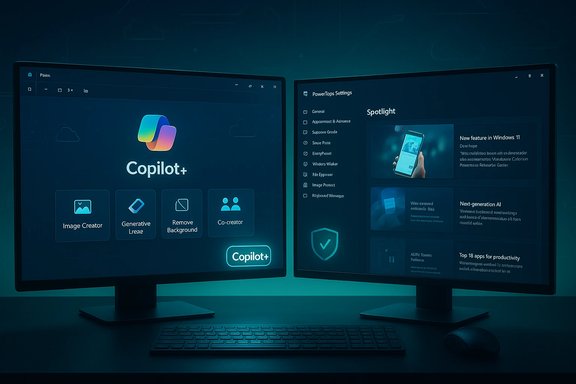
Paint on Windows 11 has evolved far beyond the simple raster editor most people remember. Recent updates introduce a suite of features that transform the app into a lightweight creative surface with AI tools built into the UI:- Copilot hub — a consolidated entry point for Paint’s generative features (Image Creator, Generative Erase, Remove Background, Cocreator).
- Image Creator — text‑to‑image generation inside Paint, available in preview in multiple markets and requiring sign‑in for some capabilities.
- Generative Fill / Generative Erase — prompt‑driven edits and AI‑backed removal/fill workflows; some functions are gated to Copilot+ hardware (NPU‑enabled).
- Layers, improved brushes, background removal, and a collapsible toolbar — features that modernize the editing workflow and make Paint more competitive as a quick‑edit tool.
How the AI bits work (and what’s verified)
- Generative tools appear as part of Paint’s “Copilot” menu and use a mix of local NPU processing and cloud services. Microsoft documentation clearly states that certain generative features — notably Generative Fill on some flows — require Snapdragon‑powered Copilot+ PCs because they leverage the device’s NPU for local generation; other features use cloud models and require a Microsoft account sign‑in. This hybrid approach is documented in Microsoft support notes.
- Independent reporting and official Microsoft materials indicate that Paint’s Image Creator functionality is conceptually aligned with Bing Image Creator and has historically been tied to models like OpenAI’s DALL·E family (as Microsoft integrates DALL·E into its Bing/Copilot image offerings). Multiple outlets and product write‑ups refer to DALL·E when describing Image Creator / Cocreator flows, while Microsoft’s own communications emphasize the “diffusion‑based” or generative model approach without naming a single exclusive backend for all scenarios. Given Microsoft’s broader use of both OpenAI models and its own MAI models, the precise runtime model can vary; treating the model attribution as broadly accurate but subject to change is prudent.
- The user experience has been simplified: users can select an area, type a short instruction, or press a single Generate button and receive variants that can be dropped into the canvas. That simplified flow is verified by Microsoft’s blog posts and Insider hands‑on reporting.
Verified constraints and gating
Microsoft has gated some Paint experiences:- Sign‑in and region limits: Image Creator and some AI features require a signed‑in Microsoft account and are rolled out by region; Microsoft’s insider notes list the initial markets.
- Hardware gates: Copilot+ features and certain local generative experiences require NPU‑equipped devices (Snapdragon X Elite and similar SoCs). Microsoft’s documentation explicitly calls out this hardware gate for specific features.
Practical use cases and limitations
Paint’s new features target quick content creation and iteration rather than replacing professional tools. Use cases include:- Social media asset creation, quick concept art and mood images, simple background replacement for product shots, and fast restyling of photos.
- Generative edits are best for broad scene‑level transformations; precision work (logo removal, fine retouches, or professional compositing) still benefits from dedicated tools like Photoshop. Early tester reports show mixed fidelity on tight, detail‑sensitive edits.
Privacy, provenance, and safety: the tradeoffs of bringing AI to inbox apps
What Microsoft says about safety and provenance
Microsoft has stated that some generation can happen locally (on NPU) and that the company uses content filtering via its cloud services for moderation. The company also indicates that generated outputs may carry content credentials (aligned with standards like C2PA) to help consumers identify AI‑generated content. These points help but do not eliminate governance concerns — organizations and users must treat generated content appropriately.Key privacy and governance risks
- Data handling uncertainty: While Microsoft documents that local generation uses device NPUs and suggests moderation pipelines for cloud flows, enterprise administrators should verify telemetry and data retention policies for devices in their fleet before enabling experimental Labs features. Early reports recommend disabling Windows AI Labs on managed endpoints until policies are clear.
- Likeness and IP risks: Generative tools can produce outputs that replicate copyrighted styles or real individuals’ likenesses. That raises legal and ethical questions for commercial use. Microsoft’s filtering helps but cannot guarantee elimination of problematic outputs; human review remains essential.
- Provenance and trust: Content credentials are a positive step, but adoption and integrity depend on consistent tooling and industry buy‑in. Enterprises should require metadata preservation in workflows for any AI‑generated assets used in commercial contexts.
KB5022905 and the ‘advanced auto‑learning’ facial recognition entry
What the update actually added
A Release Preview cumulative update (KB5022905, build 22000.1641 / 22000.1639 in some notations) lists as a highlight: “New! This update adds an advanced auto‑learning feature for facial recognition.” Microsoft’s KB article and multiple independent outlets report the same language in the update highlights. The entry appears in February’s cumulative preview notes and was distributed through the Insider channels before broader servicing.What that phrase likely means — and what it doesn’t
- The short KB description does not provide technical specifics about how the auto‑learning operates, where data is stored, or whether model updates or retraining occur locally or in the cloud. Microsoft’s release notes are intentionally succinct and do not enumerate telemetry or retention details. Because the KB entry lacks depth, the exact behavior should be treated as ambiguous until Microsoft publishes detailed documentation.
- Independent reporting echoes the KB note but does not add technical clarity. That means the claim is verified at the existence level (Microsoft shipped an update containing a facial‑recognition improvement), but the operational specifics remain unverified in public documentation. Administrators should treat this as a feature requiring verification in test environments before broad deployment.
Practical recommendations for IT and privacy teams
- Test before broad rollout: Validate the update in a lab environment, examine Windows Hello behavior, and log any changes in biometric processing or model behavior. Microsoft notes a known issue where Hello facial recognition may behave differently on Arm64 devices in some Insider flights; this underlines the importance of testing.
- Ask for documentation: For enterprise use, request formal documentation on training data, retention, telemetry, and opt‑out controls. If the feature is important for your deployment, require contractual assurances around biometric processing and compliance.
- User communication: If devices in your organization gain facial recognition improvements, communicate changes to users and leadership, and update security and privacy training materials accordingly.
PowerToys: incremental polish and distribution changes
v0.56.2 and the cadence of bug‑fix releases
PowerToys continues to receive iterative releases that fix stability bugs and add incremental settings. The v0.56.2 release — characterized as a patch release — fixed FancyZones template reset bugs, updated installer flags, fixed file preview handler issues, and added new customization for the Find My Mouse utility. BetaNews and release packages confirm the 0.56.2 tag and release notes.PowerToys in the Microsoft Store
PowerToys is also available via the Microsoft Store, which broadens discoverability for mainstream Windows 11 users and eases installation/updates for those who prefer the Store channel. That Store availability has been reported and is reflected in official distribution choices: while GitHub remains the place for the bleeding‑edge experimental builds, the Microsoft Store listing provides a stable, reviewable distribution for many users.What’s new and what’s coming
Recent PowerToys development shows a mix of:- Usability features (Light Switch / auto theme switching, improved Command Palette/PowerToys Run evolution).
- Stability and installer fixes in patch releases like v0.56.2.
- A clear path to more advanced utilities being incubated and then promoted via Store or GitHub as they mature. The PowerToys project’s rapid cadence means version numbers and features change fast; administrators who rely on PowerToys should pin a tested version and validate updates in a pilot ring before wide deployment.
Windows Spotlight and Build 25281: polish that matters
What changed in Build 25281
Windows Insider Preview Build 25281 (Dev Channel) introduced new “treatments” for Windows Spotlight: richer UI for titles/descriptions, different picture‑switching experiences (preview, full‑screen, minimized), and an updated graphics settings page that aligns with Windows 11’s design language. Microsoft’s blog post and independent coverage confirm the experimental nature of these changes — Insiders may see different treatments across devices.Why Spotlight UX matters
Spotlight is a low‑friction place to surface contextual information at the desktop — the revised UI and richer metadata surfaces can make it easier for users to learn about the images they see and to interact with Spotlight more meaningfully. For organizations, Spotlight changes are mostly cosmetic, but they do reflect Microsoft’s broader emphasis on delivering curated, discoverable content in the OS without forcing users into the Edge/Bing ecosystem.Best Windows apps and the ecosystem context
Weekly app roundups and curated lists continue to matter: they shape discoverability and user adoption of third‑party utilities that can complement inbox features like Paint and PowerToys. Independent app reviewers and curated storefronts will determine which third‑party editors and utilities fill the gaps where Microsoft stops short (professional compositing, enterprise‑grade image processing, or specific workflow automations). Pay attention to these roundups if you’re building a software catalog for a team or organization. (Recent editorial coverage highlights both Microsoft’s built‑in pushes and third‑party innovation around productivity and creativity on Windows 11.Critical analysis: strengths, gaps, and risks
Strengths
- Accessibility and democratization of AI: By adding generative tools to default apps, Microsoft reduces the friction for casual creators to experiment with AI image generation and editing, which is valuable for education, marketing, and rapid prototyping.
- Hybrid on‑device/cloud approach: Gating heavier operations to NPU‑equipped Copilot+ devices while offering cloud fallbacks preserves performance for capable hardware and broad access for everyone else — a pragmatic engineering compromise.
- Iterative stability releases: PowerToys’ steady patch cadence demonstrates healthy community maintenance and incremental improvements that matter to power users.
Gaps and risks
- Opaque model and telemetry details: KB‑style release notes and blog posts do not always provide the deep operational specifics enterprises need for compliance and security reviews — especially for biometric features and generative models. Administrators should request explicit documentation before enabling experimental features fleetwide.
- Mixed fidelity for professional production: Early testing indicates AI edits are fast and often impressive, but results vary; generative edits are best treated as drafts requiring human refinement, not production‑ready outputs.
- Governance complexity: The combination of local NPU processing, cloud moderation pipelines, region gating, and account sign‑in requirements creates a matrix of possible configurations — useful for flexibility but complex to manage at scale.
Practical recommendations
- For creative users:
- Try Paint’s Copilot features for rapid prototyping and social assets, but keep source files and maintain originals for reversion.
- For IT admins:
- Pilot updates (especially releases that touch biometrics, e.g., KB5022905) in a test ring and validate Hello/biometric behavior and logging.
- Freeze or stage PowerToys updates for production machines; use Store or GitHub consistently and pin to tested versions.
- For privacy officers and legal teams:
- Demand documentation around biometric auto‑learning features and any model training/retention. If devices are subject to regulatory constraints (e.g., GDPR), treat biometric updates as high‑priority items for review.
- For creative teams:
- Use Paint’s Image Creator and Generative Erase as ideation tools. For final assets, apply human review and professional editing pipelines to ensure fidelity and rights compliance.
Conclusion
Microsoft’s recent updates illustrate a deliberate strategy: fold AI into familiar, widely used apps while keeping the entry barrier low for most users and offering hardware‑accelerated premium experiences to those with modern NPUs. That strategy is effective for broad adoption and rapid experimentation, and it elevates Windows 11 from an operating system into a platform for creative acceleration.However, this convenience comes with responsibilities. Organizations must treat biometric and generative features as policy‑sensitive changes; users must treat AI outputs as assistive, not authoritative; and administrators must validate update behavior in controlled environments before rolling them out.
The net result is an interesting equilibrium: everyday Windows apps are becoming smarter and more useful, but their safe and compliant adoption depends on deliberate testing, careful governance, and an ongoing conversation about how AI should behave on the desktop. The rollout of these features is verified across Microsoft’s own release notes and independent reporting, and the practical risks and mitigations outlined above should help readers assess whether to adopt new Paint, PowerToys, and Windows features now or to wait and evaluate further.
Source: Microsoft https://www.microsoft.com/en-us/win...load-from-the-microsoft-store-for-window-11/]
