

Allcargo Global’s migration to Amazon FSx and AWS DataSync is a textbook example of pragmatic cloud storage modernization: the logistics giant moved VDI-backed user data from regional hyper‑converged NAS systems into a mixed FSx estate—Amazon FSx for NetApp ONTAP for general home folders and Amazon FSx for Windows File Server for Outlook cache volumes—while using AWS DataSync to preserve metadata, ACLs, and permissions and to execute the bulk transfer with minimal user disruption. The project addressed acute morning‑login and Outlook cache write‑storms, scaled capacity and throughput on demand, and combined NetApp SnapMirror cross‑Region replication plus FSx snapshots for both disaster recovery (DR) and point‑in‑time restores. The migration reduced operational overhead and delivered immediate VDI responsiveness gains, while Allcargo reported significant financial savings tied to decommissioning legacy DR infrastructure and optimizing tenancy and autoscaling for VDI hosts.
Allcargo is a global logistics operator with roughly 3,500 internal VDI users distributed across EMEA, NAMER, and APJ. Their estate relied on regional data centers with hyper‑converged platforms exposing SMB, NFS, and iSCSI to VDIs and clustered Windows services. VDI workloads—particularly FSLogix profile containers and Outlook cache volumes—created heavy, bursty write patterns (peak writes approaching multiple Gbps) that the existing on‑premises NAS struggled to absorb during concurrent logins and Office I/O peaks. The environment contained roughly 70 TB of mixed protocol data and was projected to grow substantially over the next 12–24 months.
The migration goals were straightforward but nontrivial:
Key DataSync patterns and features used:
Cost governance is equally important: ingestion spikes, temporary throughput increases, and higher SSD allocation during migration can produce short‑term bills that exceed normal run‑rate. Teams should automate reversion of temporary settings and build alerts for budget thresholds.
Finally, the choice between Single‑AZ and Multi‑AZ (or cross‑Region) remains workload dependent: mission‑critical file servers often justify higher availability configurations; less critical, cache‑like volumes may be efficient in Single‑AZ. Document service‑level expectations and align them to the FSx deployment model you choose.
The project’s clear wins—improved responsiveness, preserved security metadata, automated scaling during migration, and reported cost reductions—come with tradeoffs: careful attention to availability models (Single‑AZ vs Multi‑AZ), permission mapping for SACLs, and disciplined post‑migration right‑sizing are essential. For teams planning similar moves, the Allcargo case underlines three consistent themes: align storage technology to workload semantics, automate to manage scale, and validate DR and access semantics early and often.
If you’re planning a VDI file share migration, treat the process as both a technical and change‑management exercise: plan pilot waves, verify permission fidelity, instrument the environment, and commit to a rollback and reversion schedule for temporary performance changes. The Allcargo story shows that with the right planning—and the right AWS managed storage building blocks—you can migrate massive file estates with fidelity, speed, and a measurable improvement in end‑user experience.
Source: Amazon Web Services (AWS) How Allcargo Global migrated VDI workloads to Amazon FSx for NetApp ONTAP and FSx for Windows File Server using AWS DataSync | Amazon Web Services
 Background / Overview
Allcargo is a global logistics operator with roughly 3,500 internal VDI users distributed across EMEA, NAMER, and APJ. Their estate relied on regional data centers with hyper‑converged platforms exposing SMB, NFS, and iSCSI to VDIs and clustered Windows services. VDI workloads—particularly FSLogix profile containers and Outlook cache volumes—created heavy, bursty write patterns (peak writes approaching multiple Gbps) that the existing on‑premises NAS struggled to absorb during concurrent logins and Office I/O peaks. The environment contained roughly 70 TB of mixed protocol data and was projected to grow substantially over the next 12–24 months.The migration goals were straightforward but nontrivial:
- Maintain login and application responsiveness for thousands of users.
- Preserve file metadata, NTFS ACLs, and user ownership.
- Implement a DR posture across Regions without incurring major on‑prem replication management.
- Reduce operational overhead and hardware maintenance burden.
- Minimize user downtime and profile disruption during cutover.
Why Allcargo chose a mixed Amazon FSx approach
Allcargo selected two complementary FSx services to match distinct I/O and protocol needs:- Amazon FSx for Windows File Server for the high‑write, latency‑sensitive Outlook cache volumes. FSx for Windows provides a simple SMB‑native experience with provisioned throughput capacity, sub‑millisecond latencies, and the option to set throughput up to multiple GB/s to serve heavy write workloads. Allcargo sized the Outlook cache file system to 8 TB SSD with a 2,048 MBps throughput configuration to sustain heavy write activity. These throughput numbers align with the documented FSx for Windows throughput tiers and guidance for provisioning throughput independently of storage capacity.
- Amazon FSx for NetApp ONTAP for home folders and mixed SMB/NFS access. FSx for ONTAP offers multi‑protocol support (SMB, NFS, iSCSI) plus ONTAP‑native features such as thin provisioning, compression/deduplication, and NetApp SnapMirror for cross‑Region replication. Allcargo used an SSD primary pool (10 TB with higher throughput) combined with a capacity pool tier (cost‑optimized) to support ~32 TB of home directories while automatically tiering cold blocks to reduce persistent SSD costs. The ONTAP design also enabled iSCSI LUNs for clustered Windows Failover Cluster usage for DFS namespace hosting.
The migration architecture and core components
Network and authentication fabric
To reduce latency for AD operations and SMB authentication, Allcargo extended their Active Directory into AWS by deploying an EC2‑based domain controller in the Frankfurt region. Regional data centers maintained redundant 125 Mbps ISP links to the chosen AWS Regions to carry migration traffic and to provide ongoing hybrid access. The FSx services were integrated with the corporate AD, DNS, and DFS namespace to produce a consistent UNC path experience for users across cloud and on‑premises.VDI compute sizing and access patterns
VDIs were migrated to AWS using a third‑party VDI orchestrator. Each cloud VDI was deployed on r6i.xlarge instances (4 vCPU, 32 GiB memory), sized to run between 12–16 users per instance per Allcargo’s benchmarking. Choosing a memory‑optimized instance family helped accommodate user profiles and local caching behavior. The VDI guests were configured to mount SMB shares for home folders and for dedicated Outlook cache volumes (managed by FSLogix). EC2 instance sizing and network characteristics directly impacted observed login times and cache performance.FSx configuration details
- FSx for Windows File Server: Single‑AZ deployment, SSD storage, throughput set to 2,048 MBps to meet the Outlook cache write load and to deliver predictable SMB performance for FSLogix containers. Single‑AZ was chosen because Outlook cache volumes are re‑created and do not require cross‑AZ synchronous HA, while the throughput SLA matched the use case.
- FSx for NetApp ONTAP: Single‑AZ ONTAP configuration with a 10 TB SSD primary pool for high‑performance data (256 MBps baseline per documented sizing in the Allcargo design) and a capacity pool sized to hold colder, infrequently accessed blocks (22 TB in Allcargo’s layout). ONTAP tiering policies were used to move blocks to the capacity pool using AUTO and SNAPSHOT_ONLY for different volumes, preserving SSD capacity for hot data. FSx ONTAP includes built‑in dual file server HA within the same AZ and supports iSCSI LUNs for Windows cluster CSVs used by DFS.
DR and replication
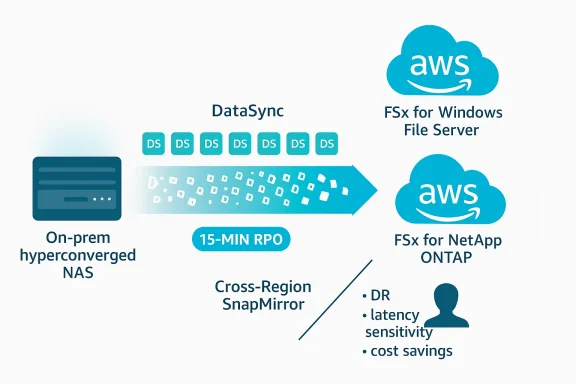
For cross‑Region disaster recovery, Allcargo leveraged NetApp SnapMirror (available in FSx for ONTAP) to replicate approximately 25 TB of critical shares from Frankfurt (primary) to Ireland (secondary) on a 15‑minute schedule—meeting a 15‑minute RPO. NetApp SnapMirror on ONTAP supports scheduled replication at intervals as low as 5 minutes, giving teams flexibility to tune RPO versus replication load. SnapMirror’s block‑level, incremental replication also benefits from ONTAP storage efficiency to reduce replicated bytes. Allcargo complemented cross‑Region replication with AWS snapshots for point‑in‑time recovery.Data migration: AWS DataSync in action
Allcargo used AWS DataSync as its primary migration engine to move hundreds of millions of files while preserving metadata and permissions.Key DataSync patterns and features used:
- Multiple DataSync agents (Allcargo deployed 14) to parallelize tasks and speed throughput for millions of small files and many directories. Using one agent per task—or multiple agents attached to the same location where supported—reduces the scanning and transfer time for massive datasets.
- Manifests for selective transfers to avoid scanning entire file systems when only batches of directories were scheduled for migration. This significantly cuts task preparation time on very large namespaces. Manifests allow listing millions of files for DataSync to transfer without a full scan.
- Metadata fidelity options: When transferring SMB‑backed Windows data, DataSync can preserve owners, NTFS DACLs and, optionally, SACLs when the transfer is between SMB and FSx for Windows File Server locations. The DataSync task option SecurityDescriptorCopyFlags can be set to OWNER_DACL_SACL to copy SACLs as well, but copying SACLs requires elevated permissions for the Windows user DataSync uses for SMB access. Where ONTAP was used with SMB, DataSync’s SMB mode preserves NTFS ACLs if the destination volume uses NTFS security style. For NFS sources/destinations, DataSync preserves POSIX ownership and permissions. These controls let migration teams choose the right fidelity based on the source protocol and target FSx configuration.
- Temporary operational changes: Allcargo temporarily increased FSx for ONTAP throughput and set the volume tiering policy to “All” for faster initial writes and efficient data reduction (compression/dedupe), then scaled throughput and tiering back down post‑migration. They also implemented a CloudWatch alarm to monitor SSD utilization (80% threshold) and dynamically scaled SSD pool capacity in 2 TB increments using an SNS → Lambda workflow to avoid full‑SSD saturation during ingestion. The approach balanced performance with cost control.
- Batch‑based migration and cutover: The team ran pre‑migration backups, transferred data in batches using manifests and multiple agents, validated integrity and permissions, and then updated DFS namespace targets to point to FSx shares during controlled cutovers to minimize user impact. The Outlook cache volumes were not migrated because FSLogix rebuilds cache on first access, simplifying migration and reducing transferred bytes.
Results: throughput, fidelity, and user impact
Allcargo achieved several measurable outcomes:- Data transfer performance: Using 14 DataSync agents and parallel tasks, the team migrated ~32 TB with approximately 208 million files to FSx for ONTAP in 15 days—demonstrating DataSync’s capability to handle very large file counts when architected with multiple agents and manifests. Permission and metadata fidelity were preserved according to the chosen security descriptor options.
- Application responsiveness: After migration and cutover, users reported faster VDI reboots and quicker MCS catalog updates—improvements attributable to higher available throughput, ONTAP caching, and FSx Windows throughput provisioning for latency‑sensitive cache volumes. These are typical benefits when profile containers and Outlook caches move from constrained on‑premises HCI to provisioned cloud file systems with larger in‑memory caches and NVMe read layers.
- Operational savings: Allcargo reported eliminating a hyper‑converged DR platform on AWS—delivering a customer‑reported ~$1.5M annual saving—and additional reductions (23%) by shifting non‑persistent VDIs to shared tenancy and using VDI autoscaling with off‑hours shutdown. These figures are customer outcomes reported in the Allcargo case narrative and reflect their specific contract, sizing, and cost model; individual results will vary.
- Reliability: Despite operating the FSx deployments in Single‑AZ mode, Allcargo experienced consistent uptime and reported no service failures since migration. This is an operational outcome for this deployment and should be validated against business continuity requirements for other customers—Single‑AZ designs reduce cost and complexity but trade off cross‑AZ failover guaranteed by Multi‑AZ deployments.
Critical analysis — strengths, tradeoffs, and operational risks
Strengths and notable engineering choices
- Right‑sizing by protocol and I/O pattern. Splitting Outlook cache and home directories between FSx for Windows and FSx for ONTAP respectively is a textbook pattern: it isolates heavy write SMB workloads to a tuned Windows file server and leverages ONTAP’s multi‑protocol and tiering advantages for general user data. This reduces contention and optimizes cost.
- Data fidelity and auditability. Using DataSync’s security descriptor options and ONTAP’s NTFS security style allowed Allcargo to migrate ACLs and owner metadata—critical for enterprise audit and least privilege controls. The option to copy SACLs when required is valuable for regulated environments but requires explicit privilege planning.
- Operational automation during migration. The CloudWatch + SNS + Lambda pattern to scale SSD pool capacity on demand is a practical, automated safeguard against SSD exhaustion during bulk ingestion. It avoids surprise failures from tiering or capacity overflows.
- Efficient DR with built‑in ONTAP replication. Leveraging SnapMirror gives Allcargo managed, incremental replication without separate replication appliances—reducing operational complexity and delivering sub‑hour RPOs when configured aggressively. SnapMirror’s block‑level replication plus ONTAP storage efficiencies reduces replication bandwidth and storage costs.
Tradeoffs and risks to watch
- Single‑AZ deployments vs. availability requirements. Allcargo chose Single‑AZ file systems for cost and simplicity. Single‑AZ FSx systems carry a lower availability SLA compared to Multi‑AZ options; organizations with strict RTO/RPO or regulatory uptime obligations should evaluate Multi‑AZ FSx or replicate across Regions with SnapMirror. The lack of AZ diversity reduces the platform’s resilience to AZ outages.
- Permission and SACL migration complexity. While DataSync can preserve DACLs and SACLs, copying SACLs requires the migrating account to have special audit permissions on source file servers. Misconfiguration can lead to loss of audit policy continuity or access mismatches; migration plans must include permission reviews and least‑privilege testing. In mixed SMB/NFS migrations, metadata semantics differ—preserve fidelity by matching protocol choices to source systems.
- Performance and cost balance during ingestion. Temporarily scaling throughput and SSD capacity is effective for ingestion but increases cost. Teams must track and revert temporary provisioning and monitor cloud spend. Automation as implemented by Allcargo helps, but governance and post‑migration right‑sizing are essential.
- File count vs. throughput considerations. Environments with hundreds of millions of small files (Allcargo’s ~208M in the migrated set) benefit dramatically from manifest usage and multiple DataSync agents. However, scanning and metadata handling remain significant overheads; consider pre‑filtering, archiving, and dedup strategies to reduce transferred items.
- DR RPO expectations and replication cadence. Allcargo configured SnapMirror every 15 minutes, which they reported met requirements. SnapMirror supports more frequent replication (as low as 5 minutes), but increased frequency raises replication load and costs. Test failover/failback operations and failover automation to verify RTOs.
Best practices and prescriptive checklist for similar migrations
- Inventory and classify data by protocol, activity, and criticality; target SMB‑heavy, latency‑sensitive caches to FSx for Windows and mixed access to FSx for ONTAP.
- Validate AD integration and DNS/DFS behavior in a pilot VPC and deploy domain controllers close to FSx endpoints to minimize SMB authentication latency.
- Use DataSync manifests and multiple agents for high file‑count transfers; set SecurityDescriptorCopyFlags deliberately (OWNER_DACL or OWNER_DACL_SACL) after verifying required privileges. Run small‑scale validation transfers before production.
- During bulk ingestion, temporarily increase throughput and SSD allocations on FSx ONTAP, and set tiering to ALL for ingestion if you intend to compress/dedupe on write—then revert to production tiering policies (AUTO, SNAPSHOT_ONLY) afterwards. Automate SSD capacity monitoring and scaling with CloudWatch, SNS, and Lambda.
- Design DR early: use SnapMirror schedules that meet business RPOs and test failover/failback procedures. Remember SnapMirror is asynchronous; choose cadence to balance RPO and replication impact.
- Plan for cost control: tag resources, schedule temporary upgrades for removal, and use telemetry (CloudWatch, ONTAP counters) to right‑size throughput and storage after migration.
Where the hard choices are: governance, compliance, and long‑term operations
Moving file shares for thousands of users into managed cloud services changes the operational model. Teams must rework backup/retention policies, access review processes, and audit streams if SACLs are migrated. Restore workflows change when using FSx snapshots and SnapMirror; recovery drills should be scheduled and measured.Cost governance is equally important: ingestion spikes, temporary throughput increases, and higher SSD allocation during migration can produce short‑term bills that exceed normal run‑rate. Teams should automate reversion of temporary settings and build alerts for budget thresholds.
Finally, the choice between Single‑AZ and Multi‑AZ (or cross‑Region) remains workload dependent: mission‑critical file servers often justify higher availability configurations; less critical, cache‑like volumes may be efficient in Single‑AZ. Document service‑level expectations and align them to the FSx deployment model you choose.
Takeaways and recommendations
- Use protocol‑aware storage choice: map SMB, NFS, and iSCSI needs to FSx variants that preserve semantics and performance characteristics. FSx for Windows File Server excels for SMB/IIS/FSLogix caches; FSx for ONTAP brings multi‑protocol flexibility and ONTAP features like SnapMirror, dedupe, and tiering.
- Plan your DataSync strategy around file count, not just bytes. For very large namespace counts, manifests + parallel agents are the difference between weeks and days. Ensure appropriate permissions and plan to test SACL/DACL preservation where audit continuity is required.
- Automate transient scaling and monitor closely. If you temporarily expand throughput or SSD pools for ingestion, schedule automatic rollback and use CloudWatch alarms to avoid unexpected long‑term costs.
- Test DR and failover regularly. SnapMirror and FSx snapshots are powerful but must be exercised to validate RTOs and application behavior when services switch to the DR copy.
- Validate user experience end‑to‑end. Beyond measuring throughput and IOPS, measure login times, Outlook cache build durations, and application startup latency before and after migration to ensure business impact aligns with engineering expectations.
Conclusion
Allcargo’s migration demonstrates how a targeted, workload‑aware use of AWS managed file services and DataSync can both simplify operations and materially improve VDI performance. The combination of Amazon FSx for Windows File Server for latency‑sensitive SMB cache volumes and Amazon FSx for NetApp ONTAP for multi‑protocol home directories, when paired with AWS DataSync (manifests, parallel agents, and metadata controls) and NetApp SnapMirror for cross‑Region replication, forms a practical blueprint for enterprises modernizing file storage for desktop virtualization.The project’s clear wins—improved responsiveness, preserved security metadata, automated scaling during migration, and reported cost reductions—come with tradeoffs: careful attention to availability models (Single‑AZ vs Multi‑AZ), permission mapping for SACLs, and disciplined post‑migration right‑sizing are essential. For teams planning similar moves, the Allcargo case underlines three consistent themes: align storage technology to workload semantics, automate to manage scale, and validate DR and access semantics early and often.
If you’re planning a VDI file share migration, treat the process as both a technical and change‑management exercise: plan pilot waves, verify permission fidelity, instrument the environment, and commit to a rollback and reversion schedule for temporary performance changes. The Allcargo story shows that with the right planning—and the right AWS managed storage building blocks—you can migrate massive file estates with fidelity, speed, and a measurable improvement in end‑user experience.
Source: Amazon Web Services (AWS) How Allcargo Global migrated VDI workloads to Amazon FSx for NetApp ONTAP and FSx for Windows File Server using AWS DataSync | Amazon Web Services