

A used MXM video module being advertised as “Discount 6770m windows 10 2026 HD6770M HD 6770M M5950 216 0810001 DDR5 VGA Video Graphics Card GPU For Dell M4600 M4700 6700M CN 0P4R8T Working Perfectly” raises three simultaneous questions for buyers and enthusiasts: what the part really is, whether it will work in the Dell Precision family listed, and how safe and practical it is to run this decade‑old mobile GPU on modern Windows systems. The short answer: the listing most likely refers to an AMD FirePro M5950 / Radeon HD 6770M MXM module (GPU variant 216‑0810001) commonly used in Dell Precision M4600/M4700 systems, it uses GDDR5 memory (not DDR5), and it can work — but only with caveats about driver support, warranty, and long‑term security on Windows 10 after support ended.
The Radeon HD 6770M and its workstation sibling, the FirePro M5950, were mobile GPU options released in early 2011. These were sold as MXM modules for business and workstation laptops, not as full‑length desktop cards. The FirePro M5950 is essentially an MXM‑packaged, OEM‑branded variant of the HD 6770M architecture and is often sold as a replacement part for older Dell Precision machines. Technical databases list the HD 6770M / FirePro M5950 as a TeraScale‑2 (Whistler) design using a 40 nm process, with roughly 480 shader cores, a 128‑bit memory bus, and 1 GB of GDDR5 memory in most MXM variants. The GPU often walks around with the internal variant identifier 216‑0810001. The listing text you shared (the Born2Invest snippet) appears to be a reseller-style title that merges spec keywords and marketplace identifiers into one line; such titles are common for used MXM modules and laptop replacements. Treat the “working perfectly” and “Windows 10 2026” claims as seller assertions that must be verified by inspection, photos, or return policy rather than hard facts.
Source: Born2Invest https://born2invest.com/?b=style-232025112/
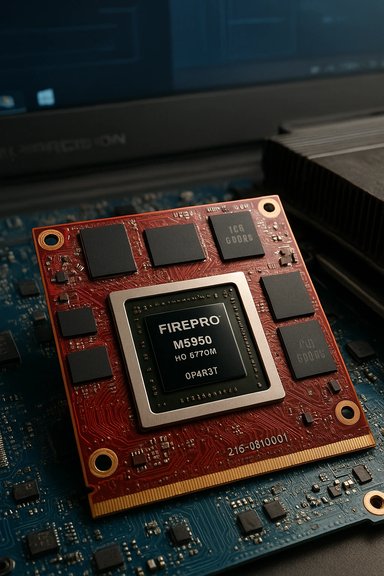 Background / Overview
The Radeon HD 6770M and its workstation sibling, the FirePro M5950, were mobile GPU options released in early 2011. These were sold as MXM modules for business and workstation laptops, not as full‑length desktop cards. The FirePro M5950 is essentially an MXM‑packaged, OEM‑branded variant of the HD 6770M architecture and is often sold as a replacement part for older Dell Precision machines. Technical databases list the HD 6770M / FirePro M5950 as a TeraScale‑2 (Whistler) design using a 40 nm process, with roughly 480 shader cores, a 128‑bit memory bus, and 1 GB of GDDR5 memory in most MXM variants. The GPU often walks around with the internal variant identifier 216‑0810001. The listing text you shared (the Born2Invest snippet) appears to be a reseller-style title that merges spec keywords and marketplace identifiers into one line; such titles are common for used MXM modules and laptop replacements. Treat the “working perfectly” and “Windows 10 2026” claims as seller assertions that must be verified by inspection, photos, or return policy rather than hard facts.What the hardware actually is — technical snapshot
Below is a concise, fact‑checked spec list for the HD 6770M / FirePro M5950 MXM module. These numbers are cross‑checked against multiple hardware databases and OEM listings.- GPU family / architecture: TeraScale 2 (Whistler).
- GPU variant (common MXM part ID): 216‑0810001 (Whistler XT MXM variant).
- Compute units / stream processors: ~480 stream processors.
- Core clock: typically ~725 MHz (OEM clocks can vary).
- Memory: 1 GB GDDR5 on a 128‑bit bus; memory clock commonly 900 MHz (3.6 Gbps effective). Seller claim of “DDR5” is likely shorthand for GDDR5 — not to be confused with modern system DDR5 RAM.
- Memory bandwidth: roughly 57.6 GB/s (GDDR5 variant).
- TDP / power (mobile): ~35 W (MXM module rating).
- Form factor: MXM‑A (MXM 3.0) module — commonly used in Precision M4600 / M4700 upgrade slots.
Dell Precision M4600 / M4700 compatibility and part numbers
Dell’s Precision 15‑inch family (M4600, M4700) was built to accept MXM video modules and shipped with various professional GPU options; the FirePro M5950 was one of the OEM options. Dell uses its own DP/N (Dell Part Number) labeling for these modules; the Dell DP/N 0P4R8T repeatedly appears in resale listings and OEM spare inventories as the FirePro/HD67xx MXM module compatible with Precision M4600/M4700 systems. If the seller lists a DP/N such as 0P4R8T or shows that code on the PCB sticker, it’s a strong sign the module is the genuine Dell‑flashed MXM card for these laptops. Important platform facts:- The M4600 / M4700 heat‑sink, BIOS, and power delivery were designed with MXM replaceable GPUs in mind; while physical fitment is often straightforward, BIOS whitelists or firmware expectations can complicate “plug‑and‑play” behavior with non‑Dell or mismatched MXM cards.
- Many resellers list the same module under both “HD 6770M” and “FirePro M5950” model names because the FirePro branding is a workstation‑tuned OEM variant of the 6770M silicon. Always ask for photos of the module sticker (which shows the DP/N) and board markings.
Windows 10 compatibility and driver reality (what “works perfectly” actually means)
Two independent forces determine “will it work?”: (A) will Windows recognise the card and install a driver, and (B) will that driver provide stable, hardware‑accelerated 3D/compute and power management on the laptop’s hybrid graphics architecture.- Windows Update and Microsoft‑signed legacy drivers often provide the safest baseline: a minimal, signed display driver that restores desktop acceleration and basic video playback. Community experience shows Windows Update is the lowest‑risk path for legacy mobile GPUs on modern installs.
- OEM drivers from Dell that match the exact laptop model and OS are preferred for hybrid graphics (Intel + AMD switching) and power‑management features. If Dell’s support page lists a driver package for your laptop model and OS, use that.
- Archived AMD Catalyst packages (the old driver era) can sometimes be installed manually, but they often require careful INF verification and a clean driver state using DDU. These manual installs are advanced and can leave you with partial installs or the Microsoft Basic Display Adapter if the INF doesn’t match. Community guides strongly recommend DDU and verifying the hardware ID in the extracted INF before attempting this route.
Buyer’s checklist — how to evaluate the listing before you click Buy
When the listing is a short title with multiple part codes, follow this checklist before you purchase. These checks reduce the risk of receiving a nonfunctional or counterfeit module.- Ask for clear photos of the PCB sticker showing the DP/N (Dell Part Number), serial number, and any MXM labels. A genuine listing for a Dell module often shows DP/N like 0P4R8T.
- Request a short video showing the module installed in the seller’s laptop booting to Windows Device Manager with the GPU visible (or GPU‑Z readout). This verifies basic functionality and avoids “photo of a photo” scams.
- Confirm return policy and testing window. Sellers of used MXM modules should accept returns if the part is DOA; prefer vendors with a 14–30 day tested return window. Marketplaces and reseller sites often show short-term warranties.
- Inspect for heat damage or solder repairs. Ask for closeups of the PCB around the VRM caps and heatsink mounting points. Burn marks, bulging capacitors, or residue indicate a higher failure risk.
- Verify the module’s form factor. Are you getting an MXM‑A (MXM 3.0) module? Confirm your laptop physically supports MXM replacements and that the heatsink and power delivery in your model match the module’s TDP (about 35 W).
- Price vs. replacement cost. Compare the asking price to other refurbished or NOS MXM listings. A very cheap price could be attractive but may signal used/untested stock or modules removed from dead laptops.
Installation and driver workflow — safe recipe
If you buy the module and plan to install it yourself, follow this conservative, community‑tested sequence to reduce the chance of bricking your display or ending up with a nonfunctional device.- Create a full disk image and a System Restore point on the laptop before touching drivers.
- Boot into Windows and record the current GPU hardware ID (Device Manager → Display adapters → Properties → Details → Hardware Ids). Save the string.
- If possible, test boot with the old GPU driver in place. Remove the old module only after verifying you can restore the system image with an external drive if needed.
- When installing the new MXM module, carefully seat it and confirm all thermal interface materials and screws are clean. Power on and watch for POST videos; a lack of video may indicate BIOS/whitelist or power mismatch.
- If Windows installs a generic adapter or fails to enumerate the GPU, use Display Driver Uninstaller (DDU) in Safe Mode to remove remnants of old drivers and then allow Windows Update to supply a Microsoft‑signed legacy driver as the first step. Reboot and validate.
- If you need additional features and the OEM provides a driver package, use the Dell driver package for your exact laptop model. If you must use an archived Catalyst package, extract it and confirm the INF lists your hardware ID before attempting Have Disk manual installs. Only advanced users should proceed beyond OEM or Windows Update drivers.
Red flags and risks to factor into the purchase
- “Working perfectly” is unverifiable without testing. Sellers commonly describe used components as “working” but do not test under stress or for long‑term stability. Ask for a validated run of GPU‑Z and a short 3DMark or Unigine loop test if possible.
- Driver and OS support is limited. Windows 10 end of support (October 14, 2025) reduces the long‑term security and support options for legacy drivers. Expect to rely on archived drivers and community troubleshooting.
- Counterfeit or repackaged drivers. Avoid downloading repackaged driver bundles from untrusted third parties — community threads report instability and malware risks from unsigned installers. Prefer Microsoft Update or OEM pages.
- Hybrid graphics complexity. Many Dell Precisions use Optimus or hybrid switching that depends on OEM firmware and specific driver stacks; mixing non‑OEM modules or mismatched drivers can break automatic switching and power management.
- No warranty / limited returns. Many marketplace listings for MXM cards are “sold as tested” with short or no returns. Factor testing time and potential repair costs into your effective price.
Practical use cases: who should buy one?
- Hobbyists and maintainers of legacy Dell Precision machinery who need a tested replacement module to resurrect a working M4600/M4700 or keep an older CAD workstation alive. These buyers value the mechanical fit and OEM DP/N match above new‑hardware performance.
- Collectors and labs that run legacy software tied to older GPUs or drivers where certifying an identical hardware environment is necessary.
- Not recommended for users who expect modern gaming performance, secure daily computing on Windows 10 after EoS without ESU, or those who cannot tolerate driver maintenance and potential driver‑related instability.
Final verdict and recommendation
The listing you provided is consistent with established MXM replacement listings for Dell Precision workstations: it likely references an AMD FirePro M5950 / Radeon HD 6770M MXM module (GPU variant 216‑0810001) that uses GDDR5 memory and often carries Dell DP/N labels such as 0P4R8T. Those facts are verifiable through hardware databases and reseller inventories. However, “working perfectly” and “Windows 10 2026” are seller claims that need verification. Given Windows 10’s end of support and the vintage nature of the hardware, treat this purchase as a parts/legacy restoration buy rather than a worry‑free modern GPU upgrade. Follow the buyer checklist above — especially insist on clear DP/N photos, a tested return window, and a simple video of the card enumerating under Device Manager — before finalizing payment. If you plan to use the machine for security‑sensitive or mission‑critical workloads, budget for a hardware or OS refresh instead of relying on an archived mobile GPU and legacy drivers.Quick action checklist (copyable)
- Ask seller for photos of PCB sticker with DP/N (e.g., 0P4R8T) and serial.
- Request a short video showing GPU‑Z / Device Manager recognizing the card under Windows.
- Confirm return policy and allowed testing window.
- Plan driver workflow: Windows Update → OEM driver → archived Catalyst (advanced; use DDU & INF check).
- Consider the Windows 10 EoS risk and whether ESU or OS migration is required for your use case.
Source: Born2Invest https://born2invest.com/?b=style-232025112/
