

Android 17 is now past its first Pixel beta confusion and, as of mid-June 2026, Google lists Android 17 over-the-air updates and downloads for supported Pixel devices, while partner-device beta programs continue separately. That chronology matters because the original “beta is rolling out” story has already been overtaken by the platform’s stable arrival on Pixels. The interesting story is no longer whether Pixel owners can find the beta toggle. It is how Google’s faster Android cadence is making the boundary between beta, stable, Pixel Drop, and quarterly preview harder for normal users to parse.
The old Android rhythm was easy enough to explain: developer previews early in the year, public betas in spring, a stable release later, and a long wait for everyone outside Google’s own phones. Android 17 has made that storyline feel less like a release cycle and more like a conveyor belt. By the time some users are still discussing beta availability, Google’s own developer pages are already presenting Android 17 as something Pixel owners can receive over the air.
That does not mean the early reports were meaningless. They captured a real user experience: some Pixel owners enrolled in the beta program saw builds immediately, while others saw nothing, saw downgrade warnings, or were left guessing whether their device, account, carrier channel, or region was the reason. In the Android world, “available” has always been a slippery word.
But the slippage is more visible now because Google is compressing more work into overlapping tracks. There is the main Android platform release. There are Pixel-only features delivered alongside it. There are quarterly platform release betas that can begin before everyone has emotionally exited the previous beta. There are partner-device betas run by OEMs with their own support pages and schedules. The result is technically coherent and publicly confusing.
For WindowsForum readers, the closest analogy is the difference between Windows General Availability, Release Preview, Insider Beta, Canary, cumulative updates, enablement packages, and OEM driver timing. Microsoft learned the hard way that having many rings is useful for engineering and treacherous for messaging. Google is now living in that same release-management neighborhood.
A user with a Pixel 8 Pro and a user with a Pixel 7 may both be “eligible” in the marketing sense while living in very different update realities. One may be enrolled in the Android Beta Program and receive an OTA almost instantly. Another may be enrolled but stuck on a prior build. A third may have opted out at exactly the wrong moment and now see only a wipe-based downgrade path. None of those outcomes contradicts the claim that the beta exists.
This is the paradox of modern platform engineering: the more cautiously a vendor deploys software, the more chaotic the rollout can look from the outside. Staging protects the broad population from catastrophic regressions, but it also creates thousands of little mysteries. Enthusiasts then fill the gap with screenshots, Reddit threads, rumors, and theories about whether Google has forgotten their device.
The strongest criticism is not that Google uses staggered rollouts. It would be reckless not to. The problem is that the consumer-facing language still often treats availability as binary. If a page says a Pixel model is supported, users reasonably expect the update screen to agree.
That matters because the Pixel line has become both Google’s showcase and its compatibility proving ground. Pixel 6 support is especially notable because those devices now sit at the older edge of the supported fleet. When they remain in the update story, the installed base for developers and IT administrators becomes more predictable.
It also complicates advice. A Pixel 6 on Android 17 is not the same operational bet as a Pixel 10 Pro on Android 17. Older devices may receive the same platform version while differing in performance headroom, modem behavior, thermal limits, feature availability, and update cadence. The version number hides a lot of hardware reality.
For admins managing Android fleets, the supported-device list is only the first filter. The harder question is which devices are suitable for early adoption, which should wait for a later monthly or quarterly patch, and which should remain on the prior version until critical apps are validated.
A Pixel owner may be on Android 17 stable. Another may be on Android 17 QPR1 beta. Another may be trying to exit a beta track without wiping data. Another may be on a partner OEM’s Android 17 beta that behaves nothing like Google’s Pixel build. The platform name is shared, but the risk profile is not.
This is where Google’s developer-first clarity runs into consumer expectations. Developers understand build numbers, API levels, system images, emulator targets, and issue trackers. Normal users understand the update screen. Enthusiasts sit somewhere in between and often get burned because they know just enough to enroll but not enough to map every exit route.
The Windows Insider Program has the same trap. Canary and Beta channels are not just “early Windows.” They are distinct commitments with different escape hatches. Android’s beta program increasingly needs that same plain-language warning: you are not merely getting tomorrow’s Android today; you may be joining a moving train.
Android is mature. Windows is mature. iOS is mature. The biggest changes increasingly arrive as policy, plumbing, security posture, background restrictions, app compatibility behavior, device-to-device continuity, or AI integration that may be switched on later. A release can be important without looking spectacular in screenshots.
That distinction matters for Pixel owners deciding whether to install early builds. If the update were a once-a-decade interface revolution, more enthusiasts might accept instability. If the update is mostly refinements and platform groundwork, the risk-reward calculation changes. A banking app breaking, Bluetooth becoming flaky, or battery life wobbling for a week is harder to justify when the visible payoff is subtle.
Google’s own strategy reinforces this. Android increasingly ships as a foundation for later feature drops, Play services updates, app-level changes, and device-specific capabilities. The operating system version is still important, but it is no longer the only vehicle for user-facing change.
That makes “what’s new in Android 17” a harder question than it used to be. A feature may be in the platform but disabled. It may be present on Pixel 10 but absent on Pixel 6. It may require a server-side flag. It may ship later as part of a Pixel Drop. It may be announced as Android functionality but experienced as a Google app feature.
Windows users have already seen this pattern with Copilot-era Windows 11. The OS build, Microsoft Store apps, cloud services, regional availability, and hardware requirements all interact. Android’s AI future is likely to be similarly layered, and that means release notes will become less satisfying as a source of truth.
For IT teams, this is not just semantics. AI features can affect data exposure, user training, compliance review, app workflows, and support tickets. The more these features arrive through mixed channels, the harder it becomes to freeze a known-good configuration.
Enthusiasts often underestimate the hidden cost of a beta. The obvious risk is crashes. The less obvious risk is state: app data, authentication tokens, passkeys, device management profiles, payment cards, eSIMs, encrypted backups, and beta enrollment status. A bad build is annoying; a bad exit path is worse.
Developers and testers have a different calculus. They need to validate behavior changes, target SDK implications, UI regressions, background restrictions, permission prompts, and device-form-factor behavior. For them, early Android 17 access is not a toy. It is part of staying ahead of support problems before the stable wave reaches customers.
The cleanest rule is to separate curiosity from dependency. If a Pixel is a test device, enroll it. If it is your daily lifeline, wait for stable and then wait again for the first meaningful patch unless you have a specific reason to move immediately.
This distinction is essential. A Pixel beta is Google’s reference implementation on Google’s hardware. A partner beta is an OEM interpretation of Android 17 on its own hardware, drivers, skin, power management stack, camera pipeline, modem configuration, and update infrastructure. The version number may match, but the experience may diverge sharply.
For enthusiasts, partner betas can be exciting because they offer early access beyond Pixel. For ordinary users, they are often more hazardous than the phrase “Android beta” implies. Manual flashing, region-specific builds, limited rollback options, and sparse support documentation can turn curiosity into a weekend recovery project.
For enterprise Android deployments, partner betas are useful mainly as early warning systems. They show where OEM-specific behavior may break apps or policies. They are not a green light for production adoption.
Microsoft has spent years trying to explain servicing channels, feature updates, quality updates, enablement packages, Windows Insider rings, and hardware blocks. Even then, confusion persists. Google’s Android messaging has historically leaned on simplicity: here is the new Android, Pixel gets it first, others follow. That story is now too thin.
The deeper Android becomes as a platform for AI, foldables, desktop modes, passkeys, private compute, and cross-device services, the more Google needs to distinguish between platform availability and feature availability. Otherwise users will keep asking why their supported device does not show the update, why their update lacks a demoed feature, or why leaving a beta threatens to wipe their phone.
This is not a niche communications problem. It affects app developers timing target SDK changes, security teams approving devices, OEMs setting support expectations, and consumers deciding whether a phone is still meaningfully current. Release language is infrastructure.
A good update system should tell users three things plainly: what track they are on, what build they are being offered, and what happens if they accept or decline. It should also say whether leaving a track requires a wipe, whether a stable exit build is expected, and whether waiting is safer. Those details should not require archaeology across forums and support pages.
Google has improved Android’s developer documentation over the years, but the consumer beta experience still depends heavily on community interpretation. That is fine for hobbyists. It is not fine when Pixel phones are marketed as mainstream premium devices with long support windows.
The irony is that Google’s release engineering may be stronger than its messaging makes it look. Staged rollouts, beta channels, and QPR testing are signs of a mature platform. But maturity should reduce uncertainty for users, not merely redistribute it.
That is dangerous territory for any platform vendor. Updates are already moments of anxiety for users who have been trained by years of battery drain stories, app breakage, and post-patch bugs. If the availability story also feels inconsistent, cautious users delay. Delayed updates then become a security and compatibility problem.
The answer is not to stop staging releases. The answer is to narrate the stage. Microsoft, Google, Apple, Samsung, and every other platform steward should treat update messaging as part of the product, not as a support afterthought.
For Android 17, the practical reality is simple enough: stable builds are now available for supported Pixels, while beta activity continues through partner devices and quarterly preview channels. The public conversation, however, is still catching up to that reality.
The users most likely to benefit from early Android 17 builds are developers, testers, and enthusiasts with spare hardware. The users most likely to regret it are those who treat the beta as a sneak preview rather than a test program. That distinction sounds pedantic until a critical app refuses to launch on Monday morning.
There is also no shame in waiting. In mature operating systems, the first stable release is not always the best release. The second or third update often tells a clearer story about battery life, app compatibility, modem behavior, and device-specific bugs.
For organizations, Android 17 should go through the same discipline as any Windows feature update. Inventory devices, identify supported models, validate required apps, test identity and management workflows, and avoid assuming that one successful Pixel install proves fleet readiness.
That model can work. It may even be necessary. Android now has to serve phones, tablets, foldables, desktop-like modes, cars, watches, developer APIs, AI features, and an enormous OEM ecosystem. A single annual monolith would be too slow.
But faster channels demand better signs. If Google wants users to participate in testing, it must make the cost of participation obvious. If it wants businesses to trust long support windows, it must make update states legible. If it wants Android 17 to be seen as a polished platform rather than a rolling experiment, it must explain where the experiment ends.
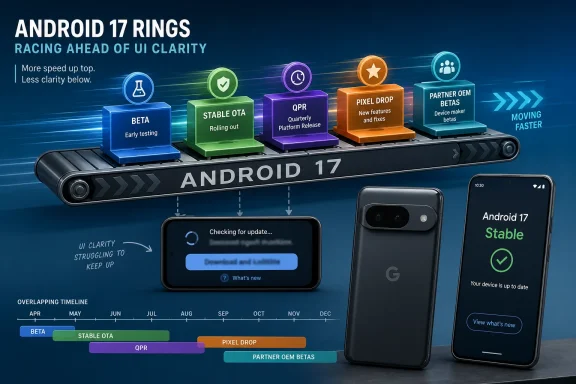 Google’s Android Calendar Has Started to Outrun the User Interface
The old Android rhythm was easy enough to explain: developer previews early in the year, public betas in spring, a stable release later, and a long wait for everyone outside Google’s own phones. Android 17 has made that storyline feel less like a release cycle and more like a conveyor belt. By the time some users are still discussing beta availability, Google’s own developer pages are already presenting Android 17 as something Pixel owners can receive over the air.That does not mean the early reports were meaningless. They captured a real user experience: some Pixel owners enrolled in the beta program saw builds immediately, while others saw nothing, saw downgrade warnings, or were left guessing whether their device, account, carrier channel, or region was the reason. In the Android world, “available” has always been a slippery word.
But the slippage is more visible now because Google is compressing more work into overlapping tracks. There is the main Android platform release. There are Pixel-only features delivered alongside it. There are quarterly platform release betas that can begin before everyone has emotionally exited the previous beta. There are partner-device betas run by OEMs with their own support pages and schedules. The result is technically coherent and publicly confusing.
For WindowsForum readers, the closest analogy is the difference between Windows General Availability, Release Preview, Insider Beta, Canary, cumulative updates, enablement packages, and OEM driver timing. Microsoft learned the hard way that having many rings is useful for engineering and treacherous for messaging. Google is now living in that same release-management neighborhood.
The First Android 17 Beta Story Was Really a Rollout Story
The NPowerUser report framed Android 17 Beta as newly available for Pixel phones while noting that many eligible users could not see the update. That tension is familiar. Modern software rollouts are rarely a single switch; they are a mesh of staged deployments, server-side eligibility, account enrollment, carrier certification, device variants, and risk controls.A user with a Pixel 8 Pro and a user with a Pixel 7 may both be “eligible” in the marketing sense while living in very different update realities. One may be enrolled in the Android Beta Program and receive an OTA almost instantly. Another may be enrolled but stuck on a prior build. A third may have opted out at exactly the wrong moment and now see only a wipe-based downgrade path. None of those outcomes contradicts the claim that the beta exists.
This is the paradox of modern platform engineering: the more cautiously a vendor deploys software, the more chaotic the rollout can look from the outside. Staging protects the broad population from catastrophic regressions, but it also creates thousands of little mysteries. Enthusiasts then fill the gap with screenshots, Reddit threads, rumors, and theories about whether Google has forgotten their device.
The strongest criticism is not that Google uses staggered rollouts. It would be reckless not to. The problem is that the consumer-facing language still often treats availability as binary. If a page says a Pixel model is supported, users reasonably expect the update screen to agree.
Pixel Support Is Broader Than the Early Lists Suggested
The early article’s device list was directionally right but incomplete by today’s official picture. Google’s current Android 17 documentation lists OTAs and downloads for Pixel 6, Pixel 6 Pro, Pixel 6a, Pixel 7, Pixel 7 Pro, Pixel 7a, Pixel Tablet, Pixel Fold, Pixel 8, Pixel 8 Pro, Pixel 8a, Pixel 9 family devices, Pixel 9a, Pixel 10 family devices, Pixel 10a, and the Pixel 10 Pro Fold.That matters because the Pixel line has become both Google’s showcase and its compatibility proving ground. Pixel 6 support is especially notable because those devices now sit at the older edge of the supported fleet. When they remain in the update story, the installed base for developers and IT administrators becomes more predictable.
It also complicates advice. A Pixel 6 on Android 17 is not the same operational bet as a Pixel 10 Pro on Android 17. Older devices may receive the same platform version while differing in performance headroom, modem behavior, thermal limits, feature availability, and update cadence. The version number hides a lot of hardware reality.
For admins managing Android fleets, the supported-device list is only the first filter. The harder question is which devices are suitable for early adoption, which should wait for a later monthly or quarterly patch, and which should remain on the prior version until critical apps are validated.
Beta, Stable, and QPR Are Now Part of the Same Conversation
Android 17’s public perception is muddied because Google’s release machinery does not stop when stable lands. Quarterly Platform Release betas continue the experiment, and those builds can include meaningful interface changes, feature previews, bug fixes, and regressions of their own. That means “I’m on Android 17” is no longer specific enough.A Pixel owner may be on Android 17 stable. Another may be on Android 17 QPR1 beta. Another may be trying to exit a beta track without wiping data. Another may be on a partner OEM’s Android 17 beta that behaves nothing like Google’s Pixel build. The platform name is shared, but the risk profile is not.
This is where Google’s developer-first clarity runs into consumer expectations. Developers understand build numbers, API levels, system images, emulator targets, and issue trackers. Normal users understand the update screen. Enthusiasts sit somewhere in between and often get burned because they know just enough to enroll but not enough to map every exit route.
The Windows Insider Program has the same trap. Canary and Beta channels are not just “early Windows.” They are distinct commitments with different escape hatches. Android’s beta program increasingly needs that same plain-language warning: you are not merely getting tomorrow’s Android today; you may be joining a moving train.
The Feature Story Is Smaller Than the Platform Story
The early Android 17 beta chatter emphasized smoother animations, privacy refinements, background efficiency, and groundwork for AI-powered system features. Those are plausible and unsurprising areas for a modern Android release, but they also show why Android updates have become harder to market. The dramatic annual redesign is no longer the core product.Android is mature. Windows is mature. iOS is mature. The biggest changes increasingly arrive as policy, plumbing, security posture, background restrictions, app compatibility behavior, device-to-device continuity, or AI integration that may be switched on later. A release can be important without looking spectacular in screenshots.
That distinction matters for Pixel owners deciding whether to install early builds. If the update were a once-a-decade interface revolution, more enthusiasts might accept instability. If the update is mostly refinements and platform groundwork, the risk-reward calculation changes. A banking app breaking, Bluetooth becoming flaky, or battery life wobbling for a week is harder to justify when the visible payoff is subtle.
Google’s own strategy reinforces this. Android increasingly ships as a foundation for later feature drops, Play services updates, app-level changes, and device-specific capabilities. The operating system version is still important, but it is no longer the only vehicle for user-facing change.
The AI Layer Makes Rollouts Even Less Transparent
The early report’s mention of AI groundwork is where the story points forward. Google, like Microsoft, is turning the operating system into a staging area for AI features that may not map cleanly to a single OS release. Some capabilities depend on silicon. Some depend on cloud services. Some depend on regional policy. Some depend on app updates.That makes “what’s new in Android 17” a harder question than it used to be. A feature may be in the platform but disabled. It may be present on Pixel 10 but absent on Pixel 6. It may require a server-side flag. It may ship later as part of a Pixel Drop. It may be announced as Android functionality but experienced as a Google app feature.
Windows users have already seen this pattern with Copilot-era Windows 11. The OS build, Microsoft Store apps, cloud services, regional availability, and hardware requirements all interact. Android’s AI future is likely to be similarly layered, and that means release notes will become less satisfying as a source of truth.
For IT teams, this is not just semantics. AI features can affect data exposure, user training, compliance review, app workflows, and support tickets. The more these features arrive through mixed channels, the harder it becomes to freeze a known-good configuration.
The Sensible Pixel Owner Should Treat Betas as Disposable
The advice for most users remains boring because it is correct: do not install Android betas on the phone you need to trust. That is doubly true if the device is used for work authentication, banking, travel, medical apps, two-factor authentication, or anything else where “just factory reset it” is not a serious recovery plan.Enthusiasts often underestimate the hidden cost of a beta. The obvious risk is crashes. The less obvious risk is state: app data, authentication tokens, passkeys, device management profiles, payment cards, eSIMs, encrypted backups, and beta enrollment status. A bad build is annoying; a bad exit path is worse.
Developers and testers have a different calculus. They need to validate behavior changes, target SDK implications, UI regressions, background restrictions, permission prompts, and device-form-factor behavior. For them, early Android 17 access is not a toy. It is part of staying ahead of support problems before the stable wave reaches customers.
The cleanest rule is to separate curiosity from dependency. If a Pixel is a test device, enroll it. If it is your daily lifeline, wait for stable and then wait again for the first meaningful patch unless you have a specific reason to move immediately.
Android’s Partner Beta Program Is Not a Pixel Program With Different Logos
Google’s Android 17 Beta devices page lists partner programs from brands including HONOR, iQOO, Lenovo, OnePlus, OPPO, realme, Sharp, vivo, and Xiaomi. That sounds like a broad Android ecosystem moving together, but the reality is more fragmented. Each partner handles its own enrollment, images, OTA delivery, support, and bug reporting.This distinction is essential. A Pixel beta is Google’s reference implementation on Google’s hardware. A partner beta is an OEM interpretation of Android 17 on its own hardware, drivers, skin, power management stack, camera pipeline, modem configuration, and update infrastructure. The version number may match, but the experience may diverge sharply.
For enthusiasts, partner betas can be exciting because they offer early access beyond Pixel. For ordinary users, they are often more hazardous than the phrase “Android beta” implies. Manual flashing, region-specific builds, limited rollback options, and sparse support documentation can turn curiosity into a weekend recovery project.
For enterprise Android deployments, partner betas are useful mainly as early warning systems. They show where OEM-specific behavior may break apps or policies. They are not a green light for production adoption.
Google Is Borrowing the Enterprise Playbook Without Fully Speaking Enterprise
The Android 17 rollout reflects a broader industry shift: consumer operating systems are adopting enterprise-style release trains. There are stable channels, preview rings, staged deployments, rollback rules, and support matrices. That is good engineering. It is also a communications burden.Microsoft has spent years trying to explain servicing channels, feature updates, quality updates, enablement packages, Windows Insider rings, and hardware blocks. Even then, confusion persists. Google’s Android messaging has historically leaned on simplicity: here is the new Android, Pixel gets it first, others follow. That story is now too thin.
The deeper Android becomes as a platform for AI, foldables, desktop modes, passkeys, private compute, and cross-device services, the more Google needs to distinguish between platform availability and feature availability. Otherwise users will keep asking why their supported device does not show the update, why their update lacks a demoed feature, or why leaving a beta threatens to wipe their phone.
This is not a niche communications problem. It affects app developers timing target SDK changes, security teams approving devices, OEMs setting support expectations, and consumers deciding whether a phone is still meaningfully current. Release language is infrastructure.
The Windows Lesson Is That Rings Need Plain English
WindowsForum readers know this movie. Microsoft can publish meticulous documentation and still lose users if the update UI compresses complex policy into one ambiguous button. “Check for updates” has carried too much meaning for years. Android’s beta enrollment and OTA screens are now approaching the same problem.A good update system should tell users three things plainly: what track they are on, what build they are being offered, and what happens if they accept or decline. It should also say whether leaving a track requires a wipe, whether a stable exit build is expected, and whether waiting is safer. Those details should not require archaeology across forums and support pages.
Google has improved Android’s developer documentation over the years, but the consumer beta experience still depends heavily on community interpretation. That is fine for hobbyists. It is not fine when Pixel phones are marketed as mainstream premium devices with long support windows.
The irony is that Google’s release engineering may be stronger than its messaging makes it look. Staged rollouts, beta channels, and QPR testing are signs of a mature platform. But maturity should reduce uncertainty for users, not merely redistribute it.
The Pixel Update Button Now Carries More Weight Than It Should
The concrete lesson from the Android 17 beta confusion is that the update button has become a trust interface. When it says nothing is available, users infer something about eligibility. When it offers a wipe downgrade, users infer something about risk. When news sites say a build is rolling out but the phone disagrees, trust shifts from Google to rumor.That is dangerous territory for any platform vendor. Updates are already moments of anxiety for users who have been trained by years of battery drain stories, app breakage, and post-patch bugs. If the availability story also feels inconsistent, cautious users delay. Delayed updates then become a security and compatibility problem.
The answer is not to stop staging releases. The answer is to narrate the stage. Microsoft, Google, Apple, Samsung, and every other platform steward should treat update messaging as part of the product, not as a support afterthought.
For Android 17, the practical reality is simple enough: stable builds are now available for supported Pixels, while beta activity continues through partner devices and quarterly preview channels. The public conversation, however, is still catching up to that reality.
Where Pixel Owners Should Land After the Beta Dust Settles
Pixel users do not need to panic, and most do not need to rush. If your device is supported and you are on the stable channel, Android 17 is the normal path forward. If you are on a beta build, your first job is to understand the exact track and build before tapping anything that mentions exit, downgrade, or wipe.The users most likely to benefit from early Android 17 builds are developers, testers, and enthusiasts with spare hardware. The users most likely to regret it are those who treat the beta as a sneak preview rather than a test program. That distinction sounds pedantic until a critical app refuses to launch on Monday morning.
There is also no shame in waiting. In mature operating systems, the first stable release is not always the best release. The second or third update often tells a clearer story about battery life, app compatibility, modem behavior, and device-specific bugs.
For organizations, Android 17 should go through the same discipline as any Windows feature update. Inventory devices, identify supported models, validate required apps, test identity and management workflows, and avoid assuming that one successful Pixel install proves fleet readiness.
The Android 17 Signal Behind the Pixel Noise
The immediate Android 17 story is about Pixel betas, stable OTAs, and confused timing. The larger story is about Google moving Android into a faster, more layered release model where the operating system, Pixel features, AI services, and quarterly previews blur together.That model can work. It may even be necessary. Android now has to serve phones, tablets, foldables, desktop-like modes, cars, watches, developer APIs, AI features, and an enormous OEM ecosystem. A single annual monolith would be too slow.
But faster channels demand better signs. If Google wants users to participate in testing, it must make the cost of participation obvious. If it wants businesses to trust long support windows, it must make update states legible. If it wants Android 17 to be seen as a polished platform rather than a rolling experiment, it must explain where the experiment ends.
The Version Number Is No Longer the Whole Story
Android 17 is not just an update users install; it is a release train users board, leave, or accidentally remain on. That is the mental model Pixel owners need now.- Pixel owners with supported devices should distinguish Android 17 stable from Android 17 beta and Android 17 QPR beta before making update decisions.
- Users who rely on a Pixel as their primary phone should avoid beta builds unless they have a tested backup and a clear rollback plan.
- Developers should use Pixel and emulator builds to validate app behavior early, especially around permissions, background behavior, large screens, and device-specific regressions.
- Partner-device Android 17 betas should be treated as OEM-specific test programs, not as interchangeable versions of Google’s Pixel beta.
- IT teams should validate Android 17 with the same caution they apply to Windows feature updates, including app compatibility, enrollment flows, authentication, and rollback procedures.
- Google’s biggest Android 17 challenge is not merely shipping the code; it is explaining the channel, build, and feature state clearly enough that users know what they are accepting.
References
- Primary source: nokiapoweruser.com
Published: Thu, 02 Jul 2026 05:10:58 GMT
Loading…
nokiapoweruser.com - Related coverage: androidcentral.com
Loading…
www.androidcentral.com - Related coverage: developer.android.com
Loading…
developer.android.com - Related coverage: gizmochina.com
Stable Android 17 rolling out to Google Pixels: Check eligible devices, new features, and more - Gizmochina
Google rolls out stable Android 17 to Pixel devices. Discover new AI upgrades, Bubble bar enhancements, and see if your Pixel is eligible. www.gizmochina.com
- Related coverage: techrepublic.com
Android 17 Is Live on Pixel, but Samsung and Other Android Users Still Have to Wait - TechRepublic
Android 17 is live on supported Pixel devices, but Samsung, Xiaomi, OPPO, OnePlus, and other Android users must wait for OEM rollout schedules.www.techrepublic.com
- Related coverage: tomsguide.com
Android 17 officially rolls out to Pixel devices with new features — screen reactions, bubbles, gaming mode, and more | Tom's Guide
Google's massive June 2026 software drop delivers Android 17's productivity and security overhauls to Pixel devices, alongside new Wear OS 7 features.www.tomsguide.com
- Related coverage: arstechnica.com
Android 17 starts hitting Pixel phones and watches today - Ars Technica
Pixels will get their OTA in the coming weeks, but don't expect monumental changes.arstechnica.com - Related coverage: phonearena.com
Android 17 just dropped for Pixel phones and Watch all at once - the biggest update of the year - PhoneArena
From real multitasking to better battery life, here is what landed today.www.phonearena.com - Related coverage: notebookcheck.net
Loading…
www.notebookcheck.net - Related coverage: cincodias.elpais.com
Loading…
cincodias.elpais.com - Related coverage: t3.com
Loading…
www.t3.com - Related coverage: techradar.com
A new Android 17 beta has landed — and it brings an exciting Screen Reactions feature for social media creators | TechRadar
Record yourself and your screenwww.techradar.com