

From the first boot, AnduinOS does something most Linux remixes only pretend to do: it matches Windows behavior in places that matter, not just the wallpaper and icons, and that simple design decision makes it one of the most convincing escape routes from Windows yet.
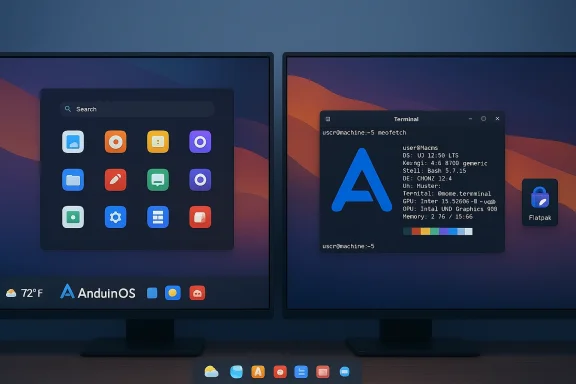
AnduinOS is an Ubuntu‑based desktop distribution that intentionally models its user experience on Windows 11 while running a standard Linux stack underneath. What makes the project notable is the combination of a Windows‑like GNOME shell, an Ubuntu upstream for driver and package compatibility, and a developer‑led focus on lowering the cognitive cost of switching platforms for everyday Windows users.
The project is relatively young and has been evolving rapidly through point releases that track Ubuntu’s cadence. The developer has published a roadmap that shows the distribution aligning releases with Ubuntu bases and iterating quickly on desktop polish, app store choices, and display stack decisions. This pace has produced features that feel “done” from a user standpoint — centered search, a centered taskbar, pinned app behavior, and quick toggle controls — while leaving deeper infrastructure decisions (update model, repositories, major‑version upgrades) still in flux.
What follows is a practical, journalist‑grade look at what AnduinOS is, why it matters to anyone considering leaving Windows, where it excels, and the real risks and tradeoffs you should weigh before making the switch.
That matters because the hardest part of switching operating systems for most users isn’t finding settings — it’s breaking years of muscle memory. With AnduinOS, that muscle memory is preserved for a large chunk of everyday tasks: launching apps, searching, switching windows, and accessing quick system toggles. The result is a smaller cognitive gap on day one.
Tip: if you prefer to stick to distro packages you can — the two models are not mutually exclusive — but Flatpak simplifies getting the newest versions of many desktop apps without risking core system changes.
That said, AnduinOS is not a “ultra‑light” distribution intended for extremely old hardware. GNOME itself is a modern desktop environment and consumes more resources than minimal window managers. The meaningful takeaway: compared with a typical Windows setup that accrues background services and scheduled tasks, AnduinOS often delivers a more consistently responsive experience for the same hardware class.
But that design choice comes with nuanced tradeoffs:
If you are a Windows user considering a move — especially a developer or general productivity user — AnduinOS is absolutely worth a live‑USB trial. Validate your critical apps, test hardware, and plan for a possible reinstall at major release boundaries until the distribution’s in‑place major‑upgrade path is clearly documented and stable.
For creative professionals and enterprises with tightly coupled Windows toolchains, treat AnduinOS as an interesting proof point rather than a ready drop‑in: evaluate app compatibility carefully and consider hybrid strategies (dual boot, VM, or selective migration) that provide safety during the transition.
For many users, that’s exactly the kind of escape route that turns a theoretical alternative into a practical next step.
Source: MUO This Ubuntu-based distro might be the easiest Windows escape route yet
 Background / Overview
AnduinOS is an Ubuntu‑based desktop distribution that intentionally models its user experience on Windows 11 while running a standard Linux stack underneath. What makes the project notable is the combination of a Windows‑like GNOME shell, an Ubuntu upstream for driver and package compatibility, and a developer‑led focus on lowering the cognitive cost of switching platforms for everyday Windows users.The project is relatively young and has been evolving rapidly through point releases that track Ubuntu’s cadence. The developer has published a roadmap that shows the distribution aligning releases with Ubuntu bases and iterating quickly on desktop polish, app store choices, and display stack decisions. This pace has produced features that feel “done” from a user standpoint — centered search, a centered taskbar, pinned app behavior, and quick toggle controls — while leaving deeper infrastructure decisions (update model, repositories, major‑version upgrades) still in flux.
What follows is a practical, journalist‑grade look at what AnduinOS is, why it matters to anyone considering leaving Windows, where it excels, and the real risks and tradeoffs you should weigh before making the switch.
The Windows likeness: design by behavior, not just appearance
A behavioral sense of familiarity
Many “Windows‑like” Linux distributions try to copy the visual look of Microsoft’s UI and stop there. AnduinOS goes further: it recreates interaction patterns and affordances Windows users rely on — centered application launcher behavior, predictable keyboard shortcuts (Super key to open the launcher), context menu actions like pinning, and small UI cues such as a lower‑left weather widget.That matters because the hardest part of switching operating systems for most users isn’t finding settings — it’s breaking years of muscle memory. With AnduinOS, that muscle memory is preserved for a large chunk of everyday tasks: launching apps, searching, switching windows, and accessing quick system toggles. The result is a smaller cognitive gap on day one.
Where mimicry helps — and where it cannot disguise Linux
The familiarity is particularly effective for:- Web‑centric workflows (browsing, email, cloud docs).
- Basic productivity (office suites, note taking, media playback).
- Developer workflows that already thrive in terminal environments (Git, containers, editors).
The Ubuntu foundation: stability, drivers, and practical benefits
Why Ubuntu matters here
AnduinOS is built on an Ubuntu base and intentionally uses Ubuntu packages for core system components. That choice delivers several practical benefits to would‑be switchers:- Hardware compatibility: Ubuntu’s wide driver support means Wi‑Fi, Bluetooth, webcams, and many peripherals are detected and usable out of the box on a much higher percentage of machines than an indie distro without that upstream.
- Package and repository maturity: Leveraging Ubuntu repositories keeps AnduinOS tied to a mature ecosystem of packages, drivers, and kernel builds that are well tested across hardware.
- Upgrade and LTS options: Aligning with Ubuntu’s LTS releases allows AnduinOS users a predictable support lifecycle when the Anduin build is itself built on an LTS base.
Flatpak, apps, and the user experience
AnduinOS ships a GNOME desktop tuned to look and behave like Windows. For application management, the practical approach is to support both traditional distro packages for system components and Flatpak for user apps. Installing Flatpak and adding the primary Flatpak app store gives users access to a huge catalog of desktop apps packaged with runtime isolation, which is especially useful for distributing modern apps across Ubuntu‑based systems.Tip: if you prefer to stick to distro packages you can — the two models are not mutually exclusive — but Flatpak simplifies getting the newest versions of many desktop apps without risking core system changes.
Performance: does AnduinOS actually make hardware feel younger?
One of the standout claims — and practical selling points — is improved responsiveness on older machines. AnduinOS’s combination of:- A lean GNOME session with selected extensions and performance tweaks,
- An absence of many Windows background services and telemetry,
- Lightweight default background activity settings,
That said, AnduinOS is not a “ultra‑light” distribution intended for extremely old hardware. GNOME itself is a modern desktop environment and consumes more resources than minimal window managers. The meaningful takeaway: compared with a typical Windows setup that accrues background services and scheduled tasks, AnduinOS often delivers a more consistently responsive experience for the same hardware class.
Project status, governance, and update model — critical caveats
Solo‑maintainer realities and bus‑factor risk
AnduinOS began as a passion project and has been driven publicly by a single lead developer. That focus has advantages — a clear product vision, tight UI cohesion, and fast iteration — but it also introduces important risks:- Bus factor: A one‑person core team means continuity is fragile. If the lead developer steps away, progress could stall and community support resources may be limited.
- Limited official support: Expect community threads, user‑submitted guides, and Git issue trackers to be the primary help channels rather than a large documentation portal or corporate support desk.
- Project governance: With an evolving roadmap and a small maintainer footprint, major policy changes (like how updates are delivered) can change rapidly.
Update mechanics and major upgrades
AnduinOS currently leans heavily on Ubuntu repositories for core packages; however, the distribution historically used point‑release scripts for delivering Anduin‑specific updates and dot builds. This means:- Some minor and point upgrades can be applied with supplied scripts or package actions.
- Upgrading across major AnduinOS versions has, in practice, required a fresh reinstall in some early releases — an important consideration if you expect seamless in‑place upgrades every six months.
Application compatibility and the professional user
Developer and general user workflows
AnduinOS is a good fit for developers and everyday Windows users who rely on web and cross‑platform tools. Benefits include:- Native terminal support, with standard shells and developer toolchains available from Ubuntu repositories.
- Easy access to container runtimes, build tools, and Git workflows that often feel more natural on Linux.
- A modern desktop suitable for multi‑monitor, tiling, and keyboard‑driven workflows that many developers prefer.
Creatives, specialized tools, and limits
If your workflow depends on high‑end, closed‑source Windows applications (industry creative suites, specialized audio/video production tools, or certain proprietary hardware control apps), be cautious:- Some heavyweight professional apps do not have native Linux ports and require complex workarounds.
- Even when community or third‑party installers exist for popular packages, they may not deliver the same performance, plugin compatibility, or hardware acceleration that the native Windows build provides.
- Closed‑system DRM and hardware dongles can be especially finicky.
Security and privacy: expectations and realities
Switching to Linux offers clear privacy and telemetry differences compared with modern Windows versions. AnduinOS benefits from that base shift and from Ubuntu’s security posture. Important points to consider:- Update cadence: Timely security patches depend on both Ubuntu upstream and Anduin‑specific update mechanisms. For critical systems, confirm how AnduinOS publishes and applies security updates for distribution‑specific components.
- Attack surface: Fewer background telemetry services and reduced default cloud integration can lower expansive telemetry risk, but they do not eliminate the need for endpoint security best practices.
- Third‑party apps and repos: Exercise caution when adding external repositories or third‑party builds. Stick to trusted sources and understand that adding third‑party repos increases maintenance burden and potential for dependency conflicts.
Installation, testing, and an honest migration checklist
If you’re considering AnduinOS as a migration target, follow a measured plan:- Try it live first. Boot the ISO as a live session on a USB stick to validate basic hardware support (Wi‑Fi, webcam, external displays).
- Backup your Windows system image and data. Always assume you may need to restore and have a tested backup.
- Test critical apps. Before switching, verify your essential apps (or acceptable Linux alternatives) work for the tasks you rely on every day.
- Prepare for dual‑boot if you need to keep a safety net. Dual‑booting or using a VM gives you an escape hatch while you acclimate.
- Learn package and app management basics: apt for system packages, Flatpak for many desktop apps, and Snap if you prefer it — AnduinOS integrates with Ubuntu’s package ecosystem, so these skills transfer.
- Expect occasional terminal tasks. Some troubleshooting in Linux will require a terminal command; that’s part of the tradeoff for control and flexibility.
Community, documentation, and where to look for help
Because AnduinOS is an emerging project, community resources are the lifeblood of real‑world adoption. Expect:- Community forums and discussion threads where users share fixes, theming tips, and hardware notes.
- A project blog or news feed for release notes and developer updates.
- Third‑party reviews and how‑tos from Linux writers and early adopters that will accelerate the documentation corpus over time.
Who should switch — and who should pause
AnduinOS presents a compelling option for several user profiles:- Ideal candidates
- Non‑specialist Windows users who primarily use web apps, email, and common desktop productivity tools.
- Developers and technical users who want a modern Linux environment but prefer a comfortable, Windows‑like desktop on day one.
- Owners of older or mid‑range hardware looking for a fresh, responsive experience without buying new machines.
- Edge cases where you should pause
- Users who rely on industry‑specific Windows software with no Linux equivalents or reliable Wine/VM paths.
- Enterprises or organizations needing long‑term vendor SLAs and predictable, centrally managed update strategies.
- Users unwilling to accept a small amount of Linux literacy (terminal, package tools) for troubleshooting.
The strategic tradeoffs: why mimicry is both clever and complicated
AnduinOS’s central strategic insight is that the biggest migration barrier is not technical compatibility — it’s habit. By designing a Linux desktop that honors Windows interaction patterns, AnduinOS dramatically lowers the first‑week friction for newcomers.But that design choice comes with nuanced tradeoffs:
- It raises expectations. Users may expect Windows‑level binary compatibility and straightforward upgrade semantics; the reality of cross‑platform differences can lead to frustration.
- It invites scrutiny. The closer a distro looks and behaves like Windows, the more it will be compared to Windows for every missing feature — not every similarity is a win if core apps fail to match expectations.
- It concentrates risk on governance and continuity. A project with rapid UX progress but a limited maintainer base needs a plan for scaling documentation, support, and upgrade infrastructure.
Practical verdict and recommendation
AnduinOS is one of the most persuasive Windows‑to‑Linux transition desktops I’ve used in recent years because it focuses on the right kind of mimicry: behavioral familiarity. It preserves the mental model Windows users carry every day while delivering the practical benefits of a Linux base: solid driver support, access to modern developer tooling, and a quieter background process model that often translates into better perceived responsiveness on older hardware.If you are a Windows user considering a move — especially a developer or general productivity user — AnduinOS is absolutely worth a live‑USB trial. Validate your critical apps, test hardware, and plan for a possible reinstall at major release boundaries until the distribution’s in‑place major‑upgrade path is clearly documented and stable.
For creative professionals and enterprises with tightly coupled Windows toolchains, treat AnduinOS as an interesting proof point rather than a ready drop‑in: evaluate app compatibility carefully and consider hybrid strategies (dual boot, VM, or selective migration) that provide safety during the transition.
Final thoughts: a pragmatic path out of Windows
Switching operating systems is rarely a single decision; it’s a small series of decisions that add up. AnduinOS lowers the first of those decisions — whether the desktop will feel foreign on day one — and that is a powerful enabler. It does not pretend to be a universal replacement for Windows. Instead, it offers a pragmatic, user‑centric bridge: keep the muscle memory that matters, step into a Linux stack that’s dependable, and buy time to evaluate which pieces of your workflow need deeper change.For many users, that’s exactly the kind of escape route that turns a theoretical alternative into a practical next step.
Source: MUO This Ubuntu-based distro might be the easiest Windows escape route yet
