

Apple’s rumored MacBook Ultra could represent the most consequential high-end Mac laptop redesign since the Apple silicon era began, but the emerging picture is as much about strategic tension as it is about new hardware. Expected between late 2026 and early 2027, the machine is rumored to bring OLED, direct touchscreen input, a redesigned camera cutout, slimmer hardware, and potentially cellular connectivity to Apple’s professional notebook line—while possibly arriving with chips that are already familiar by the time it reaches stores.
For Windows users, the concept will sound immediately recognizable. Premium touchscreen laptops, thin-bezel panels, 5G options, and touch-aware operating systems have been established parts of the Windows PC market for years. What makes the MacBook Ultra notable is not that it would invent these ideas, but that Apple may finally apply them to a premium clamshell Mac without turning it into a tablet hybrid.
The key caveat is essential: Apple has not announced a MacBook Ultra. Its name, release window, features, pricing, and configuration remain subject to change. Yet the range and consistency of the current reports suggest that Apple is at least seriously preparing a new tier above the existing MacBook Pro lineup.
The rumored product is widely described as a MacBook Ultra, a name that would position it above the MacBook Air and MacBook Pro rather than merely replacing an existing configuration. Apple has already used “Ultra” to identify its highest-end desktop-class processor, so the branding would create a logical, if potentially confusing, extension to its laptop range.
A MacBook Ultra would also answer a lingering question around Apple’s portable lineup: how does the company create a genuinely premium notebook category when its current MacBook Pro models are already extremely expensive and capable?
Today’s high-end MacBook Pro range already targets developers, video editors, 3D artists, audio professionals, photographers, and enterprise users who need substantial CPU, GPU, memory, display, and battery capability. A MacBook Ultra therefore cannot succeed simply by being a slightly faster MacBook Pro. It needs a visibly more advanced industrial design and a set of features that give professionals a reason to accept an even higher price.
The reported design direction appears to do exactly that. Rather than relying on a radical foldable screen or a detachable keyboard, Apple is said to be preserving the familiar laptop form factor while modernizing nearly every part of the experience around it.
That decision matters. Many professional users value the MacBook Pro because it is predictable: a strong keyboard, a highly accurate trackpad, a robust enclosure, long battery life, and a straightforward operating system. The MacBook Ultra could aim to retain those strengths while making the device feel much less conservative.
That hierarchy has benefits. A buyer who simply wants a powerful workstation could remain with a MacBook Pro, while customers who want every new technology Apple can offer would have a clearly defined flagship. It could reduce the pressure to cram every premium feature into both 14-inch and 16-inch MacBook Pro models.
The risk is that the lineup becomes more difficult to understand. Apple’s historical strength has been in making expensive product choices feel relatively simple. Adding Ultra branding alongside Pro, Max, and potentially multiple generations of Apple silicon may make purchasing decisions less clear, particularly for businesses managing fleets of notebooks.
OLED’s potential advantages are well known:
The technical detail reportedly under consideration is especially important: tandem OLED combined with an oxide thin-film-transistor backplane. Tandem OLED stacks multiple emitting layers, which can improve brightness and longevity compared with a conventional single-stack OLED panel.
That does not eliminate all OLED concerns. Professional buyers will still look closely at durability, color stability, brightness under sustained HDR workloads, power consumption on white-heavy content, and possible image retention. Apple has experience with tandem OLED technology in its premium tablets, but a MacBook display is used differently. Desktop-class productivity involves static menus, timelines, toolbars, IDE panels, spreadsheets, and browser elements that can remain on-screen for hours at a time.
A MacBook Ultra OLED panel would need excellent long-term management of those risks to earn the trust of professional users.
That change would finally put macOS hardware closer to the expectations created by premium Windows laptops. From Surface devices to high-end Dell, HP, Lenovo, Asus, and Samsung systems, touchscreen notebooks have become common in the Windows ecosystem—even where the keyboard-and-trackpad workflow remains the primary interaction model.
Apple’s reported approach is sensible: touch would be available, but the MacBook Ultra would not become touch-first. It would remain a conventional clamshell with a physical keyboard and trackpad. Users could switch naturally among keyboard shortcuts, trackpad gestures, mouse input, and screen taps depending on the task.
This has several practical benefits:
The touchscreen also introduces a practical downside: fingerprints. Apple would need a high-quality anti-reflective and oleophobic coating, but no coating makes a frequently touched glossy display completely immune to smudges. For visual professionals, that can become irritating quickly.
The rumored MacBook Ultra may bring input-aware controls, with elements becoming easier to tap when a user interacts directly with the display. Larger menus, touch-friendly popovers, pinch-to-zoom, faster scrolling, and improved gesture support would all be logical additions.
This is where Apple has an opportunity to avoid one of Windows’ longstanding touch challenges. Windows has often had to balance touch-friendly experiences with a massive backlog of traditional desktop applications, legacy control panels, tiny dialog boxes, and mouse-oriented workflows. Modern Windows applications have improved substantially, but inconsistent touch targets still appear in many utilities and older programs.
Apple has a more controlled platform. macOS applications follow relatively consistent interface conventions, and Apple can update its own apps together with the operating system. If it treats touch as a supplemental input method rather than an attempt to transform macOS into iPadOS, it could preserve desktop flexibility while making common actions less cumbersome.
The danger is oversimplification. Professional Mac users do not want large touch targets, oversized window controls, and reduced information density imposed on every workflow. A well-designed implementation should be adaptive, allowing touch-oriented affordances to appear when they are useful while retaining the compact precision of a conventional desktop interface.
It is an unglamorous rumor, but it may be one of the most important. Current MacBook Pro hinges are engineered for one-handed opening and stable typing angles, not for repeated direct touch. A screen that visibly shakes every time a user taps a button would undermine the entire experience.
The engineering challenge is a balancing act. The hinge must be stiff enough to resist touch input yet smooth enough to open easily. It must also maintain the premium feel associated with Apple hardware without making the laptop bulkier or causing the display to feel unnaturally rigid.
Windows hardware makers have wrestled with this issue for more than a decade. Some devices solve it through heavier bases, deeper hinge assemblies, or convertible designs. Apple’s chance to deliver a thin laptop with a stable touchscreen will depend heavily on whether it can address the mechanics without sacrificing portability.
Apple’s MacBook notch has always been unusual because macOS largely works around it rather than trying to disguise it. The result is functional, but it remains a visible design compromise on a premium laptop.
A hole-punch camera would represent a cleaner solution. It would not create a completely uninterrupted display, but it could reduce the visual intrusion dramatically. With thinner bezels and a marginally larger panel, the change could make the entire device look more modern without requiring an impractical under-display camera.
For Windows users, the change would align the Mac more closely with the visual direction of premium ultrabooks. Thin bezels and minimal camera cutouts are now common on high-end PCs, though quality webcam placement remains a challenge. Apple cannot afford to trade away FaceTime quality simply to shrink the camera opening.
On a MacBook Ultra, such a feature could surface:
A Dynamic Island on macOS could become useful if it is tightly focused on transient, high-priority activity. If it duplicates existing status areas or becomes another surface competing for attention, it risks feeling like a mobile interface element pasted onto a desktop operating system.
This could create a difficult buying decision. Early adopters would get OLED, touch input, a new chassis, and potentially other exclusive features. But buyers who prioritize maximum performance per dollar might reasonably ask why Apple’s top laptop does not debut with its newest chip architecture.
There are possible explanations. Apple may prefer to separate hardware redesigns from major silicon transitions to reduce engineering risk. It may also be working around supply constraints, especially if high-capacity memory remains constrained across the broader industry. Or it may view the MacBook Ultra primarily as a display-and-experience flagship rather than a raw-performance replacement for every MacBook Pro.
Whatever the reason, the decision could make the first generation less attractive to buyers with urgent workstation needs. Reports suggesting a more advanced successor could arrive in late 2027 only intensify that concern.
This is arguably where Apple’s design discipline will be tested most severely. The 2021 MacBook Pro redesign earned praise because it restored practical features such as HDMI, MagSafe, and an SD card slot. It gave up some thinness in exchange for better connectivity and a more professional focus.
A MacBook Ultra should not repeat the mistakes of earlier ultra-thin MacBook Pro generations. Professional customers are unlikely to welcome a return to dongle-heavy life simply to save a few millimeters.
The strongest outcome would be a thinner machine that still preserves the current practical port selection:
The smaller model would likely appeal to developers, photographers, consultants, and mobile professionals who need maximum capability in a more manageable form factor. The larger model would serve video editors, 3D creators, music producers, engineers, and users who want greater screen real estate without relying on an external display.
The rumored panel sizes may be slightly larger than today’s MacBook Pro screens, potentially around 14.3 inches and 16.3 inches. If accurate, the difference would probably come from thinner bezels rather than a significantly larger chassis.
That is a welcome direction. Thin bezels can make a laptop feel more immersive without making it less portable. But Apple must avoid making the display edges too narrow for comfortable opening, handling, and webcam placement.
This is especially relevant for macOS. The menu bar consumes a fixed area at the top of the display, and professional applications often use dense toolbars, sidebars, timelines, inspectors, and palettes. Even a small gain in usable vertical or horizontal space can improve productivity.
A cleaner upper edge could also make full-screen applications more elegant. Video editors and photographers would benefit from a less distracting display boundary, while general users would simply see more of their documents and browser windows.
There is an important distinction, though: thinner bezels are not automatically better if they compromise durability. Laptop displays are among the most vulnerable parts of a mobile computer. Apple’s engineers will need to preserve the structural strength expected from a premium machine, particularly if the screen is now intended to withstand regular touch input.
Built-in 5G or LTE could make the MacBook Ultra more flexible for frequent travelers, field workers, journalists, consultants, emergency responders, and professionals who cannot rely on consistent Wi-Fi. It could also reduce dependence on phone tethering, which is convenient but often drains a smartphone battery and creates another point of friction.
For Windows users, this is familiar territory. Cellular-capable Windows PCs have existed for years, particularly among business-focused models. Their appeal is straightforward: open the laptop and get online without finding a Wi-Fi network, accepting a captive portal, or enabling a hotspot.
Still, cellular in a MacBook would raise questions around price, data plans, battery impact, antenna design, and regional availability. It could be offered only on selected models, or it may never make it into the first-generation MacBook Ultra at all. Among the current rumors, this is the feature that deserves the greatest caution.
These include direct touch interaction through Sidecar when using an iPad as a display extension, pull-to-refresh behavior in Apple apps, and a redesigned Spotlight-based Siri experience with a pill-shaped visual treatment. None of those features proves that a touchscreen MacBook is imminent. Software design can serve multiple products and future directions.
But together, they suggest that Apple may be quietly normalizing touch-related behavior in macOS. That is precisely the kind of groundwork the company would need before introducing a touchscreen flagship.
The notable point is not that macOS would become iPadOS. It is that macOS may become more comfortable with direct manipulation while preserving its keyboard-centric and pointer-centric identity.
That creates a risk of a laptop that is technically impressive but commercially narrow. A flagship 16-inch MacBook Ultra could plausibly enter a price bracket normally associated with heavily configured workstations, desktop-and-display combinations, or enterprise mobile workstations from Dell, HP, and Lenovo.
Apple can justify a high price only if the package feels complete. Buyers will expect:
The MacBook Ultra’s first generation could be compelling for buyers who value display quality, industrial design, and new input methods more than the absolute newest processor architecture. It could also appeal to users who have long wanted a touch-enabled Mac but have not wanted to move to an iPad-based workflow.
Buyers focused primarily on performance longevity may be more cautious. If the first MacBook Ultra uses M5 Pro and M5 Max chips, and a later revision arrives relatively quickly with significantly more advanced silicon, the first generation may have a shorter period at the top of Apple’s mobile lineup than expected.
The most prudent view is that the MacBook Ultra is not yet a reason to dismiss today’s MacBook Pro. It is, however, a strong signal that Apple may be preparing to redefine what its premium laptop category looks like.
What Apple could contribute is a more tightly integrated version of those ideas. A well-implemented touchscreen Mac would not need to abandon the keyboard, trackpad, desktop apps, file management, or high-performance workflows that define a professional notebook. It would simply make touch another credible option.
That is a meaningful distinction. The best laptop interfaces are not ideological. They let users tap when tapping is fastest, type when typing is best, use a trackpad for precision, and connect peripherals when a desk-bound workflow demands them.
If the MacBook Ultra arrives with the rumored combination of OLED, touch support, a refined macOS interface, thinner hardware, and professional-grade connectivity, it could become Apple’s clearest attempt yet to merge its mobile-interface instincts with the serious computing expectations of the Mac. Its success will depend less on whether it has twelve new features than on whether those features form one coherent, practical, and appropriately premium machine.
For Windows users, the concept will sound immediately recognizable. Premium touchscreen laptops, thin-bezel panels, 5G options, and touch-aware operating systems have been established parts of the Windows PC market for years. What makes the MacBook Ultra notable is not that it would invent these ideas, but that Apple may finally apply them to a premium clamshell Mac without turning it into a tablet hybrid.
The key caveat is essential: Apple has not announced a MacBook Ultra. Its name, release window, features, pricing, and configuration remain subject to change. Yet the range and consistency of the current reports suggest that Apple is at least seriously preparing a new tier above the existing MacBook Pro lineup.
 Overview: A New Tier Above MacBook Pro
The rumored product is widely described as a MacBook Ultra, a name that would position it above the MacBook Air and MacBook Pro rather than merely replacing an existing configuration. Apple has already used “Ultra” to identify its highest-end desktop-class processor, so the branding would create a logical, if potentially confusing, extension to its laptop range.A MacBook Ultra would also answer a lingering question around Apple’s portable lineup: how does the company create a genuinely premium notebook category when its current MacBook Pro models are already extremely expensive and capable?
Today’s high-end MacBook Pro range already targets developers, video editors, 3D artists, audio professionals, photographers, and enterprise users who need substantial CPU, GPU, memory, display, and battery capability. A MacBook Ultra therefore cannot succeed simply by being a slightly faster MacBook Pro. It needs a visibly more advanced industrial design and a set of features that give professionals a reason to accept an even higher price.
The reported design direction appears to do exactly that. Rather than relying on a radical foldable screen or a detachable keyboard, Apple is said to be preserving the familiar laptop form factor while modernizing nearly every part of the experience around it.
That decision matters. Many professional users value the MacBook Pro because it is predictable: a strong keyboard, a highly accurate trackpad, a robust enclosure, long battery life, and a straightforward operating system. The MacBook Ultra could aim to retain those strengths while making the device feel much less conservative.
The 12 Rumored MacBook Ultra Features
The rumored feature list spans branding, display technology, input, silicon, portability, connectivity, and software. Some points appear considerably more credible than others, but together they describe a fundamentally different kind of Mac laptop.1. “MacBook Ultra” Branding
The first change may be the product’s identity. The MacBook Ultra name would establish a third major Mac notebook class:- MacBook Air for mainstream and portable computing
- MacBook Pro for advanced users and professional workflows
- MacBook Ultra for customers demanding the best display, design, features, and available performance
That hierarchy has benefits. A buyer who simply wants a powerful workstation could remain with a MacBook Pro, while customers who want every new technology Apple can offer would have a clearly defined flagship. It could reduce the pressure to cram every premium feature into both 14-inch and 16-inch MacBook Pro models.
The risk is that the lineup becomes more difficult to understand. Apple’s historical strength has been in making expensive product choices feel relatively simple. Adding Ultra branding alongside Pro, Max, and potentially multiple generations of Apple silicon may make purchasing decisions less clear, particularly for businesses managing fleets of notebooks.
2. The First OLED Display in a Mac
The most important hardware change may be an OLED display, which would reportedly make the MacBook Ultra the first Mac to move away from mini-LED backlighting at the high end.OLED’s potential advantages are well known:
- Per-pixel lighting for deep blacks and extremely high contrast
- Greater control over blooming than local-dimming LCD technologies
- Potentially improved color presentation for media work
- Better efficiency in darker interface elements and content
- A thinner display assembly than a comparable mini-LED design
The technical detail reportedly under consideration is especially important: tandem OLED combined with an oxide thin-film-transistor backplane. Tandem OLED stacks multiple emitting layers, which can improve brightness and longevity compared with a conventional single-stack OLED panel.
That does not eliminate all OLED concerns. Professional buyers will still look closely at durability, color stability, brightness under sustained HDR workloads, power consumption on white-heavy content, and possible image retention. Apple has experience with tandem OLED technology in its premium tablets, but a MacBook display is used differently. Desktop-class productivity involves static menus, timelines, toolbars, IDE panels, spreadsheets, and browser elements that can remain on-screen for hours at a time.
A MacBook Ultra OLED panel would need excellent long-term management of those risks to earn the trust of professional users.
3. A Direct Touchscreen on a Mac
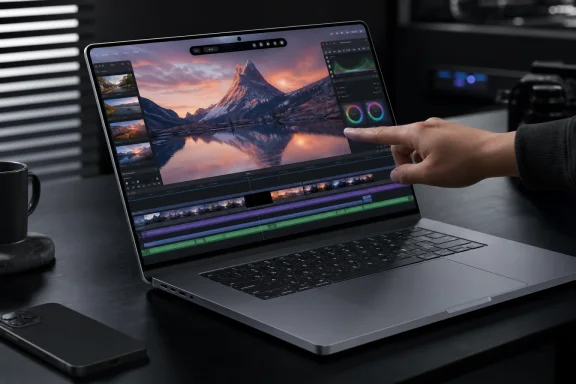
The headline feature is expected to be a touchscreen display, a step Apple has resisted for years. If it arrives, the MacBook Ultra would be Apple’s first traditional Mac laptop designed for direct finger input on its built-in screen.That change would finally put macOS hardware closer to the expectations created by premium Windows laptops. From Surface devices to high-end Dell, HP, Lenovo, Asus, and Samsung systems, touchscreen notebooks have become common in the Windows ecosystem—even where the keyboard-and-trackpad workflow remains the primary interaction model.
Apple’s reported approach is sensible: touch would be available, but the MacBook Ultra would not become touch-first. It would remain a conventional clamshell with a physical keyboard and trackpad. Users could switch naturally among keyboard shortcuts, trackpad gestures, mouse input, and screen taps depending on the task.
This has several practical benefits:
- Tapping controls during presentations
- Scrubbing or zooming through media
- Quick navigation in maps, dashboards, and visual tools
- Direct manipulation in creative or educational workflows
- Easier use of simple touch-oriented controls from iPhone and iPad apps
- More natural interaction when the notebook is used standing up or at a distance
The touchscreen also introduces a practical downside: fingerprints. Apple would need a high-quality anti-reflective and oleophobic coating, but no coating makes a frequently touched glossy display completely immune to smudges. For visual professionals, that can become irritating quickly.
4. Touch-Optimized macOS
Hardware alone would not make a touchscreen Mac useful. The larger question is whether macOS can adapt without compromising the precision and density that professional users expect.The rumored MacBook Ultra may bring input-aware controls, with elements becoming easier to tap when a user interacts directly with the display. Larger menus, touch-friendly popovers, pinch-to-zoom, faster scrolling, and improved gesture support would all be logical additions.
This is where Apple has an opportunity to avoid one of Windows’ longstanding touch challenges. Windows has often had to balance touch-friendly experiences with a massive backlog of traditional desktop applications, legacy control panels, tiny dialog boxes, and mouse-oriented workflows. Modern Windows applications have improved substantially, but inconsistent touch targets still appear in many utilities and older programs.
Apple has a more controlled platform. macOS applications follow relatively consistent interface conventions, and Apple can update its own apps together with the operating system. If it treats touch as a supplemental input method rather than an attempt to transform macOS into iPadOS, it could preserve desktop flexibility while making common actions less cumbersome.
The danger is oversimplification. Professional Mac users do not want large touch targets, oversized window controls, and reduced information density imposed on every workflow. A well-designed implementation should be adaptive, allowing touch-oriented affordances to appear when they are useful while retaining the compact precision of a conventional desktop interface.
5. A Reinforced Hinge
A touchscreen laptop needs a hinge built for interaction. Reports point to a reinforced hinge designed to stop the display from bouncing or drifting backward when users tap the panel.It is an unglamorous rumor, but it may be one of the most important. Current MacBook Pro hinges are engineered for one-handed opening and stable typing angles, not for repeated direct touch. A screen that visibly shakes every time a user taps a button would undermine the entire experience.
The engineering challenge is a balancing act. The hinge must be stiff enough to resist touch input yet smooth enough to open easily. It must also maintain the premium feel associated with Apple hardware without making the laptop bulkier or causing the display to feel unnaturally rigid.
Windows hardware makers have wrestled with this issue for more than a decade. Some devices solve it through heavier bases, deeper hinge assemblies, or convertible designs. Apple’s chance to deliver a thin laptop with a stable touchscreen will depend heavily on whether it can address the mechanics without sacrificing portability.
6. The Notch Could Become a Hole-Punch Camera
The current MacBook Pro display notch may reportedly disappear in favor of a smaller hole-punch camera. That would free some menu-bar space and make the screen feel less interrupted.Apple’s MacBook notch has always been unusual because macOS largely works around it rather than trying to disguise it. The result is functional, but it remains a visible design compromise on a premium laptop.
A hole-punch camera would represent a cleaner solution. It would not create a completely uninterrupted display, but it could reduce the visual intrusion dramatically. With thinner bezels and a marginally larger panel, the change could make the entire device look more modern without requiring an impractical under-display camera.
For Windows users, the change would align the Mac more closely with the visual direction of premium ultrabooks. Thin bezels and minimal camera cutouts are now common on high-end PCs, though quality webcam placement remains a challenge. Apple cannot afford to trade away FaceTime quality simply to shrink the camera opening.
7. A Mac-Sized Dynamic Island
The hole-punch cutout may reportedly expand digitally into a Dynamic Island-style interface. On the iPhone, this concept turns a necessary camera cutout into an area for live activities, system controls, alerts, and ongoing tasks.On a MacBook Ultra, such a feature could surface:
- Siri activity
- AirPods pairing and battery information
- Low-battery warnings
- Recording indicators
- Media playback controls
- File-transfer progress
- Meeting or call status
- Timers, alerts, and background tasks
A Dynamic Island on macOS could become useful if it is tightly focused on transient, high-priority activity. If it duplicates existing status areas or becomes another surface competing for attention, it risks feeling like a mobile interface element pasted onto a desktop operating system.
8. M5 Pro and M5 Max Chips
One of the more surprising claims is that the first MacBook Ultra may use M5 Pro and M5 Max chips rather than brand-new M6-class professional silicon. That would mean the most dramatic Mac laptop redesign in years could launch with processor options that have already been available in MacBook Pro models for months.This could create a difficult buying decision. Early adopters would get OLED, touch input, a new chassis, and potentially other exclusive features. But buyers who prioritize maximum performance per dollar might reasonably ask why Apple’s top laptop does not debut with its newest chip architecture.
There are possible explanations. Apple may prefer to separate hardware redesigns from major silicon transitions to reduce engineering risk. It may also be working around supply constraints, especially if high-capacity memory remains constrained across the broader industry. Or it may view the MacBook Ultra primarily as a display-and-experience flagship rather than a raw-performance replacement for every MacBook Pro.
Whatever the reason, the decision could make the first generation less attractive to buyers with urgent workstation needs. Reports suggesting a more advanced successor could arrive in late 2027 only intensify that concern.
9. A Thinner and Lighter Chassis
The MacBook Ultra is expected to be noticeably thinner and lighter than the current MacBook Pro. OLED display technology could assist by reducing the thickness of the lid, but the final result will depend on batteries, thermal architecture, ports, speakers, hinge strength, and chassis rigidity.This is arguably where Apple’s design discipline will be tested most severely. The 2021 MacBook Pro redesign earned praise because it restored practical features such as HDMI, MagSafe, and an SD card slot. It gave up some thinness in exchange for better connectivity and a more professional focus.
A MacBook Ultra should not repeat the mistakes of earlier ultra-thin MacBook Pro generations. Professional customers are unlikely to welcome a return to dongle-heavy life simply to save a few millimeters.
The strongest outcome would be a thinner machine that still preserves the current practical port selection:
- MagSafe charging
- Multiple Thunderbolt/USB-C ports
- HDMI output
- SD card support
- A 3.5 mm headphone jack
10. 14-Inch and 16-Inch Models
The MacBook Ultra is rumored in both 14-inch and 16-inch configurations, mirroring the established MacBook Pro lineup. That approach makes sense because it gives Apple two familiar purchasing paths.The smaller model would likely appeal to developers, photographers, consultants, and mobile professionals who need maximum capability in a more manageable form factor. The larger model would serve video editors, 3D creators, music producers, engineers, and users who want greater screen real estate without relying on an external display.
The rumored panel sizes may be slightly larger than today’s MacBook Pro screens, potentially around 14.3 inches and 16.3 inches. If accurate, the difference would probably come from thinner bezels rather than a significantly larger chassis.
That is a welcome direction. Thin bezels can make a laptop feel more immersive without making it less portable. But Apple must avoid making the display edges too narrow for comfortable opening, handling, and webcam placement.
11. Slimmer Bezels and More Usable Screen Area
The combination of a hole-punch camera, reduced bezels, and marginally larger panels could make the MacBook Ultra feel substantially more spacious than its stated screen size suggests.This is especially relevant for macOS. The menu bar consumes a fixed area at the top of the display, and professional applications often use dense toolbars, sidebars, timelines, inspectors, and palettes. Even a small gain in usable vertical or horizontal space can improve productivity.
A cleaner upper edge could also make full-screen applications more elegant. Video editors and photographers would benefit from a less distracting display boundary, while general users would simply see more of their documents and browser windows.
There is an important distinction, though: thinner bezels are not automatically better if they compromise durability. Laptop displays are among the most vulnerable parts of a mobile computer. Apple’s engineers will need to preserve the structural strength expected from a premium machine, particularly if the screen is now intended to withstand regular touch input.
12. Potential Built-In Cellular Connectivity
The most speculative feature is built-in cellular connectivity, possibly using Apple’s own modem technology. If it ships, it would be a first for the Mac.Built-in 5G or LTE could make the MacBook Ultra more flexible for frequent travelers, field workers, journalists, consultants, emergency responders, and professionals who cannot rely on consistent Wi-Fi. It could also reduce dependence on phone tethering, which is convenient but often drains a smartphone battery and creates another point of friction.
For Windows users, this is familiar territory. Cellular-capable Windows PCs have existed for years, particularly among business-focused models. Their appeal is straightforward: open the laptop and get online without finding a Wi-Fi network, accepting a captive portal, or enabling a hotspot.
Still, cellular in a MacBook would raise questions around price, data plans, battery impact, antenna design, and regional availability. It could be offered only on selected models, or it may never make it into the first-generation MacBook Ultra at all. Among the current rumors, this is the feature that deserves the greatest caution.
macOS 27 Could Be Preparing the Ground
Reports surrounding macOS 27 Golden Gate have added weight to the touchscreen theory. The operating system is said to include changes that make more sense in a world where direct touch is becoming a supported Mac input method.These include direct touch interaction through Sidecar when using an iPad as a display extension, pull-to-refresh behavior in Apple apps, and a redesigned Spotlight-based Siri experience with a pill-shaped visual treatment. None of those features proves that a touchscreen MacBook is imminent. Software design can serve multiple products and future directions.
But together, they suggest that Apple may be quietly normalizing touch-related behavior in macOS. That is precisely the kind of groundwork the company would need before introducing a touchscreen flagship.
The notable point is not that macOS would become iPadOS. It is that macOS may become more comfortable with direct manipulation while preserving its keyboard-centric and pointer-centric identity.
The Pricing Problem
Pricing remains the biggest unanswered question, but the MacBook Ultra is almost certain to sit above the current MacBook Pro range. With premium materials, a tandem OLED screen, touch hardware, a redesigned hinge, and potentially cellular connectivity, the cost structure could rise sharply.That creates a risk of a laptop that is technically impressive but commercially narrow. A flagship 16-inch MacBook Ultra could plausibly enter a price bracket normally associated with heavily configured workstations, desktop-and-display combinations, or enterprise mobile workstations from Dell, HP, and Lenovo.
Apple can justify a high price only if the package feels complete. Buyers will expect:
- Exceptional display quality
- Sustained performance under demanding workloads
- Quiet, effective thermals
- Excellent battery life
- A stable and useful touchscreen implementation
- Sufficient ports for professional use
- Durable long-term build quality
- Strong repair and service support
Should Buyers Wait?
The rumored timing creates an awkward situation for prospective Mac buyers. Anyone who needs a dependable high-end notebook now should judge the current MacBook Pro range on its present capabilities rather than delay a purchase solely for an unannounced product.The MacBook Ultra’s first generation could be compelling for buyers who value display quality, industrial design, and new input methods more than the absolute newest processor architecture. It could also appeal to users who have long wanted a touch-enabled Mac but have not wanted to move to an iPad-based workflow.
Buyers focused primarily on performance longevity may be more cautious. If the first MacBook Ultra uses M5 Pro and M5 Max chips, and a later revision arrives relatively quickly with significantly more advanced silicon, the first generation may have a shorter period at the top of Apple’s mobile lineup than expected.
The most prudent view is that the MacBook Ultra is not yet a reason to dismiss today’s MacBook Pro. It is, however, a strong signal that Apple may be preparing to redefine what its premium laptop category looks like.
The Bigger Picture for Windows Users
The rumored MacBook Ultra is a reminder that Apple may be moving closer to the practical flexibility that Windows laptop users have taken for granted. Touch displays, optional cellular connectivity, reduced bezels, and mixed-input computing are not new ideas in the PC market.What Apple could contribute is a more tightly integrated version of those ideas. A well-implemented touchscreen Mac would not need to abandon the keyboard, trackpad, desktop apps, file management, or high-performance workflows that define a professional notebook. It would simply make touch another credible option.
That is a meaningful distinction. The best laptop interfaces are not ideological. They let users tap when tapping is fastest, type when typing is best, use a trackpad for precision, and connect peripherals when a desk-bound workflow demands them.
If the MacBook Ultra arrives with the rumored combination of OLED, touch support, a refined macOS interface, thinner hardware, and professional-grade connectivity, it could become Apple’s clearest attempt yet to merge its mobile-interface instincts with the serious computing expectations of the Mac. Its success will depend less on whether it has twelve new features than on whether those features form one coherent, practical, and appropriately premium machine.
References
- Primary source: MacRumors
Published: 2026-07-25T01:00:00+00:00
'MacBook Ultra' Coming Soon With These 12 New Features
Apple's first high-end MacBook redesign in five years is expected to arrive in the near future, bringing a run of firsts to the Mac. Bloomberg's Mark Gurman expects the laptop to arrive between late 2026 and early 2027, with the later window now looking more likely owing to the global...www.macrumors.com