

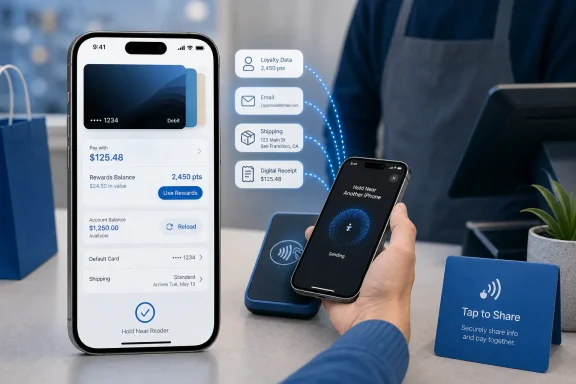
Apple Pay is being positioned for a more ambitious role in Apple’s ecosystem: not merely a fast way to tap an iPhone at a checkout terminal, but a richer digital wallet experience that blends card selection, rewards redemption, loyalty data, account management, and merchant interaction. A new report describes four forthcoming improvements—an overhauled checkout interface, American Express Membership Rewards redemption, a “Tap to Share” in-store feature, and debit-card reload capabilities—that could make the platform meaningfully more flexible for iPhone users.
The headline is attractive, particularly for users who already rely on Apple Pay for daily purchases in stores, apps, and on the web. But the details matter. Some capabilities align with Apple Pay’s established direction, including issuer rewards, connected account balances, contactless merchant acceptance, and expanded Wallet functionality. Others should be treated cautiously until Apple confirms their precise rollout, device requirements, participating issuers, regions, and privacy controls.
For Windows users watching Apple’s payments strategy from outside the company’s hardware ecosystem, the developments are still significant. Apple Pay is part of a broader battle over the digital wallet: one where convenience, platform control, payment-network partnerships, consumer privacy, and merchant data all intersect.
Apple Pay began with a simple and persuasive promise: replace a physical card with a more convenient, tokenized payment credential stored on a device. In practical use, it lets consumers authenticate with Face ID, Touch ID, or a device passcode, then make a payment without exposing their actual card number directly to the merchant.
That formula remains central to Apple Pay’s appeal. The system is quick, deeply integrated with the iPhone, and familiar enough that it can be used at payment terminals, inside apps, and across supported websites. Yet the next stage of digital payments is less about whether a transaction can be completed and more about what happens around it.
The reported new Apple Pay features point toward four broader goals:
The reported design would allow users to swipe among cards directly from the primary Apple Pay checkout screen, while tapping a card would reveal a full grid of available payment methods. That is a modest-looking change with potentially outsized usability benefits. It could reduce the number of taps required to select an alternative card and make the available choices more obvious.
For example, a shopper may discover that one card offers a better reward rate for the current purchase category. Another shopper may see that a debit account balance is insufficient and switch to a different payment method before receiving a decline. Someone making a higher-value purchase may be able to compare an issuer’s installment offer against paying the amount in full.
There is also a question of neutrality. A payment interface that surfaces installment offers or rewards prominently can influence consumer behavior. The most visible option may not always be the best-value option. Users should be able to understand whether an offer carries interest, fees, missed-payment consequences, or other terms before selecting it.
Apple will need to preserve its traditional emphasis on clarity. The strongest implementation would put the default card front and center while allowing additional financial information to appear when it is genuinely useful—not merely because it is available.
According to the report, the checkout interface would show a Use Rewards option and the user’s available Membership Rewards balance. The shopper could then apply points toward all or part of the purchase without leaving the Apple Pay flow.
For many cardholders, Membership Rewards points are most valuable when transferred to travel partners. Depending on availability, redemption strategy, travel dates, and the program involved, points can potentially yield greater value through airline or hotel redemptions than through a straightforward checkout credit.
The reported Apple Pay redemption rate—0.7 cents per point—therefore deserves careful attention.
At that rate:
However, the 0.7-cent rate reported for Apple Pay redemption is likely to be less appealing to users who treat Membership Rewards as a travel currency. Points valuations vary heavily by person and redemption method, but many frequent travelers aim to obtain more than 0.7 cents per point when transferring to airline or hotel partners.
That does not make Apple Pay redemption inherently bad. It simply means the feature should be understood for what it is: a convenience redemption option, not necessarily a maximum-value redemption strategy.
For American Express, the feature could increase the practical visibility of Membership Rewards. Rather than being something a customer checks periodically in an account dashboard, the balance becomes a live option during a purchase. That might strengthen engagement, but it could also lead to more impulsive redemptions.
The reported data types include:
Tap to Share could turn an iPhone-based checkout into a more interactive exchange. In theory, it could replace several common sources of retail friction:
A merchant could potentially run a compact checkout operation using an iPhone while still offering digital receipts, loyalty enrollment, address collection, and Apple Pay payment. That would bring capabilities traditionally associated with more expensive point-of-sale systems to a broader range of businesses.
Apple Pay’s reputation has been built in part on limiting exposure of the underlying card number and using device-based authentication. Tap to Share would deal with a different category of information: identity and relationship data that merchants often value highly.
The quality of the feature will depend on whether the permission model is genuinely clear. A well-designed experience should make it obvious:
That creates a familiar challenge. Apple can provide the platform layer, but the real-world experience will vary substantially based on the merchant’s implementation. A polished integration could be useful and quick. A poorly designed one could create extra prompts, confusing consent screens, or unreliable basket synchronization.
The feature also raises a broader competitive question. Digital wallets are no longer just vying to become the preferred payment method. They are competing to become the interface between a consumer and a retailer. That is a more valuable—and more contested—position.
Apple Wallet already supports selected account-balance and transaction-history integrations through participating financial institutions. Users can connect eligible accounts and view relevant card information within the Wallet app. Expanding this to allow account reloads would make Wallet more active as a financial-management tool.
Potential benefits include:
Users should also review:
That approach reflects a larger trend in digital wallets. The battle is not confined to near-field communication hardware or tokenization standards. Those capabilities are increasingly foundational. The differentiating layer is software: account information, loyalty relationships, financing, rewards, receipts, commerce data, and user experience.
The company’s device-centric approach also supports a strong privacy narrative. Apple Pay generally uses tokenization and device authentication to protect payment credentials, while Wallet keeps cards and passes in a centralized, familiar interface.
The danger is that deeper commerce integrations can test the boundaries of that simplicity. Apple needs to ensure that making Wallet more powerful does not make it more intrusive or cluttered.
That integration is Apple Pay’s strength and its constraint. A Windows PC can be part of the transaction, but the iPhone remains the anchor for authentication and completion. Users who move between Windows, Android, and Apple devices may prefer payment systems with broader platform parity, even if those alternatives lack some of Apple’s polish.
Tap to Share could be the most transformative feature if it gives consumers clearer control over loyalty, receipt, shipping, and purchase information while simplifying in-store checkout. It could also be the most controversial if merchants use it to push unnecessary data collection. Debit-card reloads, meanwhile, could make Wallet more useful for supported account types, but availability and fees will depend heavily on participating financial institutions.
The underlying theme is unmistakable: Apple Pay is evolving from a payment button into a smarter transaction interface. If Apple preserves the speed, clarity, security, and privacy expectations that made the service successful, these additions could make iPhone checkout more capable without making it more complicated.
The headline is attractive, particularly for users who already rely on Apple Pay for daily purchases in stores, apps, and on the web. But the details matter. Some capabilities align with Apple Pay’s established direction, including issuer rewards, connected account balances, contactless merchant acceptance, and expanded Wallet functionality. Others should be treated cautiously until Apple confirms their precise rollout, device requirements, participating issuers, regions, and privacy controls.
For Windows users watching Apple’s payments strategy from outside the company’s hardware ecosystem, the developments are still significant. Apple Pay is part of a broader battle over the digital wallet: one where convenience, platform control, payment-network partnerships, consumer privacy, and merchant data all intersect.
 Overview: Apple Pay Moves Beyond the Tap
Apple Pay began with a simple and persuasive promise: replace a physical card with a more convenient, tokenized payment credential stored on a device. In practical use, it lets consumers authenticate with Face ID, Touch ID, or a device passcode, then make a payment without exposing their actual card number directly to the merchant.That formula remains central to Apple Pay’s appeal. The system is quick, deeply integrated with the iPhone, and familiar enough that it can be used at payment terminals, inside apps, and across supported websites. Yet the next stage of digital payments is less about whether a transaction can be completed and more about what happens around it.
The reported new Apple Pay features point toward four broader goals:
- Reducing friction at checkout by making card selection and payment options easier to understand.
- Making rewards useful in the moment, rather than leaving points trapped in a separate bank or card-issuer portal.
- Bringing loyalty and customer details into the in-store checkout experience without resorting to printed cards, email lookups, or manual data entry.
- Turning Wallet into a financial-management surface, not just a static place to store card credentials.
A Redesigned Apple Pay Checkout Interface
The most immediately visible change described in the report is a redesigned Apple Pay checkout screen for the next major iPhone software release. The redesign is said to make it easier to switch payment cards while buying something online or in an app.Why card switching has mattered
For customers with one payment card in Wallet, the existing Apple Pay process is already extremely simple. But many users carry several cards for different purposes:- A primary credit card for general spending
- A card with stronger grocery, dining, travel, or fuel rewards
- A corporate card for business expenses
- A debit card for purchases tied to a particular account
- A card with promotional financing or installment eligibility
- A store-linked or co-branded card
- A payment card with a low balance or stricter spending limit
The reported design would allow users to swipe among cards directly from the primary Apple Pay checkout screen, while tapping a card would reveal a full grid of available payment methods. That is a modest-looking change with potentially outsized usability benefits. It could reduce the number of taps required to select an alternative card and make the available choices more obvious.
More context at the moment of payment
The other important element is the reported availability of card-specific data in the checkout interface. This could include:- Rewards information
- Available balance or remaining credit
- Buy now, pay later options
- Installment eligibility
- Other issuer-provided payment details
For example, a shopper may discover that one card offers a better reward rate for the current purchase category. Another shopper may see that a debit account balance is insufficient and switch to a different payment method before receiving a decline. Someone making a higher-value purchase may be able to compare an issuer’s installment offer against paying the amount in full.
The strengths of a richer checkout screen
A more informative Apple Pay checkout interface has several obvious advantages:- It could make multi-card Wallet setups easier to manage.
- It could reduce accidental use of the wrong card.
- It could make issuer rewards and payment plans more visible.
- It could cut down on payment failures caused by insufficient funds or credit.
- It could encourage users to keep more eligible cards in Apple Wallet.
The risks: too much choice can slow payment
The potential downside is complexity. Apple Pay became popular in part because it has historically avoided the clutter of traditional payment pages. If the checkout screen starts showing rewards, balances, financing options, and competing cards all at once, the experience could become less immediate.There is also a question of neutrality. A payment interface that surfaces installment offers or rewards prominently can influence consumer behavior. The most visible option may not always be the best-value option. Users should be able to understand whether an offer carries interest, fees, missed-payment consequences, or other terms before selecting it.
Apple will need to preserve its traditional emphasis on clarity. The strongest implementation would put the default card front and center while allowing additional financial information to appear when it is genuinely useful—not merely because it is available.
American Express Membership Rewards in Apple Pay
The second reported feature is potentially one of the most consequential: the ability for eligible American Express cardholders to use Membership Rewards points toward purchases made with Apple Pay in apps and online.According to the report, the checkout interface would show a Use Rewards option and the user’s available Membership Rewards balance. The shopper could then apply points toward all or part of the purchase without leaving the Apple Pay flow.
A significant expansion of rewards redemption
Rewards redemption is not new to Apple Pay as a concept. Apple has previously supported eligible issuer rewards in digital checkout flows. The important development here is the inclusion of American Express Membership Rewards, one of the largest and most recognizable transferable-points currencies in the United States.For many cardholders, Membership Rewards points are most valuable when transferred to travel partners. Depending on availability, redemption strategy, travel dates, and the program involved, points can potentially yield greater value through airline or hotel redemptions than through a straightforward checkout credit.
The reported Apple Pay redemption rate—0.7 cents per point—therefore deserves careful attention.
At that rate:
- 1,000 points would cover approximately $7
- 5,000 points would cover approximately $35
- 10,000 points would cover approximately $70
- 25,000 points would cover approximately $175
Convenience versus point value
Using points at checkout has clear advantages. It is immediate, straightforward, and does not require navigating a separate rewards website or waiting for a statement credit. It may be appealing for people who prioritize simplicity, need to reduce out-of-pocket spending, or have points they are unlikely to use for travel.However, the 0.7-cent rate reported for Apple Pay redemption is likely to be less appealing to users who treat Membership Rewards as a travel currency. Points valuations vary heavily by person and redemption method, but many frequent travelers aim to obtain more than 0.7 cents per point when transferring to airline or hotel partners.
That does not make Apple Pay redemption inherently bad. It simply means the feature should be understood for what it is: a convenience redemption option, not necessarily a maximum-value redemption strategy.
Why this matters for Apple
For Apple, issuer rewards inside Apple Pay have two benefits. First, they make the wallet more useful at checkout. Second, they give card issuers another reason to make their products and rewards systems compatible with Apple’s payment interface.For American Express, the feature could increase the practical visibility of Membership Rewards. Rather than being something a customer checks periodically in an account dashboard, the balance becomes a live option during a purchase. That might strengthen engagement, but it could also lead to more impulsive redemptions.
What users should verify before redeeming
Before using points through Apple Pay, eligible cardholders should check several details:- The precise redemption rate shown in the checkout flow.
- Whether partial redemptions are allowed and how the remaining balance is charged.
- Whether the transaction is eligible for points redemption.
- Whether rewards are returned if the merchant later issues a refund.
- How refunds are handled when only part of the purchase was covered by points.
- Whether the purchase earns new rewards on the card-funded portion.
- Whether another redemption route offers greater value for the user’s goals.
Tap to Share: A New In-Store Checkout Layer
The most unusual feature described in the report is Tap to Share, an in-store capability expected to build on Tap to Pay on iPhone. The idea is that a customer taps an iPhone against a participating merchant’s iPhone to share approved information and conduct a more personalized checkout.The reported data types include:
- Email address
- Contact information
- Shipping address
- Loyalty-rewards details
- Other purchase-related information
From payment terminal to two-way interaction
Traditional contactless payment is mostly one-directional. The customer presents a payment credential; the terminal requests authorization; the card issuer approves or declines the transaction. The merchant may have loyalty, receipts, promotions, and product information in separate systems.Tap to Share could turn an iPhone-based checkout into a more interactive exchange. In theory, it could replace several common sources of retail friction:
- Typing an email address at a register
- Reading out a phone number for loyalty lookup
- Showing a barcode from a separate loyalty app
- Entering shipping information for an order placed in-store
- Reviewing a paperless receipt after the transaction
- Discovering at the end that a discount did not apply
Strong potential for small merchants
Tap to Pay on iPhone has already made it possible for merchants to accept contactless payments using an iPhone and a supported payment app rather than dedicated payment-terminal hardware. A related customer interaction feature could be especially valuable for smaller businesses, pop-up sellers, independent retailers, service providers, and event vendors.A merchant could potentially run a compact checkout operation using an iPhone while still offering digital receipts, loyalty enrollment, address collection, and Apple Pay payment. That would bring capabilities traditionally associated with more expensive point-of-sale systems to a broader range of businesses.
Privacy is the decisive issue
The potential benefit is clear, but so is the privacy sensitivity. A payment transaction should not silently become a data-sharing event.Apple Pay’s reputation has been built in part on limiting exposure of the underlying card number and using device-based authentication. Tap to Share would deal with a different category of information: identity and relationship data that merchants often value highly.
The quality of the feature will depend on whether the permission model is genuinely clear. A well-designed experience should make it obvious:
- Exactly what information will be shared
- Which merchant receives it
- Why the merchant is requesting it
- Whether the information is necessary for the transaction
- Whether the sharing is one-time or persistent
- How a user can decline without losing the ability to pay
- How consent can be reviewed or revoked later
Merchant adoption will determine its value
The success of Tap to Share would not depend solely on Apple. It would require merchant software providers, payment processors, retailers, and loyalty platforms to adopt it.That creates a familiar challenge. Apple can provide the platform layer, but the real-world experience will vary substantially based on the merchant’s implementation. A polished integration could be useful and quick. A poorly designed one could create extra prompts, confusing consent screens, or unreliable basket synchronization.
The feature also raises a broader competitive question. Digital wallets are no longer just vying to become the preferred payment method. They are competing to become the interface between a consumer and a retailer. That is a more valuable—and more contested—position.
Debit Card Reloads and Wallet-Based Account Management
The fourth reported addition is the ability to add money to supported debit cards through Apple Wallet or during an Apple Pay checkout. The wording matters here: this appears to refer to supported debit-card accounts, not every debit card stored in Wallet.Apple Wallet already supports selected account-balance and transaction-history integrations through participating financial institutions. Users can connect eligible accounts and view relevant card information within the Wallet app. Expanding this to allow account reloads would make Wallet more active as a financial-management tool.
Why reloading a debit card can be useful
The use case is strongest for prepaid, teen, fintech, payroll, benefits, or specialty debit products where users routinely maintain a balance. Instead of opening a bank’s app, logging in, navigating to a funding section, and choosing a payment method, the user may be able to add money inside Wallet.Potential benefits include:
- Faster funding of eligible debit or prepaid accounts
- Fewer app switches during checkout
- A more direct way to address low-balance situations
- Better visibility into available funds
- A smoother experience for issuer-backed digital accounts
Important limitations and consumer protections
Consumers should not assume that this will be available for their bank-issued debit card. Debit accounts vary widely in their technical infrastructure, funding rules, transaction limits, fees, and fraud controls. Participation will likely be limited to issuers that specifically support the feature.Users should also review:
- Funding-source eligibility
- Daily and monthly reload limits
- Potential issuer fees
- Processing time before funds become available
- Fraud-protection rules
- Whether a reload can be canceled or reversed
- Whether reloading from a credit card is allowed
- Cash-advance implications, if applicable
What the Changes Mean for Apple Pay’s Competitive Position
Taken together, the four features suggest an effort to make Apple Pay more comprehensive. The platform would not just execute a payment; it would help users choose a card, understand rewards, manage balances, identify themselves to merchants when they consent, and complete a transaction with less manual input.That approach reflects a larger trend in digital wallets. The battle is not confined to near-field communication hardware or tokenization standards. Those capabilities are increasingly foundational. The differentiating layer is software: account information, loyalty relationships, financing, rewards, receipts, commerce data, and user experience.
Apple’s core advantage remains integration
Apple has a natural advantage because it controls the iPhone hardware, iOS software, Wallet experience, biometric authentication, and the broader ecosystem in which many transactions occur. This lets it make payments feel like a native operating-system function rather than a separate app.The company’s device-centric approach also supports a strong privacy narrative. Apple Pay generally uses tokenization and device authentication to protect payment credentials, while Wallet keeps cards and passes in a centralized, familiar interface.
The danger is that deeper commerce integrations can test the boundaries of that simplicity. Apple needs to ensure that making Wallet more powerful does not make it more intrusive or cluttered.
The Windows and cross-platform angle
For Windows users, Apple Pay’s evolution highlights the limits of platform-specific payments. Apple Pay can work on supported websites and, in some circumstances, extend across third-party browsers or non-Apple computers through iPhone-based authentication. But the experience remains fundamentally rooted in Apple hardware.That integration is Apple Pay’s strength and its constraint. A Windows PC can be part of the transaction, but the iPhone remains the anchor for authentication and completion. Users who move between Windows, Android, and Apple devices may prefer payment systems with broader platform parity, even if those alternatives lack some of Apple’s polish.
The Bottom Line
The reported Apple Pay updates point toward a meaningful shift in how Apple thinks about Wallet. A new checkout design could make card switching and payment decisions easier. American Express Membership Rewards redemption could put points directly into the purchase flow, though the reported 0.7-cent-per-point rate makes it a convenience option rather than an automatic best-value choice.Tap to Share could be the most transformative feature if it gives consumers clearer control over loyalty, receipt, shipping, and purchase information while simplifying in-store checkout. It could also be the most controversial if merchants use it to push unnecessary data collection. Debit-card reloads, meanwhile, could make Wallet more useful for supported account types, but availability and fees will depend heavily on participating financial institutions.
The underlying theme is unmistakable: Apple Pay is evolving from a payment button into a smarter transaction interface. If Apple preserves the speed, clarity, security, and privacy expectations that made the service successful, these additions could make iPhone checkout more capable without making it more complicated.
References
- Primary source: 9to5Mac
Published: 2026-07-24T21:24:36+00:00
Apple Pay is getting even better with four new features - 9to5Mac
Apple recently announced four new Apple Pay features for iPhone users. Here's how each one works and when you can use it.9to5mac.com - Official source: apple.com
New features come to Apple services this fall - Apple
With the release of iOS 18, iPadOS 18, macOS Sequoia, watchOS 18, visionOS, and tvOS 18 this fall, Apple is enhancing the services users love with all-new features.www.apple.com
