

Apple used its June 8, 2026 WWDC keynote to preview a revamped Siri across macOS and its other platforms, positioning the assistant as a more integrated, privacy-conscious layer for finding, understanding, and acting on personal information. The uncomfortable comparison for Windows users is not that Apple invented a new category of AI. It is that Apple made the category look coherent. Microsoft has plenty of the same ingredients in Copilot, Windows Search, File Explorer, Recall, Edge, PowerToys, and Phone Link, but the meal still arrives as separate plates.
The sharpest point in PCWorld’s comparison is that Apple did not need to show science fiction. It showed ordinary computer work made less annoying: finding files, understanding context, summarizing information, comparing options, and moving between phone and desktop without forcing the user to think about plumbing.
That is the old Apple trick. The company often arrives after the market has already explained what the thing is, then reframes it as a product experience rather than a feature race. The iPod was not the first MP3 player, the iPhone was not the first smartphone, and Apple Intelligence was certainly not the first serious AI push. But Apple’s strength has never been being first; it has been making lateness look like discipline.
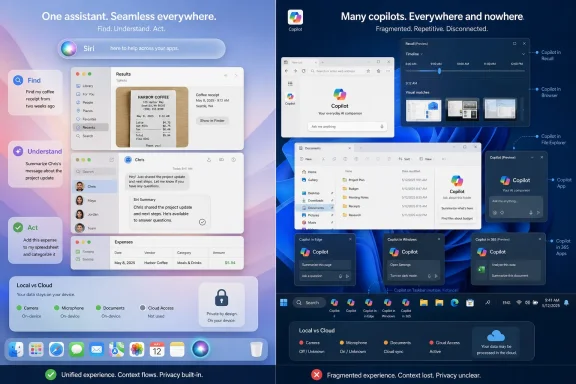
Microsoft, by contrast, has spent the Copilot era acting like a company with too many front doors. There is Copilot in the taskbar, Copilot in Edge, Copilot in Microsoft 365, Copilot in Windows, Copilot Vision, Copilot Pages, Copilot for Security, Copilot Studio, and a long tail of app-level integrations. Some of these are powerful. Some are useful. The problem is that Windows users are still left asking which Copilot is supposed to help them right now.
Apple’s new Siri pitch is simpler: there is one assistant, and it lives where the user already is. Whether that remains true in day-to-day use is an open question, but the framing matters. In consumer technology, the story users believe often determines whether they try the feature at all.
That is a formidable list. It is also a map of Microsoft’s problem.
A Windows user who wants to “find the spreadsheet from last week about the laptop budget” may need to know whether to use Windows Search, File Explorer, Microsoft 365 search, Recall, Copilot, or Edge. A Mac user watching Apple’s keynote saw the same kind of request routed through Siri and Spotlight, presented as one motion rather than a scavenger hunt.
This is not merely aesthetic. Fragmentation imposes a tax on trust. The more places an assistant appears, the more the user has to wonder what it can see, what it remembers, where the data goes, and whether the next click will open a web chatbot instead of helping with the local task.
Windows has always been a federation: shell, Explorer, Control Panel, Settings, Microsoft account, Office, Edge, OneDrive, Store, PowerToys, and OEM utilities all coexisting in uneasy truce. That flexibility is part of the platform’s appeal. But AI assistants punish architectural ambiguity because their whole promise is that users should not need to understand the architecture.
But that answer is too easy. Apple’s control is not incidental to the product; it is the product. When Apple shows a user taking a photo of a receipt, asking who ordered what, and getting a contextual answer that spans messages, images, and local understanding, it is showing the payoff from years of vertical integration.
Microsoft once had a plausible version of that story. Windows Phone, Lumia cameras, Cortana, Office, Skype, OneDrive, Xbox, and Windows could have formed a cross-device personal computing layer. That world died by inches, and Phone Link is the salvage operation. Useful as it is, Phone Link still feels like a bridge between two ecosystems rather than a native extension of one.
This matters because personal AI depends on personal context. The assistant that knows your files but not your phone is limited. The assistant that knows your browser but not your desktop is limited. The assistant that can summarize a document but cannot act in the app where the document lives is limited. Apple’s pitch is that Siri sits across enough of the personal stack to be useful without constantly asking the user to change venues.
Microsoft’s answer is enterprise breadth: Microsoft 365, Graph, Teams, SharePoint, Outlook, Entra, Defender, and Windows. In business environments, that is a serious advantage. But on the consumer desktop, the company’s story is less tidy, especially for users whose phone is Android, whose browser may or may not be Edge, and whose documents may live across OneDrive, Google Drive, Dropbox, local folders, and email attachments.
Microsoft later tightened Recall’s security model, made it opt-in, tied it to Windows Hello, and emphasized local processing on Copilot+ PCs. Those changes were necessary. They also confirmed the initial suspicion that the first public version had been introduced with too much confidence and too little humility.
Apple is not immune to privacy skepticism. The company collects data, runs cloud services, and increasingly relies on external AI partnerships where on-device models are not enough. But Apple has spent years teaching its customers that local processing and privacy are part of the brand. When Apple says the assistant will understand personal context, many users hear convenience. When Microsoft says Windows will remember what you have seen, many users hear evidence locker.
That difference is not entirely fair, but it is real. Trust is cumulative. Microsoft can repair it, but not with another branding campaign. It has to make AI features visibly optional, legible, local where possible, administratively controllable, and boringly secure.
For sysadmins, the issue is even sharper. A consumer may ask whether an AI feature is creepy. An IT department asks whether it creates discoverable records, captures regulated data, violates retention policy, expands the attack surface, or confuses users into pasting confidential material into the wrong assistant. Apple’s keynote charm does not erase those questions, but Microsoft faces them in a harsher environment because Windows is the default workplace operating system.
That is why Copilot’s placement has mattered so much. The assistant has moved from a sidebar to an app to keyboard shortcuts to contextual hooks, and Microsoft continues experimenting with taskbar integration. Each move may make sense in isolation, but together they create a sense that Microsoft is still looking for the right place to put the future.
Apple avoided that trap by making Siri part of existing habits. Spotlight is already the Mac’s command center for many users. If Siri becomes an intelligence layer inside that workflow, Apple does not have to persuade users to visit a new destination. It can make the old destination more capable.
PowerToys Command Palette shows that Microsoft understands this audience, at least in part. It is fast, keyboard-driven, extensible, and appealing to people who want Windows to feel more like a precision instrument. But PowerToys is optional, semi-enthusiast software, not the mainstream Windows shell. The feature that should be Microsoft’s answer to Spotlight remains adjacent to the operating system rather than fully absorbed into it.
This is the recurring Windows AI problem: the best version of the idea often exists somewhere, but not where a normal user would naturally find it.
Microsoft has the hardware foundation for a similar story. Copilot+ PCs include neural processing units capable of local AI workloads. Windows now has a clearer technical path for semantic search, image understanding, and assistive features that do not need to round-trip every request to the cloud. In enterprise contexts, Microsoft can also lean on compliance tooling and tenant controls that Apple cannot match at the same scale.
The difference is communication. Apple turns local AI into a consumer promise. Microsoft often turns it into a matrix of SKUs, prerequisites, admin controls, feature rollouts, regional availability, and Insider channels.
Those details matter, especially to IT pros. But they should not be the first thing a user has to understand. If the future of Windows AI depends on explaining which Copilot can see which file under which account on which class of PC, Microsoft has already lost the simplicity contest.
The irony is that Microsoft has spent years building some of the world’s strongest cloud AI infrastructure. Azure, OpenAI partnerships, GitHub Copilot, Microsoft 365 Copilot, and enterprise Graph integration are not minor assets. Yet the desktop experience needs a different kind of excellence. It needs restraint.
That means Copilot cannot simply “just work” in the Apple sense. It has to respect data loss prevention policies, sensitivity labels, identity boundaries, local device configuration, cloud tenant settings, and industry-specific compliance obligations. A magical assistant that violates access control is not magical. It is an incident report.
This is where Microsoft can still win. Apple’s consumer trust and integration are powerful, but Microsoft owns the administrative layer of modern work. If Copilot becomes a reliable interface to organizational knowledge without flattening permissions or leaking context, it can be more valuable in the workplace than Siri is on the Mac.
The catch is that enterprise strength does not excuse consumer confusion. Windows needs a coherent assistant model for both worlds: one that makes sense to a home user looking for a vacation PDF and to an administrator deciding whether Recall should be enabled across a fleet of laptops.
Microsoft’s path should be to unify the experience while separating the policy. The user should see one assistant. The organization should see many controls. Today, too often, users see the complexity that admins actually need.
That modesty is strategic. The public has now seen enough AI demos to know that “agentic” can mean impressive, brittle, or both. For everyday operating systems, the killer feature may not be autonomy. It may be continuity.
Windows users do not need Copilot to become a digital employee before it becomes useful. They need it to answer questions about local files without ambiguity. They need it to understand what is on screen without feeling invasive. They need it to move between Edge, File Explorer, Outlook, Photos, and Settings without requiring a new mental model each time. They need it to stop feeling like a promotion for Microsoft’s AI strategy and start feeling like part of the operating system.
Apple’s advantage is that it showed AI as a layer of polish. Microsoft has too often shown AI as a layer of ambition. Ambition excites investors and keynote audiences. Polish wins daily use.
First, Copilot needs a single user-facing identity on Windows. The assistant can have many back-end services, but the user should not have to distinguish between local Copilot, web Copilot, Edge Copilot, and file-aware Copilot before asking a question. If context is unavailable, the assistant should say so clearly and explain how to enable it.
Second, Windows search needs to become the AI command line for everyone, not just enthusiasts. Start search, File Explorer search, Recall search, and Copilot queries should feel like different views of one index rather than separate systems stitched together by branding.
Third, Microsoft must treat privacy UX as a core interface, not a compliance afterthought. Users should know when the assistant is looking at the screen, when it is searching local files, when it is using cloud processing, and when enterprise policy blocks an action. The indicators should be as obvious as a microphone or camera light.
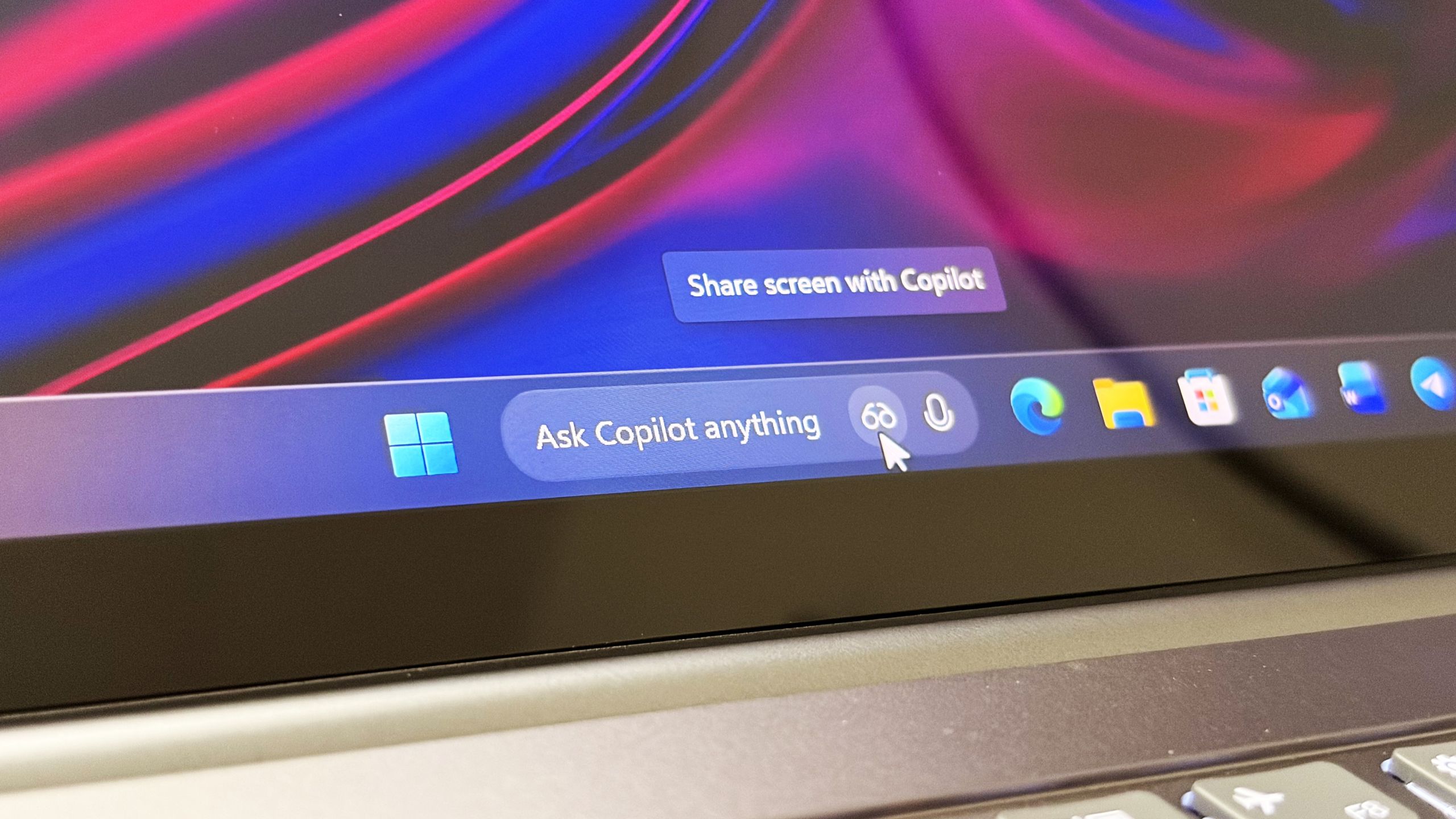
Finally, Microsoft needs to resist the temptation to surface Copilot everywhere simply because it can. A right-click menu with “Ask Copilot” is useful only if the result is predictable and context-aware. A taskbar button is useful only if it opens the right assistant for the job. An AI feature that appears at the wrong moment is not assistance. It is advertising.
For Windows users and administrators, the practical lessons are concrete:
 Apple’s Real Announcement Was Coherence
The sharpest point in PCWorld’s comparison is that Apple did not need to show science fiction. It showed ordinary computer work made less annoying: finding files, understanding context, summarizing information, comparing options, and moving between phone and desktop without forcing the user to think about plumbing.That is the old Apple trick. The company often arrives after the market has already explained what the thing is, then reframes it as a product experience rather than a feature race. The iPod was not the first MP3 player, the iPhone was not the first smartphone, and Apple Intelligence was certainly not the first serious AI push. But Apple’s strength has never been being first; it has been making lateness look like discipline.
Microsoft, by contrast, has spent the Copilot era acting like a company with too many front doors. There is Copilot in the taskbar, Copilot in Edge, Copilot in Microsoft 365, Copilot in Windows, Copilot Vision, Copilot Pages, Copilot for Security, Copilot Studio, and a long tail of app-level integrations. Some of these are powerful. Some are useful. The problem is that Windows users are still left asking which Copilot is supposed to help them right now.
Apple’s new Siri pitch is simpler: there is one assistant, and it lives where the user already is. Whether that remains true in day-to-day use is an open question, but the framing matters. In consumer technology, the story users believe often determines whether they try the feature at all.
Microsoft Has the Pieces, But Windows Still Shows the Seams
The PCWorld critique lands because Microsoft’s AI work is not empty. Windows 11 already has semantic file search on Copilot+ PCs. File Explorer can increasingly interpret natural-language queries. Edge can compare information across open tabs. Copilot Vision can inspect what is on screen. Recall, after its bruising security delay, is designed to make past activity searchable through local snapshots.That is a formidable list. It is also a map of Microsoft’s problem.
A Windows user who wants to “find the spreadsheet from last week about the laptop budget” may need to know whether to use Windows Search, File Explorer, Microsoft 365 search, Recall, Copilot, or Edge. A Mac user watching Apple’s keynote saw the same kind of request routed through Siri and Spotlight, presented as one motion rather than a scavenger hunt.
This is not merely aesthetic. Fragmentation imposes a tax on trust. The more places an assistant appears, the more the user has to wonder what it can see, what it remembers, where the data goes, and whether the next click will open a web chatbot instead of helping with the local task.
Windows has always been a federation: shell, Explorer, Control Panel, Settings, Microsoft account, Office, Edge, OneDrive, Store, PowerToys, and OEM utilities all coexisting in uneasy truce. That flexibility is part of the platform’s appeal. But AI assistants punish architectural ambiguity because their whole promise is that users should not need to understand the architecture.
Siri Benefits From Apple’s Walled Garden, and That Is the Point
It is tempting for Windows loyalists to dismiss Apple’s advantage as ecosystem privilege. Of course Siri can work across iPhone, Mac, Messages, Mail, Photos, and Calendar. Apple controls the hardware, operating systems, app frameworks, silicon roadmap, privacy narrative, and default services in a way Microsoft simply does not.But that answer is too easy. Apple’s control is not incidental to the product; it is the product. When Apple shows a user taking a photo of a receipt, asking who ordered what, and getting a contextual answer that spans messages, images, and local understanding, it is showing the payoff from years of vertical integration.
Microsoft once had a plausible version of that story. Windows Phone, Lumia cameras, Cortana, Office, Skype, OneDrive, Xbox, and Windows could have formed a cross-device personal computing layer. That world died by inches, and Phone Link is the salvage operation. Useful as it is, Phone Link still feels like a bridge between two ecosystems rather than a native extension of one.
This matters because personal AI depends on personal context. The assistant that knows your files but not your phone is limited. The assistant that knows your browser but not your desktop is limited. The assistant that can summarize a document but cannot act in the app where the document lives is limited. Apple’s pitch is that Siri sits across enough of the personal stack to be useful without constantly asking the user to change venues.
Microsoft’s answer is enterprise breadth: Microsoft 365, Graph, Teams, SharePoint, Outlook, Entra, Defender, and Windows. In business environments, that is a serious advantage. But on the consumer desktop, the company’s story is less tidy, especially for users whose phone is Android, whose browser may or may not be Edge, and whose documents may live across OneDrive, Google Drive, Dropbox, local folders, and email attachments.
Recall Poisoned the Well Before Copilot Could Drink From It
The shadow over Microsoft’s AI desktop strategy remains Recall. The original concept was easy to understand and genuinely ambitious: Windows would remember what you had seen and done, allowing you to search your past activity in natural language. The backlash was also easy to understand. A feature that continuously captured screenshots of user activity sounded less like memory and more like surveillance.Microsoft later tightened Recall’s security model, made it opt-in, tied it to Windows Hello, and emphasized local processing on Copilot+ PCs. Those changes were necessary. They also confirmed the initial suspicion that the first public version had been introduced with too much confidence and too little humility.
Apple is not immune to privacy skepticism. The company collects data, runs cloud services, and increasingly relies on external AI partnerships where on-device models are not enough. But Apple has spent years teaching its customers that local processing and privacy are part of the brand. When Apple says the assistant will understand personal context, many users hear convenience. When Microsoft says Windows will remember what you have seen, many users hear evidence locker.
That difference is not entirely fair, but it is real. Trust is cumulative. Microsoft can repair it, but not with another branding campaign. It has to make AI features visibly optional, legible, local where possible, administratively controllable, and boringly secure.
For sysadmins, the issue is even sharper. A consumer may ask whether an AI feature is creepy. An IT department asks whether it creates discoverable records, captures regulated data, violates retention policy, expands the attack surface, or confuses users into pasting confidential material into the wrong assistant. Apple’s keynote charm does not erase those questions, but Microsoft faces them in a harsher environment because Windows is the default workplace operating system.
Copilot’s Biggest Rival Is Not Siri, It Is Windows Itself
Microsoft’s challenge is that Copilot has to coexist with decades of Windows habits. Users already know Win+R, Start search, File Explorer, Alt-Tab, Task Manager, browser tabs, pinned apps, and the system tray. Power users in particular are resistant to anything that feels like it has been bolted on to slow them down.That is why Copilot’s placement has mattered so much. The assistant has moved from a sidebar to an app to keyboard shortcuts to contextual hooks, and Microsoft continues experimenting with taskbar integration. Each move may make sense in isolation, but together they create a sense that Microsoft is still looking for the right place to put the future.
Apple avoided that trap by making Siri part of existing habits. Spotlight is already the Mac’s command center for many users. If Siri becomes an intelligence layer inside that workflow, Apple does not have to persuade users to visit a new destination. It can make the old destination more capable.
PowerToys Command Palette shows that Microsoft understands this audience, at least in part. It is fast, keyboard-driven, extensible, and appealing to people who want Windows to feel more like a precision instrument. But PowerToys is optional, semi-enthusiast software, not the mainstream Windows shell. The feature that should be Microsoft’s answer to Spotlight remains adjacent to the operating system rather than fully absorbed into it.
This is the recurring Windows AI problem: the best version of the idea often exists somewhere, but not where a normal user would naturally find it.
Apple’s Privacy Story Is a Product Feature, Not a Press Release
The most important phrase in Apple’s AI strategy is not “generative AI.” It is “on device.” The distinction is not absolute, because complex tasks may still use private cloud infrastructure or external models, but Apple knows that the first answer to privacy anxiety is architectural. If a task can happen locally, users and regulators both have fewer reasons to object.Microsoft has the hardware foundation for a similar story. Copilot+ PCs include neural processing units capable of local AI workloads. Windows now has a clearer technical path for semantic search, image understanding, and assistive features that do not need to round-trip every request to the cloud. In enterprise contexts, Microsoft can also lean on compliance tooling and tenant controls that Apple cannot match at the same scale.
The difference is communication. Apple turns local AI into a consumer promise. Microsoft often turns it into a matrix of SKUs, prerequisites, admin controls, feature rollouts, regional availability, and Insider channels.
Those details matter, especially to IT pros. But they should not be the first thing a user has to understand. If the future of Windows AI depends on explaining which Copilot can see which file under which account on which class of PC, Microsoft has already lost the simplicity contest.
The irony is that Microsoft has spent years building some of the world’s strongest cloud AI infrastructure. Azure, OpenAI partnerships, GitHub Copilot, Microsoft 365 Copilot, and enterprise Graph integration are not minor assets. Yet the desktop experience needs a different kind of excellence. It needs restraint.
The Enterprise Will Not Buy Magic Without Controls
Apple’s demo-friendly AI story is strongest in the personal productivity world: a user, a device, a few files, a message thread, a photo, a calendar, and a request. Microsoft’s burden is heavier because Windows is where many organizations run their regulated, audited, legacy-bound reality.That means Copilot cannot simply “just work” in the Apple sense. It has to respect data loss prevention policies, sensitivity labels, identity boundaries, local device configuration, cloud tenant settings, and industry-specific compliance obligations. A magical assistant that violates access control is not magical. It is an incident report.
This is where Microsoft can still win. Apple’s consumer trust and integration are powerful, but Microsoft owns the administrative layer of modern work. If Copilot becomes a reliable interface to organizational knowledge without flattening permissions or leaking context, it can be more valuable in the workplace than Siri is on the Mac.
The catch is that enterprise strength does not excuse consumer confusion. Windows needs a coherent assistant model for both worlds: one that makes sense to a home user looking for a vacation PDF and to an administrator deciding whether Recall should be enabled across a fleet of laptops.
Microsoft’s path should be to unify the experience while separating the policy. The user should see one assistant. The organization should see many controls. Today, too often, users see the complexity that admins actually need.
Apple’s Demo Was Modest Because Modesty Is the Feature
A striking aspect of the WWDC Siri pitch is how little of it depended on agentic spectacle. Apple did not need to promise that Siri would run your company, negotiate your mortgage, or build an app while booking a vacation. It showed AI doing the unglamorous work of modern computing: locating, comparing, summarizing, interpreting, and acting across apps.That modesty is strategic. The public has now seen enough AI demos to know that “agentic” can mean impressive, brittle, or both. For everyday operating systems, the killer feature may not be autonomy. It may be continuity.
Windows users do not need Copilot to become a digital employee before it becomes useful. They need it to answer questions about local files without ambiguity. They need it to understand what is on screen without feeling invasive. They need it to move between Edge, File Explorer, Outlook, Photos, and Settings without requiring a new mental model each time. They need it to stop feeling like a promotion for Microsoft’s AI strategy and start feeling like part of the operating system.
Apple’s advantage is that it showed AI as a layer of polish. Microsoft has too often shown AI as a layer of ambition. Ambition excites investors and keynote audiences. Polish wins daily use.
The Windows Roadmap Needs Fewer Doors and Better Defaults
There is a version of Copilot on Windows that could answer Apple convincingly. It would not require Microsoft to copy Siri’s personality, Apple’s UI, or the Mac’s ecosystem model. It would require Microsoft to make a few hard product decisions.First, Copilot needs a single user-facing identity on Windows. The assistant can have many back-end services, but the user should not have to distinguish between local Copilot, web Copilot, Edge Copilot, and file-aware Copilot before asking a question. If context is unavailable, the assistant should say so clearly and explain how to enable it.
Second, Windows search needs to become the AI command line for everyone, not just enthusiasts. Start search, File Explorer search, Recall search, and Copilot queries should feel like different views of one index rather than separate systems stitched together by branding.
Third, Microsoft must treat privacy UX as a core interface, not a compliance afterthought. Users should know when the assistant is looking at the screen, when it is searching local files, when it is using cloud processing, and when enterprise policy blocks an action. The indicators should be as obvious as a microphone or camera light.
Finally, Microsoft needs to resist the temptation to surface Copilot everywhere simply because it can. A right-click menu with “Ask Copilot” is useful only if the result is predictable and context-aware. A taskbar button is useful only if it opens the right assistant for the job. An AI feature that appears at the wrong moment is not assistance. It is advertising.
The Lesson From Cupertino Is Uncomfortable but Useful
Apple’s new Siri should not be treated as proof that Microsoft has failed at AI. Microsoft remains far ahead in many AI markets that matter: developer tools, enterprise productivity, cloud services, security operations, and business data integration. But PCWorld’s provocation works because desktop computing is judged by feel, not portfolio breadth.For Windows users and administrators, the practical lessons are concrete:
- Apple’s Siri pitch succeeds because it presents AI as one experience across familiar places, not as a collection of separate branded tools.
- Microsoft already has many of the required technologies in Windows, Edge, Microsoft 365, Copilot+ PCs, and PowerToys, but discovery and consistency remain weak points.
- Recall damaged Microsoft’s AI trust story because it made local context feel like surveillance before Microsoft had fully explained and secured the model.
- Copilot’s future on Windows depends on local processing, transparent permissions, and a clearer boundary between what happens on the PC and what happens in the cloud.
- Enterprise IT will judge Copilot less by keynote demos than by policy control, auditability, data boundaries, and user confusion.
- The winning assistant on the desktop may be the one that does fewer spectacular things and more ordinary things reliably.
References
- Primary source: PCWorld
Published: Mon, 08 Jun 2026 20:01:00 GMT

Apple's new Siri just works. Why can't Windows Copilot?
Apple's improved Siri with Apple Intelligence isn't revolutionary for what it can do. It's impressive for how it all works together, which is something that Microsoft, Windows, and Copilot still struggles to pull off. www.pcworld.com
- Related coverage: axios.com

Apple debuts software updates amid Siri overhaul
The announcements comes as Apple holds its annual developer conference.www.axios.com
- Related coverage: techradar.com
- Related coverage: macrumors.com
Loading…
www.macrumors.com - Related coverage: techcrunch.com
Loading…
techcrunch.com - Related coverage: tomsguide.com
Loading…
www.tomsguide.com
- Related coverage: techtimes.com
Loading…
www.techtimes.com - Related coverage: elpais.com
Loading…
elpais.com - Related coverage: windowscentral.com
Microsoft confirms Ask Copilot is still coming to Windows 11's Taskbar this summer
First announced last year, a new document has confirmed that Microsoft's upcoming "Ask Copilot" feature for Windows 11's Taskbar is arriving mid-2026. www.windowscentral.com
- Related coverage: los40.com
Loading…
los40.com - Related coverage: t3.com
Loading…
www.t3.com - Official source: news.microsoft.com
- Official source: cdn-dynmedia-1.microsoft.com