

Microsoft is preparing to launch Ask Copilot for Windows 11 in mid-2026, turning the taskbar search box into an optional Copilot-powered entry point for local search, Microsoft 365 Copilot, and enterprise AI agents. The important word is not “Copilot.” It is “optional.” After years of treating Windows as a billboard for whatever Microsoft wanted users to try next, Redmond appears to be testing a more defensible bargain: AI can live where work begins, but only if it earns the right to replace a core Windows habit.
The Windows taskbar has always been more than decoration. It is where users launch apps, search for files, switch contexts, and recover from the mess of modern multitasking. Replacing the search box with a Copilot-flavored interface is therefore not a small UI experiment; it is a bid to make AI the front door to Windows work.
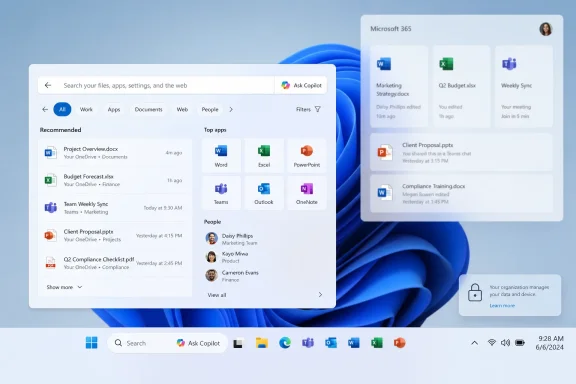
Ask Copilot, as described in reporting from Windows Central and DigitalToday, would replace the current search flyout with a pop-up environment that can search local files and apps while also offering a chat interface. In testing, it reportedly performs better than existing Windows search for local file and app discovery. That alone explains why Microsoft is interested: Windows search has been a persistent sore point, especially when users type the name of a file or application and are rewarded with web suggestions, Bing detours, or results that feel oddly indifferent to what is actually on the PC.
But this is also a strategic move around Microsoft 365 Copilot. The target audience is not primarily the home user who just wants to find Notepad faster. Microsoft is aiming at commercial and enterprise users who live inside Microsoft 365, where documents, meetings, chats, emails, and business data can become fuel for AI assistance.
That distinction matters. Microsoft is not merely putting another chatbot button in Windows. It is trying to collapse the distance between operating system search, workplace knowledge retrieval, and agent-driven automation. If successful, Windows becomes less a neutral desktop and more a managed AI surface for the enterprise.
The taskbar search box is a more logical place to try again. Search already has the user’s intent. When someone clicks the box, they are announcing that they want to find something, launch something, or ask something. That makes it a better fit for AI than a floating button that waits around like a sales demo.
The weakness is that Windows search has never quite lived up to its obvious promise. It should be one of the fastest, most reliable features in the operating system. Instead, many users have learned to treat it as a lottery: sometimes it finds the installed app, sometimes it suggests the web, sometimes it makes the user wonder whether indexing is a form of performance art.
Ask Copilot gives Microsoft a way to reframe that failure as an AI opportunity. If Copilot can understand natural language, surface relevant local files, and bridge into Microsoft 365 context, then the old search box can be presented as a legacy interface rather than a broken one. That is clever product positioning, but it also raises the bar. Once Microsoft claims AI search is smarter, users will expect it to be measurably better, not merely more branded.
Microsoft has learned, slowly and unevenly, that the Windows audience has a long memory. Every promotional tile, default app reset, Edge push, Bing redirect, Teams auto-start, and unwanted assistant icon becomes part of the same story in users’ heads. By the time a genuinely useful feature appears, it arrives carrying the baggage of every previous attempt to “surface” something Microsoft wanted adopted.
An opt-in Ask Copilot avoids the worst version of that cycle. It gives Microsoft room to pitch the feature to organizations that actually want a Copilot-centered workflow while leaving traditional search intact for everyone else. It also gives administrators a cleaner governance story: this is a capability to evaluate, pilot, and deploy, not a surprise change that must be explained to thousands of irritated employees.
Still, “optional” is not a permanent product philosophy. In Microsoft’s world, optional features that drive engagement have a way of becoming suggested, then recommended, then default in some SKU, region, or managed configuration. The company can defuse skepticism only by being unusually clear about controls, defaults, data access, and the line between local search and cloud-assisted reasoning.
Microsoft’s pitch is that Windows can become the point of coordination. Ask Copilot could let a worker search for an app, find a file, ask a question about a document, or invoke an agent without leaving the taskbar. In theory, this is the kind of workflow compression that enterprise software has promised for decades.
But IT departments will not deploy it because it feels futuristic. They will ask whether it respects existing Microsoft 365 permissions, whether queries and responses are logged appropriately, whether sensitive data is excluded when policies require it, and whether administrators can disable or scope the experience by group. They will also ask whether the feature behaves predictably on shared devices, virtual desktops, regulated endpoints, and machines with strict data-loss-prevention policies.
Microsoft’s commercial Copilot story rests on a claim that enterprise data protection and tenant boundaries make AI safe enough for workplace use. Ask Copilot brings that claim closer to the operating system shell. That makes the feature more useful, but also more politically sensitive inside organizations where the desktop is a controlled environment, not a playground for interface experiments.
When a user searches from the taskbar, the first obligation of the operating system is to the machine in front of them. If the user types “Excel,” “printer,” “invoice,” or “device manager,” Windows should not behave as though the web is the default destination. The PC still matters. Local context still matters. Speed still matters.
This is where Microsoft’s AI ambitions collide with basic product hygiene. Users are more likely to accept Copilot in search if the non-AI version is also getting better. If Microsoft appears to be withholding good search behind an AI toggle, the backlash writes itself. If, instead, Ask Copilot is presented as an additional layer above a healthier Windows search foundation, the proposition becomes more credible.
The company seems to understand this. Improving local-first results is not glamorous, and it will not generate keynote applause. But for daily Windows use, it may matter more than the Copilot branding.
Copilot is not Cortana. The underlying AI is more capable, the Microsoft 365 integration is more commercially coherent, and the broader software industry has moved toward chat-based interfaces in a way that gives Microsoft better timing. But the lesson from Cortana is not about voice recognition or mascot design. It is about overpromising what an assistant can do inside a personal computer.
Ask Copilot will succeed only if it is boringly useful. It needs to find the right spreadsheet, open the right app, summarize the right thread, and respect the fact that many users do not want the operating system to become conversational. The fastest way to lose credibility is to make Windows feel like it is constantly trying to turn every action into a chat.
That is the line Microsoft has to walk. AI should shorten the distance between intent and outcome. If it adds another pane, another prompt, another account requirement, or another moment of uncertainty, users will retreat to muscle memory.
That is powerful, and it is also classic platform lock-in. Microsoft can argue that integration is what customers want: fewer context switches, fewer disconnected tools, and a single governed environment for work. Competitors and skeptics will argue that Microsoft is using Windows’ privileged position to steer users into its AI and productivity stack.
Both readings can be true. Platform integration is often convenient until it becomes coercive. The health of this feature will depend on whether Microsoft treats Ask Copilot as a replaceable interface component or as another one-way door into its ecosystem.
For IT buyers, the calculus will be pragmatic. If Ask Copilot saves time, respects policy, and reduces support friction, many organizations will tolerate the ecosystem gravity. If it feels like a licensing upsell stapled to the taskbar, it will become another feature admins learn to suppress.
That does not mean consumers will never see it. Microsoft often tests enterprise features in one form and later adapts them for broader Windows use. The company also has a strong incentive to normalize Copilot as part of the Windows interface across consumer and commercial markets.
But the immediate logic is business-first. Enterprises have the data graph, the subscriptions, and the management infrastructure that make Copilot more than a general chatbot. A consumer Windows user may ask for a recipe or a setting. A commercial user may ask for the latest quarterly forecast, the slide deck from last week’s meeting, or the action items from a Teams discussion. That is where Microsoft believes it can justify Copilot’s cost.
This is why the Start menu and taskbar matter. Microsoft is not chasing novelty; it is chasing default workflow position. Whoever owns the first query of the workday has leverage over everything that follows.
Ask Copilot must aspire to that standard. It cannot behave like a product tour. It cannot turn every local search into a cloud conversation. It cannot make users wonder whether typing a filename has become a data-governance event. And it cannot degrade the responsiveness of the taskbar, which remains one of the most visible performance surfaces in Windows.
Latency will matter. Result ranking will matter. Offline behavior will matter. So will failure modes. A good search box fails quietly and lets the user keep moving; a bad AI assistant fails verbosely and explains itself while the user grows older.
If Microsoft gets this right, Ask Copilot could make Windows feel more modern without making it feel less like Windows. If it gets it wrong, the taskbar will become the latest front in a familiar argument over whether Microsoft understands the difference between helping users and capturing them.
Even so, the direction is clear. Microsoft wants Copilot closer to where work starts. It wants Windows search to become a bridge into Microsoft 365 intelligence. It wants AI agents to feel less like separate tools and more like ambient capabilities inside the operating system.
The risk is equally clear. The taskbar is sacred real estate. Users may tolerate experimentation in a sidebar or app; they are far less forgiving when Microsoft changes the behavior of something they use dozens of times a day. Optional rollout is therefore not a footnote. It is the launch strategy.
Microsoft has a chance here to show that it can deploy AI with restraint. That means keeping the classic search experience healthy, making controls obvious, documenting enterprise behavior plainly, and avoiding dark-pattern nudges that turn “optional” into “inevitable.” Windows users have heard the future-of-computing pitch before. This time, they will judge it by whether they can still find their files.
The practical takeaways are already visible:
 Microsoft Moves Copilot From Ornament to Infrastructure
The Windows taskbar has always been more than decoration. It is where users launch apps, search for files, switch contexts, and recover from the mess of modern multitasking. Replacing the search box with a Copilot-flavored interface is therefore not a small UI experiment; it is a bid to make AI the front door to Windows work.Ask Copilot, as described in reporting from Windows Central and DigitalToday, would replace the current search flyout with a pop-up environment that can search local files and apps while also offering a chat interface. In testing, it reportedly performs better than existing Windows search for local file and app discovery. That alone explains why Microsoft is interested: Windows search has been a persistent sore point, especially when users type the name of a file or application and are rewarded with web suggestions, Bing detours, or results that feel oddly indifferent to what is actually on the PC.
But this is also a strategic move around Microsoft 365 Copilot. The target audience is not primarily the home user who just wants to find Notepad faster. Microsoft is aiming at commercial and enterprise users who live inside Microsoft 365, where documents, meetings, chats, emails, and business data can become fuel for AI assistance.
That distinction matters. Microsoft is not merely putting another chatbot button in Windows. It is trying to collapse the distance between operating system search, workplace knowledge retrieval, and agent-driven automation. If successful, Windows becomes less a neutral desktop and more a managed AI surface for the enterprise.
The Search Box Was the Weakest Link in the Windows AI Story
Microsoft has spent the last several years trying to make Copilot feel inevitable. It added Copilot branding to Windows, shipped Copilot keys on new keyboards, placed AI into Edge and Microsoft 365, and experimented with entry points across the operating system. The results have been mixed, not because users hate the idea of assistance, but because Windows users are unusually sensitive to anything that looks like an interruption dressed as innovation.The taskbar search box is a more logical place to try again. Search already has the user’s intent. When someone clicks the box, they are announcing that they want to find something, launch something, or ask something. That makes it a better fit for AI than a floating button that waits around like a sales demo.
The weakness is that Windows search has never quite lived up to its obvious promise. It should be one of the fastest, most reliable features in the operating system. Instead, many users have learned to treat it as a lottery: sometimes it finds the installed app, sometimes it suggests the web, sometimes it makes the user wonder whether indexing is a form of performance art.
Ask Copilot gives Microsoft a way to reframe that failure as an AI opportunity. If Copilot can understand natural language, surface relevant local files, and bridge into Microsoft 365 context, then the old search box can be presented as a legacy interface rather than a broken one. That is clever product positioning, but it also raises the bar. Once Microsoft claims AI search is smarter, users will expect it to be measurably better, not merely more branded.
Optional Is the Word Doing All the Work
The most significant detail in the current reporting is that Ask Copilot is not expected to be enabled by default. Users would opt in, and standard Windows Search would remain the default experience for those who do nothing. That is not just a courtesy; it is the difference between an ambitious feature and another trust-eroding Windows controversy.Microsoft has learned, slowly and unevenly, that the Windows audience has a long memory. Every promotional tile, default app reset, Edge push, Bing redirect, Teams auto-start, and unwanted assistant icon becomes part of the same story in users’ heads. By the time a genuinely useful feature appears, it arrives carrying the baggage of every previous attempt to “surface” something Microsoft wanted adopted.
An opt-in Ask Copilot avoids the worst version of that cycle. It gives Microsoft room to pitch the feature to organizations that actually want a Copilot-centered workflow while leaving traditional search intact for everyone else. It also gives administrators a cleaner governance story: this is a capability to evaluate, pilot, and deploy, not a surprise change that must be explained to thousands of irritated employees.
Still, “optional” is not a permanent product philosophy. In Microsoft’s world, optional features that drive engagement have a way of becoming suggested, then recommended, then default in some SKU, region, or managed configuration. The company can defuse skepticism only by being unusually clear about controls, defaults, data access, and the line between local search and cloud-assisted reasoning.
Enterprise IT Will Judge the Feature by Control, Not Cleverness
For enterprise users, Ask Copilot is attractive precisely because work is scattered. A project may live across Teams threads, SharePoint folders, Outlook attachments, Word drafts, Excel models, and meeting transcripts. A local search box that understands only filenames is insufficient for that world.Microsoft’s pitch is that Windows can become the point of coordination. Ask Copilot could let a worker search for an app, find a file, ask a question about a document, or invoke an agent without leaving the taskbar. In theory, this is the kind of workflow compression that enterprise software has promised for decades.
But IT departments will not deploy it because it feels futuristic. They will ask whether it respects existing Microsoft 365 permissions, whether queries and responses are logged appropriately, whether sensitive data is excluded when policies require it, and whether administrators can disable or scope the experience by group. They will also ask whether the feature behaves predictably on shared devices, virtual desktops, regulated endpoints, and machines with strict data-loss-prevention policies.
Microsoft’s commercial Copilot story rests on a claim that enterprise data protection and tenant boundaries make AI safe enough for workplace use. Ask Copilot brings that claim closer to the operating system shell. That makes the feature more useful, but also more politically sensitive inside organizations where the desktop is a controlled environment, not a playground for interface experiments.
The Local Search Fix Is Microsoft’s Quiet Admission
There is another revealing detail in the same reporting: Microsoft is also improving ordinary Windows search by testing changes that prioritize local files and apps over internet search results. That may sound minor, but it is a tacit admission that the existing experience has been optimized around the wrong incentives.When a user searches from the taskbar, the first obligation of the operating system is to the machine in front of them. If the user types “Excel,” “printer,” “invoice,” or “device manager,” Windows should not behave as though the web is the default destination. The PC still matters. Local context still matters. Speed still matters.
This is where Microsoft’s AI ambitions collide with basic product hygiene. Users are more likely to accept Copilot in search if the non-AI version is also getting better. If Microsoft appears to be withholding good search behind an AI toggle, the backlash writes itself. If, instead, Ask Copilot is presented as an additional layer above a healthier Windows search foundation, the proposition becomes more credible.
The company seems to understand this. Improving local-first results is not glamorous, and it will not generate keynote applause. But for daily Windows use, it may matter more than the Copilot branding.
The Ghost of Cortana Still Haunts the Taskbar
Microsoft has tried the assistant-on-the-PC idea before. Cortana began as a promising digital assistant and gradually became a symbol of Microsoft’s inability to decide whether it wanted a consumer assistant, a productivity tool, a search feature, or a branding exercise. Users eventually learned to ignore it, disable it, or resent it.Copilot is not Cortana. The underlying AI is more capable, the Microsoft 365 integration is more commercially coherent, and the broader software industry has moved toward chat-based interfaces in a way that gives Microsoft better timing. But the lesson from Cortana is not about voice recognition or mascot design. It is about overpromising what an assistant can do inside a personal computer.
Ask Copilot will succeed only if it is boringly useful. It needs to find the right spreadsheet, open the right app, summarize the right thread, and respect the fact that many users do not want the operating system to become conversational. The fastest way to lose credibility is to make Windows feel like it is constantly trying to turn every action into a chat.
That is the line Microsoft has to walk. AI should shorten the distance between intent and outcome. If it adds another pane, another prompt, another account requirement, or another moment of uncertainty, users will retreat to muscle memory.
Microsoft Is Selling a New Kind of Windows Lock-In
The enterprise focus also exposes the larger strategy. Ask Copilot is not only about making Windows search better; it is about making Windows, Microsoft 365, and Copilot mutually reinforcing. The more work data lives in Microsoft’s cloud, the more useful Copilot becomes. The more useful Copilot becomes, the more valuable Windows becomes as a surface for invoking it.That is powerful, and it is also classic platform lock-in. Microsoft can argue that integration is what customers want: fewer context switches, fewer disconnected tools, and a single governed environment for work. Competitors and skeptics will argue that Microsoft is using Windows’ privileged position to steer users into its AI and productivity stack.
Both readings can be true. Platform integration is often convenient until it becomes coercive. The health of this feature will depend on whether Microsoft treats Ask Copilot as a replaceable interface component or as another one-way door into its ecosystem.
For IT buyers, the calculus will be pragmatic. If Ask Copilot saves time, respects policy, and reduces support friction, many organizations will tolerate the ecosystem gravity. If it feels like a licensing upsell stapled to the taskbar, it will become another feature admins learn to suppress.
The Consumer PC Is Not the Center of This Announcement
Home users may see “replacing the Windows 11 taskbar search box” and assume another forced AI rollout is coming for every PC. The available reporting suggests a narrower initial target. Ask Copilot is expected to focus on enterprise users, particularly those already inside the Microsoft 365 Copilot world.That does not mean consumers will never see it. Microsoft often tests enterprise features in one form and later adapts them for broader Windows use. The company also has a strong incentive to normalize Copilot as part of the Windows interface across consumer and commercial markets.
But the immediate logic is business-first. Enterprises have the data graph, the subscriptions, and the management infrastructure that make Copilot more than a general chatbot. A consumer Windows user may ask for a recipe or a setting. A commercial user may ask for the latest quarterly forecast, the slide deck from last week’s meeting, or the action items from a Teams discussion. That is where Microsoft believes it can justify Copilot’s cost.
This is why the Start menu and taskbar matter. Microsoft is not chasing novelty; it is chasing default workflow position. Whoever owns the first query of the workday has leverage over everything that follows.
The Real Test Is Whether Ask Copilot Can Stay Out of the Way
Windows users are not anti-feature. They are anti-friction. The most beloved parts of Windows tend to be the ones that disappear into routine: Alt-Tab, the Start menu, File Explorer, taskbar pinning, clipboard history, window snapping. They help without demanding a relationship.Ask Copilot must aspire to that standard. It cannot behave like a product tour. It cannot turn every local search into a cloud conversation. It cannot make users wonder whether typing a filename has become a data-governance event. And it cannot degrade the responsiveness of the taskbar, which remains one of the most visible performance surfaces in Windows.
Latency will matter. Result ranking will matter. Offline behavior will matter. So will failure modes. A good search box fails quietly and lets the user keep moving; a bad AI assistant fails verbosely and explains itself while the user grows older.
If Microsoft gets this right, Ask Copilot could make Windows feel more modern without making it feel less like Windows. If it gets it wrong, the taskbar will become the latest front in a familiar argument over whether Microsoft understands the difference between helping users and capturing them.
The Summer Rollout Will Be a Trust Exercise Disguised as a Feature Launch
The concrete details are still limited. Ask Copilot has not been officially released, the mid-2026 timing could shift, and early impressions are based on reporting and test builds rather than broad deployment. That uncertainty should temper both hype and outrage.Even so, the direction is clear. Microsoft wants Copilot closer to where work starts. It wants Windows search to become a bridge into Microsoft 365 intelligence. It wants AI agents to feel less like separate tools and more like ambient capabilities inside the operating system.
The risk is equally clear. The taskbar is sacred real estate. Users may tolerate experimentation in a sidebar or app; they are far less forgiving when Microsoft changes the behavior of something they use dozens of times a day. Optional rollout is therefore not a footnote. It is the launch strategy.
Microsoft has a chance here to show that it can deploy AI with restraint. That means keeping the classic search experience healthy, making controls obvious, documenting enterprise behavior plainly, and avoiding dark-pattern nudges that turn “optional” into “inevitable.” Windows users have heard the future-of-computing pitch before. This time, they will judge it by whether they can still find their files.
The Search Box Becomes Microsoft’s Smallest Big AI Bet
Ask Copilot is not the flashiest AI feature Microsoft has shown, but it may be one of the most revealing. It sits at the intersection of Windows usability, enterprise productivity, data governance, and Microsoft’s desire to make Copilot unavoidable without appearing to force it.The practical takeaways are already visible:
- Ask Copilot is expected to arrive in mid-2026 as an optional Windows 11 taskbar experience rather than a default replacement for everyone.
- The feature is aimed primarily at enterprise and Microsoft 365 Copilot users, not ordinary home PCs as the first priority.
- The new interface is expected to combine local file and app search with Copilot chat and agent-oriented workflows.
- Microsoft is also working on ordinary Windows search improvements that prioritize local files and apps over web results.
- The feature’s success will depend less on branding than on speed, accuracy, admin controls, privacy assurances, and whether users can easily avoid it.
- The broader strategy is to make Windows the launch surface for Microsoft 365 Copilot rather than treating Copilot as just another app.
References
- Primary source: 디지털투데이
Published: Wed, 27 May 2026 06:37:07 GMT
Microsoft to unveil 'Ask Copilot' this summer, replacing Windows 11 taskbar search box
Microsoft plans to launch its 'Ask Copilot' feature this summer as it moves to replace the Windows 11 taskbar search box with a Copilot chat environment, Windows Central reported on May 26. The feature aims to integrate Microsoft 365 Copilot and AI agents directly into the taskbar and Start...www.digitaltoday.co.kr
- Related coverage: windowscentral.com
Microsoft admits its "infuriating" floating AI button was a mistake
Microsoft admits the floating Copilot button was a mistake and will allow you to hide it in Word, Excel, and PowerPoint soon. www.windowscentral.com
- Related coverage: windowslatest.com

Microsoft confirms Ask Copilot is coming to the Windows 11 taskbar in mid-2026
Footnotes in a new Microsoft e-book confirm Ask Copilot and Click to Do are launching in mid-2026 for enterprise "Frontier Firms." www.windowslatest.com
- Related coverage: techradar.com
- Related coverage: technobezz.com

Microsoft Confirms Ask Copilot Feature Will Arrive on Windows 11 Taskbar This Summer
Microsoft confirms Ask Copilot will replace the Windows 11 taskbar search box this summer, offering natural language queries and AI agents while scaling back other AI integrations. www.technobezz.com
- Official source: learn.microsoft.com

Updated Windows and Microsoft 365 Copilot Chat experience
Learn about changes to the Copilot in Windows experience for commercial environments and how to configure it for your organization.learn.microsoft.com
- Related coverage: tomsguide.com
- Related coverage: tomshardware.com
Admins finally get the power to uninstall Microsoft Copilot on Windows 11 Pro, Enterprise, and EDU versions — devices must meet specific conditions to allow the removal of the AI app
One less bloatware on Windows 11.www.tomshardware.com
- Official source: news.microsoft.com
- Official source: adoption.microsoft.com
- Related coverage: techxplore.com
