

The ASUS NUC 15 Preo squeezes modern desktop power and on-device AI muscle into a remarkably small chassis, pairing an Intel Core Ultra 7 255H processor with high-speed DDR5 memory, PCIe Gen4 storage, Wi‑Fi 7, Thunderbolt 4 and support for multiple 4K displays—positioning itself as a serious choice for creators, professionals, and small‑business deployments that need workstation-class capability without a tower.
ASUS introduced the NUC 15 Pro family as its compact, AI‑ready mini PC series built around Intel’s second‑generation Core Ultra platform. The product line emphasizes what ASUS calls platform AI performance (TOPS), next‑generation connectivity such as Intel Wi‑Fi 7 and Bluetooth 5.4, and dense I/O including Thunderbolt 4 and HDMI 2.1 so small systems can drive multiple high‑resolution displays. The company positions the NUC 15 Pro and the higher‑end NUC 15 Pro+ as mini PCs for developers, content creators, and enterprise use where desktop performance, local inference and manageability matter.
In plain terms: if you want a tiny Windows 11 Pro desktop that claims to handle intensive multitasking, GPU‑accelerated workloads and some classes of local AI inference without a full tower, the NUC 15 Pro is exactly the niche ASUS is targeting. But there are important caveats around configurability, advertised TOPS figures, and SKU variation that buyers must check before purchase.
Key verified hardware points from Intel’s spec sheet:
Practical takeaway: the NUC 15 Pro does include dedicated hardware elements that accelerate AI inference (Arc GPU and platform accelerators), but expect real performance to vary widely by model, framework, memory configuration and thermal/power limits.
Storage: ASUS documents show support for PCIe Gen4 NVMe SSDs with one or two M.2 slots depending on the variant. Many retail SKUs include a 2TB PCIe Gen4 SSD out of the box; the platform supports Gen‑4 speeds and is upgradeable in most tool‑accessible units. Confirm the number of M.2 sockets and their physical sizes (2280 vs 2242) on the SKU you intend to buy.
Retail bundles: some sellers list Norton 360 or other security suites as included with purchase. That is a retail bundle decision, not an inherent ASUS hardware feature; verify bundled software on the retailer’s SKU page and whether subscription activation is required. Bundled antivirus can be useful but is not a substitute for organizational security policies or endpoint management. (Retail bundling is common; confirm what’s actually shipped with the unit before purchase.)
Security and manageability: selected SKUs include Intel vPro, TPM 2.0 / Microsoft Pluton support and BIOS manageability options—features IT teams require for fleet security and remote management. Confirm vPro availability on the specific SKU if enterprise management is a requirement.
For users who need desktop‑class responsiveness in a compact box—whether for video editing, coding, Copilot‑augmented workflows, or light on‑device inference—the NUC 15 Pro family is worth strong consideration. For sustained heavy GPU compute, model fine‑tuning, or 24/7 high‑throughput server duties, evaluate thermal headroom and consider a larger workstation or rack system. Verify the specific SKU, confirm the included RAM and storage, and benchmark your key workloads where possible before committing—those steps will separate marketing claims from real‑world utility.
Source: umlconnector.com https://umlconnector.com/itm/ASUS-NUC-15-Pro-Mini-PC-Intel-Core-Ultra-7-255H-64GB-DDR5/1082919/
 Background / Overview
ASUS introduced the NUC 15 Pro family as its compact, AI‑ready mini PC series built around Intel’s second‑generation Core Ultra platform. The product line emphasizes what ASUS calls platform AI performance (TOPS), next‑generation connectivity such as Intel Wi‑Fi 7 and Bluetooth 5.4, and dense I/O including Thunderbolt 4 and HDMI 2.1 so small systems can drive multiple high‑resolution displays. The company positions the NUC 15 Pro and the higher‑end NUC 15 Pro+ as mini PCs for developers, content creators, and enterprise use where desktop performance, local inference and manageability matter. In plain terms: if you want a tiny Windows 11 Pro desktop that claims to handle intensive multitasking, GPU‑accelerated workloads and some classes of local AI inference without a full tower, the NUC 15 Pro is exactly the niche ASUS is targeting. But there are important caveats around configurability, advertised TOPS figures, and SKU variation that buyers must check before purchase.
What’s inside: CPU, GPU and AI acceleration
Intel Core Ultra 7 255H — what it is and why it matters
The headline CPU for the SKU you asked about, the Intel Core Ultra 7 255H, is a Series‑2 Core Ultra mobile‑class processor built on Intel’s hybrid architecture and modern process nodes. Intel’s product documentation lists the 255H as a high‑performance part suitable for compact desktop designs and confirms support for DDR5 up to high frequencies, integrated Intel Arc graphics, and modern media I/O. The 255H’s GPU (Intel Arc 140T variant in Intel documentation) provides dedicated execution units and hardware media encode/decode blocks that matter for creative workloads.Key verified hardware points from Intel’s spec sheet:
- Hybrid core architecture with multiple P‑cores and E‑cores for mixed single‑thread and multi‑thread performance.
- Integrated Intel Arc‑class GPU with hardware encode/decode and quoted GPU TOPS for integer inferencing workloads (Intel lists a GPU peak TOPS figure on the 255H page).
TOPS and “AI acceleration” — what the numbers mean
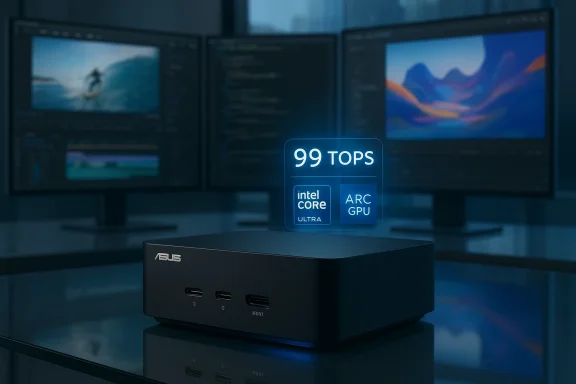
ASUS advertises up to 99 platform TOPS for the NUC 15 Pro family—this is a platform aggregate number that combines CPU, GPU and NPU‑style inferencing capabilities when the system bursts. ASUS’s press materials and product announcement explicitly use the “up to 99 TOPS” marketing line for certain configurations. That figure should be read as a vendor‑reported maximum under specific test conditions rather than a guaranteed sustained throughput for every real‑world model or workload. Independent reviewers and system designers routinely point out that TOPS figures are useful for comparing relative capability but do not directly translate to latency or throughput for particular LLMs or computer vision models without additional context (model size, quantization, memory bandwidth, drivers).Practical takeaway: the NUC 15 Pro does include dedicated hardware elements that accelerate AI inference (Arc GPU and platform accelerators), but expect real performance to vary widely by model, framework, memory configuration and thermal/power limits.
Memory and storage — what’s supported vs. what retail SKUs ship with
A major point buyers must verify: memory capacity and configuration differ between SKUs and documentation pages.- ASUS marketing for the NUC 15 Pro family highlights support for high‑speed DDR5 and even cites support for large memory capacities on promotional pages. The global product page confirms support for DDR5‑6400 and high memory ceilings on some model variants.
- The detailed technical spec page (techspec) shows multiple listings and, for some SKUs, a maximum of 48GB (2 × 48GB‑equivalent configs) in particular internal notes—this suggests there are mode‑ and SKU‑dependent limits. That divergence between marketing copy and SKU‑level tech sheets has appeared across ASUS documentation. Buyers should check the exact SKU string and the techspec for that SKU when purchasing.
Storage: ASUS documents show support for PCIe Gen4 NVMe SSDs with one or two M.2 slots depending on the variant. Many retail SKUs include a 2TB PCIe Gen4 SSD out of the box; the platform supports Gen‑4 speeds and is upgradeable in most tool‑accessible units. Confirm the number of M.2 sockets and their physical sizes (2280 vs 2242) on the SKU you intend to buy.
Connectivity and displays
ASUS places a strong emphasis on connectivity in this line:- Intel Wi‑Fi 7 (BE201) and Bluetooth 5.4 are listed in ASUS press materials and product pages, promising multi‑gigabit wireless throughput, low latency and improved multi‑link reliability—useful for large file movement and cloud interaction.
- Thunderbolt 4 (USB4) ports and HDMI 2.1 outputs enable support for up to four simultaneous 4K displays in some configurations using a combination of Thunderbolt/DisplayPort tunneling and dual HDMI outputs, per ASUS. That capability is attractive for trading desks, creator rigs and multi‑monitor productivity setups.
- Ethernet and enterprise features such as 2.5GbE (where present), Intel vPro on selected SKUs, and TPM/Secured‑core options appear across the lineup, making the devices viable for managed deployments.
Software, security and bundled extras
The NUC 15 Pro ships with Windows 11 on many retail SKUs and ASUS highlights compatibility with Windows Copilot and enterprise management features where configured. The device’s hardware accelerators are explicitly positioned for better on‑device Copilot responsiveness in marketing material, which aligns with Microsoft’s Copilot+ guidance that recommends local NPUs for improved laarios.Retail bundles: some sellers list Norton 360 or other security suites as included with purchase. That is a retail bundle decision, not an inherent ASUS hardware feature; verify bundled software on the retailer’s SKU page and whether subscription activation is required. Bundled antivirus can be useful but is not a substitute for organizational security policies or endpoint management. (Retail bundling is common; confirm what’s actually shipped with the unit before purchase.)
Security and manageability: selected SKUs include Intel vPro, TPM 2.0 / Microsoft Pluton support and BIOS manageability options—features IT teams require for fleet security and remote management. Confirm vPro availability on the specific SKU if enterprise management is a requirement.
Cooling, power and real‑world sustained performance
Mini PCs trade volume for thermals. ASUS states the NUC 15 Pro family uses an advanced thermal design tuned to reduce noise and heat while enabling burst performance, claiming quieter operation versus prior generations. Marketing materials emphasize a balance of bursty platform performance for AI tasks and sustained throughput for creative applications. Independent reviewers and community threads note that sustained multi‑hour workloads (long renders, model fine‑tuning) will expose the thermal limits of compaclan look impressive but may not reflect multi‑hour throughput. Expect the NUC to excel at short to medium bursts, multitasking and workflows with GPU‑accelerated encode, but treat it cautiously as a 24/7 server for heavy continuous inference without active cooling considerations or power/performance planning.Use cases — where the NUC 15 Pro makes sense
- Home or compact office workstation: Lots of power in a tiny footprint for editing, compiling, and multitasking without a full tower.
- On‑device AI development and inference: Good for local model experimentation, smaller LLMs, and CV tasks where platform TOPS and Arc acceleration speed up inference—keep expectations realistic for large models.
- Digital signage and media playback: Multiple HDMI/DisplayPort outputs, HDMI 2.1 and hardware encode/decode make it ideal for high‑resolution signage and kiosks.
- Small business desktop fleet: vPro and enterprise BIOS options make the NUC attractive for managed deployments in constrained spaces.
- Compact rendering or encoding workstation: Hardware encode blocks and Arc acceleration improve video export times for many workflows, though for sustained, heavy rendering a full‑size workstation with discrete GPU may still be superior.
Comparisons and market contepetes in a crowded “powerful mini PC” market that includes devices from Geekom, GMKtec and vendor‑configured compact systems that emphasize AI acceleration. Independent roundups and community reviews show ASUS aiming for a higher tier in connectivity, platform AI claims and multi‑display I/O, while rivals can beat it on price, upgradeability or specific GPU options. Community analysis and product roundups caution buyers to treat TOPS figures as indicative, to verify memory limits and to compare SKU specifics carefully before choosing between manufacturers.
Strengths — verified and practical
- Compact size with desktop performance: The NUC 15 Pro delivers strong single‑ and multi‑threaded capability for a small chassis thanks to Core Ultra Series 2 silicon.
- On‑device AI posture: Platform TOPS marketing and Arc GPU acceleration make it well‑suited for on‑premise inference tasks and Copilot‑adjacent features.
- Modern connectivity: Wi‑Fi 7, Bluetooth 5.4, Thunderbolt 4 and HDMI 2.1 give the unit flexibility for multi‑monitor and high‑bandwidth workflows.
- Tool‑less or easy upgrades on some SKUs: ASUS emphasizes accessible internals for RAM and storage on select variants, which can extend device life.
Risks and limitations — what to watch out for
- Marketing vs. sustained real‑world performance: “Up to 99 TOPS” is a vendor aggregate peak—real LLM latency/throughput depends on memory, drivers, and thermal/power constraints. Treat TOPS as a relative indicator, not an absolute guarantee.
- SKU and spec fragmentation: Different SKUs in the NUC 15 Pro family have divergent memory, storage and vPro options. Some official pages show differing maximums (e.g., 48GB vs. 96GB in various docs). Verify the exact SKU/techspec before buying.
- Thermal limits for sustained heavy workloads: Compact enclosures are thermally constrained; for prolonged, high‑TDP compute tasks a tower or workstation with larger cooling may be better.
- Bundle claims (Norton, extra software): These are retailer‑dependent; check whether included subscriptions require activation and whether they are time‑limited. Retail ad copy can list extras that are not part of manufacturer warranty/service. (Retail verification advised.)
- Driver and tooling maturity for AI stacks: For some on‑device AI workflows, driver support and framework optimizations (TensorRT equivalents, ONNX runtime tweaks, vendor drivers) determine usability. Expect improvements over time but verify current software ecosystem compatibirameworks.
Buying checklist — confirm before you pay
- Confirm the exact SKU string (e.g., NUC 15 Pro, NUC 15 Pro+) and match it to ASUS techspecs for memory max, included RAM, and storage slots.
- Verify whether the advertised memory (64GB in the listing you saw) is factory‑fitted or part of a reseller upgrade; check whether the memory is SO‑DIMM (user‑replaceable) or soldered.
- Confirm storage configuration: number of M.2 slots, sizes supported (2280 vs 2242) and whether the 2TB SSD is Gen4 NVMe.
- Check the presence of Intel vPro, TPM / Pluton options and warranty/enterprise support if you plan to deploy multiple units in an organization.
- If you need on‑device AI for production LLM workloads, test your target models against a representative configuration or consult benchmarked third‑party reviews; do not purchase solely on TOPS numbers.
Practical configuration recommendations
- For a general‑purpose creator/office machine: 32–64GB DDR5 (verify supported max), 1–2TB PCIe Gen4 NVMe, Windows 11 Pro, and an external fast SSD for scratch disk if you do heavy video work.
- For local AI development and small‑model inference: prioritize maximum RAM and SSD speed, and ensure the SKU exposes the Arc GPU and any on‑package NPU features you intend to use. Consider additional cooling and evaluate model quantization to fit within the device’s memory constraints.
- For enterprise fleets: pick vPro SKUs, secure BIOS options, and verify ASUS’s update and driver support window for commercial deployments.
Conclusion
The ASUS NUC 15 Pro is a compelling evolution of the mini‑PC idea: it brings modern Intel Core Ultra silicon, Arc GPU acceleration, Wi‑Fi 7 and robust I/O into a tiny chassis intended for creators, developers and IT teams that need powerful endpoints in small spaces. ASUS’s marketing claims—up to 99 platform TOPS, multi‑4K display support, and enterprise features—are backed by product documentation and press materials, but buyers must treat those numbers as marketing‑adjacent indicators and verify SKU‑level techspecs for memory limits, bundled software and upgrade paths.For users who need desktop‑class responsiveness in a compact box—whether for video editing, coding, Copilot‑augmented workflows, or light on‑device inference—the NUC 15 Pro family is worth strong consideration. For sustained heavy GPU compute, model fine‑tuning, or 24/7 high‑throughput server duties, evaluate thermal headroom and consider a larger workstation or rack system. Verify the specific SKU, confirm the included RAM and storage, and benchmark your key workloads where possible before committing—those steps will separate marketing claims from real‑world utility.
Source: umlconnector.com https://umlconnector.com/itm/ASUS-NUC-15-Pro-Mini-PC-Intel-Core-Ultra-7-255H-64GB-DDR5/1082919/
