

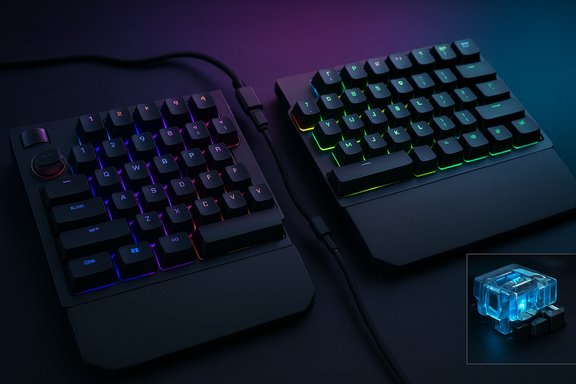
The Asus ROG Falcata is an ambitious, high‑feature split 75% keyboard that tries to bridge competitive gaming mechanics and semi‑ergonomic layout, but in the trade it compromises some of the very ergonomics its design seems to promise.
Background / Overview
Asus positions the ROG Falcata as a compact, detachable 75% gaming keyboard built around its new ROG HFX V2 magnetic (Hall‑effect) switches, an 8K‑class polling/SpeedNova wireless implementation, and a raft of gaming‑first features such as per‑key adjustable actuation, Rapid Trigger, and a multifunction roller and dial on the left half. The basic physical footprint—roughly 327 × 127 × 38 mm—converts to about 1.5 × 12.9 × 5 inches (HWD) with the halves connected, and the board is commonly listed at just under 1 kilogram without its wrist rests, matching both Asus’ product pages and multiple retailers’ spec sheets. These same official pages describe the HFX V2 switches as pre‑lubed, magnetic Hall‑effect units with a 3.5 mm travel, a 32 gf initial force and a 49 gf total force. Independent hands‑on reviewers have largely agreed on the spec outline and the Falcata’s emphasis on gaming features: multiple reviews note the Hall‑effect switches, tri‑mode connectivity (wired / 2.4 GHz / Bluetooth), per‑key RGB, and the ability to detach or offset the halves to free mouse space. The Falcata’s aim is clear—offer an out‑of‑box, prebuilt split keyboard that targets FPS and competitive players who want fine‑grained input control without building a custom kit.What the PCMag excerpt says (summary)
PCMag’s hands‑on notes emphasize the Falcata’s large box and included wrist rests, the compact measurement when joined (1.5 × 12.9 × 5 inches), and the relatively light total mass at about 2.13 pounds (≈968 g without rests). PCMag verified Asus’ battery estimate—Asus states up to 200 hours of battery life with per‑key RGB turned off—and reported that their review unit lasted several days in testing with RGB on before needing a charge. The review also describes the stock switches (ROG HFX V2) as pre‑lubed magnetic linears with a 49‑gram actuation force and praises their springy linear feel. Finally, PCMag calls out the left half’s I/O and controls—two USB‑C ports, a volume roller, and a dial for Rapid Trigger—and explains Rapid Trigger’s gameplay behavior: the keyboard prioritizes a newly pressed key immediately so you begin movement the instant you press another key instead of waiting for the previous press to finish registering. The PCMag excerpt provided by the user matches these takeaways. (User‑provided PCMag excerpt.Design and build: compact with heavy gamer cues
Split 75% with removable wrist rests
The Falcata’s split 75% layout is its defining physical trait. One side detaches cleanly, allowing you to re‑position halves for a more natural shoulder‑width posture or to remove the right half to carve out more mouse space—an attractive option for low‑sensitivity FPS players. The detachable halves are connected with a proprietary cable, and Asus warns third‑party cables may not fully support all features. Measured assembled dimensions from Asus and independent listings match PCMag’s inch‑based measurement. The keyboard ships with large wrist rests to enhance comfort, but several reviewers and community posts note a mismatch between wrist rest height and the keycap profile—low wrist pads combined with taller caps can leave the wrist angle suboptimal for some users. The real‑world ergonomics, therefore, are conditional: the split design enables better shoulder alignment, but the fixed height range and limited cable separation constrain how much ergonomic benefit users actually realise.Materials and details
Asus uses a mix of plastics and metal reinforcements, pre‑lubed stabilizers, and a multi‑layer dampening system under the plate to keep acoustics and feel cushioned. Keycaps are cross‑stem compatible (standard MX profile), and the switches’ top housings and stems are tuned to accept aftermarket keycaps. The build is solid, though a few outlets found aspects—like a stiff scroll wheel or minor finish tolerances—worthy of note in a product at this price tier.Switches, hot‑swap, and typing vs. gaming feel
ROG HFX V2: what they are and how they behave
The ROG HFX V2 switches are magnetic Hall‑effect switches engineered to detect magnet position in the switch travel instead of relying on a physical electrical contact. Asus publishes the headline numbers: 3.5 mm travel, 32 gf initial, 49 gf total, and a 100‑million‑keystroke lifespan for the V2 family. The switches are pre‑lubed and described as linear in feel—springy and fast—making them well suited to gaming and rapid repeated presses.Hot‑swap and customization caveat
The keyboard is hot‑swappable for magnetic HFX modules, so you can change switch assemblies without soldering. However, Asus does not sell the Falcata as a bare frame or offer a choice of stock switches at purchase—units ship with HFX V2 only. For hobbyists and deep tinkerers who want full freedom over switch variants and to start from a bare chassis, the Falcata will feel restrictive compared with boutique kits and enthusiast boards that permit complete parts choice. This is a practical buying consideration for people who prioritize ultimate modability.Typing vs. gaming
Linears usually favor gaming for smooth repeated presses and minimal tactile interference. The HFX V2s deliver that profile, and reviewers found them responsive and fast. That said, the Hall‑effect architecture introduces new behavioral quirks—actuation and reset behavior can differ from traditional mechanical switches, and some users report needing to tune Rapid Trigger/reset settings to avoid missing or doubled keystrokes in certain connection modes. These subtleties mean heavy typists or users who expect classic mechanical feedback may not prefer the Falcata’s feel out of the box.Features that target competitive players
- Per‑key adjustable actuation: Fine control over actuation depth (often down to hundredths of a millimeter in Asus’ tooling) lets players tune WASD and movement keys for the fastest, most repeatable inputs. Multiple reviews confirm granular actuation controls tied to Rapid Trigger and other modes.
- Rapid Trigger: A hardware/software feature that prioritizes a new key press over the last input so movement or a new action happens instantly. It’s especially useful for counter‑strafing and quick micro‑movement in FPS titles. PCMag’s description of Rapid Trigger matches Asus’ documentation and other reviewers’ hands‑on notes.
- High polling and SpeedNova 8K wireless: Asus advertises up to 8,000 Hz polling rates in certain modes—an extreme‑latency marketing figure intended to appeal to the competitive crowd. That figure appears on Asus pages and retailer lists; independent reviewers have measured very low latency but caution that host system and RF environment heavily influence real performance.
- Multifunction roller/dial and left‑side I/O: The left half houses two USB‑C ports, a volume roller, and the Rapid Trigger dial—convenient for live tuning without software. Multiple hands‑on reviews specifically called out this control cluster as thoughtful for gamers who want quick, on‑the‑fly actuation adjustments.
Battery, wireless reliability, and practical runtime
Battery claims vs tested experience
Asus lists long battery runtimes that vary by lighting and mode; marketing numbers for "up to 200 hours with RGB off" are widely reported in product listings and press materials. Retail spec pages commonly echo the 200‑hour figure, and PCMag’s unit lasted multiple days with RGB active before recharge—supporting the general point that battery life is strong for a wireless feature set of this calibre. That said, "up to" figures are lab‑style claims and will vary substantially by polling mode, brightness, profile use, and Rapid Trigger settings. Treat the 200‑hour number as a best‑case figure under conservative usage.Wireless reliability flags from the community
Independent reviews and forum threads reveal a pattern common to many feature‑dense wireless keyboards: occasional 2.4 GHz dropouts, inconsistent behavior between Bluetooth and RF modes, and software‑related quirks. Community discussion around similar modern high‑feature boards shows that RF connectivity can be fragile in certain environments (USB3 noise, crowded hubs, or poorly placed dongles). These issues are often mitigated by using a rear‑motherboard port or a short USB extension to keep the dongle on the desktop, but they’re non‑zero risks for tournament players who demand total determinism.Software, tuning, and the learning curve
Asus’ Armoury Crate / Gear Link and on‑device dials enable deep customization, from per‑key actuation to lighting and macros. That power is both a strength and a complexity cost—many users and reviewers remark that the software is feature‑rich but sometimes flaky or confusing, and changes may not always persist without explicit saving. Community posts also report occasional misapplied Rapid Trigger settings and UI friction. If you intend to rely on per‑key actuation and analog behavior, expect a non‑trivial setup and testing phase, and plan to spend time tuning profiles for each game.Strengths — where the Falcata stands out
- Unique out‑of‑box split + Hall‑effect combo: The Falcata is the first mainstream prebuilt keyboard that pairs a detachable split layout with Hall‑effect switches and competitive features, delivering a rare mix without custom assembly.
- Granular actuation and Rapid Trigger: Both hardware and software enable extremely short actuation distances and instant key re‑prioritization—features aimed squarely at precise competitive play. Reviewers praise their effectiveness in the right hands.
- Good battery potential: In conservative modes and with RGB off, multi‑day battery life is plausible and was echoed by PCMag’s reported experience. Real test results vary but are generally strong for a wireless split board.
- Solid build and damping: Pre‑lubed switches, dampening layers, and included wrist rests give a premium, quiet typing profile compared with many raw gaming boards.
Risks and limitations — what to watch for
- Ergonomic compromise: Despite the split concept, limited tenting, a proprietary short cable separation, and wrist rest/keycap height mismatches restrict the Falcata’s real ergonomic benefit. Users seeking clinical ergonomic relief should consider dedicated split/tenting frames (Kinesis, ErgoDox variants) instead.
- Software and firmware fragility: Gear Link and related tools add power but also points of failure—reports of misapplied profiles, Rapid Trigger toggles that don't stick, and occasional need for firmware resets are plentiful in community conversations. If you expect zero setup or a completely hands‑off experience, this device may not meet that expectation.
- Wireless edge cases: As with many high‑spec wireless peripherals, the Falcata’s RF and Bluetooth performance can be environment dependent. Competitive players who require absolute determinism may prefer wired setups for tournament play.
- Limited tinker‑friendly availability: The Falcata ships only with HFX V2 switches and is not sold as a bare frame. Hardcore customizers used to swapping switch families, top plates, and G‑pro‑level modding may find the Falcata limiting.
- Price vs. niche value: The Falcata is a premium product with a premium price. Many reviewers note that its value is clearest for competitive players who will use the analog features; casual or generalist buyers may find better value elsewhere unless these specific features are essential to their playstyle.
Practical buying checklist
- Confirm that you need a split layout and that the provided wrist‑rest heights will work with your typing posture.
- Decide whether you’ll use wireless modes; if so, plan to test RF in your setup and keep the dongle on a short extension or rear port.
- If you’re an extreme customizer (different switch families, bare frame), note Asus’ shipping policy: the Falcata comes with HFX V2s and no bare chassis option.
- Budget time to tune profiles in Armoury Crate / Gear Link—per‑key actuation requires patience to avoid accidental inputs.
- If you’re buying for esports or tournament play, prefer wired mode for absolute determinism and verify tournament rules about macro/analog features if relevant.
Real‑world verdict: who the Falcata is for
The ROG Falcata is best for competitive players who:- Want fine‑grained, hardware‑level input control (per‑key actuation, Rapid Trigger).
- Value a prebuilt split layout combined with Hall‑effect switches without assembling a custom kit.
- Are willing to invest time tuning software and profiles for their specific games.
- Buyers seeking the most comfortable, therapeutic ergonomic keyboard rather than a gaming‑centric split solution.
- Tinkerers who require a bare frame or multiple stock switch options at purchase.
- Users who need perfect wireless reliability out of the box without network‑environment testing.
Final take: an innovative keyboard with a specific audience
The Asus ROG Falcata pushes the envelope by shipping a prebuilt split keyboard with Hall‑effect switches and esports‑grade features aimed at squeezing the last milliseconds from competitive inputs. It succeeds in delivering novelty and capability: fast magnetic switches, per‑key actuation, Rapid Trigger, 8K‑class polling, and tangible battery endurance in conservative modes. However, that innovation brings cost—both monetary and practical. Ergonomics are promising on paper but constrained in practice by fixed height ranges and cable length; software and RF reliability remain the usual modern‑keyboard caveats; and the unit’s non‑modular sales approach limits appeal to full‑blown enthusiasts who prefer bespoke parts.For players who understand and will use the Falcata’s competitive toolset—especially those who value a split layout and are happy to tune profiles—the Falcata is a compelling, if specialist, choice. For everyone else, the keyboard is a fascinating experiment in prebuilt Hall‑effect design that should be evaluated carefully against true ergonomic split solutions and more conventional mechanical boards that offer broader modability at lower price points.
Note on verification: technical numbers cited above (dimensions, travel, actuation force, HFX V2 characteristics, 8K claims and battery guidance) were checked against Asus’ official ROG product pages and independent reviews/retailer specifications. Where vendor "up to" battery figures are quoted, treat them conservatively—the actual runtime will vary with polling mode, RGB, Rapid Trigger and host environment.
Source: PCMag Asus ROG Falcata Review: Better Ergonomics by Half
