

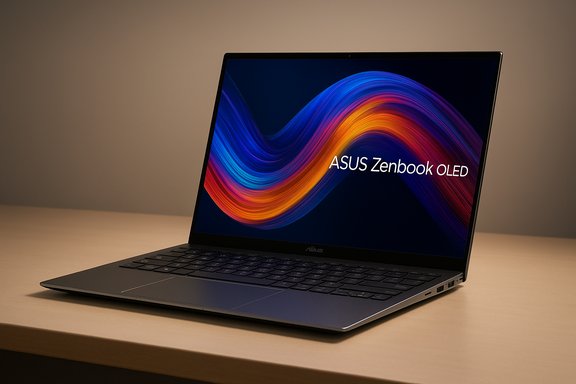
The Asus Zenbook 14 OLED — a slim Windows 11 ultraportable with a 3K OLED touchscreen and Intel Core Ultra silicon — has surfaced in Black Friday chatter as one of the standout bargains, with at least one widely circulated report claiming the laptop is deeply discounted on Amazon from its typical asking price to around £519.19. That kind of discount would put a premium OLED ultraportable into reach for mainstream buyers and budget-conscious shoppers, but the reality behind that headline requires closer inspection: which Zenbook 14 OLED configuration is on offer, how the Intel Core Ultra 5 variant compares to the higher-tier Ultra 7/9 SKUs, and whether the trade-offs (soldered RAM, integrated graphics, potential thermal limits and OLED risks) make this a genuinely smart buy. This feature unpacks the hardware, validates technical claims from manufacturer and independent reviews, assesses the Black Friday pricing context, and lays out clear buying checks so readers avoid nasty surprises.
Background / Overview
Asus relaunched the Zenbook 14 OLED family as a premium 14‑inch ultraportable built around the new Intel Core Ultra platform and a high-resolution OLED panel. The official announcement details a 3K (2880×1800) 16:10 ASUS Lumina OLED panel with high color fidelity, a thin and light aluminium chassis, and Intel Core Ultra processor options (Core Ultra 5 / 7 / 9) depending on configuration. The company positions the line as an Intel Evo-class ultraportable (where applicable) that blends battery life, display quality and modern I/O. Independent coverage at product launch confirms the same core specification goals: a 14‑inch OLED touchscreen available in a 3K 16:10 format, 120 Hz refresh option on higher-tier variants, and the use of Intel’s new Ultra chips with integrated Intel Arc graphics and an on‑chip Neural Processing Unit (NPU) for on‑device AI workloads. Tom’s Hardware and other hands‑on reports emphasize that base models ship with the Core Ultra 5 (entry‑level Ultra) and higher configurations step up to Ultra 7 or Ultra 9 and larger RAM/SSD. On the retail front, retail listings in the UK show multiple Zenbook 14 OLED SKUs active on Amazon and other stores, with prices and configurations varying substantially between AMD‑ and Intel‑powered models and between RAM/SSD choices. Many UK listings in 2025 show full‑price models well above the £500 mark for new units, indicating that an advertised price near £519 would be steeply discounted compared with current street prices for comparable new configurations.What the hardware actually is: core specs and options
Display: OLED that matters
- Panel: 14‑inch ASUS Lumina OLED, 16:10 aspect ratio.
- Resolution: 3K (2880 × 1800) on the higher‑end 3K variants.
- Refresh & brightness: Many SKUs offer a 120 Hz option and peak brightness claims up to 550–600 nits on certain configs, with DisplayHDR True Black certification on higher tiers. These traits give the Zenbook strong contrast, deep blacks and excellent color for photo/video work and content consumption.
CPU, NPU and graphics
- CPU choices: Intel Core Ultra family — Ultra 5 (entry), Ultra 7 (mid), Ultra 9 (top). Base retail SKUs commonly ship with the Core Ultra 5 in lower‑cost configurations. The Ultra chips include a dedicated NPU intended for local AI tasks.
- Graphics: Integrated Intel Arc graphics on Intel SKUs; some market variants for the Zenbook family also appear with AMD Ryzen AI or other CPUs depending on region and release window. Integrated solutions are fine for productivity and light gaming, but do not replace discrete GPUs for heavy 3D titles.
Memory, storage, ports & battery
- Memory: LPDDR5x in most modern Zenbook variants; many SKUs use soldered RAM (non‑user‑upgradable) with 8GB commonly present on base models and 16GB/32GB on higher tiers.
- Storage: PCIe Gen4 NVMe SSD options up to 1TB depending on SKU.
- Ports: Expect two Thunderbolt/USB‑C ports, a USB‑A port, HDMI 2.1, and a headphone jack on typical configurations — a practical set for most users without needing dongles.
- Battery: ASUS claims long battery life — upwards of 12–15+ hours in some marketing materials depending on panel and SoC. Independent testing varies by model and usage but reports solid real‑world battery life for mixed office workloads.
Build & weight
The chassis is thin and light (Asus advertises ~1.2 kg for many Zenbook 14 OLED models) with a premium aluminium finish. Port selection and a healthy battery cell make this a realistic daily driver for commuters and students.Independent testing and real‑world behavior: strengths and weak points
What reviewers praise
- Display quality: Across multiple reviews the OLED panel is consistently called the best feature: color accuracy, contrast and HDR look excellent compared with typical LCDs in the same class. This is a major win for creatives, streamers and anyone who values image fidelity.
- Portability and battery: The Zenbook 14 OLED scores highly for lightness and battery life relative to its hardware class, making it a strong pick for long days away from the outlet.
- Design and I/O: A well‑balanced selection of ports and a sturdy all‑metal body earn praise in most hands‑on pieces.
Noted weaknesses and caveats
- Soldered RAM / limited upgradeability: Many SKUs use soldered LPDDR5x; base models with 8GB will be constrained for heavy multitasking and future‑proofing. Independent reviews caution buyers to opt for 16GB or higher when possible.
- Thermal throttling under sustained CPU loads: Benchmarks and long workloads reveal that the thin chassis can struggle to sustain peak performance under prolonged heavy CPU use, leading to throttling in some tests. That impacts sustained rendering or heavy compilation workloads.
- OLED burn‑in risk and occasional firmware quirks: Long‑term static UI elements (toolbars, coding IDEs with constant UI elements) raise the theoretical risk of burn‑in; reviewers recommend enabling OLED protection features and varying content over long periods. Some early users reported firmware quirks that vendor updates subsequently addressed.
The Black Friday price claim: bargain or red flag?
A prominent consumer write‑up circulated a specific Amazon price — a cut from £899.99 RRP to £519.19 (a 42% reduction). Retail listings and current retailer pricing show multiple Zenbook 14 OLED SKUs selling on Amazon UK, but with typical new‑unit prices much higher than the £519 figure for equivalent high‑end configurations. Example Amazon UK listings for Zenbook 14 variants commonly show prices in the £900–£1,400 range depending on CPU, RAM and SSD, which suggests that a sub‑£520 price would either be a highly limited clearance SKU, a lower‑spec configuration, or potentially a third‑party/refurbished offer. Important verification steps before treating that advertised Black Friday price as a done deal:- Confirm the exact SKU/model number (UX3405 / UM3406KA / UX5406 etc) and the full configuration (CPU, RAM, SSD, UK vs EU keyboard).
- Check whether the offer is sold by Amazon or a marketplace seller; marketplace “deals” can be used/refurbished units or require careful return/warranty checking.
- Confirm warranty coverage and return policy (new, sold by Amazon and fulfilled by Amazon typically carries straightforward returns; third‑party sellers can be riskier).
- Validate the product condition — “new” vs “refurbished” vs “grade‑B used” can materially alter value.
Is the Intel Core Ultra 5 model "good enough"?
The Intel Core Ultra 5 variant is the entry point in the Intel Ultra family for these Zenbooks. In practice:- It handles everyday productivity, office work, web browsing, streaming and light creative tasks easily.
- Its integrated Arc graphics allow casual gaming at modest settings and good media codec acceleration.
- For heavy multitasking, video rendering, 3D work or future‑proofing, the Ultra 7 or Ultra 9 and a larger RAM & SSD spec are better choices.
Practical buying checklist for the Black Friday Zenbook 14 OLED deal
Before checking out, walk through this checklist to protect value and avoid returns:- Confirm the exact model number and configuration (CPU model, RAM, SSD capacity, OLED 3K vs 1080p variants, touch vs non‑touch).
- Verify the seller: Sold & dispatched by Amazon (or an authorised Asus reseller) is preferable.
- Check the warranty (Asus manufacturer warranty vs seller warranty), and whether warranty claims are supported in your country.
- Inspect the return window and shipping times — Black Friday sometimes has special rules.
- Confirm Windows edition (Windows 11 Home vs Pro) and whether any bloatware or OEM apps are included.
- If the SKU has 8GB LPDDR5x soldered RAM, plan for realistic long‑term expectations; unless you strictly need portability and display above all, 16GB is a safer choice.
- Watch for refurbished/used labels or "open box" pricing that can masquerade as new deals.
- Compare current live prices across sellers (Amazon UK, Currys, John Lewis, official Asus store) to ensure the discount is genuine.
Alternatives and where this laptop fits in the Windows ecosystem
If the deal is genuine and matches a new, full‑spec 16GB/512GB or 16GB/1TB configuration, the Zenbook 14 OLED becomes one of the best values for buyers prioritizing a high‑quality OLED display in a lightweight Windows 11 laptop.If the discounted SKU is a lower‑spec Ultra 5 / 8GB model, consider how it compares to:
- Acer Swift Go / Swift 3: Solid, lower‑cost ultraportables, sometimes with high battery life but typically LCD screens.
- Lenovo Yoga / IdeaPad lines: Good all‑rounders with convertible options and sometimes better price/performance for office use.
- Surface Laptop (13/14/13.8 family): Often thicker margins on price but strong Microsoft‑ecosystem integrations and Copilot+ options in some 2025 Surface SKUs. (Note: vendor comparison context and exact models change rapidly during holiday sales.
Final verdict: who should buy, and who should wait
- Buy if:
- You want the best display money can buy on a 14‑inch Windows laptop and are prepared to accept the consequences of a thin, integrated‑RAM design.
- You value portability, strong battery life and an OLED touchscreen for media, photo work, and everyday productivity.
- The Amazon price is confirmed for a new unit from a reputable seller and the SKU offers at least 16GB RAM for longevity.
- Hold off / look elsewhere if:
- You need upgradability (user‑replaceable RAM) or a discrete GPU for sustained creative or gaming workloads.
- The listing is for an 8GB or refurbished SKU and you rely on heavy multitasking or professional software.
- Warranty, shipping origin, or seller reputation are unclear.
Practical tips for long‑term ownership (OLED & thin‑and‑light laptops)
- Use auto‑hide taskbars, periodic full‑screen white/black screen changes or screen savers to reduce OLED burn‑in risk.
- Keep firmware and graphics drivers current — manufacturers regularly push updates addressing power, display and thermals.
- If you buy an Ultra 5/8GB model for the price, consider using lightweight workflows (web, Office, streaming) and offload heavier tasks to a desktop/workstation when possible.
- Use power profiles to moderate peak CPU clocks for improved sustained performance and reduced thermal throttling during long workloads.
Recap and closing assessment
The Asus Zenbook 14 OLED is a compelling Windows 11 ultraportable: a class‑leading OLED display, modern I/O, thin/light build and Intel Core Ultra platform give it substantial appeal. Independent testing corroborates that the display and portability are standout attributes, while reviewers caution about thermal limits, soldered RAM and OLED long‑term care. The Black Friday price headline — a reduction to roughly £519.19 from an RRP near £899.99 — would be an excellent bargain if the listing is a genuine new unit of the mid/high configuration and from a reputable seller. Given how quickly holiday prices and SKUs change, the headline discount should be verified on the product page (model number, seller and condition) before purchasing. Treat the offer as a potentially rare opportunistic save, not a permanent market shift, and follow the buying checklist above to protect warranty and value.Bold decision points: if the Amazon listing is for a new Zenbook 14 OLED with at least 16GB RAM and an Ultra 7 or higher CPU, the deal is a clear win for anyone wanting a premium Windows 11 laptop with an outstanding OLED display. If it’s a lower‑spec Ultra 5 / 8GB variant or a third‑party/refurbished sale, the price is still tempting — but buyers must weigh upgradeability, long‑term needs and warranty against the short‑term savings.
Source: Daily Express I love this Windows 11 laptop that's much cheaper for Black Friday
