

Amazon Web Services has quietly flipped the switch on nested virtualization for a subset of its newest Intel-powered EC2 families, putting the long-awaited ability to run a hypervisor inside an EC2 virtual machine into general configuration for 8th‑generation Intel instance types — specifically C8i, M8i and R8i (and their flex variants). This change turns a previously bare‑metal‑only capability into a first‑class, controllable CPU option for many workloads and exposes new design choices — and security trade‑offs — for cloud architects, platform engineers, and DevOps teams.
Nested virtualization is the practice of running a hypervisor (L1) inside another hypervisor’s guest (L0) and then launching secondary virtual machines (L2) inside that nested hypervisor. It’s been used for years by labs, training environments, CI systems, and specialized production setups that require isolation or hardware features not available at the guest level.
Cloud providers historically restricted nested virtualization because exposing processor virtualization instructions (Intel VT‑x / AMD SVM) to guest VMs complicates scheduling, isolation, and security. Where cloud vendors did allow it, the route was often to use bare‑metal instances: full host access with no hypervisor layer between user workloads and the CPU. AWS has long supported nested virtualization on bare‑metal EC2 instances; the novelty today is turning nested virtualization into a configurable option on virtualized Nitro instances based on Intel Xeon 6 processors.
That said, TDX itself has been the subject of security research and advisories: vulnerabilities have been found in TDX implementations and mitigations or microcode updates have been issued. The security posture of TDX is evolving, and cloud users should treat any new TDX-enabled deployment with the same scrutiny they apply to other confidential computing stacks.
At the same time, this change is not a cure‑all. Enterprises that require ESXi, absolute bare‑metal semantics, or who rely heavily on VSM for security will still need careful design work. The cloud ecosystem’s confidential computing and processor isolation story (TDX, SEV‑SNP, Nitro, vendor microcode) remains complex and evolving. Expect further clarifications from AWS on operational guidance, and expect security researchers and vendors to continue probing the boundaries of TDX and nested virtualization at scale.
That said, the upgrade comes with important trade‑offs: automatic VSM disablement for Windows, performance overheads, vendor and licensing caveats, and an ongoing security story around Intel’s TDX platform. Teams should adopt nested virtualization deliberately: validate performance, confirm vendor support, and re‑assess security posture and compliance implications before rolling it out to production workloads.
For engineers and architects, the near‑term task is straightforward: run a measured proof‑of‑concept on the supported instance families, update runbooks and compliance assessments to reflect the change, and keep a close eye on microcode and cloud provider advisories as the ecosystem adapts to these new hardware and hypervisor combinations.
Source: theregister.com AWS adds nested virtualization option for handful for EC2
 Background / Overview
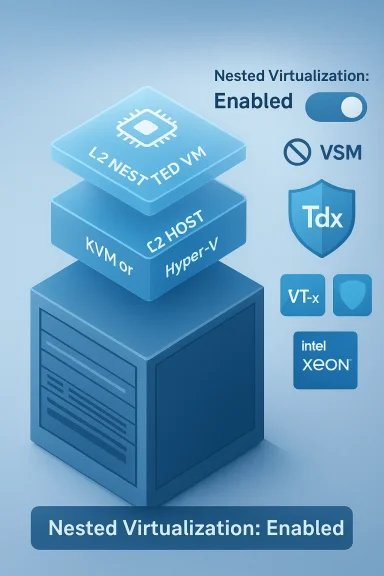
Nested virtualization is the practice of running a hypervisor (L1) inside another hypervisor’s guest (L0) and then launching secondary virtual machines (L2) inside that nested hypervisor. It’s been used for years by labs, training environments, CI systems, and specialized production setups that require isolation or hardware features not available at the guest level.Cloud providers historically restricted nested virtualization because exposing processor virtualization instructions (Intel VT‑x / AMD SVM) to guest VMs complicates scheduling, isolation, and security. Where cloud vendors did allow it, the route was often to use bare‑metal instances: full host access with no hypervisor layer between user workloads and the CPU. AWS has long supported nested virtualization on bare‑metal EC2 instances; the novelty today is turning nested virtualization into a configurable option on virtualized Nitro instances based on Intel Xeon 6 processors.
What changed on AWS — the technical headline
- AWS now exposes nested virtualization as a CPU option for 8th‑generation Intel‑based EC2 instances: C8i, M8i, and R8i, including their flex variants. That option can be turned on or off via instance CPU options (for example, the CLI/API/SDK supports a NestedVirtualization flag).
- When you enable nested virtualization on these instance types, Virtual Secure Mode (VSM) is automatically disabled for the instance. VSM is Windows’ virtualization‑based security feature set; the automatic disablement is important for Windows workloads that depend on VSM.
- The supported model is a three‑layer architecture: the physical host and Nitro hypervisor (L0), your EC2 instance running a hypervisor (L1), and one or more nested virtual machines inside that L1 hypervisor (L2). AWS’ published CLI and SDK interfaces expose the nested virtualization option as part of CPU configuration.
Why AWS targeted C8i / M8i / R8i (Xeon 6 + TDX)
The three families that gained nested virtualization support — compute (C8i), general purpose (M8i), and memory‑optimized (R8i) — are notable because they use the Intel Xeon 6 family. Intel’s Xeon 6 product line ships with the latest Trust Domain Extensions (TDX) support — a set of hardware features aimed at improving guest isolation and confidential computing. Cloud vendors and customers see TDX as a way to reduce the hypervisor’s visibility into (and attack surface around) guest memory and execution state.That said, TDX itself has been the subject of security research and advisories: vulnerabilities have been found in TDX implementations and mitigations or microcode updates have been issued. The security posture of TDX is evolving, and cloud users should treat any new TDX-enabled deployment with the same scrutiny they apply to other confidential computing stacks.
Supported hypervisors and immediate limitations
- AWS currently documents support for KVM and Microsoft Hyper‑V as guest (L1) hypervisors on nested‑enabled EC2 instances. That means Linux users who use KVM and Windows users who rely on Hyper‑V can run nested VMs inside those L1 hypervisors.
- VMware ESXi — the dominant enterprise hypervisor — is not listed as a supported L1 hypervisor for this feature. VMware’s licensing model and Broadcom’s enterprise positioning for their Cloud Foundation products complicate bringing ESXi to shared‑infrastructure EC2 offerings; customers with strict ESXi requirements will still rely on dedicated VMware cloud options or Amazon’s VMware partnership. The absence of ESXi support narrows use cases for enterprises that standardize heavily on VMware tooling and management.
- Historically, many nested virtualization use cases on AWS used bare‑metal instances to get full VT‑x access; AWS’ new option reduces that need for many teams but doesn’t remove the need for bare‑metal where full host semantics or absolute hardware pass‑through is required. AWS’ earlier guidance and blog posts explain why bare‑metal was the default route for KVM inside EC2.
Use cases — practical and realistic
Nested virtualization is not just a lab trick. Here are practical use cases enterprises and teams will find attractive now that the capability is easier to enable:- Developer labs and CI: reproduce entire multi‑VM topologies in the cloud for integration testing without burning through bare‑metal resources. This reduces test friction for hypervisor‑aware tooling and OS images.
- Windows Subsystem for Linux (WSL) on Windows EC2 instances: WSL 2 depends on a lightweight Hyper‑V instance; being able to run Hyper‑V inside an EC2 Windows guest enables richer developer workstations in the cloud. AWS’ documentation historically required bare metal for full WSL 2 support; nested virtualization may open the door to WSL 2 on virtualized instances while noting the VSM caveat.
- Mobile emulator farms and device simulation: emulating mobile hardware or instrumenting virtual devices inside L2 VMs helps QA teams scale test matrices in the cloud.
- Kubernetes-on‑VMs and container isolation models: teams running container runtimes inside Linux VMs (Kata Containers, specialized isolation stacks) can adopt nested virtualization instead of bare metal to spawn KVM microVMs per container or pod. AWS documented patterns for Kata and microVMs previously that used bare metal; nested virtualization lowers friction.
- Training and certification: courses that require rolling labs with multiple nested hypervisors can be provisioned programmatically without dedicated hardware.
Performance and operational trade‑offs
Nested virtualization is not free. Expect measurable overhead and operational complexity:- CPU and I/O overhead: hardware‑assisted nested virtualization reduces some of the software emulation costs, but nested guests (L2) still add scheduling layers and may incur 10%+ CPU overhead for CPU‑bound workloads and potentially more for I/O heavy workloads. Google’s documentation for Compute Engine explicitly calls out potential performance drops for nested VMs; similar performance considerations apply on AWS. Plan capacity accordingly and benchmark real workloads.
- Feature trade‑offs: enabling nested virtualization on AWS automatically disables Virtual Secure Mode (VSM) on the instance. For Windows workloads that rely on VSM (Credential Guard, BitLocker enhancements, or other virtualization‑based security features), this is a material compatibility and security change. Confirm feature requirements before enabling nested virtualization.
- Licensing and support: software vendors often stipulate virtualization conditions in their support and licensing agreements. Running licensed hypervisors or workloads inside nested environments can have ambiguous or explicit support boundaries, especially for enterprise software that expects a specific hypervisor or hardware topology.
- Complex debugging and tooling: nested environments complicate profiling, tracing, and incident response. Observability agents, kernel tracing, and hardware counters behave differently across L0/L1/L2, so your toolchain may need updates or reconfiguration.
- Networking and peripheral passthrough: device support (SR‑IOV, accelerators, GPUs) may be unavailable or limited in nested L2 guests. For performance‑sensitive network or accelerated workloads, bare metal or direct instance families with supported device pass‑through remain the safer choice.
Security implications — what to watch closely
Nested virtualization expands the attack surface and creates unique security considerations you must plan for:- TDX and confidential computing caveats
Intel TDX is present in Xeon 6 hardware and is appealing for confidentiality guarantees, but TDX is an evolving technology. Recent research and vendor advisories show that TDX implementations and orchestration features (like live migration) can expose serious vulnerabilities unless microcode and cloud‑level mitigations are applied. Treat TDX as an additional layer, not a replacement for defense‑in‑depth. - Hypervisor visibility and trust
Exposing VT‑x to a guest (even when mediated by Nitro) gives L1 more power; misconfiguration or a compromised L1 hypervisor could jeopardize L2 VMs. Ensure L1 hypervisor code is patched and limited to trusted OS images and operators. - VSM and endpoint security
Because enabling nested virtualization disables VSM on the instance, Windows workloads that depend on VSM’s protections will lose those guarantees. That has both security and compliance implications for regulated workloads. - Tooling and Marketplace images
Vendors that ship security agents or rely on kernel integrity may not behave as expected in L1 or L2 contexts. Validate vendor support before migrating sensitive workloads into nested setups.
How to enable and manage nested virtualization on AWS (practical steps)
AWS exposes nested virtualization as a CPU option you can set at launch or modify after stopping an instance. Key practical notes:- Instance family requirement
Only 8th‑gen Intel families (C8i, M8i, R8i and flex variants) currently support the nested virtualization flag. Verify instance type compatibility before attempting to enable the feature. - Enable via CLI / SDK / Console CPU options
The EC2 run‑instances and modify‑instance‑cpu‑options APIs and corresponding CLI/SDK calls include a NestedVirtualization parameter that acceptsenabledordisabled. If you modify an existing instance, the instance must typically be stopped before changing CPU options. - Check consequences for VSM
Be aware that enabling nested virtualization will automatically turn off VSM for that instance; test the effects on Windows security features and application dependencies. - Choose and configure an L1 hypervisor
- For Linux: KVM is supported and the common path for nested VM creation.
- For Windows: Hyper‑V can be run as L1 on nested‑enabled instances if your OS image and licensing permit.
Follow vendor guidance for configuring host‑passthrough CPU modes, EPT/NPT, and nested parameters in your hypervisor’s config. - Benchmark and validate
Run representative benchmarks for CPU, disk, and network traffic in your L2 guests. Nested environments can behave differently under load; plan capacity and scaling accordingly.
How AWS stacks up against Azure and Google Cloud
- Azure: Microsoft Azure has supported nested virtualization for years on specific VM families and is typically the natural choice for running Hyper‑V in Azure VMs. Azure’s documentation and Q&A references list specific instance series (Dv3/Ev3 and later variants) that support nested Hyper‑V setups. That makes Azure attractive for teams that need Hyper‑V compatibility in the cloud.
- Google Cloud: Google Compute Engine supports nested virtualization primarily for KVM‑based hypervisors and explicitly documents that restriction. GCE’s documentation calls out performance impacts and that the host adds VT‑x support to VMs to enable KVM. Google’s implementation is mature and well‑documented for Linux/KVM use cases.
- AWS: With this change, AWS narrows the historical feature gap by offering nested virtualization on Nitro instances without requiring bare metal. AWS adds the ability to choose nested virtualization at the CPU option level and supports both KVM and Hyper‑V as L1 hypervisors. The AWS approach gives more flexibility for mixed Windows and Linux workloads but still lacks first‑class ESXi support and carries the VSM trade‑off for Windows.
Enterprise considerations: migration, licensing, and support
Enterprises evaluating nested virtualization on AWS should explicitly check:- Vendor support statements: If you plan to run licensed middleware inside L2 VMs, confirm with the software vendor whether nested topologies are supported under their license and support terms.
- Compliance and attestation: Some compliance frameworks require specific attestations about host‑level security. Running nested hypervisors may impact audit scopes and evidence collection. Coordinate with compliance teams before adopting nested setups for regulated data.
- Operational runbooks: Update incident response, patching, and backup runbooks to account for L0/L1/L2 layers and the interplay with cloud provider patch schedules, microcode updates, and mitigation rollouts.
- Billing and cost modeling: Nested virtualization reduces the need to use expensive bare metal instances, but you still pay for the instance VM resources and any additional nested VM licensing. Model costs for density and expected overhead.
What we could not independently verify (cautionary note)
Third‑party reporting quotes an AWS user guide phrasing that the Nitro System “passes the processor extensions, such as Intel VT‑x, to instances,” and describes the L0/L1/L2 layering in detail. While AWS’ CLI and SDK references confirm nested virtualization as a CPU option and explain that enabling it disables VSM, the exact quoted phrasing from some coverage could not be located verbatim in publicly indexed AWS documentation at the time of reporting. The broader technical points — that Nitro‑based instances can be configured to expose hardware virtualization extensions and that AWS models nested architecture across L0/L1/L2 — are supported by AWS’ CLI/API references and behavior. Readers should treat any single quoted sentence as paraphraseable AWS documentation unless they require an exact wording verification for legal or compliance reasons.Risk register — what could go wrong (short list)
- TDX microcode or orchestration flaws: Recent advisories show that TDX and confidential computing features can have high‑impact vulnerabilities. Keep microcode and cloud‑hosted mitigations up to date.
- Unexpected loss of VSM protections: For Windows workloads, enabling nested virtualization disables VSM; this is a functional and compliance risk if VSM was part of your security posture.
- Performance surprises under load: Production workloads that appear fine in low‑stress testing can show significant performance degradation when nested. Benchmark with realistic loads before migrating.
- Unsupported hypervisors or vendor restrictions: Enterprises standardized on ESXi or other proprietary stacks may find limited paths to run those environments on nested EC2 instances. They will need either dedicated VMware services or alternative migration strategies.
Practical recommendations — a checklist for teams
- Evaluate whether nested virtualization is the right tool: prefer it for test, CI, emulation, and specific dev workstation needs; prefer bare metal when you need full device pass‑through or absolute host parity.
- Start with a dedicated proof of concept on the intended instance family (C8i/M8i/R8i) and enable NestedVirtualization in a controlled test environment. Use the AWS CLI/SDK modifiers to toggle the option and validate the VSM implication.
- Benchmark representative workloads across L1 and L2 to quantify overhead; include CPU, storage IOPS, network throughput, and real application latency.
- For Windows workloads, map required Windows security features (VSM, Credential Guard) to the enable/disable behavior and consider alternate host designs for workloads that cannot run without VSM.
- Validate vendor support and licensing for the full stack (guest OS, hypervisor, middleware inside L2).
- Monitor Intel and cloud advisories for TDX microcode fixes and apply mitigations quickly when directed.
The big picture — how this changes cloud architecture choices
Bringing nested virtualization onto Nitro instances is a practical, incremental change rather than a revolutionary one. It reduces friction for many engineering teams that previously needed bare‑metal to test hypervisor‑aware tooling or to run nested KVM/Hyper‑V setups. For development, CI, and lab environments it’s a real productivity win — you can spin nested topologies more cheaply and with programmatic control.At the same time, this change is not a cure‑all. Enterprises that require ESXi, absolute bare‑metal semantics, or who rely heavily on VSM for security will still need careful design work. The cloud ecosystem’s confidential computing and processor isolation story (TDX, SEV‑SNP, Nitro, vendor microcode) remains complex and evolving. Expect further clarifications from AWS on operational guidance, and expect security researchers and vendors to continue probing the boundaries of TDX and nested virtualization at scale.
Conclusion
AWS’ addition of nested virtualization as an explicit CPU option on C8i, M8i and R8i instances is a welcome and practical expansion of EC2 capabilities. It democratizes a capability that was previously confined to expensive bare‑metal instances and enables a range of developer, testing, and certain production scenarios to run more flexibly in the cloud.That said, the upgrade comes with important trade‑offs: automatic VSM disablement for Windows, performance overheads, vendor and licensing caveats, and an ongoing security story around Intel’s TDX platform. Teams should adopt nested virtualization deliberately: validate performance, confirm vendor support, and re‑assess security posture and compliance implications before rolling it out to production workloads.
For engineers and architects, the near‑term task is straightforward: run a measured proof‑of‑concept on the supported instance families, update runbooks and compliance assessments to reflect the change, and keep a close eye on microcode and cloud provider advisories as the ecosystem adapts to these new hardware and hypervisor combinations.
Source: theregister.com AWS adds nested virtualization option for handful for EC2