

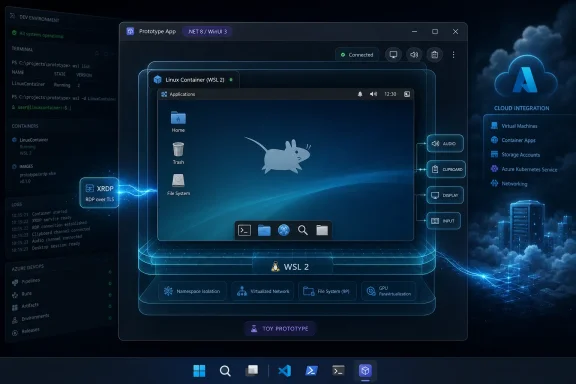
Hayden Barnes published Azure Linux Desktop on June 6, 2026 as an experimental Windows app that boots an Azure Linux 4.0 graphical desktop inside a window using Microsoft’s unfinished WSL container plumbing, XFCE, XRDP, and Windows Remote Desktop Protocol components. The project is not Microsoft’s secret Linux desktop, and Barnes has been careful to call it what it is: a toy. But toys matter in platform history because they reveal where the seams are, and this one exposes a seam Microsoft has spent years trying to make disappear. The interesting story is not that Azure Linux can be made to look like a desktop; it is that Windows is becoming a place where Linux workloads are expected to feel first-class, managed, and boring.
Azure Linux Desktop is easy to misunderstand because the screenshot-friendly version of the story is irresistible. A Microsoft-adjacent Linux distribution appears in a desktop environment, launched from a Windows app, with audio, resizing, clipboard support, GPU acceleration, VS Code, and PowerShell all apparently behaving like the pieces belong together. For anyone who lived through the old Windows-versus-Linux tribal wars, it looks like a punchline written by time travelers.
But the demo is less a new operating system than a stack of deliberate compromises. Barnes’s application wraps Azure Linux 4.0 in a .NET 10 WinUI 3 app, starts an embedded
That plumbing matters because it shows how much of the Linux-on-Windows experience is no longer about emulation in the old sense. Microsoft is not trying to pretend Linux binaries are Windows binaries. It is building enough host-side infrastructure that Linux processes, Linux containers, and eventually Linux-adjacent developer environments can be orchestrated by Windows with less third-party glue.
The word desktop is therefore slightly misleading. The demo presents a desktop, but its center of gravity is container management, display remoting, and the next phase of WSL. It is a graphical stress test for the container layer Microsoft says is coming to ordinary WSL users through a regular update.
That makes the XFCE layer in Barnes’s prototype both clever and artificial. Azure Linux 4.0 does not ship as a workstation distribution with a rich graphical package universe waiting to be enabled. The project reportedly leans on Fedora 43 package lineage to pull in desktop components that Azure Linux itself is not trying to provide.
This distinction is not pedantry. It is the difference between “Microsoft is launching a Linux desktop” and “a developer proved Azure Linux can be dressed up as one if you are willing to stitch together unfinished parts.” The former would be a strategic earthquake. The latter is a useful hack that says more about WSL’s future than Azure Linux’s product brief.
Microsoft’s own positioning for Azure Linux 4.0 is strikingly conservative compared with the internet’s likely reaction. The company is talking about modernized packages, predictable servicing, Azure workload support, container base images, and a Fedora-derived foundation. In other words, the sales pitch is not “install this on your laptop”; it is “run the same Microsoft-maintained Linux substrate closer to where your Azure workloads live.”
That is why this prototype lands in an odd place. It is visually about Linux on the desktop, but operationally about Windows as the control plane for developer infrastructure. The desktop is bait; the container runtime is the hook.
The new
Barnes’s app is interesting because it treats
That is where the prototype starts to feel less like a parlor trick. A server-oriented Linux distribution, a lightweight desktop, an RDP session, and a Windows application shell are individually unremarkable. Put together, they suggest a future in which Windows apps can carry Linux environments as implementation details.
There are obvious limits. Latency, display fidelity, security boundaries, lifecycle management, file access, image provenance, and update behavior all become thornier when the container is not just running a command but hosting an interactive session. Still, the pattern is provocative: the user clicks a Windows app, and the app quietly brokers a Linux world behind it.
That choice also says something about Microsoft’s platform inheritance. Windows is full of mature subsystems that predate the current developer-platform push by decades, and RDP is one of the most battle-tested. Using it as the bridge between an app window and a containerized Linux session is not elegant in the way a new compositor protocol would be elegant, but it is exactly the kind of engineering shortcut that can make a prototype feel real.
The cleverness is in the layering. XFCE provides a modest desktop that does not demand the full complexity of GNOME or KDE. XRDP turns that session into something Windows already knows how to consume. WinForms hosts the ActiveX control because WinUI is not the right container for that display surface. WinUI 3 and the Windows App SDK wrap the whole thing in a modern application shell.
A purist might see this as a pile of mismatched parts. An IT pro should see it as a map of compatibility assets. Microsoft’s platform advantage is not always that it has the newest abstraction; often it is that Windows contains a warehouse of old abstractions that can still be pressed into service.
That also explains why the demo can appear more polished than its support status warrants. Working audio, clipboard integration, dynamic resizing, and GPU acceleration can make the experience feel product-like. But a working demo path is not the same thing as a supported lifecycle, and no administrator should confuse the two.
For enthusiasts, that caveat is an invitation. For enterprises, it is a stop sign. Unsupported container layers and borrowed desktop packages do not belong in production fleets, no matter how well the demo records. The moment a developer environment touches corporate data, source code, credentials, or regulated workloads, the difference between “possible” and “supported” becomes the whole story.
This is especially true because the container boundary is becoming a security boundary in Microsoft’s broader Windows strategy. At Build, the company paired its developer announcements with policy-driven execution containers, agent isolation, Defender and Intune tie-ins, and a broader argument that Windows can host increasingly autonomous workloads without losing manageability. WSL containers fit that story only if they become governable.
An app like Azure Linux Desktop therefore sits in the awkward middle. It demonstrates what developers will want to do once the APIs exist, but it arrives before the management model is finished. That is a useful tension, because it forces the platform question into the open: will WSL containers be merely convenient, or will they be trustworthy enough for enterprise laptops?
The answer will not come from this prototype. It will come from Microsoft’s public preview, documentation, policy surface, image controls, update cadence, and integration with the tools administrators already use. Until then, the demo is a glimpse, not a deployment plan.
That era is over. The company is no longer treating Linux compatibility as an exception to Windows strategy. It is treating Linux workflows as an ordinary part of Windows development, especially for cloud, container, AI, and cross-platform teams.
The Build 2026 announcements make that plain. Coreutils for Windows brings familiar Unix-like commands natively into the Windows shell. Windows Developer Configurations can set up WSL, PowerShell 7, Git, VS Code, and developer settings in one sweep. WSL containers aim to reduce dependence on third-party container stacks. Microsoft Execution Containers frame workload containment as an OS-level responsibility across Windows and WSL.
Barnes’s prototype lands neatly in that context. It is not an isolated curiosity; it is an exaggerated version of the direction Microsoft is already advertising. Windows wants to be the host where developers can run Windows apps, Linux tools, containers, local AI models, and managed agents without constantly leaving the platform.
That ambition is not altruistic. If Microsoft can make Windows the most convenient managed developer workstation, it keeps enterprise developers, security teams, and procurement departments inside its ecosystem. Linux becomes not a rival desktop to defeat, but a workload type to host, observe, and govern.
But the price of that convenience has been another layer to install, configure, license, update, explain, and secure. Some organizations tolerate that because the tools are mature and familiar. Others dislike the sprawl, especially when developer machines become increasingly important parts of the software supply chain.
A built-in Windows container path changes the negotiation. If
Barnes’s prototype makes that baseline more vivid because it shows
The competitive risk for third-party vendors is not that Microsoft will instantly replace them feature-for-feature. It is that Windows will absorb enough of the boring, everyday use case that the premium tools must justify themselves higher up the stack. That is a familiar Microsoft move: commoditize the layer beneath, then compete on integration.
Enterprise administrators will start with identity, inventory, policy, patching, data movement, and support boundaries. What images are allowed? Where did the packages come from? Can the container access host files? Can clipboard sharing be disabled? Are GPU resources brokered safely? Are logs visible to security tools? Can Intune enforce configuration? What happens when WSL updates break a dependency?
Microsoft knows this, which is why its WSL container pitch emphasizes policy-based enablement and management. The company is not just courting developers who want fewer setup steps. It is courting IT departments that want to stop treating developer workstations as artisanal snowflakes.
Azure Linux adds another layer to that argument. If Microsoft can offer a Linux base image with a consistent supply chain from local development through Azure deployment, it can sell a form of dev-prod alignment that does not require the developer to leave Windows. That is strategically powerful, especially in organizations where Windows remains the managed desktop standard.
But the graphical part of Barnes’s experiment is unlikely to be the first enterprise use case. Most companies do not need Azure Linux with XFCE on every Windows laptop. They might, however, want controlled Linux containers for builds, test services, local AI processing, security tools, and CI-adjacent workflows. The demo is a spectacular edge case attached to a much more practical center.
The reality is less romantic. Microsoft has little reason to build a general-purpose desktop Linux competitor when Windows remains its client platform, Microsoft 365 remains its productivity anchor, and Azure remains the gravitational center of its infrastructure business. A polished Azure Linux workstation would create support obligations without obviously improving Microsoft’s position.
What Microsoft does need is a better story for developers whose tools, dependencies, deployment targets, and production environments are increasingly Linux-shaped. WSL answered the command-line part of that problem. WSLg addressed Linux GUI apps in a different way. WSL containers aim at the container workflow. Azure Linux 4.0 gives Microsoft a first-party Linux substrate aligned with its cloud.
Barnes’s prototype braids those themes together in a way that looks like a product but reads like a provocation. It asks what happens when a Windows app is allowed to bring along its own Linux desktop-shaped environment. The answer, for now, is “something unstable but surprisingly convincing.”
That is enough to keep the fantasy alive, but not enough to change the market. If Microsoft ever does put serious product muscle behind a graphical Azure Linux experience, it will likely be for specialized developer, cloud, or managed-workstation scenarios, not as a general consumer desktop rebellion against Windows.
Azure Linux Desktop is a reminder that demos can also expand uncertainty. It proves that a stack can be assembled, but not that it should be supported. It shows a plausible future user experience, but not the policy, servicing, and security model needed to make that experience safe for ordinary users or corporate fleets.
That distinction is especially important for WindowsForum readers because many of us are exactly the people tempted to try this before it is ready. The combination of Azure Linux 4.0, WSL main builds, Fedora packages, .NET 10, WinUI 3, XRDP, and RDP hosting is catnip for tinkerers. It is also a reminder that modern Windows experimentation increasingly lives at the intersection of consumer UI, enterprise security, cloud infrastructure, and open-source plumbing.
Microsoft’s platform challenge is to make the supported path as compelling as the hack. If
The prototype’s best contribution may be that it raises the bar for imagination. Once people see a Linux desktop embedded in a Windows app through the new container layer, they will ask what else should be packaged that way. Microsoft may not want to ship Azure Linux Desktop, but developers will absolutely want the primitives that made it possible.
 A Toy Desktop Reveals a Serious Windows Strategy
Azure Linux Desktop is easy to misunderstand because the screenshot-friendly version of the story is irresistible. A Microsoft-adjacent Linux distribution appears in a desktop environment, launched from a Windows app, with audio, resizing, clipboard support, GPU acceleration, VS Code, and PowerShell all apparently behaving like the pieces belong together. For anyone who lived through the old Windows-versus-Linux tribal wars, it looks like a punchline written by time travelers.But the demo is less a new operating system than a stack of deliberate compromises. Barnes’s application wraps Azure Linux 4.0 in a .NET 10 WinUI 3 app, starts an embedded
wslc container, launches XFCE, runs XRDP inside the container, then displays the session through the Windows Remote Desktop Protocol ActiveX control. A borderless WinForms host keeps the RDP display path outside the WinUI tree, which is exactly the kind of practical engineering decision that separates a working prototype from a clean architecture diagram.That plumbing matters because it shows how much of the Linux-on-Windows experience is no longer about emulation in the old sense. Microsoft is not trying to pretend Linux binaries are Windows binaries. It is building enough host-side infrastructure that Linux processes, Linux containers, and eventually Linux-adjacent developer environments can be orchestrated by Windows with less third-party glue.
The word desktop is therefore slightly misleading. The demo presents a desktop, but its center of gravity is container management, display remoting, and the next phase of WSL. It is a graphical stress test for the container layer Microsoft says is coming to ordinary WSL users through a regular update.
Azure Linux Was Built for the Cloud, Not the Couch
The most important caveat is also the least glamorous one: Azure Linux 4.0 is not a consumer Linux distribution. It is Microsoft’s Fedora-derived, RPM-based server and cloud operating system, aimed at Azure Virtual Machines, VM Scale Sets, container images, and eventually AKS and WSL support. It exists because Microsoft wants a distribution it can service, secure, and align with its cloud supply chain.That makes the XFCE layer in Barnes’s prototype both clever and artificial. Azure Linux 4.0 does not ship as a workstation distribution with a rich graphical package universe waiting to be enabled. The project reportedly leans on Fedora 43 package lineage to pull in desktop components that Azure Linux itself is not trying to provide.
This distinction is not pedantry. It is the difference between “Microsoft is launching a Linux desktop” and “a developer proved Azure Linux can be dressed up as one if you are willing to stitch together unfinished parts.” The former would be a strategic earthquake. The latter is a useful hack that says more about WSL’s future than Azure Linux’s product brief.
Microsoft’s own positioning for Azure Linux 4.0 is strikingly conservative compared with the internet’s likely reaction. The company is talking about modernized packages, predictable servicing, Azure workload support, container base images, and a Fedora-derived foundation. In other words, the sales pitch is not “install this on your laptop”; it is “run the same Microsoft-maintained Linux substrate closer to where your Azure workloads live.”
That is why this prototype lands in an odd place. It is visually about Linux on the desktop, but operationally about Windows as the control plane for developer infrastructure. The desktop is bait; the container runtime is the hook.
WSL Containers Are the Real Product Hiding Behind the Window
At Build 2026, Microsoft described WSL containers as a built-in way to create, run, and interact with Linux containers on Windows through a familiar command-line interface and an API. The company’s complaint is familiar to anyone who has administered developer laptops: container workflows on Windows often depend on third-party tools, licensing choices, VM backends, and policy gaps that IT departments do not fully control.The new
wslc layer is Microsoft’s answer. It is meant to give developers Linux containers “out of the box” while giving administrators policy-based enablement, visibility into what is running, control over where images come from, and governance over how containers interact with the host. That is not merely a developer convenience story. It is a manageability story.Barnes’s app is interesting because it treats
wslc not as a CLI demo but as an application substrate. If a native Windows app can programmatically spin up a Linux container, start services inside it, and present an interactive GUI back to the user, then the container layer becomes more than a Docker alternative. It becomes a way for Windows software to package Linux capabilities without asking users to understand the boundary.That is where the prototype starts to feel less like a parlor trick. A server-oriented Linux distribution, a lightweight desktop, an RDP session, and a Windows application shell are individually unremarkable. Put together, they suggest a future in which Windows apps can carry Linux environments as implementation details.
There are obvious limits. Latency, display fidelity, security boundaries, lifecycle management, file access, image provenance, and update behavior all become thornier when the container is not just running a command but hosting an interactive session. Still, the pattern is provocative: the user clicks a Windows app, and the app quietly brokers a Linux world behind it.
Remote Desktop Is the Old Trick That Makes the New Trick Work
The display path in Azure Linux Desktop is almost comically pragmatic. Instead of trying to make WinUI natively render a Linux desktop, Barnes starts XRDP in the Linux environment and connects to it over loopback using Windows’ own RDP machinery. The result is not philosophically pure, but it is effective.That choice also says something about Microsoft’s platform inheritance. Windows is full of mature subsystems that predate the current developer-platform push by decades, and RDP is one of the most battle-tested. Using it as the bridge between an app window and a containerized Linux session is not elegant in the way a new compositor protocol would be elegant, but it is exactly the kind of engineering shortcut that can make a prototype feel real.
The cleverness is in the layering. XFCE provides a modest desktop that does not demand the full complexity of GNOME or KDE. XRDP turns that session into something Windows already knows how to consume. WinForms hosts the ActiveX control because WinUI is not the right container for that display surface. WinUI 3 and the Windows App SDK wrap the whole thing in a modern application shell.
A purist might see this as a pile of mismatched parts. An IT pro should see it as a map of compatibility assets. Microsoft’s platform advantage is not always that it has the newest abstraction; often it is that Windows contains a warehouse of old abstractions that can still be pressed into service.
That also explains why the demo can appear more polished than its support status warrants. Working audio, clipboard integration, dynamic resizing, and GPU acceleration can make the experience feel product-like. But a working demo path is not the same thing as a supported lifecycle, and no administrator should confuse the two.
The Unsupported Bits Are Not Footnotes
The rough edges here are not cosmetic. Barnes’s prototype depends on unstable WSL builds, unfinishedwslc work, Fedora package workarounds, and a source-built application experiment. That combination is precisely why Barnes’s “toy” label is doing real work.For enthusiasts, that caveat is an invitation. For enterprises, it is a stop sign. Unsupported container layers and borrowed desktop packages do not belong in production fleets, no matter how well the demo records. The moment a developer environment touches corporate data, source code, credentials, or regulated workloads, the difference between “possible” and “supported” becomes the whole story.
This is especially true because the container boundary is becoming a security boundary in Microsoft’s broader Windows strategy. At Build, the company paired its developer announcements with policy-driven execution containers, agent isolation, Defender and Intune tie-ins, and a broader argument that Windows can host increasingly autonomous workloads without losing manageability. WSL containers fit that story only if they become governable.
An app like Azure Linux Desktop therefore sits in the awkward middle. It demonstrates what developers will want to do once the APIs exist, but it arrives before the management model is finished. That is a useful tension, because it forces the platform question into the open: will WSL containers be merely convenient, or will they be trustworthy enough for enterprise laptops?
The answer will not come from this prototype. It will come from Microsoft’s public preview, documentation, policy surface, image controls, update cadence, and integration with the tools administrators already use. Until then, the demo is a glimpse, not a deployment plan.
Microsoft’s Linux Strategy Has Stopped Being Apologetic
There was a time when every Microsoft Linux move arrived wrapped in cultural significance. WSL felt astonishing because it inverted an old rivalry. SQL Server on Linux, Azure’s Linux-heavy estate, and Microsoft’s open-source acquisitions all required a certain amount of historical processing.That era is over. The company is no longer treating Linux compatibility as an exception to Windows strategy. It is treating Linux workflows as an ordinary part of Windows development, especially for cloud, container, AI, and cross-platform teams.
The Build 2026 announcements make that plain. Coreutils for Windows brings familiar Unix-like commands natively into the Windows shell. Windows Developer Configurations can set up WSL, PowerShell 7, Git, VS Code, and developer settings in one sweep. WSL containers aim to reduce dependence on third-party container stacks. Microsoft Execution Containers frame workload containment as an OS-level responsibility across Windows and WSL.
Barnes’s prototype lands neatly in that context. It is not an isolated curiosity; it is an exaggerated version of the direction Microsoft is already advertising. Windows wants to be the host where developers can run Windows apps, Linux tools, containers, local AI models, and managed agents without constantly leaving the platform.
That ambition is not altruistic. If Microsoft can make Windows the most convenient managed developer workstation, it keeps enterprise developers, security teams, and procurement departments inside its ecosystem. Linux becomes not a rival desktop to defeat, but a workload type to host, observe, and govern.
Docker Desktop Is the Shadow Competitor in the Room
Microsoft rarely needs to say the quiet part loudly: WSL containers are a challenge to the current container-desktop market. Docker Desktop, Podman Desktop, Rancher Desktop, and other tools have filled a real gap for Windows developers. They made Linux containers usable on machines where the host operating system was not Linux.But the price of that convenience has been another layer to install, configure, license, update, explain, and secure. Some organizations tolerate that because the tools are mature and familiar. Others dislike the sprawl, especially when developer machines become increasingly important parts of the software supply chain.
A built-in Windows container path changes the negotiation. If
wslc becomes good enough for common build, test, and run workflows, many teams will ask whether they still need a separate desktop container platform for every developer. That does not mean Docker Desktop disappears; Docker has ecosystem depth, developer loyalty, cloud services, extensions, and cross-platform consistency. But it does mean Microsoft is moving the baseline.Barnes’s prototype makes that baseline more vivid because it shows
wslc doing something more theatrical than running Nginx. A container runtime that can host a graphical Azure Linux session inside a Windows app is a runtime with ambitions beyond command-line parity. Even if the specific app never becomes useful, the underlying model points toward richer packaging possibilities.The competitive risk for third-party vendors is not that Microsoft will instantly replace them feature-for-feature. It is that Windows will absorb enough of the boring, everyday use case that the premium tools must justify themselves higher up the stack. That is a familiar Microsoft move: commoditize the layer beneath, then compete on integration.
Enterprise IT Will Ask the Boring Questions First
The enthusiast reaction to Azure Linux Desktop will likely focus on whether it is fast, whether it looks native, whether it can run more desktops, and whether someone can turn it into a daily driver. Those are fun questions. They are not the questions that decide whether the underlying model matters at scale.Enterprise administrators will start with identity, inventory, policy, patching, data movement, and support boundaries. What images are allowed? Where did the packages come from? Can the container access host files? Can clipboard sharing be disabled? Are GPU resources brokered safely? Are logs visible to security tools? Can Intune enforce configuration? What happens when WSL updates break a dependency?
Microsoft knows this, which is why its WSL container pitch emphasizes policy-based enablement and management. The company is not just courting developers who want fewer setup steps. It is courting IT departments that want to stop treating developer workstations as artisanal snowflakes.
Azure Linux adds another layer to that argument. If Microsoft can offer a Linux base image with a consistent supply chain from local development through Azure deployment, it can sell a form of dev-prod alignment that does not require the developer to leave Windows. That is strategically powerful, especially in organizations where Windows remains the managed desktop standard.
But the graphical part of Barnes’s experiment is unlikely to be the first enterprise use case. Most companies do not need Azure Linux with XFCE on every Windows laptop. They might, however, want controlled Linux containers for builds, test services, local AI processing, security tools, and CI-adjacent workflows. The demo is a spectacular edge case attached to a much more practical center.
The Desktop Linux Fantasy Still Refuses to Die
Every time Microsoft and Linux appear in the same sentence, someone asks whether this is the year of the Linux desktop in disguise. Azure Linux Desktop will feed that reflex, because it offers the visual proof people crave: a Linux GUI running inside Windows under a Microsoft-branded distribution name.The reality is less romantic. Microsoft has little reason to build a general-purpose desktop Linux competitor when Windows remains its client platform, Microsoft 365 remains its productivity anchor, and Azure remains the gravitational center of its infrastructure business. A polished Azure Linux workstation would create support obligations without obviously improving Microsoft’s position.
What Microsoft does need is a better story for developers whose tools, dependencies, deployment targets, and production environments are increasingly Linux-shaped. WSL answered the command-line part of that problem. WSLg addressed Linux GUI apps in a different way. WSL containers aim at the container workflow. Azure Linux 4.0 gives Microsoft a first-party Linux substrate aligned with its cloud.
Barnes’s prototype braids those themes together in a way that looks like a product but reads like a provocation. It asks what happens when a Windows app is allowed to bring along its own Linux desktop-shaped environment. The answer, for now, is “something unstable but surprisingly convincing.”
That is enough to keep the fantasy alive, but not enough to change the market. If Microsoft ever does put serious product muscle behind a graphical Azure Linux experience, it will likely be for specialized developer, cloud, or managed-workstation scenarios, not as a general consumer desktop rebellion against Windows.
The Real Boundary Is Between Supported and Merely Possible
The software industry loves demos because demos compress uncertainty. A thing that boots feels more real than a roadmap. A desktop that resizes and plays audio feels closer to shipping than a bullet point that says “public preview coming soon.”Azure Linux Desktop is a reminder that demos can also expand uncertainty. It proves that a stack can be assembled, but not that it should be supported. It shows a plausible future user experience, but not the policy, servicing, and security model needed to make that experience safe for ordinary users or corporate fleets.
That distinction is especially important for WindowsForum readers because many of us are exactly the people tempted to try this before it is ready. The combination of Azure Linux 4.0, WSL main builds, Fedora packages, .NET 10, WinUI 3, XRDP, and RDP hosting is catnip for tinkerers. It is also a reminder that modern Windows experimentation increasingly lives at the intersection of consumer UI, enterprise security, cloud infrastructure, and open-source plumbing.
Microsoft’s platform challenge is to make the supported path as compelling as the hack. If
wslc arrives feeling brittle, hidden, or overconstrained, developers will keep using the tools they already trust. If it arrives with good CLI ergonomics, strong APIs, clean policy hooks, and reliable performance, it could become one of the most consequential WSL additions since WSL 2 itself.The prototype’s best contribution may be that it raises the bar for imagination. Once people see a Linux desktop embedded in a Windows app through the new container layer, they will ask what else should be packaged that way. Microsoft may not want to ship Azure Linux Desktop, but developers will absolutely want the primitives that made it possible.
The Small Print Is the Story This Time
The concrete lessons from Barnes’s Azure Linux Desktop experiment are narrow, but they point toward a much larger Windows platform shift. The trick is to resist both overhyping the demo and dismissing it because it is unsupported.- Azure Linux Desktop is an experimental prototype, not a Microsoft product announcement or a supported Azure Linux workstation release.
- The app works by combining an embedded
wslccontainer, Azure Linux 4.0, XFCE, XRDP, and Windows RDP hosting inside a .NET-based Windows application. - Azure Linux 4.0 is aimed at cloud, server, VM, container, AKS, and WSL scenarios rather than conventional desktop Linux use.
- The demo depends on unfinished WSL container work and package workarounds, which keeps it firmly outside production use.
- Microsoft’s larger play is to make Linux containers on Windows more native, manageable, and policy-aware.
- The most important audience may be enterprise developers and administrators who want Linux workflows without surrendering Windows fleet control.
References
- Primary source: WinBuzzer
Published: 2026-06-07T18:31:06.941014
Loading…
winbuzzer.com - Related coverage: windowscentral.com
Loading…
www.windowscentral.com - Official source: techcommunity.microsoft.com
Announcing Azure Linux 4.0: Purpose-Built for Azure, Now in Public Preview | Microsoft Community Hub
Today at Microsoft Build, we're announcing the public preview of Azure Linux 4.0 - Microsoft's first party Linux distribution, purpose-built for Azure. Azure... techcommunity.microsoft.com
- Related coverage: infoq.com

Microsoft Announces Azure Linux 4.0, Its First General-Purpose Server Linux Distribution
Microsoft announced Azure Linux 4.0 and Azure Container Linux at Open Source Summit. Azure Linux 4.0 is a Fedora-based general-purpose server distribution for Azure VMs, the first time Microsoft has offered a supported Linux beyond container hosting. Azure Container Linux is an immutable...www.infoq.com
- Related coverage: thurrott.com

Microsoft Announces Azure Linux 4.0 and Release of Azure Container Linux
Microsoft announced Azure Linux 4.0 running on Azure virtual machines and the general availability of Azure Container Linux this week. www.thurrott.com
- Related coverage: securityonline.info

Microsoft Breaks Container Boundaries: Azure Linux 4.0 Drops as a Full General-Purpose Server OS
Microsoft releases Azure Linux 4.0 at the Open Source Summit, transforming its custom OS into a full general-purpose VM server distribution based on Fedora. securityonline.info
- Official source: learn.microsoft.com

Overview of Azure Linux Deployment Options
Learn about the different deployment options for Azure Linux, including AKS container hosts, Azure Container Linux (ACL), virtual machines, and container images, and how to choose the right option for your workloads.learn.microsoft.com - Official source: blogs.windows.com
Build 2026: Furthering Windows as the trusted platform for development
Build is one of our favorite moments each year - a chance to connect with the global developer community and share what we’ve been building. Over the past year, we have connected with many developers pushing the boundaries of what’s possible on blogs.windows.com
- Related coverage: tgland.ru
Loading…
tgland.ru - Related coverage: docs.redhat.com
Loading…
docs.redhat.com - Official source: download.microsoft.com
Loading…
download.microsoft.com