

Broadcom’s security team has flagged a focused tech-support scam campaign that weaponizes Microsoft Azure’s static website endpoints—those familiar web.core.windows.net addresses—to host convincing “Windows Defender / Microsoft Security” scare pages aimed primarily at Japanese recipients, and the operation is a timely reminder that cloud-hosted phishing is now an operational default for opportunistic attackers.
The incident described by Broadcom highlights a simple yet effective technique: attackers provision short‑lived Azure Storage accounts, enable the static website feature, upload a crafted HTML/JavaScript landing page that mimics Microsoft warnings, and then distribute targeted phishing emails linking directly to the Azure-managed endpoint. When victims follow the link they see an intimidating “your PC is blocked / trojan detected” page that prompts a phone call to a fake Microsoft support number — the classic tech‑support scam that ends in payment requests, credential theft, or remote‑access abuse.
This use of Azure’s static website capability is not a bug in Azure so much as a predictable friction point: static websites are cheap, they receive valid TLS under Microsoft’s domain, and they are fast to spin up and discard. Microsoft’s documentation makes the mechanics explicit: enabling static website hosting creates a $web container and exposes pages via a publicly accessible primary endpoint like accountname.zNN.web.core.windows.net. Static sites are intentionally served as anonymous read access via that web endpoint unless additional network controls are applied.
At the same time, the tech‑support scam playbook is well documented: bogus system warnings, invented “error codes,” and explicit phone numbers to call are established social‑engineering hooks. Microsoft’s threat guidance has repeatedly warned users that official error messages never include phone numbers and that unsolicited support calls or pop‑ups are nearly always scams.
These landing pages exploit two advantages:
Where multiple independent vendors have reported cloud‑hosting abuse (Azure, other public clouds), the qualitative behaviors—static site creation, short lifetimes, and click‑to‑call tech‑support scams—are consistently documented. Microsoft and several industry writeups show that attackers frequently use static hosting and other legitimate services as low‑cost infrastructure for phishing.
Platform vendors must continue improving abuse response workflows and offer better primitives for authenticated, short‑lived public hosting that can be quickly verified or revoked. And enterprises should pressure cloud vendors for richer telemetry and a faster takedown path that does not rely solely on manual abuse reports.
However, limitations remain:
For administrators: prioritize auditing static website configurations, tighten storage access and SAS usage, and enable Defender‑level scanning and automation. For security teams: deploy click‑time isolation and tune hunting queries for short‑lived web.core.windows.net endpoints. For users: never call phone numbers presented by urgent security pop‑ups and report suspicious emails through your organization’s incident channels.
Cloud‑hosted phishing is not a theoretical risk anymore—it's operational. The tools to mitigate it exist, but they must be deployed in layers and practiced regularly. The alternative is reactive containment at scale, chasing disposable endpoints in an arms race that favors speed and deception.
Source: Broadcom Protection Highlight: Azure-Hosted Tech Support Scam Campaign Targets Japan
 Background / Overview
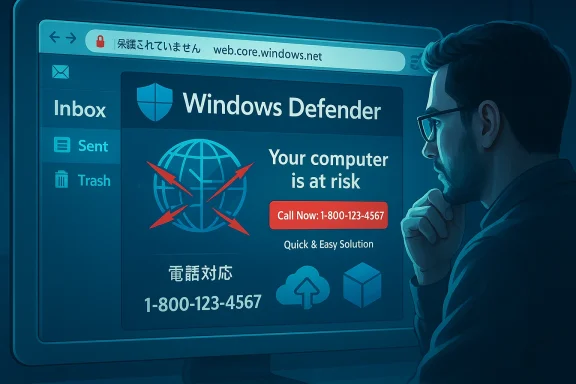
The incident described by Broadcom highlights a simple yet effective technique: attackers provision short‑lived Azure Storage accounts, enable the static website feature, upload a crafted HTML/JavaScript landing page that mimics Microsoft warnings, and then distribute targeted phishing emails linking directly to the Azure-managed endpoint. When victims follow the link they see an intimidating “your PC is blocked / trojan detected” page that prompts a phone call to a fake Microsoft support number — the classic tech‑support scam that ends in payment requests, credential theft, or remote‑access abuse.This use of Azure’s static website capability is not a bug in Azure so much as a predictable friction point: static websites are cheap, they receive valid TLS under Microsoft’s domain, and they are fast to spin up and discard. Microsoft’s documentation makes the mechanics explicit: enabling static website hosting creates a $web container and exposes pages via a publicly accessible primary endpoint like accountname.zNN.web.core.windows.net. Static sites are intentionally served as anonymous read access via that web endpoint unless additional network controls are applied.
At the same time, the tech‑support scam playbook is well documented: bogus system warnings, invented “error codes,” and explicit phone numbers to call are established social‑engineering hooks. Microsoft’s threat guidance has repeatedly warned users that official error messages never include phone numbers and that unsolicited support calls or pop‑ups are nearly always scams.
How this Azure‑hosted tech‑support scam campaign works
The operational chain (observed pattern)
Broadcom’s bulletin — and corroborating telemetry from other cloud‑security analyses — describes a short, repeatable sequence attackers use to stay ahead of takedowns:- Provision: Create a fresh Azure Storage account (often short‑lived).
- Host: Enable static website hosting and upload an HTML/JS landing page that impersonates Microsoft or Windows Defender UX.
- Deliver: Send phishing emails in Japanese that claim account compromise or abnormal sign‑in activity, embedding urgency and step‑by‑step instructions.
- Rotate: When URLs are reportecounts and repeat the cycle.
The lure and the landing
The emails in this campaign typically warn that “your account was accessed from another device” or that suspicious activity was detected, and they pressure recipients to “review account settings” or “sign out unknown devices.” The malicious link lands users on a familiar themed page: a fake Microsoft Defender or Windows warning with an urgent tone, an invented error code, and a telephone hyperlink or click‑to‑call behavior that immediately connects the user to a scammer.These landing pages exploit two advantages:
- Domain trust: The page is served from a legitimate Microsoft‑owned host name (web.core.windows.net) with valid HTTPS, increasing the chance that casual inspection will fail to raise suspicion.
- Interaction simplicity: The page’s objective is not to deliver malware by file download but to convince the user to call and then to hand over credit card details, remote access, or account credentials.
Why Azure static websites are attractive to attackers
Built‑in TLS and provider reputation
A static website hosted under Azure’s storage endpoint benefits from provider TLS and a Microsoft domain. Attackers exploit this to evade basic URL reputation checks and to pass superficial trust signals—users and some defenses treat a web.core.windows.net address as “Microsoft‑owned,” so they are less likely to balk at the content. The static endpoint’s default HTTPS and hosting convenience are the core of the problem: low cost, high credibility.Low cost, fast rotation, and anonymity
Creating and deleting storage accounts is inexpensive and can be automated. Attackers frequently rotate accounts and container names to avoid static blocklists. The disposable nature of these resources makes enforcement by blocklisting brittle unless defenders move to higher‑order controls (for example, behaviour‑based detection, domain‑reputation scoring, or blocking entire wildcard endpoints—which has collateral cost). Security practitioners have repeatedly warned that whitelisting or wildcard allowances for cloud provider domains (such as *.web.core.windows.net) is risky because attackers can temporarily host malicious content on otherwise legitimate platforms.Abuse of default settings and misconfigurations
Azure’s static website feature intentionally exposes content via anonymous reads. Disabling container anonymous access is not sufficient to close the static website endpoint; static site endpoints remain publicly served unless the static website configuration itself is removed or additional access controls (Private Endpoint, Firewalls, CDN in front) are applied. This nuance is central: defenders who change container access without addressing the static website configuration can be caught ’s docs explicitly call this out.What we know (and what we can’t verify)
Broadcom’s bulletin describes observed peaks in delivery (an initial mass send peaking on December 26, a temporary drop, and resumed/rotated activity in early January with rising volume). Those timing and volume details appear to be derived from Broadcom/Symantec telemetry. Unless multiple vendors publish the same telemetry, campaign‑specific counts and exact spike dates are best treated as vendor‑reported and may not be independently verifiable in public datasets. Use caution before generalizing volumes or attributing intent beyond the documented behavior.Where multiple independent vendors have reported cloud‑hosting abuse (Azure, other public clouds), the qualitative behaviors—static site creation, short lifetimes, and click‑to‑call tech‑support scams—are consistently documented. Microsoft and several industry writeups show that attackers frequently use static hosting and other legitimate services as low‑cost infrastructure for phishing.
Why this matters to Japanese enterprises — and everyone else
- Localized language and social engineering: The campaign uses Japanese subject lines and localized messaging, increasing effectiveness against employees and consumers in Japan. Localized phishing always raises the success rate vs. generic English content.
- Business continuity risk: If an employee follows up on the fake call and grants remote control or reveals credentials, attackers can escalate to corporate account compromise, lateral movement, or targeted ransomware/extortion.
- Supply chain and brand impact: Attackers using Microsoft branding can damage user trust in genuine vendor communications and force enterprises to spend time and resources on user education and defensive controls.
- Detection gap: Because the content is served from a Microsoft endpoint, simple domain‑based filters or naive allowlists may fail to identify the link as malicious.
What defenders should do right now — practical controls
Below are prioritized actions for both enterprise security teams and end users. These combine cloud hygiene, email controls, endpoint posture, and user education.For cloud operators and administrators
- Inventory and remove unnecessary static websites: Audit storage accounts for static website hosting and disable it where not required. Remember that changing container anonymous access does not disable the static website endpoint—explicitly remove the static website configuration if you want to close public hosting.
- Use Private Endpoints or CDN/Front Door: For required web content, place a content delivery proxy (CDN or Front Door) in front of the static site and enable Private Link / private endpoints so you can enforce access restrictions and TLS on custom domains. Microsoft recommends these patterns to avoid uncontrolled public exposure.
- Enforce least‑privilege and rotate keys: Avoid distributing account keys; prefer managed identities and short‑lived SAS tokens with tight scopes and expirations. Monitor management‑plane calls for suspicious key downloads or mass SAS generation.
- Enable Defender for Storage and malware scanning: Platform‑native scanning (on‑upload or on‑demand) can detect and quarantine abusive content. Integrate Defender alerts into automation playbooks (Event Grid → Logic Apps/Sentinel) to remove or block freshly provisioned static sites when they match malicious indicators.
- Detect reconnaissance and bulk GET traffic: Hunt for spikes in anonymous GET/HEAD calls, mass list operations, or unusual AzCopy behavior. These signals frequently precede hosting abuse or exfiltration activity.
For email security and SOC teams
- Click‑time protection / URL isolation: Use click‑time URL analysis and Email Threat Isolation (ETI) where available to sandbox web content at click time. ETI can render suspicious links in an isolated remote browser, blocking credential capture and preventing direct downloads. Broadcom/Symantec’s ETI offering is explicitly designed to protect against link‑based scams in email.
- Blocklists plus behaviour: Block known malicious URLs but prioritize behaviour‑based detections — e.g., newly minted web.core.windows.net subdomains that suddenly appear in mass mailings. Avoid wholesale wildcard whitelists for provider domains. Plan for automation to identify and respond to new malicious subdomains quickly.
- Train detection rules for call‑to‑action phone numbers: Many tech‑support scams pivot to phone calls. Enrich URL and landing‑page detections for strings that present phone numbers with urgent language and “call support” CTA patterns.
For endpoint teams and end users
- Educate users about Microsoft‑branded scams: Reinforce that legitimate Microsoft warnings never present a support phone number and that Microsoft will not call unsolicited to fix a user’s computer. Teach users to treat any message that instructs them to call a number with extreme skepticism.
- Block remote‑support tools from use by non‑admins: Enforce policies to prevent users from installing or running remote‑access tools without IT authorization. Where remote support is necessary, use organization‑managed remote access tooling with recorded sessions and MFA.
- Prompt incident reporting and rapid containment: If a user calls a scam line or allows access, treat the incident as a potential credential compromise. Rotate affected credentials, check recent sessions, and review audit logs for suspicious admin actions.
Detection recipes and hunting queries (practical)
- Hunt for new or short‑lived web.core.windows.net endpoints appearing in inbound mails or web logs, especially those with path lengths short (< 64 chars) and hosting index.html that contains phrases like “Windows Defender,” “error code,” “call support,” or “PC blocked.”
- Alert on mail flows with Japanese subject lines referencing account compromise where the message body includes a web.core.windows.net URL and the message fails internal DKIM/SPF checks despite being routed through a major cloud provider.
- SIEM/Sentinel query targets:
- Management‑plane events: storageAccount/listKeys, storageAccount/regenerateKey, or mass SAS-create operations.
- Data‑plane spikes: sudden volume of GetWebContent events from previously unseen storage account endpoints.
- AzCopy or Storage Explorer usage anomalies in short windows to unusual destinations.
- Endpoint EDR detection:
- Monitor for tools that launch external communication sessions after a user follows a link (e.g., an automated open to the phone app or a remote desktop client launching after web content instructs the user).
Broader implications: cloud trust, vendor responsibility, and defender tradeoffs
Attackers exploiting major cloud platforms pose a thorny dilemma: providers give companies enormous benefits (scale, availability, TLS, reputation), and those same benefits are now a tool for attackers to increase the success rate of scams. Defenders must balance three competing pressures:- Experience: Allow staff and customers to use cloud services without excessive friction.
- Security: Prevent attackers from abusing the platform’s trust fabric.
- Resilience: Avoid policies that break legitimate services or cause operational overhead.
Platform vendors must continue improving abuse response workflows and offer better primitives for authenticated, short‑lived public hosting that can be quickly verified or revoked. And enterprises should pressure cloud vendors for richer telemetry and a faster takedown path that does not rely solely on manual abuse reports.
Strengths and limitations of vendor protections (Broadcom / Symantec)
Broadcom’s Symantec protections cited in the bulletin (Email Security.cloud, WebPulse categorization, Email Threat Isolation, and endpoint controls) represent a layered defense that addresses multiple stages of the attack chain:- Email filtering and click‑time URL protection reduce initial delivery risk.
- Email Threat Isolation (ETI) prevents credential harvesting by rendering sites in an isolated container rather than letting users interact with a raw page.
- WebPulse categorization and URL reputation feeds help identify and block known malicious endpoints.
However, limitations remain:
- Rapid rotation of disposable cloud endpoints imposes a constant reactive burden on blocklists and reputation services.
- Isolation and proxying add latency and complexity and are not universally adopted across all email stacks.
- User behavior remains the weakest link: an isolated rendering that shows a phone number can still prompt a user to call from a separate device or copy the number to a phone.
- For organizations lacking robust telemetry or tightly integrated cloud controls, the static website endpoint nuance (that disabling anonymous blob access does not disable the static site) can cause blind spots.
Recommended long‑term security posture (policy and automation)
- Adopt zero‑trust principles for cloud storage: default to private endpoints, require authentication for access, and only enable public static hosting with strict change management and monitoring.
- Automate takedown and blocking workflows: integrate URL hunting with automated ticketing and takedown requests to cloud providers; feed suspicious endpoints into ETI and proxy layers automatically at click‑time.
- Harden email delivery and response: enforce DMARC at enforcement mode, enable link rewrite and click‑time analysis for external links, and deploy isolation for links that match risky heuristics.
- Improve user reporting and run regular phishing drills that simulate cloud‑hosted landing pages to raise suspicion thresholds for phone‑centric scams.
- Maintain segmented recovery plans: store backups and recovery artifacts under separated subscriptions/accounts to prevent single‑account deletion or poisoning.
Conclusion
Cloud providers have democratized web hosting, but that convenience also gives attackers a high‑value toolset: valid TLS, brandable hostnames, and extremely low friction for rotational hosting. The Broadcom protection bulletin on the Azure‑hosted tech‑support scam campaign underscores two enduring truths: attackers will abuse trusted infrastructure, and defenders must shift from static allowlists to dynamic, behavioral, and isolation‑first defenses.For administrators: prioritize auditing static website configurations, tighten storage access and SAS usage, and enable Defender‑level scanning and automation. For security teams: deploy click‑time isolation and tune hunting queries for short‑lived web.core.windows.net endpoints. For users: never call phone numbers presented by urgent security pop‑ups and report suspicious emails through your organization’s incident channels.
Cloud‑hosted phishing is not a theoretical risk anymore—it's operational. The tools to mitigate it exist, but they must be deployed in layers and practiced regularly. The alternative is reactive containment at scale, chasing disposable endpoints in an arms race that favors speed and deception.
Source: Broadcom Protection Highlight: Azure-Hosted Tech Support Scam Campaign Targets Japan
