

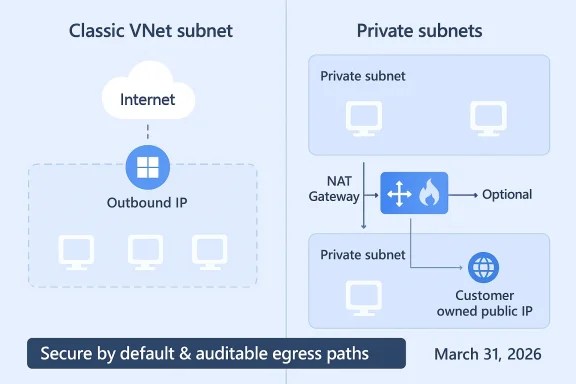
Microsoft is changing the default networking behavior for new Azure Virtual Networks: starting March 31, 2026 new VNets and their subnets will default to private (no implicit outbound internet access), meaning virtual machines deployed into those networks will not be granted Azure’s long-standing default outbound access unless you explicitly configure an outbound path such as Azure NAT Gateway, Load Balancer outbound rules, or an assigned Public IP.
For years, Azure offered a convenience feature: when you deployed a VM into a VNet subnet that had no explicit egress, Azure implicitly assigned a Microsoft-owned outbound IP so that the VM could reach the internet and public Microsoft endpoints. That behavior—default outbound access (DOA)—was never intended for production-grade scenarios because the IPs were not customer-owned, were subject to change, and offered limited control and auditability. Microsoft has formalized a secure-by-default move: from the API version released after March 31, 2026 the subnet property defaultOutboundAccess will be false by default for new VNets, preventing automatic creation of these default outbound IPs unless you opt to allow them.
This is not a silent removal of connectivity for existing networks: Microsoft explicitly says existing VNets created prior to the cutover will continue to behave as they do today unless you change them. New VNets and subnets created using API versions released after the effective date will adopt the private-by-default behavior. Administrators who need the old implicit behavior can still configure subnets to be non-private during creation, but the platform will nudge customers toward explicit egress architecture.
Treat the March 31, 2026 change as an opportunity to harden network posture, modernize IaC practices, and consolidate egress where it makes sense. Start with discovery and small-scope pilots: validate NAT Gateway use, size for SNAT capacity, test firewall throughput where needed, and update templates. With deliberate planning, the shift can reduce risk and improve manageability — but only if organizations move proactively rather than waiting for surprise failures in newly created VNets.
End of article.
Source: securityboulevard.com Azure VNET Outbound Access – Important Changes March 2026
 Background / Overview
For years, Azure offered a convenience feature: when you deployed a VM into a VNet subnet that had no explicit egress, Azure implicitly assigned a Microsoft-owned outbound IP so that the VM could reach the internet and public Microsoft endpoints. That behavior—default outbound access (DOA)—was never intended for production-grade scenarios because the IPs were not customer-owned, were subject to change, and offered limited control and auditability. Microsoft has formalized a secure-by-default move: from the API version released after March 31, 2026 the subnet property defaultOutboundAccess will be false by default for new VNets, preventing automatic creation of these default outbound IPs unless you opt to allow them.This is not a silent removal of connectivity for existing networks: Microsoft explicitly says existing VNets created prior to the cutover will continue to behave as they do today unless you change them. New VNets and subnets created using API versions released after the effective date will adopt the private-by-default behavior. Administrators who need the old implicit behavior can still configure subnets to be non-private during creation, but the platform will nudge customers toward explicit egress architecture.
What exactly is changing (technical summary)
- New virtual networks and subnets created with API versions released after March 31, 2026 will have the subnet-level property defaultOutboundAccess set to false by default. This makes those subnets private by default (no automatic DOA IP assigned).
- Virtual machines in those new subnets will not be able to reach public endpoints unless an explicit outbound method is attached: NAT Gateway, Standard Load Balancer with outbound rules, instance-level Public IP addresses, or a routed path through an Azure Firewall / NVA.
- Existing VNets and subnets created before the change continue to behave as before unless administrators modify them. New VMs in pre-existing VNets retain their legacy behavior unless the subnet is changed to private.
Why Microsoft is doing this — security and governance drivers
Microsoft frames the change as aligning Azure networking with Zero Trust and secure by default principles: implicit internet access is an audit and governance blind spot and introduces unpredictable operational behavior (IP churn on Microsoft-owned addresses, lack of customer control over egress policy, and difficulty in creating allowlists). By forcing administrators to explicitly choose an egress mechanism, the platform encourages a design where outbound traffic is:- Traceable to customer-owned IPs,
- Consistent and auditable for compliance,
- Centrally enforceable (via NAT Gateway, Azure Firewall, or an NVA),
- Predictable for third-party integrations and firewall allowlists.
Supported approaches for explicit outbound access (what to use)
Microsoft recommends several, well-established options for explicit outbound connectivity. Each option trades off cost, manageability, scale, and control:- Azure NAT Gateway (recommended for most scenarios)
- Provides static, customer-owned public IP addresses or prefixes.
- Scales SNAT capacity and avoids ephemeral port exhaustion issues common with simple SNAT strategies.
- Keeps VM NICs private while allowing outbound access.
- Standard Load Balancer with Outbound Rules
- Can provide SNAT (outbound NAT) from a set of public IPs or a public IP prefix.
- Useful if you already use a Standard Load Balancer and want to consolidate IPs.
- Assign Public IPs to NICs (instance-level)
- Fastest to enable for individual workloads but increases attack surface and management overhead when used at scale.
- Azure Firewall or Network Virtual Appliances (NVAs)
- Gives centralized inspection, application-level control, and policy enforcement; route outbound through these via UDRs.
- Best for organizations that require deep inspection, DLP, or central egress policy.
Who is affected and where the risk is highest
- Development and test subscriptions that spin up VNets on-the-fly and depend on implicit internet access for updates or telemetry will be most immediately impacted.
- Legacy automation and deployment pipelines that assume DOA—for example, scripts that install OS updates, pull packages from public repositories, or perform runtime license activations—are high risk.
- Teams that create many ephemeral VNets (sandboxing, proof-of-concept subscriptions) will need to embed explicit egress configuration into IaC templates to avoid surprise failures.
- Organizations that rely on allowlisting Microsoft’s default outbound IPs in third-party vendors will need to switch to owned IPs or vendor allowlist mechanisms.
Migration and readiness checklist (practical steps to avoid disruption)
Follow this prioritized checklist to prepare for and adopt the new default:- Inventory and discovery
- Identify all VNets and subnets in all subscriptions and catalog which VMs and scale sets rely on implicit DOA.
- Flag deployments created by automation (IaC templates, pipelines) so you can update those artifacts.
- Evaluate workload egress requirements
- For each workload, list destinations required (OS update servers, package repositories, telemetry endpoints, Azure services).
- Note any third-party dependencies that are IP-allowlist based.
- Design an egress strategy
- Prefer NAT Gateway for general-purpose outbound access.
- Use Azure Firewall / NVAs where centralized policy, filtering, or inspection is required.
- Use Load Balancer outbound rules when consolidating SNAT on an existing standard LB is desirable.
- Avoid instance-level public IPs for fleets of VMs.
- Update IaC and pipelines
- Modify ARM templates, Terraform modules, and scripts to attach NAT Gateway or public IPs by default, or to explicitly set defaultOutboundAccess as required.
- Ensure your deployment tooling uses the intended API version and validate behavior in a test subscription.
- Implement logging, telemetry, and allowlists
- Ensure egress flows are logged (NSG flow logs, Firewall logs, and Azure Monitor).
- Publish owned public IPs / prefixes for third-party allowlists rather than relying on Microsoft-owned default IPs.
- Test thoroughly
- Deploy to a staging subscription with API versions that reflect the post-March-31-2026 behavior to verify bootstrapping, updates, and license checks.
- Validate SNAT scaling characteristics and resilience for your traffic patterns.
- Roll out incrementally
- Start with non-critical workloads, then move production once you have validated connectivity and monitoring.
- Update runbooks and incident playbooks to reflect the new failure modes (e.g., "no internet because subnet is private").
Cost, operational, and performance implications
- Cost: NAT Gateway itself incurs resource charges and any public IP resources attached to it have associated costs. Azure Firewall can be significantly more expensive than NAT Gateway or Load Balancer. Weigh security benefits against running costs—centralized inspection has an operational and dollar cost.
- Performance/Scale: NAT Gateway scales SNAT port capacity automatically and is designed to avoid SNAT exhaustion; Load Balancer requires additional IPs/prefixes to scale SNAT capacity. If you have heavy outbound concurrency, test for port exhaustion scenarios and plan for IP prefix sizing.
- Operational Complexity: Centralized egress (Azure Firewall or NVA) simplifies policy enforcement, logging, and detection, but introduces a single egress point and a potential performance bottleneck. Design accordingly with autoscaling NVAs or a robust firewall tier.
Common migration pitfalls and how to avoid them
- Assuming “existing VNets are unaffected” means you don’t need to test: mixed environments can silently produce differences between old and new VNets. Run compatibility tests that mimic both old and new VNet behaviors.
- Not updating IaC modules: many teams use pinned API versions; if your IaC continues to use older ARM API versions, you might retain the old behavior unintentionally—or conversely, you might update tooling later and create new VNets that behave differently. Treat API versioning as part of your compatibility matrix.
- Over-consolidation: routing all egress through a single NVA without capacity planning risks introducing latency and single-point-of-failure concerns. Consider redundancy and capacity in design.
- Forgetting DNS and Azure service endpoints: some Azure PaaS services have special connectivity semantics; ensure you understand private endpoints, service endpoints, and when an explicit outbound method is necessary for accessing regional Azure services. Validate service-specific docs.
Implementation patterns and recommended architectures
Pattern A — NAT Gateway per environment (recommended, balanced)
- Assign one NAT Gateway per environment (Prod / Non‑Prod / Dev) with a static public IP prefix.
- Associate it with all subnets that need outbound access.
- Benefits: predictable IPs, good scale, low operational overhead.
Pattern B — Centralized Firewall + NAT Gateway for inspection
- Route outbound via Azure Firewall or NVA for inspection, logging, and policy.
- For SNAT stability you may still attach NAT Gateway to subnets or use public IPs on the firewall for stable egress identity.
- Benefits: central control, deep inspection; tradeoffs: cost and potential latency.
Pattern C — Load Balancer outbound for application clusters
- Use a Standard Load Balancer with tailored outbound rules when you already have an LB in front of a fleet of VMs and want to consolidate IPs.
- Benefits: use existing assets, granular control over SNAT; watch for SNAT port considerations.
Testing and verification plan (practical sequence)
- Create a sandbox subscription where you deliberately use the newer API (post-March-31) to validate default private behavior.
- Deploy a VM and attempt to reach internet endpoints without explicit egress—expect failure.
- Attach a NAT Gateway and confirm outbound connectivity and that the egress IP is your owned IP.
- Simulate high-concurrency outbound flows to validate SNAT port behavior and capacity.
- Route a subnet to Azure Firewall and test policy enforcement, logging, and throughput.
- Repeat these tests for scale sets and flexible orchestration mode (note: flexible scale sets are secure-by-default already and require explicit egress).
Monitoring, detection, and runbook changes
- Add checks to your CI/CD and provisioning pipelines: deployment tasks should fail if an environment lacks the required explicit egress object.
- Monitor NSG flow logs, Firewall logs, and NAT Gateway diagnostics to detect unexpected outbound failures.
- Update incident runbooks to include steps such as “check subnet defaultOutboundAccess property” and “verify NAT Gateway association” before escalating. Microsoft Q&A and documentation show how the defaultOutboundAccess property changes behavior and should be used in troubleshooting.
Critical analysis — strengths, trade-offs and risks
Strengths- The change reduces a blind spot in egress visibility and forces enterprises to adopt auditable, customer-owned egress IPs—an immediate win for compliance and for allowlisting scenarios.
- It encourages better network hygiene and aligns platform defaults with Zero Trust principles.
- Microsoft provides multiple explicit egress options that suit different organizational needs (cost-lean NAT Gateway, policy-rich Azure Firewall, consolidated Load Balancer).
- Short-term operational disruption: teams with informal or poorly documented dependencies on implicit internet access may see provisioning failures, failed updates, or broken telemetry flows.
- Cost and complexity increase: explicit egress adds resource cost (NAT Gateway, Firewall, Public IPs) and operational overhead, particularly for small teams or in many sandbox subscriptions.
- Mixed-state estate risk: Because pre-existing VNets are unaffected, organizations will often operate a hybrid estate where old behavior coexists with new private defaults—this can cause inconsistent behavior and debugging challenges.
- Tooling and IaC brittle points: relying on older ARM API versions or tooling that implicitly uses previous defaults can create confusing behavior when pipeline or provider upgrades occur. Microsoft’s Q&A explicitly calls this out; treat API versions as configuration that needs governance.
- Some third-party commentary predicted earlier cutoff dates or inconsistent dates before Microsoft clarified a March 31, 2026 deadline. Always confirm the date in official Microsoft documentation and Q&A posts when planning. If you rely on blog or press commentary, cross-check with the Microsoft Learn page.
Practical recommendations (short, actionable)
- Treat March 31, 2026 as the operational change window for new VNet defaults; if you create VNets after that date, design with explicit egress from day one.
- Prioritize NAT Gateway for most standard workloads and Azure Firewall where inspection and policy are necessary.
- Update IaC templates, CI/CD pipelines, and marketplace images to include explicit outbound configuration by default.
- Conduct a connectivity inventory in the next 30 days to identify VMs that will be impacted by private-subnet defaults.
- Build test cases that emulate both legacy and new VNet creation paths so you can catch behavior changes before they hit production.
Final thoughts
Microsoft’s move to make new VNets private by default is a significant platform-level nudge toward better egress governance and Zero Trust networking. The security advantages are real: more predictable IP ownership, better allowlisting, and explicit, auditable egress paths. That said, the operational work to adopt explicit outbound access patterns is non-trivial—especially for large, mature estates and teams that use informal sandbox networks.Treat the March 31, 2026 change as an opportunity to harden network posture, modernize IaC practices, and consolidate egress where it makes sense. Start with discovery and small-scope pilots: validate NAT Gateway use, size for SNAT capacity, test firewall throughput where needed, and update templates. With deliberate planning, the shift can reduce risk and improve manageability — but only if organizations move proactively rather than waiting for surprise failures in newly created VNets.
End of article.
Source: securityboulevard.com Azure VNET Outbound Access – Important Changes March 2026
