

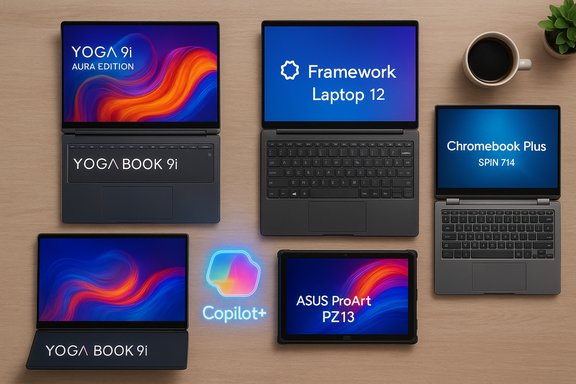
Lenovo’s Yoga 9i 14 Gen 10 Aura Edition tops PCMag UK’s 2025 list of the best 2‑in‑1 laptops, but the year’s roundup is far from a single‑device story: OEMs have pushed aggressively on OLED panels, on‑device AI (NPUs/Copilot+ readiness), and form‑factor variety — from dual‑OLED experiments to rugged detachables and repairable modular convertibles — giving buyers a genuine choice between power, portability, and longevity. PCMag UK’s picks highlight a clear pattern: buy for the real use case, not the headline spec, and confirm that 2025’s best 2‑in‑1s are purpose-built for distinct users, from creators and business fleets to field technicians and budget students.
The 2‑in‑1 category has matured into several distinct families in 2025: thin-and‑light convertibles (360° hinges), detachable tablets (tablet-first with clip‑on keyboards), dual‑screen experiments that double display area, and rugged detachables engineered for field use. Across these families a few trends dominate buyer decisions:
If the decision feels complex, prioritize the one real criterion that will dominate your day: do you need tablet ergonomics more often than a keyboard? If yes, lean detachable. If not, pick a convertible with the best display and battery figure you can verify with independent testing. The best 2‑in‑1 for you will be the one that matches your workflow, not the one with the boldest spec sheet.
Conclusion: 2025’s best 2‑in‑1 laptops are defined less by a single breakthrough than by the variety and maturity of the category: brilliant OLEDs, real‑world NPUs for local AI features, and purposeful designs that solve clear problems for creators, business fleets, field crews, students, and repair‑minded buyers. PCMag UK’s roundup collects the most practical winners across those needs — a strong starting point for any buyer — but the final step remains essential: verify the SKU, read the independent tests, and match the device to the work you actually do.
Source: PCMag UK The Best 2-in-1 Laptops for 2025
 Background / Overview
The 2‑in‑1 category has matured into several distinct families in 2025: thin-and‑light convertibles (360° hinges), detachable tablets (tablet-first with clip‑on keyboards), dual‑screen experiments that double display area, and rugged detachables engineered for field use. Across these families a few trends dominate buyer decisions:- OLED and HDR panels are mainstream even in business SKUs — better color, contrast, and high refresh help creators and make media more compelling.
- On‑device AI is now a selling point. Many Intel Core Ultra, AMD Ryzen AI, and Snapdragon X SKUs include NPUs that enable local Copilot/Copilot+ features; this changes real‑world performance for meeting summaries, transcription, and some creative tasks.
- SKU fragmentation is a buyer’s worst enemy. The same model name may hide different CPUs, NPUs, brightness levels, and RAM; always confirm the exact SKU before checkout.
The top pick: Lenovo Yoga 9i 14 Gen 10 Aura Edition
Why PCMag UK chose it
PCMag UK names the Lenovo Yoga 9i 14 Gen 10 Aura Edition its overall best 2‑in‑1 for 2025 because it combines a high‑brightness 14‑inch OLED, long battery life, polished chassis, and stylus support into a well‑rounded convertible package that suits creators and high‑mileage road warriors alike. That assessment fits broader press coverage: independent previews and reviews call the Aura Edition a premium convertible built around brighter OLEDs and Intel’s latest Core Ultra silicon.Key specifications (what matters)
- 14‑inch PureSight / OLED touch display (high peak brightness and 2.8K resolution on many SKUs), 120Hz VRR on some panels.
- Intel Core Ultra family (Lunar Lake / Core Ultra 7/9 options) with on‑die NPU on Copilot+ capable SKUs.
- Typical memory: 16–32 GB LPDDR5X; NVMe SSDs up to 1 TB.
Strengths
- Display — a brighter, color‑accurate OLED is ideal for photo/video and everyday viewing.
- Battery life — Aura configurations tuned with Lunar Lake silicon show long mixed‑use endurance in real‑world tests (vendor claims are often generous; independent testing confirms substantial day‑long runtimes on efficient SKUs).
- All‑round polish — premium materials, good keyboard, bundled pen on many SKUs.
Caveats and verification
Lenovo’s marketing claims (peak brightness figures, “up to” battery numbers) vary by SKU. Real mixed‑use runtime depends heavily on panel choice, NPU usage for AI features, and brightness settings; independent reviews urge buyers to verify the exact display and CPU before purchase. If on‑device Copilot+ matters, confirm the NPU TOPS and vendor certification for Copilot+ features.Dual‑screen for extreme multitaskers: Lenovo Yoga Book 9i (Gen 10)
The Yoga Book 9i remains the marquee experiment in dual‑screen computing — two OLED surfaces stacked where a keyboard would be — and it’s recommended for heavy multitaskers and early adopters who will actually use two full‑size touch panels in parallel. Reviewers praise the pair of OLEDs for color and clarity but warn that software support and ergonomics are a real consideration.Verified facts
- The Yoga Book 9i uses twin 2.8K OLED panels (previous 13.3" generation or larger 14" screens in Gen 10 updates) and Intel Core Ultra or Arrow Lake processors depending on the year/refresh. Multiple reviews confirm the attractive dual OLEDs and the real battery cost of driving two screens.
Pros
- Exceptional for reference workflows (video on one screen, editing/tools on the other).
- Portable relative to the screen area it provides and surprisingly competitive battery life for the class.
Cons
- Software maturity: Windows and third‑party apps don’t always behave ideally across two independent touch displays; that leads to odd window placement and occasional input quirks.
- Price and long‑term reliability reports are mixed; user forums show a range of owner experiences.
Best for long‑term value and tinkerers: Framework Laptop 12 (convertible)
Framework’s Laptop 12 brings the company’s modular, repairable ethos to a convertible 2‑in‑1, making it a standout for classroom deployments, DIY enthusiasts, and anyone who wants to plan upgrades instead of replacing a whole system. Independent coverage confirms its modular approach, tool‑less access, and above‑average repairability for the category.Why it matters
- Modularity and repairability: RAM, storage, and many components are designed to be user‑replaceable, and Expansion Cards let you swap port configurations long after purchase.
- MIL‑STD durability on select SKUs and a convertible design aimed at education fleets gives administrators a lower total cost of ownership.
Tradeoffs
- Display color and peak brightness are adequate but not class‑leading; the reward is long lifespan and lower lifetime cost. Reviews note the display is serviceable but not premium, and battery life and performance are typical for midrange 12‑inch designs.
Field‑ready rugged detachable: Getac F110 G7
For field service, manufacturing floors, and first responders, few commercial detachables rival Getac’s F110 G7. It’s built for survivability, sunlight legibility, and continuous uptime with hot‑swappable batteries — features that make it a practical tool rather than a fragile convenience gadget. Retail and industrial datasheets list MIL‑STD certification and IP66 ingress protection, plus swappable battery packs and sunlight‑readable displays.Key verified specs and features
- IP66 rating and MIL‑STD‑810H tested configurations; display tech optimized for direct sunlight (LumiBond, high‑nit panels).
- Hot‑swappable dual batteries and expansion modules (WWAN, barcode readers, extra ports) make it a field toolkit rather than a consumer tablet.
Real‑world strength
- The F110’s key advantage is reliability under harsh conditions (extreme temps, moisture, drops) and the operational continuity that swappable batteries provide; however, it’s bulky, expensive, and purpose‑built — poor value for typical office users.
Detachable champion for creators: Asus ProArt PZ13
Asus positions the ProArt PZ13 as a Surface Pro challenger: a detachable with a color‑accurate OLED screen, stylus, SD slot, and a Qualcomm Snapdragon X Plus platform in certain SKUs. Reviews praise the value proposition compared to Surface Pro offerings, noting long battery life and included accessories. Wired’s hands‑on commentary and other reviews detail Snapdragon X Plus performance, exceptional battery life numbers in light workloads, and a focus on content creators who need portability and media intake features.Considerations
- The PZ13 is an ARM‑based detachable: excellent battery and lightweight, but verify compatibility for mission‑critical x86 Windows apps.
- For creators who capture lots of media on the go, the SD card slot and included keyboard/kickstand improve real‑world workflow speed.
Best ChromeOS 2‑in‑1 and AI on Chrome: Acer Chromebook Plus Spin 714
ChromeOS remains an excellent value for students and cloud‑centric users. The Acer Chromebook Plus Spin 714 ranks highly for its convertible design, robust Intel Core Ultra internals on some SKUs, and recent promotional bundles that tie in Google’s Gemini/NotebookLM features via Google AI subscriptions. Notebookcheck and other reviewers note the Spin 714’s balance of build quality and ChromeOS perks, while Acer’s promotions in 2025 have bundled Google AI plans for Chromebook Plus models to sweeten the deal.Why buyers like it
- Chromebook Plus SKUs often include a free Google AI/NotebookLM trial or subscription, making the Spin 714 attractive for students and Google‑centric users.
- Convertible design, adequate battery life, and a light, durable chassis for campus use.
Business‑grade convertible: Lenovo ThinkPad X1 2‑in‑1 Gen 10 Aura Edition
For corporate fleets, PCMag UK and other reviewers single out the ThinkPad X1 2‑in‑1 Gen 10 Aura Edition for its classic ThinkPad ergonomics (keyboard and TrackPoint), excellent battery life on Lunar Lake silicon, and enterprise features (TPM, vPro options on select SKUs). Independent reviews demonstrate exceptional mixed‑use endurance and a business‑oriented feature set that favors manageability and durability.Enterprise strengths
- All‑day battery on efficient SKUs and a proven keyboard that corporate users prefer for long typing sessions.
- Ports and manageability — more robust peripheral support and enterprise firmware/service options than many consumer convertibles.
Honorable mentions and use‑case matches
- HP OmniBook Ultra Flip 14 — a premium remote‑work convertible with long battery life and thin‑and‑light portability; great for hybrid workers who value battery and build.
- Dell Inspiron 14 2‑in‑1 (7445) — best value 2‑in‑1 for budget buyers who still want a convertible hinge and respectable battery and port selection.
- LG Gram Pro 2‑in‑1 16 — excellent large‑screen 2‑in‑1 for desktop replacement use cases; lightweight for a 16‑inch machine and long battery claims make it ideal for content consumption and big‑canvas productivity.
- Asus ProArt PX13 — top pick for creators who need the most performance in a convertible, with Ryzen AI/HX‑class silicon and OLED displays for color work.
What ‘2‑in‑1’ means today — convertible vs detachable
Convertible (360° hinge)
- One‑piece device where the keyboard remains attached; modes include laptop, tent, stand, and tablet. Better balance (battery and motherboard in base), generally more ports, and superior typing experience. Ideal for frequent typists who want occasional tablet use.
Detachable (tablet + dock/keyboard)
- Tablet‑first: lighter screen, optional keyboard, often fanless and lower‑power processors (good for battery and thinness), but generally less raw performance and ports than convertibles. Best for presenters, sketchers, and those who value tablet ergonomics.
Tech specs and buying checklist: what to look for in 2025
- Processor & NPU: Decide whether you need raw x86 multi‑core performance (H/HX‑class CPUs or Ryzen AI) or day‑long battery and on‑device AI inference via Snapdragon/Intel Core Ultra (Lunar Lake) with integrated NPUs. If you care about Copilot+ or local Gemini features, verify the NPU TOPS and vendor Copilot+ certification.
- Display: OLED is increasingly common; verify resolution, refresh (60Hz vs 120Hz), and peak brightness (nits) — if you work outdoors, look for 600+ nits or specialized sunlight‑readable tech.
- RAM & storage: 16 GB is the practical baseline for general productivity; 32+ GB for creators and heavy multi‑taskers. SSDs should be NVMe; prefer 512 GB or larger unless you commit to cloud storage.
- Battery & real tests: Vendor claims are useful but check independent mixed‑use reviews; ARM and Snapdragon SKUs often win battery tests in light workloads, while H/HX x86 devices drain faster under sustained loads.
- Serviceability & TCO: If fleet management or longevity matters, invest in repairable or modular machines (Framework, certain ThinkPad lines) to lower total cost of ownership over 3–5 years.
- Ports and docking: If you run multiple displays or external storage, prioritize Thunderbolt/USB4 or a vendor docking option — some detachable keyboards do not add ports, and that can be a surprise.
Critical analysis — strengths, risks, and buyer traps
Strengths across 2025 2‑in‑1s
- Meaningful hardware integration for AI — NPUs are now a practical platform feature, not just marketing, enabling low‑latency assistant features on-device.
- Display quality has leapt forward — premium convertibles and detachables increasingly ship with OLED panels suitable for creators.
- Diversity of form factors — the category now offers tailored devices for every use case (rugged, dual screen, repairable, detachable, convertible).
Risks and buyer traps
- SKU roulette — the same model name can include different CPUs, NPUs, brightnesses, and storage options. Always check the SKU string and independent reviews for that exact configuration.
- ARM compatibility caveats — Snapdragon/ARM Windows machines deliver impressive battery life, but legacy x86 binaries or niche enterprise utilities can misbehave under emulation. Test critical apps before committing.
- Thermals & sustained performance — thin convertibles with H‑class chips can thermal‑throttle under prolonged creative loads; if you need sustained multi‑core throughput, prefer larger chassis or HX‑class systems.
- Accessory cost creep — keyboard covers, pens, and docks are often optional and expensive; factor them into the final purchase price.
How to match a 2‑in‑1 to the right user (quick checklist)
- For heavy creative work and sustained performance: choose a convertible with H/HX‑class or Ryzen AI CPUs, a color‑accurate OLED, and good thermal design.
- For all‑day battery and lightweight portability: prefer ARM/Snapdragon or Lunar Lake Core Ultra U‑class SKUs with verified battery tests.
- For repairability and long TCO: prefer Framework or businesses offering user‑serviceable SKUs.
- For fieldwork: buy a rugged detachable (Getac F110 G7 or similar) with IP/MIL ratings and swappable batteries.
- For students and Chrome‑centric users: pick convertible Chromebooks like the Acer Chromebook Plus Spin 714 for value and Google AI perks.
Final verdict — how to buy without regrets
The 2025 2‑in‑1 market has matured into a choice between targeted excellence and generalized good‑enough. PCMag UK’s list clearly rewards devices that solve real problems: the Yoga 9i Gen 10 Aura Edition for balanced creator/road‑warrior needs; the Yoga Book 9i for screen‑first multitaskers; Framework for longevity and repair; Getac for mission‑critical field use; and Asus/Chromebook contenders for detachable and cloud‑centric workflows. PCMag UK’s recommendations align with independent hands‑on testing and vendor specs, but buyers must do the final homework: confirm the exact SKU, check independent battery and thermals tests for that SKU, and test mission‑critical apps on ARM devices before relying on them in production.If the decision feels complex, prioritize the one real criterion that will dominate your day: do you need tablet ergonomics more often than a keyboard? If yes, lean detachable. If not, pick a convertible with the best display and battery figure you can verify with independent testing. The best 2‑in‑1 for you will be the one that matches your workflow, not the one with the boldest spec sheet.
Conclusion: 2025’s best 2‑in‑1 laptops are defined less by a single breakthrough than by the variety and maturity of the category: brilliant OLEDs, real‑world NPUs for local AI features, and purposeful designs that solve clear problems for creators, business fleets, field crews, students, and repair‑minded buyers. PCMag UK’s roundup collects the most practical winners across those needs — a strong starting point for any buyer — but the final step remains essential: verify the SKU, read the independent tests, and match the device to the work you actually do.
Source: PCMag UK The Best 2-in-1 Laptops for 2025
