
 The Agent Builder Market Has Split Into Two Different Industries
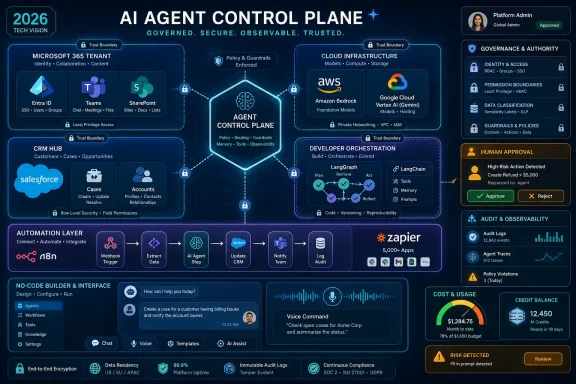
The phrase AI agent builder now covers products that barely resemble one another. OpenAI’s Agent Builder, LangGraph, and CrewAI speak to developers who want control over orchestration, state, tool calls, and observability. Microsoft Copilot Studio, Salesforce Agentforce, and Google’s Gemini Enterprise Agent Platform speak to enterprises that want agents embedded into existing identity, data, governance, and billing systems.
Then there is the automation layer: n8n, Zapier Agents, Gumloop, Lindy, Relevance AI, Voiceflow, Dify, and Flowise. These tools are not all chasing the same buyer. Some sell speed to operations teams. Some sell flexibility to developers. Some sell customer-service containment. Some sell the hope that a sales rep, founder, or support manager can build an “AI workforce” without waiting for engineering.
That is why a ranked list of the 15 best tools can be useful only if we treat it as a map, not a podium. The right question is not “Which agent builder is best?” It is “Where should agentic decision-making live inside this organization?” For WindowsForum readers, especially IT admins and sysadmins, the answer often begins with identity, permissions, auditability, and integration debt rather than model benchmarks.
OpenAI Wants the Developer Workflow Before the Enterprise Workflow
OpenAI’s agent stack is the most obvious place to start because it sits closest to the frontier models that made this category explode. Agent Builder gives developers a visual canvas for building workflows, while the Agents SDK, Responses API, tool calling, tracing, file search, web search, and computer-use capabilities turn the model into something closer to a programmable worker than a chatbot.
Its strength is control. A product team can prototype a workflow visually, inspect how it runs, export or reproduce logic in code, and wire it into a SaaS product or internal application. That makes OpenAI a strong choice for teams building product-embedded assistants, research agents, coding helpers, support copilots, and custom workflows that need direct access to OpenAI’s model ecosystem.
The trade-off is that OpenAI is not really selling you a finished business automation suite. It is selling powerful primitives. Your team still owns architecture, testing, permissions, data boundaries, deployment, monitoring, retries, and cost control.
That matters because the submitted source’s pricing examples should be treated cautiously. The current public OpenAI pricing landscape changes quickly, and some model names and rates in third-party roundups can lag reality or get ahead of official releases. The larger point survives: OpenAI’s agent tools are usage-priced, and a useful agent that searches, retrieves, calls tools, and iterates can consume far more than a single chat completion.
For developer-first teams, OpenAI belongs near the top. For business teams expecting a turnkey admin console with governance inherited from their existing productivity suite, it is not the path of least resistance.
Microsoft Turns Agents Into Another Layer of the Tenant
Microsoft Copilot Studio is the natural choice for organizations already living in Microsoft 365, Teams, SharePoint, Dataverse, Power Platform, Dynamics 365, and Azure. It is not merely an agent builder in the abstract. It is Microsoft’s attempt to make agents a managed artifact inside the tenant, governed by the same instincts that already shape enterprise Microsoft deployments.
That gives Copilot Studio a real advantage. Agents can be connected to SharePoint content, Power Platform connectors, Dataverse records, Azure AI Search, Teams channels, websites, and customer-facing endpoints. Internal agents can extend Microsoft 365 Copilot experiences, while standalone agents can be published to websites, apps, service channels, and social platforms.
For IT pros, the attraction is obvious. Microsoft already owns the identity layer in many organizations. It already owns the productivity suite. It already has administrative surfaces for compliance, data loss prevention, environment management, and licensing. Copilot Studio fits into that world better than a generic agent startup can.
But Microsoft’s weakness is also familiar: licensing complexity. Copilot Studio’s move toward Copilot Credits and capacity packs gives Microsoft flexibility, but it also makes cost estimation a planning exercise. A simple answer might be cheap; an agent that invokes multiple tools, searches, reasons, escalates, and updates systems may not be.
The platform is best understood as the default candidate for Microsoft-heavy enterprises, not necessarily the universal best agent builder. If your organization is already governed around Entra ID, SharePoint, Teams, Power Platform, and Dynamics, Copilot Studio reduces friction. If you are outside that ecosystem, it may feel like adopting a cathedral just to build a workshop.
Google and Amazon Are Selling Agent Infrastructure, Not Just Agent Builders
Google’s Gemini Enterprise Agent Platform and Amazon Bedrock Agents occupy a different layer of the market. They are less about democratizing simple agent creation and more about making agents a managed part of cloud infrastructure.
Google has been consolidating agent development, model access, orchestration, enterprise search, evaluation, governance, and AI operations under the Gemini Enterprise Agent Platform banner. The attraction is strongest for organizations already using Google Cloud for data, analytics, machine learning, and application infrastructure. Agent Studio, the Agent Development Kit, Model Garden, Agent Engine-style runtime services, and Google Cloud security controls give enterprises a way to build agents close to the data they need.
Amazon Bedrock Agents plays the AWS version of the same game. Bedrock provides access to multiple foundation-model providers, knowledge bases for retrieval-augmented generation, Lambda-backed actions, API integrations, memory, evaluation, and broader AgentCore services for deploying and managing agents. For AWS-native teams, the appeal is less about a pretty builder and more about keeping agents inside the AWS control plane.
These platforms matter because many serious agent workloads are not merely conversational. They need to retrieve enterprise data, invoke APIs, run code, maintain state, respect IAM policies, log activity, and scale under production load. Google and Amazon are trying to make that operational layer boring.
The drawback is that boring infrastructure is still infrastructure. Teams need cloud architecture skills, IAM discipline, monitoring, deployment strategy, and cost governance. A cloud-native agent platform can be the safest long-term option for a sophisticated organization, but it is rarely the fastest path for a sales operations manager who wants an outbound research assistant by Friday.
Salesforce Agentforce Is the CRM Agent Play Everyone Else Has to Work Around
Salesforce Agentforce is important because Salesforce customer data is already where many business workflows begin and end. For companies that use Sales Cloud, Service Cloud, Data Cloud, Customer 360, and Salesforce automation heavily, Agentforce has a structural advantage: it does not need to pretend the CRM is an external system.
That matters. A support agent can inspect cases, knowledge articles, customer history, and entitlements. A sales agent can work with leads, accounts, opportunities, and activity records. An employee-facing agent can operate inside the same business logic that already governs the organization’s customer lifecycle.
Salesforce has also been pushing Agentforce beyond the chatbot framing. The platform includes low-code and pro-code options, prompts, actions, APIs, subagents, workflow automation, testing, deployment, supervision, and governance controls. It is designed for organizations that want AI agents to perform customer-facing and employee-facing work without leaving the Salesforce universe.
The risk is lock-in and data hygiene. Agentforce can be only as useful as the Salesforce implementation beneath it. Messy records, inconsistent fields, duplicated accounts, stale knowledge articles, and brittle business processes do not magically become clean because an agent reads them.
Pricing also reflects Salesforce’s enterprise DNA. Flex Credits, conversation pricing, user add-ons, industry add-ons, and bundled editions make sense for large deployments, but they demand careful modeling. For Salesforce-heavy companies, Agentforce is one of the most credible enterprise agent platforms. For everyone else, it is a reminder that the best agent builder is often the one closest to the system of record.
Open Source Gives Developers Leverage, but Not a Free Lunch
CrewAI, LangGraph, Dify, and Flowise are the counterweight to the cloud and SaaS giants. They appeal to teams that want portability, custom orchestration, self-hosting options, and more control over how agents reason, retrieve, coordinate, and act.
CrewAI is built around role-based multi-agent collaboration. Developers can define agents with specific responsibilities, assign tools, coordinate tasks, and create workflows where agents research, validate, and execute in sequence. It is a strong fit for teams experimenting with agent “crews” that break complex work into specialized roles.
LangGraph is more fundamental and more demanding. Its graph-based architecture is designed for stateful, long-running, branching workflows where persistence, retries, human approval, and explicit control matter. If CrewAI feels like assembling a team, LangGraph feels like designing the workflow engine that determines how the team moves through a process.
Dify and Flowise lower the barrier with visual builders, RAG pipelines, model integrations, APIs, and self-hosting paths. Dify is especially attractive for teams building AI applications, internal copilots, document-grounded assistants, and production workflows with LLMOps features. Flowise is a strong visual option for chatflows, agentflows, retrieval pipelines, tool use, embedded chat, and multi-agent experimentation.
The open-source label can mislead buyers, however. Free framework access does not eliminate model costs, hosting costs, vector storage costs, monitoring costs, security work, or the labor required to keep agents reliable. In many organizations, the real cost is not the license. It is the engineering time needed to turn a clever prototype into something an auditor, security team, or customer support manager can live with.
Automation Platforms Are Becoming Agent Platforms by Accretion
n8n and Zapier Agents show how workflow automation is being pulled into the agent era. These platforms already had the connective tissue: triggers, actions, app integrations, webhooks, API calls, conditional logic, and business-process automation. Adding AI steps and agent-like behavior is a natural extension.
Zapier’s advantage is reach. Its app ecosystem is vast, and that makes it attractive for teams that want agents to touch many SaaS tools without writing custom integrations. A Zapier agent can monitor business events, retrieve live data, trigger workflows, and act across the same apps companies already automate.
n8n’s advantage is flexibility and deployment control. It offers a visual workflow builder, hundreds of integrations, custom code, HTTP requests, self-hosting, Docker, Kubernetes, and private infrastructure options. For technically comfortable teams, n8n can be a pragmatic bridge between no-code automation and developer-owned systems.
The issue is that workflow automation and autonomous agency are not the same thing. A deterministic workflow is easier to test because every branch is explicit. An agentic workflow can decide which tools to call, how to interpret data, and when to continue. That power is useful, but it complicates debugging, auditability, and cost prediction.
For many businesses, these platforms will be enough. If the agent’s job is to summarize inbound emails, enrich leads, update a CRM, route support tickets, or generate follow-ups, an automation-native platform may outperform a more elegant developer framework simply because the integrations are already there.
No-Code Agent Builders Sell Speed, Then Charge for Usage and Trust
Relevance AI, Lindy, Gumloop, and Voiceflow represent the no-code and low-code side of the market, though each has a different center of gravity. Relevance AI sells the idea of AI workforces for sales, operations, research, marketing, and customer success. Lindy sells assistant-style delegation for email, calendar, meetings, CRM updates, follow-ups, and admin work. Gumloop sells AI-first visual workflow automation with agents, documents, data sources, APIs, and recurring tasks. Voiceflow focuses on customer-facing chat and voice experiences.
These platforms matter because most organizations do not have enough AI engineers to build every useful agent from scratch. A sales operations team may understand its workflow better than the central platform team. A customer support team may be able to iterate faster in Voiceflow than in a code repository. A founder may get more immediate value from Lindy than from designing a LangGraph state machine.
The cost is abstraction. No-code platforms simplify agent creation by hiding orchestration, infrastructure, model routing, and deployment details. That makes them faster, but it also means the organization must accept the platform’s assumptions about how agents are built, monitored, governed, and billed.
This is where vendor promises deserve skepticism. “No code” does not mean “no design.” Someone still has to define what the agent is allowed to do, what systems it can touch, when a human must approve an action, how failures are handled, and how outputs are measured. The more important the workflow, the more the no-code builder becomes a governance surface rather than a toy.
Voiceflow is a useful example. It is not trying to be the best general-purpose automation engine. It is trying to be the best environment for designing, deploying, and improving customer-facing conversational agents across chat and voice. That specialization is valuable if customer experience is the job. It is a limitation if the real need is back-office orchestration.
The Best Tool Depends on Where the Agent Gets Its Authority
The defining feature of an AI agent is not that it chats. It is that it can take action. That means every agent builder should be evaluated according to where the agent gets authority, how that authority is constrained, and who is accountable when the agent does something unexpected.
For OpenAI, CrewAI, and LangGraph, authority is usually granted by the application developer. The agent gets tools, APIs, credentials, memory, and business rules through code. This allows very fine control, but it also means the engineering team must build the safety rails.
For Microsoft, Google, Amazon, and Salesforce, authority is inherited from cloud, productivity, CRM, and identity platforms. That is attractive to enterprises because permissions, logs, data boundaries, and governance can align with existing systems. It also means the agent builder becomes another expression of platform dependency.
For Zapier, n8n, Relevance AI, Lindy, Gumloop, and Voiceflow, authority often comes through connected apps and user-approved integrations. This is convenient, but it can sprawl quickly. A harmless-looking agent with access to email, CRM, Slack, documents, and scheduling can become a surprisingly powerful actor inside a business.
That is the lens buyers should use. Not the demo. Not the template gallery. Not the number of integrations. Ask what the agent can do at 2:00 a.m. without a human watching.
Retrieval Is the Feature Everyone Needs and Everyone Overestimates
Nearly every serious agent platform now advertises some form of retrieval-augmented generation, or RAG. The idea is simple: connect the agent to company documents, knowledge bases, websites, databases, tickets, or files so it can answer from grounded information rather than model memory.
Dify, Flowise, Voiceflow, Agentforce, Microsoft Copilot Studio, Google’s agent platform, Amazon Bedrock, OpenAI’s file search, and LangGraph-based systems can all support retrieval-heavy workflows. This is essential for internal copilots, support agents, policy assistants, documentation bots, and customer-service agents.
But RAG is not magic. Retrieval quality depends on document structure, chunking, metadata, permissions, freshness, search configuration, and evaluation. An agent connected to a messy SharePoint folder, stale help center, or poorly governed CRM may answer with confidence and still be wrong.
The practical lesson is that the agent builder is only one part of the system. Organizations that already have clean knowledge management will see faster returns. Organizations with years of duplicated PDFs, abandoned wiki pages, and inconsistent taxonomy may discover that the AI project is really an information architecture project wearing a new badge.
Pricing Has Moved From Seats to Metered Work
The agent builder market is drifting toward usage-based pricing because agents consume resources unpredictably. A user can ask one question and trigger a cascade of model calls, searches, tool invocations, API requests, vector lookups, workflow executions, code runs, and external service charges.
Microsoft uses Copilot Credits. Salesforce uses Flex Credits and other enterprise pricing structures. Google and Amazon meter model usage, runtime, storage, search, and cloud resources. OpenAI charges by model and tool consumption. Zapier prices around tasks. Gumloop uses credits. Lindy packages usage into subscription tiers. Open-source tools shift the bill toward hosting, models, observability, and engineering labor.
This is rational for vendors and unnerving for customers. Seat-based SaaS taught administrators to budget by headcount. Agentic systems require budgeting by behavior. That is harder because behavior changes as users discover what agents can do.
The best buyers will instrument cost from the beginning. They will monitor not just total spend, but spend per workflow, per successful outcome, per department, and per tool call. The worst buyers will discover after deployment that their most enthusiastic users have turned automation into a metered slot machine.
Windows Shops Should Start With Identity, Not Novelty
For WindowsForum’s audience, the practical short list often begins with Microsoft Copilot Studio, OpenAI, n8n, Dify, Flowise, and maybe Salesforce or AWS depending on the stack. That is not because the other tools are weak. It is because Windows-centric organizations usually care deeply about Microsoft 365, Entra ID, Teams, SharePoint, endpoint management, compliance boundaries, and administrative control.
A Microsoft 365-heavy company should evaluate Copilot Studio first because it aligns with the tenant. A developer team building a custom AI feature should consider OpenAI, LangGraph, CrewAI, Dify, or Flowise. A sysadmin or operations team that needs automation across apps may find n8n or Zapier more practical than a pure agent framework. A Salesforce-heavy business should look hard at Agentforce before trying to bolt a generic agent onto CRM data from the outside.
The endpoint angle also matters. Agents that can use browsers, manipulate apps, or trigger desktop-adjacent workflows raise a different class of risk. As tools such as computer use mature, admins will need to think about agent permissions the way they think about privileged access, not the way they think about chat widgets.
This is where Windows management culture may prove useful. The boring habits of IT — least privilege, approval flows, logging, conditional access, environment separation, change control, and rollback planning — are exactly what agent deployments need. The organizations that treat agents as software supply-chain and identity problems will fare better than those that treat them as smarter chatbots.
The 2026 Shortlist Is Really a Stack Decision
The 15-tool field looks less chaotic once each product is placed in its natural habitat. The smart buyer does not choose the most hyped builder. The smart buyer chooses the platform whose assumptions match the organization’s existing architecture, governance model, and builder skill set.
- OpenAI Agent Builder is strongest for developer teams that want direct access to OpenAI’s agent primitives, visual workflow design, tool use, tracing, and custom product integration.
- Microsoft Copilot Studio is the default contender for Microsoft 365 organizations that want agents governed through the same ecosystem as Teams, SharePoint, Power Platform, Dataverse, and Azure.
- Google Gemini Enterprise Agent Platform and Amazon Bedrock Agents are best understood as cloud-native agent infrastructure for organizations already standardized on Google Cloud or AWS.
- Salesforce Agentforce is the most logical choice when the agent’s real job is to act on CRM, service, sales, marketing, or customer data already governed by Salesforce.
- CrewAI, LangGraph, Dify, and Flowise give developers and technical teams more control, portability, and self-hosting flexibility, but they shift more responsibility onto engineering.
- n8n, Zapier Agents, Relevance AI, Lindy, Gumloop, and Voiceflow are strongest when speed, integrations, visual workflow design, and business-team ownership matter more than low-level orchestration control.
The agent builder market in 2026 is still young enough that today’s categories will blur, merge, and be renamed before many deployments reach maturity. The durable lesson is simpler: agents turn software from a place where employees retrieve information into a place where software performs work, and that makes governance, cost control, and system ownership just as important as model quality. The winners will not be the tools that make the flashiest demos; they will be the ones that let organizations give AI real responsibility without losing sight of who is ultimately accountable.
