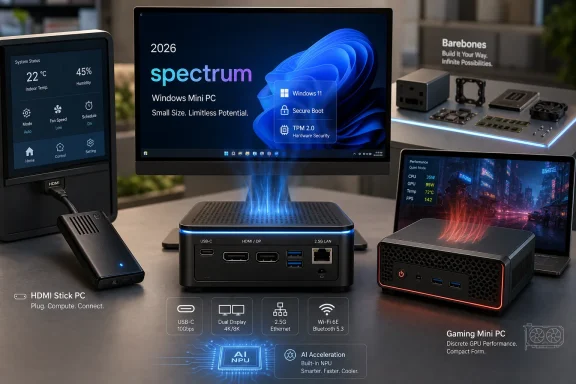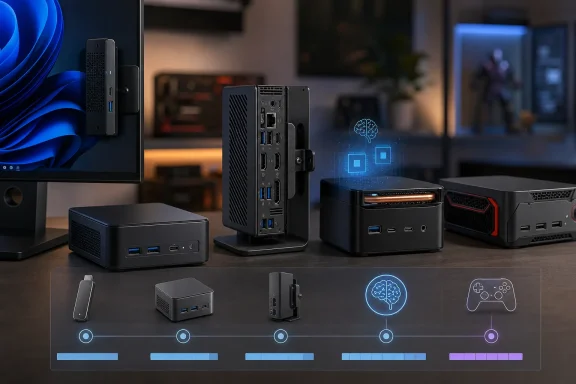
For Windows buyers, that matters because the old shortcut — “mini PC” as a cheap little box for basic computing — is now dangerously imprecise. In 2026, the same phrase can mean a signage stick, a corporate fleet endpoint, a homelab node, a local-AI experiment box, or a thermally constrained gaming PC with laptop graphics. The best choice is no longer the smallest machine you can afford; it is the smallest machine that does not lie about the job it is being asked to do.
The Mini PC Market Has Finally Stopped Being Cute
The early appeal of the mini PC was almost emotional. A Windows desktop that could disappear behind a monitor felt like a magic trick, especially in the years when mainstream towers still looked like black filing cabinets with fans. Intel’s Compute Stick pushed that fantasy to its logical extreme: Windows, HDMI, a low-power Atom-class processor, and a device not much larger than a streaming dongle.
That form factor was always more impressive as a demonstration than as a daily computer. Stick PCs made sense for kiosks, digital signage, dashboards, and the kind of edge cases where “can boot Windows” mattered more than “feels good to use Windows.” They did not have the thermal headroom, serviceability, port selection, or performance envelope to become a serious desktop replacement.
The more durable idea was the NUC-class machine. Intel’s Next Unit of Computing program, launched in 2013, gave the industry a repeatable template: laptop-class processors, desktop-like I/O, upgradable memory and storage in many models, and a chassis small enough to mount out of sight. It was not the smallest possible Windows PC. It was the smallest one that could plausibly behave like a real computer.
That distinction now defines the 2026 market. The smallest machines remain limited, but the next size up has become a full ecosystem. PCMag’s guide captures a category where vendors such as Asus, MSI, Acer, ASRock, Geekom, Shuttle, Zotac, Lenovo, and others are not merely copying Intel’s homework. They are exploring what happens when small desktops become differentiated products rather than novelty hardware.
Intel Left the NUC Behind, but the NUC Idea Got Loose
Intel’s decision to exit the NUC business in 2023 could have been read as a funeral notice for the category. Instead, it looks more like the moment the concept escaped its parent company. Asus took over the NUC product line and support responsibilities, preserving the brand while Intel moved on to other priorities.
That handoff matters because NUC was never just a product name. It was a reference design, a mental model, and a buying vocabulary. For more than a decade, “NUC-like” told buyers what to expect: a compact square-ish box, mobile CPU, modest power draw, just enough expandability, and a bias toward business, enthusiast, or edge-computing use.
Once Intel stopped being the sole gravitational center, the market became more varied. Asus can sell NUC-branded systems, but Geekom, Minisforum, Beelink, Zotac, Shuttle, Lenovo, HP, Dell, and others can sell mini PCs that borrow the form factor without inheriting the brand. That creates both opportunity and confusion.
The upside is obvious: more designs, more chip choices, more ports, more price points, and more experiments. The downside is that “NUC-class” no longer guarantees much beyond approximate size. One box may be a quiet office endpoint; another may be a hot little gaming rig; a third may be a developer workstation masquerading as a bookshelf ornament.
For IT buyers, that makes spec discipline more important than brand nostalgia. The NUC era taught the market that small Windows desktops can be legitimate. The post-NUC era requires buyers to ask what kind of legitimacy they need.
Barebones PCs Are a Bargain Only If Your Time Is Free
One of the old mini PC rituals is still alive: the barebones kit. In theory, it is elegant. The vendor supplies the chassis, motherboard, processor, power design, and often wireless networking. The buyer adds memory, storage, and an operating system, ending up with a configuration tailored to the workload.
That model appeals to enthusiasts for good reason. If you already have compatible SO-DIMMs, an M.2 SSD, and a Windows license, a barebones mini PC can be cost-effective and satisfying. It also avoids the classic OEM sin of pairing a decent processor with too little RAM or a mediocre SSD.
But barebones systems are not automatically cheaper in 2026. Memory and storage pricing has become a real consideration, and PCMag is right to warn buyers to calculate the full system cost rather than the kit price. A machine that looks inexpensive before RAM, SSD, and Windows may lose badly to a preconfigured model once the shopping cart is complete.
There is also a support issue that spec sheets rarely capture. A fully configured mini PC gives the buyer a vendor-tested combination of firmware, drivers, storage, memory, and Windows. A barebones kit turns the buyer into the integrator. That is fun when the machine is a weekend project and less fun when it is endpoint number 47 in a small business deployment.
This does not make barebones a bad deal. It makes it a specialist’s deal. The more you value control, reuse, and component choice, the more sense it makes. The more you value fast deployment and predictable support, the more a fully configured Windows 11 mini PC looks like the adult option.
The CPU Suffix Has Become a Trap
For years, mini PC shopping had a reliable decoding ritual. Intel chips ending in U were low-power mobile parts, H chips were faster mobile parts, T chips were lower-power desktop parts, and socketed desktop CPUs usually announced themselves clearly. That shorthand still helps, but it no longer carries the weight it once did.
Intel’s branding transition from Core i3/i5/i7/i9 to Core and Core Ultra has made the landscape messier. Meteor Lake, Lunar Lake, and Panther Lake introduced new naming conventions, integrated NPUs, and stronger integrated graphics in certain tiers. Intel’s Core Ultra Series 3 “Panther Lake” chips, including X7 and X9 graphics-focused variants, make the old “just look at the suffix” advice feel incomplete.
That is not merely a branding complaint. In a mini PC, the CPU is usually the machine’s personality. It determines not only raw performance but also thermals, acoustics, power limits, graphics capability, and how much sustained work the system can handle before fan noise or throttling becomes the real benchmark.
A Core Ultra 5 in a thin laptop-like mini PC is not the same proposition as a higher-power H-class chip in a slightly larger chassis with aggressive cooling. Likewise, an AMD Ryzen mobile part can punch above its apparent size if the vendor gives it enough power and cooling, while an impressive chip can underperform in a cramped enclosure with conservative firmware.
The practical advice is less satisfying but more accurate: read the exact processor model, check whether it is mobile or desktop-class, and treat benchmark data from the specific system as more meaningful than the CPU name alone. In 2026, a mini PC’s processor label is the opening argument, not the verdict.
Integrated Graphics Are No Longer Synonymous With “Bad”
The traditional mini PC compromise was graphics. Integrated GPUs were fine for the desktop, fine for video playback, fine for office work, and generally not fine for serious gaming, GPU compute, or workstation tasks. If a buyer needed discrete graphics, the advice was usually to buy a larger PC.
That advice is still broadly true, but the edges are changing. AMD’s Ryzen AI Max+ 395 and related Strix Halo-class parts blur the line between integrated and discrete graphics by pairing strong CPU resources with unusually capable integrated Radeon graphics and a unified memory approach. Intel’s Panther Lake X-series branding similarly signals a world where integrated graphics can be a selling point rather than an apology.
This is particularly important for mini PCs because discrete GPUs create a cascade of design problems. They need space, power delivery, airflow, and noise tolerance. Laptop-grade discrete GPUs can fit in some compact systems, but they bring laptop-style compromises. Desktop graphics cards require larger chassis that start to leave the mini PC category behind.
The result is a new middle tier. These machines are not replacements for full gaming towers or professional GPU workstations, but they can handle more than older integrated-graphics desktops ever could. Casual gaming, accelerated creative work, media processing, and some local AI workloads become plausible on boxes that still occupy little desk space.
The danger is expectation creep. “Better integrated graphics” does not mean “ignore thermals.” A tiny chassis with a powerful APU can still become loud, hot, or power-limited under sustained load. Buyers should be excited that integrated graphics are improving, but they should not confuse architectural progress with the abolition of physics.
AI Has Given the Mini PC a New Sales Pitch, but Not Yet a New Standard
The arrival of NPUs in mainstream PC processors has given vendors a fresh reason to sell new hardware. Microsoft’s Copilot+ PC push, Intel’s Core Ultra line, AMD’s Ryzen AI chips, and Qualcomm’s Snapdragon X platform have all made AI PC a retail phrase. Mini PCs, unsurprisingly, are being pulled into that story.
There is a credible version of this pitch. A small, power-efficient Windows box with a modern NPU can make sense for edge inference, development, conferencing enhancements, image workflows, or lightweight local AI features. Businesses may like the idea of compact endpoints that can perform some AI tasks locally rather than sending everything to cloud services.
But there is also a foggy version of the pitch. Many buyers do not yet have a clear NPU-dependent workload. Windows itself is still in transition, application support varies, and local AI performance depends on more than the presence of an NPU. Memory capacity, GPU capability, driver maturity, and software frameworks all matter.
That is where systems built around parts like Ryzen AI Max+ 395 become interesting. They are not just “AI PCs” because a marketing badge says so; they offer substantial unified memory configurations and graphics resources that can matter for local models. They also cost much more and occupy a different part of the market than a cheap office mini PC.
For the WindowsForum crowd, the right posture is skepticism without cynicism. AI acceleration is real, and the mini PC is a natural host for edge workloads. But the buyer should still begin with the application, not the sticker. If the software does not use the NPU or GPU effectively, the machine is just an expensive small desktop waiting for a future workload.
Ports Are the Difference Between Minimal and Miserable
Mini PC spec sheets often lead with processor, memory, and storage, but the daily experience frequently comes down to ports. A small Windows desktop that cannot connect to the required displays, peripherals, network gear, and storage without a nest of adapters is not elegant. It is merely outsourced clutter.
This is where tiny PCs can surprise buyers in both directions. Some compact systems offer generous I/O, including multiple USB-A ports, USB-C, 2.5GbE or faster networking, HDMI, DisplayPort, audio, and sometimes dual LAN. Others appear modern until the buyer tries to connect two monitors, a webcam, a keyboard receiver, external storage, and wired Ethernet at the same time.
Multi-monitor support deserves particular attention. Digital signage boxes may support several displays despite modest CPU power, while sleeker consumer systems may be less flexible than expected. The presence of USB-C is not enough; buyers need to know whether it carries DisplayPort, USB4, Thunderbolt, charging, or merely data.
VESA mounting is another deceptively practical detail. A mini PC mounted behind a display can create a clean all-in-one-like workstation, especially in offices, labs, reception areas, classrooms, and workshops. But once mounted, front-facing ports, power-button placement, ventilation direction, and cable routing become more important than they looked in the product render.
The best mini PCs understand that small does not mean sparse. They make room for the connections people actually use. The worst ones treat every port as a luxury and assume the buyer will solve the problem with dongles.
Windows on Arm Is Knocking, but x86 Still Owns the Room
Qualcomm Snapdragon X-based mini PCs are no longer hypothetical, and their appearance in the category is worth watching. Windows on Arm has improved substantially, especially in battery-powered laptops where efficiency changes the whole ownership experience. On a plugged-in mini desktop, however, the equation is more complicated.
The strongest argument for Arm in a mini PC is not battery life but efficiency, thermals, and integrated AI capability. A quiet, low-power Windows box with solid responsiveness could be attractive for offices, kiosks, classrooms, and light productivity deployments. If the software stack is modern and browser-heavy, the old compatibility anxieties may matter less than they once did.
But Windows mini PCs have historically thrived on boring compatibility. They run old utilities, niche drivers, management agents, label printers, USB devices, accounting software, industrial tools, and whatever strange application a business bought in 2017 and never replaced. That long tail still favors x86.
This does not doom Arm mini PCs. It defines their beachhead. They should be judged in contexts where the application set is known, modern, and controlled. They are less appealing as general-purpose replacements in environments full of unknown peripherals and legacy Windows assumptions.
For enthusiasts, the arrival of Arm boxes is healthy pressure. It gives Intel and AMD another reason to improve performance per watt, idle behavior, and integrated acceleration. For administrators, it is a reminder that architecture is not an aesthetic choice. It is a compatibility contract.
Gaming Mini PCs Are Real, but They Are Still Negotiations
The dream of a tiny gaming PC has existed for as long as small-form-factor cases have had side panels. Mini PCs bring a sharper version of that dream: console-like size, Windows flexibility, desktop monitor support, and enough GPU power to play modern games. Some systems now come close enough to make the category legitimate.
The catch is that gaming is one of the least forgiving workloads for a small chassis. Sustained CPU and GPU load exposes every cooling compromise. Laptop-grade Nvidia or AMD graphics can deliver impressive results in compact systems, but they are not magic. They are governed by power limits, memory bandwidth, cooling design, and fan curves.
This makes mini gaming PCs feel closer to gaming laptops than desktops. Performance can be strong, but the buyer is purchasing a tightly integrated thermal design rather than an upgradeable platform. The GPU is usually not something you replace two years later. The cooling system is not something you casually improve. The value proposition depends on liking the machine as configured.
There is still a place for these systems. Dorm rooms, living rooms, travel setups, compact desks, and users who prioritize size over future upgrades can all benefit. A small gaming box can also double as a media PC or general Windows desktop in a way that a console cannot.
But the honest comparison is not against a full tower with a desktop GPU. It is against a gaming laptop without the built-in screen, keyboard, and battery. That can be a good deal, but only if the buyer understands the negotiation.
The Business Case Is Stronger Than the Enthusiast Hype
Enthusiasts tend to focus on the exotic end of the mini PC market: powerful APUs, local AI, tiny gaming systems, homelab clusters, and weird cooling experiments. Those are interesting, but the most durable market for Windows mini PCs may be more ordinary. Businesses need quiet, manageable, space-saving desktops that can be deployed in volume.
A mini PC is often a better office machine than a laptop pretending to be a desktop. It does not have a battery swelling quietly under a desk. It can be paired with full-size peripherals and monitors. It can be mounted, locked down, imaged, serviced, and replaced with less drama than a tangle of consumer notebooks on docking stations.
The industrial and vertical-market uses are even clearer. Digital signage, point-of-sale, medical carts, factory terminals, conference-room systems, classroom stations, and edge gateways all benefit from small Windows systems with predictable I/O. Vendors like Shuttle and Zotac have long understood this better than the consumer market does.
For sysadmins, the questions are familiar. Does the vendor provide BIOS updates, driver packages, warranty support, lifecycle clarity, and management features? Is the network adapter reliable under the organization’s imaging and deployment tools? Can the machine run quietly in the intended environment? Can it be purchased again in six months, or is it a one-off SKU that disappears after a promotional run?
That is why the Asus takeover of NUC support matters beyond brand trivia. In business deployments, continuity is a feature. The best mini PC is not always the fastest or smallest; sometimes it is the one that still has firmware updates, spare power bricks, and a support path when something fails.
The Cheap Mini PC Temptation Has a Long Tail
The lower end of the mini PC market is seductive. A small Windows box with an Intel N-series chip, enough RAM, and an SSD can cost less than many monitors. For light browsing, basic productivity, streaming, signage, and simple home-server experiments, these machines can be genuinely useful.
They are also where buyers most often overreach. A low-cost mini PC can feel responsive on day one and then struggle once browser tabs, background sync clients, security tools, Teams, OneDrive, and Windows updates pile on. The difference between “boots Windows” and “comfortably runs my Windows life” is not always visible in the price.
Low-end processors such as Intel’s N100-class chips have done useful work by replacing older Celeron and Pentium parts in the cheapest systems. They are much better than the bargain-bin Windows machines of a decade ago. But they remain entry-level parts, and no amount of small-chassis charm changes that.
Storage quality is another trap. Some inexpensive mini PCs ship with SSDs that are adequate for light use but unimpressive under sustained writes or multitasking. Memory configuration can also matter, particularly if the system uses integrated graphics and shares RAM with the GPU.
The right way to buy cheap is to keep the workload honest. A low-cost mini PC for a kitchen display, home lab utility, browser station, or signage endpoint can be a win. A low-cost mini PC expected to behave like a workstation is just a delayed disappointment.
The 2026 Buyer Needs a Workload, Not a Vibe
The clearest lesson from PCMag’s guide is that mini PCs now cover too much ground for generic advice. “Buy the best mini PC” is not a useful sentence until the workload is named. The right machine depends on whether the buyer is optimizing for price, silence, size, ports, serviceability, CPU performance, graphics, AI, fleet management, or upgrade control.
A home user replacing an aging tower may want a fully configured Core Ultra or Ryzen mini PC with 16GB or 32GB of RAM, a 1TB SSD, Wi-Fi 6E or Wi-Fi 7, and enough USB ports to avoid adapters. A business may care more about warranty, imaging, wired networking, VESA mounting, and consistent availability. A developer may prioritize RAM ceiling, storage expansion, Linux compatibility, and local AI or container workloads.
The barebones-versus-configured decision follows from that. Enthusiasts and homelab users may enjoy choosing their own SSD and memory. Offices should be wary of turning every deployment into a parts project. A cheap kit can become expensive once someone’s labor is counted.
Graphics should be treated the same way. If the machine will run office apps, web apps, media playback, and remote desktops, integrated graphics are enough. If it will run games, CAD, AI models, or GPU-accelerated creative tools, buyers need to inspect the exact GPU architecture, memory arrangement, cooling design, and benchmark behavior.
Above all, mini PC buyers need to stop rewarding misleading minimalism. A system that is too small to cool itself, too sparse to connect peripherals, or too obscure to receive firmware updates is not a triumph of design. It is a support ticket with rounded corners.
The Small Box Now Carries Bigger Consequences
The mini PC category is no longer a sideshow, and that is the most important buying signal for 2026. These machines now sit at the intersection of several major PC trends: mobile silicon moving into desktops, integrated graphics becoming more capable, AI acceleration moving local, and businesses rethinking what a desktop endpoint should look like.
That convergence is useful, but it also raises the cost of lazy buying. The old categories — stick PC, NUC, office desktop, gaming rig, workstation — have blurred. Buyers now need to evaluate small systems with the same seriousness once reserved for larger desktops.
The near-term winners will be vendors that balance ambition with restraint. A good 2026 mini PC does not need to be the smallest, loudest, hottest, or most aggressively branded device in the catalog. It needs to be clear about its purpose and engineered around that purpose.
The category’s future probably looks less like one perfect mini PC and more like many specialized small PCs. Some will disappear behind monitors. Some will sit in racks, labs, classrooms, and conference rooms. Some will run local AI experiments on desks where a tower would be unwelcome. Some will disappoint gamers who expected desktop-class performance from laptop-class thermals.
PCMag’s Guide Points to a Market That Has Outgrown Its Nickname
PCMag’s 2026 mini PC coverage is useful because it treats the category as stratified rather than monolithic. That is the right lens. A stick PC, a NUC-style business endpoint, a Ryzen AI Max workstation-ish box, and a compact gaming system are all small Windows PCs, but they are not the same product in any meaningful operational sense.
The concrete lessons are straightforward, even if the market is not.
- The smallest Windows PCs remain best suited to signage, dashboards, kiosks, and very light computing rather than serious daily work.
- NUC-style systems survived Intel’s exit because the form factor had already become an industry template rather than a single-vendor product line.
- Barebones kits are attractive for enthusiasts, but fully configured systems often make more sense when Windows licensing, memory prices, storage prices, and deployment time are included.
- Modern integrated graphics from AMD and Intel have made small PCs more capable, but they have not removed the thermal limits that define compact systems.
- AI-capable processors make mini PCs more interesting for edge and local workloads, but buyers should not pay for NPU marketing unless their software can use it.
- Ports, firmware support, warranty terms, and lifecycle stability matter as much as benchmark scores for anyone deploying these machines beyond a hobby desk.
The mini PC has matured from a novelty into a category with real architectural choices, and that maturity cuts both ways. Windows users now have more credible small desktops than ever, but they also have more ways to buy the wrong one. In 2026, the smartest buyers will not ask how tiny a PC can get; they will ask how much of a real Windows desktop can fit inside the smallest box that still makes sense.
References
- The Best Windows Mini PCs for 2026 - PCMag Australia PCMag Australia · Wed, 17 Jun 2026 13:24:01 GMT