

This week’s BetaNews roundup serves as a tight, practical distillation of what’s new and useful in the Microsoft Store — a clear “best of” list anchored by a couple of standouts (notably Tubecast Pro and Polarr Photo Editor), backed by a clutch of small utilities and a few platform-level items that matter to IT teams and power users. The column’s value is straightforward: fast discovery for everyday installs, plus early warning about SDK and firmware drops that can affect managed fleets.
BetaNews’ weekly “Best Windows apps this week” pieces operate as a discovery engine: one or two headline picks receive a short capsule review while the rest of the list highlights focused utilities, ports and occasional platform-level updates. The format is intentionally not deep — it emphasizes quick signal over exhaustive testing — which makes it useful for users who want to try low-friction software or for administrators who need to spot operationally relevant changes fast.
What stands out about the most recent edition is the mix: consumer-facing picks (a native YouTube client, a pro-grade photo editor, a handful of games) balanced with items that have operational impact (a Windows SDK/tooling drop and a Surface Pro 3 UEFI firmware update that adds finer lockdown controls). Taken together, the list exemplifies the weekly column’s two roles: surface short-term wins and flag items that require staging and vetting before broad deployment.
The primary risk is the inherently shallow nature of the format: technical specifics (codec lists, DRM behavior, firmware side effects) often require deeper, hands-on verification that the roundup does not attempt to provide. For operationally significant items (dev tooling and firmware), BetaNews’ practice of flagging the items for administrators to verify is the right approach — but administrators must still run standard staging and rollback practices.
In short: treat the column as a discovery lens, not a deployment plan. Try the consumer picks on personal devices; stage SDKs and firmware in controlled environments; and verify small or lightly documented utilities before they touch critical data or join managed fleets. These steps preserve the convenience of quick discovery while minimizing risk.
This week’s selections demonstrate the Microsoft Store’s continuing role as a source of useful, focused apps and a nozzle for occasional platform-level changes. The combination of low-friction consumer picks and higher-impact developer/firmware items is the column’s core value: quick ideas for everyday productivity and explicit signals for administrators who must plan upgrades and manage risk.
Source: BetaNews https://betanews.com/series/best-windows-apps-this-week-53/]
 Background / Overview
BetaNews’ weekly “Best Windows apps this week” pieces operate as a discovery engine: one or two headline picks receive a short capsule review while the rest of the list highlights focused utilities, ports and occasional platform-level updates. The format is intentionally not deep — it emphasizes quick signal over exhaustive testing — which makes it useful for users who want to try low-friction software or for administrators who need to spot operationally relevant changes fast.What stands out about the most recent edition is the mix: consumer-facing picks (a native YouTube client, a pro-grade photo editor, a handful of games) balanced with items that have operational impact (a Windows SDK/tooling drop and a Surface Pro 3 UEFI firmware update that adds finer lockdown controls). Taken together, the list exemplifies the weekly column’s two roles: surface short-term wins and flag items that require staging and vetting before broad deployment.
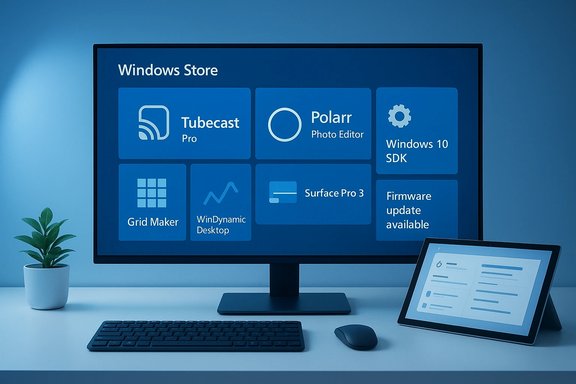
Quick snapshot: what landed this week
- Tubecast Pro — App of the Week: a native YouTube client focused on broad casting support (Chromecast, AirPlay, DLNA), background audio playback, and offline downloads.
- Polarr Photo Editor — pro-capable photo editor in a Store package, notable for RAW support, advanced sliders and presets.
- Grid Maker for Instagram — small image-slicing utility for multi-tile Instagram posts (availability and exact Store SKU may vary).
- WinDynamicDesktop — macOS “Dynamic Desktop” port that rotates wallpapers by local time and supports theme packs.
- Norton Safe Web (Edge extension) — URL-safety and site-reporting extension for Microsoft Edge.
- Platform-level items: an updated Windows 10 SDK/tooling drop and a Surface Pro 3 UEFI firmware update (noted as v3.11.760.0 in the roundup). Both items are flagged as higher-priority for admins.
Deep dive — Tubecast Pro: what it offers and what to test
Why BetaNews picked Tubecast Pro
BetaNews highlighted Tubecast Pro as the App of the Week because it bundles casting and playback conveniences many Windows users want in a native client: Chromecast, AirPlay, DLNA support, background audio on locked devices, multi-quality playback and offline downloads where permitted. For tablet and convertible owners, background audio is particularly useful — it transforms videos into a quasi-podcast experience while preserving battery.Key strengths
- Casting versatility: Chromecast, AirPlay and DLNA in one client reduces friction in mixed home AV setups.
- Background audio: Useful when the device is locked or used like an audio player.
- Offline downloads: Where permitted, downloads provide bandwidth resiliency for travel or poor connections.
Caveats and verification checklist
- DRM and YouTube API policy constraints: third-party YouTube clients depend on API rules and platform policy; a future policy change can break features or restrict downloads. This is a known risk with third-party clients.
- Codec and resolution support: Store pages sometimes omit exact container/codec support and whether 4K/HDR playback is available or limited by DRM/hardware. Users should test with their regular content types.
- Account entitlements and in-app purchases: offline downloads and background playback may require an in-app purchase or particular account/state; verify trial limitations on the Store listing.
Practical tips before installing Tubecast Pro
- Confirm publisher identity and Store SKU — similar names can mask different publishers.
- Test casting to your exact devices (Chromecast generation, Apple TV firmware, DLNA receivers).
- Try background audio and offline download flows during the Store trial or with a sample account.
- Check privacy permissions and what data the app transmits (sign-in telemetry or API requests).
Deep dive — Polarr Photo Editor: where it fits and who benefits
Polarr earned a flagship mention for delivering pro-grade controls in a compact interface. It aims at photographers, bloggers and students who need RAW support, batch export and a strong preset ecosystem without adopting a heavyweight Digital Asset Manager.Strengths
- RAW support and editing depth: Polarr’s slider and masking toolset lets users make specific, high-fidelity edits quickly.
- Fast learning curve: Compared with full desktop editors, Polarr is optimized for rapid edits and batch processing.
Caveats and verification
- Pricing and trials vary by region and over time; confirm current trial limits and pro-tier feature lists on the Store listing before purchasing.
- Output fidelity: when adopting for professional pipelines, verify color profiles and export fidelity with representative RAW files. This is standard best practice for any photo editor.
Practical guidance
- Test with original RAW files and a production sample workflow (export to TIFF/JPEG, inspect metadata).
- Use batch export on a small set to confirm speed and CPU/GPU behavior on your hardware.
- Confirm update cadence and developer support channel in case future OS changes affect functionality.
Small utilities worth trying — quick notes and risks
BetaNews’ roundups excel at surfacing small, focused tools that deliver immediate value. The following summarizes common picks, their benefits and caveats.WinDynamicDesktop
- What it is: an open-source port of macOS Mojave’s Dynamic Desktop; rotates wallpapers by local time and supports theme packs.
- Why try: provides tasteful, automatic wallpaper rotation with local-time cues and community theme packs.
- Caveat: Theme packs and updates are community-driven; check GitHub releases and Store metadata for maintenance status.
Grid Maker for Instagram
- What it does: slices images into multi-tile grids for Instagram posting.
- Why try: quick solution for designers and social users who post multi-tile layouts.
- Caveat: Store availability and exact SKU can be ephemeral; verify publisher data and reviews before installing.
Norton Safe Web (Edge extension)
- What it offers: URL safety ratings, site reporting and link scanning inside Edge.
- Why it matters: simple way to add another layer of link safety for casual users.
- Caveat: Browser extensions have broad permissions; carefully review requested permissions and corporate policies before deploying to managed browsers.
Platform-level items: Windows 10 SDK drop and Surface Pro 3 UEFI update
The roundup flagged two items with potential operational impact: a Windows 10 SDK/tooling update for developers, and a Surface Pro 3 UEFI firmware update (called out as v3.11.760.0 in the coverage). Both items require different handling than simple Store installs.Windows 10 SDK/tooling drop
- Why it matters: SDK updates can change build targets, introduce new APIs and affect compatibility for developers maintaining Store or native apps. Administrators of dev environments should stage these updates to avoid breaking CI pipelines.
- Practical admin checklist:
- Stage SDK update in a development branch and validate builds.
- Update CI images only after verification.
- Review release notes and Visual Studio tooling updates before mass adoption.
Surface Pro 3 UEFI firmware update (v3.11.760.0)
- Why it matters: firmware/UEFI updates often include security and manageability changes; this update reportedly introduces more granular UEFI lockdown controls for device hardening. That’s meaningful for education and enterprise deployments that rely on UEFI-level lockdown and secure-boot policies.
- Cautionary notes: UEFI changes can alter boot behavior, DTK/IMCI interactions, and remote management tooling compatibility. Test on a representative device pool and ensure recovery images or rollback procedures are available.
Security, privacy and operational hygiene — a compact playbook
BetaNews repeatedly urges readers to verify storefront details and vendor pages before installing; for good reason. Installing a seemingly benign Store app can still introduce privacy leaks, telemetry or unexpected permissions. The recommendations below synthesize those caveats into a practical checklist.- Confirm publisher identity: multiple apps with similar names exist in the Store. Check publisher metadata and reviews.
- Review permissions: browser extensions and apps that access the camera, microphone or file system require closer vetting.
- Test on non-production hardware first: especially for firmware, SDKs or system-level utilities. Maintain images and rollback procedures.
- Validate network behavior: inspect traffic to understand whether data is sent to third-party services and whether local processing is possible (important for OCR, translation and AI features).
- Lock down management: for enterprise rollouts, stage extensions and Store installs via enterprise Store controls or MDM policies rather than unregulated user installs.
Who should care and why — targeted takeaways
Home users and power consumers
The column’s consumer picks (Tubecast Pro, Polarr, dynamic wallpaper tools) deliver immediate user-facing improvement: better casting workflows, lighter professional photo editing, and prettier desktops without manual effort. These are low-friction installs for non-critical systems — but verify DRM/codec behavior for media apps.Creators and photographers
Polarr is the clearest win for creators who need RAW editing without the complexity of desktop DAM systems. Verify output fidelity and batch performance before committing to a production pipeline.IT administrators and developers
The SDK tooling drop and Surface Pro 3 UEFI firmware update are the main items that require staging. Treat SDK updates like any other development dependency change (CI validation, developer communications). Treat UEFI updates as firmware that must be staged, tested and rolled out with a rollback plan.Privacy-conscious users
Prefer apps that compute locally (e.g., local OCR or hashing tools that do not upload content). When an app uses cloud APIs, assess the provider’s data-retention and processing terms. Several of the smaller utilities noted in the roundup are single-purpose but rely on external services — treat these as discovery leads and confirm data flows.Cross-checks and unverifiable claims — what to flag
BetaNews does useful curation, but a few claims in the weekly lists are lightly documented and should be treated as discovery leads rather than definitive endorsements. Notable gaps include:- Exact codec/DRM support and 4K playback behavior for Tubecast Pro — the Store pages often omit low-level codec and DRM details, so hands-on testing is necessary.
- Some small utilities (for example, Grid Maker and Monitae) have limited independent documentation; availability and Store SKU can vary by region and may be ephemeral. Treat these mentions as starting points and verify the publisher and update cadence before relying on them.
- Firmware version references (Surface Pro 3 UEFI v3.11.760.0) were called out in the roundup; because firmware details and rollouts are time-sensitive, validate the exact version and release notes on vendor support pages prior to deployment.
Practical next steps — a short operational checklist
- For consumer installs: test in a sandbox or a non-critical user profile; confirm trial behavior, permissions and privacy settings.
- For developer SDK updates: run CI builds on a branch with the updated SDK and validate all required targets. Keep existing build images for rollback.
- For firmware/UEFI updates: stage on a small set of devices, confirm boot order and management integration, and ensure recovery images exist.
- For browser extensions and security tools: review requested permissions and test for false positives or conflicts with existing security stacks.
- For creative workflows (Polarr): run export fidelity tests and confirm color profile handling with representative files.
Final analysis — strengths, risks and editorial verdict
BetaNews’ weekly roundups continue to deliver exactly what they promise: rapid, curated discovery of Microsoft Store arrivals combined with a timely callout for platform-level changes worth vetting. The format’s strength is clarity and economy — a fast read and a quick list of things to try. For readers who want a steady stream of practical app leads and early signals about SDK and firmware movement, these posts are high value.The primary risk is the inherently shallow nature of the format: technical specifics (codec lists, DRM behavior, firmware side effects) often require deeper, hands-on verification that the roundup does not attempt to provide. For operationally significant items (dev tooling and firmware), BetaNews’ practice of flagging the items for administrators to verify is the right approach — but administrators must still run standard staging and rollback practices.
In short: treat the column as a discovery lens, not a deployment plan. Try the consumer picks on personal devices; stage SDKs and firmware in controlled environments; and verify small or lightly documented utilities before they touch critical data or join managed fleets. These steps preserve the convenience of quick discovery while minimizing risk.
This week’s selections demonstrate the Microsoft Store’s continuing role as a source of useful, focused apps and a nozzle for occasional platform-level changes. The combination of low-friction consumer picks and higher-impact developer/firmware items is the column’s core value: quick ideas for everyday productivity and explicit signals for administrators who must plan upgrades and manage risk.
Source: BetaNews https://betanews.com/series/best-windows-apps-this-week-53/]
