

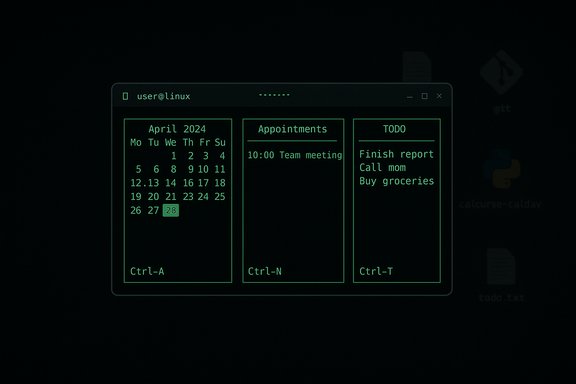
I switched my main calendar to a text-based, terminal-driven tool and the difference in speed, focus, and scriptability was immediate and, in many ways, surprising—what felt like friction in graphical calendars vanished when I learned to think in short commands and plain text.
Background
When people think “productivity app,” they picture polished interfaces, colorful blocks, and drag‑and‑drop scheduling. The counterintuitive alternative—calcurse, a compact, ncurses-based calendar for the command line—delivers the essentials in plain text, keyboard bindings, and tiny, local files. calcurse is free, open source, and explicitly designed for use from a terminal; it supports appointments, events, TODOs, recurring items, notifications, import/export, and experimental CalDAV synchronization. The MakeUseOf author’s experience—swapping a web calendar for calcurse and discovering a calmer, faster workflow—captures what many users report: fewer distractions, lightning‑fast launch, and an intentionality enforced by typing rather than tapping. That narrative is echoed across user threads and the calcurse documentation: calcurse’s niche is speed, simplicity, and scriptability.What calcurse actually is (and what it is not)
A quick technical profile
- Type: Terminal (ncurses) calendar and TODO organizer.
- Language & licensing: C, BSD‑licensed.
- Storage: Plain text files in ~/.calcurse (apts, todo, conf, keys, notes).
- Interaction: Keyboard-driven interactive UI; non‑interactive CLI options for scripting and output.
- Key features: Recurring appointments, all‑day events, notes per item, configurable notifications (including external commands or mail), import/export (iCalendar/pcal), hooks for running scripts, experimental CalDAV sync via a Python script.
The interface and workflow mindset
Calcurse presents three primary panes in interactive mode: daily appointments, a month calendar, and a TODO list. Everything can be navigated by keyboard; the program displays a small legend of keybindings and an in‑app help system accessible with?. The learning curve exists—power users quickly master keystrokes such as Ctrl+A to add appointments or Ctrl+T for todos—but that initial friction is precisely what reduces casual, browser‑based distractions. Verified features and technical capabilities
This section verifies calcurse’s most important capabilities with primary documentation and independent pages so readers can judge what to expect.Local text storage and version control friendliness
calcurse stores data as human‑readable text files in the calcurse data directory. That design makes it trivial to put your calendar under version control (Git) or to back it up as plain files. The hooks system lets users run scripts on load/save—perfect for automatic commits or triggers. The manual and support pages explicitly recommend using hooks to push calendars into Git or other workflows. Why this matters: plain text + hooks = reproducible, auditable calendar history without vendor lock‑in.Recurring events, reminders, and notifications
calcurse supports recurring rules (create an event, pressr to repeat), all‑day events, and reminders that can run arbitrary shell commands, send emails, or call scripts. The program can run as a background daemon to issue notifications even when interactive mode is not open. Those are not mere marketing claims—they are part of the CLI’s configuration and notification subsystems described in the manual. Command‑line queries and export
calcurse has a powerful non‑interactive mode for queries and automated tasks. Example uses:- Export the next seven days of appointments with the
-doption (e.g.,calcurse -d 7prints upcoming items). - Export the entire calendar to iCalendar format with
calcurse --export(alias-x), or generate pcal text exports. Redirect stdout to save the export to a file.
CalDAV synchronization — experimental but usable
calcurse doesn’t include native CalDAV sync inside the main binary; instead, the project ships calcurse‑caldav, a Python script that syncs a single calcurse data source with a CalDAV server. The calcurse team labels this script as alpha/experimental, and the docs warn users to make backups and expect occasional rough edges. The script supports OAuth2 for Google Calendar, basic auth for other servers, and initialization modes (--init=keep-local, keep-remote, two-way). Community threads show that CalDAV sync works for many people but can require troubleshooting—redirect URI quirks with Google OAuth2, server path adjustments for Nextcloud, and occasional HTTP errors are commonly reported. That means CalDAV with calcurse is possible, but not a one‑click affair the way cloud calendar clients behave. Installation and cross‑platform notes
Linux distributions and package managers
Calcurse is packaged widely: Debian, Ubuntu, Fedora, Arch, openSUSE, macOS Homebrew/MacPorts, and more. Installing from your distro’s package repositories is the recommended, fastest path:- Debian/Ubuntu: sudo apt update && sudo apt install calcurse
- Arch: pacman -S calcurse
- Fedora: dnf install calcurse
Windows via WSL
On Windows, the practical option is WSL (Windows Subsystem for Linux). Install WSL, set up an Ubuntu (or other distro) instance, and then install calcurse from the distro packages or compile from source. Because calcurse is terminal‑based, WSL gives a near-native experience. Many users run calcurse inside Windows Terminal or another terminal emulator.macOS and other Unix variants
macOS users can install calcurse with Homebrew or MacPorts. The program’s ncurses interface runs well in macOS terminal emulators.Real‑world limitations and risks (what the MakeUseOf article glosses over)
The terminal charm is real, but so are trade‑offs. The following items are the most important constraints to know before you commit.Timezones and iCalendar limitations
Calcurse’s iCalendar import/export and internal logic have meaningful limitations around timezones. The documentation explicitly warns that timezones are not fully taken into account during import/export in several parts of the manual. For users who work across multiple zones and rely on automatic adjustments, calcurse’s native behavior can be insufficient. The MakeUseOf author’s note about missing automatic timezone adjustments is accurate and maps to documented limitations. Practical consequence: If you have teammates in different countries or frequently travel, expect to do manual checks or use careful exports/edits to avoid wrong meeting times.CalDAV is experimental and sometimes fragile
calcurse‑caldav exists and can sync with CalDAV servers and even Google Calendar via OAuth2, but:- The script is labeled alpha and requires configuration and dependencies (httplib2, oauth2client for Google).
- Users report setup pitfalls: redirect URI problems, path mismatches for Nextcloud, HTTP 415 or 401 errors, and token refresh issues. Community threads document solutions, but they demand troubleshooting.
Collaboration, meeting links, and modern integrations
calcurse is not a team‑collaboration tool. It does not:- Automatically embed Google Meet/Zoom links.
- Provide invite tracking or RSVP widgets comparable to web clients.
- Offer a smooth UI for sharing calendars with non‑technical teammates.
Plain text storage — great for transparency, risky for secrets
Storing calendar data in plain text is empowering but also a privacy risk if you place those files in cloud folders without encryption. If you put ~/.calcurse under a Git repo that’s not encrypted, you must accept that your meeting details are readable. If you use CalDAV to sync with external services, OAuth tokens and credentials must be handled securely—calcurse‑caldav supports passing passwords via environment variables, but you must take care with token storage and permissions.Practical recipes: Try calcurse without breaking your workflow
Here are concise, practical steps that get you running—fast.1. Install and preview (30 minutes)
- Install from your package manager: sudo apt install calcurse (or the distro equivalent).
- Launch calcurse and press
?to open the help screen. - Add a simple appointment (Ctrl+A), add a todo (Ctrl+T), and practise navigation (Tab to move panels).
2. Export and import (safe migration)
- From your GUI calendar, export a single month or the required range as an iCalendar (.ics).
- Use calcurse’s import to pull in events, or use
calcurse --importif your build supports that; test on a small dataset first. The import supports common VEVENT properties but has documented limits (RRULE nuances and timezone caveats).
3. Keep a Git history (optional, advanced)
- Create a local Git repository in ~/.calcurse (or copy the important files in).
- Use the hook directory (~/.calcurse/caldav/hooks or the
hookssystem) to place a small script that runsgit add -A && git commit -m "calcurse: auto backup". The hooks system is designed for this.
4. Try CalDAV sync (only if you need mobile sync)
- Read the calcurse‑caldav documentation carefully and keep local backups.
- Install required Python dependencies: pip3 install --user httplib2 oauth2client (if using Google).
- Configure ~/.calcurse/caldav/config using the sample config and test with
calcurse-caldav --init=keep-localfor a safe first run. - If you run into OAuth redirect issues, copy the auth code from the redirected URL as described in the docs and in community threads. Expect to tweak
Hostname,Path, andRedirectURIfor your provider (Nextcloud and Google differ).
Who should try calcurse (and who should not)
Try calcurse if:
- You live in a terminal most of the day and want an instant calendar.
- You value offline-first tools, plaintext storage, and scriptability.
- You like the idea of versioning your calendar with Git or automating reminders via shell scripts.
- You want to reduce distraction and force intentional scheduling.
Don’t rely on calcurse if:
- Your job depends on shared, collaborative scheduling, meeting link plumbing, or automatic timezone conversions.
- You need a polished visual week view with colors and drag‑and‑drop rescheduling for a team.
- You need a no‑setup, cloud‑first mobile sync for multiple calendars out of the box.
Critical analysis — why calcurse matters and what to watch for
Strengths
- Speed & focus: startup time is effectively instantaneous; terminal workflows remove browser-induced distraction loops.
- Scriptability: full CLI and export facilities let you integrate calendar data into almost any automation pipeline.
- Privacy & portability: plain text files are portable and auditable; you keep control over your data.
- Low resource footprint: ideal for older hardware, minimal VM setups, and headless servers.
Risks & operational costs
- Synchronization complexity: CalDAV sync is possible but fragile and requires manual setup and periodic maintenance; the calcurse team marks calcurse‑caldav as experimental. That’s a real operational cost if you expect cloud parity with Google Calendar.
- Timezone handling: documented limitations make cross‑timezone scheduling error prone without manual checks.
- Collaborative shortcomings: lacking invitation workflows, automated RSVP tracking, or meeting link management is a dealbreaker for many collaborative roles.
- Security posture: plaintext storage is a double‑edged sword—great for audits, risky for exposure if files are synced insecurely. Users must adopt encryption or secure sync channels for sensitive schedules.
Final verdict
For a solo user, developer, or sysadmin who wants a fast, distraction‑free calendar that belongs to them, calcurse is an excellent, defensible choice. The tradeoff is explicit: you trade the convenience and integrations of graphical web calendars for speed, transparency, and scriptability. That trade works wonderfully for people who value control and reduced distraction.If your work depends on collaborative scheduling, automatic timezone adjustment, or integrated meeting links, calcurse should be used alongside (not instead of) a mainstream calendar service—perhaps authoring events in calcurse and occasionally exporting or syncing a single authoritative calendar via calcurse‑caldav once the setup is stable. The official calcurse documentation and man pages describe the feature set and caveats precisely, and the alpha status of calcurse‑caldav means you should allocate time for configuration and periodic troubleshooting. For anyone curious about the terminal-first approach: install it, give it a week, and accept the initial shortcut memorization phase. The reduction in clicks and the regained control over where and how your calendar data lives is, for many, shockingly efficient.
Key resources referenced in this article (for verification and deeper reading): calcurse project pages and manual, the calcurse‑caldav documentation, distribution package pages and community installation guides.
Source: MakeUseOf I switched to a text-based calendar and it’s shockingly efficient
