

Google’s new “Cameyo by Google” brings Windows app streaming natively into ChromeOS and the Chrome browser, presenting legacy Windows applications as lightweight, browser‑streamed remote apps rather than full Windows desktops — a tactical move aimed at lowering the enterprise friction for moving users to ChromeOS and cloud‑first endpoints.
ChromeOS has steadily broadened its enterprise appeal by layering support for Android, Linux containers, and several virtualization options on top of its browser‑first core. That roadmap left a conspicuous gap: running mission‑critical Windows client apps without a franchise‑level virtual desktop. Google’s acquisition of Cameyo — a specialist in Virtual Application Delivery (VAD) — and the relaunch of the product as Cameyo by Google is explicitly designed to close that gap. The acquisition and integration path began with a partnership and culminated in a first‑party offering now tied into Chrome Enterprise tooling. The timing is strategic. The mainstream Windows 10 end‑of‑support deadline and associated upgrade friction have accelerated interest in alternate endpoint strategies, including ChromeOS and ChromeOS Flex for repurposing older hardware. Organizations confronting device refresh cycles or hardware that cannot meet Windows 11 requirements are actively evaluating hybrid strategies: keep Windows where absolutely required, and move the rest of the fleet to lighter, centrally managed endpoints. Cameyo by Google positions itself as the compatibility layer for that second bucket.
The initiative is both strategic and sensible. It reduces migration risk, stretches hardware lifecycles, and provides security advantages when implemented with appropriate identity and DLP controls. IT teams should treat it like any other major platform decision: pilot aggressively, validate licensing, and measure performance under representative conditions before scaling. If those steps are followed, Cameyo by Google could change how organizations think about endpoint strategy in a post‑Windows 10 world.
Cameyo by Google is available now and integrated into Chrome Enterprise offerings; procurement and technical teams should engage with Google or channel partners to evaluate the right licensing and deployment model for their needs, and prioritize pilots for the highest‑value, lowest‑risk apps first.
Source: findarticles.com Google Revives Cameyo to Run Windows Apps on ChromeOS
 Background
ChromeOS has steadily broadened its enterprise appeal by layering support for Android, Linux containers, and several virtualization options on top of its browser‑first core. That roadmap left a conspicuous gap: running mission‑critical Windows client apps without a franchise‑level virtual desktop. Google’s acquisition of Cameyo — a specialist in Virtual Application Delivery (VAD) — and the relaunch of the product as Cameyo by Google is explicitly designed to close that gap. The acquisition and integration path began with a partnership and culminated in a first‑party offering now tied into Chrome Enterprise tooling. The timing is strategic. The mainstream Windows 10 end‑of‑support deadline and associated upgrade friction have accelerated interest in alternate endpoint strategies, including ChromeOS and ChromeOS Flex for repurposing older hardware. Organizations confronting device refresh cycles or hardware that cannot meet Windows 11 requirements are actively evaluating hybrid strategies: keep Windows where absolutely required, and move the rest of the fleet to lighter, centrally managed endpoints. Cameyo by Google positions itself as the compatibility layer for that second bucket.What Cameyo by Google actually is
Virtual App Delivery, not full VDI
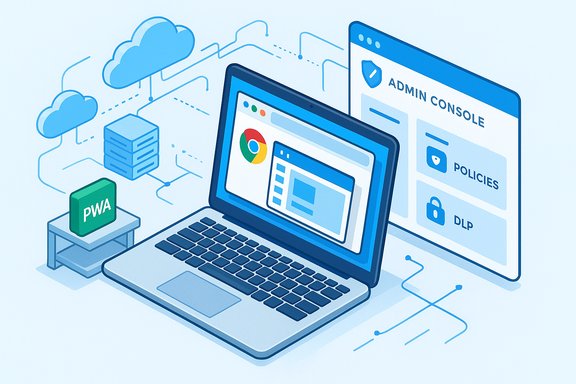
Cameyo by Google implements a Virtual App Delivery (VAD) model: instead of streaming an entire Windows desktop session, it streams individual application windows into the browser. The result is an app‑first experience where legacy Windows programs appear in their own resizable windows or as Progressive Web Apps (PWAs) on the ChromeOS shelf or Chrome browser, preserving familiar workflows while eliminating local installs. This reduces compute and session overhead versus traditional VDI solutions and simplifies administration for IT.Deep ChromeOS integration
Google and Cameyo have integrated the service with ChromeOS features that make virtual apps feel native:- Progressive Web App (PWA) packaging so virtualized apps can be pinned to the shelf and launched like installed apps.
- Native file system integration that lets virtual apps open, edit, and save local files as if they were local applications.
- Clipboard and file‑type handling so double‑clicking a file launches the correct virtual app.
- Management integration with the Google Admin console and Chrome Enterprise policies, enabling centralized provisioning, access control, and DLP filters for virtual apps.
Identity, access control, and data protection
Cameyo by Google supports modern identity federation and single sign‑on workflows through Google Workspace, Okta, and Microsoft Entra ID, so IT teams can leverage existing access controls and conditional access policies. Integration with Chrome Enterprise Premium introduces additional browser‑centric protections such as URL filtering and data loss prevention (DLP) to limit exfiltration from a streamed application. Those controls aim to keep sensitive data in the cloud or data center rather than on devices.Why this matters for enterprises and IT teams
A practical path off Windows‑only endpoints
Many enterprises maintain small but critical Windows applications that block wholesale moves to non‑Windows endpoints. Rewriting or replacing those apps is expensive and time consuming. Cameyo by Google lets organizations serve the exact Windows clients required, without the overhead of full desktop virtualization or complex endpoint images. For IT, that translates to fewer Windows images to maintain, lower patch surface on endpoints, and simplified lifecycle management for client apps.Cost and operational considerations
Because VAD streams single apps instead of full desktops, infrastructure needs are typically lower than high‑density VDI farms. Independent vendor studies (including those highlighted by Cameyo and ESG) argue for material TCO reductions compared to traditional VDI; Google and vendor materials cite reductions in operational costs and simplified provisioning as concrete benefits of the approach. That said, costs vary by deployment model: self‑hosted options and fully hosted SaaS tiers have distinct price points and trade‑offs. Recent reporting and vendor pricing pages indicate a range of commercial models and list price reference points for organizations to consider.Security posture: data stays off the device
A core security benefit is architectural: when apps run remotely and only UI drawing and input are exchanged with the client, sensitive data never lands on the endpoint. This model aligns with many zero‑trust principles (reduce the endpoint attack surface, centralize data controls) and can make compliance easier for regulated workloads. However, zero‑trust is a broader program, and streaming an app alone is not a full compliance silver bullet — organizations still need strong identity controls, telemetry, and logging.How Cameyo by Google compares to VDI, Cloud PCs and Parallels
VDI (Citrix / VMware Horizon) — breadth at infrastructure cost
Traditional VDI provides a complete Windows desktop and full OS‑level control, which is essential for some power users. But that power comes with higher infrastructure, image management, and licensing complexity. Cameyo’s remote app model intentionally narrows scope to the application layer, trading generality for lower overhead and faster session starts. For many users who only need a handful of Windows apps, VAD is materially cheaper and simpler to operate.Cloud PCs (Windows 365 / Azure Virtual Desktop) — full Windows with cloud simplicity
Microsoft’s Windows 365 and Azure Virtual Desktop simplify Windows lifecycle by moving the image to the cloud. They still require managing Windows images and licensing, however, and typically stream full desktops. Cameyo carves out the use case where organizations want access to legacy Windows apps but not a full Windows environment. The trade‑off is that VAD is less suitable for workloads that require kernel‑level drivers, deep local hardware access, or offline use.Parallels on ChromeOS — full VM on a Chromebook
Parallels Desktop for Chrome Enterprise runs full Windows VMs on supported Chromebooks, useful where local Windows integration is required. Parallels requires specific device support and licensing. Cameyo’s approach is complementary: VAD can scale to large fleets (including ChromeOS Flex and non‑managed Chrome instances) without device‑level virtualization or per‑device licensing constraints in some models.Strengths and clear advantages
- Low friction end‑user experience: Apps behave like native windows or PWAs, minimizing retraining and preserving workflows.
- Centralized policy control: Admins can use Google Admin console and Chrome Enterprise controls to manage app access, DLP, and URL filtering for virtual apps.
- Reduced endpoint maintenance: No Windows image to update on each device; fewer local patches and driver headaches.
- Favorable TCO for many scenarios: For workloads limited to a set of legacy Windows apps, VAD can significantly reduce infrastructure, operational, and licensing complexity compared with full VDI farms.
- Faster session start and lower compute per session: Because only the application state is streamed, resource utilization is typically lower than a full desktop stream.
Risks, unresolved questions and practical limits
1) Licensing realities
Application licensing is often the stickiest issue. Independent ISV contracts vary: some publishers allow streaming models without significant changes, others require additional VDA, per‑user, or site licenses. Organizations must audit vendor license agreements carefully before routing a commercial Windows application through a VAD service. Market reporting flags licensing as one of the earliest barriers IT teams will need to solve.2) Hardware acceleration and graphics workloads
Cameyo by Google is pitched primarily at business and education workloads that are not GPU‑intensive. Exposing GPU acceleration across streamed apps requires GPU‑backed servers and careful architecture; the technology is evolving but not yet a drop‑in replacement for local GPUs in CAD, video editing, or advanced visualization tools. Expect pilots and specialized infrastructure for graphics‑heavy use cases.3) Peripheral support (USB, printers, file handlers)
Full compatibility with USB devices, local printers, scanners, and complex file handlers can be brittle. ChromeOS has improved support for file and clipboard integration, but some specialized peripherals that need kernel‑level drivers will still require local Windows endpoints or full desktop virtualization. Admins should inventory peripherals tied to workflows and run functional tests before broad rollouts.4) Network dependency and latency
Remote app streaming depends on reliable, low‑latency networks. While single app sessions are more forgiving than full desktops, user experience degrades noticeably as round‑trip latency climbs. Organizations with distributed field teams or unreliable branch connectivity must plan around network topology, caching, and edge deployments.5) Unverified or aspirational claims
Some product marketing language extrapolates security benefits or seamlessness beyond what is trivially verifiable. For example, claims that data “never reaches the endpoint” can be true in a pure VAD model, but client side caching, temporary files, clipboard leaks, or third‑party browser extensions can introduce exceptions. Treat broad security claims as directionally correct but audit and validate in your environment. If a claim cannot be corroborated in product documentation or independent testing, flag it as unverified for legal and procurement teams.Pricing and deployment models — what to expect
Cameyo historically offered both fully hosted SaaS and self‑hosted server models, and recent market reporting indicates multiple price points depending on the chosen architecture. Public reporting on the Cameyo relaunch references per‑user pricing for certain deployment models and shows differentiated cost tiers for self‑hosted versus fully hosted scenarios. Organizations should expect to model costs across:- Faas/SaaS vs self‑hosted Cameyo servers.
- Chrome Enterprise and ChromeOS licensing per device (where applicable).
- Compute, GPU, and networking costs for backend infrastructure (if self‑hosting).
- ISV application licensing costs for streamed apps.
Implementation checklist for IT teams
- Inventory critical apps and map each to one of: web, Android, Linux, or Windows‑only. Prioritize apps appropriate for VAD.
- Run license reviews with ISV legal teams for every Windows app planned for streaming.
- Pilot with representative users (finance, clinical, engineering) to validate performance and peripheral compatibility.
- Test end‑to‑end security: SSO flows, conditional access, DLP, audit logs, and incident response — don’t rely solely on marketing claims.
- Measure real‑world latency from office and remote locations; add edge compute or prioritized networking where needed.
- Prepare fallback plans (local Windows images, Parallels, or Azure Virtual Desktop) for users who require full OS integration.
- Build a device‑agnostic rollout plan: ChromeOS devices, Chrome browser on Windows/Mac, and ChromeOS Flex machines all represent different operational tradeoffs.
Use cases where Cameyo by Google shines
- Finance teams with a handful of legacy desktop accounting applications (QuickBooks, custom ledger tools) that are expensive or risky to rewrite.
- Healthcare clinics that need secure access to legacy EHR modules without changing clinician workflows.
- Education institutions that want to retire lab Windows images and still provide students access to essential Windows apps.
- Frontline workers and kiosks that require a small set of Windows utilities while leveraging the manageability of ChromeOS.
Strategic implications for ChromeOS adoption
Cameyo by Google removes one of the most persistent excuses for not deploying ChromeOS at scale: “We have a few Windows apps we can’t live without.” By lowering the cost and operational complexity of providing those apps, ChromeOS becomes a more realistic choice for mixed‑environment endpoints. That improves the total cost of ownership calculus for many organizations and makes ChromeOS a more credible option for broader enterprise rollouts. However, the adoption wave will be deliberate and phased — migration of core systems and rewrites remains a multi‑year effort for many enterprises. Expect migrations to proceed app‑by‑app, department‑by‑department.What to watch next
- Licensing outcomes: how major ISVs respond to streamed delivery and whether their licensing terms evolve to accommodate VAD at scale.
- GPU and hardware acceleration: announcements or technical guides enabling reliable GPU passthrough or server‑side acceleration for CAD and creative workflows.
- Deeper ecosystem integrations: printing, advanced USB peripheral handling, and seamless SSO/conditional access across hybrid device fleets.
- Independent performance audits and security penetration tests that validate vendor claims in real customer environments.
Final analysis — pragmatic, not magical
Cameyo by Google is a significant, pragmatic step in making ChromeOS a more complete enterprise platform. It should be understood as a practical compatibility layer rather than a universal replacement for Windows. For many organizations, Cameyo removes the last practical blocker to deploying Chromebooks widely: selective access to legacy Windows apps with reduced infrastructure overhead. For others — heavy GPU users, deep OS integrators, or businesses with mission‑critical local drivers — full Windows endpoints or cloud PC solutions will remain necessary.The initiative is both strategic and sensible. It reduces migration risk, stretches hardware lifecycles, and provides security advantages when implemented with appropriate identity and DLP controls. IT teams should treat it like any other major platform decision: pilot aggressively, validate licensing, and measure performance under representative conditions before scaling. If those steps are followed, Cameyo by Google could change how organizations think about endpoint strategy in a post‑Windows 10 world.
Cameyo by Google is available now and integrated into Chrome Enterprise offerings; procurement and technical teams should engage with Google or channel partners to evaluate the right licensing and deployment model for their needs, and prioritize pilots for the highest‑value, lowest‑risk apps first.
Source: findarticles.com Google Revives Cameyo to Run Windows Apps on ChromeOS
