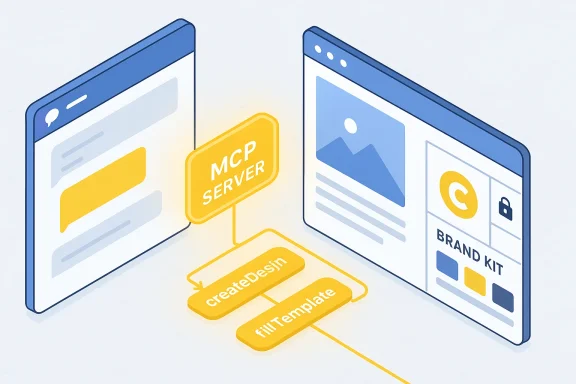
Canva’s design engine now rides shotgun inside ChatGPT, letting users turn a plain-language prompt into a layered, editable, on‑brand visual without leaving the chat — a change that promises to collapse the familiar “idea → mockup → manual reformat” loop into a single conversational workflow and, if properly governed, to speed routine marketing and sales work across teams of all sizes.
For years the promise of generative AI for creative teams has been straightforward: faster ideation, cheaper first drafts. The reality has been messier — AI could sketch attractive visuals, but those outputs were frequently off‑brand, flattened into static PNGs, and required significant designer time to become reusable templates or localized variants. Canva’s recent expansion of its AI connector — bringing Brand Kits, fonts, colors and logos into ChatGPT via the Canva MCP (Model Context Protocol) Server — is designed to address that “last‑mile” problem by applying brand rules at generation time and returning editable Canva projects instead of one‑off images.
This is not simply a UI plugin. It’s a platform-level connector that combines three elements: (1) Canva’s Design Model that produces layered, metadata‑rich projects; (2) the Canva AI tools and copilot features that can edit and translate across an entire design; and (3) the Canva MCP Server, the connector that exposes a user’s brand context and assets to external assistants such as ChatGPT, Anthropic’s Claude and Microsoft Copilot. Canva and partner reporting say the MCP Server has already produced millions of designs across assistants — a vendor figure commonly cited in coverage that should be treated as directional rather than independently audited.
That said, the integration raises real governance, security and licensing questions. Enterprises should pilot deliberately, require admin controls for connector activation, negotiate robust contractual protections for data and fonts, insist on provenance and audit logs, and demand independent security attestations for MCP implementations. For regulated or high‑value outputs, preserve human sign‑off as non‑negotiable.
This feature is not a replacement for design craft; it is a powerful productivity layer that amplifies both potential and risk. Treat it as a platform capability that requires the same lifecycle discipline you apply to identity, storage and critical productivity services: pilot, instrument, govern, and then scale. If managed well, this is the kind of practical product advance that could finally deliver on generative AI’s long‑promised ROI for real, usable creative work.
Canva’s integration with ChatGPT is a structural step in AI workflows — one that will change how brands produce visual identity in conversation. The technical plumbing is promising; the human systems around it will determine whether it becomes a reliable productivity multiplier or an uncontrolled source of risk.
Source: DesignTAXI Community Canva plugs logos, fonts & colors straight into ChatGPT for instant on-brand designs
 Background / Overview
For years the promise of generative AI for creative teams has been straightforward: faster ideation, cheaper first drafts. The reality has been messier — AI could sketch attractive visuals, but those outputs were frequently off‑brand, flattened into static PNGs, and required significant designer time to become reusable templates or localized variants. Canva’s recent expansion of its AI connector — bringing Brand Kits, fonts, colors and logos into ChatGPT via the Canva MCP (Model Context Protocol) Server — is designed to address that “last‑mile” problem by applying brand rules at generation time and returning editable Canva projects instead of one‑off images. This is not simply a UI plugin. It’s a platform-level connector that combines three elements: (1) Canva’s Design Model that produces layered, metadata‑rich projects; (2) the Canva AI tools and copilot features that can edit and translate across an entire design; and (3) the Canva MCP Server, the connector that exposes a user’s brand context and assets to external assistants such as ChatGPT, Anthropic’s Claude and Microsoft Copilot. Canva and partner reporting say the MCP Server has already produced millions of designs across assistants — a vendor figure commonly cited in coverage that should be treated as directional rather than independently audited.
What changed — the product shift that matters
From flattened mockups to editable, brand‑aware projects
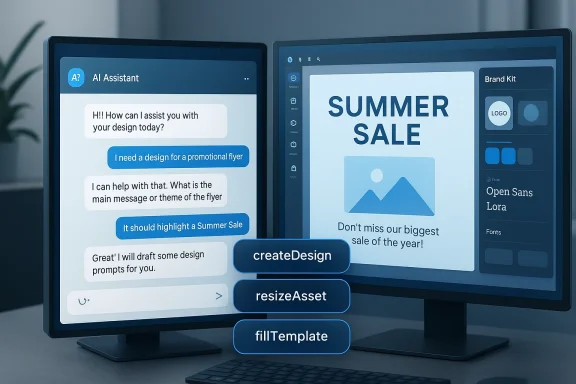
Historically AI-driven visual outputs were static: attractive but not reusable. The Canva–ChatGPT integration changes the end artifact. When ChatGPT calls Canva through the connector it can now:- Apply a stored Brand Kit (logos, licensed fonts, validated color palettes and locked templates) automatically during generation.
- Return layered, editable Canva projects that keep text boxes, image placeholders, layout hierarchy and metadata intact — not just a raster image.
- Provide a live preview and in‑chat iterative edits, letting you refine copy or layout inside the conversation before opening the project in Canva for final polish.
How the flow works — user journey at a glance
- Set up a Brand Kit in Canva (upload logos, declare colors, link licensed fonts).
- Connect your Canva account to ChatGPT when prompted (OAuth consent and scoped permissions).
- Tell ChatGPT what you need — e.g., “Canva, create a 10‑slide pitch deck for Q2 that uses our Marketing Brand Kit.”
- ChatGPT issues a structured intent to Canva’s MCP Server, which generates an editable Canva project server‑side and returns a preview visible inside the chat.
- Iterate in chat, then open the returned project in Canva for collaboration, export and sharing.
Why enterprises and small teams should care
Real productivity gains
- Time-to-first-draft shrinks: non‑designers can produce client‑ready slides, social posts, or flyers in minutes rather than hours.
- Consistency at scale: Brand Kits enforce identity rules the moment content is generated, reducing the risk of off‑brand or non‑compliant materials.
- Lower cost of creative ops: franchises, field sales, and local marketing teams can generate assets that adhere to corporate identity without hand‑holding from centralized design teams.
Democratization of design — for better and worse
Non‑design teams gain agency: a store manager, recruiter, or local agent can create polished collateral quickly. That democratization is a genuine win for speed and autonomy — but it also raises governance and licensing questions (below) that legal and brand teams must address before wholesale adoption.Technical anatomy — Model Context Protocol (MCP), intents and metadata
MCP in plain language
The Model Context Protocol (MCP) is the interoperability layer that allows an AI assistant to call into an app’s backend with structured, scoped intents. Instead of returning a textual suggestion or a flat image, the assistant issues verbs like createDesign, resizeAsset, or fillTemplate to the MCP server, which executes those operations inside the app and returns an actionable artifact — in this case, an editable Canva project. MCP relies on OAuth‑style scoping so assistants only get the permissions the user grants.Design models that return structure, not pixels
Canva’s design model understands objects and layers — text blocks, image placeholders, layout rules, and locked elements — and can generate outputs that preserve those semantics. The effect is the difference between receiving a screenshot and receiving the original, layered document you can edit and reuse. That structural fidelity underpins real reuse, resizing, localization and automation.Compliance, security and governance: the unstated friction
Canva and partner outlets emphasize privacy and security under frameworks like “Canva Shield,” but the integration increases the surface area for risk in several ways. These are not theoretical: the integration pattern (assistant → MCP connector → app) raises concrete governance and threat considerations.Key risk vectors
- Data leakage and exposure: connecting a Brand Kit to an external assistant increases the channels through which logos, proprietary templates and licensed fonts can be accessed. Enterprises must treat MCP connectors as high‑privilege integrations.
- Licensing and font enforcement: Brand Kits may contain licensed fonts and paid stock assets. Organizations must ensure the generated outputs and downstream sharing respect licensing terms and that connectors enforce usage constraints.
- Provenance and audit trails: questions remain about how generated assets are logged, whether prompt history and transformation metadata are preserved for audit and compliance, and how editing histories are exposed to legal or regulatory review. Early coverage highlights that provenance tooling is still emerging.
- Protocol‑level security: independent analysis of MCP shows architectural weaknesses around attestation and prompt injection possibilities. A security review published on the preprint server describes protocol‑level vulnerabilities that increase the risk of server‑side prompt injection and capability spoofing unless MCP implementations adopt stronger message authentication and attestation. This is a non‑trivial risk for high‑privilege connectors.
Availability and regional caveats
Canva states the ChatGPT integration is rolling out broadly but with regional and plan‑level exceptions — some functionality may be restricted or staged across geographies and subscription tiers. Procurement teams should not assume immediate global parity.Practical governance checklist — what IT, procurement and brand teams must do now
If your organization pilots this integration, treat it like any other high‑privilege SaaS connector. The following checklist converts healthy skepticism into operational controls:- Require admin approval for connector linkage and restrict who can invoke Brand Kits from external assistants.
- Enforce SSO + MFA for all accounts that will use connectors.
- Negotiate contractual non‑training clauses and explicit data‑retention policies with third parties to ensure proprietary assets are not ingested into model training without consent.
- Establish audit trails and versioning: ensure every generated asset carries metadata for origin, prompt, and edits; require exportable logs for legal review.
- Implement role‑based access to Brand Kits: separate corporate and local Brand Kits, and require approval for the assistant to access enterprise Brand Kits.
- Create human‑in‑the‑loop sign‑off for all external‑facing content and regulated material. Use the ChatGPT preview as a draft — not as final approval — for legal or regulated copy.
Real‑world use cases and limitations
Where it works best
- Local marketing at scale: franchises, real‑estate brokers and field sales teams can produce consistent collateral without central designers.
- Rapid deck creation: sales and product teams can turn outlines into branded presentations quickly.
- Social campaigns: small businesses can create on‑brand social posts and carousels with minimal tooling overhead.
Where human designers still win
- High‑stakes creative direction: brand identity refreshes, complex art direction, and original illustration still require craft skills and a human creative director.
- Regulated copy: legal statements, product claims and compliance language must be reviewed and validated by counsel; ChatGPT’s copy generation can introduce factual errors even when layout is correct.
- Nuanced typography and kerning: automated application of fonts and layout tokens is powerful, but fine adjustments for typographic rhythm or bespoke branding systems remain designer work.
The vendor claims to treat cautiously
Canva and coverage repeatedly reference an adoption figure — “more than 12 million designs” created via the MCP Server across assistants. That number is a useful directional indicator of traction, but it is a vendor‑reported aggregate that likely mixes light interactions (a preview generation) with heavier uses (full presentation renders). Treat usage metrics as signals that merit contractual verification if they influence procurement decisions or capacity planning.Security spotlight: MCP vulnerabilities and mitigation strategies
A recent academic security analysis of the MCP specification outlines architectural vulnerabilities that can amplify prompt-injection attacks and privilege‑escalation risks in tool integrations. The core issues are not minor implementation bugs — they concern protocol assumptions, message authentication and capability attestation. Practically, that means:- Vendors and integrators must adopt message authentication and attestation for MCP exchanges.
- Enterprises should insist on proof of mitigations (e.g., MCPSec-style extensions) and third‑party security audits before deploying MCP connectors into production.
- For sensitive environments, consider air‑gapped or isolated workflows where the assistant’s access to brand assets is restricted or proxied through internal gateways.
Deployment playbook — how to pilot responsibly
- Start small: run a four‑week pilot with a focused set of personas (sales, field marketing, local store managers). Measure time‑to‑first‑draft and design correction rates.
- Define success metrics: average edit time after generation, number of assets published per week, brand anomalies detected, user satisfaction.
- Instrument everything: log connector activity, preserve prompts and response metadata, and require exportable audit logs.
- Train users: teach OAuth consent hygiene, prompt templates that generate predictable outputs, and mandatory human sign‑off for sensitive materials.
- Iterate governance: refine access policies, apply role‑based restrictions and extend DLP where necessary.
Strategic implications — why this matters beyond speed
Canva’s approach is emblematic of a larger shift in AI UX: assistants are becoming execution engines, not just idea machines. By turning Brand Kits into active context rather than static PDFs, Canva is positioning itself as the “visual brain” behind multiple assistants. For organizations, that means one of two outcomes:- If treated as a strategic platform with proper governance, the integration can yield a sustained ROI by lowering creative ops costs and increasing publish velocity.
- If adopted ad hoc without controls, it can spawn shadow workflows, licensing missteps and audit gaps that outweigh the productivity gains.
Strengths and notable wins
- Practical last‑mile fix: the integration directly addresses the most persistent pain point in AI visual workflows — off‑brand, flattened outputs — by making brand fidelity part of generation.
- Preserves editability: returning layered Canva files instead of raster images keeps designers in the loop and supports scalable reuse.
- Ecosystem leverage: supporting multiple assistants (ChatGPT, Claude, Copilot) gives organizations flexibility and reduces vendor lock‑in for visual generation workflows.
- Lowered barrier to entry: small businesses and non‑design teams gain access to professional-looking, brand‑compliant assets without hiring outside help.
Risks and open questions
- Protocol security: MCP’s architecture invites scrutiny; protocol‑level fixes and independent audits are essential.
- Data governance and licensing: enterprises need contractual clarity on training, retention, and licensing enforcement for Brand Kit assets.
- Auditability and provenance: provenance tools for proving origin, prompt history and editorial lineage are still maturing.
- Human accountability: AI can produce layout‑correct assets that still contain factual errors; human review remains mandatory for regulated, public‑facing content.
Final assessment and recommendations
Canva’s plug‑into‑ChatGPT move is consequential: it turns an assistant into a production pathway for visually consistent, editable content and shrinks the friction between ideation and execution. For marketing teams, sales enablement, and small businesses the value proposition is immediate — faster, brand‑safe outputs that lower the cost of producing routine collateral.That said, the integration raises real governance, security and licensing questions. Enterprises should pilot deliberately, require admin controls for connector activation, negotiate robust contractual protections for data and fonts, insist on provenance and audit logs, and demand independent security attestations for MCP implementations. For regulated or high‑value outputs, preserve human sign‑off as non‑negotiable.
This feature is not a replacement for design craft; it is a powerful productivity layer that amplifies both potential and risk. Treat it as a platform capability that requires the same lifecycle discipline you apply to identity, storage and critical productivity services: pilot, instrument, govern, and then scale. If managed well, this is the kind of practical product advance that could finally deliver on generative AI’s long‑promised ROI for real, usable creative work.
Canva’s integration with ChatGPT is a structural step in AI workflows — one that will change how brands produce visual identity in conversation. The technical plumbing is promising; the human systems around it will determine whether it becomes a reliable productivity multiplier or an uncontrolled source of risk.
Source: DesignTAXI Community Canva plugs logos, fonts & colors straight into ChatGPT for instant on-brand designs