

Chapman University’s Information Systems & Technology (IS&T) has opened registration for its Spring 2026 Technology Workshops, a semester-long series that blends practical Microsoft 365 skills with hands-on introductions to campus-specific AI tooling — including Chapman’s own PantherAI — alongside sessions on OneDrive, Teams, SharePoint, Outlook, Word, PowerPoint, Canva, and an explicit look at approved AI options for the community.
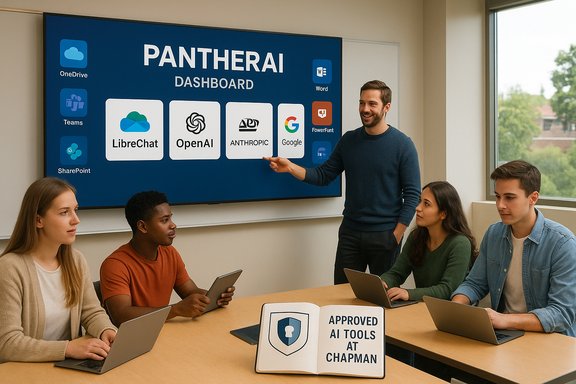
Chapman’s IS&T program has run recurring seasonal workshop series for staff and faculty throughout 2024 and 2025, and the Spring 2026 lineup continues that pattern with a clear emphasis on productivity and responsible AI adoption. The Spring schedule lists a mix of short practical sessions (for example, OneDrive and Outlook tips) and targeted AI-focused presentations, such as “A PantherAI Overview” and “Learning About Approved AI Tools at Chapman University.” These workshops are offered as live sessions with recordings available to registered attendees. Chapman’s PantherAI — a campus-hosted multi-model AI portal built on the LibreChat open-source framework — is already positioned by IS&T as a central piece of the university’s AI strategy. PantherAI aggregates access to multiple models (OpenAI, Anthropic, Google) and is framed as a privacy-minded gateway that keeps chat histories under the university’s control. IS&T has publicly described PantherAI’s LibreChat foundation and positioned it as a practical alternative to requiring individual paid accounts for commercial AI services.
Key governance considerations that campuses should address and that Chapman appears to be recognizing through training:
This model reflects two parallel trends:
Source: Chapman Blogs Announcing IS&T’s Spring 2026 Technology Workshops
 Background
Chapman’s IS&T program has run recurring seasonal workshop series for staff and faculty throughout 2024 and 2025, and the Spring 2026 lineup continues that pattern with a clear emphasis on productivity and responsible AI adoption. The Spring schedule lists a mix of short practical sessions (for example, OneDrive and Outlook tips) and targeted AI-focused presentations, such as “A PantherAI Overview” and “Learning About Approved AI Tools at Chapman University.” These workshops are offered as live sessions with recordings available to registered attendees. Chapman’s PantherAI — a campus-hosted multi-model AI portal built on the LibreChat open-source framework — is already positioned by IS&T as a central piece of the university’s AI strategy. PantherAI aggregates access to multiple models (OpenAI, Anthropic, Google) and is framed as a privacy-minded gateway that keeps chat histories under the university’s control. IS&T has publicly described PantherAI’s LibreChat foundation and positioned it as a practical alternative to requiring individual paid accounts for commercial AI services. What the Spring 2026 Workshops Cover
The workshop slate is intentionally broad, balancing basic productivity with AI literacy:- OneDrive: File Management Made Simple (offered multiple dates)
- Microsoft Teams Best Practices
- SharePoint: Efficient Team File Management
- Chapman’s own PantherAI: overview and practice sessions
- Getting Started with Canva
- Outlook inbox cleanup and calendar/scheduling tips
- “Approved AI Tools at Chapman University”
- Microsoft Word and PowerPoint time-savers
- Microsoft Copilot for Web overview (late in the semester)
Format and logistics
Workshops are offered virtually via Chapman’s event links (Zoom), and registration guarantees access to the session recording. IS&T encourages early registration because seats are limited and recordings are distributed only to registrants. The program is promoted through Chapman’s IS&T blog and campus events pages.Why These Workshops Matter: Productivity, Creativity, and Risk Management
Higher education IT training programs increasingly combine routine productivity topics (OneDrive, Teams, SharePoint) with AI literacy work. That’s sensible: staff and faculty need to be efficient with collaboration tools while also understanding how AI can augment or complicate academic workflows.- Productivity: Mastering OneDrive, SharePoint, and Teams cuts down on duplicate files, version confusion, and wasted time tracking the latest document iteration.
- Creativity: Tools like Canva and Copilot-powered features in Word/PowerPoint accelerate content creation and iteration.
- Risk management: Campus-controlled AI portals such as PantherAI attempt to give universities control over data flows and compliance — but they also introduce institutional responsibility for governance, transparency, and user education.
PantherAI: What It Is and What to Watch For
The technical baseline
PantherAI is Chapman’s internally hosted AI portal that uses LibreChat as its front-end/middleware. LibreChat allows institutions to present a single user interface that connects to multiple back-end providers (OpenAI via Azure, Anthropic, Google Gemini, and other models). Chapman’s public materials state PantherAI’s goals as reducing friction for users who might otherwise need separate subscriptions while retaining campus control over chat logs and data retention. LibreChat’s popularity and development trajectory also matter here. LibreChat has grown rapidly as an open-source chat UI and middleware, with documented roadmaps and community adoption metrics. Its design intentionally supports self-hosting and multiple-provider connectivity — features attractive to institutions seeking data sovereignty while offering modern model access. Chapman’s choice to build on LibreChat is consistent with broader higher-education interest in self-hosted AI front ends.Privacy and governance claims — verify the details
Chapman’s documentation and IS&T messaging emphasize that PantherAI transmits prompts and responses to the chosen provider to produce answers while retaining historical chat data on Chapman servers. This is an important governance posture: centralizing logs within the university can simplify compliance, auditing, and policy enforcement. However, claims about what is or isn’t retained, how long it’s retained, and who can access logs are operational details that vary by configuration and policy — and those details are consequential for faculty and students using PantherAI for research or graded coursework. Chapman’s published guidance includes warnings that users must verify AI outputs and adhere to academic integrity policies. Cautionary note: Chapman’s public statements about PantherAI’s data handling and partnership relationships are authoritative for the campus, but they are still institution-origin claims. Independent reporting has captured student skepticism over the platform’s terms of service, particularly around the possibility that IS&T staff may access prompt or response data for troubleshooting. That tension — between institutional control and student trust — is familiar at many universities deploying internal AI services. Readers should review the PantherAI terms and the university’s acceptable use policies to understand the procedural safeguards in place, and administrators should consider how to communicate retention and access policies clearly.Strengths and limitations
Strengths:- Multi-model access in one place reduces account complexity and cost barriers.
- Self-hosting and centralized logs can help with compliance and controlled pilots.
- LibreChat’s extensibility supports adding new models and local RAG (retrieval-augmented generation) workflows.
- Self-hosting does not remove provider-side metadata collection if external APIs are used; implementation details determine the true privacy posture.
- Dependency on external APIs (cost and availability) remains; IS&T notes that some models may be too expensive or unsupported at times.
- Student and faculty trust is fragile; unclear or poorly communicated retention/access policies can undermine adoption.
How PantherAI Fits Into Campus AI Governance
Institutions that host AI portals inherit governance responsibilities. PantherAI’s presence on Chapman’s training calendar — and the specific workshop dedicated to it — signals the university’s intent to both provide access and educate users.Key governance considerations that campuses should address and that Chapman appears to be recognizing through training:
- Clear retention policies: how long are prompts and outputs stored, and who can see them?
- Access control and auditability: under what circumstances can IS&T or other staff view chat data?
- Scholarly integrity and permitted uses: are students allowed to use PantherAI for graded work, and if so, with what attribution or verification requirements?
- Incident response: how will inadvertent disclosure of sensitive data be handled?
- Vendor risk: which provider endpoints are used, and what contractual controls exist to prevent provider-side training on campus data?
Microsoft Copilot for Web and Institutional Training
Chapman’s Spring 2026 calendar includes a session titled “Learning About Microsoft Copilot for Web.” Microsoft’s Copilot ecosystem has been rolling out web-first and app-integrated experiences across Office apps; recent public updates show active feature development for Copilot in Word, Teams, and the web interface, plus tenant-level management controls for web grounding and administrative policies. For campus IT and users, Copilot offers high-productivity features — but it also raises the usual data-control questions institutions must manage through licensing choices and admin policies. What the Chapman workshop can realistically cover:- How Copilot in Word/PowerPoint/Web can accelerate document drafting and slide creation
- Admin controls that determine whether Copilot uses live web grounding (searching the web in responses)
- Licensing distinctions (Copilot features often require specific Microsoft 365 Copilot or enterprise SKUs)
- Practical templates and prompts to avoid hallucinations and protect sensitive data
What Attendees Should Expect to Learn
The practical takeaway from Chapman’s series should be immediately applicable skills and governance awareness:- Concrete file-management workflows using OneDrive and SharePoint to reduce duplication and improve collaboration.
- Microsoft Teams practices to streamline meetings, channels, and threaded conversations.
- Outlook organizational hygiene: inbox triage and calendar efficiencies.
- Word and PowerPoint tips that let users leverage built-in templates and Copilot features for faster drafts and cleaner presentations.
- Basic Canva usage for quick visual content.
- How to use PantherAI responsibly: when to use it, how results are retained, and how to verify outputs.
- Understanding of what makes an AI tool “approved” at Chapman, including vendor and data-handling criteria.
Critical Analysis: Strengths, Gaps, and Recommendations
Notable strengths
- Balanced curriculum: Chapman’s inclusion of both productivity and AI topics meets users where they are — day-to-day work and emerging technology.
- Campus-hosted AI: PantherAI gives Chapman control over a key access point to modern generative models, which is preferable to unregulated third-party usage for many institutional workflows.
- Communication and training: Providing workshops on “approved” tools and PantherAI itself is a best practice for institutions integrating AI into operations and pedagogy.
Areas that need continued attention
- Transparency about retention and access: Terms and policies must be crystal clear and easy to find. Student distrust uncovered by campus reporting suggests more direct communication and FAQ updates are needed to reduce anxiety about disciplinary uses of logs.
- Vendor dependence and cost risks: PantherAI’s reliance on commercial model APIs means the university remains exposed to price and availability volatility. IS&T’s materials acknowledge that some models may be too costly to host; ongoing cost-management and contingency planning are essential.
- Governance enforcement: Workshops should be paired with enforceable admin settings (for example, disabling web grounding in Copilot for sensitive tenants) and with clear academic integrity guidance that instructors can apply consistently. Microsoft’s Copilot admin policy features make such enforcement possible, but they require active configuration by campus IT.
Practical recommendations for Chapman and similar campuses
- Publish a short, plain-language summary of PantherAI’s data retention and access practices and link it prominently from the PantherAI portal.
- Create role-specific guidance: one sheet for researchers (RDM concerns), one for instructors (academic integrity), one for staff (operational use).
- Run periodic tabletop exercises to simulate a data-access or misuse incident and test IS&T response protocols.
- Maintain a cost and availability dashboard for hosted AI model usage to detect runaway consumption and make budgeting decisions quickly.
- Pair technical workshops with policy clinics that explain how vendor and campus policies intersect — specifically for Microsoft Copilot, PantherAI, and third-party SaaS AI tools.
How This Fits Into Broader Higher-Education Trends
Chapman’s workshop series is an archetype of where campus IT training is headed: routine productivity uplift plus managed, transparent AI adoption. Universities are increasingly building internal AI gateways, whether to support research, reduce per-user subscription costs, or provide safer environments for students and faculty.This model reflects two parallel trends:
- Platforms like LibreChat have made multi-provider integrations technically accessible for institutions that can self-host and operate middleware.
- Major vendor offerings (Microsoft Copilot, Google’s AI tools) continue to add features and tenant-level admin controls that make campus deployments viable — provided IT teams invest in governance and communication.
How to Join and What to Expect Next
Registration for Chapman’s Spring 2026 workshops is live on the IS&T blog and Chapman events pages. Seats are limited and recordings are distributed to registrants. The practical next steps for interested staff and faculty are:- Register for sessions of interest early to secure a spot.
- Review Chapman’s PantherAI portal and acceptable-use guidance prior to AI-focused workshops.
- Bring real tasks or documents to the sessions (where appropriate) so the learning is hands-on.
- Follow up with IS&T support channels for technical or policy questions.
Conclusion
Chapman IS&T’s Spring 2026 Technology Workshops present a pragmatic roadmap for campus technology adoption: teach core productivity skills, provide safe and managed AI access through PantherAI, and educate the campus about approved AI tools such as Microsoft Copilot. The program’s clarity of purpose — productivity, creativity, and responsible AI use — is commendable, but the real success will come from sustained governance, transparent data handling, and clear communication that builds user trust. Institutions adopting similar strategies should combine technical safeguards with plain-language policies and hands-on training to unlock the productivity benefits of AI while containing its institutional risks.Source: Chapman Blogs Announcing IS&T’s Spring 2026 Technology Workshops
