

If you’re hunting for a cheap ATI/AMD Mobility Radeon MXM module — the kind of bargain listing that reads like a keyword salad (“ATI Mobility Radeon HD 3650 HD3650 256MB MXM II Video Card For Acer Aspire… Windows 10”) — pause before you click “Buy.” The technical reality in 2026 is straightforward but often surprising: these mobile-era GPUs will display a desktop on Windows 10, but they live inside a fragile, legacy driver ecosystem. Expect limits on features, intermittent breakage after Windows updates, and measurable security and stability risks if you use repackaged installers. This article explains what actually works, why sellers’ “Windows 10 perfect” claims are misleading unless proven, how to evaluate and install drivers safely, and whether a cheap MXM module is worth the time and risk versus a modest modern replacement.
The ATI/AMD Mobility Radeon HD 3000–4000 family (including the Mobility Radeon HD 3650 and the Mobility/desktop HD 4570) were designed and shipped during the late 2000s. They were mainstream for their day — good enough for accelerated desktops and older DirectX 10-era games — but they predate modern codecs, modern Windows driver models, and today’s security posture.
Running legacy hardware is often rewarding for hobbyists, but it’s no small task: drivers, firmware, BIOS whitelists, and Windows lifecycle policies are all part of the puzzle. Follow a conservative workflow, demand proof before buying, and weigh the long-term value — sometimes a slightly larger upfront spend on modern hardware will save hours of troubleshooting and deliver better performance, power efficiency, and security.
Source: Born2Invest https://born2invest.com/?b=style-238763912/
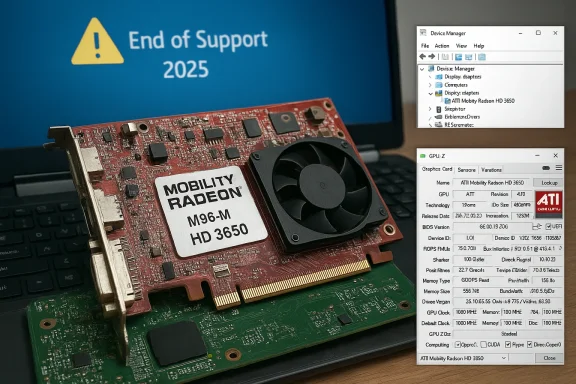 Background / Overview
The ATI/AMD Mobility Radeon HD 3000–4000 family (including the Mobility Radeon HD 3650 and the Mobility/desktop HD 4570) were designed and shipped during the late 2000s. They were mainstream for their day — good enough for accelerated desktops and older DirectX 10-era games — but they predate modern codecs, modern Windows driver models, and today’s security posture.- Hardware facts: the Mobility Radeon HD 3650 typically shipped with about 120 shader cores, 128-bit memory bus, and 512 MB of GDDR3 memory in many laptop integrations; the Mobility/desktop Radeon HD 4570 typically has ~80 shader cores, a 64-bit memory bus and was commonly paired with 512–1,024 MB of memory depending on desktop or MXM variants. These published specs align with independent GPU databases and community hardware listings.
- Support model: AMD has moved these families into legacy status. AMD’s documented guidance and the vendor community are consistent: no new feature drivers are being produced for many HD 2000/3000/4000-era parts, and Windows Update is the primary supported delivery mechanism for Windows 10 systems where a basic fallback driver is required. Community and vendor threads also note that Microsoft-supplied fallback drivers (commonly referenced in community posts as driver 8.970.100.9001) are the supported route for older Radeon families on Windows 10.
- Windows lifecycle change: Windows 10 reached formal end-of-support on October 14, 2025. That change affects the driver and security calculus: vendors and Microsoft deprioritize Windows 10-specific validation, which increases the chance that an older driver stack will break without timely fixes. If you plan to keep an older laptop or desktop on Windows 10, understand you are running on an unsupported OS unless you enroll in an Extended Security Updates program.
What sellers and “cheap driver” listings actually mean — and why to be skeptical
Marketplace titles that jam together model numbers, “Windows 10,” and “works perfectly” are ubiquitous. They’re optimized for search and not for truth. A listing may advertise an MXM II Mobility Radeon HD 3650 or desktop HD 4570 “for Acer Aspire 4710G, 4920G, 5520G…” and claim Windows 10 compatibility, but that claim is a seller assertion until validated.- Sellers often copy spec keywords to reach buyers. The mere presence of “Windows 10” in a title doesn’t prove the card was tested on Windows 10 with a clean install, nor does it mean the vendor supplied correct drivers. Community moderation records show many such claims are unverified or based on an isolated test on a non‑standard machine.
- Repackaged installers are a real threat. One-click driver updaters and repackaged “patched” drivers can alter INFs or strip signatures, and may bundle unwanted software or unsigned kernel code. Community archives and security-conscious posts repeatedly warn against downloading drivers from unknown mirrors. If a seller supplies a driver, insist on an OEM or AMD archive link and cryptographic checksums.
The driver reality: what works and what doesn’t on Windows 10
There are only three safe driver sources for legacy Radeon mobile/desktop parts on Windows 10:- Windows Update (Microsoft-signed fallback driver) — Lowest risk. Windows Update often supplies a signed, basic display driver that restores desktop composition, multi‑monitor support, and video playback. For many legacy GPUs this is the recommended first step. Community documentation and AMD support guidance point to Microsoft Update delivering legacy driver builds for older families (historically referenced by communities as 8.970.100.9001).
- OEM / laptop vendor driver — If your laptop vendor provides a Windows 10 driver package for the exact model, use it. OEM packages may include platform-specific adjustments (switchable graphics handling, power management) not present in AMD’s archived drivers. This is particularly important on systems with hybrid graphics.
- AMD legacy archives (manual, advanced) — For advanced users who need Catalyst/Crimson features that Windows Update doesn’t provide, AMD retains archived driver bundles (Catalyst 13.x series and certain Adrenalin legacy builds). These installers were validated originally for Windows 7/8-era kernels and require a manual INF check: ensure the extracted package actually lists your hardware’s VID/PID before using the “Have Disk” method. Use this only after full backups and in a test environment.
- Don’t run unknown repackaged installers from random marketplaces.
- Don’t edit and install unsigned INFs on production machines without re‑signing and a test environment.
- Don’t assume Windows 10 will always keep legacy drivers working after cumulative updates — community reports show Windows updates can break older WDDM 1.1 drivers and leave device errors that require rollback.
Step-by-step: a conservative, safe workflow to add a Mobility HD 3650 / HD 4570 to a Windows 10 machine
This sequence is written for technically comfortable users. If you’re not confident with Safe Mode, DDU, or INF edits, stop at Step 2 and rely on Windows Update or OEM drivers.- Inventory and backups
- Record the GPU hardware ID in Device Manager → Display adapters → Properties → Details → Hardware Ids (copy the PCI\VEN_1002&DEV_xxxx string).
- Create a System Restore point and, if possible, a complete disk image. Driver changes to the display stack can make a system unbootable.
- Try Windows Update first (recommended)
- Settings → Update & Security → Windows Update → Check for updates → View optional updates → Driver updates.
- If Windows Update supplies a Microsoft-signed Radeon driver, install it, reboot, and validate resolutions and display functionality. This is the safest route.
- If Windows Update doesn’t meet your needs, check the OEM support page
- Search the laptop vendor’s support downloads for your exact product model — many vendors keep Windows 10 packages even when AMD has archived generic drivers. OEM drivers are safer for switchable/hybrid graphics.
- Advanced attempt: manual install from AMD legacy archive
- Extract the archive (AMD installers usually unpack to C:\AMD). Inspect Display.Driver*.inf for your hardware ID. If you find your VID/PID, proceed only after DDU cleanup.
- Boot to Safe Mode, run Display Driver Uninstaller (DDU), reboot to normal mode, and use Device Manager → Update driver → Browse my computer → Let me pick from a list → Have Disk… point to the INF. Reboot and test.
- If Windows warns about unsigned drivers, treat this as experimental and do not leave signature enforcement disabled. Re-enable enforcement afterward.
- If the install fails or breaks displays
- In Safe Mode run DDU again to return to the Microsoft-signed driver. If Windows updates keep replacing your manual driver, use “Pause Updates” or hide the offending driver update during debugging, but do not leave Windows Update disabled permanently.
Typical failure modes and fixes
- Symptom: Device Manager shows “Microsoft Basic Display Adapter” or “Microsoft Basic Render Driver”
- Fix: Run DDU in Safe Mode to clean up remnants, reboot, and allow Windows Update to locate the driver. If you attempted a manual install, ensure the INF actually contains your hardware ID.
- Symptom: Installer says “This device is not supported”
- Fix: The installer’s INF doesn’t list your VID/PID. Don’t blindly edit INFs. Either locate an OEM package or accept the Windows Update fallback.
- Symptom: Driver worked until a Windows cumulative update
- Fix: If a specific Windows update caused regression, consider System Restore or uninstalling the problematic update. Document the Windows build using winver and be prepared to roll back drivers via Device Manager. If the card is critical, keep offline copies of known-good driver installers.
Specifics for MXM modules and laptop compatibility (Acer Aspire examples)
MXM modules (e.g., “256MB MXM II” Mobility HD 3650 modules sold for Acer Aspire lines) add another layer of complexity:- Physical fitment vs. firmware whitelists: even if an MXM module physically fits, the laptop BIOS may enforce whitelist restrictions or expect OEM-flashed modules. Sellers should provide high-resolution photos of the PCB sticker and any vendor DP/N (Dell Part Number) if applicable. Community threads repeatedly show BIOS or whitelisting issues as the reason otherwise compatible cards won’t initialize properly.
- Power and thermal behavior: laptop cooling and power delivery were designed around specific OEM modules. Installing a different MXM card (or a used module meant for another model) can lead to thermal stress or incorrect fan behavior. Check the module’s part number and ask the seller for proof of boot (Device Manager or GPU-Z screenshot/video).
- Driver interplay with switchable graphics: many laptops of the era use hybrid setups (Intel + ATI). OEM drivers and firmware manage the handoff. Using generic drivers can break switching and may leave the system forcing the wrong GPU. Prefer OEM packages for hybrid systems.
Performance and real‑world expectations
Be honest with what these GPUs can and cannot deliver today:- Use cases they still handle well:
- Multi-monitor desktop work at modest resolutions.
- Office productivity and web browsing.
- Running legacy titles and applications built for DirectX 9/10.
- Refurbishing a non‑critical office PC where security and modern codecs are not required.
- Use cases they struggle with:
- Modern gaming or high‑fps play.
- Hardware-accelerated HEVC/AV1 decoding and modern codecs.
- Any GPU compute or modern API features (DirectX 12/Vulkan optimizations, modern Radeon Software extras).
Security and lifecycle considerations
Two interlocking facts raise red flags:- Windows 10 end of support on October 14, 2025 — Without security updates, running Windows 10 in a networked environment increases exposure. Microsoft explicitly recommends upgrading to Windows 11 or enrolling in an Extended Security Updates program for more time.
- Legacy drivers + unsigned packages = kernel risk — Drivers run in kernel mode. Installing unsigned or modified kernel drivers, or running repackaged installers from untrusted places, increases the attack surface. Community and vendor documentation caution against third‑party driver shops and recommend Microsoft/OEM sources. If the machine handles sensitive data or is exposed to the internet, avoid experimental driver installs.
Buying checklist: what to demand from the seller
If you still want to buy a cheap Mobility HD 3650/HD 4570 MXM module, insist on the following before paying:- Clear photos of the actual module (closeups of PCB sticker and part numbers).
- A short video of the card recognized in Device Manager on a Windows 10 x64 system (show Device Manager and the driver details).
- Proof of the seller’s return policy and a DOA (dead-on-arrival) window (7–14 days minimum is reasonable).
- If the seller supplies a driver, insist they reference an OEM or official AMD archive and provide an SHA‑256 checksum for any downloadable file. Avoid unknown installer links.
Quick decision guide: keep, tinker, or replace?
- If the machine is a non‑critical home PC used for web, mail, and legacy apps: try Windows Update first. If Windows Update driver is adequate, stop there.
- If you need hybrid graphics to work correctly (laptops with switchable GPUs): prefer OEM driver packages tied to your laptop model. Avoid generic archived packs unless you know what you’re doing.
- If you’re buying a used MXM module:
- If the purchase price is extremely low and you enjoy hardware tinkering, it’s a hobby buy — budget time for driver surgery and possible returns.
- If you need reliability, security, and codec support, spend a bit more on a modern replacement GPU or a more modern laptop. The long‑term value usually favors newer hardware.
Final assessment and practical recommendations
- Strengths: These legacy AMD parts are extremely inexpensive, can restore display capability to a legacy laptop or desktop, and are fine for basic desktop tasks and older titles. For tinkering, hobbyist retro builds, or restoring an old machine for non‑critical use, they’re useful components.
- Key weaknesses and risks:
- Limited modern codec and API support.
- AMD moved these families to legacy status years ago; Windows 10 support depends on Microsoft-supplied fallback drivers and OEM packages rather than active vendor development.
- Running legacy drivers on an OS that reached end-of-support (Windows 10) increases security exposure and future compatibility risk.
- Repackaged “cheap driver” downloads are an avoidable security hazard. Insist on signatures and checksums.
- Actionable, pragmatic advice:
- Always try Windows Update first and prefer OEM packages when available.
- If you need Catalyst features, do it only after backing up and using DDU — check INF files for your VID/PID before attempting manual installs.
- For production or security-sensitive systems, plan a hardware upgrade or move to a supported OS rather than rely on legacy GPUs and unsigned driver hacks.
Running legacy hardware is often rewarding for hobbyists, but it’s no small task: drivers, firmware, BIOS whitelists, and Windows lifecycle policies are all part of the puzzle. Follow a conservative workflow, demand proof before buying, and weigh the long-term value — sometimes a slightly larger upfront spend on modern hardware will save hours of troubleshooting and deliver better performance, power efficiency, and security.
Source: Born2Invest https://born2invest.com/?b=style-238763912/
