

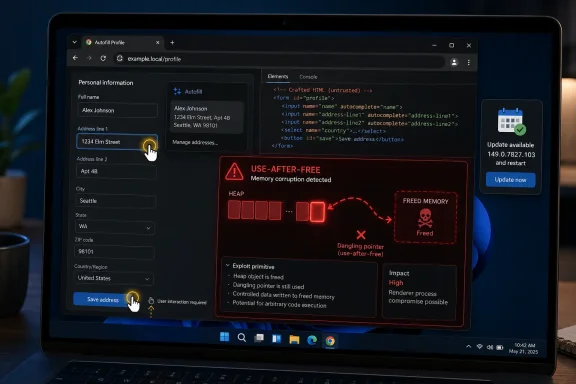
Autofill Turns Convenience Into Attack Surface
Autofill is one of those browser features that disappears when it works. It remembers names, addresses, payment-adjacent details, and form patterns; it predicts what a page is asking for; it stitches user intent to web page structure. That means it lives close to both sensitive data and untrusted HTML, which is exactly the uncomfortable intersection modern browser security tries to police.
CVE-2026-11636 is described as a use after free in Autofill affecting Google Chrome on Windows prior to 149.0.7827.103. In plain English, that means Chrome could be tricked into continuing to use a chunk of memory after it had already been released. If an attacker can influence what later occupies that memory, the bug can move from crash territory into heap corruption, and from there into the familiar swamp of exploit development.
The vulnerability requires a crafted HTML page and “specific UI gestures,” according to the public description. That wording matters. This is not framed as a silent drive-by exploit that triggers simply because a tab loads; it requires persuading the user to do something in the interface. But the web has spent three decades becoming very good at persuading users to click, type, select, drag, approve, and confirm things that feel routine.
That is why the “user interaction required” line should not be read as comfort. It should be read as a constraint on the exploit chain. A bug that requires a gesture may be less broadly wormable, but it can still be practical in phishing, malvertising, fake login flows, and targeted watering-hole pages built around exactly the sort of interface behavior users already perform dozens of times a day.
The Severity Split Says More About Scoring Than Risk
The vulnerability carries Chromium’s “Critical” security severity, while CISA’s ADP CVSS 3.1 vector gives it a 7.5 High score: network attack vector, high attack complexity, no privileges required, user interaction required, unchanged scope, and high impact to confidentiality, integrity, and availability. That discrepancy is not a contradiction so much as a reminder that vulnerability scoring systems are blunt instruments trying to describe living software.
Chrome’s internal severity labels are shaped by what browser engineers know about exploitability classes. A use-after-free in a renderer-adjacent feature that can be reached from hostile web content is a known-dangerous pattern. Even with gesture requirements and complexity, the bug class has a long history of turning into reliable exploitation when paired with the right memory grooming and a second vulnerability.
CVSS, by contrast, is trying to score a generic vulnerability in a portable grammar. It penalizes the need for user interaction and high attack complexity. That is rational, but it can also understate the urgency for platforms where browsers are always exposed, always parsing hostile content, and often handling identity flows, password managers, single sign-on prompts, and session-bearing cookies.
For administrators, the practical answer is not to debate whether the bug is “really” Critical or High. The practical answer is to treat it as a browser memory-corruption issue reachable from web content on Windows and already fixed by the vendor. Once those facts are true, the patch clock starts.
Windows Is Not Just Another Platform in This Advisory
The most striking detail in CVE-2026-11636 is the platform qualifier: Google Chrome on Windows prior to 149.0.7827.103. Chrome is cross-platform, Chromium is cross-platform, and many browser vulnerabilities read as if the operating system hardly matters. This one does not.
That does not automatically mean Windows itself is defective here. Browser code paths can diverge by platform for UI frameworks, input handling, accessibility hooks, memory allocators, graphics stacks, form controls, font rendering, credential integration, and operating-system conventions around focus and gestures. Autofill is particularly likely to touch platform-specific behavior because it is both a browser feature and a user-interface feature.
For WindowsForum readers, that distinction is important. A Chrome vulnerability “on Windows” is still a Chrome vulnerability, but the endpoint exposure is Windows-shaped. It affects how enterprise inventory should be queried, how remediation dashboards should be filtered, and how security teams should prioritize browser patch compliance across fleets where Windows remains the dominant desktop.
It also raises the question of downstream Chromium-based browsers. Microsoft Edge, Brave, Vivaldi, Opera, and others inherit large portions of Chromium but ship on their own timelines and may carry different version numbers, feature flags, patches, or platform integrations. The safe operational stance is not to assume immunity because the browser is not named Chrome. The safe stance is to verify each Chromium-based browser’s security release notes and deployed build state.
NVD’s CPE Entry Is Awkward, But Not Meaningless
The user-submitted NVD record shows a CPE configuration that combines Google Chrome versions up to, but excluding, 149.0.7827.103 with the Microsoft Windows operating-system CPE. That can look odd at first glance, especially to anyone used to vulnerability scanners producing noisy or misleading matches. The question “Are we missing a CPE here?” is not just administrative clutter; it gets at how machine-readable vulnerability data tries to encode platform-specific software exposure.
In this case, the CPE logic is attempting to say that vulnerable Chrome is the application, and Windows is the relevant operating system condition. That is a reasonable model for a Windows-only Chrome flaw. It is also a model that can be mishandled by tools that flatten CPEs into simplistic “Chrome vulnerable everywhere” or “Windows vulnerable by itself” interpretations.
This is where security teams need to understand their tooling rather than merely obey it. If a scanner flags Windows hosts because they run Chrome below 149.0.7827.103, that is useful. If it flags Windows itself as vulnerable without tying the finding to installed Chrome, that is noise. If it ignores Chromium-based browsers that are not Google Chrome, that may be a blind spot rather than a clean bill of health.
NVD had not yet provided its own CVSS score in the user-supplied detail, while CISA-ADP had added a CVSS 3.1 assessment. That is common in the early life of CVE records. Initial enrichment often trails vendor disclosure, and the record can change as CPEs, references, severity data, and affected configurations are refined.
The Patch Number Is the Policy
The fixed version in the CVE description is Chrome 149.0.7827.103 for Windows. Other reporting around the same Chrome stable-channel release also references 149.0.7827.102 and .103 builds across desktop platforms, with rollout behavior varying by operating system and channel. For Windows defenders, the relevant operational threshold for this CVE is simple: Chrome builds earlier than 149.0.7827.103 should be treated as exposed.
Chrome’s update mechanism is one of the better consumer software patch systems in circulation, but enterprise reality is messier. Browsers remain open for days. Virtual desktops revert to stale images. App control policies pin versions. Third-party patch tools wait for catalog updates. Kiosk systems and lab machines get excluded from standard maintenance windows because “it’s just a browser.”
That last phrase is the old mistake. The browser is the operating system’s most exposed application runtime. It executes attacker-supplied code, parses attacker-supplied documents, stores user identity state, brokers access to cloud services, and increasingly functions as the front end for line-of-business applications. If that layer is behind, the endpoint is behind.
The correct verification path is boring but necessary. Chrome users can check the version from the browser’s About page, while administrators should query installed versions through endpoint management, software inventory, or patch compliance platforms. The important part is not whether the update was “available”; it is whether the vulnerable binary is still running.
The UI-Gesture Requirement Is a Social Engineering Invitation
The CVE’s phrase “specific UI gestures” is doing a lot of work. It suggests that successful exploitation needs more than a page load; the attacker must convince the user to interact with the page in a particular way. In a narrow technical sense, that raises the bar. In the real world, it may simply define the lure.
Attackers do not need to invent new human behavior when the web already trained users to complete forms, accept prompts, click into fields, choose saved addresses, drag sliders, open menus, and confirm overlays. Autofill is especially attractive because it appears during moments when the user already expects the browser to be helpful. The attacker’s task is to choreograph a page where the malicious gesture looks like ordinary friction.
That is the darker side of browser convenience. A feature designed to reduce user effort can also reduce user suspicion. When a page asks for a shipping address, billing detail, contact field, or identity confirmation, Autofill is supposed to appear; the user is not startled by browser UI entering the scene.
None of this means CVE-2026-11636 is known to be exploited in the wild. The public reports around the same Chrome update call out active exploitation for a different Chrome vulnerability, CVE-2026-11645, an out-of-bounds read/write issue in V8. But defenders should not wait for a second advisory or a proof-of-concept video before patching a critical Autofill memory-corruption flaw.
The Chrome Release Was Bigger Than One CVE
CVE-2026-11636 arrived in a broader Chrome security update, and that context matters. Browser security releases increasingly look less like isolated bug fixes and more like mass cleanups across rendering, JavaScript, UI, GPU, media, extensions, and platform-integration layers. A single named CVE may get attention, but the release train is doing cumulative risk reduction.
That is especially true for Chromium, where the same underlying engine supports a large slice of the modern desktop browsing ecosystem. A bug fixed in Chrome may have implications beyond Chrome, even if exploitability differs by downstream product. Enterprises that standardize on Edge, deploy Chrome for compatibility, and tolerate secondary Chromium browsers for developer or user preference can end up with three or four patch timelines for what feels like one browser family.
The industry’s public attention tends to snap toward zero-days, and understandably so. A known exploited V8 flaw is more urgent than an unexploited Autofill flaw in most triage meetings. But that hierarchy can obscure the larger maintenance truth: once the stable channel carries fixes for dozens of security issues, staying behind means preserving an exploit surface attackers can study at leisure.
Patch diffing is not theoretical. Once a fix ships, attackers can compare old and new code, infer the vulnerable pattern, and build test cases. The disclosure clock and the reverse-engineering clock start at roughly the same time.
Enterprise IT Needs Version Truth, Not Browser Hope
The consumer guidance for Chrome updates is usually a sentence long: open the menu, go to About Chrome, let it update, restart. That advice is fine for home users. It is inadequate for organizations where browsers are deployed through management systems, wrapped in policy, subject to change windows, and used inside regulated workflows.
Enterprise IT needs version truth. That means knowing which machines have Chrome installed, which build is present, whether the browser has relaunched into the patched version, and whether users have multiple profiles or side-by-side channels that escape normal inventory. It also means knowing whether Chrome is present on servers, jump boxes, developer workstations, test rigs, and shared conference-room systems that often live outside the neat edges of endpoint governance.
The restart problem remains underrated. Chrome can download an update but continue running the old code until the browser is relaunched. In user-friendly environments, Chrome nags. In locked-down environments, it may defer. In operational environments, users may leave browser sessions open for weeks because tabs have become a poor man’s workflow state.
Security teams should also check policy settings that affect update behavior. Chrome’s enterprise controls are powerful, but any mechanism that can manage updates can also delay them. Deferral windows, version pinning, testing rings, and application-control allow lists all need a fast path when the browser patch contains memory-corruption fixes reachable from the open web.
Autofill Bugs Are Identity Bugs by Proximity
It would be wrong to say CVE-2026-11636 is a credential theft bug based only on the public description. The record says use-after-free, heap corruption, crafted HTML, and specific UI gestures. It does not say saved passwords are exposed, form data is stolen, or account takeover is the direct consequence.
But Autofill lives near identity. It appears on forms where users enter names, addresses, phone numbers, account details, and sometimes payment workflows. It interacts with browser profile state and page structure. A memory-corruption flaw in that neighborhood is not automatically an identity compromise, but it is close enough that defenders should resist the urge to downgrade it as “just form filling.”
Modern attacks often chain proximity. A renderer bug gets code execution in a sandbox. A UI or browser-process bug helps escape. A form-flow lure captures a session. A malicious page abuses trust granted to a logged-in user. The technical exploit and the social engineering are not separate campaigns; they are two halves of the same operation.
This is why browsers have become such prized targets. The endpoint may have EDR, disk encryption, least privilege, and hardened baselines, but the browser still has access to live sessions and the user’s authenticated cloud world. Compromising or manipulating that environment can be enough, even without classic malware persistence.
Scanner Output Will Lag Behind Operational Reality
The NVD record’s change history shows the normal early lifecycle of a CVE: the record arrives from Chrome, CISA-ADP adds a CVSS vector, and NIST begins enrichment with affected configurations and references. That sequencing is important because many organizations treat scanner output as if it were the vulnerability itself. It is not. It is an interpretation layer.
In the first days after disclosure, different databases may disagree on CVSS score, platform status, affected versions, or package naming. Ubuntu’s security tracker, for example, can mark its Chromium packaging as not affected for supported releases because the Linux distribution’s packaging model differs from Google Chrome on Windows. Tenable or other vulnerability databases may show different scoring derived from their own analysis or imported feeds.
This does not mean the data is useless. It means the data needs an owner. Someone has to translate “Chrome on Windows prior to 149.0.7827.103” into the organization’s actual asset model: installed applications, user devices, virtual machines, management groups, browser channels, and exceptions.
The most dangerous gap is the one between “patch released” and “patch verified.” A dashboard may show the CVE. A ticket may be opened. A compliance rule may be written. But until the old browser process is gone from the endpoint, the vulnerability remains live.
The Practical Reading for WindowsForum Readers Is Narrow and Urgent
CVE-2026-11636 is not a reason to panic, but it is a reason to close the loop quickly. The affected product is Google Chrome on Windows before 149.0.7827.103. The bug class is use-after-free in Autofill. The attack path involves a crafted HTML page and user gestures. The plausible consequence is heap corruption, which is exactly the sort of primitive exploit writers care about.
For home users, the answer is to update Chrome and restart it. For enthusiasts running multiple browsers, check every Chromium-based browser rather than assuming Chrome’s updater solved the whole problem. For IT pros, confirm deployed versions centrally, watch for stale sessions, and pay attention to machines that fall outside normal user-device patch rings.
The CPE question is worth asking, but it should not become a distraction. The Windows qualifier belongs in the affected configuration because this CVE is scoped to Chrome on Windows. The vulnerability should not be interpreted as a standalone Windows OS flaw, nor should it be ignored because the CPE expression looks more complex than a simple application match.
The Useful Facts Fit on One Screen, But the Risk Does Not
The operational summary is short because the action is obvious. The broader lesson is longer because Chrome has become too important to treat as a background utility.
- CVE-2026-11636 affects Google Chrome on Windows before version 149.0.7827.103.
- The flaw is a critical Chromium-rated use-after-free in Autofill that may allow heap corruption through crafted HTML and specific user-interface gestures.
- The public record shows CISA-ADP scoring it as CVSS 3.1 7.5 High, while NVD’s own assessment was not yet provided in the submitted data.
- The NVD CPE configuration pairs vulnerable Google Chrome with Microsoft Windows to express a Windows-specific application exposure, not a standalone Windows operating-system vulnerability.
- Administrators should verify installed and running browser versions, because downloading a Chrome update is not the same as relaunching into the fixed build.
- Chromium-based browsers other than Google Chrome should be checked through their own vendor release channels and deployed version inventories.
The forward-looking lesson is that browser security is becoming less about rare emergency patches and more about disciplined release hygiene. CVE-2026-11636 is a sharp example because it lives inside an ordinary convenience feature, depends on ordinary user behavior, and still carries extraordinary consequences if left unfixed. Windows shops that can prove browser version state quickly will treat this as another Tuesday; everyone else will discover, again, that the most exposed application on the endpoint is also the one users are least willing to close.