

Google’s latest Chrome update places a conspicuous new “AI Mode” button on the mobile New Tab page and folds the company’s Gemini reasoning stack deeper into everyday searches — a change that makes mobile search feel more conversational, multimodal, and context-aware while raising fresh questions about privacy, control, and the future shape of the browser as a productivity surface.
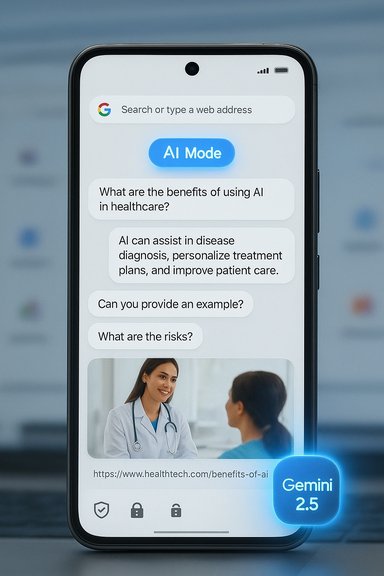
Google has been steadily redesigning Search around conversational, generative interactions for more than a year. What began as experimental “AI Overviews” has evolved into the broader AI Mode concept: a dedicated way to ask multi-part questions, follow up on answers, and feed multimodal inputs (images, files) into a single conversational flow. That work has been powered by successive Gemini model updates and surfaced in multiple places — Search, the Google app, desktop Chrome, and now Chrome on mobile. The mobile change is simple to spot: when users open a new tab in Chrome on Android or iOS they’ll now see an AI Mode button just below the search bar. Tapping that button summons an AI-centered search flow that emphasizes back-and-forth dialogue, suggested follow-ups, and answers that synthesize information rather than only listing links. Google has started the rollout in the United States and says it will expand to roughly 160 countries with support for many additional languages, including Portuguese.
Google has framed AI Mode as opt-in and controllable, and it is deploying technical mitigations like on-device safety checks. Still, real-world behavior — particularly around data routing and agentic automation — needs verification as features broaden and land in more countries and languages. Until then, users should test AI Mode for productivity gains while applying conservative privacy hygiene; administrators should pilot carefully, require explicit audits, and delay organization-wide enablement until enterprise-grade controls and documentation are available.
The mobile AI Mode rollout extends a much larger trend: browsers are no longer simply windows to the web — they are becoming assistant-enabled command centers. That evolution promises productivity wins, but it also puts a premium on transparency, governance, and the hard work of balancing convenience with control.
Source: Ubergizmo Google Chrome Adds New AI Mode To Transform Mobile Search Experience – Ubergizmo
 Background / Overview
Google has been steadily redesigning Search around conversational, generative interactions for more than a year. What began as experimental “AI Overviews” has evolved into the broader AI Mode concept: a dedicated way to ask multi-part questions, follow up on answers, and feed multimodal inputs (images, files) into a single conversational flow. That work has been powered by successive Gemini model updates and surfaced in multiple places — Search, the Google app, desktop Chrome, and now Chrome on mobile. The mobile change is simple to spot: when users open a new tab in Chrome on Android or iOS they’ll now see an AI Mode button just below the search bar. Tapping that button summons an AI-centered search flow that emphasizes back-and-forth dialogue, suggested follow-ups, and answers that synthesize information rather than only listing links. Google has started the rollout in the United States and says it will expand to roughly 160 countries with support for many additional languages, including Portuguese. What’s new in Chrome mobile: the user-facing changes
The visible changes
- A dedicated AI Mode button appears beneath the search field on Chrome’s New Tab page on iOS and Android.
- The button opens a conversational interface that behaves more like an assistant than a traditional search box: users can ask complex questions, follow up, and include images or other multimodal inputs.
Rollout, languages, and availability
- Google began the mobile rollout in the United States and plans to expand to more than 160 countries over the coming weeks and months, with additional language support (Hindi, Indonesian, Japanese, Korean, Portuguese and more) added as part of that expansion.
How the experience differs from classic search
- Instead of returning a page of ranked links as a first result, AI Mode delivers summarized, synthesized answers and shows cited links and suggested follow-ups to refine a query.
- The UI intentionally encourages a conversational thread: answers are constructed to support follow-up prompts, so users can drill down without retyping or reformulating the original query.
Technical underpinnings: Gemini, multimodality, and on-device safety
Gemini 2.5 — the reasoning model behind the new experience
Google has been iterating the Gemini family rapidly; the recent updates driving AI Mode’s expanded capabilities include Gemini 2.5 (and subscriber-tier variants like Gemini 2.5 Pro), which Google positions as an advanced reasoning model able to handle longer, multimodal dialogues and deeper “chain-of-thought” reasoning. For higher‑precision, long-form synthesis and Deep Search-style research tasks, Google surfaces the stronger 2.5-class variants to paying tiers and some experimental surfaces.Multimodal inputs and Google Lens integration
AI Mode is not text-only. The feature accepts images and other visual inputs by integrating Google Lens capabilities directly into the experience, enabling image-based queries, OCR, and follow-up questions grounded in photographs or screenshots. This expansion lets mobile users pose questions like “What’s this model number?” or “Summarize the recipe in this photo” and get synthesized, link-rich answers.Safety and on-device checks: Gemini Nano
To reduce straightforward scams and phishing attempts, Chrome leverages smaller, on-device models (often discussed internally as Gemini Nano) for lightweight safety checks — for example, to detect fake virus alerts or impersonation pages. Larger generative tasks still route to cloud-hosted models for full reasoning power, but Google emphasizes a hybrid approach to balance latency, capability, and privacy. That hybrid routing is central to the security and performance trade-offs baked into the rollout.Why this matters: user workflows and the browser battleground
From passive browser to active assistant surface
Chrome is evolving from a passive viewing layer into an active productivity surface. Embedding a conversational assistant into the browser — and now ensuring one-touch access on mobile — changes how people research, plan, and act online. Activities that once required opening multiple tabs, comparing pages, and copying bits of text can increasingly happen inside a single assistant thread. Chrome’s ubiquity amplifies that shift: small UX changes at the New Tab level translate to large behavior changes at scale.Competitive dynamics
This move mirrors other platform strategies: Microsoft put Copilot into Edge and Windows; OpenAI and Perplexity integrated browsing into their products; smaller browsers have either embraced or resisted deep AI integration. Google’s advantage is reach and data connectivity across Search, Maps, YouTube, Calendar and Drive — an advantage that makes AI Mode particularly sticky for users already in Google’s ecosystem.Strengths: immediate benefits for users
- Faster, more natural research. AI Mode reduces friction for multi-step queries and multi-tab synthesis by delivering concise summaries and follow-up prompts that steer subsequent exploration.
- Multimodal convenience. Integrated visual search (Lens) lets users add screenshots or photos directly to a conversational query, speeding up workflows like shopping research, homework help, or how‑to lookups.
- Accessibility and usability. Conversational interfaces lower the entry barrier for complex searches, benefiting users who prefer natural-language queries or need concise, synthesized answers.
- Context-aware suggestions. Contextual prompts based on the page (for example, prompts tied to product pages or documentation) help users ask the right question faster.
Risks and trade-offs: privacy, accuracy, and ecosystem effects
1. Data surface expansion and privacy concerns
Any feature that bundles open tabs, local context, images, and account data into a single query necessarily increases the amount of data that can be transmitted to Google’s servers. While Google provides toggles and claims an opt‑in model, the practical risks — accidental sharing of sensitive screenshots, browser history exposure, or long‑term logging of conversational threads — are real and must be managed. Enterprises and privacy-minded users should assume hybrid processing may send some data to the cloud unless explicitly documented otherwise.2. Accuracy and hallucinations
Generative summaries are convenient, but models still hallucinate. A concise AI‑generated answer can feel authoritative while being partially or wholly incorrect, and short overviews increase the risk that users will accept incorrect outputs without checking primary sources. Google’s UI includes citations and links, but the summarization layer can obscure nuance and source boundaries. Users should treat AI Mode outputs as starting points rather than definitive answers.3. Publisher economics and click-through decline
If browsers routinely deliver distilled answers, publishers may receive fewer direct visits — a structural concern for ad-supported journalism and independent content creators. Some publishers and browser vendors have already flagged this tension, arguing that aggressive summarization risks undermining the web’s referral economy. Chrome’s reach heightens the stakes.4. Enterprise governance and compliance
For IT administrators, the chief questions are control and observability. Agentic features that later enable automation (booking, form-filling, or agentic commerce) create clear liability and data-flow questions. Admin consoles and domain-level toggles are part of Google’s enterprise controls, but organizations should validate data residency, retention, and audit trails before enabling assistant features broadly.Practical guidance: how to use AI Mode responsibly (for users and IT)
For personal users
- Try AI Mode for iterative research and quick summaries, but verify important facts against primary sources.
- Avoid feeding sensitive screenshots or account details into an AI query until you’re confident about how Chrome handles that data.
- Use browser and account privacy toggles to limit what AI Mode can read (page content, tabs, account data), and periodically clear Gemini/assistant activity if concerned.
For IT administrators
- Start with a limited pilot: test features in a controlled OU with strict logging and data‑exfiltration monitoring.
- Audit consent flows: ensure users understand when a request is routed to cloud models and what metadata is logged.
- Define task boundaries: allow read-only summarization for research tasks, but block or gate agentic actions that would perform transactions or access critical systems.
- Monitor costs and quotas: if your organization uses paid Gemini tiers or Vertex AI, align usage with budget and compliance expectations.
What remains unclear or unverifiable today
- Exact model routing guarantees: while Google documents a hybrid on-device/cloud approach, precise rules (which requests stay on-device, which go to cloud-hosted 2.5-class models, and how telemetry is stored) are not fully public. That means some privacy and performance claims require hands‑on verification or confirmation from Google’s technical documentation. Treat routing descriptions as informed but incomplete.
- Agentic automation timelines and safeguards: Google has signaled future “agentic” capabilities that will let the assistant perform multi-step tasks across sites, but detailed audit trails, liability models, and per-action confirmation rules are still being rolled out. Enterprises should treat agentic automation as a planned capability, not a production-ready feature.
- Regional behavior and localized privacy differences: rollout to 160 countries is a broad commitment, but how different privacy regimes (e.g., EU, Brazil) will change data handling and feature availability is an open question until regional documentation appears.
Hands-on tips and settings to check in Chrome
- Look for the Gemini / AI Mode control panel in Chrome settings to:
- Toggle page content access for Gemini.
- Pause or clear Gemini Apps Activity.
- Manage microphone permission for Gemini Live (voice interactions).
- Use Incognito or guest mode when testing on-screen Lens inputs that might capture sensitive UIs.
- On managed devices, verify whether your Admin Console exposes domain-level toggles to disable Gemini features entirely; if not, request explicit controls from IT leadership before broad enabling.
The competitive and regulatory context
- Google’s rollout comes at a competitive inflection point: Microsoft’s Copilot is baked into Windows and Edge, and independent players like Perplexity and Brave offer alternative approaches to AI-first browsing. Each company’s design choices — local-first execution, paywalling advanced models, or embedding assistants into OS shells — point to diverging visions of how AI should mediate information on the web.
- Regulators are watching large-platform AI integrations closely. Deep integration of assistant models into core consumer surfaces concentrates data flows and can raise antitrust, privacy, or competition questions — especially when incumbent platforms use assistant features to keep users inside their ecosystems. Enterprises and publishers should monitor policy guidance as national regulators update rules for generative AI.
Conclusion
Chrome’s mobile AI Mode button is more than a UI tweak — it signals a deliberate pivot in how Google expects users to interact with the web: conversationally, multimodally, and contextually. For everyday users the benefits are clear: faster research, integrated visual search, and the convenience of one-place conversational queries. For IT leaders, privacy advocates, and publishers the rollout demands scrutiny: hybrid model routing, telemetry, accuracy limits, and the economics of distilled answers all require concrete documentation and defensive governance.Google has framed AI Mode as opt-in and controllable, and it is deploying technical mitigations like on-device safety checks. Still, real-world behavior — particularly around data routing and agentic automation — needs verification as features broaden and land in more countries and languages. Until then, users should test AI Mode for productivity gains while applying conservative privacy hygiene; administrators should pilot carefully, require explicit audits, and delay organization-wide enablement until enterprise-grade controls and documentation are available.
The mobile AI Mode rollout extends a much larger trend: browsers are no longer simply windows to the web — they are becoming assistant-enabled command centers. That evolution promises productivity wins, but it also puts a premium on transparency, governance, and the hard work of balancing convenience with control.
Source: Ubergizmo Google Chrome Adds New AI Mode To Transform Mobile Search Experience – Ubergizmo
