

The Camera Was Supposed to Watch the Perimeter, Not Become One
The uncomfortable thing about CCTV vulnerabilities is that they collapse two worlds administrators often prefer to keep separate. On one side is physical security: entrances, warehouses, parking lots, server rooms, lobbies, production floors. On the other is network security: authentication, firmware, segmentation, remote access, patch cadence, vendor support. An IP camera sits squarely in both, and when its authentication fails, the failure is not merely digital.
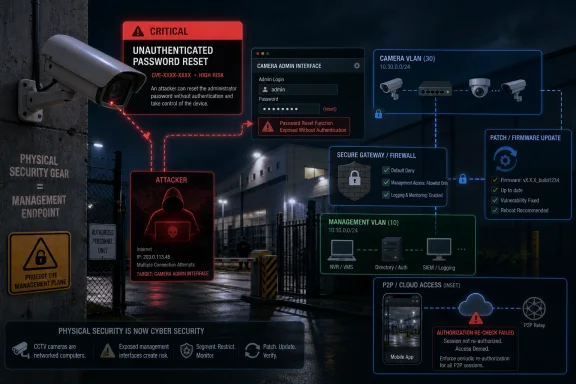
KMW’s affected camera line is vulnerable to a remote password-reset condition that does not require authentication. In plain English, an attacker does not need to know the current admin password before triggering the reset path. If exploitation resets the administrator password to a known value, the attacker can move from outsider to administrator in one step.
That is the kind of bug that deserves the word critical without much theatrics. It does not require a chain of browser exploits, a malicious document, or a compromised workstation. It turns the password-recovery mechanism itself into the attack surface.
The vendor’s fix is firmware, which is normal for embedded devices and also the source of much of the operational pain. Cameras are often installed by facilities teams, integrators, or security contractors, then left running for years as long as video continues to appear on a monitor or in a mobile app. Firmware update discipline rarely matches the discipline applied to Windows servers, firewalls, endpoint agents, or domain controllers.
That gap is where this advisory lives. The KMW issue is a product vulnerability, but it is also a reminder that surveillance systems are often managed like appliances while behaving like networked computers.
A Password Reset Bug Is Really an Ownership Bug
Password reset features are supposed to be a safety valve. They exist because people forget credentials, installers leave, vendors change, and sites need a way back into equipment that may be mounted high on a wall or deployed across multiple buildings. But a reset function is also one of the most sensitive operations any device exposes.
If the reset path can be reached without proving identity, the device is effectively asking the network, “Who wants to be administrator now?” The danger is not limited to viewing live footage, though that is bad enough. Administrative access to a camera can mean changing recording settings, disabling streams, altering network configuration, pivoting through integrations, or erasing evidence by changing retention behavior.
The known-value aspect makes the issue sharper. Some vulnerabilities merely deny service or create unpredictable states. This one, as described, gives the attacker a deterministic outcome: reset the password and then log in. That is a clean operational path, which is exactly what defenders do not want.
For WindowsForum readers, the mental model should be familiar. Imagine a remote endpoint that allows anyone to reset the local Administrator password to password123 from the network. The impact would not be softened because the device is “just a camera.” In many environments, cameras are part of investigations, safety monitoring, loss prevention, and regulatory oversight.
There is also a human factor here. When a camera feed goes dark or settings change, the first suspicion is often power, cabling, storage, or app trouble. Compromise of the camera management plane may not be the first theory. That delay gives an attacker time to watch, reconfigure, or cover tracks.
Firmware Is the Fix, but Firmware Is Also the Test
KMW has issued a firmware update and pointed customers to an update package for the affected devices. That is the necessary first step, and organizations running affected models should treat the update as urgent. But embedded firmware updates are not like Patch Tuesday for a managed Windows fleet.
There is no guarantee every camera is centrally inventoried. There may be no standard maintenance window for surveillance gear. There may be no lab unit to test on. The original installer may own the admin credentials. The site may depend on cloud relay or peer-to-peer connectivity that users barely understand because the mobile app “just worked” when the system was installed.
KMW’s note that the KM-IP421 will lose cloud authorization after the update is a small line with large operational consequences. After applying the firmware, users of that model will need to contact customer support to re-authorize the P2P connection. That is not a reason to avoid patching, but it is a reason to plan.
This is where security guidance becomes operational reality. A sysadmin hears “update firmware” and thinks about version control, rollback plans, and maintenance communications. A small business owner hears “firmware update” and worries that the camera app will stop working. Both reactions are rational.
The correct answer is not to leave the device vulnerable because reauthorization is annoying. The correct answer is to schedule the update with eyes open: know which devices are affected, confirm local access before touching cloud connectivity, document current settings, and have vendor-support contact information ready before the maintenance window begins.
The Cloud Convenience Tax Comes Due at Patch Time
The reauthorization warning for the KM-IP421 is more than a footnote. It exposes the bargain many CCTV buyers have made, sometimes unknowingly. Cloud-enabled and P2P camera systems reduce the friction of remote viewing, but they also add dependencies that become visible only when something breaks, expires, or needs to be repaired securely.
P2P camera access is popular because it avoids the traditional pain of firewall rules, VPNs, static IP addresses, and port forwarding. The camera or recorder phones home to a vendor-operated service, the mobile app discovers it, and the user gets video without learning network engineering. For consumers and small offices, that convenience is powerful.
For administrators, it is also a control problem. The system may have an external dependency that is not documented in the network diagram. Remote access may be bound to a vendor cloud account rather than an enterprise identity provider. Firmware may change cloud authorization state in ways that are not obvious until after the update.
KMW’s mitigation language points customers toward using cloud connections responsibly, and that is the right direction. But “responsibly” has to mean more than using a strong password in the app. It means knowing which cameras talk to which external services, which devices can reach them internally, and who can reauthorize them after a security update.
This is the broader Internet of Things bargain in miniature. The device is sold as simple infrastructure. Then a vulnerability arrives and reveals that it has identity, remote access, firmware state, vendor trust, and network reachability. At that point it is not simple infrastructure anymore. It is an endpoint.
Segmentation Is Not Optional When the Device Has Eyes
KMW recommends placing surveillance equipment on a separate network and allowing only specific devices access to the internet. That advice is not glamorous, but it is the difference between a camera vulnerability and an incident that spreads.
A flat network makes every embedded device more dangerous than it needs to be. If cameras sit on the same broadcast domain as workstations, printers, file servers, and administrative systems, then a camera takeover can become reconnaissance. Even if the camera itself is not a strong pivot platform, it may reveal network layout, credentials, time patterns, or open services.
A separate VLAN or physically distinct network does not magically fix a broken password-reset mechanism. What it does is reduce who can reach that mechanism. If only a management workstation, an NVR, and a VPN-controlled admin path can talk to the camera interface, the universe of possible attackers shrinks dramatically.
Internet exposure is the sharper issue. Cameras should not present their management interfaces directly to the public internet unless there is an extremely specific, well-defended reason. “The installer set it up that way” is not a reason. “The owner wanted to check video from home” is not a reason either, not when VPNs, controlled gateways, and properly secured cloud models exist.
For home labs and small offices, the practical version is simple: do not put the camera web interface on an open port, do not rely on obscurity, and do not assume that a nonstandard port is meaningful protection. For enterprise sites, the practical version is policy: surveillance networks should be inventoried, monitored, and reviewed like any other operational technology segment.
The irony is that many organizations have spent years teaching users not to expose Remote Desktop Protocol to the internet, while camera interfaces have been left reachable because they are perceived as less consequential. A camera with admin compromise is consequential. It may not hold payroll data, but it can see people, places, routines, assets, and in some cases screens.
The Risk Is Bigger Than Video Privacy
The most obvious impact is unauthorized viewing. Someone who takes over a camera can watch live feeds, change viewing angles where applicable, and learn when people arrive, leave, open doors, unload equipment, or access restricted areas. That alone is serious.
But surveillance integrity may be even more important than surveillance confidentiality. If an attacker can alter settings, they may reduce resolution, disable motion detection, change timestamps, stop recording, modify network destinations, or interfere with storage. The footage you rely on after an incident may not exist, may not show what you think it shows, or may be easier to challenge.
For regulated environments, that matters. Retail, healthcare, education, manufacturing, logistics, and municipal facilities may use cameras as part of safety, compliance, or evidence workflows. A compromised camera can undercut those workflows quietly.
There is also the reputational problem. Customers, employees, students, patients, or tenants generally do not think of security cameras as internet-connected computers with firmware vulnerabilities. They see them as instruments of institutional control. When those systems are exposed, the organization’s promise of safety starts to look careless.
That is why a vulnerability in a camera can be more politically sensitive than a vulnerability in a printer. Printers are annoying. Cameras watch people.
CISA’s ICS Lens Is the Right One
Some readers may wonder why a CCTV camera lands in an industrial-control advisory stream. The answer is that security cameras are increasingly part of operational environments, not merely office accessories. They monitor substations, warehouses, factories, data centers, water facilities, transportation hubs, campuses, and local government sites.
In those places, a camera is part of a larger operational picture. It may be tied to access control, alarms, incident response, guard operations, and compliance processes. If the camera can be remotely seized, defenders lose more than a video feed. They lose confidence in a sensor.
CISA’s industrial-control advisories have spent years documenting the same recurring embedded-device failures: missing authentication, exposed management paths, weak recovery flows, hardcoded assumptions, and slow patch adoption. The KMW advisory fits that pattern. The sector changes, the product name changes, but the architectural lesson is familiar.
Windows administrators should resist the temptation to treat this as someone else’s problem. Many Windows environments depend on IP cameras even if the camera fleet is not managed by the same team that manages endpoints. The NVR may run on Windows. The viewing client may run on Windows. The network shares, domain accounts, browser sessions, or monitoring workstations around the CCTV system may be part of the broader IT estate.
That creates a governance problem. If facilities owns the cameras but IT owns the network, who patches firmware? If the installer owns the admin password but the business owns the risk, who responds to CISA advisories? If the camera loses cloud authorization after a security update, who is allowed to call vendor support?
The answer cannot be “whoever notices first.” Camera fleets need ownership.
The Patch Window Should Start With an Inventory, Not a Download
The first instinct after a critical advisory is to grab the firmware and patch. That instinct is understandable, but with CCTV systems, a little preparation prevents outages and half-remediated fleets.
Start with the models. Identify whether the site has KMW devices, and specifically whether any affected models are present. Cameras are often rebranded, installed under project names, or tracked only in installer invoices. If the asset database says “front gate camera,” it is not good enough.
Then identify exposure. A camera that is reachable only from a locked-down management subnet has a different immediate risk profile from one exposed through port forwarding or broadly accessible internal networks. The firmware still matters in both cases, but the emergency actions may differ. Public exposure should be closed immediately, before waiting for a full maintenance process.
Next, identify dependencies. If KM-IP421 units are in use, the cloud authorization loss after update should be planned. Remote viewing may break until support reauthorizes P2P connectivity. If the site depends on remote viewing for guards, owners, or after-hours monitoring, that is a communications issue as much as a technical one.
Finally, preserve access. Confirm local admin access, document current configuration, export settings if the device supports it securely, and ensure there is a path to recover if the update fails. Embedded devices can be unforgiving, and a botched update on a camera mounted 20 feet above a loading dock is not an abstract inconvenience.
This is not an argument for delay. It is an argument for disciplined urgency. Patch quickly, but do not patch blindly.
The Real Mitigation Is Reducing Who Gets to Ask the Reset Question
Firmware closes the specific flaw, assuming the update is applied correctly and covers the deployed model. Network controls reduce the blast radius both before and after the patch. The strongest remediation posture combines both.
KMW’s recommendations are sensible: separate the surveillance equipment, restrict internet access to specific devices, check for firmware updates regularly, and use cloud connections responsibly. Those points sound basic because they are. They also remain unevenly implemented because CCTV systems often arrive as turnkey projects outside normal IT change control.
Administrators should translate the vendor language into enforceable controls. A separate network means a defined VLAN or segment, not merely “the cameras are plugged into a different switch under the counter.” Limited internet access means explicit outbound rules, not a default allow policy. Responsible cloud use means documented accounts, multi-factor authentication where available, and a review of who has remote viewing or administrative privileges.
There is a subtle but important distinction between allowing cameras to reach a vendor cloud and allowing the internet to reach cameras. The former may be necessary for certain products. The latter is usually a mistake. Even outbound-only cloud models deserve scrutiny, but inbound management exposure is the scenario defenders should treat as toxic unless proven otherwise.
Monitoring matters too. A camera password reset should be a rare administrative event. If logs exist, they should be retained. If the NVR or management system can alert on lost connectivity, credential changes, or device re-enrollment, those alerts should go somewhere a human will actually see them.
The cheap-camera era trained buyers to think in terms of pixels, night vision, mobile app support, and price per unit. The next era has to include patchability, authentication design, cloud dependency, and support lifecycle.
Windows Shops Have a Stake in the CCTV Rack
This advisory belongs on WindowsForum not because KMW cameras run Windows, but because Windows administrators are often the people asked to clean up when “non-IT” devices become IT incidents. The workstation used to view cameras is domain-joined. The NVR stores footage on a Windows share. The browser used to administer the camera is on an admin PC. The network routes through infrastructure managed by the same small team responsible for everything else.
That pattern is especially common in small and midsize organizations. The camera installer configures the system, the business uses it, and IT inherits the risk later. When CISA publishes an advisory, the first person capable of understanding the implications may not be the person who bought the cameras.
There is also a Windows-specific operational wrinkle: many CCTV ecosystems still rely on desktop utilities, browser plugins, legacy web interfaces, or vendor tools that feel out of step with modern endpoint-hardening practices. Even when the camera vulnerability is the headline, the management workflow around the camera may introduce its own risks.
Sysadmins should use this moment to ask basic questions. Are camera admin passwords stored in a password manager? Are they unique per site or per device? Is remote access tied to individual accounts or shared logins? Is the camera network reachable from ordinary user workstations? Are firmware versions tracked anywhere? Are old cameras still receiving updates?
Those questions may sound mundane, but they are the difference between a one-day patch exercise and a recurring blind spot. The KMW issue will not be the last critical camera advisory. It is one more data point in a long-running trend.
The KMW Fix Buys Time, but the Architecture Decides the Damage
The practical response to this advisory is straightforward, but the strategic response is broader. Organizations should apply KMW’s firmware update, plan for KM-IP421 cloud reauthorization, and then use the incident to harden the surveillance environment before the next camera vulnerability arrives.
- Organizations running KMW CCTV cameras should identify affected models immediately and prioritize the firmware update as a critical security task.
- KM-IP421 deployments need extra planning because the update will remove cloud authorization and require customer-support reauthorization for P2P connectivity.
- Camera management interfaces should not be directly exposed to the public internet, especially when remote viewing can be handled through safer access patterns.
- Surveillance equipment should live on a dedicated network segment with tightly limited access from management systems, NVRs, and approved administrative devices.
- Camera firmware versions, administrator accounts, cloud dependencies, and support contacts should be documented as part of the normal IT asset inventory.
- A password-reset vulnerability should be treated as a possible integrity failure for recorded evidence, not merely as a privacy risk for live video.
The lesson from ICSA-26-148-06 is not that KMW customers have a firmware chore to complete, though they do. It is that cameras have become security-critical endpoints while too many environments still manage them as sealed appliances. The organizations that come out ahead will be the ones that patch the immediate flaw, narrow the network paths to the next one, and finally bring the CCTV rack into the same security conversation as every other system they depend on.