

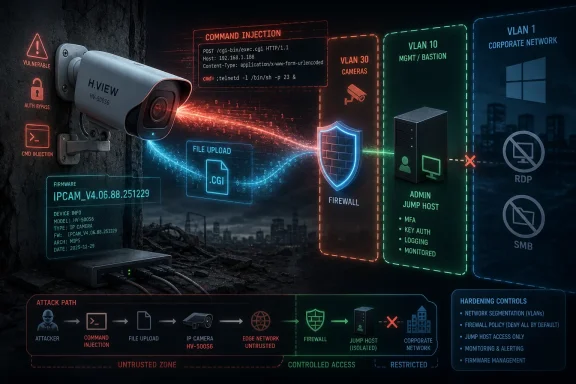
A Camera Advisory Is Really a Network Perimeter Story
The most important word in CISA’s advisory is not “camera.” It is “execute.” Once an attacker can run arbitrary commands on a network-connected device, the conversation stops being about video feeds and starts being about footholds, persistence, and lateral movement.
That distinction matters because IP cameras occupy a peculiar place in enterprise and small-business networks. They are physically visible but digitally invisible. Everyone can point to the device in the hallway, the lobby, or the loading dock, yet few administrators can immediately say what firmware it runs, who last changed its password, whether its web interface is exposed, or whether it sits on the same flat network as Windows clients and file shares.
CISA rates the H.VIEW issue at CVSS 7.2, which is serious rather than apocalyptic on paper. But CVSS is a scoring system, not an architectural map. A medium-to-high severity flaw on a device placed behind proper segmentation may be a maintenance task; the same flaw on an internet-exposed camera with a weak password and access to business systems is an incident waiting for a verb.
The affected product is the H.VIEW HV-500S6 IP Camera, with CISA naming firmware IPCAM_V4.06.88.251229. The agency says successful exploitation could allow arbitrary code execution and malicious file uploads. That combination is enough to move the advisory from “patch when convenient” to “find out whether this thing is reachable before someone else does.”
The CVSS Number Understates the Shape of the Risk
A 7.2 score can invite a dangerous kind of relaxation. Security teams buried under critical browser bugs, VPN appliance zero-days, and Exchange-style emergencies may be tempted to leave camera advisories in the long tail of asset management. That would be understandable, but it would also miss the operational lesson.
Command injection is one of the oldest and least subtle classes of vulnerability. It happens when a system passes attacker-controlled input into an operating-system command without properly neutralizing dangerous characters or syntax. In plain English, a feature that should accept a filename, IP address, parameter, or configuration value can be tricked into running something the developer never intended.
Unrestricted upload of a dangerous file type is similarly blunt. If a device lets an attacker place executable content where the device can later run, serve, or interpret it, the upload feature becomes a delivery mechanism rather than an administrative convenience. Together, these two weakness classes create a familiar path: get code onto the box, trigger it, and turn a passive endpoint into an attacker-controlled node.
That is why security practitioners often view command injection differently from many other vulnerability categories. It tends to collapse the distance between “bug” and “capability.” The attacker is not merely reading a setting or causing a denial of service; they may be able to make the underlying operating system do work on their behalf.
The advisory does not say that exploitation is happening in the wild, and CISA specifically notes that it has not received reports of public exploitation targeting these vulnerabilities. That is welcome news. It is not a permission slip to wait indefinitely. Public exploitation status can change quickly once a vendor name, model, firmware string, and weakness category are public.
The Cheap Device Problem Keeps Getting Expensive
IP cameras are part of a larger class of devices that enterprises often buy as appliances but must defend as computers. They run operating systems, expose management interfaces, authenticate users, process untrusted input, receive firmware updates, and frequently live for years beyond the attention span of the purchasing project that installed them. The fact that they are mounted above a doorway rather than placed in a rack does not make them less interesting to attackers.
The commercial facilities label in the advisory is also doing more work than it may appear to do. Commercial facilities include the places where Windows networks are everywhere: offices, retail locations, warehouses, apartment buildings, schools, clinics, mixed-use campuses, and small industrial sites. These are environments where surveillance equipment is often installed by a contractor, managed through a web UI, and then left alone unless the video feed fails.
That operating model is the opposite of modern vulnerability management. A Windows workstation will usually be joined to a domain, monitored by endpoint tooling, patched through Microsoft’s servicing channels, and visible in an asset inventory. A camera may have a sticker, a local admin account, a vendor cloud option, a port-forwarding rule created years ago, and no obvious owner after the facilities manager who approved the purchase has moved on.
The result is a governance gap. IT is expected to defend the network, facilities owns the physical device, a third-party installer may know the password, and the vendor may publish firmware in a support channel nobody checks. When CISA publishes an advisory, the first real challenge is often not applying a fix. It is proving whether the organization owns the affected product at all.
Internet Exposure Turns Surveillance Gear Into Attack Surface
CISA’s recommended practices are familiar because they remain stubbornly relevant. Minimize network exposure. Keep control-system devices and remote systems off the open internet. Put them behind firewalls. Isolate them from business networks. Use VPNs for remote access, and keep those VPNs current too.
This advice can sound generic, but for cameras it is almost painfully specific. Many IP camera deployments were designed around convenience: remote viewing from a phone, access for a security vendor, browser-based management from anywhere, or a quick port-forward on a small-business router. That convenience often becomes the security boundary, and the security boundary often becomes a search-engine result.
The problem is not that remote access exists. The problem is that remote access is frequently bolted on without the same lifecycle discipline applied to mainstream IT systems. A camera web interface exposed to the internet is not a harmless dashboard. It is an authentication surface, a parsing surface, an update surface, and, in this case, potentially a command-execution surface.
Even VPNs are not magic. CISA’s language is careful on this point: a VPN should be more secure, but it is only as secure as the devices and accounts connected to it. If the camera network is reachable after a single shared VPN credential is compromised, or if every vendor technician lands on the same subnet as the recorder, domain controller, and file server, the VPN has narrowed the door without meaningfully redesigning the room.
For Windows-heavy shops, the practical question is whether the camera VLAN exists and whether it actually behaves like a boundary. Can cameras initiate connections to workstations? Can a compromised camera reach SMB, RDP, WinRM, printer admin panels, or backup infrastructure? Can the video-management server talk both to the camera network and the corporate LAN without tight controls? The answers matter more than the logo printed on the camera.
The Advisory’s Silence on a Patch Is Its Own Operational Signal
CISA’s summary, as provided, names affected firmware and recommends defensive measures, but it does not present a clean “upgrade to version X” remediation path in the text. That is not unusual for ICS advisories involving smaller vendors, but it changes the burden on defenders. When a patch path is unclear, exposure reduction becomes the immediate mitigation.
That means the first response should be discovery, not debate. Administrators should determine whether HV-500S6 units exist on the network, whether they run IPCAM_V4.06.88.251229, whether their management interfaces are reachable from untrusted networks, and whether any vendor, recorder, or mobile-access service provides a path into them. In many organizations, that requires coordination between IT, security, facilities, and whoever installed the cameras.
Firmware provenance also deserves attention. Camera firmware updates are not always delivered through the polished channels administrators expect from Microsoft, Dell, Lenovo, or major firewall vendors. Downloads may sit behind vendor portals, reseller pages, region-specific support sites, or informal instructions from integrators. That makes verification important. Installing mystery firmware from a search result can trade one risk for another.
If no trusted update is available, network isolation becomes more than best practice; it becomes compensating control. Disable direct internet access to the device. Restrict management to a jump host or tightly scoped admin network. Block outbound traffic that the camera does not require. Rotate credentials. Review accounts. Preserve logs where possible. Treat the device as potentially vulnerable until there is evidence otherwise.
There is also a procurement lesson hiding here. Buyers should ask vendors not only about resolution, lens quality, night vision, and storage integration, but about vulnerability disclosure, firmware signing, update cadence, and support lifetime. A camera that is cheap to buy and expensive to secure is not cheap. It is deferred labor with a purchase order attached.
Windows Administrators Inherit the Blast Radius
At first glance, an H.VIEW camera advisory may seem distant from Windows administration. It is not a Windows vulnerability, it does not require a Patch Tuesday cycle, and it likely runs some embedded operating system that most domain admins never touch. Yet Windows environments are often where the consequences land.
A compromised camera can become a vantage point inside the network. From there, an attacker may scan internal address space, probe management interfaces, observe traffic patterns, attack weak services, or use the device as a pivot for further exploitation. Even if the camera itself contains little sensitive data, its position may be valuable because it is trusted by network design rather than by security review.
Video-management systems complicate the picture. Many camera deployments include a Windows-based network video recorder, monitoring workstation, or client application that talks to the cameras. Those systems may have elevated local privileges, shared credentials, broad firewall allowances, or vendor software that is updated irregularly. The camera becomes one side of a trust relationship, and the Windows box becomes the place where that trust can become damage.
Credential reuse is another quiet hazard. If installers or administrators used the same password across multiple cameras, recorders, switches, routers, or Windows local administrator accounts, compromise of one device can become compromise of many. This is especially common in smaller environments where speed of deployment mattered more than identity architecture.
For defenders, the right mental model is not “can an attacker watch the lobby camera?” It is “what can this embedded device reach, and what trusts it?” That is a Windows question as much as a surveillance question.
The Small Vendor Supply Chain Is Now Part of Critical Infrastructure
CISA lists the affected product as deployed worldwide and identifies the vendor headquarters location as China. That geographic detail will attract attention, but it should not lead to a lazy conclusion that this is only a China-supply-chain story. The broader reality is that the global camera market is dense with rebadged hardware, shared firmware families, reseller brands, and devices that look different on the outside while sharing components underneath.
That does not absolve any vendor. It raises the stakes for transparency. When vulnerabilities are found in a camera model, customers need to know whether the flaw is confined to one SKU, one firmware branch, one OEM lineage, or a broader family. They need version strings that match what the device UI reports. They need signed updates. They need realistic mitigation guidance if the product cannot be patched.
The acknowledgment in CISA’s advisory credits Fukuhara Rikuto of Smooth Inc. and Hosei University for reporting the vulnerabilities. That matters because coordinated disclosure is one of the few mechanisms that can drag embedded-device risk into public view before exploitation becomes the only evidence anyone sees. Researchers find the bug, CISA coordinates the advisory, vendors are supposed to respond, and defenders get a chance to act.
The trouble is that the embedded-device ecosystem often moves slower than the threat market. Attackers can search for exposed devices at internet scale, test default credentials, fingerprint firmware, and automate exploitation once technical details become available. Defenders, meanwhile, may be emailing a facilities contractor to ask whether “HV-500S6” appears on an invoice from 2023.
That asymmetry is why even a non-exploited advisory deserves attention. The time to build an inventory is not after a botnet author decides a firmware string is interesting.
“No Known Exploitation” Is a Status, Not a Strategy
CISA says it has not received reports of known public exploitation specifically targeting these vulnerabilities. That is useful information, and it should prevent panic. It should not prevent action.
There are several reasons. First, absence of reported exploitation is not absence of exploitation. Embedded devices often have poor logging, limited telemetry, and no endpoint agent watching process creation or suspicious shell commands. If an attacker compromises a camera quietly, many organizations will not have the evidence needed to recognize the intrusion, let alone report it.
Second, camera exploitation often becomes visible only after scale. A single compromised device may be used for reconnaissance or persistence. Thousands of compromised devices become a botnet, a DDoS platform, a proxy network, or a scanning swarm. By the time the pattern is public, the remediation problem is larger and messier.
Third, public advisory details can change attacker incentives. A named model and firmware version reduce the research cost for opportunists. Even if the advisory does not include exploit code, the categories of weakness point toward where to look. That does not mean every advisory instantly becomes a weaponized campaign, but it does mean defenders should treat publication as the start of a clock.
The correct reaction is proportional urgency. Do not rip out every camera in a blind rush. Do not ignore the advisory because the CVSS score is below 9.0. Find the devices, close the unnecessary paths, verify firmware, and decide whether continued operation is acceptable under the organization’s risk model.
Segmentation Is the Patch You Can Apply Today
The advice to minimize exposure can feel unsatisfying because it lacks the finality of a vendor patch. But segmentation is often the only control an organization can apply immediately, and it is the one that most directly changes exploitability. If an attacker cannot reach the management interface, the vulnerability is much harder to use.
Good segmentation for cameras is not merely placing them on a different IP range. It means defining who can initiate connections, which ports are allowed, which systems can administer devices, and whether cameras can reach the internet at all. It also means monitoring the boundary for behavior that cameras should never exhibit, such as outbound connections to unfamiliar hosts or attempts to reach Windows administrative services.
For many Windows environments, this can be implemented with familiar tools: switch VLANs, firewall rules, access-control lists, dedicated management workstations, and logging that feeds the SIEM or network detection stack. The hard part is rarely the technology. The hard part is untangling years of convenience exceptions.
Remote viewing deserves special scrutiny. If executives, guards, property managers, or third-party vendors need camera access from outside the building, the access path should terminate in a controlled service, not a raw device interface exposed to the world. Multi-factor authentication, account-specific access, logging, and least privilege should apply. Surveillance systems should not get a security exemption because they are “just cameras.”
The same logic applies to vendor support. Temporary access should be temporary. Shared credentials should be retired. Admin accounts should be named, scoped, and rotated. If the camera requires a vendor to manage it, that vendor relationship should include security responsibilities, not just installation labor.
The Firmware String Is the New Asset Tag
The affected firmware version, IPCAM_V4.06.88.251229, is more than a detail for vulnerability scanners. It is an example of why device inventory must include software state, not just hardware names. Knowing that a building has “H.VIEW cameras” is not enough. Knowing the model is better. Knowing the firmware version is what turns an advisory into an action plan.
This is where many organizations still struggle. Windows assets are comparatively easy to inventory because they participate in management ecosystems. Embedded devices may require SNMP, network discovery, authenticated scans, vendor APIs, manual exports, or physical inspection. Some cameras may not report useful version information unless an administrator logs into the device UI.
That friction leads to stale inventories. A spreadsheet created during installation becomes outdated when a camera is replaced, a firmware update is applied, a recorder is swapped, or a contractor adds a temporary unit that becomes permanent. Security teams then discover during an advisory that their visibility is not just incomplete; it is structurally dependent on people remembering to tell them things.
A better model treats firmware like any other managed configuration item. Record the model, serial number, firmware version, network segment, owner, support contact, management URL, update source, and exposure status. Tie it to a review cadence. Make cameras part of vulnerability management rather than a side channel owned by whoever can reach the ladder.
This is mundane work, but it is also the difference between a one-hour advisory response and a week of hallway archaeology.
The Camera Feed Is Not the Crown Jewel, but the Camera May Be the Door
It is tempting to frame camera vulnerabilities around privacy: unauthorized viewing, recorded footage, physical surveillance, or sensitive locations. Those risks are real, especially in schools, healthcare, offices, and residential facilities. But the H.VIEW advisory points to something broader because code execution and file upload can affect the integrity of the device itself.
An attacker who controls a camera may be able to alter its behavior, disable it, use it as storage, stage tools, proxy traffic, or hide inside normal device noise. Depending on the implementation, a malicious file upload may enable persistence across reboots or provide a web-accessible foothold. Command injection may permit changes to network settings, user accounts, or system binaries.
Even if those possibilities are not all confirmed for this specific model, they are the class of outcomes defenders must consider when evaluating arbitrary code execution on embedded devices. The safe assumption is that compromise of the device means loss of confidence in what the device is doing and what it may be used to reach.
That matters for incident response. If an affected camera was exposed and suspicious behavior is observed, simply changing the password may not be enough. Administrators may need to isolate the device, preserve what logs exist, reflash trusted firmware if available, reset configuration, rotate credentials used by related systems, and review network traffic from the camera’s address.
A camera is not a domain controller. But in a segmented network, it should behave like a predictable appliance. When it stops being predictable, defenders should treat it as an untrusted host.
CISA’s Boilerplate Is Boring Because It Keeps Being Right
Every ICS advisory seems to arrive with the same defensive refrain: limit exposure, isolate networks, use firewalls, prefer secure remote access, beware phishing, perform risk assessment, and report suspicious activity. The repetition can make the guidance feel ceremonial. It is not.
The reason the guidance repeats is that the same deployment failures repeat. Devices are reachable from places they should not be. Business and operational networks are insufficiently separated. Remote access is treated as a convenience feature rather than an attack path. Vulnerability remediation is attempted without understanding operational impact. Organizations discover during an incident that they do not know what they own.
For industrial-control systems, these failures can have safety and continuity consequences. For commercial-facility cameras, the consequences may be less dramatic but still serious: surveillance outages, privacy exposure, network compromise, reputational damage, and expensive emergency remediation. The shared theme is that embedded systems are now part of enterprise security whether or not enterprise security was invited to the purchasing meeting.
The advisory’s social-engineering reminders may seem disconnected from command injection, but they fit the same risk environment. Attackers rarely respect category boundaries. A phishing email can deliver credentials that provide VPN access to a camera network. A compromised camera can help an attacker understand facility layouts. A weak remote-access setup can convert a device flaw into a business breach.
Security programs work when these threads are seen together. They fail when every advisory is handled as an isolated product defect.
The Practical Read for WindowsForum Readers
The H.VIEW HV-500S6 advisory is not a reason to panic, but it is a reason to stop treating cameras as decorative network appliances. The most defensible response is fast triage followed by durable cleanup, especially in environments where facilities technology and Windows infrastructure share space.
- Organizations should identify whether they operate H.VIEW HV-500S6 cameras and verify whether any device is running firmware IPCAM_V4.06.88.251229.
- Administrators should remove direct internet exposure for affected cameras and restrict management access to trusted networks or dedicated administrative hosts.
- Security teams should check whether camera networks can reach Windows services, file shares, remote-management ports, backup systems, or identity infrastructure.
- Facilities and IT teams should establish a shared owner for firmware updates, credential rotation, vendor access, and vulnerability tracking.
- If no trusted firmware fix is available, segmentation, firewalling, credential review, and monitoring become the immediate compensating controls.
- Any suspicious activity involving affected cameras should be handled through normal incident-response procedures and reported through appropriate channels.
The bigger lesson is that the edge of the Windows environment no longer runs only Windows. It runs cameras, recorders, access-control panels, printers, badge systems, sensors, and vendor boxes with web servers nobody remembers deploying. CISA’s H.VIEW advisory is one more prompt to bring those devices into the same discipline we already expect for PCs and servers: inventory them, isolate them, update them, and assume that attackers are perfectly happy to enter through the least glamorous machine on the network.