

Anthropic has quietly moved Claude out of the chat window and into the slide deck: Claude in PowerPoint is now available as a Research Preview add-in that generates and edits native, editable PowerPoint content from plain‑language instructions — but the feature’s beta state, reported Marketplace errors, and compliance gaps mean many enterprises will treat it as promising yet unready for high‑stakes deliverables.
Anthropic released Claude Opus 4.6 in early February 2026, the model update that underpins a raft of product improvements aimed at longer, more agentic tasks and tighter integration with office workflows. That release included public research previews for new productivity tooling — notable among them Claude in PowerPoint, paired with upgrades to Claude in Excel and Cowork — positioning Claude as a direct productivity competitor to Microsoft’s Copilot offerings.
The technical and market context matters: Opus 4.6 brings a larger context window, improved planning and self‑correction, and new product controls that allow Claude to reason across documents and produce native files rather than image exports. That foundational work is what makes a PowerPoint add‑in capable of creating editable shapes, charts and diagrams directly in the PowerPoint document — a major step beyond tools that only generate static images or web exports.
Why that matters in practice: for consulting, finance, and many internal functions the deliverable is not a JPEG — it’s an editable .pptx that must conform to corporate templates, link to Excel data, and accept precise formatting changes. Native elements plus template awareness can reduce — though not eliminate — the tedious manual work that many users have long complained about in earlier AI slide generators.
Key points on availability and access:
Anthropic’s own documentation warns users that Claude can make mistakes and explicitly recommends human review before using AI outputs for client deliverables or regulated data. The support article for Claude in PowerPoint lists best practices that include starting with the correct template, verifying outputs for brand compliance, and avoiding use on highly sensitive or regulated data until stronger admin controls exist. Additionally, chat history for the PowerPoint add‑in is described as ephemeral — sessions don’t persist across restarts — a product behavior consistent with Anthropic’s cautious privacy posture for some features.
Practical limits that matter for IT and compliance teams (what we can verify)
Industry reviewers and competitive vendors that focus on PowerPoint workflows highlight two recurring patterns:
Microsoft’s Copilot remains the dominant AI entry point within Office for many IT organizations, but its commercial packaging varies:
Microsoft’s Copilot, by contrast, carries the advantage of deep tenant integration, Microsoft Graph grounding, and established enterprise governance features — and Microsoft continues to evolve Copilot pricing and packaging with SMB bundles and new agent tooling that make the overall commercial decision more complex. Enterprises will weigh three things when choosing a route:
Yet the feature remains a research preview. Early access problems, product limitations, and governance gaps — especially around auditability and specialized charting — mean the add‑in is best viewed today as a powerful drafting assistant rather than a drop‑in replacement for existing, regulatorily governed processes. For teams that can tolerate a beta environment, Claude in PowerPoint promises to accelerate ideation and reduce repetitive formatting; for regulated, client‑facing workflows, the pragmatic choice for now is cautious pilot testing until Anthropic ships the compliance, audit and advanced charting features enterprise IT requires.
Source: WinBuzzer Claude in PowerPoint Arrives, But Beta Bugs Linger
 Background
Anthropic released Claude Opus 4.6 in early February 2026, the model update that underpins a raft of product improvements aimed at longer, more agentic tasks and tighter integration with office workflows. That release included public research previews for new productivity tooling — notable among them Claude in PowerPoint, paired with upgrades to Claude in Excel and Cowork — positioning Claude as a direct productivity competitor to Microsoft’s Copilot offerings.The technical and market context matters: Opus 4.6 brings a larger context window, improved planning and self‑correction, and new product controls that allow Claude to reason across documents and produce native files rather than image exports. That foundational work is what makes a PowerPoint add‑in capable of creating editable shapes, charts and diagrams directly in the PowerPoint document — a major step beyond tools that only generate static images or web exports.
What Claude in PowerPoint does — and how it works
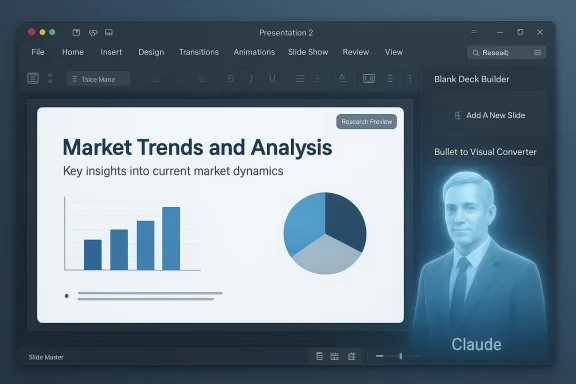
Claude in PowerPoint installs as a PowerPoint add‑in (available through the Microsoft app store) and operates inside the PowerPoint editing surface. The product team designed three primary workflows to match common professional needs:- Blank‑Deck Builder — generate a full deck from a short text brief (for example, “Create a 10‑slide market sizing and go‑to‑market deck for X industry”).
- Pinpoint Editor — modify selected slides or objects while preserving the existing slide master formatting.
- Bullet‑to‑Visual Converter — transform bullet lists into editable native PowerPoint diagrams, process flows, or charts.
Why that matters in practice: for consulting, finance, and many internal functions the deliverable is not a JPEG — it’s an editable .pptx that must conform to corporate templates, link to Excel data, and accept precise formatting changes. Native elements plus template awareness can reduce — though not eliminate — the tedious manual work that many users have long complained about in earlier AI slide generators.
The rollout and who can use it now
Anthropic launched the Claude Opus 4.6 model and associated product previews in early February 2026, and it made Claude in PowerPoint available as a research preview to paid plan customers. Initially the preview targeted Max, Team and Enterprise subscribers; Anthropic expanded access to include Pro subscribers later in the month, with Pro access added on February 20, 2026. Multiple outlets reported the staged availability and Anthropic’s decision to keep the feature designated as a Research Preview as it gathers feedback.Key points on availability and access:
- Research preview / beta: intentionally limited; Anthropic classifies the release as a Research Preview and urges review of generated material before finalizing.
- Installation: the add‑in is distributed through the Microsoft app store and is activated inside PowerPoint.
- Account eligibility: Max, Team and Enterprise users received initial access; Pro users were added during the staged rollout.
Early friction: error reports, Marketplace messages, and hands‑on limitations
No beta launches at scale are entirely smooth, and Claude in PowerPoint is no exception. Within days of broader distribution users reported Marketplace installation errors and “limited access” messages, and some organizations have encountered inconsistent availability while Anthropic scales the feature. Public threads discussing access problems and intermittent failures surfaced almost immediately after the add‑in appeared on the Marketplace.Anthropic’s own documentation warns users that Claude can make mistakes and explicitly recommends human review before using AI outputs for client deliverables or regulated data. The support article for Claude in PowerPoint lists best practices that include starting with the correct template, verifying outputs for brand compliance, and avoiding use on highly sensitive or regulated data until stronger admin controls exist. Additionally, chat history for the PowerPoint add‑in is described as ephemeral — sessions don’t persist across restarts — a product behavior consistent with Anthropic’s cautious privacy posture for some features.
Practical limits that matter for IT and compliance teams (what we can verify)
- Audit and retention gaps: Anthropic’s Cowork product documentation explicitly notes that Cowork activity is not captured in standard enterprise audit logs, exports, or compliance APIs; some of the same governance gaps appear across early integrations and are flagged in Anthropic’s product notes and advisor materials. That absence of robust audit trails is an immediate blocker for regulated workflows that require verifiable provenance.
- Marketplace instability: users have reported Marketplace error messages and “limited access” states during the initial rollout; community threads reflect that some customers saw intermittent availability even when they held qualifying plans.
- File size cap (30 MB), missing chart types (Waterfall, Mekko, Gantt), and “no audit logs” for the PowerPoint add‑in have been reported in secondary coverage and social summaries. Anthropic’s public product pages and help center emphasize that advanced or highly specialized charts may not be fully supported by the beta, but concrete product documentation for a strict 30 MB upload cap or an authoritative list of unsupported chart types was not found in official support pages at the time of reporting. Those specifics should be treated as provisional until Anthropic publishes explicit technical limits. Where possible, IT teams should conduct their own tests in a controlled environment.
Hands‑on quality: how much rework is likely?
The real question for professionals is how much time AI saves versus how much cleanup it requires. Several independent reviewers and product teams have stressed caution. Early hands‑on tests show that while Claude can produce an on‑brand first draft faster than starting from a blank slide, substantial human editing is frequently required to reach consulting‑grade standards.Industry reviewers and competitive vendors that focus on PowerPoint workflows highlight two recurring patterns:
- Structural accuracy is often good: slide sequences and the overall narrative are commonly reasonable and helpful as a starting point.
- Visual and numeric polish still requires manual attention: positioning, axis labeling, consistent spacing, and complex financial visuals still need eyeballs and manual adjustment.
Pricing and how Claude stacks up against Microsoft Copilot
Anthropic’s paid plans are tiered: Pro (commonly cited at approximately $20/month for individuals), Max (higher‑capacity tiers), and Team/Enterprise seat plans with additional governance features. The PowerPoint add‑in is bundled with Anthropic’s paid tiers (Max, Team, Enterprise) in the research preview and was extended to Pro users during the staged rollout. Pro’s price point — $20/month — is a deliberate market decision that positions Claude as a lower‑cost alternative to some enterprise Copilot seat configurations for single users.Microsoft’s Copilot remains the dominant AI entry point within Office for many IT organizations, but its commercial packaging varies:
- Microsoft 365 Copilot (enterprise add‑on) has been widely described as a $30/user/month commercial add‑on in many enterprise scenarios, although Microsoft has introduced SMB bundles and promotional pricing that can lower the effective per‑user cost for smaller organizations. Copilot’s enterprise packaging integrates with Microsoft security and compliance controls and is designed around tenant‑aware, Graph‑grounded capabilities. For organizations that require centralized governance, audit trails and tenant‑aware grounding, Copilot’s integration into Microsoft’s admin surface is a significant advantage.
- Sticker price: Claude Pro ≈ $20/month (individual); Microsoft 365 Copilot ≈ $30/month add‑on for many enterprise plans (but bundle pricing and SMB programs can change the effective cost).
- Deskilling vs. governance tradeoff: Claude’s lower direct cost is attractive, but the value equation for enterprises includes governance, auditability, and compliance — areas where Microsoft’s tenant‑aware Copilot offerings currently enjoy a structural advantage.
- Prompt and capability differences: product UX differences (e.g., argument length limits or UI integrations) can affect real productivity even when list prices look similar.
Enterprise implications: governance, audit trails, and the IT decision tree
For enterprise adopters the central question is not “does the AI work?” but where it can be used safely inside a regulated IT estate. That decision rests on several axes:- Auditability and recovery: tools that do not surface admin‑grade audit logs, retention controls, or a compliance API create an obstacle for teams that must maintain verifiable provenance for regulatory or legal reasons. Anthropic’s research previews have documentation indicating gaps in audit traceability for agentic features; IT teams should assume that early releases will not meet strict audit requirements until Anthropic publishes specific compliance features.
- Data residency and handling: enterprise customers will want to know where inference runs (regional inference) and how file artifacts are stored. Anthropic’s documentation for Opus 4.6 mentions US‑only inference as a paid option for specific workloads, but full enterprise data residency features and contractual assurances (BAAs, specific SOC/ISO attestations) are the standard gating items.
- Integration versus isolation: putting Claude inside PowerPoint reduces context switching and can accelerate workflows, but dramatically expands the surface area for prompt injection and malicious file‑based instructions. Anthropic’s help pages explicitly call out prompt‑injection risks and recommend using Claude in PowerPoint only with trusted files. That guidance alone will force many security teams to carve out tightly controlled pilot environments.
- Feature parity for specialized charts and finance: many advisory and investment workflows rely on specialized chart types (waterfall/bridge charts, Mekko/Marimekko, linked Excel‑PowerPoint charts). Some reviewers and competitor blogs note gaps in advanced chart support across many AI slide tools — a gap that will take time to close if Anthropic prioritizes general‑purpose displays first. Until those chart types are verifiably supported in the add‑in, finance and consulting teams will remain cautious. (We could not find a definitive, official list of supported/unsupported chart types at the time of writing — treat individual claims about missing charts as provisional and test in your environment.)
Competitive landscape and where Claude fits
Claude’s core competitive advantages are strong reasoning, long‑context handling (Opus 4.6’s 1M token capability in beta), and the ability to output editable file artifacts that respect slide masters. That differentiates it from many web‑first slide generators that export to PowerPoint as a secondary step.Microsoft’s Copilot, by contrast, carries the advantage of deep tenant integration, Microsoft Graph grounding, and established enterprise governance features — and Microsoft continues to evolve Copilot pricing and packaging with SMB bundles and new agent tooling that make the overall commercial decision more complex. Enterprises will weigh three things when choosing a route:
- Productivity lift per user (how much drafting + cleanup time is saved).
- Governance fit (audit logs, data residency, admin controls).
- Total cost of ownership (subscription price, management overhead, training and support).
Practical guidance for IT leaders and power users
If your organization is evaluating Claude in PowerPoint, here’s a short practical checklist to run before approving any broad deployment:- Pilot in a controlled sandbox: enable the add‑in only for a small group of trusted users and monitor experience, stability, and content quality.
- Test governance controls: verify whether your tenant admin tools can audit or at least detect add‑in usage, and confirm data egress paths.
- Validate the output: run realistic, business‑critical slide builds and measure time to consulting grade (including manual edits) against existing benchmarks.
- Evaluate chart support and Excel linking: if your workflows depend on waterfall, Mekko, Gantt, or Excel‑linked charts, validate these precisely in the pilot.
- Train users and set policies: publish “human‑in‑the‑loop” rules requiring review before sharing externally — and include prompt‑injection awareness training in your AI guidance.
What’s next — product maturity signals to watch for
Anthropic’s staged rollout approach is deliberate. For enterprise IT teams to move from pilot to production, watch for these signals:- Official audit logging and compliance API: an admin‑visible audit trail and policy controls.
- Formalized data residency and contractual assurances (BAA, SOC/ISO reports) for regulated industries.
- Public documentation of supported chart types and the maximum file sizes/limits for practical usage.
- Reliability improvements in the Microsoft Marketplace listing and resolution of “limited access” deployment errors.
- A clear migration path from Research Preview to general availability with enterprise release notes that enumerate governance features.
Conclusion
Claude in PowerPoint is an important technical and product step: editable, on‑template PowerPoint output generated from natural language opens a new class of productivity workflows and directly addresses the longstanding pain of “AI generates pretty images, but I still have to fix everything.” Anthropic’s underlying model upgrades (Opus 4.6) and the in‑app approach give the company a credible foothold in the productivity market.Yet the feature remains a research preview. Early access problems, product limitations, and governance gaps — especially around auditability and specialized charting — mean the add‑in is best viewed today as a powerful drafting assistant rather than a drop‑in replacement for existing, regulatorily governed processes. For teams that can tolerate a beta environment, Claude in PowerPoint promises to accelerate ideation and reduce repetitive formatting; for regulated, client‑facing workflows, the pragmatic choice for now is cautious pilot testing until Anthropic ships the compliance, audit and advanced charting features enterprise IT requires.
Source: WinBuzzer Claude in PowerPoint Arrives, But Beta Bugs Linger
