

Microsoft’s decision to surface Viva Engage communities directly inside the Teams Chat experience shifts one of the last major employee-experience boundaries into the place where people already do their work — and it matters. The public-preview rollout that began in early 2026 folds community conversations, Q&A, events, and long-form posts into the Teams Chat app, adds AI-driven “community agents” and Copilot grounding, and promises a zero-migration experience for existing Engage customers — but it also elevates governance, licensing, and operational complexity for IT teams. m])
For several years Microsoft has been intentionally collapsing discrete employee-experience products into Microsoft Teams: Viva Engage (the evolution of Yammer), Viva Connections, Viva Amplify, and the Copilot family of capabilities. The goal has been consistent: reduce app hopping, surface institutional knowledge where people already collaborate, and apply AI across those surfaces to improve discoverability and speed. The Communities-in-Teams move is the convergent endpoint of that strategy — not merely a new tab but an integrated conversation surface that toations, admin controls, analytics, and AI grounding.
Microsoft’s public documentation confirms the integration is available in a public preview and that admins can manage Engage experiences from Teams; the company frames the change as part of a broader push to bring leadership communication, asynchronous engagement, and knowledge discovery into Teams. Administrators should treat this as a tenant-level change with implications across security, compliance, and content lifecycle management.
Key admin controls of note:
Together, community agents and Copilot grounding create a hybrid model:
Caveat: third-party coverage may call out earlier preview dates; IT teams should rely on their tenant’s Message Center notices and the Engage admin center to determine when features become available in their environment. Always confirm using your tenant’s tries.
Microsoft’s documentation and Message Center guidance make the roadmap and controls clear: public preview capabilities are available now and GA is slated in the March–April 2026 window, while Copilot grounding and community agents already provide powerful, tenant-aware AI capabilities if you choose to enable them. Administrators should validate timelines and tenant settings in their own Message Center and Engage admin portals, pilot thoroughly, and ensure human oversight remains central to any AI-assisted communications workflow.
Source: WinBuzzer Microsoft Integrates Viva Engage Communities Into Teams Chat
 Background: why this is more than a UI tweak
For several years Microsoft has been intentionally collapsing discrete employee-experience products into Microsoft Teams: Viva Engage (the evolution of Yammer), Viva Connections, Viva Amplify, and the Copilot family of capabilities. The goal has been consistent: reduce app hopping, surface institutional knowledge where people already collaborate, and apply AI across those surfaces to improve discoverability and speed. The Communities-in-Teams move is the convergent endpoint of that strategy — not merely a new tab but an integrated conversation surface that toations, admin controls, analytics, and AI grounding.Microsoft’s public documentation confirms the integration is available in a public preview and that admins can manage Engage experiences from Teams; the company frames the change as part of a broader push to bring leadership communication, asynchronous engagement, and knowledge discovery into Teams. Administrators should treat this as a tenant-level change with implications across security, compliance, and content lifecycle management.
What’s included in the integration (practical features)
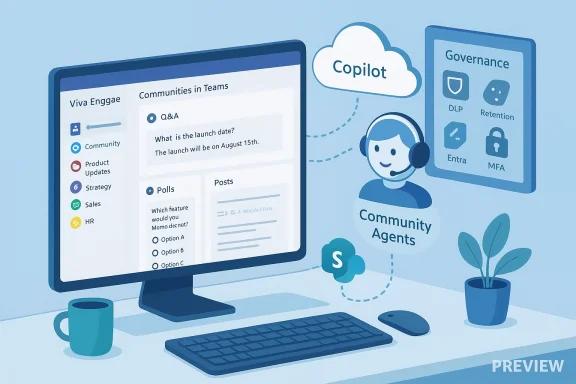
The Communities-in-Teams experience unifies disparate conversation spaces into the Chat app (or a split Chats + Channels layout) and adds a set of Teams-native affordances and copy-paste behaviors to community content. Key elements of the rollout include:- A Teams-native Communities surface where users can discover, join, follow, and post to Viva Engage communities without switching apps. Existing community favorites and memberships synchronize into Teams.
- A larger conversation pane, docked right rail, and Teams-style unread/read indicators that match the existing Teams UX.
- Support for Q&A, long-form posts, polls, praise, and rich media content types inside the new Teams view, with posting and moderation controls inherited from Engage. (mc.merill.net)
- Search and discovery integrated into Teams global search and a new community browse experience to surface functional groups, interest communities, and organization-wide announcements.
- Notifications for announcements and mentions flowing into Teams Activity, with deep links into the community context.
- Zero migration for Engage customers who opt into the preview: memberships, permissions, and governance settings carry over automatically, and admins can enable the preview through admin settings.
AI layers: community agents and Copilot grounding
Two distinct AI integrations are central to the value proposition.Community agents (answer automation)
Microsoft introduced community agents for Viva Engage as a public preview capability that drafts answers to repeated or unanswered questions by mining organizational knowledge held in the community and linked sources. Admins can configure agent behavior — whether it posts automatically or requires human approval — and can scope the agent’s knowledge sources, including SharePoint sites outside the community. This gives organizations a way to automate routine knowledge answers while preserving human oversight.Key admin controls of note:
- Toggle preview opt-in at the network level in the Engage admin center.
- Configure automatic posting vs. approval workflows to keep a human in the loop.
- Scope grounding sources (community threads, selected SharePoint content) and tagging behavior.
Copilot grounding (contextual answers across Microsoft 365)
Separately, Microsoft 365 Copilot can use public Viva Engage content as a grounding source for Copilot responses across Microsoft 365 apps. That means when a user asks Copilot a question in Word, Outlook, or Teams, the assistant may cite and reference relevant community discussions or Q&A posts (only content the asking user has permission to view). Importantly, users require a Microsoft 365 Copilot license to access Copilot responses, but they do not need a Viva Engage license to see Copilot outputs that are grounded in Engage content. Microsoft’s documentation emphasizes that only public communities are supported for grounding at this time — content from private communities is excluded.Together, community agents and Copilot grounding create a hybrid model:
- Agents operate inside communities to keep answers fresh and visible to members.
- Copilot can incorporate community knowledge as a secondary grounding source when answering queries across Microsoft 365.
Timeline and availability: what to expect in your tenant
Reporters covering the rollout noted early public-preview availability in February 2026; Microsoft’s admin and message-center records provide the authoritative schedule and capability notes. The Message Center item associated with Roadmap ID 513274 lists General Availability til 2026 and describes the unified Chat app experience, membership sync, and Activity/notification behavior. The Engage admin and Teams documentation also state that the Communities-in-Teams surface is in public preview and that Engage storylines are generally available. These multiple touchpoints confirm the integration is both live in previews and scheduled for broader GA in the March–April 2026 window, though tenant-by-tenant rollouts and preview opt-ins mean exact dates will vary.Caveat: third-party coverage may call out earlier preview dates; IT teams should rely on their tenant’s Message Center notices and the Engage admin center to determine when features become available in their environment. Always confirm using your tenant’s tries.
Administration, governance, and compliance implications
Bringing community-scale communications into Teams transforms the risk surface. Organizations that treat this as a be surprised by the operational demands. Key areas IT must address before broad enablement:- Identity and access control
- Enforce strong authentication (MFA, conditional access via Microsoft Entra).
- Review guest access and external-sharing settings; communities surfaced in Teams are more discoverable.
- Data protection and DLP
- Apply Microsoft Purview sensitivity labels and DLP policies to community content.
- Consider discoverability trade-offs: content that was formerly in a separate app may now be indexed and surfaced by Teams search and Copilot.
- Retention, eDiscovery, and auditing
- Align retention labels and hold policies to ensure legal and compliance requirements continue to be enforced across the new surface.
- Verify that logging of AI prompts/outputs and agent decisions meets your auditability requirements.
- AI governance
- For community agents and Copilot grounding, implement human-in-the-loop approval workflows for sensitive outputs.
- Retain logs of agent-suggested answers and human moderation decisions where policy requires.
- Licensing and FinOps
- Copilot capabilities require separate licensing; the grounding capability does not require users to have a Viva Engage license to receive Copilot answers, but Copilot itself requires a Copilot license. Map entitlements carefully to avoid unexpected costs.
- Operational load
- Expect moderation, taxonomy, and lifecycle tasks to increase. Community admins will need to coordinate with IT to manage tagging, republishing, and archival processes.
Adoption playbook: roll it out like a program, not a feature flag
Experience shows that integrated tools only deliver ROI when people change behavior. Here’s a pragmatic, sequential rollout plan suitable for mid-size and enterprise tenants:- Plan and sponsor
- Secure an executive sponsor and name an IT Service Owner. Public leadership usage accelerates adoption.
- Pilot with champions
- Select a small set of communities (HR updates, sales enablement, internal comms) and invite community owners and champions.
- Configure governance first
- Set naming conventions, owner rules, retention labels, DLP policies, and external access settings before enabling the preview more widely.
- Enable preview in a c Use the Engage admin center to opt the pilot network into community agents and the Teams Communities preview. Validate membership sync, notifications, and access controls.
- Train with microlearning
- Deliver short, in-flow guidance through Viva Learning or Teams tabs. Provide starter prompts and etiquette rules for using Copilot and community agents.
- Measure and iterate
- Use Experience Insights and Copilot Analytics to correlate engagement changes with business KPIs. Adjust policy thresholds, moderator rosters, and license assignments based on measured outcomes.
- Expand and operationalize
- Scale to more communities with defined owner SLAs, content calendars, and moderation playbooks.
Technical verification: what we can confirm — and what still needs tenant checks
Verified by Microsoft docs and Message Center notices:- Copilot grounding: public Viva Engage content (public communities, Q&A, Storylines) is available as a grounding source for Microsoft 365 Copilot; Copilot respects user permissions. Microsoft documents this behavior and the licensing preconditions.
- Community agents: available in public preview, with admin settings for automatic posting vs. approval and scoping to SharePoint sources. Admins enable agents via the Engage admin center.
- Communities in Teams: listed as a public preview feature by Microsoft and associated with Roadmap ID 513274; Message Center notes GA timing (March–April 2026) and describes membership sync and Activity integration.
- Zero migration behavior: Microsoft’s message clearly states existing Viva Engage community memberships and favorites will sync into Teams; third-party reports echo a zero-migration approach. Still, tenant-level behavior can vary based on existing customizations.
- The exact admin UI locations and preview flags can differ across tenant configurations and Teams client versions; test in a pilot tenant to confirm the enablement path and effects.
- Licensing entitlements and which Copilot features require additional purchase should be validated against your Microsoft 365 agreement and the Microsoft 365 admin center because Copilot licensing is often handled separately from base M365 licenses.
anizations gain
- Reduced context switching: employees find community discussions where they already chat and collaborate, increasing the chance leadership posts and knowledge-sharing get seen.
- Faster, automated knowledge answers: community agents surface repeat answers quickly, reducing repetitive queries and freeing moderators for higher-value tasks. ([mc.merill.net] and discoverability**: Activity feed integration and Teams search improve visibility for community announcements and discussions.
- Content lifecycle improvements: Republish (part of Viva Amplify) and integrated analytics make it simpler to refresh and measure communications across SharePoint, Outlook, Viva Engage, and Teaopilot answers**: Copilot can cite community threads in responses, letting employees get instant, organization-specific answers without leaving their current app.
Risks and trade-offs — what keeps CIOs up at night
- Expanded governance surface: y the collaboration plane but the organizational communications plane — raising stakes for DLP, retention, and eDiscovery.
- AI hallucination and trust: generative answers — whether auto-posted by agents or surfaced by Copilot — risk being inaccurate. Human approval workflows and logging are non-negotiable for regulated communications.
- Licensing and cost creep: Copilot licenses and certain Viva capabilities can add material seat costs; enablement without a FinOps plan risks runaway spend.
- ***: moderation, taxonomy, archival, and human review for AI outputs require sustained staffing zations that under-resource these tasks will see quality decline.
- External sharing and guest risk: surfacing communities in Teams increases discoverability; ensure guest policies are tuned for your risk tolerance.
Practical checklist for IT before enabling pr tenant’s Message Center entries for the Communities-in-Teams rollout window and any tenant-specific notes.
- Map which users need Copilot licenses and which do not; confirm licensing costs with procurement.
- Configure conditional access, MFA, and guest policies in Entra to align identity controls with the new discoverability.
- Define mandatory owner rules, naming conventions, and archival/retention labels in Purview.
- Pilot community-agent behavior on low-risk communities and test approval workflows before wider enablement.
- Prepare short, role-based microlearning modules for community owners, moderators, and end-users on using Copilot responsibly.
- Set up Experience Insights and Copilot Analytics reporting to measure DAU, engagement, and business impact before and after rollout.
Conclusion: a strategic opportunity with operational obligations
Embedding Viva Engage communities inside Microsoft Teams brings a strategic usability win: fewer app switches, better discoverability of institutional knowledge, and richer AI-assisted answers via community agents and Copilot grounding. For organizations that approach the change as a coordinated program — with governance, pilot-driven adoption, and FinOps discipline — the integration can increase engagement and reduce friction in internal communications. For those that treat it as an automatic switch, the result is likely to be increased operational burden, compliance risk, and surprise licensing costs.Microsoft’s documentation and Message Center guidance make the roadmap and controls clear: public preview capabilities are available now and GA is slated in the March–April 2026 window, while Copilot grounding and community agents already provide powerful, tenant-aware AI capabilities if you choose to enable them. Administrators should validate timelines and tenant settings in their own Message Center and Engage admin portals, pilot thoroughly, and ensure human oversight remains central to any AI-assisted communications workflow.
Source: WinBuzzer Microsoft Integrates Viva Engage Communities Into Teams Chat
