

ControlUp has released a free migration utility, ControlUp Migrate for Windows 365, designed to automate the movement of Azure-based virtual machines and Azure Virtual Desktop (AVD) images into Windows 365 Cloud PCs — replacing much of the manual imaging work with a guided, snapshot-based workflow that leverages Microsoft’s Windows 365 migration API to validate, provision, and integrate Cloud PCs back into ControlUp’s management plane.
Microsoft’s Windows 365 service lets organizations provision Cloud PCs — personal, persistent virtual desktops hosted in Azure — that are managed and consumed like physical endpoints. Microsoft provides a Migration API and Graph endpoints to enable partners and automation tooling to import OS disk snapshots and provision Cloud PCs from existing Azure VMs, but the process carries strict technical constraints (fixed-format VHDs, Gen2 VMs, OS-only disks, healthy Azure VM agent, license assignment) and operational steps that frequently trip up manual projects. ControlUp’s new tool aims to abstract and automate those checks and steps by scanning candidate VM disks, validating prerequisites, orchestrating snapshot-based uploads, creating Cloud PCs via the Graph API, and reconnecting the newly provisioned Cloud PCs to ControlUp for monitoring and DEX management. The company says the tool is available free to both customers and non-customers and is intended to shorten project timelines, reduce failure rates, and lower migration costs for enterprises that want to standardize on Windows 365.
ControlUp’s announcement is a meaningful addition to the Windows 365 ecosystem: it automates a painful part of cloud desktop transformation while tying results back into an existing DEX platform. For organizations that meet Microsoft’s technical prerequisites and can implement the required governance around Graph permissions and storage, the new tool offers a fast route to converting Azure-based desktops into managed Cloud PCs — and a viable way to accelerate Windows 365 adoption with lower operational risk.
Source: IT Brief Asia ControlUp launches tool to speed Azure to Windows 365 move
 Background
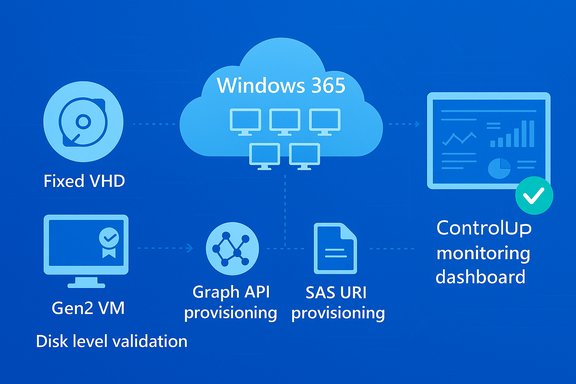
Microsoft’s Windows 365 service lets organizations provision Cloud PCs — personal, persistent virtual desktops hosted in Azure — that are managed and consumed like physical endpoints. Microsoft provides a Migration API and Graph endpoints to enable partners and automation tooling to import OS disk snapshots and provision Cloud PCs from existing Azure VMs, but the process carries strict technical constraints (fixed-format VHDs, Gen2 VMs, OS-only disks, healthy Azure VM agent, license assignment) and operational steps that frequently trip up manual projects. ControlUp’s new tool aims to abstract and automate those checks and steps by scanning candidate VM disks, validating prerequisites, orchestrating snapshot-based uploads, creating Cloud PCs via the Graph API, and reconnecting the newly provisioned Cloud PCs to ControlUp for monitoring and DEX management. The company says the tool is available free to both customers and non-customers and is intended to shorten project timelines, reduce failure rates, and lower migration costs for enterprises that want to standardize on Windows 365. What ControlUp Migrate for Windows 365 does — a technical overview
ControlUp packages migration tasks into an automated workflow that performs the following high-level functions:- Intelligent discovery and selection of candidate Azure Virtual Desktop (AVD) instances, Azure VMs, or custom VM images for migration.
- Pre-migration compatibility validation performed directly on OS disks to detect format, generation, OS version, agent health, and unsupported third-party agents.
- Snapshot-based provisioning and upload to a customer-owned Azure Storage account (page blob) using SAS URIs or equivalent access patterns.
- Orchestration of Cloud PC creation through the Windows 365 migration API and Microsoft Graph, including policy assignment and provisioning checks.
- Post-provisioning integration of Cloud PCs into an organization’s ControlUp tenant for unified monitoring, remediation, and lifecycle tracking.
Key automation and validation points
ControlUp emphasizes several automation points that matter in practice:- Disk-level compatibility scanning: the tool inspects the VM’s OS disk before initiating a snapshot to ensure the disk format (fixed VHD), generation (Gen2), and OS version (Windows 10+) meet Windows 365 migration requirements. This reduces trial-and-error and failed imports.
- Third-party agent detection: many migrations fail because endpoint management or backup agents interfere with the snapshot import process; ControlUp reports it will detect incompatible agents as part of pre-validation.
- Graph API-driven provisioning: the underlying provisioning and Cloud PC creation use Microsoft’s snapshot-based import model in the Windows 365 migration API, a supported and documented approach from Microsoft. The API requires certain parameters and tenant-level permissions and is the sanctioned path for importing Azure VM disks as Cloud PCs.
Verified technical prerequisites and constraints
Every migration project needs to satisfy both Microsoft’s migration rules and the tooling’s required permissions. ControlUp’s documentation and Microsoft’s migration guidance align on a common set of prerequisites; the most important are:- Azure VM requirements: the VM’s OS disk must be a fixed-format VHD (not VHDX or dynamic), be Gen2, and be running Windows 10 or later. The VM must be stopped (deallocated) before snapshot creation.
- No data or additional disks: only the OS disk can be migrated using the snapshot-based flow; data disks are not supported and must be handled separately.
- Healthy Azure VM agent: the Azure VM agent must be healthy and responsive; Microsoft enforces this requirement during validation.
- Removal of unsupported third-party agents: Microsoft’s snapshot import process does not support certain third-party agents; the snapshot must be free of those prior to capture. ControlUp’s tool claims to detect such agents during pre-validation to prevent failure.
- Licensing and tenant roles: the target user requires a Windows 365 Enterprise license, and the tool needs Azure AD roles (Global Administrator or Cloud Application Administrator) to register applications, grant Graph permissions, and obtain admin consent for the app used to perform migration. ControlUp’s prerequisites document enumerates the required Graph permissions (Directory.ReadWrite.All, CloudPC.ReadWrite.All, User.Read.All) and IAM role assignments.
- Storage and SAS URIs: snapshot uploads must be stored in a customer-owned Azure Storage account (page blob) and accessed by the Windows 365 provisioning flow via SAS URIs or managed identity permissions.
Why this matters — practical benefits for IT teams
ControlUp’s pitch addresses three common friction points in desktop cloud migration projects:- Reduced manual labor and human error: manual image conversions, agent removal, and OS disk packaging are time-consuming and error-prone. The automation reduces repetitive, checklist-driven work and the number of manual touchpoints.
- Faster time-to-production: snapshot-based provisioning and API-driven orchestration compress the migration timeline. For organizations with hundreds or thousands of personalized images or AVD personal desktops, automated parallelization and pre-validation can shave weeks or months off a program.
- Lower migration failure rates: by validating prerequisites — including disk format, generation, OS version, and agent status — before initiating the snapshot, many common failure modes are eliminated earlier in the process, which in turn reduces rework and troubleshooting overhead.
What the Microsoft migration API requires — clarified and confirmed
Microsoft’s Migration to Windows 365 technical documentation is explicit about supported scenarios and limitations. Important operational realities drawn from Microsoft’s guidance:- Supported only for Azure-based VMs that are Entra ID joined or Entra hybrid joined.
- Only snapshot-based provisioning is supported at the time of writing; image-based imports may not be available for all scenarios.
- The imported snapshot must be a fixed VHD stored in customer-owned Azure Storage and accessible by the Windows 365 provisioning service via SAS or managed identity.
- Some limitations are explicit: Enterprise Cloud PCs only, commercial cloud-only initial support, and restrictions around third-party agents and disk types.
Security, governance, and consent — critical considerations
Automation at scale requires elevated privileges and the ability to interact with tenant-level APIs. ControlUp’s documentation confirms the tool requires application permissions and admin consent — a typical requirement for service-driven migrations but one that raises security and governance questions for any enterprise:- Admin consent: the tool requests high-privilege Graph permissions (Directory.ReadWrite.All, CloudPC.ReadWrite.All, User.Read.All) that require tenant admin consent. Proper governance controls (explicit approval workflows, limited-lifetime client secrets, service principal monitoring) are essential before deploying the tool in production.
- Least privilege and auditing: administrators should apply the principle of least privilege where possible — create dedicated service principals, limit subscription-level permissions to required scopes (for snapshot read access), and closely monitor the tenant’s audit logs during migration. ControlUp’s prerequisites document outlines the need for role assignment for the app’s service principal.
- Data residency and storage controls: snapshots are stored in customer-owned Azure Storage accounts using page blobs. This is positive for data residency control, but organizations must ensure that SAS tokens or storage access patterns are provisioned securely and expire appropriately.
- Agent and software hygiene: because unsupported third-party agents must be removed before snapshot creation, IT teams must balance migration speed with the need to preserve agent-based security or monitoring functionality. That usually requires staging, test captures, or temporary replacement tooling.
Limitations and important caveats
ControlUp’s solution is promising, but the following limitations and caveats should guide planning:- Beta phase: ControlUp currently marks parts of this capability as beta in its documentation, meaning workflows may change and support expectations should be clarified with ControlUp prior to large-scale projects. Enterprises should expect changes, early-edge bugs, and evolving feature parity.
- Microsoft-imposed technical limits: the migration API has strict requirements (fixed VHD, Gen2 only, OS-only disks). If an organization’s fleet contains older VM generations, dynamic disks, or VHDX-formatted disks, a pre-migration conversion plan is required. Those conversions are non-trivial and may require rebuilding images or reimaging endpoints.
- Enterprise Cloud PCs and cloud scope: current documented Microsoft limitations restrict snapshot-driven imports to Enterprise Cloud PCs and to the commercial cloud. Organizations operating in sovereign, government, or specialized clouds may find the API unavailable or restricted.
- No automated remediation for data disks and peripherals: data disks and some user-specific artifacts are excluded. Migration projects that require data-on-disk migration or specialized hardware configurations will need separate plans for user data and device configuration.
- Dependency on Azure subscription hygiene: because snapshots and uploads require a healthy Azure subscription and specific IAM role settings, tenant-by-tenant variance (e.g., who owns subscriptions, who can grant access) can slow adoption and require cross-team coordination. ControlUp provides an admin checklist to assist, but organizational readiness still matters.
Deployment checklist — a practical runbook for IT
- Inventory candidate VMs and classify them by generation (Gen1/Gen2), disk format (VHD/VHDX), OS version, and installed agents.
- Confirm Windows 365 Enterprise license availability for target users.
- Register a migration application in Azure AD (create client ID and secret) and prepare admin consent. Ensure Graph permissions include Directory.ReadWrite.All, CloudPC.ReadWrite.All, User.Read.All.
- Assign Reader IAM role to the service principal on the Azure subscription containing the VMs.
- Use the ControlUp tool to run disk-level compatibility scans and address any flagged issues (convert disk format, uninstall incompatible agents, ensure VM agent health).
- Provision or confirm customer-owned Azure Storage (page blob) for snapshot uploads and prepare SAS URIs or managed identity access.
- Run a pilot batch (small number of users) and validate end-to-end provisioning, licensing assignment, and ControlUp integration. Monitor logs and Graph API responses carefully.
- Scale the migration in waves, maintaining rollback plans for user access and data recovery.
Operational impacts and cost considerations
ControlUp’s tool is free to use, which removes a direct software acquisition cost barrier, but migration programs still carry real costs:- Azure compute and storage costs for snapshot creation, temporary storage of page blobs, and any duplicate runs for failed captures.
- Administrative and engineering time for pre-migration cleanup (agent removal, OS updates, format conversions).
- Licensing costs for Windows 365 Enterprise seats — each migrated Cloud PC requires an appropriate user license.
- Potential rework for applications or endpoint agents that must be reinstalled or replaced with Cloud PC–compatible alternatives.
Where ControlUp fits in a migration strategy — strategic analysis
ControlUp Migrate for Windows 365 is best-positioned for organizations that:- Have existing operational dependence on ControlUp’s DEX and want a tool that ties directly back into their monitoring and remediation workflows.
- Operate Azure-based AVD or personal desktop fleets where snapshot-based provisioning maps cleanly to target Cloud PC user profiles.
- Want to reduce manual image-handling overhead and prefer a guided, vendor-supported path that uses Microsoft’s sanctioned API.
Alternatives and complementary options
ControlUp’s offering sits alongside three primary paths organizations typically evaluate when moving to Windows 365:- Native DIY using Microsoft Graph: organizations with engineering capacity can script the migration flow directly against Microsoft’s Graph endpoints and build custom validation and upload automation. This provides maximum control but requires development effort and ongoing maintenance.
- Other third-party migration products and partners: several ISVs and managed service providers are integrating with the Windows 365 migration API or building complementary tooling. The choice depends on feature set, scale, and whether the vendor provides managed services for agent removal and image conversion.
- Rebuild or reimage strategy: some organizations opt to reprovision Cloud PCs from base, clean images and reinstall apps and data using profile and user data migration strategies. This avoids snapshot constraints but can increase app packaging and deployment work.
Risks and what to watch for in production rollouts
- Over-privileged service principals: granting broad Graph permissions without compensating controls risks exposure if credentials leak. Use conditional access, short-lived secrets, or managed identity patterns where possible.
- Insufficient pilot coverage: because the migration API excludes data disks and specific agent scenarios, a narrow pilot that doesn’t reflect the broader fleet often underestimates remediation work. Expand pilot diversity.
- Latent application compatibility issues: pre-migration disk-level checks can verify OS-level compatibility but cannot always detect subtle application behaviors when run in Cloud PC environments; test user workflows thoroughly.
- Hidden costs: snapshot storage, SAS generation, and additional Azure operations can add cloud costs that need to be tracked and optimized. Measure and forecast these during the pilot.
- Beta maturity and support SLAs: since components are in beta, confirm ControlUp’s support and escalation model before moving mission-critical users.
Final assessment
ControlUp Migrate for Windows 365 fills a clear operational gap by automating many error-prone steps in the Azure VM → Cloud PC migration path and by using Microsoft’s official migration API to do so. For teams already invested in ControlUp, the tool offers a low-cost, integrated path to accelerate Windows 365 adoption with reduced manual effort and a governance-driven workflow. However, the solution is not a magic bullet. The Microsoft migration model imposes rigid constraints — fixed VHDs, Gen2, OS-only disks, supported clouds — and the ControlUp tooling is still evolving in beta form. Enterprises should treat this as a strategic acceleration enabler rather than a fully turn-key cure-all: thorough inventory, pilot testing, security governance, license planning, and data migration strategies remain essential. For organizations wrestling with large AVD estates, the combination of pre-validation, API-driven provisioning, and integrated DEX monitoring can materially lower migration risk and cost. The free availability removes a financial barrier to experimentation, making it feasible to run meaningful pilots and prove the approach before committing to enterprise-scale waves.Recommended next steps for IT leaders
- Run a posture assessment of Azure VMs to determine how many meet Microsoft’s migration constraints (Gen2, fixed VHD, OS disk only).
- Plan a representative pilot that includes VMs with varying OS builds, common business apps, and agents to surface remediation work.
- Establish governance for the migration app (short-lived secrets, service principal monitoring, conditional access).
- Budget for Windows 365 Enterprise licensing and Azure storage/transfer costs upfront.
- Coordinate cross-team stakeholders (endpoint management, security, cloud ops, identity) to avoid subscription and role friction.
ControlUp’s announcement is a meaningful addition to the Windows 365 ecosystem: it automates a painful part of cloud desktop transformation while tying results back into an existing DEX platform. For organizations that meet Microsoft’s technical prerequisites and can implement the required governance around Graph permissions and storage, the new tool offers a fast route to converting Azure-based desktops into managed Cloud PCs — and a viable way to accelerate Windows 365 adoption with lower operational risk.
Source: IT Brief Asia ControlUp launches tool to speed Azure to Windows 365 move
