

Background / Overview
Microsoft has been steadily reshaping Copilot from a chat box into a system‑level productivity layer for Windows 11. The latest wave — grouped under the Copilot Voice, Copilot Vision, and Copilot Actions pillars — pushes Copilot beyond suggestion and into action: an assistant that can click, type, scroll, open apps, manipulate local files, and run chained workflows on a user’s behalf. The company frames this as a cautious, preview‑first expansion: Copilot Actions is experimental, opt‑in, and gated to Insiders using Copilot Labs while Microsoft gathers feedback and telemetry.
At the core of the preview is a set of platform changes intended to reduce risk while enabling agentic capability:
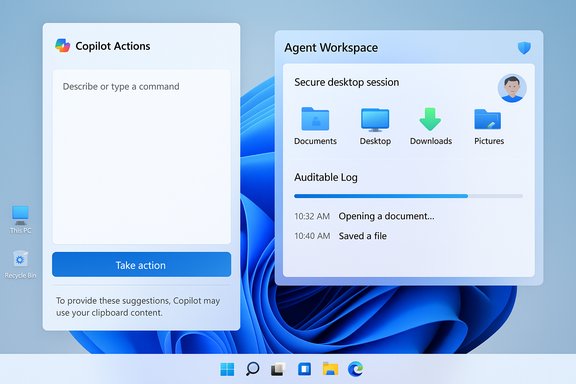
- Agent Workspace — a contained, observable desktop instance where an agent runs separately from the interactive user session.
- Agent accounts — dedicated, limited Windows accounts for agent processes to enable distinct authorization and auditing.
- Scoped permissions — agents start with limited access (known user folders) and require explicit user authorization to expand scope.
- User transparency and takeover — visible progress, step‑by‑step logs, and controls to pause or take over an agent’s task.
Microsoft’s own security explainer and support pages outline these building blocks and the defensive rationale for them, describing the Agent Workspace as a runtime isolation boundary built to leverage existing Windows security primitives.
What Copilot Actions does today
The user experience in practical terms
Copilot Actions is designed to let you describe a task in plain English and have an agent try to complete it. In the preview flow Microsoft demonstrated to Insiders, the typical steps are:
- Open the Copilot composer and choose “Take Action” from the dropdown.
- Optionally attach files or folders via the + button (Attach file / Attach folder).
- Provide a natural‑language instruction (for example, “Organize my vacation photos by date, resize them for sharing, remove duplicates, and create a summary Word doc”).
- Copilot provisions an Agent Workspace (a separate desktop session) and the agent begins executing the plan.
- You can watch the agent operate in that contained workspace, inspect the actions it performs, pause or stop it, or take over the session at any time.
Examples Microsoft has shown in previews and documentation include:
- Sorting and deduplicating photos in Pictures or Downloads.
- Extracting tables or structured data from PDFs and compiling results in Excel.
- Batch‑resizing or converting image formats.
- Assembling files into a document and drafting an email with the compiled output attached.
What’s gated in the preview
To reduce exposure during this early phase, Microsoft limits the agent’s default file access to known folders such as Documents, Desktop, Downloads, and Pictures unless users explicitly grant more access. Agents are off by default and must be enabled through a distinct setting (Settings > System > AI components > Agent tools > Experimental agentic features). Microsoft also requires agents to be digitally signed and tied to a platform trust model to make revocation and enterprise control feasible.
The technical contours — how it works under the hood
Agent identity and runtime isolation
A central architectural decision is that agents run under dedicated, non‑interactive Windows accounts separate from the logged‑in user. This does three things:
- Makes agent actions auditable and distinguishable in logs and ACLs.
- Allows administrators to apply policy, blockade, or revoke agent accounts via existing management tools.
- Limits the agent’s default access surface through standard Windows security controls.
The Agent Workspace itself is implemented as a contained desktop session; public Microsoft notes and reporting indicate it is realized using a Windows Remote Desktop child session model rather than a full virtual machine, balancing performance and isolation. This design lets the agent operate "in parallel" while giving the user a visible place to monitor activity.
Vision + action grounding
Copilot Actions leverages screen‑understanding (Copilot Vision) to see UI elements and map natural‑language goals to click, type, and scroll events. The agent then builds a step plan and executes a sequence of UI interactions inside the Agent Workspace. Where appropriate, integrations and connectors (Outlook, OneDrive, Gmail, Google Drive) let agents extend actions to cloud services — always under explicit user consent.
Hybrid compute model
Microsoft’s platform uses a hybrid approach: lightweight spotters and small models may run on device for activation and privacy‑sensitive triggers, while heavier reasoning may use cloud LLMs. Copilot+ hardware (machines with NPUs) can accelerate on‑device model inference and reduce latency for some flows; however, the agent runtime itself and its isolation model are platform features independent of NPU presence.
Security, privacy and governance: Microsoft’s stated protections
Microsoft has explicitly framed Copilot Actions as a preview for learning and iterating on controls before a broader release. The company lists several guardrails designed to contain risk:
- User opt‑in and controls: Actions are disabled by default and require the user to enable experimental agentic features before any agent account is provisioned.
- Agent accounts and least‑privilege: Agents run under distinct Windows accounts with minimal default privileges; administrators can govern those accounts with ACLs and MDM/Intune policies.
- Agent workspaces with visibility: Agents operate in a separate desktop instance the user can view, pause, or take over; actions are logged for audit.
- Explicit consent for sensitive resources: Connectors to mail, drive, and third‑party services are opt‑in via OAuth flows, and the agent may ask for additional approvals during a task.
Independent coverage and analysis from outlets covering the preview confirm Microsoft’s messaging about these core protections, while also noting that many details (policy hooks, enterprise revocation paths, developer platform for third‑party agents) are still being fleshed out in private previews.
Strengths — where Copilot Actions could deliver real value
- Real productivity wins for repetitive, multi‑step tasks. The ability to describe a multiphase job in plain English and have the agent stitch together actions across apps — e.g., extract tables from PDFs, compile a report, and email it — converts multi‑app workflows into a single instruction, a clear time saver for power users.
- Tighter context awareness. Because Copilot Actions can operate on what’s already on your PC and use the desktop as context, it avoids friction that occurs when you must upload files to cloud services to run automation or use isolated web-only assistants.
- Auditable, platform‑level controls. Building agent identity and workspace management into Windows means enterprises can use familiar admin tools (ACLs, Intune, Entra) to govern agents rather than relying on ad‑hoc app permissions. This opens a path to safer scaling than previous, third‑party automation experiments.
- User visibility and takeover. The visible Agent Workspace with step‑by‑step progress and explicit pause/takeover controls gives users immediate situational awareness and control over what an agent is doing — a stronger UX than “silent” automation.
Risks, limitations and practical caveats
- Fragility of UI automation. Agents that operate by clicking and typing are inherently brittle. Complex app UIs, subtle timing issues, localization changes, and nonstandard controls can cause failures or unexpected side effects. Microsoft explicitly calls the feature experimental and warns agents may make mistakes on complex interfaces; Insiders should monitor agent activity closely.
- New attack surface for automation exploits. Agentic features introduce novel classes of risk — for example, cross‑prompt injection (malicious input that manipulates an agent’s plan) or crafted documents that cause unwanted agent behavior. Microsoft is addressing this through signing, scoped folders, and manifest‑based permissions, but the threat surface is real and evolving.
- Data residency, compliance, and EEA concerns. Microsoft’s staged rollout notes some regional exclusions in early previews. Enterprises in regulated industries should be cautious: agent logs, where they reside, and how long action traces are kept will be material to compliance reviews. (Note: the specific rollout exclusion of EEA was mentioned in the Insider preview text provided to Insiders; independent web documentation of that precise regional exclusion was not found at the time of reporting and should be validated with Microsoft if EEA deployment is a requirement for your organization.
- User trust and accidental actions. The UX must prevent agents from taking irreversible actions without explicit consent. Microsoft’s design emphasizes prompts for sensitive steps, but humans often click through consent dialogs — a social engineering vector to watch for.
- Enterprise lifecycle management gaps. While agent accounts are a promising control, enterprises will want clear policy templates, SIEM integration, and incident response guidance specific to agent behavior. Those operational artifacts remain a work in progress in Microsoft’s public documentation.
How to try Copilot Actions as a Windows Insider (Insider steps)
- Join the Windows Insider Program and ensure your device is configured for Copilot Labs participation.
- Update the Copilot app from the Microsoft Store and confirm your Copilot package is the version that includes the preview (the Insider post notes the feature begins rolling out with Copilot app versions 1.25112.74 and higher; this version is cited in the Insider communication distributed to Insiders). If you don’t see it immediately, it’s a staged rollout — not all Insiders will get it at once, and some regions may be excluded initially.
- Enable experimental agentic features: Settings > System > AI components > Agent tools > Experimental agentic features.
- Open the Copilot composer, select the dropdown and choose “Take Action.” Optionally attach files or folders with the + button.
- Monitor the Agent Workspace that appears; use pause/stop/takeover controls as needed and provide feedback through the Copilot app.
Recommendations for home users and Windows Insiders
- Treat Copilot Actions as an advanced, experimental convenience tool. Use it on non‑critical files and monitor actions until you understand its behavior on your most used apps.
- Keep backups of key files before running batch operations (a short manual checkpoint step prevents data loss if the agent misapplies an action).
- Test on a sample folder: put a copy of files you want processed into a test folder and give the agent access only to that set.
- Provide feedback through the Copilot app’s built‑in feedback tooling — Microsoft is explicitly collecting Insider feedback to tune agent behavior.
Recommendations for IT admins and security teams
- Inventory potential use cases and run small, controlled pilots. Identify low‑risk automation workflows (image resizing, name normalization, PDF table extraction) as first pilots.
- Use policy to control preview exposure. If you do not want Copilot Actions enabled on employee devices, block Experimental agentic features via group policy/MDM until you have run tests and established governance.
- Demand operational telemetry. Ensure Copilot agent actions are surfaced to logging and SIEM systems (action start/stop, agent account identity, files used, network calls made).
- Verify signing and revocation workflows. Microsoft’s model relies on signed agents; test how revocation and emergency disablement would work in practice.
- Update incident response playbooks. Add agent‑specific scenarios (e.g., runaway automation, attempted exfiltration via an agent) to tabletop exercises.
Developer and OEM implications
- Developers building agentic extensions or apps should plan for robust UI resilience and explicit manifest‑based permission requests so agents can request only the minimum required access.
- OEMs and hardware partners will continue to highlight Copilot+ hardware (devices with dedicated NPUs) as a value tier for richer on‑device inference and lower latency, but Copilot Actions is primarily a platform feature and will function (with cloud dependence) on non‑Copilot+ devices. Buyers should weigh NPU claims carefully and request concrete performance data.
Verification, outstanding items and cautionary notes
- Microsoft’s Insider communication states that the Copilot app update enabling Copilot Actions is being distributed as version 1.25112.74 (and higher) via the Microsoft Store to Insiders, and that the feature rollout excludes the EEA in the initial stage. That exact app version and regional rollout language appeared in the Insider post material provided to Insiders; however, independent public search queries at the time of writing did not return a separate Microsoft support page explicitly documenting the 1.25112.74 package number or the EEA exclusion outside the Insider post excerpt. Readers with compliance or regional concerns should validate release timing and regional availability against official Microsoft release notes or enterprise channels.
- The security model described by Microsoft — agent accounts, agent workspaces, signed agents, and scoped folder access — is consistent across Microsoft’s Windows Experience blog and the support pages, and has been echoed by independent coverage in PCWorld and CRN. These sources corroborate the core platform primitives and Microsoft’s staged, opt‑in approach.
- Expect ruggedness issues early on. UI automation is notoriously error‑prone across different versions of apps, different display scaling and localization settings. Windows Insiders and IT pilots are the right early audience for this preview precisely because those groups can capture failure modes and feed actionable improvement data back to Microsoft.
The larger picture — why this matters
Copilot Actions is a notable shift in the Windows experience: it converts a conversational assistant into an agent that can translate intent into physical desktop actions. If Microsoft successfully balances convenience and containment, the result could be a meaningful productivity uplift for both consumers and knowledge workers.
There are also strategic business implications. Embedding agentic automation at the OS level nudges device buyers toward the Copilot ecosystem and raises the stakes around hardware claims such as neural‑processing units. Equally, enterprises must evaluate whether operating system‑level agents fit their governance model better than third‑party automation tools that often lack the same integration with core identity and platform management controls.
Conclusion — measured optimism, active oversight
Copilot Actions represents one of the clearest examples yet of agentic AI moving from lab demos into real user workflows on the desktop. The idea of telling Windows to “do the tedious parts” is compelling, and Microsoft’s design choices — agent accounts, agent workspaces, scoped access and visible takeover controls — are the right kinds of defensive measures for an experiment of this scale.
However, this capability changes the threat model for endpoints. Organizations and savvy individuals should approach the preview with measured optimism: test early, lock down policies where necessary, demand telemetry and revocation controls, and require that any agentic extension be signed and auditable. For Insiders, proceed cautiously, keep backups, and provide the feedback Microsoft requests so the feature matures before broader deployment.
The rollout to Windows Insiders marks the start of a long refinement cycle. Watch for subsequent documentation from Microsoft on enterprise controls, regional availability, and operational logging, and treat this preview as a critical early window to influence how agentic computing arrives on the desktop.
References
- Copilot on Windows: Copilot Actions begins rolling out to Windows Insiders Microsoft - Windows Insiders Blog